Disclosure: As an Amazon Associate, ilcastellomenu.com earns from qualifying purchases. Links on this page are affiliate links; they cost you nothing extra. Prices and availability change often, so check the current Amazon listing before you buy.
Usb foot switch reviews tend to fail readers in a predictable way: they rank five near-identical pedals by star-shaped enthusiasm and never explain what actually separates them. This roundup takes the harder, more useful route. A usb foot switch is a floor pedal that sends keystrokes, shortcuts or media commands to your computer, and the models that dominate the category — from iKKEGOL, PCsensor, Kinesis, X-keys and Infinity — differ less in what they do than in how they think: how much configuration they offer, where the programming lives, how the pedal feels under a working foot, and which workflow each design quietly assumes. Read these reviews as five answers to five different questions, and the right choice for your desk usually identifies itself.
One framing note before the individual reviews. Every model here is covered in prose, with its character, strengths and honest limitations laid out so you can compare philosophies rather than marketing claims. If you want the single-product deep dive instead, our usb foot switch review examines the category through one lens, while the usb foot switch buying guide starts from your workflow and works backwards to the hardware. This page sits between them: the whole field, model by model, with a verdict attached to each.
Key Takeaways
- The category splits into three families: simple single-purpose pedals, programmable pedal platforms, and dedicated transcription pedals — and choosing the family matters more than choosing within it.
- iKKEGOL and PCsensor own the entry tier: minimal setup, standard key and media assignments, and exactly the core benefit of foot input without a platform to learn.
- Kinesis and X-keys are the programmable tier: onboard configuration, macros and layered assignments for users whose pedal is part of a defined professional workflow.
- The Infinity IN-USB-2 is a transcription instrument first and everything else second; within that job it is the reference design, outside it, the wrong tool.
- Across all five, pedal feel and base stability predict daily satisfaction better than any feature list — a pedal you can rest on without triggering beats a cleverer pedal you cannot.
- Whatever you buy, get the configuration software from the manufacturer’s official website only.
In this guide
How These Reviews Judge a Foot Switch
Consistent criteria matter more than verdicts, so here is the framework applied to every model below. First, pedal feel: the size and shaping of the pedal surface, whether a resting foot triggers it accidentally, how the press travels, and whether the hinge arrangement suits repeated tapping or sustained holds. A foot switch is operated blind, through footwear, hundreds of times a day; feel is not a luxury criterion, it is the product. Second, stability: weight, base design and grip, because a pedal that migrates across the floor fails at its only job. Third, configuration: what the software allows — single keys, combinations, typed strings, macros, media controls — where the programming is stored, and how painful the setup experience is. Fourth, workflow fit: every pedal in this roundup is really designed for someone, and the review names that someone rather than pretending the pedal is for everyone.
Two things this framework deliberately ignores. It ignores novelty features that do not survive contact with a working week, and it ignores the spec-sheet theatre that surrounds simple devices. A foot switch is a switch; the meaningful differences are mechanical feel, configuration depth and design intent. It is also worth stating what these reviews are not: they are not medical assessments. Pedals frequently appear in accessibility-oriented setups because they add an input location, and that is described here as a feature. Comfort outcomes belong to individual experience, not to product rankings. With the criteria on the table, the reviews themselves can be read quickly — each ends with the buyer it suits and the buyer it does not, in plain terms.
Usb Foot Switch Reviews: The Field, Model by Model

iKKEGOL USB Foot Switch — Best First Pedal for Most People
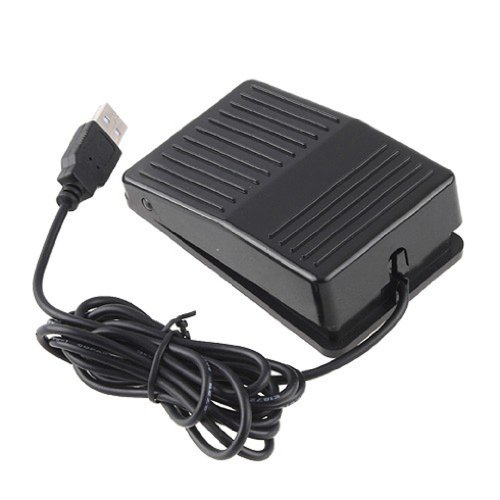
The iKKEGOL single pedal earns its place at the top of these reviews by understanding its job: be the pedal a newcomer buys, plugs in, assigns one command to, and forgets about. The design is a single wide pedal in a moulded housing, broad enough to find without looking and simple enough that there is nothing to misunderstand. Configuration runs through the manufacturer’s utility — download it from the maker’s official website — and covers the standard vocabulary of a single key, a key combination or a media command. That vocabulary sounds limited until you list the jobs people actually give a first pedal: microphone mute, push-to-talk, play and pause, a screenshot key, one repeated application shortcut. The iKKEGOL covers all of them without ceremony.
Where the review must be honest is about the ceiling. One pedal is one command, and the configuration depth stops where the professional platforms begin; there are no layers, no elaborate macro chains, no ecosystem waiting if your ambitions grow. The pedal feel is functional rather than refined, and the whole device sits unambiguously in the entry tier. But those are criticisms of scope, not of execution. Within its scope — a single, reliable foot-operated command — the iKKEGOL does exactly what it promises, and its popularity among streamers buying their first mute pedal is earned rather than accidental. Best for: first-time buyers, streamers, and anyone offloading exactly one shortcut. Not suited for: multi-command workflows or users who already know they want programmable depth. For the decision framework behind this verdict, see how to choose a usb foot switch.

PCsensor USB Foot Pedal — The Flexible Budget Family
PCsensor’s contribution to the category is not a single pedal but a small family: the same straightforward design philosophy offered as one pedal and in multi-pedal arrangements, so the hardware can be matched to the number of commands a workflow actually has. That sounds like a minor point and is actually the smartest thing about the range, because pedal count is the decision buyers most often get wrong — buying a triple unit for one job, or a single pedal for transcription. The PCsensor triple arrangement, in particular, gives budget-conscious transcription and media-control users a play, rewind and fast-forward layout under one foot without stepping up to the professional tier.
The configuration experience is utilitarian: the vendor’s software, taken from the official source, assigns keys, combinations and media functions without frills, and the pedals then do their work without further attention. Refinement is where the tier shows. The pedal feel is workmanlike, the software is a tool rather than an experience, and the platform offers none of the memory-and-macros sophistication of the Kinesis or X-keys designs reviewed below. None of that prevents PCsensor pedals from being the correct answer for a large share of real desks — the streamer adding a second pedal, the office worker automating a pair of shortcuts, the home transcriptionist equipping a spare room. Best for: buyers who know their pedal count and want it covered at the accessible end of the market. Not suited for: users who want deep programmability or a premium pedal feel.
Kinesis Savant Elite2 — The Programmable Professional
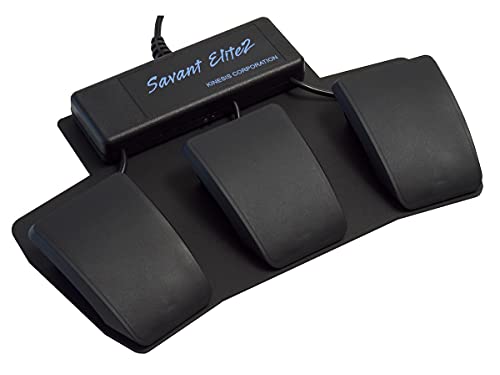
Kinesis built its name on ergonomic keyboards, and the Savant Elite2 applies the same sensibility — configure thoughtfully, then rely on it for years — to the floor. The standard unit carries two substantial pedals, and the design accepts an additional connected pedal for a third action, which makes the system unusually good at growing with a workflow: start with the two commands you have, add the third when it proves itself. The programming story is the headline. The Savant Elite2 is built to hold its configuration, so the pedals carry their assignments from machine to machine, and the configuration tooling supports the kind of deliberate, layered setup that professionals in transcription, medical imaging, media production and similar fields tend to build over time.
That depth defines both the strength and the warning in this review. A user with a defined workflow — who knows their shortcuts, works at the same setup for hours, and values a pedal that behaves identically on any computer — will find the Savant Elite2 the most complete general-purpose pedal in this roundup. A user who wanted a mute button will find it excessive: mid-to-premium tier, with software that rewards reading and thinking rather than poking and hoping. The pedal hardware itself matches the intent, with a solid, workmanlike feel designed for all-day professional use rather than occasional taps. Best for: professionals with a stable, demanding workflow and multi-machine needs. Not suited for: casual single-command use, or buyers who will never open the configuration tool after day one.
X-keys USB Foot Pedals — Broadcast-Grade Control
X-keys pedals, from P.I. Engineering, arrive from a different world than the rest of this roundup: the world of broadcast control rooms, production galleries and specialist workstations, where programmable control surfaces are infrastructure and a missed command is an on-air problem. The foot pedals are offered in different hinge arrangements, a choice this review treats as genuinely important — the hinge geometry changes whether the press feels like rocking forward over a planted heel or lifting and dropping the toe, and professionals who press a pedal thousands of times develop firm preferences. Programming, through the manufacturer’s software from its official site, goes well beyond single keys into macros and layered assignments, and the pedals sit naturally alongside the wider X-keys ecosystem of control devices.
The verdict follows the pedigree. For a pedal that is one instrument in a larger control setup — or a single pedal whose reliability is genuinely load-bearing, in a studio, a production environment or a demanding specialist workstation — X-keys is the heavyweight recommendation in these reviews, built and priced at the premium tier accordingly. For a bedroom streamer who needs to mute a microphone, it is magnificent, unnecessary overkill, and the money is better spent elsewhere in the setup. Neither statement is a criticism; they are the same statement about intent. Best for: broadcast, production and professional control environments, and perfectionists with macro-heavy workflows. Not suited for: simple single-command jobs or tight budgets. Readers building a streaming desk around gear like this may also want our guide to gaming keyboards built for streaming.

Infinity IN-USB-2 — The Transcription Reference
Every category has one product that does not compete with the others because it is playing a narrower, older game — and playing it perfectly. The Infinity IN-USB-2 is that product: a dedicated transcription pedal with the classic layout of a large central play pedal flanked by rewind and fast-forward, shaped wide and low so the ball of the foot can work it for hours. Its design is the accumulated answer to a single question — how does a foot control audio comfortably at professional speed — and it is recognised and supported directly by the transcription software its users actually run, which removes the mapping guesswork entirely.
The review writes itself once the intent is clear. As a transcription instrument, the IN-USB-2 is the reference against which general pedals mapped to transcription shortcuts are approximations: workable, sometimes good, but not shaped by the workflow. As a gaming pedal, a streaming pedal or a macro device, it is simply the wrong purchase, and no flexibility in its design pretends otherwise. That honesty is refreshing in a market of all-things-to-all-people products. If you transcribe for a living, this is the pedal your profession already chose; if you do not, admire it and buy something else. Best for: professional and serious home transcriptionists. Not suited for: literally every other use case in this roundup. Pair it with our notes on keyboards for medical transcriptionists for the full workstation picture.
Side by Side: What Actually Differs
Strip away the branding and the five designs differ on four axes. Pedal count and layout: single for iKKEGOL’s base design, a one-to-three family for PCsensor, two-plus-one for the Kinesis, professional arrangements for X-keys, and the fixed transcription trio for the Infinity. Configuration depth: basic key and media assignment at the entry end, growing through combinations and strings to the macros and layers of the Kinesis and X-keys platforms. Where the programming lives: simpler pedals lean on their utility, while the professional designs hold their configuration so it travels with the hardware. And design intent: general-purpose for the first four families, single-workflow for the Infinity. Notice what is not on the list — raw performance. Every pedal here sends its command essentially instantly; there is no meaningful speed race to win. The differences that matter are the ones above, which is why the buying decision should start from your workflow and pedal count, not from a ranking.
A word about tiers, since these reviews avoid static prices on principle: the category arranges itself into an entry tier (iKKEGOL, PCsensor), a mid-to-premium professional tier (Kinesis), a premium platform tier (X-keys) and a specialist tier (Infinity) whose cost reflects professional tooling rather than general features. The useful question is never which tier is best but which tier your usage justifies. A pedal pressed a few times a day for one command does not need platform money spent on it; a pedal pressed a thousand times a day as part of your livelihood should not be the cheapest object on the floor. The middle failure mode — premium hardware bought for a trivial job, then resented — is the one these reviews most want to save you from. The argumentative version of the same point fills our usb foot switch pros and cons page.
Which Pedal for Which Workflow
Streaming and Gaming
For streamers and gamers, the shortlist is short: start with the iKKEGOL single pedal for microphone mute or push-to-talk, and step up to a PCsensor multi-pedal arrangement only when a second or third command — a scene toggle, a clip marker — has genuinely joined the first. The professional platforms are wasted here unless streaming is your profession and your pedal layout has become a real production tool, at which point the X-keys approach starts to make sense. What matters most in this workflow is pedal feel: you will press this thing mid-sentence and mid-fight, blind, and a pedal that tolerates a resting foot without firing is worth more than any feature. Keep the assignment count low, keep the commands forgiving, and the pedal will be the least glamorous and most used device in the setup.
Transcription and Audio Work
Transcription divides cleanly by seriousness. Professionals and high-volume home transcriptionists should go directly to the Infinity IN-USB-2, whose layout and software support exist precisely for this work, or to the Kinesis Savant Elite2 if the workflow mixes transcription with other programmed commands and machines. Occasional transcription — a student working through interviews, a researcher with a few hours of audio a month — is well served by a PCsensor triple arrangement mapped to the player’s shortcuts. The mistake to avoid is the single pedal: transcription needs its trio of commands together under the foot, and no single-pedal cleverness substitutes for the layout.
Office, Editing and Accessibility-Oriented Use
Office adoption succeeds one shortcut at a time. Identify the command that most often drags your hand away — the image advance, the form key, the editor’s play and stop — and assign it to an iKKEGOL or PCsensor pedal; graduate to the Kinesis if the pedal becomes infrastructure and its configuration needs to travel or deepen. In accessibility-oriented setups, the same logic applies with the framing kept honest: a pedal relocates an input to the foot, and whether that redistribution suits a particular person and task is for them to judge in use. What the reviews can say is that the programmable models offer the most flexibility in shaping that relocation, and that starting with one command remains the right method for everyone. The companion guide to using a foot switch well covers the placement and learning process in practical detail.
Setup Notes That Apply to All Five
Every pedal in this roundup follows the same broad setup arc: plug in the USB cable, watch the computer recognise a standard input device, then run the manufacturer’s configuration utility to assign each pedal its command. Three notes apply universally. First, the software source: configuration utilities are small niche downloads and a favourite of bundling sites, so take them only from the manufacturer’s official website — Kinesis, P.I. Engineering, Infinity and the others all publish their tools on their own support pages, and no mirror is worth the risk. Second, onboard versus on-computer configuration: if your pedal stores its own programming, it will behave identically on any machine; if the configuration lives in software on one computer, expect to recreate it when you move. Third, placement beats programming: a pedal positioned where your foot naturally rests, on a surface it cannot skate across, will teach itself to you within a week, while a cleverly programmed pedal in the wrong place will be kicked aside — literally — within a day.
Care is equally generic and equally ignored. Floor-level devices collect dust and grit around hinges and switches, so include the pedal in your ordinary desk cleaning rather than treating it as furniture. Route cables away from chair castors and never let a cable sit under tension, since the cable entry point is the most common failure site across the category. And keep a written note of your pedal assignments; six months from now, when you add a second command or replace a computer, that note is the difference between a five-minute job and an archaeology expedition. None of this is difficult, which is precisely why skipping it is so common.
Final Verdict
Read as a field, usb foot switch reviews resolve into a refreshingly simple conclusion: the category has no bad mainstream products, only mismatches. The iKKEGOL is the right first pedal for the majority of buyers. PCsensor is the flexible, accessible family for buyers who know their pedal count. The Kinesis Savant Elite2 is the programmable professional’s choice, and X-keys the broadcast-grade platform for control-heavy environments. The Infinity IN-USB-2 stands apart as the transcription reference. Choose by workflow first, pedal count second and tier third — in that order — and any of the five will serve you well for years. Still undecided about the category itself? The worth-it verdict on usb foot switches makes the ownership case, for and against, without a product in sight.
How the Five Designs Age in Daily Use
A review snapshot can describe a pedal on day one; ownership is decided by how it behaves on day three hundred. The five designs in this roundup age in characteristically different ways, and the patterns are consistent enough to report. The iKKEGOL single pedal ages by disappearing: its owners stop thinking about it entirely, which is the intended fate of a single-command device, and the only visible wear tends to be dust and the occasional cable re-route. Its risk is not deterioration but outgrowth — the day a second command appears, the single pedal becomes half a solution, and its owner joins the upgrade path these reviews keep describing.
PCsensor units age as a system. Because the family spans single and multi-pedal forms, owners tend to add rather than replace, and a PCsensor desk a year later often shows two arrangements where one began. The utilitarian software shows its age least where it matters — it is opened rarely after setup — and the pedals’ workmanlike construction tolerates the accumulation of floor life without complaint. The Kinesis Savant Elite2 ages like professional kit generally does: its configuration deepens over time. Owners describe returning to the programming tool at intervals — a new application, a refined layer, the third pedal finally connected — so the device a year in is more personal than the device unboxed, and its onboard memory means that personality survives every computer change intact.
X-keys pedals age inside setups rather than alone. In production and broadcast environments they become part of a control surface whose other elements also evolve, and the pedals’ job quietly expands as macros are refined. Their build intent shows here: these are the units least likely to be the component that fails first in a hard-used workstation. The Infinity IN-USB-2 ages the most simply of all, because its job never changes. A transcription pedal’s thousandth day is its first day repeated, and its owners’ loyalty is of the professional kind — not enthusiasm, but the refusal to relearn a tool that has never once been the problem. Across all five, the common thread is that none of these designs has a reputation for dying young; the category’s mortality is about fit, not failure.
What Owners Argue About
The Hinge Argument
No topic divides experienced pedal users like hinge geometry. One camp swears by the rear-hinged press — heel planted, foot rocking forward, a motion they describe as sustainable for hours and precise in its repetition. The other camp prefers the front-hinged action, lifting and dropping the toe, which they experience as more deliberate and less prone to accidental half-presses at rest. Both camps are describing real biomechanical differences filtered through personal habit, footwear and flooring, which is why the argument never resolves and why this roundup refuses to resolve it. The actionable conclusion is narrower: if your expected volume is high — transcription, production, all-day shortcut work — the hinge choice deserves genuine weight in your decision, and the professional makers’ decision to offer arrangements reflects that. If your volume is a mute pedal’s, the argument is a spectator sport.
The Pedal-Count Regret
Ask owners what they would buy differently and the answer is almost never a different brand; it is a different count. The regrets run in both directions and are equally instructive. Buyers of triple units for single jobs describe the two extra pedals as permanent minor obstacles — unlearned, occasionally struck by accident, resented out of proportion to their size. Buyers of single pedals for growing workflows describe the opposite frustration: the second command that arrived in month two and had nowhere to live. The pattern underneath both regrets is the same — the count was chosen from imagination rather than from the workflow as it actually stood. The reviews’ consistent advice follows directly: buy for the commands you have today, because the category’s upgrade path is painless, and a pedal added on evidence never carries regret in either direction.
The Software Argument
The third standing argument concerns configuration software, and it is really an argument about what a pedal is. One side holds that a switch should be beneath software entirely — plug in, assign once through the simplest possible tool, never think again — and regards the platforms’ deeper tooling as a tax on a simple idea. The other side, concentrated among professional users, regards the software as the product and the pedal as its physical terminal: layers, macros and onboard memory are precisely what they bought, and a simpler tool would be the defective one. This roundup’s position is that both are right about their own desks. What deserves criticism is not depth or simplicity but mismatch — and, on the safety side, any buyer sourcing these utilities from anywhere other than the manufacturer’s official website, a point on which both camps, notably, agree.
A Short History of the Category, Because It Explains the Designs
The foot switch is older than the personal computer’s ubiquity, and its history explains why the modern category looks the way it does. Pedal control of audio began in dictation and transcription, where the economics were obvious generations ago: a typist’s hands are the production line, and anything that interrupts them costs money. That origin is why the transcription layout — play in the centre, rewind and fast-forward flanking — feels less designed than evolved, and why the Infinity design reads as a refined answer to a very old question. The second wave came from specialist workstations: broadcast, medical imaging and industrial control adopted programmable pedals as one surface among many, and the Kinesis and X-keys philosophies descend from that world of configured, dependable control. The third wave is the recent one — streaming and gaming — which discovered the pedal as a consumer device and dragged the simple end of the market, the iKKEGOL and PCsensor territory, into the mainstream. Read the five reviews above again with that history in mind and the field makes complete sense: three eras of the same idea, still on sale side by side, each correct for the work that created it.
Five Desks, Five Verdicts
Rankings flatten people; profiles restore them. Here are the five buyer profiles these reviews were really written for, with the verdict each one should take away — because in a category this dependent on fit, the profile is the review.
The Evening Streamer
She broadcasts four nights a week from a bedroom desk, plays with one hand on the mouse and the other dancing across movement keys, and loses a little of her audience’s patience every time a household noise reaches the microphone. Her verdict from this roundup is the simplest on the page: the iKKEGOL single pedal, assigned to mute, placed where her right foot rests during a session. Nothing in the professional tiers would improve her broadcast by a single viewer, and the money those tiers would consume belongs in her lighting. Her review ends in one line because her problem had one shape, and the category’s entry point was built in exactly that shape.
The Freelance Transcriptionist Scaling Up
He began with occasional interview work on a general triple pedal and has watched the occasional become the weekly, then the daily. His verdict is a graduation: the Infinity IN-USB-2, because his workflow has crossed the line where approximations cost more than the specialist tool. The reviews’ role in his story is timing — the general pedal was correct when his volume was speculative, and it becomes incorrect precisely when the work turns professional. Buyers in his position should read the Infinity review not as a product description but as a threshold marker: when transcription is the job, the tool of the trade is the purchase, and every month spent approximating it is a small, unnecessary tax on the work itself.
The Broadcast Technician
She maintains a small production setup where a pedal is one control among many and a missed command is a visible mistake. Her verdict is the X-keys platform, chosen for the reasons its review gave: hinge arrangement she can specify, macro-capable programming from the maker’s official tooling, and construction intended for environments that do not forgive. For her, the entry pedals in this roundup are not bargains but risks — devices scoped for lighter duties than hers. The profile matters because it inverts the usual consumer logic: at her level, the premium tier is the economical choice, since the cost of the tool is trivial beside the cost of the failure it prevents.
The Data Professional With the Shortcut
His work runs on one application and one command inside it, issued so often that his left hand performs it in his sleep. His verdict is the Kinesis Savant Elite2 — not because he needs its full depth on day one, but because his pedal will work occupational hours, travel between his workstation and his laptop, and grow a second and third assignment as his workflow’s other interruptions reveal themselves. The mid-tier profiles in this roundup exist for buyers like him: the pedal is becoming infrastructure, and infrastructure is bought on configuration and durability rather than on the lowest sufficient price. His is the profile most likely to be mis-served by an entry purchase repeated twice.
The Curious Gamer
He plays team games twice a week, uses voice when the squad is on, and has read about pedals in a forum thread that made them sound transformative. His verdict is the honest one this roundup owes several of its readers: a PCsensor single or an iKKEGOL, bought as an experiment with push-to-talk as the assigned job — or, if the twice-a-week voice use is really the whole story, possibly no purchase at all yet. His profile is the control group of the category: the technology will either find its job in his sessions within a fortnight or it will not, and the entry tier exists so that finding out costs him the least. The reviews’ enthusiasm is genuine, but it is addressed to his evidence, not to his curiosity.
Reviewing the Reviewers: How to Read Other Roundups
Before these reviews close, a service to readers who will inevitably consult others: foot switch roundups vary wildly in usefulness, and the tells are consistent. Trust the roundup that describes pedal feel in physical language — resting behaviour, hinge motion, the press through a shoe — because that vocabulary can only come from use. Trust the one that assigns each model a buyer and a non-buyer, since a pedal recommended to everyone is being recommended by no one. Trust the one that discusses where configuration lives and where the software comes from, because those unglamorous topics decide real ownership. Distrust the roundup organised as a countdown to a single winner, because this category has no winner — it has fits. Distrust star-shaped certainty about devices whose entire value depends on a workflow the reviewer cannot see. And distrust, above all, the roundup that never mentions the learning week: any account of foot switches that omits the clumsy first days is describing a product that exists only in the first hour of ownership. Read widely, by all means — but read with these tells in hand, and the signal separates from the noise quickly.
The One-Paragraph Version of All Five Reviews
For the reader who has scrolled to the end for the summary: buy the iKKEGOL if you have one command and no pedal yet; buy PCsensor if you know your count is two or three and your needs are simple; buy the Kinesis Savant Elite2 if your workflow is professional, evolving or spread across machines; buy X-keys if your pedal lives in a production-grade control setup; buy the Infinity IN-USB-2 if you transcribe. Every longer verdict in this roundup is that paragraph with its reasoning shown, and the reasoning is there for readers whose situations sit near a boundary. If your situation sits squarely inside one clause, the paragraph is the review, and the rest of this page happily releases you to the rest of your day.
What These Reviews Deliberately Left Out
A roundup is defined as much by its exclusions as its inclusions, and this one should declare its own. It leaves out the no-name listings that flood the category’s lower reaches — pedals sold under rotating brand names with no official website, no findable configuration software and no production history — not because every one of them is bad, but because none of them can be reviewed responsibly: there is no maker to verify, no support page to check, no continuity to rely on, and in a category where the established entry tier is already inexpensive, the gamble buys nothing. It leaves out laboratory measurements, because a switch’s meaningful properties are felt rather than metered, and a table of invented precision would decorate the page while informing no one. And it leaves out the future — the wireless experiments and app-connected novelties at the category’s fringe — because a review roundup’s duty is to the devices a reader can buy and rely on today. The five designs that remain after those exclusions are, not coincidentally, the five that professionals in the category’s home industries actually use, and a roundup that began anywhere else would be reviewing the market’s noise instead of its signal.
A Closing Note on Value Across the Field
One judgement runs underneath all five reviews and deserves to be said once, plainly: this is a category without a rip-off in its mainstream. The tiers price themselves against configuration depth and build intent with unusual honesty, the entry point delivers the core benefit complete rather than rationed, and the professional models repay their premiums in the specific currencies — memory, macros, durability — that their buyers actually spend. Readers accustomed to categories where the mid-range is a trap and the flagship is a tax will find the foot switch market refreshingly legible: you can read the price structure as a map of the workflows, and the map is accurate. That legibility is itself a finding of these reviews, and part of why the roundup can be so definite in its assignments — when a market prices honestly, matching buyers to models becomes a matter of fit alone, and fit is a question this page has answered five times over.
So the field closes where it opened: five designs, five intents, no villains. The reviews’ only enemy has been mismatch, and mismatch is the one variable entirely within the buyer’s control. Name your workflow, count your commands, and the correct review in this roundup identifies itself — after which the wisest thing a reader can do is stop reading reviews, including this one, and go and give a foot a job.
Filed under last observations: the longer these reviews sat with the five designs, the more the field’s stability impressed itself as the real story. In a peripherals market addicted to annual reinvention, the foot switch category ships the same proven pedals year after year, because the work it serves — muting, transporting, advancing, holding a voice key — does not change its shape. A buyer in this category is therefore spared the usual anxieties of timing and obsolescence. The right pedal today is the right pedal for years, and the reviews above will age at the speed of the workflows they describe, which is to say slowly, and honestly.
What a Careful First Week With a Usb Foot Switch Reveals: Comparing the Field
Judge the controls by whether you can use them without looking down or stopping your task, because that is how they will be used for most of their life. Look for the failure you would notice first if you chose badly: a port you cannot reach, a part that will not fit, a control you cannot see, or a routine that becomes slower instead of easier. Keep the instructions somewhere you can find them months later, since the setting or step you skip today is often the one a future problem sends you hunting for. Think about the next purchase this one commits you to, whether that is matching accessories, consumables, a bigger surface or a different connection, and count that commitment honestly.
As a concrete listing check, take the iKKEGOL USB Foot Switch and the PCsensor USB Foot Pedal named earlier in this article and confirm, line by line, that each variant offered matches the size, connection and contents described for it here. Take a quick photo of the working setup before you change anything, so cable routes, positions and settings can be restored exactly if the new arrangement disappoints. Treat any accessory bundled in the box as a starting point, and check whether it suits your setup before assuming the maker has solved that part for you. When you compare notes with other owners, match their comments to setups like yours, because advice from a very different room, workload or routine can mislead. Compare what the listing promised with what the box actually contained, item by item, and treat any mismatch as a reason to pause before the return window closes.
Notice how the usb foot switch behaves when you are tired or in a hurry, since products that demand perfect technique tend to fail exactly when you have least patience. Ask what you would do on the day this usb foot switch stops working as expected, and whether you could swap, reset, clean or return it without dismantling half your setup. Notice the small sounds, lights and movements during normal use, because those everyday details decide whether a usb foot switch feels settled or constantly demands attention. Keep a short note of what worked, what annoyed you and what you adjusted, because that note is more useful than memory when you later replace or add another usb foot switch.
If you work in more than one place, decide whether this usb foot switch stays fixed in one spot or travels, and judge its size, weight and setup time accordingly. Start this final check away from the listings, with the space, the equipment and the routine you already have written down in plain terms. Note the moment you first had to think about the usb foot switch instead of your work, since that moment usually reveals more than any summary of features can. Decide in advance what good enough looks like for your use, so a minor cosmetic flaw does not distract you from performance that genuinely meets the brief. Separate the features you will use in the first month from the ones that only sound reassuring, and let the first group carry far more weight in the decision.
Recheck the return window and the condition requirements before you discard any packaging, especially for a usb foot switch whose fit only becomes clear after several real sessions. Picture the busiest version of your week and ask whether this usb foot switch still fits when other people, other tasks and other equipment compete for the same space. A calm final test is to walk away mid-task, come back later, and see whether the setup still makes sense at a glance without reconstructing what you were doing.
Leave a little headroom in every direction that matters, whether that means physical space, connection capacity, adjustment range or simply time to do a task properly. When you check a single usb foot switch closely, work from the outside in: condition and finish first, then controls and connections, then behaviour during a real task from start to finish. Think about storage for the accessories this usb foot switch brings with it, so spare parts and tools end up in one known place instead of scattered across drawers. Plan where the cables or materials connected to this usb foot switch will run when the room is tidy, not just while you are testing on an empty surface.
Frequently Asked Questions
Which foot switch is best for a beginner?
A simple single pedal — the iKKEGOL is the archetype — is the best starting point for most beginners. It asks you to learn exactly one thing: whether operating a command with your foot suits your workflow. Setup is minimal, the assignment vocabulary covers the classic first jobs like mute and push-to-talk, and if foot input turns out not to be for you, you have spent entry-tier money learning it. Graduate to multi-pedal or programmable models only when a real second need appears.
What is the difference between cheap and premium foot switches?
Configuration depth and build intent, not speed. Entry pedals assign a key, a combination or a media command and stop there. Premium platforms like the Kinesis and X-keys designs add onboard memory so the programming travels with the pedal, macro and layer support, deeper software and construction aimed at all-day professional use. Every pedal in this roundup sends its command essentially instantly, so the premium buys flexibility and durability, never a faster press.
Can one foot switch control play, rewind and fast-forward?
Yes — that is the classic transcription layout, and it is why triple arrangements exist. A three-pedal unit, or a dedicated transcription pedal like the Infinity IN-USB-2, places play in the centre with rewind and fast-forward to either side, so one foot runs the audio while both hands type. General triple pedals such as the PCsensor arrangement achieve the same layout by assigning the media or player shortcuts to each pedal through the configuration utility.
Do foot switches work on both Windows and Mac?
Generally, yes, because the pedal presents itself as a standard input device that both systems recognise without special drivers. The variable is the configuration utility: most manufacturers publish their software for the major desktop systems, but you should confirm the current version for your model on the manufacturer’s official website before buying if you run anything unusual. Pedals that store their programming onboard are the safest cross-platform bet, since they keep their assignments regardless of the machine they are plugged into.
Are foot switches good for push-to-talk?
They are one of the best push-to-talk solutions available. Holding a voice key ties up a finger at exactly the moments a game or a call demands the most from your hands, while a pedal moves that hold to a foot that was doing nothing. The press is blind, reliable and easy to sustain. Any of the single pedals in this roundup handles the job; choose based on pedal feel, because you will be resting on and pressing that pedal constantly through long sessions.
How long do USB foot switches last?
The mainstream designs are mechanically simple and built for repetition, so a quality pedal typically serves for years of daily use. In practice, failures concentrate in predictable places: the cable and its entry point, grit around the hinge, or a base that has been kicked across hard floors. Sensible cable routing, a stable position and occasional cleaning remove most of the risk. The long production runs of the models in this roundup are themselves evidence — designs that failed early did not survive in this small, reputation-driven market.
Related Reading
Go deeper with the single-lens usb foot switch review, start from your workflow in the usb foot switch buying guide, or settle the category question in is a usb foot switch worth it. For adjacent desk decisions, see keyboards for office typing and mechanical keyboards for writers.