Disclosure: As an Amazon Associate, ilcastellomenu.com earns from qualifying purchases. Links on this page are affiliate links; they cost you nothing extra. Prices and availability change often, so check the current Amazon listing before you buy.
How to choose a usb foot switch is a question with a deceptively short answer — match the pedal to the command — wrapped inside several decisions that buyers routinely make in the wrong order. A usb foot switch is a floor pedal that sends keystrokes, shortcuts or media commands to your computer, and the choosing goes wrong when it starts with hardware: pedal counts compared before commands are named, configuration depth purchased before workflows are understood, a specialist transcription tool admired by someone who has never transcribed. This guide reverses the order. It starts with what you need to know before comparing anything, then walks through the choice step by step — job, pedal count, configuration, feel, placement, tier — and finishes with the mistakes, the pro tips and three worked examples that show the method landing on real purchases, from the simple iKKEGOL and PCsensor pedals to the programmable Kinesis and X-keys platforms and the specialist Infinity design.
Key Takeaways
- Name the command first. Every correct decision in this category — pedal count, configuration depth, tier — is derived from the specific job the pedal will own.
- Pedal count follows command families: one pedal for one command, a triple layout for transport-style trios, and no pedal at all for long command lists, which belong on a macro pad.
- Configuration depth is the main thing money buys: simple assignment at the entry tier, onboard memory, macros and layers in the professional platforms.
- Judge feel and stability before features — a pedal your foot can rest on without triggering, on a base that stays planted, predicts satisfaction better than any specification.
- Buy the tier your usage justifies today, and let a proven workflow, not speculation, promote you to the next one.
- Take configuration software only from the manufacturer’s official website, and treat a brand without a findable official download as a brand to avoid.
The short version of the whole method: write down the command, count how often it interrupts your hands, and buy the simplest pedal that owns it completely. Readers who want the category verdict before the method will find it in is a usb foot switch worth it; readers who want the hardware compared head-to-head will find it in the usb foot switch reviews. This page is the decision process itself.
In this guide
What You Need to Know Before Comparing
Three background facts make every later step easier. The first is how a foot switch works: it presents itself to the computer as a standard input device and sends ordinary keystrokes, key combinations, typed strings or media commands, which means it works inside virtually any application that offers a shortcut for the function you want. Compatibility, the question that dominates most peripheral purchases, is nearly a non-issue here — the real check is whether your software has a shortcut for your command at all. The second fact is the category’s shape. The market divides into simple pedals (iKKEGOL, PCsensor), programmable platforms (Kinesis, X-keys) and dedicated transcription pedals (Infinity), and these are philosophies, not quality grades: each is the best answer to a different question, and choosing between philosophies matters more than choosing within one.
The third fact is about you, and it is the one buyers skip: a foot switch’s value is entirely borrowed from the command it owns. The pedal has no general productivity effect waiting to be unlocked; it removes one specific interruption, repeatedly. That is why the method below spends its first steps on your workflow rather than on products, and why honest sellers in this category ask what you will press before asking what you will spend. It is also why the comfort conversation around pedals should be kept in its proper frame. A pedal relocates input to the foot — a feature that matters in accessibility-oriented setups and in any workflow where hands are overloaded — and whether that relocation suits a particular person is something use reveals. No choosing guide can promise an individual outcome, and you should distrust any product page that tries.
One more preliminary: the floor is part of the purchase. Before comparing pedals, look at where one would live. Is there reachable space where your working foot rests? Carpet or hard floor? A cable path to the computer that avoids chair castors and walkways? A pedal that cannot be placed well cannot be chosen well, and discovering that after purchase is the category’s most avoidable disappointment. With those preliminaries settled — mechanism, market shape, the named-command principle and a viable floor — the steps themselves are straightforward.
How to Choose a Usb Foot Switch in 7 Steps
Step 1: Name the Command the Pedal Will Own
Everything starts here, and the standard of evidence is strict: the command must be written down, specific and already part of your working day. Microphone mute during calls and streams. Push-to-talk in team games. The play, rewind and fast-forward trio in transcription. The single shortcut in your editing, design, data or viewing software that your hand performs on autopilot. If you cannot complete the sentence “the pedal will press ___ for me, roughly ___ times a day,” you are not ready to choose a pedal — you are ready to observe your work for a week, which is a legitimate and valuable step zero. Buyers who skip this step populate the category’s negative reviews with a consistency that amounts to a law of nature. Buyers who complete it find the remaining steps nearly automatic, because the command dictates the pedal count, the configuration needs and the tier in one motion.
Step 2: Count the Commands and Choose the Pedal Layout
With the job named, count its family. A single command means a single pedal, full stop — extra pedals for hypothetical future commands go unlearned and underfoot. A tight family of two or three commands used in rotation means a multi-pedal unit, with audio transport as the model: play in the centre, rewind and fast-forward at the sides, learned by the foot as one skill. A long or varied list means the correct purchase is not a pedal at all but a labelled macro pad, and recognising that is a success of this step, not a failure. Also weigh tempo and footwork: commands issued at a calm, deliberate rhythm suit lateral movement between pedals; frantic sequences do not, whatever the hardware offers. And if the family is the transcription trio and the volume is professional, skip ahead to the specialist layout entirely — the dedicated pedal exists because this one family deserved its own hardware.
Step 3: Decide How Much Configuration You Will Really Use
Configuration is where the money goes, so audit yourself honestly. Level one: one pedal sends one key, combination or media command, set once. The entry utilities handle this completely, and most owners live here forever. Level two: combinations, typed strings, assignments that evolve, or a pedal that moves between computers — here, programming that lives on the device becomes valuable, because the pedal arrives at each machine already itself. Level three: macros, layers, application-specific behaviour, a pedal integrated into a wider control setup. That is platform territory, and it is genuinely powerful in the hands of the broadcast, production and specialist users it was built for. The trap is purchasing level three while living at level one; unprogrammed depth is not future-proofing, it is cost and complexity wearing a hopeful expression. Choose the level your named command from Step 1 actually requires, with one promotion allowed if a second, equally concrete need is already visible.
Step 4: Judge Pedal Feel and Base Stability
Specifications cannot tell you how a pedal feels, yet feel is what your foot will judge every day. Look for a pedal surface large enough to locate blind and shaped so your foot knows its position by touch. Consider whether you can rest your foot lightly on or beside it through a session without accidental triggers — a pedal that demands hovering will be abandoned, however clever its software. The press should be definite enough to feel through a shoe without requiring a stomp that tires the leg over hundreds of repetitions. Hinge arrangement matters more than newcomers expect: pedals hinged at the rear are pressed by rocking forward over a planted heel, pedals hinged at the front by lifting and dropping the toe, and people who press pedals professionally develop firm preferences between those motions. Finally, the base: weight and grip appropriate to your floor, because a pedal that migrates is a pedal that fails at its only job. When owner discussions praise feel, weight that praise heavily — it is the signal that survives contact with real work.
Step 5: Check the Software Source and the Setup Path
Before buying, visit the manufacturer’s official website and find the configuration utility for the model you are considering. This small errand verifies three things at once: that the software exists for your operating system, that the maker maintains it, and that you have a clean source for it. The third point is not paranoia. Small niche utilities are prime targets for download aggregators that bundle unwanted software, and the category’s standing rule — official site only, never a mirror — protects you from the one genuinely unpleasant experience this simple hardware can offer. While you are there, confirm how the pedal is configured: onboard, so assignments travel with the device, or through software on one computer, so they must be recreated when you move. Neither is wrong; Step 3 already told you which one your workflow needs. A brand whose official downloads you cannot find has told you something important about itself, and the established names in this category all pass this check easily.
Step 6: Plan the Placement Before the Purchase
Decide where the pedal will live and how its cable will travel, before money changes hands. The correct position is where your working foot rests during real work — not centred for symmetry, not tucked where it looks tidy — angled to your foot rather than to the furniture. On hard floors, plan the anti-drift measure now: a mat beneath, or a position against a fixed object. Trace the cable route: slack at the pedal, a path clear of chair castors and foot traffic, no tension at the computer end. Check the under-desk census honestly — tower case, subwoofer, footrest, the chair’s own glide path — because a pedal competing for occupied territory loses. Buyers who complete this step rarely return pedals; buyers who skip it discover, in the first hour, a problem that no product quality could have prevented.
Step 7: Match the Tier to the Job’s Weight
The final step is financial honesty. The category’s tiers are qualitative: entry (simple pedals for single commands), mid-to-premium professional (programmable, durable, configuration that travels), premium platform (control ecosystems) and specialist (transcription instruments). The tier question is never which is best but which your usage justifies. A pedal pressed a handful of times daily for one light command does not need platform money. A pedal pressed hundreds of times daily as load-bearing infrastructure for your livelihood should not be the cheapest object on the floor. And the specialist tier obeys its own logic: its cost reflects professional tooling for one workflow, justified exactly when that workflow is your work. If you are genuinely between tiers, buy the lower one — the category’s growth path is graceful, an entry pedal that proves a workflow can be promoted later with evidence in hand, and the first pedal remains useful as a second command’s home.
Gear for This Guide
Four reference points cover the method’s outcomes. Each is presented in prose, in the role the steps above assign it.

iKKEGOL USB Foot Switch — Where Step 7 Lands Most Buyers
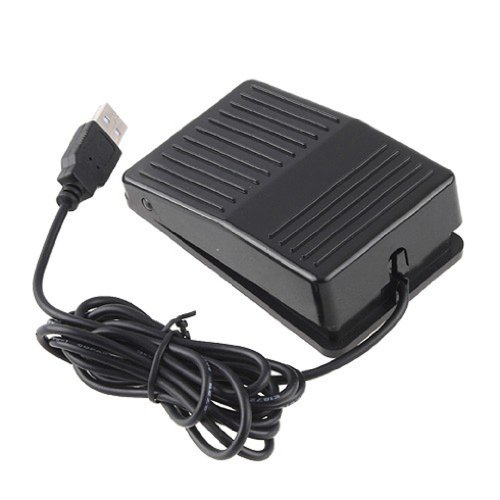
The single-pedal answer for the single-command buyer: one wide pedal, the standard assignment vocabulary through the maker’s official utility, and nothing to learn beyond the one job. If your Step 1 produced one command and your Step 3 audit stopped at level one, this is your purchase and the guide has done its work. Best for: first-time buyers, mute and push-to-talk duties, single repeated shortcuts. Not suited for: command families or macro work.

PCsensor USB Foot Pedal — When Step 2 Counts Two or Three
The same simple philosophy in single and multi-pedal forms, which makes it the natural landing spot when Step 2 counts a genuine family — above all the transport trio for occasional transcription and media control — while Step 3 stays at the simple end. Utilitarian software, workmanlike feel, accessible tier. Best for: known pedal counts on a simple brief. Not suited for: onboard-memory or layered-programming needs.
Kinesis Savant Elite2 — When Step 3 Reaches Level Two or Three
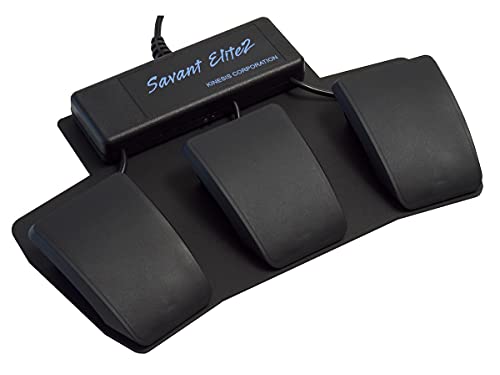
The dual-pedal programmable, expandable with an additional pedal, whose configuration lives with the device. This is where the method lands buyers whose audit showed evolving assignments, multiple machines, or a workflow the pedal must serve identically for years. Mid-to-premium tier, repaid in exactly those circumstances. Best for: professionals with defined, demanding workflows. Not suited for: a single light command. Buyers in comfort-focused setups often pair this class of pedal with the thinking in our keyboards chosen for comfort-minded desks.
X-keys USB Foot Pedals — The Platform Answer
From a wider ecosystem of programmable controls, with hinge-arrangement choices and macro-capable software from the maker’s official site. The method lands here when the pedal is one surface in a larger control system, or when a single pedal’s reliability is genuinely load-bearing in a production environment. Premium tier, justified by context rather than by features. Best for: broadcast, production and specialist workstations. Not suited for: first purchases or simple jobs. The specialist case stands apart from this list entirely: transcription at volume points to the Infinity IN-USB-2’s dedicated layout, covered fully in the usb foot switch buying guide.
Common Mistakes
The category’s mistakes are so consistent they can be treated as a checklist of what not to do. Choosing hardware before naming the command, which inverts the entire method and produces pedals in search of a purpose. Buying pedal count for hypothetical commands, which produces unlearned obstacles instead of tools. Buying configuration depth that will never be programmed, which converts a simple purchase into an expensive one for no benefit. Buying across the specialist boundary in either direction — a transcription pedal for gaming, a gaming-grade single pedal for a transcription business. Downloading configuration software from an aggregator instead of the manufacturer’s official website, a small risk with entirely avoidable consequences. Placing the pedal for tidiness instead of for your foot, then blaming the hardware for the result. And judging the whole purchase inside the learning period’s first clumsy days, when the honest verdict only exists after a fortnight of single-command use.
Pro Tips
From the setups that work: observe before you buy, spending one working week noting every command that pulls your hand away, because Step 1 done from evidence beats Step 1 done from imagination. Photograph or write down your final pedal assignments and keep the note with the device; the day you change computers, it converts an archaeology project into a five-minute job. If your pedal stores its configuration onboard, configure it on your main machine and enjoy the fact that every other machine simply inherits it. Position a new pedal slightly closer than feels dignified — feet reach less far than buyers imagine, and pedals placed at the edge of reach get stretched for and missed. Finally, when a pedal succeeds, resist immediately expanding its empire; let one command stay perfectly owned for a month, and let the second command, when it comes, arrive as an observed need rather than a decorating impulse. Gamers building a whole command setup may also appreciate the desk-level thinking in gaming keyboards for streaming setups.
Worked Examples
The Streamer With a Cough Problem
Step 1 names the command instantly: microphone mute, dozens of times per broadcast, always at moments when hands are on the game. Step 2 counts one command. Step 3 audits at level one. Step 4 prioritises a pedal that tolerates a resting foot through long sessions. Step 7 lands on the entry tier without a moment’s regret. The method’s output: a single iKKEGOL-class pedal, and a broadcaster whose household noises never reach the audience again. Every step beyond the first was a formality — which is the method working as designed, because the clarity was in the job from the start.
The Researcher With Forty Hours of Interviews
Step 1 names a family, not a command: play, rewind, fast-forward, in rotation, for weeks. Step 2 counts three and recognises the transport pattern — but Step 7’s tier question introduces the nuance: this is a project, not a profession, so the specialist Infinity pedal, built for a career of this work, overshoots. The method lands on a PCsensor triple arrangement mapped to the audio player’s shortcuts: the correct layout at the tier the job’s duration justifies. Had the forty hours been a monthly constant of her working life, the same steps would have pointed to the dedicated pedal without hesitation — the method is identical, the evidence differs.
The Imaging Professional on Two Machines
Step 1 names a small set of viewer commands, issued constantly, across a workstation and a laptop that must behave identically. Step 2 counts two working commands with a third emerging. Step 3 is decisive: assignments must travel, because recreating them per machine is exactly the friction the pedal exists to remove. Step 4 weighs all-day feel; Step 7 accepts the professional tier as infrastructure pricing. The method lands on the Kinesis Savant Elite2, configured once and carried between machines — a purchase that looks expensive beside an entry pedal and cheap beside the daily alternative. This is the profile the platforms are built for, and the steps found it by evidence rather than by budget.
Deciding Between Two Finalists
The seven steps usually narrow the field to two candidates, and buyers then stall on differences that do not matter while overlooking the one that does. When two pedals both cover your pedal count and your configuration level, decide on feel and placement fit, in that order — because those are the only qualities you will experience daily, while the feature differences that dominate a comparison table are experienced once, at setup, or never. If one finalist’s configuration lives onboard and the other’s lives on the computer, and your workflow touches more than one machine even occasionally, that is a genuine deciding fact; if it does not, it is a tiebreaker masquerading as one. If one finalist is a tier above the other, apply Step 7’s discipline in its purest form: name the specific capability the higher tier buys, in a sentence about your actual work, or buy the lower tier. And if the finalists are a general pedal and a specialist one, the decision was made at Step 1 — specialists win exactly when the named command is their specialism, and lose on every other desk. Two finalists is a good problem; it means the method has worked, and any choice between two well-matched pedals will be vindicated by the learning week far more than by another hour of comparison.
Special Cases Worth Their Own Rules
The Standing-Desk Worker
If you work standing for much of the day, adjust two steps. At Step 4, weight base stability and pedal size above all else: a standing press carries your shifting weight behind it, and a pedal that skates on a hard floor is not merely annoying but a small hazard to your balance and your concentration. At Step 6, plan for two resting positions — seated and standing stances put your foot in measurably different places — and give the pedal a home generous enough to serve both, with cable slack for the desk’s full travel. Standing users who solve those two points often become the category’s most committed owners, because a standing worker’s hands are typically committed to a task at bench height while the floor is entirely theirs.
The Laptop-Only Worker
Your special case is the port and the postcode. A pedal needs a permanent USB connection and a permanent floor position, so the choosing question is whether your working life has a fixed station at all. Docked at one desk, you are a desktop user for the purposes of every step in this guide. Genuinely mobile — sofa, café, spare room in rotation — you should let the method reach its honest negative: the pedal cannot follow that life, and the correct choice is to wait until a station exists. Forcing the purchase anyway produces the category’s most predictable clutter story, told on a smaller floor each week.
The Musician and Presenter
Performers and presenters choose under a rule of their own: the command must be issuable invisibly, mid-performance, with zero attention available to spare. That constraint elevates two criteria above the guide’s defaults — a pedal that can be found and pressed with absolute blindness, and a resting arrangement that never fires during the shifts and turns of a live set or a talk. Page-turning, slide advance, backing-track and teleprompter control are the classic assignments, and they reward the simplest reliable pedal rather than the deepest platform, because in performance the enemy is not limited features but a single moment of divided attention. Test in rehearsal conditions, at performance tempo, before the pedal is allowed anywhere near an audience.
The Buyer Outfitting Several Desks
A buyer equipping a small team or studio faces a multiplied version of every step, plus one of their own: standardise. A single model across desks means one configuration method to learn, one utility from one official source to manage, interchangeable pedals when one is borrowed, and assignments that mean the same thing at every workstation. The programmable platforms earn their tier fastest in this scenario, because onboard configuration turns each pedal into a self-describing unit that behaves identically wherever it is plugged in. Resist mixing models to save small amounts per desk; the savings are spent immediately in confusion, and the standard fleet is the professional pattern for a reason.
How Your Priorities Will Change With Experience
A final piece of choosing wisdom: the criteria that matter at purchase are not the criteria that will matter at your second purchase, and knowing the trajectory helps you spend correctly the first time. Beginners overweight features, because features are what can be compared from a chair. Experienced owners overweight feel, stability and configuration location, because those are what a year of mornings actually consists of. The practical translation is to let the steps in this guide — which are ordered by lived importance, not by listing order — discipline the beginner’s instincts: job before count, count before configuration, feel before features, tier last of all. Your second pedal, if the workflow ever calls for one, will be chosen in about five minutes, and the five minutes will be spent almost entirely on the questions this guide put first. That is not a failure of the method. That is the method, learned.
Checking a Specific Model Before You Commit
When the steps have produced a named finalist, a short verification ritual remains — twenty minutes that convert a good decision into a checked one. Begin on the manufacturer’s official website and confirm the model still exists in the maker’s current line-up, with its configuration utility listed for your operating system; a model orphaned by its own maker is a model to re-choose, however attractive its listing elsewhere. Read the maker’s own description of what the pedal can send, and match it against your Step 3 audit line by line: the combination your command needs, the string, the media function — each should be confirmable in the maker’s words, not in a retailer’s paraphrase. Examine the support pages for evidence of life: current downloads, documentation that answers real questions, a contact route that is more than a form disappearing into the void. Then turn to owner discussion with a specific shopping list of questions — resting behaviour, drift on floors like yours, the software experience after six months — and discount any account, glowing or furious, that does not describe an actual workflow, because in this category the workflow is the review. Finally, confirm the practicalities: cable routing against your measured desk, return terms in case the learning question answers itself negatively, and a seller whose listing matches the maker’s specifications exactly. A finalist that survives this ritual is not merely chosen; it is vetted, and the difference shows up in the first month of ownership as an absence of surprises.
What Experienced Buyers Ask That Beginners Do Not
Watch a second-time buyer shop for a pedal and the questions change completely, in ways this guide can hand to first-time buyers for free. The experienced buyer asks where the configuration lives before asking what it contains, because they have lived through rebuilding assignments on a new machine and price that memory correctly. They ask about the resting state of the pedal — what a foot can do on and around it at idle — before asking about its actuation, because they know the pedal spends its life being rested on and only its moments being pressed. They ask how the pedal behaves on their floor, not how it performs in a laboratory sense, and they treat drift stories in owner accounts as primary data rather than colour. They ask what the maker’s download page looks like today, having learned that software maintenance is the visible tip of a company’s seriousness. And they ask the question beginners find strangest: what will I assign to it in month six, asked not to justify buying depth today, but to check that the growth path from today’s model is graceful — that a second command, when it earns its place, has somewhere to live. None of these questions is cleverer than the beginner’s; they are simply the beginner’s questions after a year of mornings has finished editing them. Choosing by them the first time is the closest thing to experience that a guide can sell.
The Fortnight Trial, Designed Properly
Because one question — will foot control suit you — cannot be answered by research, design the trial that answers it as deliberately as the purchase itself. Choose the fortnight in advance and protect it: not a crunch week, not a holiday-shortened stretch, but ordinary working days in which your named command arises at its natural rate. Fix the variables the method depends on: pedal placed where the working foot rests, anchored, cable routed, one assignment, and a simple tally kept — a mark for every use of the pedal, a mark for every time you caught yourself using the keyboard instead. The tally is the trial’s gift to your future self, because at the fortnight’s end it replaces impressions with evidence: a pedal used constantly, with keyboard lapses shrinking toward zero, has passed; a pedal bypassed daily by your own hands has failed, and no affection for the idea should override the count. Judge, then act on the judgement completely — keep and commit, or return and close the question — because the only genuinely bad outcome of a well-run trial is the undecided desk, where a half-used pedal lingers for a year as a monument to a question nobody finished asking.
A Worked Example With a Twist: The Buyer Who Needed None
The method deserves one more example, because its most valuable output is sometimes a non-purchase. Consider the project manager who arrived at this guide convinced by a colleague’s evangelism. Step 1 asked for the command, and she produced a plausible one: advancing slides during presentations. Step 2 counted the family — one command, occasional tempo. But the observation week the guide prescribes told a different story than her imagination had: she presented twice a month, advanced slides with a clicker she already owned and liked, and spent the rest of her working life in documents and calls where no command repeated often enough to name. The method’s output was no pedal, delivered without drama and without a return label. She is in this guide because choosing well includes choosing nothing, and because her case isolates the exact moment the decision is made — not at the tier step, not at the brand step, but at the honest observation that precedes them all. A guide that cannot produce her outcome is a sales document. This one can, and does, and regards her as one of its successes.
The Method, Carried in a Pocket
Guides are long because doubts are specific, but the method itself fits in a pocket, and it is worth printing at the end in its smallest form. Name the command. Count its family. Audit your configuration honestly. Judge feel and stability before features. Verify the software on the maker’s official site. Plan the floor before the purchase. Buy the tier the job justifies, and no higher. Seven moves, in that order, and the category — for all its philosophies, platforms and specialists — becomes a two-minute decision with a fortnight’s trial attached. Everything else in this guide is commentary on those moves: the mistakes are what happens when their order is reversed, the pro tips are their refinements, the worked examples are their portraits. Carry the pocket version into the listings, where the gravity is strongest and the order is most easily lost, and the choosing will take care of itself.
The Choice, Revisited From the Far Side
It may help to end the choosing guide with the perspective of the chosen: the view from six months after a correct purchase. From there, the decision that consumed an evening of comparison has shrunk to its true size — one paragraph in the story of a workstation — and the criteria that dominated the listings have been replaced, in memory, by the two or three that actually governed daily life: the pedal is where the foot expects it, its one command is the right one, and its tier has never once been thought about since the box was opened. Buyers mid-decision find this perspective either comforting or deflating, and it is meant as the former: the choice matters, but it matters at the resolution of the method, not at the resolution of the comparison table. Get the job, the count, the configuration level and the floor right, and the remaining differences between good pedals are the kind that a fortnight of use renders invisible. The perfect choice does not exist in this category, because the perfect pedal for a workflow is defined by the workflow’s next six months, which nobody can fully foresee. The well-chosen pedal — matched, vetted, honestly tiered — is not a compromise against that ideal. It is the ideal, stated in terms a buyer can actually act on.
Choosing When the Buyer Is Not the User
One choosing situation deserves a final word, because it reverses several of the guide’s assumptions: buying a pedal for someone else — a colleague whose workflow you support, a family member whose setup you are outfitting, a team member whose desk you manage. The method survives, but its evidence must be gathered by conversation rather than observation, and its first step becomes a question asked out loud: what command would you give to your foot if you could? The answer, when it comes instantly, is as reliable as any tally. When it does not come, the gift should wait, because a pedal chosen for another person’s imagined workflow fails twice as fast as one chosen for your own. Where the purchase does proceed, prefer the models whose configuration can be adjusted easily and revisited — the programmable end of the range earns unusual credit here, since the recipient’s needs will be discovered in use and the pedal should be able to follow the discovery. And include, with the hardware, the one piece of this guide that matters most: the learning week is normal, the clumsiness is temporary, and the verdict is due at the fortnight, not the first evening. A pedal given with that sentence attached is a gift; without it, it is a puzzle in a box.
That is the whole of the choosing, for oneself or for another: a named command, an honest count, a matched depth, a verified maker, a planned floor, a justified tier. The steps are few because the device is simple. Their order is everything because the buyer, left unordered, will reliably start at the wrong end.
One more consideration belongs in the record, small but real: choose a pedal you will not mind looking at, in the glances your eyes will give it across years of mornings. It lives at the edge of your visual field, under the desk’s shadow, and while no buyer should select on appearance, a design that pleases its owner in passing is one less grain of friction in a relationship measured in years. The category’s mainstream designs are honest objects — moulded, purposeful, unpretentious — and most buyers find that honesty easy to live with. Let the method choose the pedal; let the eye merely veto the one it cannot abide.
Choose once, choose in order, and then let the choice disappear into the work — that disappearance, and not any feature on any box, is the mark of a pedal chosen well.
Step by Step With a Usb Foot Switch: Preparation, First Run and Troubleshooting
If a step produces an unexpected result, stop and return to the last point where everything behaved as expected, rather than layering new adjustments on top of confusion. When a specification is stated in unfamiliar terms, translate it into your own routine: how long, how often, how far, how loud in practice, before letting it sway you. Think about the longest session you realistically run, not the average one, since heat, noise, clutter and small annoyances all grow more noticeable over time. Give a new usb foot switch a fair trial in the position it was bought for before improvising workarounds, since many early complaints disappear once placement is corrected.
As a concrete listing check, take the iKKEGOL USB Foot Switch and the PCsensor USB Foot Pedal named earlier in this article and confirm, line by line, that each variant offered matches the size, connection and contents described for it here. Prefer a setup you can explain to another person in a minute, because simple arrangements are easier to troubleshoot, share and repeat than fragile clever ones. Decide in advance what good enough looks like for your use, so a minor cosmetic flaw does not distract you from performance that genuinely meets the brief. When something behaves oddly, return to the basics first: power, connection, position, cleanliness and the last setting you changed, in that order, before assuming a fault. Keep the step you are least sure about for a moment when you can give it full attention, and never rush the part of the job that is hardest to reverse.
Keep the area underneath and behind the usb foot switch reachable for cleaning, since the spots you cannot reach become the spots where dust and lost small parts collect. Notice the small sounds, lights and movements during normal use, because those everyday details decide whether a usb foot switch feels settled or constantly demands attention. Write the exact model name and variant from the packaging into your notes, so replacement parts, accessories and support conversations start from certainty rather than guesswork. Keep liquids, loose papers and anything that sheds dust or fibres at a sensible distance, unless the usb foot switch was clearly designed to work right beside them.
Keep a short note of what worked, what annoyed you and what you adjusted, because that note is more useful than memory when you later replace or add another usb foot switch. Keep the instructions somewhere you can find them months later, since the setting or step you skip today is often the one a future problem sends you hunting for. Finish by repeating the whole routine once more from the beginning, because fluency on the second run is the real sign that the method, and the usb foot switch, suit you. Check the underside, back or hidden face of the usb foot switch as part of your inspection, because labels, vents, switches and fasteners often live where first impressions never look. Look for the failure you would notice first if you chose badly: a port you cannot reach, a part that will not fit, a control you cannot see, or a routine that becomes slower instead of easier.
Think about the next purchase this one commits you to, whether that is matching accessories, consumables, a bigger surface or a different connection, and count that commitment honestly. Plan where the cables or materials connected to this usb foot switch will run when the room is tidy, not just while you are testing on an empty surface. When you compare notes with other owners, match their comments to setups like yours, because advice from a very different room, workload or routine can mislead.
Separate the features you will use in the first month from the ones that only sound reassuring, and let the first group carry far more weight in the decision.
Frequently Asked Questions
What is the most important factor when choosing a foot switch?
The command it will own. Pedal count, configuration depth and tier are all derived decisions — each follows from the specific job, how often it interrupts your hands, and how your workflow is shaped. Buyers who start by naming the command find the rest of the choice nearly automatic; buyers who start with hardware routinely buy the wrong philosophy of pedal and blame the category. If you take one sentence from this guide, take that ordering.
How do I know if I need a programmable pedal?
Ask what your assignments will do over the pedal’s life. If one pedal will send one command, set once, a simple model covers you completely. If assignments will evolve, involve macros or typed strings, or must travel between computers unchanged, programmability with onboard storage earns its tier. The honest dividing line is behaviour, not ambition: most owners live happily at the simple level forever, and the platforms exist for the minority whose workflows genuinely program back.
Single pedal or triple pedal for transcription?
Triple, without exception — transcription is a three-command workflow, and the layout is the point. Occasional transcription suits a general triple arrangement mapped to your player’s shortcuts. Professional volume suits the dedicated transcription pedal, whose shape and software support exist precisely for this work. A single pedal forces your hand back to the keyboard for the missing commands, which surrenders the entire benefit the pedal was bought to provide.
Does hinge direction really matter?
More than newcomers expect, less than professionals insist. A rear-hinged pedal is pressed by rocking forward over a planted heel; a front-hinged pedal by lifting and dropping the toe. For occasional presses the difference is a preference you may never notice. For hundreds of daily presses it shapes the whole feel of the work, which is why the professional lines offer the choice and why experienced users state their preference immediately. If your volume will be high, treat hinge arrangement as a real criterion; if low, let other factors decide.
What should I check before buying any foot switch?
Four checks, in order. Confirm your software has a shortcut for the command you want to move. Find the configuration utility on the manufacturer’s official website and confirm it supports your system. Decide the pedal’s physical home and cable route, and confirm the space is genuinely available. And verify your pedal count against commands you already use daily — not commands you might use someday. A pedal that passes all four checks is very unlikely to disappoint you.
Can I return a foot switch if foot control does not suit me?
Policies vary by seller, so check the return terms before buying if this concern weighs on you — it is a legitimate one, because the learning-period question is the one unknown no amount of research removes. What you can control is the experiment’s design: buy at the entry tier, assign one real command, place the pedal properly, and judge after a fortnight. Run that way, the trial is fair, the cost of a negative answer is minimal, and most buyers discover the answer is positive.
Related Reading
Put the method to work in the usb foot switch buying guide, compare the hardware in the usb foot switch reviews, read the deep single-lens usb foot switch review, and then operate your choice well with how to use a usb foot switch. For the rest of the desk, see keyboards for office typing.