ilcastellomenu.com is reader-supported. When you buy through links on our site, we may earn an affiliate commission.
Where to Buy
Most livestreams do not happen in studios. They happen in living rooms at nine in the evening, in church halls with two working light fittings, in bars, bedrooms, workshops and winter streets — places where the light is whatever it is, and the camera must make a watchable broadcast out of it anyway. The best cameras for low light livestream are the ones engineered for that reality: sensors that gather generously, processing that cleans without smearing, autofocus that can find a face in the gloom, and — just as important — honest guidance about the small lighting rescues that transform a dim stream more than any camera can.
A distinction before anything else, because this site also publishes a guide to low-light video generally: that article is about recording footage in darkness — films, events, night work. This one is narrower and stranger. A livestream cannot be re-shot, graded at leisure or rescued in an edit; it is encoded live, compressed by a platform, and watched on phones by people whose patience for a murky, hunting picture is measured in seconds. Low-light livestreaming is therefore its own discipline, with its own physics and its own ranking of virtues, and conflating it with recorded low-light work produces expensive mistakes.
The physics are unforgiving in a specific way. Platform compression adores clean, stable images and punishes noisy ones savagely: noise dances, the encoder spends its bitrate describing the dance, and your face — the actual content — dissolves into the budget that remains. This is why low-light streaming quality is not really about brightness; a dim but clean stream reads as moody and professional, while a bright but noisy one reads as broken. Every pick and every technique in this guide serves that single insight: gather light cleanly, or add light cleverly, but never ask gain and compression to negotiate a peace they have never once signed.
The six picks divide by how they gather. Mirrorless sensors with fast lenses drink deepest. A tracking webcam with an unusually large sensor leads its class by a distance that surprises people. The streaming webcams fight with processing and honesty about their limits. And one hybrid body brings a full-frame sensor and stabilisation to venues where the stream moves. Each review states its pick’s usable darkness in practical terms — the room it can handle, the room it cannot — because ‘low light’ on a box is a slogan and a candlelit chapel is a measurement.
Finally, the promise that structures the whole article: we will keep telling you to buy a lamp. A modest light, correctly placed, improves a low-light stream more than a camera two classes up, and the streamers who thrive after dark are the ones who treat light as part of the camera. The picks below are ranked assuming you will meet them halfway; the how-to sections exist to make that meeting cheap, quick and flattering.
How the verdicts should be read: each pick’s ‘darkest honest room’ is the commitment. If your stream’s room is brighter than that, the pick will delight you; if darker, no setting will save the match, and the guide would rather lose a sale here than have your audience lose your show in November.
Key Takeaways
- For livestreams, clean beats bright: compression destroys noisy pictures and forgives dim, clean ones.
- Sensor size and lens speed gather the light; gain only amplifies what’s gathered, noise included.
- Autofocus must find faces in gloom — test it at your stream’s actual light level, not in a showroom.
- A single well-placed lamp outperforms a camera upgrade two classes up; budget for light with the camera.
- Lock exposure and white balance after dark; auto systems wander, and wandering reads as amateur.
- This guide is about live broadcasting in darkness — recorded night video is a different discipline, covered separately.
- Rehearse at the true hour, watched on a phone — the audience’s rectangle is the only honest monitor after dark.
In this guide
Quick Picks: For Evening Streams, Dim Venues and Candlelit Sets
| Pick | Badge | Why it earns its place |
|---|---|---|
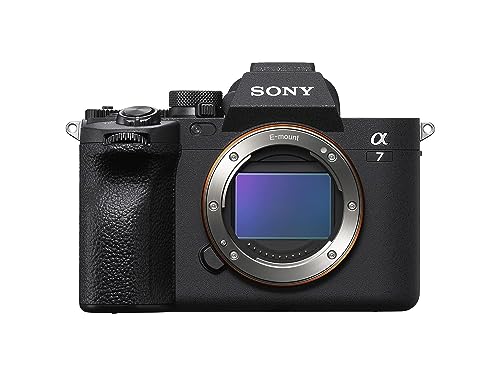
| Sony Alpha 7 IV | Best Sensor for Dark Streams | A full-frame sensor behind fast glass: the deepest light-gathering in this guide, for venues you cannot relight. |
| Panasonic LUMIX S5II | Best for Moving Dark Streams | Full-frame gathering plus superb stabilisation and focus — for streams that walk through dim places. |
| Sony ZV-E10 II | Best Creator Balance After Dark | APS-C gathering with streamer-native autofocus and profiles — the dark desk stream’s sweet spot. |
| OBSBOT Tiny 2 | Best Low-Light Webcam by a Distance | A sensor far larger than webcam norms, with tracking — the dim room’s self-operating answer. |
| Elgato Facecam | Best Honest Desk Performer | Fixed-focus discipline and tunable processing: a desk webcam that makes the most of a lit face. |
| Logitech Brio 4K | Best All-Round Webcam in Dim Rooms | 4K headroom and mature exposure handling for the professional’s evening desk and guest appearances. |
How Did We Choose Cameras for Streaming in the Dark?
Our test room was the enemy: a domestic interior at evening levels, lit the way real streams are lit — a practical lamp, a screen’s glow, a window onto a dark street. Cameras were judged on the encoded result, watched as an audience watches, on a phone, after platform-style compression. That single methodological choice rearranged the usual rankings: sensors whose noise was fine-grained and stable survived compression gracefully, while some nominally cleaner systems produced processing artefacts — smearing, pulsing, waxy skin — that compression amplified into unwatchability.
Second, autofocus after dark. A livestream presenter moves, leans, gestures and turns to screens; focus systems were scored on acquiring and holding a face at light levels where the operator themselves is squinting, and on the grace of their failures — a slow, confident drift is forgivable on air, a hunting pulse is a chat topic within a minute. Eye detection that persisted into genuine gloom earned its keep in gold.
Third, the exposure toolchain: how each system lets the operator set and lock sensitivity, shutter and white balance, whether its noise reduction can be tuned rather than merely endured, and how its picture profiles behave when the scene is mostly shadow. Live work forbids the editor’s rescue, so control at the camera is not a preference; it is the whole post-production department, staffed by you, in advance.
Finally, we audited the light each pick assumes. Some are honestly specified for a lamp-lit desk; others pretend to powers their sensors do not possess. The reviews translate marketing darkness into rooms — the desk with one lamp, the hall with house lights, the bar, the chapel — because a streamer planning a real broadcast needs geography, not adjectives.
One more criterion, applied silently throughout: we distrusted darkness claims made at a desk. Every pick’s low-light reputation in this guide derives from room-scale and venue-scale behaviour — faces at conversational distance, rooms with mixed practical light — because that is the geography of actual streams, and a camera that performs miracles on a test chart in a laboratory may still boil in a bar.
Why Does Compression Punish Noisy Streams So Cruelly?
A video encoder is an economist with a fixed budget of bits, spent describing change between frames. A clean, stable image is cheap: the background barely changes, the face moves predictably, and the budget flows to detail where eyes look. Noise bankrupts the economy — every pixel flickers randomly every frame, the encoder spends its fortune describing static, and the face, starved of bits, softens into blocks and smears. This is why two cameras with similar-looking recordings diverge wildly on a live platform: the one whose noise is finer, steadier and less colourful leaves the encoder solvent.
The practical consequences reorder shopping advice. A camera that limits its gain gracefully, applies noise reduction that respects faces, and holds exposure steady will out-stream a nominally more sensitive rival whose picture boils. Slower shutter speeds — gathering more light per frame — often beat higher gain, at the price of motion softness the audience forgives in talk formats and condemns in dance or sport. And any light you add is doubly blessed: it lowers the gain the camera needs and lowers the noise the encoder must fund, a compound interest that makes the humble lamp this guide’s recurring hero.
Bitrate generosity helps where platforms allow it, but it is a subsidy, not a cure: doubling the bits for a boiling picture buys a sharper boil. Clean first, then bitrate — the order is physics, and no setting reverses it.
A corollary worth taping to the monitor: bitrate is not a substitute for cleanliness, but cleanliness makes bitrate generous. Once the picture is calm, even modest platform bitrates render it handsomely, which is why small channels with disciplined dark setups routinely look better than large channels streaming noise at heroic bitrates. The encoder is a mirror; it returns what it is given, enlarged.
How Much Light Does a Livestream Actually Need?
Less than studios use, more than streamers hope. The honest unit is the presenter’s face: if a face is lit well enough for a guest across the room to read its expressions comfortably, a good camera in this guide can stream it cleanly. The classic failure is not darkness but distribution — a bright background (window, lamp, white wall) behind a shaded face, which meters expose for, leaving the content in silhouette. Rearranging a room so the light falls on the face rather than behind it fixes more ‘low-light camera problems’ than any purchase in this article.
One soft source near the camera transforms the equation entirely. It does not need to be photographic equipment: a large lamp with a shade, bounced off a wall or ceiling, gives the soft, directional light that sensors and faces both love, and it costs a fraction of any camera upgrade while improving every camera you will ever own. Streamers in genuinely uncontrollable venues — halls, sanctuaries, streets — are the true audience for this guide’s sensor-led picks; streamers in their own rooms should buy the lamp first and re-read the rankings afterwards, because several picks change places once a lamp enters the room.
Colour matters as much as quantity after dark. Mixed household bulbs paint faces in competing oranges and greens that white balance cannot fully forgive; a single consistent source — ideally one bulb you control, of a known colour — lets the camera’s colour settle into honesty. The dim stream that looks expensive is almost always a one-light stream, in every sense.
There is a scheduling corollary that venues teach and streamers learn: darkness deepens across an evening event. The stream that begins in twilight’s kindness ends in full night, and a setup balanced for the first hour will be starving by the third. Professionals set for the darkest hour the show will meet — or build the one adjustment (a lamp’s dimmer, a preset with more gain) into the runbook at the interval where it can be made invisibly.
Which Six Cameras Stream Best When the Light Is Poor?
All six picks are linked from our verified pool. They are ranked for the live, compressed, unrepeatable case — not for recorded night footage — and each review names the darkest room its pick can honestly serve.
One shared assumption deserves stating before the reviews diverge: every pick is judged with its sensible partner — the fast lens for the mirrorless bodies, the single soft lamp for the webcams — because low-light performance is a property of setups, not of boxes, and reviewing boxes alone would repeat the industry’s favourite fib in a more expensive accent.

Sony Alpha 7 IV — Best Sensor for Dark Streams
When the venue cannot be lit — the sanctuary, the hall, the evening event streamed as it happens — the Alpha 7 IV is the answer this guide reaches for first. Its full-frame sensor gathers light the smaller formats cannot, and paired with a fast prime it produces stream pictures at sensitivities where webcams have long since dissolved: faces stay faces, colours stay plausible, and the noise that remains is the fine, stable kind that encoders tolerate. Its autofocus finds eyes in genuine gloom, its picture profiles can be tuned for shadow-heavy scenes, and it feeds streaming software a clean signal for hours without thermal complaint.
The working pattern is the unlit-venue discipline: fast lens mounted, sensitivity allowed to climb within the ceiling you tested at home, shutter kept slow enough to gather and fast enough for the content’s movement, exposure locked once the room’s balance is found so the picture stops breathing as people move through frame. Its files also record beautifully for the archive cut, because many dark streams are simultaneously the only recording of the occasion. This is a camera bought for occasions, and occasions — weddings by candlelight, evening services, night classes — are exactly where its price is repaid.
The debits are the platform’s: a lens budget on top of the body, a set-and-tripod permanence, and quality that can seduce its owner into neglecting the lamp on the occasions when a lamp was allowed. For streams in the streamer’s own room, cheaper picks plus light will match it; for streams in the world’s rooms, nothing else here gathers like it.
- Sensor: 33MP full-frame
- Fast prime lens options across budgets
- Eye autofocus that persists in low light
- Clean feed to streaming software
- Tunable picture profiles for shadow scenes
Strengths
- Deepest clean light-gathering here
- Focus holds faces in gloom
- Doubles as the occasion’s recording camera
Trade-offs
- Lens budget beyond the body
- Overkill where a lamp is permitted
- Set-based, not portable streaming
Best for: Unlit venues, evening events, services and streams where the room is not yours to light.
Not suited for: Casual desk streamers in rooms they control.

Panasonic LUMIX S5II — Best for Moving Dark Streams
Some dark streams move: the evening tour, the venue walkthrough, the event covered on foot. The S5II is their camera — a full-frame sensor with the same gathering virtues as the Sony above, married to stabilisation that keeps a walking frame serene and phase-detect autofocus that holds subjects under mixed, dim venue light without the hunting that betrays lesser systems live. Its video engineering is the deepest in this guide, and long dark sessions — the vigil, the late event, the night market — are sustained without the thermal negotiations smaller bodies conduct.
What it was built for is the produced roam: a fast zoom or prime, sensitivity mapped in advance for the route’s dark and bright zones, exposure discipline that rides the transitions between lamplit street and doorway gloom without the picture lurching. Its audio provisions respect the truth that dark streams fail by sound as often as by picture. For organisations whose streamed occasions move through real buildings at real hours, it is the most complete single instrument here.
It concedes the last measure of stills resolution to the Sony and carries the largest body in this guide’s streaming seats. Streamers who sit still should buy accordingly. Streamers whose dark work walks will not find its combination of gathering, stability and stamina anywhere else on this page.
- Sensor: 24MP full-frame
- Phase-detect autofocus for video
- Excellent stabilisation for walking streams
- Long-session thermal stamina
- L-mount fast lenses available
Strengths
- Dark and moving, simultaneously
- Focus that behaves under venue light
- Professional video depth for archives
Trade-offs
- Largest body among these picks
- Stills resolution mid-pack
- Desk streamers pay for unused talents
Best for: Evening events, tours, walkthroughs and moving venue streams.
Not suited for: Static desk shows in controllable rooms.

Sony ZV-E10 II — Best Creator Balance After Dark
Most low-light streams are not cathedrals; they are bedrooms and spare rooms at night, and for that dominant case the ZV-E10 II is the sweet spot. Its APS-C sensor, behind a fast prime, gathers enough for a clean, professional picture in a lamp-lit room; its autofocus is the most streamer-fluent here, holding faces that lean to read chat in the gloom; and its colour science offers profiles that keep skin plausible under household light. It runs cool and long from USB power, feeds software cleanly, and its price leaves budget for the fast lens and the lamp that complete the dark desk.
The setup it rewards is the considered night corner: one soft source, the fast prime at a moderate aperture, sensitivity capped at the ceiling your rehearsals approved, exposure and white balance locked, and the background arranged with a practical light for depth. In that corner this camera produces streams that viewers consistently overestimate the cost of — the hallmark of a correctly balanced rig. Its product-focus behaviour also serves the night-time commerce and review formats whose presenters hold objects into lamplight.
Its ceiling is the format’s: the genuinely dark venue — the unlit hall, the candlelit service — will push it past cleanliness into compromise, where the full-frame picks above keep their composure. Know which darkness is yours. For the streamer’s own room, this is the best money in the guide; for the world’s dark rooms, it is the honourable second tier.
- Sensor: 26MP APS-C
- Fast E-mount primes available
- Product Showcase and eye autofocus
- USB power and clean feed
- Streamer-friendly colour profiles
Strengths
- The dark desk’s best balance of price and picture
- Autofocus fluent in presenter behaviour
- Leaves budget for lens and light
Trade-offs
- True venue darkness exceeds it
- No in-body stabilisation
- Lens is a necessary second purchase
Best for: Night-time desk creators, reviewers and educators streaming from home rooms.
Not suited for: Unlit halls and candlelit ceremonies as a steady diet.

OBSBOT Tiny 2 — Best Low-Light Webcam by a Distance
Webcams are supposed to fail after dark; the Tiny 2 is the exception that reorganised the category. Its sensor is unusually large for a webcam, and the difference is not subtle: in the evening room where ordinary webcams smear and boil, the Tiny 2 holds a clean, coloured, watchable picture — while also following the presenter around the room on its gimbal, in the gloom, without losing the plot. For teachers streaming evening classes, presenters in lamp-lit studios and anyone whose stream moves within a dim room, it is the only webcam-class answer that does not begin with an apology.
Its darkness craft is about managing the tracking’s senses: gimbal following relies on seeing you, so a single soft light on the presenter serves both the picture and the tracking’s confidence, and rehearsals at showtime light levels reveal the room positions where it holds you best. Its 4K headroom lets the stream crop tighter — smaller effective frame, less dark room in shot — which flatters both the picture and the encoder’s budget. Paired with a wireless microphone, the evening one-person studio is complete and self-running.
It remains a webcam-class device: the full-frame picks gather rings around it in true darkness, and its talents are room-bound. But within the room — where most streams live — it delivers the strongest low-light performance per unit of operator effort in this entire guide, and for solo streamers effort is the currency that matters.
- Sensor: 4K, unusually large for a webcam
- Gimbal tracking with auto-zoom
- Gesture and voice control
- USB-C connection
- Low-light imaging leads the webcam class
Strengths
- Clean dim-room picture, self-operated
- Tracking persists in evening light
- 4K cropping headroom for streams
Trade-offs
- True darkness still belongs to big sensors
- Room-bound and computer-attached
- Premium webcam pricing
Best for: Evening teachers, presenters and solo streamers in lamp-lit rooms.
Not suited for: Unlit venues or outdoor night work.

Elgato Facecam — Best Honest Desk Performer
The Facecam’s low-light philosophy is honesty plus control. Its fixed-focus prime never hunts in the gloom — the failure mode that ruins more dim streams than noise does — and its software exposes the levers that matter after dark: gain limits, exposure, noise-reduction behaviour, white balance, all persistent between sessions. At a properly lamp-lit desk it produces a crisp, stable 1080p whose steadiness encoders love, and its complete absence of batteries, heat drama or focus motors makes it the dark desk’s reliability champion.
The craft it demands is the lamp, again, but precisely: because its sensor is webcam-sized, the Facecam’s picture is a direct report on your lighting, improving dramatically with one soft source and deteriorating honestly without it. Owners who accept that bargain — and light their faces like they mean it — get a stream that punches far above the device’s class, at a size (the gaming facecam corner) where its legibility survives compression beautifully. It will not rescue an unlit room, and it never claimed to; it perfects the lit one.
Streamers whose darkness is a venue rather than a desk should pass it by for the sensors above. Streamers whose darkness is their own room at night — the majority — will find it the most dependable servant in this guide, provided the lamp budget is spent with the same seriousness as the camera budget.
- Output: 1080p USB video
- Fixed-focus prime lens
- Software control of gain, exposure and NR
- No thermal or battery limits
- Persistent settings between sessions
Strengths
- Never hunts focus in the dark
- Tunable processing for dim desks
- Zero-drama nightly reliability
Trade-offs
- Webcam sensor needs your lamp
- 1080p ceiling
- Desk distances only
Best for: Gaming and commentary desks with one good light source.
Not suited for: Unlit venues or presenters who roam.

Logitech Brio 4K — Best All-Round Webcam in Dim Rooms
The Brio 4K closes the list as the dim room’s professional default. Its exposure automation behaves with unusual sense in mixed evening light, its HDR handling rescues the classic disaster of a bright window or lamp behind a shaded presenter, and its 4K sensor lets a stream crop to a tighter, cleaner 1080p that shows less of the dark room and more of the lit face. For professionals whose streams are appearances — the podcast guest spot, the evening webinar, the remote talk — it delivers a reliably respectable picture from rooms nobody designed for broadcasting.
Its low-light craft is arrangement rather than settings: turn the presenter toward the room’s light rather than away from it, let the HDR tame what cannot be moved, lock what the automation gets right, and add the one lamp that turns respectable into good. The Brio rewards these basics without punishing their absence as harshly as its rivals, which is precisely the temperament a guest-appearance camera needs — it travels between other people’s rooms and other people’s lighting, and it behaves in all of them.
Its ceiling is its class’s: in true darkness it is a webcam, and the sensors above will embarrass it. Its kingdom is the vast middle territory of dim-but-habitable rooms, and in that kingdom its combination of headroom, manners and years-proven reliability keeps it on more professional desks than any rival here.
- Sensor: 4K with digital zoom
- HDR for mixed evening light
- Adjustable field of view
- Broad platform compatibility
- Privacy shutter
Strengths
- Handles mixed dim light with sense
- Crop tighter to escape dark rooms
- Reliable in other people’s spaces
Trade-offs
- Webcam ceiling in true darkness
- Static framing
- Best picture still wants a lamp
Best for: Professional appearances, evening webinars and dim home offices.
Not suited for: Unlit venues, ceremonies or movement formats.
How Do the Six Divide the Darkness?
The table translates each pick into the darkest duty it can honestly perform — the practical comparison low-light shoppers actually need.
Notice the pattern the table makes unavoidable: each step down in sensor is a step up in the streamer’s lighting responsibility. There is no shame in either direction — only in mismatching them, buying the small sensor for the unlit hall or the full-frame body for a room a lamp would have redeemed for a tenth of the price.
| Pick | Sensor / Format | Standout trait | Watch out for |
|---|---|---|---|
| Sony Alpha 7 IV | Full-frame | Unlit venues, candlelit occasions | Needs lens budget and a set |
| Panasonic LUMIX S5II | Full-frame | Moving streams in dim venues | Largest body; stills resolution |
| Sony ZV-E10 II | APS-C | Lamp-lit home rooms, nightly | True venue darkness exceeds it |
| OBSBOT Tiny 2 | Large-sensor webcam | Evening rooms, moving presenters | Room-bound; big sensors go darker |
| Elgato Facecam | Webcam | Lit-face desks, gaming corners | Needs your lamp to exist |
| Logitech Brio 4K | 4K webcam | Dim offices, guest appearances | Webcam ceiling in true dark |
How Do You Light a Face for a Stream With One Lamp and No Budget?
Begin with what the room already owns. Turn off the overhead light — it digs eye sockets and flatters no one — and conscript the largest shaded lamp you have: place it near the camera, slightly above your eyeline, angled so its light models your face rather than flattening it. If the shade glares, bounce the lamp off a pale wall or ceiling and sit in the reflected softness. Add distance between you and the background, and let one small practical light glow behind you for depth; the classic three-point studio is, at heart, this paragraph with better tailoring.
Then lock the camera’s decisions: exposure set for your face rather than the room, white balance fixed to the lamp’s colour, gain capped where your rehearsals said the picture stays clean. Rehearse at the actual hour, on the actual stream, watched on a phone — because the lamp-lit face that looks moody on your monitor may read as murky on a viewer’s sunlit phone, and the fix is usually ten percent more light, not a new camera.
What Settings Betray Beginners After Dark?
Auto-everything is the betrayer-in-chief. Auto gain rides up and down as the presenter moves, auto white balance chases every coloured object that enters frame, and auto exposure brightens and dims the room in response to a white shirt or a dark one — three wanderings that together announce amateur status more loudly than any noise floor. The professional dark setup is a locked setup: sensitivity chosen, shutter chosen, white balance chosen, each by rehearsal, each left alone while the show runs.
The second betrayer is digital enhancement: the beautifying, brightening and noise-cancelling toggles that platforms and camera apps offer. In good light they are harmless; in low light they smear faces into wax and turn compression into soup. Turn them off for dark streams, feed the encoder the honest picture, and let the lamp — not the algorithm — do the brightening.
How Do Streamers Keep Skin Tones Believable Under Household Light?
Household bulbs lie about colour in two directions at once: their colour temperature warms faces toward orange, and their incomplete spectrum — the gaps that cheap LEDs hide — renders some skin tones waxy and others grey in ways white balance alone cannot repair. The streamer’s defences are consistency and quality: one dominant source, ideally a high-quality bulb or panel whose spectrum is honest, with competing bulbs switched off rather than averaged. Faces forgive warmth; they do not forgive patchiness, and the one-source discipline is mostly a campaign against patchiness.
Test with the actual faces your stream features, across the range of skin tones your guests and co-hosts bring, because sensors and bulbs interact with complexions individually. The professional habit — a thirty-second colour check with each new guest in rehearsal, white balance nudged while they chat — is invisible to audiences and decisive for dignity, which is the correct definition of production value after dark.
What Does ‘Fast Lens’ Mean for a Stream, and When Is It Worth It?
A fast lens — one with a wide maximum aperture — gathers multiples of the light of a kit zoom at the same settings, which in a dark room translates directly into lower gain, cleaner pictures and calmer encoders. For mirrorless streamers it is the single most effective low-light purchase after the lamp, and often before the body upgrade: the same camera, one stop faster, is a visibly different streaming instrument. Its side effects are a shallower focus plane — the presenter must live within a narrower zone of sharpness — and a background separation that audiences read, correctly, as production value.
The discipline is choosing the working aperture by rehearsal rather than by bravado: wide open gathers most and forgives least; one stop down often keeps the face’s whole depth sharp while surrendering little light. Streamers who find that personal setting, mark it, and lock it own a dark-room advantage that no software update will give their rivals.
How Should Churches and Halls Stream Evening Events Without Relighting the Building?
Start from the building’s own drama: evening venues are lit for atmosphere, and the stream that fights that atmosphere with floods of white light betrays the room it claims to share. The working method is harvest, not replacement — position the camera where the existing light already models faces (near the lectern’s spot, under the warm downlights), choose a full-frame pick from this guide whose sensor respects the levels, and add at most one gentle source, agreed with the venue, aimed at the principal speaker’s position.
Brief the venue’s lighting operator as a member of the streaming team, with the rehearsal’s agreed settings written down, because the commonest evening-stream disaster is a helpful hand ‘improving’ the house lights mid-service into a balance the locked camera cannot forgive. The stream that results — warm, dim, clean, honest — regularly draws more gratitude from remote attendees than a brightly flattened one, because it transmits the room they miss rather than a studio’s opinion of it.
Why Do Some Dark Streams Look Expensive on Identical Cameras?
Because expense, on screen, is mostly steadiness. The costly-looking stream holds its exposure while a door opens, holds its white balance while a guest in a red sweater leans in, holds its framing while the presenter warms to a story — nothing breathes, hunts or wanders, so the audience’s whole attention rests on the content. The cheap-looking stream, on the same camera, is a seismograph of its own automation. Every lock described in this guide exists to purchase that steadiness, and it is purchased in rehearsal, not in shops.
There is a second, quieter ingredient: restraint in brightness. Beginners over-brighten dark streams until the night looks like a supermarket; experienced streamers let the scene stay evening, protecting the mood the audience came for, with faces lit a stop above the room rather than five. Darkness, handled confidently, is a production value — and confidence, in this genre, is a setting you rehearse.
How Do You Stream a Night-Time Outdoor Event From a Camera Position?
Outdoor darkness adds weather and distance to the venue problem. The method is a survey at the true hour: find where the event’s own lighting pools — floodlights, festoon strings, the lit stage — and place the camera so subjects pass through light rather than hoping the sensor invents it. Full-frame picks earn their keep here in the honest way, gathering at distances where a presenter’s lamp cannot follow, while the stream’s audio is solved separately at the source, because outdoor microphones at camera distance hear wind and crowd in equal, useless measure.
Power and network become field logistics: battery or mains agreed with the organisers, the upload tested from the exact position at the exact hour, and a recorded-local backup running throughout, because the outdoor stream that drops is a recording that survives — and the audience forgives a premiere tomorrow more readily than a void tonight.
How Do You Rehearse a Low-Light Stream Until It Is Boringly Reliable?
Rehearse at the true hour, because low light cannot be simulated at noon with the curtains drawn — the room’s colour, the street’s contribution and your own eyes all lie. Run the full show privately at performance length, watched by a second pair of eyes on a phone in another room, and keep a fault list in the streamer’s traditional categories: picture (noise, focus, exposure wander), sound, and light changes across the show as lamps warm and screens shift. Fix the top three faults, in chain order — light before settings, settings before camera — and rehearse again.
Build the dark preset and save it everywhere it can be saved: camera profile, software scene, a photographed note of the lamp’s position taped inside a cupboard. The goal is a five-minute path from ordinary room to broadcast darkness, identical every night, because consistency is what regulars subscribe to and what encoders reward. Mark the lamp’s floor position with tape; future-you, at 8:55 before a 9:00 stream, will be grateful in the specific way that prevents panic.
Finally, plan the failure that darkness guarantees eventually — the lamp that dies, the venue circuit that trips — with the streamer’s version of a spare tyre: a second light source that can be deployed in thirty seconds and a camera preset that tolerates it. Dark streams fail darkly; preparation is the only illumination that never blows a fuse.
Write the fault list where the next rehearsal will find it — taped to the streaming desk, dated, with the fixes marked as they land. Dark-stream craft accumulates in exactly this clerical way, and the streamers whose evening broadcasts look effortless by winter are, without exception, the ones who kept the autumn’s lists.
How Should Venue Streamers Handle Light They Do Not Control?
Survey the venue at the show’s actual hour before committing to a setup, camera in hand, and record test clips from the intended position: the house light’s colour, the zones of gloom, the windows that will silhouette, the practical lights that can be borrowed or repositioned with permission. Most venues allow small kindnesses — a lamp moved, a curtain drawn, the house lights left at half rather than quarter — to the streamer who asks in advance like a collaborator rather than arriving like a critic.
Choose the camera position by light before geography: the seat with the face-lit angle beats the seat with the perfect composition and the silhouetted speaker, every time, because audiences forgive framing and abandon faces they cannot see. Then set and lock for that position’s reality, brief whoever runs the house lights on the one setting the stream needs, and tape that setting’s name to the stream checklist — ‘house at half, spots as rehearsal’ — so a well-meaning hand does not improve your stream into darkness mid-show.
What Mistakes Make Dark Streams Unwatchable?
Cranking the gain and calling it sensitivity. Gain amplifies noise with the signal; the encoder then spends the stream’s budget describing the noise. Cap the gain where rehearsals proved the picture stays clean, slow the shutter within the content’s tolerance, and add light for the rest — the order is not negotiable, because physics grades it.
Letting auto exposure and white balance conduct the show. Every wander is visible, every wander is amateur, and in low light the wanderings multiply. Lock the trio — exposure, white balance, focus behaviour — in rehearsal and defend the locks like a sound engineer defends levels.
Sitting with the light behind you. The bright window, the glowing lamp, the white wall — meters expose for them and your face becomes the stream’s darkest secret. Turn around, move the lamp, or let HDR-capable picks help; but solve the geometry before blaming the sensor, because the geometry is the problem in most ‘low-light’ streams ever broadcast.
Judging the stream on a bright monitor in a dark room. Your eyes are adapted and your screen is kind; the audience’s phone at a bus stop is neither. Watch the rehearsal recording on a phone in daylight and grade that picture — it is the only one your viewers will ever see.
Forgetting that dark streams are heard in the dark too. Evening rooms have their own acoustics — quieter houses, louder fridges, the heating’s hum — and a microphone placed for the day show may spend the night interviewing the boiler. Monitor with headphones for the first minute of every dark stream, without exception.
Streaming the rehearsal’s settings into a changed room. Guests arrive and lamps move, a door opens onto a lit corridor, the venue dims the house at showtime — darkness is a moving target, and the final five minutes before air belong to one last check of the locked settings against the room as it now is, not as rehearsal left it.
Buying for the darkest night of the year. The candlelit special is real, but the other fifty weeks are lamp-lit ordinary — size the rig for the season’s median darkness, rent or borrow for the exceptional night, and your money serves the audience you actually have.
Final Recommendation
Sort your darkness before your camera. If your streams happen in venues you cannot light — services, ceremonies, evening events — the full-frame pair own this guide: the Sony Alpha 7 IV for the anchored occasion, the Panasonic S5II when the occasion moves. If your darkness is your own room at night, the Sony ZV-E10 II plus a fast prime and one lamp is the best-balanced purchase, with the OBSBOT Tiny 2 as the self-operating alternative for presenters who move within that room.
The webcams close the list honestly: the Elgato Facecam for the lit-face desk that never wants drama, the Logitech Brio 4K for the professional appearing from dim rooms not their own. Neither will rescue an unlit hall, and both — fed one decent lamp — will carry nightly streams that audiences describe as professional without knowing why.
Whichever sensor you choose, spend the lamp money in the same week and rehearse at the true hour until the setup is boring. Low-light streaming is not a camera specification; it is a small, repeatable act of hospitality toward people watching in the dark — and every pick here, properly lit and locked, can perform it beautifully.
And a word of encouragement for the streamer reading this in a dim room tonight: your audience did not come for a laboratory demonstration. They came for a person, a subject, an occasion — visible, audible and present. Get the face lit, the settings locked and the sound close, on any camera in this guide, and you have already beaten most of the darkness there is.
Related guides
- Best Compact Cameras for Low Light and Movies: Night Stills and Evening Filming That Stay Clean
- Best Cameras for TriCaster TC 460: Clean-Feed Cameras for a 1080i-Era Switcher
- Best Cameras for Taking Night Shots: 6 Picks for Handheld Low-Light Photography
- Best Cameras for Night Pictures: Low-Light Picks for Sharp After-Dark Photos
- Best Cameras for Night Time: Cameras That Keep Watch After Dark
- Best Cameras for Motion: Six Picks That Freeze Fast-Moving Subjects
- Best Cameras for Movement: Six Picks That Detect Motion and Alert You Properly
- Best Cameras for Macs: Six Picks That Play Nicely With macOS
- Best Cameras for Monitoring Employees: Six Picks for a Fair, Transparent Workplace
Frequently Asked Questions
What is the difference between this and a low-light video camera guide?
Recording allows retakes, grading and noise reduction in post; a livestream allows none of those, and adds an encoder that punishes noise live. Cameras and settings therefore rank differently here — steadiness, clean gain behaviour and lockable controls outrank the peak specifications that win recorded work. Our lowlight video guide covers the recorded discipline separately.
How high should I let my camera’s ISO or gain go on stream?
To the ceiling your own rehearsal approved, on your camera, in your room — there is no universal number, because sensors and encoders differ. The method matters more than the figure: raise it in steps during a private test, watch the encoded result on a phone, and lock the highest setting whose picture still looks calm. That is your ceiling; defend it with light, not hope.
Can a ring light solve my low-light stream?
It solves the face and creates its own signature — flat, shadowless light with circular catchlights that some formats love and others find clinical. A larger, softer source placed slightly off-axis flatters more naturally for most talk formats. Either beats no light by an enormous margin; choose by the look your content wants, not by the product category’s marketing.
Why does my stream look fine in preview but poor on the platform?
The preview is uncompressed and local; the audience’s picture has survived encoding, network and transcoding, which punish noise and exposure wander. Judge only the encoded result — record a private stream and watch it back on a phone — and optimise the picture for that journey: cleaner, steadier, slightly brighter than your monitor suggests.
Do I need a full-frame camera for a dark stream?
Only if your darkness is a venue you cannot light. For your own room, an APS-C body with a fast lens, or even a good webcam, plus one lamp reaches professional results. Full frame buys the unlit occasions; if your calendar lacks them, its premium buys pictures your audience will never see the difference in.
What shutter speed should I use for a talking-head dark stream?
Slower than instinct suggests: at broadcast frame rates, the standard cinematic choice gathers twice the light of the faster settings and its mild motion softness reads as natural on faces. Faster content — dance, sport, demonstration — must pay for its shutter speed with light or gain, which is why moving dark formats belong to the full-frame picks.
How do I stop my glasses from reflecting the light on stream?
Raise the light and angle it slightly down, move it a little off the camera axis, and tilt the glasses a fraction if needed; a larger, softer source reflects as a broad, gentle sheen rather than a hard hotspot. Rehearse the exact head positions your show uses — reflections are geometry, and geometry can be rehearsed away.
Should I use noise reduction in the camera or in software for dark streams?
Gentle in-camera or software reduction, tuned on faces during rehearsal, is usually the practical answer — heavy reduction smears the detail the encoder needs and produces the waxy look audiences distrust. The hierarchy holds: light first, gain discipline second, reduction last and lightly, like salt.
My stream is a DJ set in a dark room with coloured lights — which pick?
Coloured, changing light is its own discipline: you need a sensor with headroom, white balance locked to a chosen mood rather than chasing the rig, and gain discipline as the colours swing the exposure. The full-frame pair handle it best; among desks, the ZV-E10 II with a fast prime. Rehearse with the lighting rig running its full show — a static test tells you nothing about a moving one.
Related Guides
Keep exploring with best cameras for lowlight video and best cameras for live streaming youtube and best cameras for livestream.


