Disclosure: As an Amazon Associate, ilcastellomenu.com earns from qualifying purchases. Product examples below link to Amazon, where you can check current availability and specifications; this guide itself lists no fixed prices because pricing and bundles change frequently.
Learning how to grip a gaming mouse starts with a simple observation: there are three established grips — palm, claw and fingertip — and each one changes which muscles aim, how heavy a mouse feels, and which shapes will suit your hand. Most players already use one of them without knowing its name. Identifying yours, refining it, and matching your mouse to it does more for comfort and consistency than any sensitivity tweak.
This guide explains each grip honestly, including its real costs, shows how to test which one your hand naturally chooses, and covers the adjustments that fix the common complaints: wrist ache, overshooting on flicks, and a mouse that always feels slightly the wrong size. Grip also interacts with weight and DPI, so we will cross-reference those decisions as they come up rather than treating your hand in isolation.
The Palm Grip: Full Contact, Whole-Arm Aiming
In a palm grip your whole hand rests on the mouse: fingers lie flat and extended along the buttons, the palm fills the hump of the shell, and the mouse moves mostly from the shoulder and forearm. It is the most relaxed and sustainable posture for long sessions, because the hand is supported everywhere and the fingers do no lifting. Large, high-humped, ergonomically sloped mice exist precisely for this grip, which is why hand size matters so much in roundups like Best Gaming Mouse for Large Hands.
The trade-off is fine control. With fingers extended, small corrections come from the arm rather than the fingertips, so micro-adjustments are slower and vertical flicks — looking up and down quickly — are the weakest movement in this style. Palm players typically prefer lower sensitivities with big sweeping motions, a natural pairing with the settings approach in How to Set DPI on a Gaming Mouse. If your hand cramps when you try to ‘aim harder’ in a palm grip, that tension is the signal to let the arm do the work instead.
In this guide
The Claw Grip: Arched Fingers, Fast Corrections
Claw grip arches the fingers so only the fingertips and the base of the palm touch the mouse, with the knuckles raised. That arch preloads the fingers for rapid clicking and gives you fingertip control over small corrections while the palm heel still anchors the mouse for big movements. It is the most popular grip among competitive players precisely because it splits the difference: arm for travel, fingers for precision.
The cost is fatigue. The arched posture holds constant tension in the fingers and forearm, and sessions that feel fine for an hour can ache by the third. Shorter mice with a pronounced rear hump suit claw best, because the hump meets the palm base without forcing the arch flatter. If you claw, pay attention to mouse weight: a heavy mouse demands more from already-tensed fingers, which is one reason the debate in Lightweight vs Heavy Gaming Mouse matters more to claw players than to anyone else.
The Fingertip Grip: Maximum Agility, No Anchor
Fingertip grip removes the palm entirely: only the five fingertips touch the mouse, and every movement — travel, correction, lift — comes from the fingers and wrist. It offers the fastest micro-adjustments and the easiest vertical control of any grip, and it makes even a mediocre shape feel responsive because your fingers can reposition the mouse constantly. Small, light, low-profile mice are built for it.
It is also the least stable and most fatiguing style over long sessions, and the hardest for new players to keep consistent, because there is no palm anchor to return to. Fingertip players tend to run higher DPI values since their range of motion is small. If you test this grip, give it a week rather than an evening: the first sessions feel twitchy for everyone, and the style only shows its strengths once the fingers learn the job. Whichever grip you settle on, a consistent surface helps it develop — see Best Mouse Pad for Gaming for pad sizes that match each style’s movement range.
How to Grip a Gaming Mouse: Find Your Natural Style
Do not choose from descriptions alone; observe your hand. Play normally for ten minutes, then freeze mid-game and look down. Photograph the position if you can. Check three things: how much of your palm touches the shell, whether your fingers are flat or arched, and where the mouse sits relative to your wrist — centred under it, or pushed forward so only fingers reach. Repeat the freeze during a calm moment and during a fight; many players discover they palm when relaxed and claw under pressure, which is a hybrid worth knowing about rather than a problem to eliminate.
| Grip | Contact points | Best mouse traits | Watch out for |
|---|---|---|---|
| Palm | Whole palm and flat fingers | Large shell, high hump, ergonomic slope | Slower micro-corrections and vertical flicks |
| Claw | Fingertips plus palm base | Shorter shell, defined rear hump, light weight | Finger and forearm fatigue in long sessions |
| Fingertip | Fingertips only | Small, light, low profile | Instability and the steepest learning curve |
| Hybrid | Shifts with the moment | Medium, versatile shapes | Inconsistency if the shift is unintentional |
Hand measurement refines the match: measure from wrist crease to middle fingertip, and across the palm. As a rough guide, a mouse around 60 percent of your hand length suits most grips, with palm players favouring the longer end and fingertip players the shorter. Width matters as much as length — a mouse that forces your thumb and pinky to squeeze inward will fatigue any grip. If you are between sizes, our testing method in How to Test a Gaming Mouse includes a full-session comfort check that reveals fit problems specifications never will.
Refining Your Grip: Posture, Tension and Desk Setup
Whatever the grip, the fundamentals are shared. Your forearm should rest lightly with the wrist in a neutral, straight line — not bent upward or pressed hard into the desk edge. The mouse should sit close enough that your elbow stays near your body; reaching forward rotates every grip into a strained version of itself. Keep your shoulder down and your grip pressure at the minimum that controls the mouse: a useful drill is to play a low-stakes session consciously holding the mouse as loosely as possible, and notice how little force control actually requires.
Tension creeps in during hard fights, so build a reset habit: between rounds, open your hand flat on the desk for a few seconds. Players who death-grip also benefit from slightly larger shells, grippier textures or add-on grip tape, all of which reduce the squeezing needed to lift the mouse. And because grip, weight and shape are one system, change only one variable at a time — a new grip and a new mouse in the same week teaches you nothing about either. If your current mouse fights your natural grip at every step, the honest fix may be a shape that fits it, starting from Best Gaming Mouse for Small Hands or the large-hands roundup linked earlier, depending on your measurements.
Grip Variations: Relaxed Claw, Aggressive Claw and the Palm-Claw Hybrid
Within the three textbook grips live variations worth naming, because many players who ‘cannot find their grip’ are actually playing a variation that nobody described to them. Relaxed claw keeps the finger arch shallow and the palm contact broad — it is claw’s control with some of palm’s endurance, and it suits medium mice and long sessions. Aggressive claw raises the arch, pulls the mouse deep into the fingers and loads the fingertips for maximum click speed and micro-correction; it is a sprinter’s posture, glorious for an hour and expensive for four. Recognising which claw you play tells you whether your fatigue is a problem to solve or a trade you have already chosen.
The palm-claw hybrid is the most common competitive posture of all: the palm rests on the shell like a palm grip while the fingers arch into a claw over the buttons. It appears when players want palm stability for movement and claw readiness for clicking, and it explains why so many successful mice have a supportive rear hump and a relatively flat front — the shape is designed for exactly this compromise. If your freeze-test photographs show this posture, stop trying to purify it into a textbook grip. Optimise it instead: a medium-large shell, a weight your fingers tolerate, and a rear hump that meets your palm without pushing your wrist up.
Grip Pressure, Lifting Technique and Recoil Control
How hard you hold the mouse matters as much as where. Excess pressure does three kinds of damage: it fatigues the forearm, it transmits hand tremor into the cursor, and it makes lifting — the constant repositioning of low-sensitivity play — slower and clumsier. The corrective drill is simple: in a practice environment, play rounds at deliberately varied pressure, from barely-touching to firm, and feel how little the firm end adds. Most players discover their working pressure can halve with no loss of control, and the discovery sticks because the comfort improvement is immediate.
Lifting technique deserves its own paragraph because it is where grips succeed or fail at low sensitivity. A clean lift uses the thumb and ring or pinky finger as a pair of pincers, raises the mouse just clear of the pad — a few millimetres, not a flight — and sets it down flat, without tilting. Tilting on set-down is the hidden flaw: the sensor reads the tilt as movement, and your crosshair lands somewhere you did not aim. If your repositioning feels unreliable, film your hand from the side for one session; the tilt, if it exists, is unmistakable on video and correctable within a week of conscious practice.
When Grip Pain Is a Warning, Not a Weakness
Ordinary muscle tiredness after a long session is information about load; sharp pain, tingling, numbness or pain that persists into the next morning is a different category and should be treated as a stop signal, not a challenge. Repetitive strain problems in gaming are real, they develop gradually through exactly the postures this guide discusses, and they respond well to early respect and badly to being played through. Rest, a genuinely neutral wrist position, a larger and more supportive mouse shape, and reduced session length are the first responses; persistent symptoms deserve a medical professional, not a forum.
Prevention is mostly unglamorous: breaks on a timer rather than on a whim, a desk and chair height that keeps the forearm level and the shoulder down, and variety — a controller session or a different genre loads the hand differently and rests the mouse muscles. Players who build these habits in their teens and twenties keep their hands into their forties; players who treat every ache as weakness sometimes lose whole seasons to an injury that began as a whisper. Grip is a long game. Play it that way.
Matching Real Mice to Real Hands: Three Scenarios
Abstract grip advice lands better with cases. First: a player with large hands, a relaxed palm grip and a small esports mouse chosen because a favourite streamer uses it. The freeze test shows the real story — the hand cannot palm the tiny shell, so it has improvised a cramped claw, fingers overloaded, wrist cocked. The fix is not a grip change but a size change: a large ergonomic shell restores the palm posture the hand always wanted, and the ‘grip problem’ evaporates. Most stubborn grip complaints are this scenario in disguise — the hand is not wrong, the furniture is.
Second: a claw player with a heavy, feature-rich mouse, playing low-sensitivity shooters. The grip is textbook, the aim is fine, and the forearm ache by hour two is the tax of braking that mass with arched fingers hundreds of times a session. Keeping the grip and changing the weight — a lighter shell of similar length — removes the tax without retraining the hand. The lesson is the triangle from earlier in this guide: when one corner (grip) is right and another (weight) fights it, change the one that is wrong, not the one that is merely loudest.
Third: a fingertip player on a shared family computer, using a large wireless office-shaped mouse, wondering why their aim feels like steering a boat. Fingertip control depends on the fingers being able to surround and reposition the mouse; an oversized shell denies them the geometry entirely. A small, light mouse transforms the same hand’s authority in a single session. Note the pattern across all three cases: nobody’s technique was criticised, nobody practised a drill — the match between hand, grip and shell was repaired, and technique bloomed on its own. Diagnose the match before you diagnose the player.
Hand Size, Mouse Size and the Fit Test That Settles Arguments
Grip advice floats free of the two measurements that decide everything: your hand and your mouse. Measure your hand from the tip of your middle finger to the first crease of your wrist, and note its width across the knuckles. Then compare honestly with the mouse’s length and width. A palm grip needs a mouse long enough to fill the hand without the fingers overhanging the front; a fingertip grip tolerates — often prefers — a shorter shell. Most grip frustration is a size mismatch wearing a technique costume.
Do the static fit test before blaming your style. Rest your hand on the mouse in your natural grip without looking, then check three things: whether your fingertips land on the front third of the main buttons (too far forward means frantic clicks, too far back means mushy ones), whether the hump of the mouse supports the part of your palm your grip style expects it to, and whether your ring finger and pinky have a defined, relaxed place to rest rather than dragging on the pad or crushing the side.
If your fingers overhang, your grip will compensate by curling harder, which reads as a claw-grip preference but is really a too-small mouse. If the shell disappears under your hand and the buttons feel buried, you will compensate by flattening, which reads as a palm preference but is really a too-large mouse. Change the hardware or change the expectation — but know which problem you have. Shoppers still choosing hardware can cross-check shapes against our roundups of the best gaming mouse under 100 for medium hands, where hand fit is the organising principle rather than an afterthought.
Grip Training Drills That Actually Transfer to Games
Knowing your grip and being able to hold it under pressure are different skills. The first drill is the reset drill: during loading screens and respawns, deliberately release the mouse completely, shake your hand out, and re-grip from scratch. This sounds trivial and is not. Most players’ grips migrate during a session — fingers creep forward, the palm settles harder, tension climbs — and the player adapts to the migrated grip without noticing. Periodic resets keep the grip you chose instead of the grip entropy chooses for you.
The second drill targets tension directly. Play a low-stakes session with a deliberate focus on the lightest grip that keeps control: hold the mouse as if it were an egg you must not crack while still hitting your normal movements. Most players discover they were using two or three times the necessary force, and that the lighter grip is not less accurate — it is more accurate, because a relaxed hand makes smaller corrections and tires slower. Revisit this drill whenever you notice your forearm burning early in sessions.
The third drill is grip-specific. Palm grippers should practise initiating movement from the shoulder with a still wrist for a few minutes a day, building the arm-aiming pattern the grip assumes. Claw grippers should practise small vertical adjustments — the grip’s speciality — on targets above and below centre. Fingertip grippers should practise stopping: fast flicks that must halt on a point, because a grip with no anchor lives or dies by its braking. Ten focused minutes beats an hour of hoping matches will teach you.
Grip Across Genres: Why One Style Rarely Wins Everywhere
Your main game chose your grip more than you did. Tactical shooters reward the stability of palm and relaxed claw: low sensitivity, arm movement, clicks that must be single and deliberate. Arena shooters and fast tracking games reward the fingertip and aggressive claw end of the spectrum, where vertical freedom and instant direction changes matter more than a planted base. MOBAs sit between, asking for hours of moderate movement with bursts of frantic clicking, which is why so many MOBA players settle into relaxed claw without ever naming it.
Problems start when a player’s hardware and habits were formed in one genre and their ambitions move to another. The fingertip player who takes up tactical shooters complains of shaky holds; the palm player who takes up arena shooters complains of sluggish turns. Neither complaint is about skill. Both are the sound of a grip being asked to do the job it is worst at. The fix is rarely a wholesale grip transplant — it is a hybrid adjustment, a sensitivity change, and sometimes simply a mouse whose shape stops fighting the compromise.
Multi-genre players should also expect the grip to drift by title within a single evening, and that is fine. What matters is that each game’s grip is deliberate. Decide before the match which version of your hand shows up, run the reset drill at the start, and let muscle memory file the two patterns separately instead of blending them into one mediocre average.
The Supporting Cast: Wrist, Forearm, Chair and Sleeve
Grip does not happen in isolation; it is the end of a chain that starts at your chair. If your elbow hangs below desk height, your wrist bends upward to reach the mouse, and every grip style inherits that bend as extra tension. If your chair is too high, your shoulder shrugs to compensate and your forearm presses into the desk edge, which becomes the mystery sore spot players blame on their mouse. Set the chair so your forearm rests roughly level, your elbow near a right angle, and the mouse on the same plane as the keyboard.
Sleeves are an unglamorous variable that genuinely changes grip behaviour. A bare forearm glides on a desk mat; a hoodie sleeve grips, bunches and releases unpredictably, so your arm-aiming pattern changes with your wardrobe. Players who notice their aim varies by day in ways settings cannot explain should check the stupid variables first: sleeve, desk mat position, chair height after someone else used the desk, and the mouse feet’s condition, which our guide on how to clean a gaming mouse covers as part of routine maintenance.
Wrist rests deserve a warning in a grip guide: a rest used while actively aiming presses on the wrist exactly where you want freedom and blood flow, and encourages pivoting from the wrist alone. Use a rest between matches if you like one, but lift off it when you play. Your grip will feel strangely lighter for a session and then simply normal — which is the point.
Left-Handed and Ambidextrous Considerations
Left-handed players face a hardware market that mostly pretends they do not exist, which makes grip decisions more consequential, not less. Truly ambidextrous shells — symmetrical, with side buttons on one or both sides — are the realistic pool, and within that pool grip choice interacts with button access: a left-handed claw grip on a mouse whose only side buttons sit on the right flank means giving up those buttons or contorting the ring finger to reach them. Test button access in your actual grip before committing, because the spec sheet’s ‘ambidextrous’ label describes the shell, not the whole experience.
Southpaw players also inherit a settings task right-handed players never meet: swapping the primary click, and deciding whether to mirror the desk setup entirely. Some left-handers play with the mouse on the left but keep right-handed button assignments from years of shared computers; there is no wrong answer, only an answer that must be consistent, because grip training builds on whichever finger owns the primary click. Whichever you choose, set it at the operating system and game level deliberately rather than inheriting accidents.
The encouraging news is that grip mechanics themselves are mirror-symmetric. Everything in this guide about palm support, claw curl and fingertip freedom applies unchanged, with left and right swapped. The discipline that matters most for left-handed players is buying discipline: with fewer models to choose from, the temptation is to accept a poor fit, and a poor fit punishes a minority-hand player exactly as hard as anyone else.
Grip and Mouse Shape: Reading a Shell Before You Buy
Product photos hide the features that decide grip compatibility, so learn to read a shell’s vital statistics. Length decides whether a palm grip can land your fingers on the buttons’ front third. Width at the grip point — not the maximum width, which is often at decorative flares — decides whether your thumb and ring finger can hold without squeezing. Hump position is the subtle one: a hump toward the rear supports palm and relaxed claw by filling the back of the hand, while a centred, lower hump suits fingertip control because it stays out of the palm’s way.
Side shaping matters as much as the top. Sides that curve inward give claw and fingertip grippers a ledge to lift against; flat or outward-curving sides suit palm grips that rarely lift. If you lift your mouse constantly and your current model’s sides slope away from your fingers, you have been compensating with squeeze pressure, and your forearm has been paying for a geometry problem.
Weight distribution completes the picture. A front-heavy mouse drags against fingertip corrections; a rear-heavy one feels planted for palm play but reluctant in flicks. None of these properties appear in a headline specification, yet together they predict your grip experience better than sensor model or maximum DPI ever will. When you shop, shortlist by shape first and let the electronics break ties. Our lightweight vs heavy gaming mouse comparison goes deeper on the weight half of this equation.
Troubleshooting Grip Problems: A Symptom-First Guide
Start from the symptom and work backwards, because grip problems announce themselves in predictable ways. If your pinky drags and frays against the pad, your hand is wider than your mouse’s plan for it, or your grip has rotated clockwise over time; widen your hold deliberately or accept that a wider shell belongs on your shortlist. If your thumb aches at the base, you are likely pressing the mouse into your palm with thumb force to stabilise a shape that does not stabilise itself — try consciously unloading the thumb for a session and see whether control actually suffers.
If your aim shakes specifically at the end of long swipes, the usual cause is a grip that runs out of range: fingertip players reaching beyond their fingers’ travel, or palm players whose arm movement stalls and whose wrist tries to finish the job at an angle it does not have. The fix is range, not steadiness drills — lower sensitivity so the swipe fits your movement, or practise the reset-and-recentre habit so no single swipe has to travel so far.
If clicks feel inconsistent — some crisp, some missed — check where your index finger actually rests. Fingers that land behind the button’s actuation sweet spot produce exactly this pattern, and the cause is usually a mouse too long for the hand or a grip that has crept backward during play. Mark the discovery in your notes, adjust the grip forward, and use the reset drill until the forward position is the habit. Most ‘switch problems’ brought to forums are this paragraph wearing a disguise.
Grip, Sensitivity and Mouse Weight: The Triangle You Tune Together
Players tune grip, sensitivity and mouse weight as if they were independent dials, then wonder why changing one breaks the others. They form a triangle: each side constrains the other two. A fingertip grip on a heavy mouse at low sensitivity is a fatigue machine, because the weakest anchor (fingertips) must accelerate the most mass through the longest travel. The same grip on a light mouse at moderate sensitivity is a scalpel. Neither setup is wrong in isolation; the triangle is balanced in one and broken in the other.
Work through your own triangle honestly. Start with the constraint you cannot or will not change — often the mouse you own, or a sensitivity your main game demands — and adjust the remaining sides to fit. Heavy mouse plus low sensitivity argues for palm or relaxed claw, where the arm does the work. Light mouse plus high sensitivity argues for fingertip freedom. A grip chosen against the other two sides will feel like a technique problem forever, because it is actually an arithmetic problem.
This is also why copying a professional’s full setup fails so reliably. You copied one side of their triangle — usually the sensitivity, sometimes the mouse — while your grip, the side nobody can see in a settings screenshot, stayed yours. The resulting mismatch gets blamed on talent. Copy triangles whole or not at all: their mouse class, their grip family and their sensitivity band together form a coherent system, and cherry-picking the visible numbers imports the incoherence without the system.
When something in your aim feels persistently wrong and you cannot name it, audit the triangle before buying anything. Write down your grip, your centimetres per 360, and your mouse’s weight. Then ask which side is the outlier for the games you play. The answer is usually visible on the page once all three numbers sit next to each other, and the cheapest fix — often a sensitivity change, occasionally a grip adjustment — is the one the audit points to.
Grip During the Other Hours: Work, Browsing and Creative Tasks
Your gaming grip is a specialist tool, and using it for eight hours of office work is like commuting in racing shoes. During work, most players unconsciously relax toward a loose palm rest with the wrist planted — and that is fine, provided the desk setup supports it and the gaming grip remains a deliberate mode you switch into, not a residue you carry everywhere. Problems arise in the grey zone: the player who claws through spreadsheets all day arrives at the evening’s matches with a forearm already tired, and blames the mouse.
Creative work deserves its own arrangement. Photo and video editing reward a lower-sensitivity, fingertip-led precision for masking and scrubbing, which is nearly the opposite muscle pattern from arm-aimed gaming. If your work and play share one mouse, use the DPI stages to mark the modes — one stage for editing, one for gaming — so the switch is a button press plus a conscious grip change, rather than a slow drift that serves neither task well.
The unifying principle is that grip is a mode, not an identity. The healthiest players are mode-switchers: relaxed at work, deliberate in game, and aware of which hand they are using at any moment. That awareness, more than any single style, is what the drills in this guide are really training.
Two Hands, Two Grips: Switching Sides and Sharing Mice
Households share mice, and hands differ. If two players with different grip styles use one machine, the kindest setup is per-user profiles at the software level and a mouse shape in the overlap of their needs — medium size, safe symmetrical or gently ergonomic shape, moderate weight. A hyper-specialised shape fitted to one player’s aggressive claw will punish the other’s palm every session, and the resentment will be aimed at the person, not the peripheral. Compromise shapes exist precisely for shared desks.
Grip also matters when you teach. Showing a new player your grip is natural, but their hand is not your hand; teach the three families, let them handle the mouse each way for a few minutes, and watch which one their hand keeps returning to when they stop thinking about it. That drift back is the honest signal. Beginners forced into a coach’s grip learn the coach’s compensations along with the grip, and unlearning compensations is slower than learning fresh.
Finally, your own grip may legitimately differ between your gaming desk and a laptop on the road, where a small travel mouse imposes fingertip control whether you chose it or not. Accept the travel grip as its own mode with its own sensitivity, rather than fighting a small mouse into behaving like your home setup. Mode-switching, again, is the skill underneath all the styles.
Gear for This Guide
The examples below come from our verified product pool and illustrate the product classes discussed in this guide. They are examples, not a ranked list — use the criteria in this article to judge any model, including newer revisions.

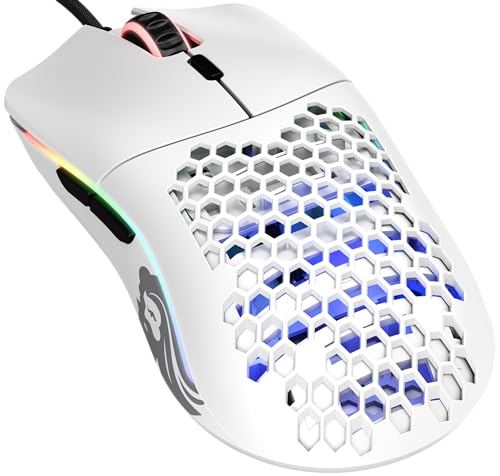
GLORIOUS Model O Gaming Mouse
A light, medium shell with a low profile that suits claw and fingertip players especially well — a clear example of shape and weight designed around those grips. GLORIOUS Model O Gaming Mouse — Check on Amazon

Logitech G502 HERO Wired Gaming Mouse
The opposite design philosophy: a larger, sculpted shell with a thumb rest that rewards a relaxed palm grip and gives the hand somewhere definite to sit. Logitech G502 HERO Wired Gaming Mouse — Check on Amazon
Frequently Asked Questions
Which grip is best for FPS games?
Claw is the most common choice among competitive FPS players because it combines arm travel with fingertip corrections, but palm players with low sensitivity and fingertip players with high control both succeed at the highest level. The best grip is the one your hand returns to naturally under pressure.
Can I change my grip style?
Yes, but expect two to three weeks of deliberately worse performance while the new posture becomes automatic. Change during casual play, keep your sensitivity constant so only one variable moves, and stop if you develop pain rather than ordinary fatigue.
Why does my hand cramp during long sessions?
Usually a combination of a mouse too small for your grip — forcing a tight claw — and unconscious tension during fights. Try consciously relaxing between rounds, check your mouse length against your hand measurement, and consider whether a larger shell would let your fingers flatten.
Does grip affect which DPI I should use?
It does. Palm aiming moves from the arm and suits lower DPI; fingertip aiming has a small range of motion and usually needs higher DPI to cross the screen. Set DPI after settling your grip, not before.
Should my wrist touch the desk while I play?
A light contact is fine for palm players; claw and fingertip players often float the wrist. What matters is avoiding a hard bend or pressing the wrist bone into a sharp desk edge, both of which cause problems over time regardless of grip.
Should my fingers be flat or curled on the buttons for palm grip?
Mostly flat and relaxed, with the fingertip pads resting where the clicks actuate most cleanly — usually the front third of each button. If your fingers slide forward off the buttons, the mouse is likely too small or its hump too far back for your hand.
Bottom line: find the grip your hand already chooses, match the mouse shape and weight to it, keep tension at the minimum that gives control, and let one full session — not five minutes — judge every change.
Can I change my grip style after years of using another one?
Yes, but budget weeks, not days, and expect a temporary dip. Change one element at a time — finger position first, then movement pattern — and use the drills in this guide in low-stakes sessions. Most players who ‘cannot’ switch grips actually quit during the clumsy first week, which is the tuition every motor skill charges. If the switch is motivated by pain rather than performance, make it regardless of the dip.
Which grip is best for small hands?
Small hands usually do best with fingertip or claw on a short, narrow mouse, because a palm grip on a full-size shell forces the fingers to reach for buttons that sit too far forward. The deciding factor is mouse size more than grip dogma: a small hand can palm a genuinely small mouse happily. Measure your hand and the mouse before concluding a style does not suit you.
Why does my ring finger ache after long sessions?
The ring finger and pinky do the stabilising work on the right side of the mouse, and they ache when that work is gripping rather than resting — usually because the mouse is too narrow for your hand, too light for your sensitivity, or shaped without a defined rest for those fingers. Check fit first, then consciously relax those fingers during play; they should steer and steady, not clamp.
Does grip tape actually help, or is it a gimmick?
It helps a specific problem: a shell your fingers slide on, whether from glossy plastic, dry skin or sweat patterns that make the mouse feel insecure and provoke over-gripping. Tape adds friction so the hand can relax. It does nothing for a mouse that is the wrong size or shape, and it adds a maintenance item, since worn tape needs replacing. Treat it as a fit adjustment, not an upgrade.
Should my fingers be flat or curled on the buttons?
For palm and relaxed claw, fingers rest mostly flat with a gentle natural curve, contacting the buttons along their length. For aggressive claw, the curl is deliberate and the fingertips press near the front of the buttons. What you want to avoid is the in-between accident: fingers curled by a too-small mouse rather than by choice, which produces claw’s tension without claw’s control benefits.
Does the way I grip affect which mouse pad I should use?
Yes. Arm-aiming palm players need large pads because the whole forearm travels; fingertip players can thrive on small pads since corrections happen in a few centimetres. Heavy grippers who press down also wear cloth pads faster and may prefer a harder surface that does not compress under pressure. Match the pad to the movement your grip actually makes, not the movement you imagine it makes.
How tight should my grip actually be?
Tight enough that the mouse never shifts in your hand during your fastest normal movement, and no tighter. Test it: make your hardest flick and check whether the shell rotated or slid; if it did not, any additional force is pure cost — fatigue, slower corrections, and wear on your forearm. Most players can relax twenty to thirty percent from their habitual squeeze without losing any control.
Why does my grip keep sliding forward during long sessions?
Forward creep usually means your hand is chasing stability it cannot find at the back of the mouse — the hump does not support your palm where your grip expects it, so the hand migrates toward the buttons seeking control. It can also be sweat reducing friction over time. Try the reset drill first; if creep persists, the shape is the cause and grip tape on the sides or a rear-humped shell is the honest fix.
Is it bad to rest my wrist on the desk while I play?
A lightly resting wrist is normal for many palm and relaxed-claw players and is not harmful by itself. The problems start when the wrist becomes a fixed pivot that all movement rotates around, which concentrates motion in a joint built for small corrections, or when you press down hard enough to restrict circulation. If your wrist aches, raise the chair slightly so the forearm carries more of the resting load and let the wrist float during big movements.
Related Guides
Keep exploring with these guides and roundups from the same Gaming Mouse collection: