Learning how to choose a desk starts with a simple truth: the right desk is the one that fits your body, your room, and the work you actually do — not the one with the longest feature list. A desk is a piece of furniture you may sit at for thousands of hours, so small mismatches in height, depth, or stability compound into daily annoyance, while a well-matched desk disappears into the background and lets you work.
This guide walks through the decision in the order that matters. First you will pin down the space and the footprint, then the surface size and depth your equipment needs, then height and ergonomics, materials and build quality, and finally the extras — cable management, storage, and adjustability — that are worth paying attention to only after the fundamentals are right. By the end you will have a short checklist you can apply to any model, in any style, at any tier.
Disclosure: As an Amazon Associate, ilcastellomenu.com earns from qualifying purchases. Product examples below link to Amazon, where you can check current availability and specifications; this guide itself lists no fixed prices because pricing and bundles change frequently.
How to Choose a Desk: Start With the Space, Not the Catalog
Measure the room before you fall in love with a product photo. Product images are shot in empty studios; your desk has to share a room with a chair that pulls out, a door that swings, radiators, sockets, and the walkway you use every day. A desk that fits on paper but blocks the chair’s travel or crowds the door will irritate you every single session.
Measure the footprint and the working zone
Write down three numbers: the width of wall or floor run the desk can occupy, the maximum depth that still leaves comfortable legroom and chair space behind it, and the clearance you need around it. As a working rule, leave roughly a metre of depth in total for desk plus chair plus push-back room. If the room is tight, our dedicated walkthrough in How to Measure for a Desk goes through the measuring process step by step, including how to tape the footprint on the floor before you commit.
Also note where the power sockets are. A desk placed far from an outlet means extension leads trailing across the floor or a cable run along the skirting board. Neither is a deal-breaker, but both are easier to plan before the desk arrives than after.
Match the shape to the room
Straight desks are the default for a reason: they fit against any wall, pair with any chair, and are easy to move. Corner and L-shaped designs earn their footprint when you genuinely work on two surfaces — a main screen area plus a writing, drawing, or second-device zone. If you are torn between the two layouts, the head-to-head in L Shaped vs Straight Desk compares usable surface, cost per square foot of workspace, and how each shape behaves in small rooms.
Small rooms reward honesty. A compact desk that leaves the room usable beats a sprawling one you have to edge around sideways, and wall-mounted or folding designs exist precisely for spaces where the desk shares duty with a living room or bedroom.
In this guide
Surface Size and Depth: Where Most Buyers Go Wrong
Width gets all the attention in product listings, but depth is the dimension that decides comfort. Depth controls how far your screen sits from your eyes and whether your forearms can rest on the surface while you type. A shallow desk forces the monitor too close and leaves your wrists hanging off the edge; a generously deep desk lets you push the screen back and still keep a notebook in front of you.
Width: count your devices, then add margin
List everything that will live on the surface permanently: monitor or monitors, laptop, keyboard, speakers, lamp, phone, notebook. Add their widths together, then add working margin — you need elbow room and somewhere to put a mug that is not on top of your keyboard. Dual-monitor setups are the classic case where buyers under-order; if that is your setup, the roundups behind Best Desks for Dual Monitors show the widths that real two-screen users end up needing.
Remember that width at the back of the desk is partly consumed by monitor stands and cable runs. A monitor arm reclaims much of that space, which is one reason arms are so popular on mid-size desks.
Depth: the 60–80 cm decision
Desks commonly range from about 50 cm to 80 cm deep. At the shallow end, a single laptop or one monitor on its stand is fine, but a separate keyboard plus a pushed-back screen gets cramped. Around 60–70 cm suits most single- and dual-monitor work. At 80 cm you gain a proper foreground zone for paperwork and can keep the screen at a relaxed viewing distance without an arm.
If you use a monitor arm, effective depth improves because the screen can float at the very back edge. If you do not, budget the back 15–20 cm of any desk for the stand and cables when you judge whether it is deep enough.
Height and Ergonomics: The Non-Negotiables
A desk at the wrong height undermines an expensive chair and good posture alike. For seated work, the surface should let your elbows rest at roughly a right angle with shoulders relaxed and feet flat on the floor. Most fixed desks cluster around a standard height that suits average-height adults; shorter and taller users feel the mismatch most, which is why the explainers on proportions matter.
Fixed, adjustable, or sit-stand?
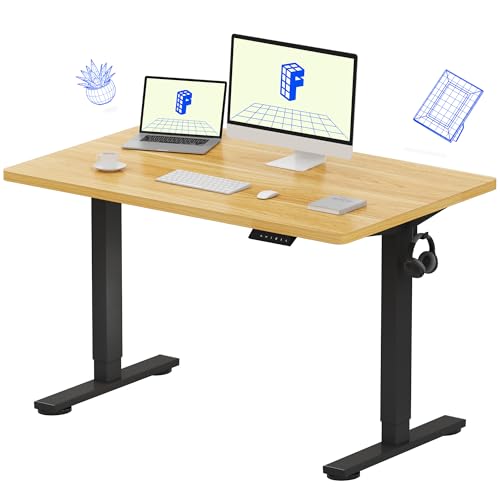
Fixed-height desks are simplest, cheapest to make sturdy, and fine if the standard height happens to fit you and one person uses the desk. Height-adjustable and sit-stand desks cost more and add moving parts, but they solve two problems at once: fine-tuning seated height to your body, and alternating posture through the day. The comparison in Standing Desk vs Regular Desk lays out who actually benefits from standing capability and who is paying for a feature they will rarely use.
Whichever style you choose, verify the height range against your own measurements rather than trusting marketing copy. Our explainer on What is the Ideal Desk Height shows how to derive your personal ideal from your seated elbow height.
Legroom and under-desk clearance
Check what lives under the surface: crossbars, modesty panels, drawer units, and cable trays all eat legroom. You want unobstructed space for your knees and feet, room to stretch your legs, and enough width between the legs or frame for your chair — including its armrests — to tuck in. Under-desk drawers are useful, but a drawer block on your dominant side can force your chair off-centre from the screen, a subtle ergonomic fault that is hard to fix later.
Materials and Build Quality
The desktop material decides how the desk ages: how it handles heat, moisture rings, scratches, and the clamp pressure of monitor arms. The frame decides whether the desk feels rock-solid or trembles every time you type. Both matter more than styling, because you will notice wobble and worn edges daily.
Desktop materials compared
Solid wood is durable, repairable, and heavy; it can be sanded and refinished years later. Engineered boards with laminate or melamine finishes are lighter and cheaper, and good ones resist stains well, but chipped edges are hard to repair invisibly. Veneer sits between the two. Glass looks clean and wipes easily but shows every fingerprint, can feel cold to the forearms, and concentrates clamp loads — check compatibility before mounting arms on glass.
Thickness matters at the clamp points and across long spans. A thin top spanning a wide frame will flex under monitors; a thicker top or a supporting crossbar underneath prevents the slow sag that appears over months.
Frames, legs, and the wobble test
Steel frames generally out-stiffen wooden legs at the same price tier, and four-leg designs behave differently from panel or cantilever frames. Whatever the design, the practical test is lateral stability: a desk should not sway noticeably when you lean on a front corner or type energetically. If you already own a desk that moves, the fixes in How to Fix a Wobbly Desk cover everything from levelling feet to cross-bracing.
Check the stated weight capacity against your real load — monitors, a desktop PC, books, and your own leaning elbows add up faster than people expect, and capacity matters most for adjustable desks whose motors must lift the whole load smoothly.
Features Worth Having (and Gimmicks to Skip)
Once size, height, and build are right, features differentiate otherwise similar desks. Rank them by how often you will touch them. Cable management is used every day; a built-in wireless charger is used only if your phone supports it and you actually charge at your desk.
Cable management and power
At minimum, look for a way to route cables off the back edge: grommet holes, a cable tray, or a rear spine. Tidy routing is not just cosmetic — it keeps cables from pulling on ports when you adjust things and makes cleaning behind the desk far easier. Desks designed around cable control are collected in Best Desks for Cable Management if that is a priority for your setup.
Built-in power strips and USB hubs are convenient but check their placement and whether they can be replaced when they fail; an external strip in a tray is more flexible over a desk’s lifetime.
Storage: drawers, shelves, and the clutter question
Drawers suit people who want a clear surface at the end of the day; open shelves suit people who grab reference items constantly. Be honest about which you are. Also weigh storage against legroom and against the simple alternative of a separate small drawer unit or shelf, which keeps the desk itself lighter, cheaper, and easier to replace or rearrange.
Setting a Sensible Budget Tier
Without naming prices, desks fall into recognisable tiers. Entry-level models prioritise a flat, usable surface with basic frames — perfectly serviceable for a laptop and one screen. Mid-tier desks add thicker tops, stiffer frames, better finishes, and cable features. Higher tiers bring solid materials, sit-stand mechanisms with smoother motors, and warranties that reflect longer expected service. Spend first on size correctness and stability, then on adjustability, then on materials and finish. A correctly sized, stable basic desk will make you happier than a beautiful one that is 10 cm too shallow.
Finally, factor in the chair and accessories you may need to make the desk work — a footrest, a monitor arm, a mat — when you compare total cost of one option against another.
Desk Types at a Glance
With the fundamentals measured, it helps to know the families you are choosing among, because each type solves a different problem and fails in a different way.
Writing and computer desks
The plain rectangular desk is the generalist: a flat surface, four legs or a frame, no opinions. Writing desks are its shallower, lighter ancestors, designed for paper and a laptop rather than monitor arms and towers; they suit bedrooms and multi-use rooms where the desk must not dominate. Computer desks add cable grommets, keyboard trays, or CPU shelves — useful features, though a keyboard tray only helps if its height suits you, since a badly placed tray is worse than none.
Judge generalists by the fundamentals in this guide and nothing else: depth, height, stability, and surface quality. They have no mechanism to hide behind, which is their virtue.
Executive, secretary, and gaming desks
Executive desks are large, deep, and storage-heavy, designed for paperwork and presence; they reward big rooms and punish small ones. Secretary desks fold their work surface away — a genuine space solution for living rooms, at the cost of a small, fixed work area. Gaming desks are computer desks with deeper surfaces, cable systems, and accessory mounts aimed at multi-monitor rigs and long sessions; their depth is their real feature, and their styling is a matter of taste. None of these types changes the selection order — measure, size, height, stability — but each shifts which dimension deserves the closest look.
A Worked Example: Choosing for a Real Room
Consider a spare bedroom, 3 metres by 3.5, that must hold a desk for full-time work, a single bed for guests, and a wardrobe. The wall run beside the window measures 170 cm after the radiator’s clearance. The worker uses a laptop plus one 27-inch monitor, a separate keyboard, and a notebook daily. The arithmetic: monitor and laptop side by side need about 110 cm of width with margin; depth of 70 cm puts the screen at a comfortable distance with forearm support; the chair zone needs 90 cm behind, which the room affords along that wall.
The shortlist writes itself: a straight desk, 120–140 cm wide and 70 cm deep, fixed height verified against the worker’s elbow measurement, steel frame for stability, a cable tray because the socket sits at the far end of the wall. An L-shape fails the bed’s floor space; a sit-stand frame passes but consumes budget the chair needs more. That is what a good choosing process looks like — not a winner picked from a list, but a specification the room and the work dictated, which several products can then compete to fill.
Testing a Desk Before and After Purchase
Specifications narrow the field, but desks are physical objects and a few hands-on checks separate the finalists. If a showroom visit is possible, perform the typing test: sit at the desk with your own chair height in mind, mime typing, and lean — a desk that trembles under a mime will tremble under real work. Press each front corner; twist is more revealing than vertical bounce. Open and close any drawers fully loaded if you can; drawer slides reveal their quality under weight, not empty.
The first-week audit at home
Most desks can be returned within a window, so treat the first week as a formal trial. Work full days at it. Note the three things that cannot be fixed later: whether your knees and chair coexist peacefully with its underside, whether the depth still feels right at hour six (too-shallow desks announce themselves as shoulder fatigue), and whether the surface height works with your chair at its best setting rather than a compromised one. Accessories can fix lighting, cables, and storage; they cannot fix geometry.
If the desk fails the audit on geometry, exchange it while the window is open rather than adapting yourself to it for years. If it passes, do the assembly re-tightening round and settle in — the decision is now properly finished.
Second-hand and vintage desks
A used solid-wood desk can be the best value in the entire category — furniture built decades ago often exceeds modern build standards — but it needs its own checks. Test every drawer and joint for the wobble patterns in our troubleshooting guide; check the top for water damage and veneer lifting; measure the knee-hole height and width, because older desks were built for handwriting, not for a chair plus a PC tower, and their modesty panels can be surprisingly low. A vintage desk that passes geometry and stability checks is a genuine find; one that fails them is a restoration project wearing a bargain’s clothes.
Choosing by Work Style: Four Buyers, Four Different Desks
The fundamentals in this guide are universal, but the order in which they bite depends on how you work. A buyer who mostly writes and reads needs foreground depth for paper and a surface that feels good under a pen, while a buyer running three screens needs width, rear cable discipline, and a frame that will not tremble when a racing wheel or a heavy typing style loads the front edge. Running your own work style through the checklist before you shop prevents the commonest error of all: buying a desk that is excellent for somebody else’s job.
The paper-heavy writer or researcher
If your day mixes a laptop with notebooks, printed drafts, and reference books, prioritise depth over width and a matte, slightly warm surface over a glossy one. Paper slides on glass, ballpoints skate on hard laminate, and a writing slope or a simple desk pad restores the friction handwriting needs. Open storage within arm’s reach — a shelf or a side return — serves you better than deep drawers, because reference material is grabbed dozens of times a day and put back in the wrong place if returning it takes effort. Readers who work this way often end up happiest with the deeper models collected among home office desks built for long sessions, where surface depth is treated as a feature rather than an accident.
The multi-screen and streaming setup
Three screens, a microphone on a boom, a camera, and speakers turn the desk into a small studio, and the binding constraints become rear-edge management and clamp strength. Every device wants to clamp or stand at the back edge, so check that the rear rail of the frame does not sit exactly where monitor arms and boom clamps need to grip, and that the desktop is thick enough at those points to take clamp pressure without crushing. Width matters, but so does the unobstructed rear strip: a desk whose cable tray occupies the whole back edge leaves nowhere for a boom to mount. Setups of this kind are the natural audience for desks chosen for streaming rigs, where those rear-edge details are the deciding factors.
The maker, artist, and hobbyist
Drawing, crafting, model work, and electronics share one demand the office buyer never faces: the surface will be cut on, spilled on, heated, and leaned on hard. A replaceable cutting mat protects most tops, but the deeper requirement is a top that tolerates abuse gracefully — solid wood that can be sanded back, or a sacrificial board you accept replacing — over a pristine finish you will spend years protecting instead of using. Stability under sideways loads matters too, because sanding and sawing push horizontally in a way typing never does. If the desk doubles for computer work, a two-zone layout keeps the messy craft area physically separate from the keyboard, which is why many makers feature in roundups of desks for artists and studio work.
Load Planning: Weighing Your Setup Before the Desk Has To
The capacity figure in a listing is a single number, but the load you apply is a pattern, and patterns are what make desks sag, wobble, or glide smoothly for a decade. Start with an honest inventory. A large monitor on its stand, a desktop PC, a pair of speakers, a printer, and a stack of books can quietly total the weight of a person, and that is before you lean on the front edge with both forearms while thinking — a dynamic load that arrives suddenly and at the worst possible point, the unsupported middle of the front edge.
Distribution matters as much as the total. Weight parked directly over the legs or frame uprights barely stresses the top, while the same weight centred on a long unsupported span bends it, and bent tops stay bent: engineered boards creep under sustained load, so a slight bow in month two becomes a permanent dish by year two. If your heaviest item is a desktop PC, plan its position over a leg or on a floor-standing CPU holder rather than mid-span, and if you run a sit-stand frame, remember the rated capacity must cover everything on the surface plus the desktop itself, with margin for the day you add a second screen.
There is also a load nobody lists: the clamp loads. Monitor arms concentrate the full weight of a screen, plus the leverage of its distance from the mount, into a few square centimetres of desktop edge. Thin tops can crush or crack at that point even when the desk’s overall capacity looks generous. A reinforcement plate, a clamp position backed by the frame, or a grommet-mount arm that spreads load through the top all solve it — but only if you think of it before the first tightening, not after the crack appears.
The Surface Under Your Hands: Edges, Finish, and Daily Feel
You touch the front edge of your desk thousands of times a year, and its profile decides whether long sessions end with comfortable forearms or with the faint red line of a sharp corner pressed into skin. A square, hard edge on a thin top is the worst combination; a rounded or bevelled edge spreads pressure, and a thicker top presents a broader bearing surface even when square-cut. When you cannot test a desk in person, zoom into listing photos of the front corners — the edge treatment is visible there even when the description never mentions it.
Finish changes how the desk works, not just how it looks. High-gloss surfaces show every fingerprint and can produce distracting reflections from windows and lamps. Very smooth matte laminate lets a mouse glide but can make paper and phones slide toward the edge. Bare or oiled wood feels warm and grips paper pleasantly, at the cost of ring marks that need prompt wiping. If you use an optical mouse without a pad, test the finish: some dark, glassy, or heavily grained surfaces confuse sensors, and a thin desk mat — which also softens the edge contact and deadens typing noise — is the standard cure.
Temperature is a real, if minor, factor. Glass and metal-edged tops feel cold to resting forearms in a cool room, which some people find alerting and others find draining over a long day. Wood and laminate sit closer to skin temperature. None of this appears on a specification sheet, yet these are the properties you will actually perceive daily once the headline dimensions are right — worth five minutes of deliberate thought before purchase rather than five years of low-grade irritation after it.
Getting It Into the Room: Delivery, Doorways, and Assembly Reality
A desk can fit its destination perfectly and still fail to arrive there. Before ordering, walk the route from your front door to the desk’s spot with a tape measure: door widths, the turn at the top of the stairs, the lift’s depth, the hallway corner where a two-metre top must pivot. One-piece and pre-assembled desks are the usual casualties; flat-pack designs exist partly because a desktop carried as a separate panel turns corners its assembled self never could. If the route is doubtful, the panel dimensions in the packaging information — not the assembled dimensions — are the numbers to check.
Weight is the second half of the problem. A solid-wood or large executive desk can need two people for every metre of its journey, and a sit-stand frame’s lifting columns are awkward rather than heavy, all length and sharp feet. Plan who is helping, where the desk will be unpacked, and where the packaging will go, because a large box broken down in the room is a very different afternoon from one that must be dragged whole through it. Keep the packaging until the desk has passed its first-week audit: returns of large furniture without the original box range from awkward to impossible.
Finally, think about the floor it crosses and lands on. Dragging a frame across wood floors scars both, so lift or use sliders; on thick carpet, a heavy desk settles over the first days as the pile compresses, which can turn a level installation into a slight lean — recheck the levelling feet after a week rather than chasing the wobble on day one with the fixes in our wobble guide.
Buying the Desk and Chair as One Decision
Buyers often shop for the desk and the chair months apart, then discover the pair argues: the chair’s armrests strike the desktop’s underside, the chair is too wide to tuck between the desk’s legs, or the chair’s lowest seat height still leaves the user perched below a fixed desk’s surface. The two pieces form one workstation, and the measurements that join them are few and knowable in advance. Your seated elbow height sets the desk height; the chair’s armrest height, if the arms are not adjustable, must clear the desktop’s underside with a finger’s width to spare; the chair’s width, casters included, must pass between the desk’s legs or frame uprights.
Sequence helps. If one piece must come first, buy the chair first and measure yourself sitting in it — elbow height, armrest height, overall width — then choose the desk against real numbers instead of population averages. If the desk already exists and is fixed, let its height drive the chair shortlist and accept a footrest as the fine adjustment when the chair must sit high for the desk and your feet pay for it. Adjustable-height desks forgive nearly all of this, which is a large part of what their extra cost actually buys: not standing, but freedom from the pairing problem.
Test the pair the way you will use them, not the way a showroom arranges them. Tuck the chair fully in, pull it out and sit, roll sideways to the printer position, and lean back. A pairing that only works in one frozen posture is a pairing that fails daily life, and it is far easier to discover that in the first week, inside the returns window, than in the third month.
Two Years On: What a Good Choice Looks Like in Hindsight
The best test of a desk decision is invisible: two years later, you have stopped thinking about the desk. The surface has the items you use daily within reach and nothing else accumulating, because the storage you chose matched your habits rather than your intentions. The top shows honest wear in the mouse and writing zones but no structural sag, the frame needs its bolts snugged perhaps once a year, and the cable run at the back has survived two equipment changes without becoming a nest — because the routing had slack and access designed in from the start.
The regrets that surface at two years are remarkably consistent, and they are the ones this guide’s order of operations is built to prevent. Too shallow, discovered the first time a full-size keyboard pushed the monitor into the user’s face. Too short for the second monitor that arrived in year two. A drawer block exactly where a taller chair’s armrest needed to be. Almost never does anyone regret spending on stability, depth, or a thicker top; almost everyone who regrets something under-bought one of the fundamentals and over-bought a feature. Let that distribution of regrets set your priorities, and the desk will pass the only review that matters — yours, at year two, by saying nothing at all.
Comparing Two Finalists: A Ten-Minute Head-to-Head
Most buyers end with two desks that both pass the checklist and differ in ways the specifications blur. Decide between them by scoring the things you will feel, in the order you will feel them. First, depth at your actual seating position: sit at each, or simulate each with a taped outline and a borrowed table, and note where the screen lands relative to your eyes. Second, the front edge under your forearms for a full minute of typing — the edge you forget wins. Third, the lean test: forearms on the front edge, weight forward, and listen. A desk that ticks, creaks, or sways at shopping weight will not improve under a full setup.
Then score the futures. Which desk accepts the second monitor, the larger PC, the boom arm, the move to a smaller room? A finalist that wins today but blocks the upgrade you already suspect is coming is the more expensive desk in disguise. Finally, score the ownership details: spare parts availability, the warranty’s length on frame and mechanism, and whether the top can be replaced alone if it is damaged. None of these appear in the photographs, and all of them appear in your life within two years. When the scores tie, buy the one with the better return terms and run the first-week audit without sentiment — the audit, not the showroom, is the final round of the comparison.
Accessories That Should Feed Back Into the Desk Decision
Some accessories are bought after the desk; a few should be chosen with it, because they change what the desk must provide. A monitor arm needs a clampable or drillable rear edge and enough depth to be worth its space saving. An under-desk PC mount needs a top thick and strong enough to carry the machine’s weight on screws, plus clearance so the case’s fans do not breathe against a modesty panel. A footrest needs legroom unobstructed by a low crossbar. A large desk mat needs a surface flat and free of raised cable grommets in its footprint. None of these is exotic, and every one of them has stranded a buyer who purchased in the wrong order.
Work backwards from your real accessory list. Write down everything that will clamp, mount, hang, or stand on the desk in the next two years — including the items you do not own yet but fully intend to — and check each against the finalist desks before money moves. The check takes minutes, uses the manufacturers’ stated requirements, and converts the accessory budget from a source of surprises into part of the plan. Readers assembling a full setup from scratch will find the same backward-planning logic throughout our small-space desk selection, where every centimetre of depth has to justify itself twice over.
Gear for This Guide
Three verified examples spanning the main desk styles discussed above — a straightforward home-office desk, a compact easy-assembly model, and a deeper gaming-style desk. Judge them with the criteria in this guide rather than by appearance alone.

SHW Mission 48-Inch Home Office Computer Desk
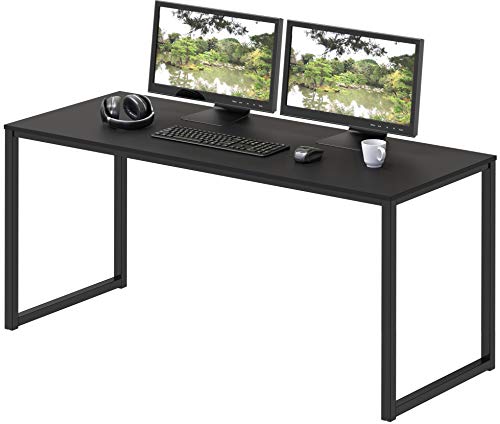
A representative mid-size straight desk: a 48-inch surface suits a monitor-plus-laptop layout in a spare room or bedroom corner, and the simple frame leaves generous legroom underneath. SHW Mission 48-Inch Home Office Computer Desk — Check on Amazon

Furinno Simplistic Easy Assembly Computer Desk
A compact entry-tier example with a keyboard tray, useful for judging the shallow end of the size range — fine for a single laptop or small monitor, tight for dual screens. Furinno Simplistic Easy Assembly Computer Desk — Check on Amazon

Mr IRONSTONE Deep Gaming Desk
A deeper 45.3-inch-wide gaming desk with cable-management touches and accessory hooks, illustrating how extra depth changes monitor distance and foreground space. Mr IRONSTONE Deep Gaming Desk — Check on Amazon
Frequently Asked Questions
What is the most common desk-buying mistake?
Buying by width alone and ignoring depth and height. A wide but shallow desk pushes your screen too close and leaves no forearm support, and a desk at the wrong height fights your chair all day. Measure your room, your equipment footprint, and your seated elbow height before comparing models.
Is a bigger desk always better?
No. Oversized desks dominate small rooms, complicate chair movement, and collect clutter simply because the space exists. The right size is the smallest surface that holds your permanent equipment with working margin — plus the depth your screen distance requires.
Should I choose a sit-stand desk or a fixed desk?
Choose sit-stand if you will genuinely alternate posture or if you need fine height adjustment because standard fixed heights do not fit your body. Choose fixed if the standard height fits you, one person uses the desk, and you prefer maximum stability and simplicity. The linked comparison in this guide breaks the trade-off down by user type.
How much legroom do I need under a desk?
Enough to sit with knees bent naturally, feet flat, and legs stretched out occasionally, with your chair — including armrests — tucking in without catching. Avoid designs where drawers, crossbars, or modesty panels occupy the centre knee space.
Can a monitor arm make a small desk workable?
Often, yes. An arm removes the monitor stand’s footprint, lets the screen sit at the very back edge, and frees foreground space for a keyboard and notebook. It cannot fix a desk that is too narrow for your devices side by side, but it is the single most effective upgrade for a cramped surface.
How deep should a desk be for a large ultrawide monitor?
Ultrawide screens are wide rather than tall, and their curved stands often sit shallower than the deep feet of large flat panels, but your eyes still need distance: the wider the screen, the further back you want it so the edges stay in comfortable view. A depth around the upper end of the usual range gives you that distance on the stand alone; at shallower depths, a monitor arm becomes close to essential, floating the screen at the very back edge and returning the foreground to your keyboard and notebook. Measure from your seated eye position, not from the desk’s front edge, because chair distance is part of the geometry.
Should I buy the desk or the chair first?
The chair, if you must choose, because your body in that chair produces the measurements — seated elbow height, armrest height, width — that the desk must then fit. A desk bought first imposes its fixed height on every chair you consider afterwards. The exception is a height-adjustable desk, which adapts to almost any chair and reverses the logic: buy it first if it is already decided, and let the chair be chosen purely for sitting comfort.
Can I clamp a monitor arm to any desktop?
No. Thin engineered-board tops can crush at the clamp, glass tops concentrate the load dangerously unless the manufacturer explicitly approves mounting, and some desks have a frame rail or a bevelled rear edge exactly where the clamp needs flat, full-thickness material. Check the top’s thickness and material at the rear edge, look for a reinforcement plate option, and consider a through-desk grommet mount, which spreads the load and suits several tops that clamps do not.
How long should a decent desk last?
A well-built fixed desk should serve a decade or more; the frame and top are simple structures with little to fail, and solid tops can be refinished rather than replaced. Sit-stand desks add motors and electronics, so judge them by the warranty on the lifting system and the availability of replacement handsets and control boxes rather than by the furniture alone. In both cases the lifespan is usually ended by a change of room, work, or taste long before the desk itself wears out — one more reason to buy the fundamentals generously and the styling conservatively.
Is a desk with built-in drawers better than a separate drawer unit?
Built-in drawers keep the footprint small and the look clean, but they fix the storage on one side forever, consume legroom, and can push your chair off-centre from the screen. A separate pedestal can move sides, leave the desk when you change it, and double as a printer stand. Choose built-in storage when floor space is the scarcest resource in the room; choose the separate unit when flexibility matters more, which for most home offices it eventually does.
What if my room forces a compromise between depth and width?
Sacrifice width first. A narrower desk limits how many devices sit side by side, and most of those can be stacked, armed, or moved to a shelf; a shallow desk limits the distance between your eyes and the screen and the support under your forearms, and neither of those can be recovered by accessories alone. If both dimensions are squeezed, protect depth, recover width vertically with shelving and monitor arms, and let the surface hold only what your hands touch hourly.
The Bottom Line
Choose a desk in this order: measure the room, size the surface to your equipment with depth for your screen distance, set height by your elbows, demand a frame that does not wobble, and only then shop features. Get those five right and almost any desk in the right tier will serve you well for years.
Related Guides
Continue with the measuring walkthrough, the shape and standing comparisons, and our home-office desk roundup: