ilcastellomenu.com is reader-supported. When you buy through links on our site, we may earn an affiliate commission.
Where to Buy
Full HD refuses to die, and for good reason. The best cameras for shooting 1080 video are not failed 4K cameras; they are the right tool for a delivery world still dominated by phone screens, classroom projectors, church livestreams, wedding highlight reels watched on televisions across the room, and platforms that compress everything you upload into something modest anyway. If your finished work lives at 1920 by 1080, the smart question is not which camera records the most pixels. It is which camera records the cleanest, most reliable, easiest-to-edit 1080p — hour after hour, without heat warnings, giant files or autofocus surprises.
There is also a quiet technical secret behind good HD: oversampling. Several bodies below capture a much richer image internally and scale it down to 1080p, which produces HD that looks noticeably crisper and cleaner than a sensor reading out a native, line-skipped HD image. Two cameras can both say 1080p on the box and deliver pictures that barely resemble each other. This guide cares about that difference more than about badge resolution, because your viewers will see it even if they never learn the word for it.
Storage and stamina belong in the same conversation. An afternoon of 4K can swallow cards and batteries at a rate that changes how a shoot feels; the same afternoon at 1080p is calmer, cheaper and kinder to an older laptop. Teachers filming lessons, volunteers running a community theatre stream, small businesses recording product demonstrations — these shooters are not settling. They are matching the tool to the destination, and this ranking rewards cameras that respect that match.
Every pick below was chosen for the quality of its HD specifically: how it downsamples, how long it records, how trustworthy its autofocus stays at this resolution, how its files behave in ordinary editing software, and how honestly it handles the dim rooms where so much real HD work happens. Check current availability on Amazon through the links in the Quick Picks table and beside each detailed review, and read the trade-offs before deciding — at 1080p, the differences are about behaviour, not bragging rights.
Key Takeaways
- Oversampled 1080p from a higher-resolution sensor looks markedly cleaner than native, line-skipped HD.
- The Sony ZV-E10 II leads this list because its HD is detailed, its autofocus is dependable and its creator tools suit long talking-head sessions.
- For all-day HD recording without thermal anxiety, the Panasonic LUMIX S5II is the calmest body here.
- Action and travel shooters get better HD from a GoPro HERO12 Black or DJI Osmo Pocket 3 than from a large camera left at home.
- Long record limits, clean HDMI output and modest file sizes matter more at 1080p than headline resolution ever will.
- Buy the lens and the microphone before upgrading the body; at HD, both change the picture more.
In this guide
Quick Picks
| Camera | Badge | Why it earns its place |
|---|---|---|
| Sony ZV-E10 II | Best overall for 1080p | Crisp downsampled HD, autofocus you can trust alone, and a body built around video work. |
| Canon EOS R50 | Best for beginners | Friendly menus, pleasing colour straight from the camera and HD that flatters people. |
| Panasonic LUMIX S5II | Best for long records | Active cooling and serious monitoring tools for events, services and interviews that run long. |
| Sony ZV-1F | Best pocket pick | A fixed wide lens, simple controls and HD ready the moment it leaves your jacket. |
| GoPro HERO12 Black | Best for action HD | Stabilised, waterproof HD from places no interchangeable-lens camera should go. |
| DJI Osmo Pocket 3 | Best walking camera | A real gimbal in a coat pocket, delivering smooth HD walk-and-talk footage effortlessly. |
How Did We Choose These 1080p Cameras?
We judged HD as a destination format, not a consolation prize. The first test was image character at 1080p itself: fine detail without crunchy oversharpening, clean shadows in ordinary indoor light, and skin tones that survive a quick edit. Cameras that merely crop or skip their way to HD scored below cameras that oversample, because the gap shows up on any television.
Recording behaviour came second. A camera aimed at lessons, services, interviews and streams must start reliably, keep recording, warn honestly about heat and card space, and produce files that a five-year-old laptop can scrub without stuttering. We weighted record limits, cooling and battery manners heavily, since an interrupted take is the one flaw no grade can repair.
Third came the solo-shooter questions. Most HD in the real world is filmed by one person who is also the presenter, the sound recordist and the editor. Autofocus that holds an eye without hunting, a screen that flips toward the lens, a microphone input, a headphone socket on the serious bodies, and menus that do not require a manual mid-shoot — these decided several places on this list.
Finally, we considered the ecosystem around each body: lenses that exist at sane prices, batteries you can buy anywhere, and mounts or accessories that will still be supported when the camera is three years old. A 1080p camera is usually a working tool rather than a trophy, and tools are judged by the company they keep.
Why Does Oversampled 1080p Look Better Than Native 1080p?
Imagine shrinking a large, detailed photograph versus enlarging a small, blurry one; both can end at the same dimensions, but only one carries real information. Oversampling works the same way. When a camera reads its whole sensor at a higher resolution and scales the result down, fine textures average into clean, stable detail, noise shrinks along with everything else, and jagged edges on fences, fabrics and hair largely disappear.
Older or cheaper HD implementations often read only part of the sensor, or skip lines to save processing effort. The frame is technically 1080p, yet it carries softness, shimmering on detailed clothing and false colour on patterns. That is why two cameras with identical specification sheets can produce HD of wildly different quality, and why this guide keeps returning to how each body makes its HD rather than the mere fact that it offers the mode.
Practically, oversampled HD also grades more gracefully. The extra information survives gentle sharpening, noise reduction and reframing; you can punch in slightly during the edit to fix a loose composition and the shot holds together. For teachers, streamers and event shooters who cannot reshoot, that forgiveness is worth more than a longer feature list.
When Is 1080p Honestly the Right Choice?
Follow the finished video to its audience. If it will be watched on phones, embedded in a learning platform, projected in a hall or streamed live through a connection of uncertain temper, 1080p is not a compromise — it is the native language of the destination. Shooting far beyond the delivery format buys storage bills and editing friction in exchange for flexibility you may never use.
There are honest exceptions, and naming them protects you from this guide’s own enthusiasm. If you routinely reframe vertical clips from horizontal footage, film wildlife that needs heavy cropping, or deliver to clients who archive in 4K, record higher and finish in HD. But notice that those are workflow reasons, not vanity. The shooter who films a weekly lesson series, a market stall’s product demos or a family’s travels gains nothing from quadrupling file sizes except slower evenings.
Live work tilts the answer further toward HD. Streaming encoders, capture devices and venue internet connections are all happiest at 1080p, and a clean HD signal with good audio impresses an audience far more than a buffering 4K one. Choose the format your whole chain — camera, computer, connection, audience — can carry without strain.
What Are the Best Cameras for Shooting 1080 Video?
Six bodies, six different answers to the same modest resolution: a creator’s mirrorless leader, a beginner-friendly Canon, a cooled full-frame workhorse, two pocket instruments and an action camera that treats HD as home turf.

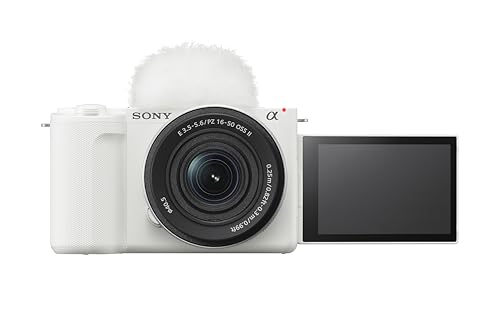
Sony ZV-E10 II — Best overall for 1080p
Sony built this body by listening to people who film themselves, and at 1080p that listening pays off in a picture that looks more expensive than the workflow behind it. The HD is derived from a richer capture, so eyebrows, knitted jumpers and the grain of a wooden desk stay composed instead of fizzing. Faces hold a natural texture; the camera resists the waxy smoothing that makes budget HD look like a video call, and it resists the brittle sharpening that makes cheap HD look anxious.
What elevates it for solo HD work is the calm of its autofocus. Set it on a presenter, and it stays on the eye while they gesture, lean and glance at notes, without the pulsing hunts that betray so much self-filmed footage. Product-showcase behaviour helps anyone demonstrating objects for a shop or a classroom: bring an item toward the lens and focus walks to it, lower it and focus returns to the face. At 1080p, where viewers sit close to phone screens, that steadiness reads as professionalism.
The supporting cast is equally considered. A vari-angle screen, a proper microphone input, a tally light and background-defocus tricks that beginners genuinely use — each one removes a small friction that otherwise accumulates across a filming week. Its files are light, its menus have grown friendlier than Sony’s older reputation suggests, and the E-mount lens shelf means the camera can grow from kit zoom to serious glass without a change of system.
- Format: APS-C mirrorless
- HD character: oversampled and detailed
- Focus: eye tracking with product-showcase mode
- Audio: microphone input fitted
- Screen: fully articulating, forward facing
Strengths
- Cleanest all-round HD picture in this group
- Autofocus a lone presenter can rely on
- Creator details that remove daily friction
Trade-offs
- No in-body stabilisation for handheld stills-style shooting
- Rolling shutter shows in fast pans
- Serious audio monitoring needs accessories
Consider how this camera treats a weekly routine. A tutor filming three lessons every Tuesday does not need drama; she needs the third lesson to match the first, the battery to last the session and the files to drop into her editor without conversion rituals. The ZV-E10 II is engineered around exactly that unglamorous dependability, and its HD rewards her with a picture her students experience as clear and trustworthy rather than merely adequate.
Its colour deserves one more word, because HD presenters rarely grade. Sony’s recent profiles keep faces honest without the grey cast older creator cameras were teased for, and a gentle picture profile can be set once and forgotten for a season of filming. Pair it with a fast prime for evening rooms or the kit zoom for daylight flexibility; either way the HD stays composed, and the upgrade path never asks you to sell the body to improve the picture.
Best for: solo creators, tutors and streamers filming in HD. Not suited for: shooters who need weather sealing or in-body stabilisation

Canon EOS R50 — Best for beginners
The R50’s gift is that it makes a newcomer’s first HD footage look like they have been practising. Canon’s colour science flatters faces directly from the camera — warm, kind skin tones that need no grading apprenticeship — and at 1080p that matters enormously, because beginners rarely colour-correct and their audiences forgive softness long before they forgive faces that look unwell.
Its guidance is woven into the experience rather than bolted on. The creative assist modes translate photographic ideas into plain language, the menus explain themselves, and the autofocus simply finds people and stays with them in a way that builds a new filmmaker’s confidence instead of testing it. Dual Pixel focusing moves between subjects with a smoothness that looks deliberate, which is the highest compliment paying a camera at this level.
For families, students and small organisations buying a first real camera, the R50 also hedges the future gracefully. The same body shoots capable stills for the school newsletter, takes the RF lens family’s affordable primes, and records HD today while offering higher resolutions when a project someday asks. It is the gentlest on-ramp in this guide, and gentleness, for a first camera, is a technical specification in its own right.
- Format: APS-C mirrorless, RF mount
- HD character: pleasing colour, minimal grading needed
- Focus: Dual Pixel with people detection
- Handling: guided modes for newcomers
- Hybrid: strong stills for a first camera
Strengths
- Faces look good with zero grading skill
- Menus that teach while you shoot
- Grows with its owner into bigger projects
Trade-offs
- Smaller buffer and simpler video toolkit than the leaders
- No headphone socket for audio checks
- Kit lens is the first upgrade most owners make
A youth worker filming a community group’s weekly sessions illustrates the fit: the camera passes between volunteers, everyone gets usable footage, and nobody needs a training evening first. Cameras that only reward experts quietly exclude the very people community HD exists for; the R50 refuses to.
Ownership costs stay gentle, which matters for the schools and clubs this camera suits. Spare batteries are inexpensive, the kit lens covers birthdays and assemblies alike, and Canon’s phone app moves clips to a parent or a group chat without a computer ceremony. A camera that fits the administrative reality of family life gets used; one that demands a workflow gets admired in its box.
Best for: first-time filmmakers, families and community groups. Not suited for: professionals needing deep video assist tools

Panasonic LUMIX S5II — Best for long records
Some HD shoots are marathons wearing a disguise: the graduation ceremony, the all-day conference, the wedding whose speeches ignore the schedule. The S5II is the camera in this list built to shrug at duration. Active cooling keeps its full-frame sensor composed through records that would have lesser bodies flashing warnings, and its 1080p — drawn from that large sensor — carries a low-light cleanliness that school halls and hotel ballrooms desperately need.
Panasonic equips it like a company that has watched professionals work. Waveform and vectorscope monitoring, shutter-angle thinking, and focus tools that assume the operator cares about precision — at HD these are not luxuries, because HD’s smaller canvas shows focus errors and exposure drift plainly. The camera’s stabilisation steadies the handheld reaction shot, the walk down the aisle, the unplanned moment a tripod cannot reach.
It is admittedly the largest commitment here: full-frame lenses cost more, the body outweighs the compacts, and a casual shooter may never open half its menus. But for the event videographer whose reputation rests on never missing the vow, the speech or the final performance, the S5II converts HD from a budget format into a professional promise.
- Format: full-frame mirrorless, L-mount
- Cooling: active fan for extended recording
- Monitoring: waveform and professional assists
- Low light: large-sensor advantage in halls
- Stabilisation: in-body, effective for handheld
Strengths
- Records long events without thermal drama
- Monitoring tools worthy of paid work
- Beautiful HD in dim venues
Trade-offs
- Heaviest and priciest route on this list
- Full-frame lenses raise the total investment
- More camera than casual shooters will use
Picture the videographer contracted for a school’s entire awards evening: three hours, mixed lighting, no second chances. While other cameras rotate batteries and prayers, the S5II simply continues, and its files come home uniform enough to edit in an evening. Reliability of that order is why professionals speak about certain bodies the way sailors speak about certain boats.
Audio completes its professional case. Proper inputs, headphone monitoring and meters that behave like instruments rather than decorations mean the vows and the keynote reach the card as surely as the pictures do. In event work the soundtrack is half the contract, and this is the only body in the six that treats that truth with full seriousness at every price of admission.
Best for: events, ceremonies, conferences and paid HD work. Not suited for: travellers counting grams or buyers on a compact budget

Sony ZV-1F — Best pocket pick
The ZV-1F makes a philosophical argument: the best HD camera is the one already in your coat when the moment happens. Its fixed wide lens suits the arm’s-length grammar of vlogging and travel diaries, its controls are reduced to what a moving person can actually operate, and its HD is bright, stable in character and immediately shareable. Nobody has ever missed a shot because this camera was too complicated to start.
Sony aimed it squarely at presenters. The lens frames a face plus a generous slice of surroundings, the defocus switch blurs a messy background on request, and product-showcase focusing handles the hold-it-up-and-talk-about-it rhythm of reviews and unboxings. Skin tones are rendered kindly, the built-in microphone is respectable in calm conditions, and the whole experience encourages filming often — which, for a channel or a family archive, beats filming rarely with something grander.
Its limits are the honest price of the size. The fixed lens will not reach across a sports hall, the small sensor works harder in dark rooms, and there is no path to different focal lengths. Treat it as a specialist in immediacy rather than a system to build on, and it is superb; ask it to be a wedding camera and the misunderstanding is yours, not its.
- Format: compact with fixed wide lens
- HD character: bright, presenter-focused
- Focus: eye tracking plus product showcase
- Carry: genuinely pocketable
- Controls: simplified for filming while moving
Strengths
- Always with you, always ready
- Wide framing made for solo presenters
- Almost no learning curve
Trade-offs
- Fixed lens cannot zoom to distant subjects
- Small sensor struggles in very low light
- No upgrade path within the body
Travel diaries show its value best. A day of wandering produces dozens of short HD scenes — a market, a train window, a café table — each captured in seconds without a bag, a lens decision or a setup ritual. By evening the footage exists, which is the entire battle; footage from a superior camera left in the hotel safe does not.
Charging and transfer are part of its pocket philosophy. It tops up from ordinary USB power, so a café stop restores it, and clips move to a phone quickly enough that a day’s story can be posted before dinner. Cameras compete with phones on convenience or they stay home; the ZV-1F is one of the few dedicated bodies that genuinely wins that contest often enough to justify its pocket.
Best for: vloggers, travellers and everyday diarists. Not suited for: distant subjects, dark venues or system builders

GoPro HERO12 Black — Best for action HD
At 1080p the HERO12 stops being a compromise and becomes a sniper. Its stabilisation — the product of a decade of being shaken, splashed and dropped — irons running, cycling and skiing footage into something watchable, and its HD modes stretch battery life and card space far beyond what its higher resolutions allow. For sports, that exchange is pure profit: the footage looks smooth and vivid, and the camera is still alive at the finish line.
The wide field of view suits HD’s canvas particularly well. Action framing is forgiving — mount it on a chest, a helmet or a handlebar and the scene composes itself — while digital lens options let you tighten the view when the full fisheye sweep feels too much. Voice control matters more than it sounds when your hands are gloved, gripping or paddling, and the waterproofing removes the weather forecast from your planning entirely.
Where it cannot follow the mirrorless picks is equally clear. Faces in a quiet room deserve better audio and gentler depth than any action camera offers, and its fixed ultra-wide perspective flattens interviews into holiday clips. Use it where movement, water and risk define the shoot, and its HD is not the budget option; it is the correct one.
- Format: waterproof action camera
- Stabilisation: class-leading electronic smoothing
- HD benefit: longer runtime and smaller files
- Control: voice commands for hands-busy filming
- Mounts: vast accessory ecosystem
Strengths
- Smooth HD through violent movement
- Survives water, mud and drops
- Mounts anywhere a story happens
Trade-offs
- Ultra-wide look wrong for interviews
- Built-in audio is for action, not dialogue
- Small screen, minimal manual ceremony
A junior football coach filming training drills captures the case neatly: the camera rides a fence post through rain, records the whole session at HD, and nobody worries when a stray ball arrives. Fragile equipment changes behaviour; this one’s toughness is itself a filming feature.
Its time-lapse and interval habits deserve mention for coaches and builders alike. Set it above a project, a pitch or a workshop bench and it will document hours patiently at HD, indifferent to weather, asking only for power on the longest sessions. Several owners in training-ground and site work buy it for the action and keep it for the documentation.
Best for: sports, outdoor work and hazardous angles. Not suited for: dialogue-led filming or shallow depth of field

DJI Osmo Pocket 3 — Best walking camera
The Pocket 3 solves HD’s most common flaw — wobble — with hardware rather than hope. Its three-axis gimbal floats the lens through walking shots that would shame a handheld mirrorless rig costing several times more, and at 1080p the result is travel, property-tour and walk-and-talk footage of an almost unfair smoothness. Viewers may not know why it looks professional; their eyes register the glide and relax.
Its one-inch-class sensor gives its HD a low-light composure that pocket cameras historically lacked, so evening streets and restaurant interiors stay clean rather than grainy. The rotating screen flips between horizontal filming and vertical social clips in a twist, face tracking follows a presenter around a room, and the optional wireless microphone ecosystem turns it into a complete one-person reporting kit that fits a jacket.
Delicacy is the counterweight. A gimbal is a precision instrument; it dislikes sand, knocks and being lent to careless hands, and the fixed lens shares the pocket-camera reach problem. Battery life is internal, so long days need charging discipline. Within its intended life — the mobile creator, the estate agent, the walking-tour filmmaker — those are acceptable terms for footage this smooth.
- Format: gimbal camera, pocket size
- Stabilisation: mechanical three-axis gimbal
- Sensor: large for its class, strong after dark
- Screen: rotating, vertical-video friendly
- Tracking: face and subject following built in
Strengths
- Walking footage of unmatched smoothness
- Excellent HD in evening light
- A complete kit that fits a coat pocket
Trade-offs
- Gimbal mechanism needs careful handling
- Fixed lens, no optical reach
- Internal battery demands charging planning
Estate agents discovered this camera before many filmmakers did, and their use explains it: a flowing HD walkthrough sells the feeling of a home, room to room, without a tripod track or a second visit. Any job built on moving through spaces will find the same advantage waiting.
Sound options lift it beyond a silent glide. The internal microphones are serviceable in calm streets, and DJI’s wireless microphone pairing turns a walking monologue into broadcast-polished audio without a receiver dangling from a belt. For the solo reporter or guide, that pairing is the difference between footage that looks professional and footage that also sounds it.
Best for: walking tours, travel and mobile presenters. Not suited for: rough treatment, telephoto work or all-day unpowered shoots
How Do the Six 1080p Cameras Compare Side by Side?
| Camera | Format | HD strength | Best use |
|---|---|---|---|
| Sony ZV-E10 II | APS-C mirrorless | Detailed oversampled picture | Solo creators and streams |
| Canon EOS R50 | APS-C mirrorless | Flattering colour, easy handling | Beginners and families |
| Panasonic LUMIX S5II | Full-frame mirrorless | Cooling and low-light depth | Long events and paid work |
| Sony ZV-1F | Compact | Instant, wide presenter framing | Pocket vlogging |
| GoPro HERO12 Black | Action camera | Stabilisation and toughness | Sport and risk |
| DJI Osmo Pocket 3 | Gimbal camera | Mechanical smoothness | Walking and tours |
Read the table by destination rather than by specification. A desk, a hall, a pocket and a handlebar are four different countries, and each of these cameras is fluent in one of them. The costliest error in HD buying is importing a camera from the wrong country and blaming it for the accent.
How Should You Set Up a Camera for Clean 1080p?
Begin with the shutter. For natural motion at common frame rates, keep the shutter near double the frame rate — the old cinematographer’s rule — so movement carries a gentle blur instead of a staccato judder. At HD this matters doubly, because viewers sit close and the canvas is unforgiving of nervous motion.
Then fix your white balance instead of trusting auto under mixed indoor light; drifting colour between shots is the amateur tell that no resolution can hide. Expose for faces, let windows blow out if they must, and record a few seconds of test footage to check on a larger screen before the real take. Finally, treat audio as half the deliverable: move the microphone close, monitor when the camera allows it, and remember that audiences abandon bad sound long before they abandon modest resolution.
What Mistakes Do People Make When Buying for 1080p?
The first mistake is apologising for the format and overspending to compensate — buying a flagship whose abilities the HD workflow will never touch, while starving the microphone and lighting budget that viewers actually perceive. The second is assuming all 1080p modes are equal and choosing by megapixels or brand loyalty; as this guide has argued, how the HD is made decides how it looks.
Record-limit surprises form the third trap. A camera that stops during the school play or the sermon has failed at its only job, so check limits and heat behaviour against your longest realistic take, not your average one. Fourth comes neglecting the edit: files your computer cannot play smoothly will quietly end your filming habit. And fifth, buyers forget the second battery and the larger card until both lessons teach themselves on the same afternoon.
How Does Frame Rate Choice Change the Feel of HD?
Frame rate is the dialect your HD speaks. Footage at 24 frames per second carries the cadence audiences associate with stories and cinema: motion blurs a little, gestures feel weighted, and a talking head acquires a calm that faster rates strip away. Lessons, interviews and narrative pieces usually live happiest here, provided the shutter follows the doubling rule and pans stay slow and deliberate.
Thirty frames per second is the pragmatic middle voice — the rate of broadcast tradition and much online teaching. It looks a touch more immediate than 24, tolerates slightly quicker camera movement, and matches the expectations of viewers raised on television. Many institutional shooters standardise on it simply because every screen, encoder and archive they own already agrees with it.
Sixty frames per second changes the subject rather than the quality. Sports, dance instruction, machinery demonstrations and anything a viewer may want slowed down in the edit all benefit, because each second carries more than twice the motion information. The cost is a video-like immediacy that can cheapen an interview, plus larger files and, on some bodies, a crop or reduced quality mode. Choose the rate per project, write it on the call sheet or the classroom wall, and never let a camera decide by accident — mixed rates inside one edit are a quiet tax on every evening you spend cutting.
Why Do Bitrate and Codec Matter More Than Resolution at HD?
Two files can share the same 1920 by 1080 dimensions while one carries three times the data of the other, and the difference is visible wherever the picture moves or gradients gather: skies banding into steps, confetti dissolving into blocks, dark coats merging into a single smudge. Bitrate is the budget the encoder spends describing each frame; codecs are the accounting systems, some frugal and efficient, others wasteful but easy for old computers to decode.
For the HD shooter this creates a practical shopping test that specification sheets hide. Ask how a camera records its HD, not merely that it does: the data rate, whether a higher-quality intra-frame option exists for fast-moving subjects, and whether the files open happily in the editor you already own. A modest camera writing generous, edit-friendly HD will outperform a glamorous one writing starved, heavily compressed HD on any subject more demanding than a still life.
Delivery compresses everything again, of course — platforms will re-encode your upload to their own recipes. That is an argument for starting with the cleanest master you can manage, not for despairing of quality altogether. Each generation of compression loses something; begin rich and the platform’s version stays respectable, begin poor and the artefacts compound into mush.
How Should You Light a Room When HD Is the Final Format?
HD forgives many things but not a face lit by a bare ceiling bulb. The single most valuable accessory for any camera in this guide is a soft light placed near the subject and slightly to one side: a window with a curtain, an inexpensive panel with diffusion, even a lamp bounced off a pale wall. Softness wraps skin kindly at 1080p, where every pore is visible enough to matter but the canvas is too small to hide behind resolution.
Backgrounds deserve a sentence of their own. A presenter shot against a dim, cluttered room looks like a video call regardless of camera; the same presenter with a lamp warming the background, a shelf or plant giving depth, and a metre of separation from the wall looks like a programme. Depth is lighting’s free gift — arrange the room so the camera sees layers, and HD’s modest canvas suddenly feels composed.
Colour consistency finishes the job. Mixed light — daylight from a window, orange from a hallway bulb, green from an old fluorescent — paints a face three colours at once, and auto white balance will wander trying to arbitrate. Pick a dominant source, switch off or embrace the others, set the balance manually, and your HD will hold together across a whole afternoon of clips.
What Does a Second Angle Buy an HD Production?
Interviews and lessons are edited on cuts, and cuts need somewhere to go. A second camera — often the humblest body in this guide, locked on a wider or tighter view — gives the editor escape routes from every stumble, cough and restarted sentence. The audience never notices the joins, which is precisely the point; they simply experience a speaker who seems unusually fluent.
Matching two cameras at HD is mercifully achievable. Set both to the same frame rate, the same white balance value rather than auto, and picture profiles as close as the makers allow; expose the tighter camera for the face and let the wide look after itself. Record a clap or a hand-wave at the start for synchronisation, feed both the same audio reference where possible, and the edit becomes an afternoon instead of an archaeology dig.
There is also an insurance argument nobody appreciates until they need it. Cards fail, batteries fade, a cleaner unplugs things. A second angle rolling quietly in the corner has saved more ceremonies and conferences than any other purchase in this guide, and at HD prices the premium for that insurance is historically low.
How Should You Archive and Organise HD Footage?
HD’s modest files tempt carelessness, and carelessness compounds. Name folders by date and project the moment cards come home, copy everything to two places before formatting anything, and keep a plain-text note of what each session contains while you still remember. The shooter who films weekly lessons or monthly events is building an archive whose value grows quietly — a library of B-roll, a record of progress, material for anniversaries and retrospectives — but only if future-you can find anything in it.
Resist deleting in the camera. The take that looks redundant at the venue may contain the reaction, the aside or the establishing detail the edit later begs for, and HD storage is cheap enough that mercy costs little. Delete at the desk, after the backup, with the project safely assembled.
How Do You Keep HD Looking Sharp After Upload?
Every platform re-encodes, and each has moods. The defence begins in the edit: export at a generous bitrate for the upload master even though the platform will compress it, because encoders preserve detail better when they are given detail to work with. Avoid re-exporting an already compressed file through multiple programmes; each pass is a photocopy of a photocopy, and HD’s smaller canvas shows the generational loss sooner than 4K does.
Sharpening deserves restraint. A whisper can restore the sense of detail that downscaling softens, but a heavy hand builds halos around faces and turns foliage into gravel — artefacts the platform’s encoder will then faithfully preserve and amplify. Judge your export on a television across the room and on a phone in your hand, the two screens your audience actually owns, rather than on a paused frame at arm’s length from a monitor.
Captions and graphics follow the same logic. Text rendered crisply in the edit stays legible after compression; tiny, thin typefaces dissolve. If your HD teaches, sells or explains, design titles for the compressed reality and your work will look deliberate while competitors’ uploads shimmer.
Which Accessories Actually Improve 1080p Footage?
Rank accessories by what the viewer perceives. First, the microphone: dialogue clarity transforms perceived production value more than any lens. Second, light: one soft source lifts faces out of murk and lets every sensor in this guide perform a class above its price. Third, support: a modest tripod or monopod removes the micro-shake that quietly fatigues an audience across a long lesson or service.
Only then come the picture toys — a faster lens for dim rooms, a variable neutral-density filter for holding cinematic shutter speeds in daylight, spare batteries and cards as unglamorous insurance. Notice what is absent from the front of the queue: resolution accessories, exotic rigs and anything whose benefit needs a magnifying glass to detect. HD rewards the audible and the visible, in that order, and punishes money spent impressing other camera owners.
One underrated purchase closes the list: a colour-checker or even a plain grey card. Thirty seconds of reference at the start of a session lets you align cameras, fix a strange room’s colour cast in the edit, and keep a series consistent across months. Consistency is the invisible signature of professional HD, and it costs less than a memory card.
How Long Will a 1080p Camera Stay Useful?
Longer than the upgrade cycle wants you to believe. A body bought for HD today sits inside an ecosystem of lenses, batteries and habits that will serve for years, because the delivery landscape changes slowly: schools, congregations, local businesses and families will be watching HD on televisions and phones long after the industry has moved its flagships elsewhere. The camera that records clean, dependable 1080p in 2026 will still be recording clean, dependable 1080p when its owner has forgotten the menu layout of every rival they once considered.
Longevity also lives in the boring specifications. A standard lens mount with a deep catalogue, batteries shared across a manufacturer’s range, firmware the maker still updates, and a body whose controls survive being learned once and used for a decade — these decide whether a camera becomes a companion or a drawer resident. Every pick in this guide was chosen partly on that evidence, because a tool’s second five years are where its price is truly repaid.
There is a skills dividend, too. Framing, lighting, sound and editing judgement learned on an HD camera transfer intact to any future format; resolution was never the skill. Buy once, learn deeply, and let other people finance the industry’s experiments.
What Should a Small Organisation Buy for Its First HD Setup?
Community halls, small firms and places of worship ask this question constantly, and the answer is a system rather than a camera. Choose the body whose handling your least technical volunteer can master — in this list, the R50 for mixed stills and video duties, the ZV-E10 II where one trained person runs a channel — then spend the remaining budget in a strict order: a microphone that reaches the speaker, a tripod that does not wobble, light for the stage or desk, and only then a second lens.
Write the settings down. A laminated card beside the camera — frame rate, white balance value, where the microphone plugs in, which card slot is sacred — prevents the slow drift into chaos that afflicts shared equipment. Organisations do not lose picture quality to bad cameras; they lose it to undocumented good intentions, one well-meaning adjustment at a time.
Finally, assign the archive a human owner. Footage that nobody copies, names or backs up effectively does not exist, and the organisation’s history deserves better than a drawer of anonymous cards. The camera is the visible purchase; the habit is the actual investment.
Can You Mix 1080p Cameras With 4K Cameras in One Edit?
Yes, and working productions do it constantly: the prestige body records the hero angle at its best, while smaller cameras cover reactions, details and risky positions at HD. The edit reconciles them by finishing at 1080p, where the higher-resolution master downscales into the timeline and the HD angles sit natively beside it. Audiences perceive the match through colour and exposure far more than through pixel counts, so spend your matching effort there — same white balance, same frame rate, picture profiles chosen to be neighbours rather than strangers.
The reverse journey needs more care. Dropping an HD angle into a 4K finish means upscaling it, which modern editors handle gracefully for a few seconds of reaction or cutaway but less kindly for a main angle that fills the screen for minutes. Plan the hierarchy before the shoot: whichever camera carries the long, important shots should record at the finishing resolution or above, and the HD bodies should be assigned the punctuation — the hands, the audience, the detail inserts — where their footage intercuts too briefly for anyone to audit it.
Audio, happily, ignores the whole question. One good recording of the room, fed to every angle’s timeline, unifies a mixed-resolution edit more completely than any colour pass, which is yet another reason this guide keeps promoting the microphone from accessory to cast member.
How Do You Test a Camera’s HD Before Committing?
Spend one afternoon with your three hardest real scenes rather than a specification sheet: the dim room where you actually film people, the bright window that blows out half your current footage, and the detailed subject — foliage, fabric, a bookshelf — where cheap HD dissolves into shimmer. Record each scene at your intended frame rate, move the camera slowly, let someone walk through frame, then watch the results on the largest screen you own from your normal seat.
Listen as carefully as you look. Note how the built-in microphones handle the room, how the autofocus behaves when the walker crosses, and whether the file plays smoothly in your editor without transcoding. A camera that passes your own three scenes will serve you for years; a camera that merely wins comparison charts may still fail the room you live in, and it is the room, in the end, that every one of these six bodies has been judged against throughout this guide.
Final Recommendation
Most readers should start with the Sony ZV-E10 II: its HD is the most accomplished all-round picture here, its autofocus frees a solo shooter to concentrate on content, and its system can grow for years. Beginners who value kindness over depth should take the Canon EOS R50 and start filming today. If your HD work is long, paid and unforgiving, the Panasonic LUMIX S5II is the professional answer. The ZV-1F, HERO12 Black and Osmo Pocket 3 are specialists — buy the one whose country you actually film in, and your 1080p will look like a decision rather than a default.
Related guides
Frequently Asked Questions
Is 1080p still good enough for YouTube and streaming?
Yes, for most channels and nearly all live work. Viewers judge clarity, lighting and sound far more than pixel counts, and a clean oversampled HD upload survives platform compression gracefully. Channels built on cropping or heavy reframing are the exception that should record higher.
Can I upscale 1080p footage for a 4K timeline?
You can, and clean source footage upscales politely, especially when the delivery platform applies its own processing. It will not invent detail that was never captured, so frame carefully and keep the original files; upscaling is a presentation choice, not a rescue.
Which of these cameras records the longest at 1080p?
The Panasonic LUMIX S5II, thanks to its active cooling, is the marathon runner of this group. Event shooters should still rotate media and batteries sensibly, but thermal shutdown is the limit it pushes furthest away.
Do I need a microphone input for HD filming?
If anyone speaks on camera, treat it as close to essential. Built-in microphones hear the room as much as the person; an external microphone placed near the speaker is the single largest quality jump available to an HD shooter.
Is an older 4K camera better for 1080p than a newer HD-focused one?
Often the newer body wins, because processing, autofocus and colour science improve faster than resolution does. Judge the actual HD mode — oversampled or not — rather than the badge on the box.
What memory cards suit 1080p recording?
HD is merciful: reputable cards of modest speed and generous capacity handle it comfortably. Buy from trusted brands, format cards in the camera, and carry a spare; capacity matters more than exotic speed at this resolution.
One last encouragement belongs here. Every camera in this guide was chosen because it lets an ordinary person, in an ordinary room, produce HD that respects its audience. Resolution was the smallest part of that judgement; steadiness, colour, sound and stamina were the substance. Buy for the substance, film something this week, and let the format’s long, practical future work in your favour.
That same practicality explains why so many working videographers keep a dedicated HD body in the kit bag even after upgrading their main camera. The older body becomes the locked-off wide, the risky balcony angle, the loaner for an assistant — roles where dependability outranks dazzle and where a modest file size is a genuine operational gift across a long day.
Related Guides
Keep exploring with our companion reading on choosing lenses for video work, our practical notes on microphones for solo creators, and a walkthrough of lighting a small room for filming.


