ilcastellomenu.com is reader-supported. When you buy through links on our site, we may earn an affiliate commission.
Where to Buy
Two people can film the same street with the same camera and return with footage a world apart, because shooting is a craft before it is a specification. This guide to the best compact cameras for shooting HD video is written from the operator’s side of the lens: it chooses bodies by how they behave in hands — how their stabilisation feels on a walking shot, how their settings submit to a workflow, how their sound gets captured in real rooms, and how forgiving they are across a full shooting day. The cameras below were picked for the filming, not for the brochure.
The division of labour with this site’s other video guide is deliberate and worth stating at the door. A companion page compares compact cameras purely by recording specification — codec, bitrate, colour depth, ports and thermal endurance — for buyers still choosing on numbers. This page assumes the shortlist exists and asks the shooter’s questions instead: what settings, what grip, what microphone placement, what order of operations turns a pocket camera into footage a family, an audience or a client will actually watch to the end. Buyers should read the specification guide to choose, and this one to shoot.
HD is the working resolution throughout, because it remains the honest deliverable for most compact filming: light files, universal playback, and quality that modern compacts render beautifully when the operator helps. Every pick below also offers higher resolutions for those who want them, but the workflows described here — the settings, the stabilisation habits, the sound discipline — are taught at HD, where the craft is learned fastest and the mistakes are cheapest.
Key Takeaways
- Workflow, not resolution, separates watchable HD from the abandoned HD nobody replays.
- Stabilisation is a walking technique as much as it is a camera feature.
- Sound captured close beats picture captured beautifully from across the room.
- Lock exposure and white balance before the moment starts moving.
- A shooting routine — set, check, film, review — prevents most failures before they happen.
- The best shooting compact is the one whose controls you can run blind, in gloves, in the rain.
In this guide
Quick Picks
| Camera | Badge | Why it earns its place |
|---|---|---|
| DJI Osmo Pocket 3 | The walking-shot instrument | A gimbal that turns an ordinary walking technique into level, floating footage with almost no learning curve. |
| Sony ZV-E10 II | The deliberate filmmaker’s compact | Creator controls, lens choice and audio provision for shooters building a repeatable interview and tutorial workflow. |
| Canon PowerShot G7 X Mark III | The handheld clip camera | A bright pocket zoom and a microphone socket that make everyday handheld clips sound as good as they look. |
| Sony ZV-1F | The one-button diary workflow | Face-first automation that lets a presenter shoot a whole day of diary HD without once visiting a menu. |
| GoPro HERO13 Black | The mounted-action workflow | Set it, mount it, and let reframing in the edit replace the camerawork the moment forbids. |
| Insta360 Ace Pro 2 | The low-fuss action shooter | A flip screen, strong stabilisation and forgiving exposure for action filming by non-specialists. |
How Did We Judge These Cameras as Shooting Tools?
Every camera here was judged through a shooting day rather than a test chart. First, the walking test: a street filmed at a natural pace, because handheld movement is where compact footage lives and where stabilisation claims go to be audited. Bodies were credited for how their footage felt — level, calm, free of the micro-jitter that makes viewers seasick — and for how much technique they demanded to achieve it.
Second, the settings test: how quickly an operator can lock exposure, fix white balance, set a frame rate and check audio without losing the moment to a menu. Shooting workflow is a race against real life, and cameras whose essential controls sit one press away beat cameras whose superior specifications hide three layers deep.
Third, the sound test in real rooms: a kitchen conversation, a street interview, a family table. Microphone placement options, monitoring and the honesty of built-in capsules were judged as shooting disciplines, because the operator’s workflow — where the mic goes, when the headphones go on — decides the result more than the capsule’s pedigree.
Finally, the day test: battery rhythm, heat behaviour across repeated takes, card discipline and the review habit. A camera for shooting HD must survive its operator’s whole day gracefully, and the picks below were chosen for the footage they produce at hour six, not only at minute one.
Why Does Shooting Workflow Matter More Than Another Specification?
Because footage fails operationally far more often than it fails optically. The abandoned family archive is full of clips that are sharp, well-exposed and unwatchable: shaky beyond comfort, silent where the words mattered, begun three seconds after the moment and ended two seconds before its point. None of those failures appears on a specification sheet, and all of them are workflow failures — of grip, of sound, of readiness.
The encouraging truth is that workflow is learnable and cheap. A shooter who masters five habits — stabilise the walk, lock the light, place the microphone, check the frame’s edges, review the take — will out-film a novice carrying a superior camera within a single afternoon. This guide’s picks were chosen to reward those habits quickly, because a camera that makes good workflow feel natural gets its owner to competence before discouragement sets in.
That is also why this page refuses to re-litigate codecs and bitrates. Those numbers live in the companion specification guide, where they belong. Here, the question is what your hands, ears and habits will do with the camera at the moment life starts moving.
Which Compacts Reward Good Shooting Habits Fastest?
Six bodies follow, each teaching a different shooting discipline: the walk, the set-up interview, the handheld clip, the one-button diary, the mounted action shot and the forgiving action workflow. Read the badges as lessons, and choose the teacher whose lessons match your subjects.

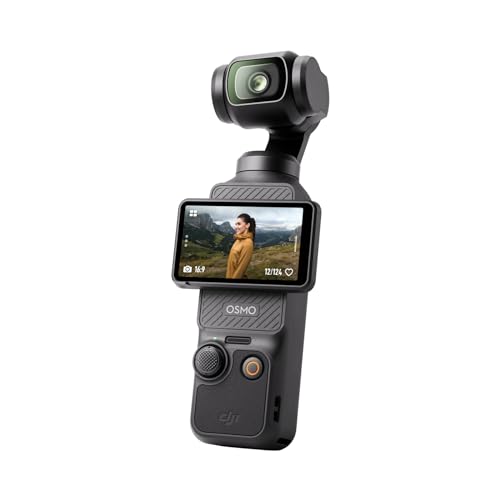
DJI Osmo Pocket 3 — The walking-shot instrument
Shooting with the Pocket 3 rewires a beginner’s instincts within one street. The gimbal absorbs the bounce that ruins handheld footage, so the operator’s whole technique reduces to walking smoothly, holding the body upright, and letting the head float — and the resulting footage has the level calm that viewers associate with professional travel films. Subject tracking, summoned with a tap, keeps a companion centred while the operator watches the route instead of the screen.
Its workflow gifts are operational: it wakes ready, its rotating screen flips between the street and the shooter’s face without a settings visit, and its built-in audio array plus wireless microphone options cover narration without a cable in sight. For the shooting disciplines of movement — tours, processions, market walks, property walkthroughs — no other body in this guide asks so little and returns so much.
- Format: gimbal pocket camera, one-inch-class sensor
- Shooting gift: level walking footage, minimal technique
- Tracking: tap a subject and walk; it follows
- Audio: capable built-ins, wireless mic pairing
- Role: the movement shooter’s primary tool
Strengths
- Walking shots emerge calm immediately
- Fastest readiness of any pick here
- Tracking frees the operator’s attention
Trade-offs
- Fixed framing limits deliberate composition
- Gimbal dislikes rain and rough handling
- No zoom for staged, distant subjects
Technique still matters at the margins: walk heel-to-toe on hard floors, keep elbows soft, and pan by turning the whole body rather than flicking the wrist. But those are refinements on an already-watchable result, which is precisely the encouragement a new shooter needs to keep filming past the first week.
Buy it if your HD moves. Static interviewers and deliberate filmmakers should take the Sony below and spend their discipline where it pays them better.
Best for: walking tours, travel movement and narrated journeys. Not suited for: staged interviews needing lens changes

Sony ZV-E10 II — The deliberate filmmaker’s compact
Where the DJI automates the shoot, the ZV-E10 II rewards the shooter who prepares. Its workflow is the professional’s in miniature: choose a lens for the job, set the camera on a tripod, place a microphone where the voice is, lock exposure and white balance, monitor through headphones, and record takes that need no rescuing. Creators who adopt that routine discover their output changing genre — from clips to productions — without the camera ever leaving the compact class.
Lens choice is its shooting superpower. A wide zoom films a room; a fast prime films a face at dusk; the same body, the same habits, two different films. Picture profiles let the deliberate shooter record flat for grading or vivid for publishing, and the body’s creator-first controls keep the essential settings — the ones this guide keeps naming — within a thumb’s reach during a take.
- Format: compact interchangeable-lens body, APS-C sensor
- Shooting gift: a repeatable, professional routine
- Audio: microphone input and headphone monitoring
- Lenses: framing chosen per assignment
- Role: the interview and tutorial workstation
Strengths
- Workflow scales from diary to client work
- Audio discipline fully supported
- Lens changes reframe any problem
Trade-offs
- No in-body stabilisation for casual handheld
- Demands preparation other picks forgive
- The right lens is a second purchase
Its defining workflow scene is the weekly tutorial: same corner, same light, same framing, recorded fifty times a year with improving polish. Systems beat talent at that game, and this body is a system in a small shell.
Shooters who film life as it happens, rather than arranging it, should let the gimbal and pocket picks carry their days instead. This Sony is for the deliberate — and it makes deliberateness pay.
Best for: interviews, tutorials, courses and graded productions. Not suited for: spontaneous handheld filming without support

Canon PowerShot G7 X Mark III — The handheld clip camera
The G7 X Mark III’s shooting workflow is the pocket clip, perfected: raise, frame on the tilting screen, record thirty honest seconds, lower. Its bright zoom handles the indoor light where daily life is filmed, its stabilisation smooths the handheld tremor adequately for short takes, and — the workflow detail that elevates it — its microphone socket lets a lapel or small shotgun ride along, so the birthday song and the market interview arrive with their words intact.
Canon colour does quiet workflow work too: footage that looks finished from the card removes the grading stage entirely for most owners, which is a shooting decision as real as any menu. Vertical filming manners suit the platforms where clips now live, and the whole routine fits the rhythm of a day rather than interrupting it.
- Format: pocket compact, one-inch-class sensor
- Shooting gift: fast, good-looking handheld clips
- Audio: microphone input transforms clip sound
- Screen: tilts for high and low handheld angles
- Role: the everyday life clip camera
Strengths
- Clips look finished without editing
- Mic input rescues dialogue anywhere
- Zoom reframes without moving the shooter
Trade-offs
- Stabilisation suits clips, not long walks
- Long takes test heat and battery
- Autofocus can breathe in busy scenes
Its technique lesson is proximity: because the zoom tempts operators to film from across the room, the Canon rewards those who walk closer, where its lens is brightest, its stabilisation calmest and its microphones — built-in or plugged — hear the subject instead of the room.
For families and everyday creators, this is the shooting workflow most likely to survive contact with real life: pocketable, quick, and honest about sound. Long-form and walking specialists should look to the DJI and the Sony for their respective marathons.
Best for: family clips, events and everyday handheld HD. Not suited for: long continuous takes or walking films

Sony ZV-1F — The one-button diary workflow
The ZV-1F’s workflow contains almost no workflow, which is its genius for presenters. Frame your face, press the large record control, talk. Face-priority exposure keeps the narrator lit against bright windows and dark streets; the wide fixed lens fits a person and a place into arm’s-length framing; the directional capsule favours the voice over the surroundings. A whole travel diary can be shot without the operator learning a single exposure term.
Its shooting discipline is therefore about presence rather than settings: keep the lens at eye level, mind the background over your shoulder, pause between thoughts so the edit has handles, and let the defocus control separate you from busy scenes when the story needs emphasis. Those habits, practised on this forgiving body, transfer to every camera its owner will ever graduate to.
- Format: fixed-lens pocket camera, one-inch-class sensor
- Shooting gift: presenter-proof automation
- Framing: wide lens for arm’s-length narration
- Audio: directional capsule, voice-first
- Role: the daily diary and vlog instrument
Strengths
- Nearly impossible to shoot badly
- Faces stay correctly exposed automatically
- Light enough to film all day
Trade-offs
- No microphone input for interview polish
- Fixed lens cannot isolate distant action
- Electronic stabilisation crops movement
Its honest ceiling is other people’s performances: filming a stage, a match or a ceremony asks for zoom, audio provision and endurance it does not pretend to own. Within its genre — the first-person day, narrated — its workflow is the most sustainable in this guide, because it never once makes the diarist choose between living the moment and operating the camera.
Choose it to start a filming habit. Habits, as this guide keeps arguing, are the actual product; the camera is merely their kindest available teacher.
Best for: vloggers and diarists filming themselves daily. Not suited for: filming other people’s distant performances

GoPro HERO13 Black — The mounted-action workflow
GoPro shooting inverts the usual workflow: the camerawork happens before the moment, in the mounting, and after it, in the edit. The operator chooses a position — chest, helmet, handlebar, board — sets a wide high-resolution frame, and lets the action happen inside it, knowing the footage can be reframed, stabilised and cropped to HD afterward. It is the workflow of moments too fast, wet or dangerous for a held camera.
Discipline still applies, differently. Mounts must be checked like parachutes, lenses wiped like glasses, and batteries rotated like tyres, because the camera will be out of reach when the moment arrives. Voice control and quick-capture habits — one press from off to recording — are shooting techniques in this genre, rehearsed until the hands can do them in gloves, in surf, at speed.
- Format: waterproof action camera
- Shooting gift: mount-first, reframe-later filming
- Stabilisation: powerful electronic, horizon-levelling
- Control: voice commands and one-press capture
- Role: the action and POV workflow
Strengths
- Films where hands cannot hold cameras
- Reframing rescues composition afterward
- Survives the workflow’s inevitable violence
Trade-offs
- Interviews and dialogue are not its language
- Low light punishes its small sensor
- Footage needs an edit to shine
Its best practitioners think like documentary editors: shoot wide, shoot long, protect the lens, and trust the timeline. Beginners who expect finished clips from the card should choose the Canon or the little Sony instead, whose workflows conclude at the record button.
For sport, water and machinery, though, no other workflow in this guide exists at all — the GoPro is not the best option for its genre; it is the genre.
Best for: sport, POV, water and mounted action filming. Not suited for: interviews or polished indoor footage

Insta360 Ace Pro 2 — The low-fuss action shooter
The Ace Pro 2 answers a fair question: what if an action camera behaved a little more like a shooting camera? Its flip screen lets the operator frame properly — including self-filming — instead of trusting a fixed wide guess, its stabilisation smooths running and riding footage convincingly, and its exposure manners forgive the mixed light of trails, streets and skateparks where action filming actually happens.
Workflow touches distinguish it in the hand. The screen’s size makes settings changes feasible with cold fingers; gesture and voice options start recording when hands are occupied; and its low-light processing squeezes evening action — the after-work ride, the floodlit pitch — further than action cameras traditionally reach. It remains an action body first, with the wide view and hardened manners of the tribe.
- Format: flip-screen action camera
- Shooting gift: framable action filming, self or scene
- Stabilisation: strong electronic for running and riding
- Low light: evening action handled gracefully
- Role: the versatile action and adventure shooter
Strengths
- Flip screen makes framing deliberate
- Evening action footage stays usable
- Controls work with occupied hands
Trade-offs
- Flip mechanism needs reasonable care
- Dialogue work still wants a real microphone
- Less pocket-diary charm than the Sonys
Between the GoPro’s mount-and-trust philosophy and this camera’s frame-and-shoot philosophy sits a genuine choice of working style. Athletes who review and adjust between runs will prefer the screen and the feedback; athletes who set and forget will stay with the simpler box.
Either way, the action workflow’s commandments hold: protect the lens, rotate the batteries, and let the edit — not the moment — do the composing that speed forbids.
Best for: action filming with deliberate framing, including self-filmed sport. Not suited for: formal interviews or studio-style work
How Do the Six Shooting Workflows Compare in Practice?
| Camera | Core technique | Sound workflow | Forgives |
|---|---|---|---|
| DJI Osmo Pocket 3 | Walk smoothly, tap to track | Built-ins plus wireless options | Beginner walking, completely |
| Sony ZV-E10 II | Prepare, lock, monitor, record | Full mic and headphone discipline | Nothing — and rewards everything |
| Canon PowerShot G7 X Mark III | Raise, frame, record the clip | Plug-in mic elevates clips | Handheld everyday shooting |
| Sony ZV-1F | Press record and present | Directional capsule, voice-first | Total beginners, daily |
| GoPro HERO13 Black | Mount first, reframe in edit | Accessories for polish | Chaos, water and impact |
| Insta360 Ace Pro 2 | Frame on the flip screen, then move | Capable built-ins for action | Mixed light and cold fingers |
Six workflows, one principle: the camera should absorb the technique its owner has not learned yet, and teach the rest by rewarding it visibly.
What Settings Should a Compact Shooter Lock Before Pressing Record?
Four decisions, made in order, precede every good take. Frame rate first: match it to the delivery and the light — standard rates for natural motion, higher only when slow motion or fast action genuinely calls. White balance second: choose the room’s dominant light and lock it, because automatic balance wanders mid-take and paints faces inconsistently across a conversation.
Exposure third: set it for the face, then lock it, so a bright window or a passing cloud cannot surge the picture mid-sentence. Most compacts here offer a simple exposure-lock or full manual video mode; learning where yours lives is the single highest-value menu expedition a new shooter can make. Focus fourth: face or eye detection for people, a deliberate focus point for objects, and a transition speed — where adjustable — set gentle, so focus glides rather than jumps.
Then the unglamorous fifth: check the frame’s edges and the audio meter, in that order, every time. Microphones left in bags, horizons tilted by habit, and headroom cropped by enthusiasm are workflow failures, and a two-second pre-record ritual is the cheapest insurance in filmmaking.
How Do You Actually Stabilise a Walking Shot?
Technique begins below the camera. Shorten the stride, land heel-to-toe as if carrying a full cup across a room, keep knees soft, and let the arms act as suspension rather than scaffolding. Hold the camera with both hands close to the body — or the gimbal upright and unhurried — and pan by rotating from the hips, slowly, the way a lighthouse turns.
The camera’s half of the bargain varies by pick. The DJI’s gimbal forgives nearly everything except running; electronic systems on the Sonys and Canon smooth clips best at moderate pace and punish sprinting with warping edges; in-body and lens stabilisation on supported bodies calms standing and slow movement elegantly. Knowing which half your camera carries tells you how fast your feet may go — a calibration worth one experimental street per new owner.
Finally, shoot the walk in segments. Thirty level seconds outrank three wandering minutes in every edit ever made, and the discipline of stopping, resetting and starting again is the walking shooter’s real stabilisation system.
How Should a Beginner Capture Sound That Audiences Can Bear?
Move the microphone toward the mouth — that sentence contains most of audio craft. A lapel mic on a speaker’s chest, a small shotgun on the camera pointed at the subject, or simply the camera itself brought closer: distance is the enemy, because every doubling of it thins the voice and fattens the room. The picks with microphone inputs exist for this sentence; the picks without them demand the camera’s own proximity as the technique.
Monitor whenever the body allows it. Headphones during an interview catch the rustling lapel, the humming fridge and the cable knock while they are still fixable; without them, those failures are discovered in the edit, where they are forever. Where monitoring is impossible, record a ten-second test and play it back before the real take — a humble ritual that has saved more wedding speeches than any equipment.
Respect the room tone. Record thirty seconds of the empty room’s sound before people arrive, keep voices off hard parallel walls where echo breeds, and close the window against the street you cannot control. Audiences forgive modest pictures indefinitely; they abandon muddy sound within a minute.
What Mistakes Do Compact Video Shooters Keep Making?
Filming everything at the default settings stands first — auto exposure surging, white balance wandering, focus hunting through every conversation. The lock-down routine in this guide exists to retire that habit in one afternoon.
Second, shooting only the wide shot. Audiences need the detail — the hands, the face, the object — intercut with the establishing view, and compact zooms and feet both exist to gather it. A shooter who returns with three distances of every subject returns with an edit; one who returns with one distance returns with evidence.
Third, neglecting the end of the take. Hold every shot five seconds longer than feels necessary, at both ends, and the edit gains the handles it needs for transitions. And fourth, never reviewing: the shooter who watches the day’s footage nightly improves visibly within a week, while the shooter who archives blind repeats the same tremor for a year.
Final Recommendation
For movement, buy the DJI Osmo Pocket 3 and let its gimbal teach your feet. For deliberate productions, the Sony ZV-E10 II’s workflow — lenses, microphones, monitoring, routine — is the compact class’s professional school. Everyday clip shooters should take the Canon G7 X Mark III and its microphone socket; diarists the ZV-1F and its one-button honesty; action filmmakers the GoPro HERO13 for mounted work or the Insta360 Ace Pro 2 when framing must stay deliberate at speed.
Whichever body you choose, spend its first week on the routines this guide describes — the locked settings, the walking practice, the sound checks, the nightly review — before judging its footage. And keep the companion specification guide on this site beside it: that page chose the instrument by its numbers, this page teaches the hands, and a shooter needs both halves of the education.
A closing thought for shooters blaming their camera tonight: film the same small scene twice tomorrow, once exactly as you usually would and once through this guide’s whole routine — locked light, placed microphone, segmented walk, held endings, reviewed take. The difference between those two clips is your actual equipment gap, and it is almost certainly smaller, cheaper and more fixable than the internet has led you to believe. Close that gap first; the cameras above will still be here, ready to reward the hands you have trained.
How Do You Light a Face With Nothing but a Room?
Compact shooters rarely own lights, so the craft is placement. Sit the subject facing a window at an angle — not square-on, which flattens, and never with the window behind, which silhouettes — and let the daylight model one side of the face while the room’s shade shapes the other. A white wall, a sheet or even a pale tablecloth opposite the window bounces fill into the shadows for free.
After dark, lamps replace windows with the same geometry: one warm source to the side, the subject a few feet from the wall behind to keep shadows soft, and every other light in the room either recruited or extinguished. Mixed bulbs tint skin unpredictably, so a single dominant source, with white balance locked to it, is the beginner’s most cinematic decision.
Watch the eyes for the verdict. A face lit well shows a catchlight and readable expression at conversational distance; a face lit badly sends the audience’s attention hunting. The cameras in this guide differ in how much darkness their sensors forgive, but none of them can relocate a lamp — that remains, happily, the operator’s free and unlimited power.
How Should a Shooter Plan a Sequence Instead of a Pile of Clips?
Think in threes: a wide shot that says where, a medium that says who, and a close shot that says what matters. A birthday becomes a room, a grandmother, and the hands lighting candles; a market becomes a street, a stallholder, and the produce changing hands. Shooters who gather the trio instinctively return home with edits that assemble themselves, because the grammar of sequence was collected in the field rather than invented in desperation at the timeline.
Continuity is the trio’s quiet discipline. Keep the camera on the same side of the action so movement flows consistently across cuts, hold each shot long enough to be usable, and record the room’s sound to stitch the joins. None of this requires talent — it requires a checklist, carried until it becomes character.
The picks above support the habit differently: zooms gather the trio without moving, the gimbal gathers it while moving, and the action cameras gather the wide and pray the edit finds the rest. Knowing your body’s trio strategy before the event is the difference between a shooter and a spectator with equipment.
What Does a Sensible Shooting Day Look Like, Hour by Hour?
It begins with preparation nobody films: batteries charged and counted, cards formatted in the camera after yesterday’s copies verified twice, lenses wiped, settings returned to the shooter’s known baseline. Ten unglamorous minutes that decide whether the day produces footage or anecdotes.
The shooting itself alternates capture and verification. Film the sequence, review the critical take immediately at full size with sound, adjust once, and move on — because the cost of discovering a dead microphone or a tilted horizon at home is total, while the cost of discovering it on location is one retake. Professionals call this discipline checking the gate; families can call it the two-minute rule, and it scales to any camera in this guide.
The day ends with the archive ritual: copy everything twice, charge everything once, and watch the best three clips before sleep. That final viewing is where tomorrow’s technique gets written — the tremor noticed, the background object spotted, the audio habit corrected — and it is why shooters who review improve in weeks while shooters who merely accumulate improve in years.
How Do You Film People Who Hate Being Filmed?
With consent, brevity and a small camera — which is where compacts earn their social licence. Ask first, film briefly, and put the camera down while the conversation continues; people relax when they learn the filming ends, and the second session, a week later, produces the unguarded footage the first one wanted. A pocket camera raised for thirty honest seconds reads as a souvenir; a rig reads as a production, and subjects perform accordingly.
Children require the same respect in miniature: film from their height, let them inspect the camera, and stop when asked, every time. The archive that results from trusted filming — grandparents unposed, children unbothered — is the footage families actually keep, and it is a workflow achievement, not a technical one.
Strangers in public scenes deserve the lightest touch of all: wide shots over portraits, discretion over persistence, and a smile that answers a glance before it becomes a complaint. The compact format’s modesty is a shooting technique in itself, and this guide’s picks were partly chosen for how politely they can be operated.
How Should a Beginner Practise Shooting Without an Occasion?
Deliberate drills beat waiting for events. Film a kettle boiling from three distances to learn sequence grammar. Walk one street weekly with the stabilisation discipline until the footage levels itself. Record a friend reading a paragraph at three microphone distances and memorise what each metre costs the voice. Interview a relative about one memory, properly — tripod, locked settings, monitored sound — and treat the result as a family document, because it is one.
Each drill isolates one variable, which is how technique actually forms. The shooter who has rehearsed sound, walking and sequence separately can combine them under the pressure of a real occasion; the shooter who has only ever filmed occasions has rehearsed nothing but hoping. Every camera in this guide is drill-worthy, and the drills cost nothing but evenings.
Keep the drill footage, dated, in its own folder. Reviewed quarterly, it becomes the most encouraging object a learning filmmaker owns: visible proof, in their own hand, that the tremor calmed, the sound cleared and the sequences began to cut themselves.
Why Does Editing Begin While You Are Still Shooting?
Because the timeline’s needs are knowable in the field: it needs handles on every take, alternatives for every important moment, and sound that bridges the cuts. A shooter who films with those needs in mind — holding shots longer, repeating the key action once from another angle, pausing between sentences — returns with footage that edits in an hour. A shooter who films only the moment returns with footage that edits in a weekend, or never.
Slating helps more than pride admits. A spoken note at the head of a take — the place, the person, the attempt number — costs two seconds and saves twenty minutes of archaeology later. Compact shooters working alone resist the habit as theatre until the first time it rescues a project, after which it becomes religion.
Even file discipline is shooting craft. Cards rotated in order, takes never deleted in-camera on location, and a backup made before the celebration ends: these are the workflows that separate archives from regrets, and they ask nothing of the camera at all — only of the person holding it.
How Do You Shoot in the Rain, the Dark and the Crowd?
Rain asks for preparation rather than courage: a cloth in a sealed pocket, a hood or hat brim shielding the lens, settings locked before the gloves get wet, and a body — like the action picks here — whose sealing matches the forecast. The gimbal and the flip screens deserve dry bags and lowered expectations; the GoPro and Ace Pro treat weather as a subject.
Darkness asks for the routine this site’s evening guide teaches in full: fast lenses, locked white balance, sensitivity capped at the graceful ceiling, and faces placed near whatever light exists. The shooting workflows above all assume the operator will position subjects toward light rather than demanding the sensor perform miracles.
Crowds ask for height, patience and manners: the tilting screen held overhead, the shot taken in the gap rather than through the argument, and the camera lowered the moment a stranger’s discomfort registers. Footage gathered politely in crowds has a looseness that forced footage never achieves, because the crowd can tell the difference.
What Should a Shooter’s First Month of Homework Look Like?
Week one is settings: the lock-down routine practised until exposure, white balance and focus can be set in under ten seconds without looking away from the subject. Week two is movement: one street, walked daily, until the footage’s horizon stops wandering. Week three is sound: interviews at home with every microphone arrangement the camera permits, reviewed on real speakers. Week four is a complete small production — a recipe, a repair, a grandparent’s story — planned, shot in sequence and edited within the week.
Graduation from that month is not a certificate; it is a feeling, the first occasion where the camera disappears and only the filming remains. Every pick in this guide can carry a shooter to that feeling, and the differences between them — gimbal versus routine versus one button — are differences of teaching style, not of destination.
How Will You Know Your Workflow Has Become Your Own?
When the checklist leaves the notebook and enters the hands. When the pre-record glance at edges and meters happens without narration, when the microphone migrates toward the voice before you have consciously decided, when the nightly review is a pleasure rather than a correction — the workflow has become a style, and the footage starts carrying a signature that equipment cannot explain.
At that point the camera conversation changes honestly. Upgrades stop being about rescue and become about preference: a lens for a look, a body for a colour, a gimbal for a genre. Shooters who reach that stage buy rarely and well, which is why this guide invested so heavily in the free part of filmmaking — the part between the ears and the hands.
How Does Vertical Filming Change the Shooting Routine?
Platforms have made the upright frame a first-class citizen, and shooting for it is a workflow, not a rotation afterthought. Compose with the subject centred and the essential action inside the middle band, keep text-critical detail away from the edges where interfaces overlay it, and hold the camera — or flip its screen — in the orientation the delivery demands from the first take rather than cropping a horizontal master and apologising to the composition.
Several picks here were designed with that reality in the room: rotating and tilting screens, vertical tripod threads and interfaces that remain legible upright. Shooters whose audience lives on phones should weight those manners heavily, because a workflow that fights the delivery format loses a little quality at every single step.
Why Should Every Shooter Learn to Film a Conversation Before Anything Else?
Because conversation is the atom of filmed life: interviews, family stories, tutorials and vlogs are all, structurally, a person talking while another person listens. Master the conversation — the locked light, the placed microphone, the patient framing, the reaction shot — and every other genre becomes a variation. Fail at it, and no amount of walking footage or action mounting will make the work watchable, because audiences come for voices and stay for everything else.
The deliberate Sony and the mic-socketed Canon are this guide’s conversation specialists, but the discipline itself is portable to every body listed. Practise it on the willing — a partner’s hobby explained, a parent’s memory recorded — and the practice doubles as an archive no family ever regrets owning.
What Gear Beyond the Camera Does a Compact Workflow Actually Need?
Less than the internet suggests, in a strict order. A way to hold the camera steady — mini tripod, grip or gimbal already in hand. A way to hear the subject — the microphone the body accepts, or the discipline of proximity where it accepts none. A way to keep shooting — spare battery, honest cards, a cloth. And a way to keep the result — the two-copy archive habit, which costs a cable and ten minutes.
Everything beyond that list is genre equipment: lights for the interviewer, mounts for the athlete, lenses for the deliberate. Buy in the order the list gives, rehearse each addition until it disappears into the routine, and the kit will grow at the speed of skill rather than the speed of advertising.
How Do You Keep a Shooting Habit Alive After the Novelty Fades?
By shrinking the unit of success. A finished sixty-second film every week — one recipe step, one street, one family ritual — beats an unfinished epic every quarter, because completion teaches what fragments cannot: endings, exports and the audience’s actual face. The diary and clip cameras in this guide exist for that cadence; their workflows are sustainable precisely because they ask minutes, not weekends.
Give the habit a home: a standing appointment with one subject, one place or one person whose filming is the week’s fixed pleasure. Shooters who attach the camera to a relationship — the grandparent’s stories, the child’s season, the town’s market — discover the motivation problem solving itself, and the archive that accumulates becomes the argument for every camera they will ever buy.
Why Is Reviewing Footage a Shooting Skill Rather Than an Editing One?
Because the lesson lands while the subject is still available. The tilted horizon corrected at the location costs one retake; discovered at home, it costs the scene. Shooters who build the two-minute review into every session are effectively giving themselves a coach who attends every shoot, and the coach’s entire fee is a habit. Full-size review matters — thumbnails forgive focus errors that televisions prosecute — and sound must be reviewed with the picture, since the meter’s confidence and the ear’s verdict regularly disagree.
Over a month, the reviewed shooter’s footage changes character: fewer accidents, longer usable takes, sound that survives the living-room speakers. None of that improvement required a new camera, which is the most useful fact a buyer can learn before spending on one.
How Should a Shooter Handle the Camera Nobody Notices?
Documentary gold is usually filmed by a camera the room has forgotten. Compacts achieve that invisibility by size, silence and the operator’s patience: set the frame, lower the camera to waist height where eyes stop tracking it, and let the scene resume its natural behaviour before recording the moments that matter. The diary Sony and the little Canon excel at this social camouflage; the action bodies achieve it by being mounted and abandoned.
The ethics travel with the technique. Forgotten is not the same as deceived: film people who know the camera exists and have settled with its presence, and stop when anyone asks, without negotiation. The footage gathered under those terms has an ease that covert footage never quite counterfeits, because relaxed subjects are visible in every frame.
What Is the Shooter’s Honest Measure of a Good Day’s Filming?
Not the number of clips but the number of keepers: takes that survive the evening review with their sound clean, their horizons level and their moments intact. A beginner’s keeper rate might begin at one in ten; the routines in this guide exist to move it, month by month, toward one in three — at which point the camera has stopped being the story and the filming has become the craft it always claimed to be. Track the rate in the drill folder, and let it, rather than any upgrade itch, tell you when the hands are ready for a more demanding instrument.
Frequently Asked Questions
How is this guide different from the HD video specifications guide?
That companion page chooses cameras by their recording numbers — codec, bitrate, colour depth, ports and endurance. This page chooses and uses them by shooting craft: settings routines, stabilisation technique, sound workflow and the order of operations on a real shoot. They were written as a pair, and neither repeats the other’s argument. Readers torn between two finalists on specifications alone will often find the tie broken here, by the simple question of which camera’s daily handling they would rather live with for the next five years.
What frame rate should I shoot HD at?
Match the rate to the subject and the destination: standard rates for conversation and natural motion, double rates when you may want gentle slow motion, and the action cameras’ high rates only for genuine speed. Higher rates cost light and storage, so let the subject — not the menu’s maximum — decide. Whatever you choose, keep it constant within a scene, because mixed rates cut together awkwardly and conforming them afterward taxes both the footage and the editor’s patience.
Why does my handheld footage look shaky when the camera has stabilisation?
Because stabilisation corrects small tremors, not walking bounce, wrist flicks or running. Shorten the stride, soften the knees, hold the camera close with both hands, pan from the hips, and shoot in segments. On the gimbal-bodied DJI those habits polish already-calm footage; on the others, they are the difference between watchable and abandoned. Practise the walk with a glass of water carried at arm’s length if you doubt the diagnosis — the spill pattern is the footage, translated.
Do I need an external microphone for family filming?
Not for ambient memories — birthdays and beaches survive on built-in capsules if the camera stays close. For anything whose words matter — grandparents’ stories, speeches, interviews — a small microphone on the bodies that accept one transforms the result more cheaply than any other purchase in this guide. If your camera accepts none, the technique is proximity plus quiet: move the camera within conversational distance, choose the calmest corner of the room, and let the subject’s voice win by geography.
Should I shoot in 4K and deliver HD, or shoot HD directly?
Shooting above HD buys reframing room and cleaner downscaled footage at the cost of heat, storage and editing weight; shooting HD directly is lighter and, with good technique, entirely sufficient for family and platform delivery. Choose per project: the interview you may reframe deserves the larger file; the school play does not. The specification guide companion to this page audits those trade-offs camera by camera, for buyers who want the numbers behind the habit.
What is the fastest way to improve my compact video this week?
Adopt the pre-record ritual — lock white balance and exposure, check the frame’s edges, glance at the audio — and review every evening’s footage before sleeping. Those two habits, practised for seven days on any camera in this guide, produce a visible step change that no purchase can match at any price. Add the third habit on day eight — filming one deliberate conversation, start to finish, with the microphone placed properly — and the week ends with a piece of footage worth keeping for decades.
Related Guides
Read the other half of the pair at compact cameras for HD video chosen by recording specification, explore small cameras for filming after dark, or browse pocket cameras for travel diaries and beginners when the shooting goes on the road — then close the laptop, charge the battery, and go film one honest conversation while the routine from these pages is still warm in your hands.


