ilcastellomenu.com is reader-supported. When you buy through links on our site, we may earn an affiliate commission.
Where to Buy Cameras That Have to Survive the School Day
The best digital cameras for classroom use are not bought the way other cameras are bought, because a classroom camera has no owner — it has thirty users a day, a cupboard for a home, and a working life measured in drops, fingerprints and forgotten charging cables. This guide therefore ranks its six picks by institutional virtues that ordinary reviews ignore: how a camera survives being shared by a whole class set, how its batteries and memory cards are charged, labelled and stored, how its lens gets cleaned after small hands have been at it, and how gracefully it serves the hybrid lesson, where half the audience is in the room and half is on a screen at home. All six are available through the education-friendly retailers and Amazon listings linked below.
Two of the six are not handheld cameras at all but classroom webcams, included deliberately: the modern classroom camera spends as many hours showing the teacher to remote learners as it spends in pupils’ hands, and a guide that ignored the hybrid half of the job would be reviewing a school that no longer exists.
Key Takeaways
- A classroom camera is shared equipment — judge it like a fleet, not a possession.
- Charging and storage systems matter more than megapixels in a class set.
- The toughest camera here can be dropped, soaked and still teach period three.
- Hybrid lessons need a proper webcam; a handheld camera on a tripod is a compromise.
- Instant prints turn photography into wall displays the same afternoon.
- Number the cameras, label the cards, and clean the lenses on a rota.
In this guide
Quick Picks
| Camera | Badge | Why it earns its place |
|---|---|---|
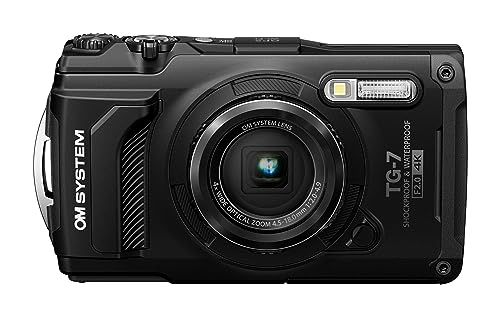
| OM SYSTEM Tough TG-7 | The class-set survivor | Waterproof, drop-resistant and rinse-clean — the camera you can hand to anyone, in any weather, without a speech. |
| Canon PowerShot G7 X Mark III | The teacher’s demonstration camera | Bright lens and flattering video for the front of the room, from science demos to recorded explanations. |
| Logitech Brio 4K | The hybrid lesson anchor | A 4K webcam that makes the whiteboard and the teacher legible to every learner watching from home. |
| OBSBOT Tiny 2 | The camera that follows the lesson | AI tracking on a gimbal keeps a moving teacher framed while both hands stay free for teaching. |
| Fujifilm Instax Mini 12 | The instant wall-builder | Prints in hand within minutes — photography lessons that end with a display, not a download queue. |
| Canon EOS R50 | The media-class step-up | An interchangeable-lens body for school newspapers, film clubs and students ready for real technique. |
How Did We Judge Cameras Whose Users Never Chose Them?
Consumer reviews ask whether a camera delights its buyer. This guide asked a ruder set of questions, modelled on a school term. Can the camera be operated by a pupil who has had ninety seconds of instruction? Does it survive the standard accidents — the drop from desk height, the splash at the sink, the yoghurt-adjacent incident nobody confesses to? Can a teacher tell, at a glance across a cupboard, which units are charged, which cards are full and which camera is number seven?
Hybrid fitness formed the second test. Each candidate was considered as the eye of a lesson streamed to absent learners: does the whiteboard stay readable, does the teacher’s face stay lit and framed while they move, does the audio path exist, and does the setup survive being assembled by a supply teacher at 8:40 in the morning? The two webcams earned their places here outright; the handhelds were judged on their manners as occasional streaming cameras via their screens, lenses and microphone inputs.
The third test was administrative, and it eliminated more famous cameras than any other: total cost of the system around the camera. Spare batteries, a charging hub, labelled cards, a lockable case, cleaning supplies — a class set is a small logistics operation, and the picks below are the ones whose ecosystems keep that operation cheap, standardised and teachable to the next teacher who inherits the cupboard.
Why Does a Class Set Need a Charging and Storage System More Than It Needs Resolution?
Ask any teacher who has run a camera project what actually failed. It is never the photographs. It is the morning of the field trip when four of ten cameras are flat, two cards are missing, and camera six has somebody’s birthday photographs from March still occupying its memory because nobody owned the offloading job. Resolution is a property of a camera; readiness is a property of a system, and classrooms run on systems.
The working pattern this guide recommends is deliberately boring. Every camera is numbered on its body and its battery door with the same digit. Batteries charge in a single multi-bay hub that lives in the cupboard, plugged in on a timer, so “charged” is a place rather than a hope. Cards are labelled to match their camera and are formatted in that camera, by the returning pupil, as the last step of handing it back — a thirty-second ritual that teaches data responsibility while it prevents the March-birthday problem. A one-page log by the cupboard door records which numbered camera went to which pupil; breakages, when they come, arrive with a history instead of a mystery.
Storage completes the system. Cameras live in a single hard case with numbered foam slots, so an empty slot announces a missing camera before the class has left the room. The case, not the cameras, is what gets signed out for trips. Schools that adopt this dull machinery discover that their cameras are suddenly always ready — and that the educational argument about image quality can finally happen, because the logistics argument has stopped eating the lesson.
How Do You Keep Shared Cameras Clean Enough to Share?
Hygiene is the classroom camera’s unglamorous specification, and the years of shared-equipment awareness have made it a permanent one. Lenses collect fingerprints the way classroom door handles collect everything else, and a smeared lens quietly degrades every photograph a class set takes until somebody notices the whole term’s images look fogged. The routine that works is weekly and pupil-powered: a designated pair of “camera monitors” — a job children compete for — wipe each lens with a clean microfibre cloth, check each screen, and report damage on the log.
Materials matter. Microfibre cloths, washed and rotated; a blower for dust; lens wipes for the greasy emergencies. Never tissues, never sleeves, never the cleaning sprays meant for whiteboards. Bodies get a wipe-down with a barely damp cloth when they return from outdoor work, and any camera that has been in a sandpit, a pond-dipping session or a food-technology crossover lesson gets inspected before it rejoins the set. The TG-7 below earns its badge partly here: as a waterproof camera it can simply be rinsed under a tap, a hygiene superpower no other handheld in this guide can match.
The webcams need less cleaning and more positioning discipline: a lens cloth fortnightly, a check that the privacy shutter works, and cables dressed so that thirty chairs a day do not slowly drag the camera out of alignment. Hygiene, in a classroom, is mostly the art of small routines performed by many hands — which is why this guide treats it as a selection criterion rather than an afterthought.
Which Are the Best Digital Cameras for Classroom Use, From Class Sets to Hybrid Desks?
The six divide by job: one armoured handheld for pupil hands, one bright compact for the teacher’s desk, two webcams for the hybrid audience, one instant camera for tangible outcomes, and one system camera for the students who catch the photography bug properly. A real school may need three of the six; no school needs all six on day one.

OM SYSTEM Tough TG-7 — The class-set survivor
Every class set needs a camera whose briefing to pupils is “go and photograph the pond” rather than a ten-minute liturgy of warnings, and the TG-7 is built to receive exactly that briefing. It is waterproof without a housing, resistant to drops from the heights desks and small hands provide, and sealed against the dust of playgrounds and science cupboards. Hand it to a seven-year-old studying minibeasts or a fourteen-year-old documenting a river fieldwork transect; the camera’s contribution is that the teacher’s blood pressure stays out of the lesson plan.
Its photographic party trick suits schoolwork uncannily well. The macro and microscope-style close focusing turns the camera toward the subjects primary science actually studies — leaf structures, pond organisms, rock textures, the gears inside a clock — at magnifications no other pick here attempts. Variable macro lighting accessories exist in its ecosystem for the schools that want to go further, but even unadorned, it photographs the small world better than cameras costing far more and surviving far less.
- Build: waterproof, drop-resistant, dust-sealed
- Focus: extreme close-up and microscope modes for science work
- Cleaning: rinse under a tap after outdoor sessions
- Logging: built-in sensors record data for fieldwork projects
- Role: the pupil-proof class set camera
Strengths
- Survives the accidents a school term guarantees
- Macro capability maps directly onto science curricula
- Hygiene is a rinse, not a procedure
Trade-offs
- Small sensor limits big enlargements and dark halls
- Zoom range is modest for sport and stage work
- Menus reward a teacher’s ten minutes of setup beforehand
Seen through the classroom’s second lens — the fleet manager’s — the TG-7’s durability is an accounting argument. A class set’s true cost is replacements per year, and a camera that treats the standard accidents as weather simply posts a lower number than delicate rivals whose purchase price looked kinder. Schools buy cameras the way councils buy benches: for the decade, not the term, and toughness is the specification that compounds.
Buy it as the backbone of a shared set, in whatever quantity the budget stretches to, before spending on anything cleverer. Cleverness can be added later; a set that survives is the platform everything else stands on.
Best for: shared class sets, fieldwork, science close-ups and outdoor learning. Not suited for: school concerts in dark halls or large-format display printing

Canon PowerShot G7 X Mark III — The teacher’s demonstration camera
Where the TG-7 belongs in pupils’ hands, the G7 X Mark III belongs in the teacher’s — the one good camera, kept in the desk rather than the cupboard, that records the demonstration the class will rewatch, photographs the experiment at the moment it works, and films the explanation video for the pupils who were absent. Its bright lens is the point: classroom light is nobody’s friend, and this Canon keeps faces and whiteboard demonstrations clean and warm in the fluorescent gloom where lesser compacts smear.
Its video manners suit teaching specifically. The screen flips up for a teacher recording a piece to camera at their own desk; a microphone input accepts the cheap lapel microphone that transforms classroom audio from echoing to intimate; and Canon’s colour renders people kindly, which matters more than resolution when the audience is a class watching their own teacher on a screen at home. It also live-streams and transfers clips wirelessly, feeding the school’s platform without a card-reader ceremony.
- Sensor: 1-inch, with a bright fast lens
- Screen: tilts up for self-recorded explanations
- Audio: microphone input for lapel microphones
- Colour: flattering skin tones for recorded lessons
- Role: the teacher’s desk camera
Strengths
- Performs in ordinary classroom light without drama
- Video workflow built for one person teaching alone
- Small enough to live in a desk drawer, ready in seconds
Trade-offs
- Too delicate and too valuable for general pupil issue
- No viewfinder for bright playground duty
- One camera serves one teacher — it is not a set solution
Continuity of explanation is where the G7 X quietly earns its place. Schools increasingly keep a library of short teacher-made videos — the fractions method, the titration, the French pronunciation set — and those libraries age well only if they look and sound decent from the first entry. This Canon is the cheapest way in this guide to make a department’s archive look intentional rather than apologetic, and departments that start with it rarely remake their early videos.
Buy one per department that records teaching, label it like the class set, and let the cupboard cameras handle the pupils. The division of labour is the strategy.
Best for: teacher demonstrations, recorded explanations and departmental video libraries. Not suited for: handing around a class of thirty

Logitech Brio 4K — The hybrid lesson anchor
The Brio’s classroom is half physical. Mounted above the classroom display or on a tripod at the back, this 4K webcam is the eye through which absent learners — ill, isolating, snowed in, or taught from another site entirely — attend the lesson, and its virtues are precisely tuned to that duty. The high resolution is not vanity: it lets remote pupils read handwriting on a whiteboard when the feed is cropped or zoomed digitally, the difference between attending a lesson and watching a rumour of one.
Its supporting behaviours are classroom-shaped. Autofocus holds the teacher rather than hunting the window blinds; exposure automation copes with the mixed light of screens and daylight; the field of view can be narrowed so the frame holds the teaching wall instead of the whole room’s distractions. It connects by a single cable to the classroom computer and simply works with the platforms schools already run, which is the highest praise any school technology can earn — the supply teacher test again, passed.
- Resolution: 4K, enabling readable board work at a distance
- Mounting: monitor clip or tripod thread for back-of-room positions
- Behaviour: autofocus and auto exposure tuned for faces and rooms
- Connection: single USB cable, platform-agnostic
- Role: the permanent hybrid eye of the classroom
Strengths
- Board writing stays legible to remote learners
- Installs once and disappears into the room’s routine
- No batteries, no cards, no charging rota required
Trade-offs
- Tethered to the classroom computer by design
- Room audio still depends on the computer’s microphone arrangements
- Useless for pupil photography — it is a broadcast eye only
Viewed from the inclusion angle, the Brio is an attendance device disguised as a camera. The pupil recovering from surgery who keeps up with fractions, the young carer whose mornings are unpredictable, the class joined across two campuses for a shared language lesson — all of them are present or absent according to whether the camera at the front renders the lesson legibly. Schools that frame the purchase that way stop asking whether a webcam belongs in a camera budget; it belongs in the attendance strategy that the camera budget happens to serve.
Install it once, aim it with care, and test it from a pupil’s laptop at home before the first real absence depends on it.
Best for: permanent hybrid classrooms and recorded board work. Not suited for: any photography a pupil will ever do

OBSBOT Tiny 2 — The camera that follows the lesson
The Tiny 2 answers the hybrid problem the Brio cannot: teachers move. They walk the whiteboard’s length, crouch at a pupil’s desk to model a method, demonstrate at the science bench across the room. A fixed webcam frames the space where the teacher was; the Tiny 2, a small camera on a motorised gimbal with AI tracking, turns to follow the teacher through all of it, reframing automatically while both of the teacher’s hands stay where teaching needs them — on the demonstration, not on a remote control.
The tracking is the product, and in a classroom it behaves like a patient camera operator: locking onto the teacher, holding the frame through turns and partial occlusions, responding to simple gesture controls when the teacher wants to zoom the remote audience toward the bench or back to the board. Voice control exists for the same hands-busy moments. For practical subjects — technology workshops, art demonstrations, PE theory in the hall — it converts a one-person hybrid lesson from a static compromise into something resembling direction.
- Design: motorised gimbal webcam with AI subject tracking
- Control: gesture and voice commands for hands-free reframing
- Image: large sensor for its class, strong in room light
- Use: follows a moving teacher across a teaching space
- Role: the mobile hybrid camera
Strengths
- Teacher stays framed while teaching naturally
- Demonstrations at benches and boards both reach remote pupils
- Setup is one cable and a few minutes of positioning
Trade-offs
- Tracking can be distracted in crowded, multi-adult rooms
- Costs more than a fixed webcam for a narrower job
- Moving parts reward a fixed home position and careful storage
Recorded lessons simply hold up better on watchback. Schools reusing hybrid recordings as revision material discover that the tracked, reframed lesson holds attention in a way the static wide shot never did — the remote pupil, and later the revising pupil, is always looking at the right part of the room. Departments that record everything — music, languages with their physical drills, design technology — feel this difference first and forgive the price accordingly.
Choose the Tiny 2 where teaching is physical and the Brio where teaching is board-centred; the two are complements wearing similar product categories, and the choice is made by watching one of your own lessons and asking where your body actually goes.
Best for: practical subjects, demonstrations and teachers who teach on their feet. Not suited for: static board lessons or the tightest budgets

Fujifilm Instax Mini 12 — The instant wall-builder
Every other pick in this guide produces files, and files in a school have a way of becoming intentions: to be printed, displayed, sent home, someday. The Instax Mini 12 produces the photograph itself, in the pupil’s hand, before the lesson ends. For younger classes especially, that physicality is pedagogically precious — sequencing a story in prints on a desk, building the class timeline on the wall the same afternoon, sending a portrait home in a book bag the same day. The camera is simple to the point of ceremony: point, press, watch the print appear.
Its simplicity is engineered for small hands and zero instruction. Automatic exposure handles the metering; a twist of the lens barrel wakes it and selects the close-up mode for the desk-distance subjects classroom projects favour; the prints are credit-card sized, which suits labels, grids and the pockets of exercise books. There are no menus to lose, no settings for a pupil to strand the camera in, no screen to crack. In the class-set economy it plays a different position from the TG-7: not the documenter of fieldwork but the maker of artefacts.
- Output: instant prints, developed in the pupil’s hand
- Operation: automatic exposure, near-zero instruction needed
- Modes: close-up setting for desk-based project work
- Consumable: film packs are the running cost to budget
- Role: tangible outcomes and displays
Strengths
- The photograph exists physically before the lesson ends
- Nothing to configure, corrupt or leave uncharged
- Prints anchor displays, timelines and portfolios directly
Trade-offs
- Film is a continuing consumable cost per photograph
- No digital file exists unless prints are scanned
- Print size and quality serve display, not enlargement
Assessment and memory matter here too. Teachers photograph classroom life constantly and display a fraction of it; the Instax inverts the ratio for the projects that matter, and its prints become the evidence in floor books and learning journeys that inspectors and parents actually leaf through. There is also a gentler truth: children who rarely see themselves in the school’s official record appear in Instax displays within the hour, and the camera’s cheap immediacy quietly democratises whose learning gets celebrated on the wall.
Budget for film the way you budget for glue sticks — as a consumable of making, not a capital cost — and the Instax earns its cupboard shelf beside the digitals rather than competing with them.
Best for: primary classrooms, displays, portfolios and same-day tangible outcomes. Not suited for: archival records or any workflow needing digital files

Canon EOS R50 — The media-class step-up
Somewhere in every school is a group of older students for whom photography stops being a classroom activity and becomes a craft: the school newspaper, the film club, the GCSE and A-level media courses, the sixth-former documenting the school production. The R50 is this guide’s pick for them — a proper interchangeable-lens camera whose guided menus welcome the beginner while its mount, its autofocus and its video capability refuse to cap the enthusiast. It is the one camera here bought for a named small group rather than for general issue.
Its teaching virtues are real. The assisted interface explains the exposure decisions students are supposed to be learning, in plain language, at the moment of decision; the eye-detection autofocus lets a student journalist concentrate on the interview rather than the focusing; and the same body that photographs the netball final films the school play’s trailer. A department that owns two, with a shared pair of lenses, owns a small media unit capable of covering the school’s whole public life.
- Format: APS-C mirrorless, Canon RF mount
- Guidance: plain-language assisted shooting interface
- Focus: eye detection for people and animals
- Video: capable 4K for school productions and journalism
- Role: the enrichment and media-course camera
Strengths
- Grows from guided beginner to deliberate technique
- One body serves the newspaper, the film club and the prospectus
- Lens sharing across a small departmental kit is economical
Trade-offs
- Too valuable and delicate for general class-set issue
- Lens ambitions can quietly expand the budget
- Needs the charging and logging discipline most of all
Viewed institutionally, the R50 is really about succession. Student media dies whenever its one enthusiast leaves; a department that owns the cameras, the lenses and a simple booking log owns the capability permanently, and each year’s editors inherit a working newsroom instead of a rumour of one. Schools that want a living school magazine should therefore buy the R50 as infrastructure, keep it in the department rather than the central cupboard, and let its small priesthood of trained students guard it — which they will, fiercely, because it is theirs.
Buy it when a named course or club exists to justify it, not as a hopeful upgrade to a general set. In the right hands it is the best value in this guide; in the general cupboard it is an expensive way to learn the logging lesson.
Best for: media courses, school journalism, film clubs and productions. Not suited for: whole-class issue or unsupervised younger pupils
How Do the Six Classroom Cameras Compare Side by Side?
| Camera | Primary user | Survivability | Classroom job |
|---|---|---|---|
| OM SYSTEM Tough TG-7 | Pupils, shared | Waterproof, drop-resistant | Class sets and fieldwork |
| Canon PowerShot G7 X Mark III | Teacher | Desk-kept, delicate | Demonstrations and recordings |
| Logitech Brio 4K | Room itself | Fixed install | Hybrid board lessons |
| OBSBOT Tiny 2 | Room itself | Fixed install | Hybrid practical lessons |
| Fujifilm Instax Mini 12 | Pupils, supervised | Simple, robust handling | Instant displays and artefacts |
| Canon EOS R50 | Older students | Department-kept | Media courses and journalism |
The survivability column is the one to read first. In classroom buying, the camera’s second year matters more than its first week, and the table is organised so that each row’s job matches its toughness honestly.
How Do You Run a Class Set Without Losing Cameras, Cards or Lessons?
Begin with the numbering ritual described earlier and make it a ceremony the class performs, not a rule the teacher recites: cameras numbered, batteries numbered to match, cards labelled to match, slots in the case numbered to match. When everything carries the same digit, every check becomes counting, and counting is a skill every pupil already owns. The sign-out log hangs by the cupboard; the return ritual — photographs reviewed, card formatted in camera, battery placed in the hub, camera wiped and slotted — is taught in the first session and inspected randomly thereafter, because systems survive on inspection, not intention.
Charging deserves its own timetable. The hub lives plugged into a timer socket that runs overnight on school nights; Monday’s first job for the camera monitors is the hub’s indicator lights, and a camera that leaves the cupboard below full charge is a system fault to be logged, not a pupil’s bad luck to be absorbed mid-lesson. Spare batteries — at least one per two cameras — rotate through the hub so no battery ages in a drawer.
Finally, plan the failure you know is coming. One camera in any set will be dropped beyond repair or lost on a trip within its first two years; the budget that admits this buys the replacement from a contingency line instead of a crisis meeting. Keep the purchase records, serial numbers and the insurer’s requirements in the same folder as the log. Boring, complete, and the entire difference between a camera programme and a camera anecdote.
How Should a Hybrid Lesson Be Set Up So Remote Pupils Actually Learn?
Position before technology. The webcam — Brio fixed or Tiny 2 tracking — should frame the teaching wall and the teacher’s demonstration zone, tested from the pupil’s side of the connection, on a pupil-grade laptop, over the home-grade connection the audience actually has. Teachers are routinely shocked by the gap between the preview on the classroom’s large display and the compressed reality at the kitchen table; every setup decision should be made from the kitchen table’s evidence.
Sound is the lesson’s spine. Remote pupils forgive a soft image and abandon a muddy voice within minutes, so the microphone arrangement — the classroom computer’s, a lapel on the teacher for the G7 X recordings, the webcam’s own array for the fixed installs — gets tested with the room’s ordinary noises running: chairs, radiators, the class next door. Speak to the remote audience by name at intervals, build in the pause that latency requires after questions, and put the chat or hand-raise channel on a screen the teacher can actually see while teaching.
Close the loop administratively: record the lesson where policy allows, name the file by date and topic, and file it where absent pupils are directed by routine rather than by asking. Hybrid teaching fails socially more often than technically — the remote pupil who must beg for the recording stops asking — and the camera system that feeds a predictable library quietly defends attendance better than any single specification in this guide.
How Do Classroom Cameras Serve Pupils Who Learn Differently?
A camera is one of the most quietly inclusive instruments a school owns, and the fleet decisions in this guide change whose learning gets seen. For the pupil whose writing lags years behind their thinking, a photographed sequence — the experiment’s stages, the model’s construction, the recipe’s progress — is evidence of understanding that a worksheet would have hidden. Teachers who build photo-evidence into ordinary assessment, using the class set’s shared output rather than any special apparatus, routinely discover competencies that paper had been concealing, and the discovery changes targets, groupings and expectations in ways no camera manufacturer will ever advertise.
Physical access matters in the selections themselves. The Instax’s single-button simplicity serves pupils for whom menus are a barrier; the TG-7’s chunky, glove-tolerant body serves fieldwork for everyone and fine-motor workarounds for some; the webcams serve the pupil whose attendance is medical rather than chosen. Even tripod choice becomes inclusion: a camera that can be positioned, triggered remotely and reviewed on a large screen is a camera a wheelchair user or a pupil with limited grip can operate as fully as anyone in the room, provided the department thought about it at purchase time rather than at the first lesson where it mattered.
There is also a confidence economy at work. The pupil who will not read aloud will often photograph brilliantly, and the class display — especially the Instax wall, refreshed within the hour — is a rare school surface where that pupil’s excellence is public, current and unarguable. Camera programmes that understand this stop describing themselves as enrichment. They are, in the plainest sense, alternative routes to being seen to succeed, and the fleet should be sized and scheduled so that every class, not only the enthusiastic teacher’s, gets its turn at the wall.
What Does a Sensible Three-Year Budget for a Camera Fleet Look Like?
Year one is capital and systems together, and the ratio is the lesson: for every ten pounds of cameras, expect roughly three of infrastructure — the case with its numbered slots, the charging hub, spare batteries, labelled cards, cleaning stock, straps, and the tripod the hybrid room and the media group will fight over. Schools that spend the whole allocation on bodies own a drawer of flat cameras by October; schools that fund the system own a programme. Add the contingency line — one replacement handheld — in year one, while the purchase is a decision rather than a reaction.
Year two is consumables and consequences. Instax film for the display habit, at a rate set by how seriously the school takes its walls. Replacement batteries for the hardest-worked class set units. A repair or replacement from the contingency pattern established in year one. And the first honest review: the logs say which cameras worked, which subjects used them, and which cupboard shelf holds a mistake — information that should steer any top-up purchase away from repeating it.
Year three is renewal at the edges: the media group’s R50 may want its second lens, the hybrid rooms may want the tracking camera where the fixed one proved static, and the oldest class-set batteries retire. Nothing in year three should be a surprise if the logs were kept, which is the entire argument for keeping them. A camera fleet budgeted this way costs less across three years than the enthusiastic single purchase followed by annual improvisations — and it teaches, by example, the project discipline the school presumably wants its pupils to absorb.
How Do Cameras Change Fieldwork, Trips and the Life Beyond the Classroom Walls?
The class set earns its keep most visibly outside the building. On the river study, the TG-7s go into the water’s edge without a risk assessment annex; on the city trip, pairs document architecture, signage and street life against a brief written before departure; on the residential, the evening slideshow of the day’s photographs — reviewed together, argued over, celebrated — becomes part of the trip’s social fabric and, quietly, its safeguarding record of who did what, where, happily. Teachers consistently report that cameras slow a trip down in the best way: pupils looking properly at a place, because looking is now their job.
The logistics scale from the cupboard system without new invention. The case is signed out whole; the log travels with it; batteries are charged the night before by rota; the return ritual happens on the coach if necessary. What changes is emphasis — spares matter more a hundred miles from the cupboard, and the teacher’s G7 X or the department’s R50 comes along as the record-of-record for the photographs the school will actually publish, while pupils’ cameras carry the learning.
Back in school, trip photographs feed everything: the assembly, the newsletter, the geography write-up where a pupil’s own frame of the meander replaces the textbook’s stranger’s, the display that recruits next year’s cohort. A camera fleet is therefore partly a publishing house the school already owns. The schools that grasp this schedule the follow-through — the editing lesson, the display afternoon, the newsletter deadline — with the same seriousness as the trip itself, because a photograph never looked at again was only ever half taken.
Who Owns the Photographs After the Lesson Ends?
Every camera programme generates an archive, and archives without owners become liabilities with good intentions. Decide, in writing, where classroom images live: the school’s approved storage, under the image policy, with class folders by term and a deletion rhythm that matches the retention schedule. The class set’s formatting ritual helps — cards return empty because the term’s keepers were moved to the archive in the review lesson — but the archive itself needs a named adult, a folder structure a supply teacher could navigate, and an annual summer hour in which the year’s photographs are culled, captioned and backed up before they fossilise into ten thousand unnamed files.
Captions deserve their sentence. A photograph labelled with names, date and activity is an asset; the same photograph unlabelled is a safeguarding query waiting for a quiet afternoon. Build the captioning into the pupils’ workflow — it is media literacy taught at the exact moment it matters — and the archive stays usable for the newsletter, the prospectus and the leavers’ assembly alike. The schools with the finest photographic records are never the ones with the finest cameras. They are the ones where somebody owned the folder.
How Should Teachers Be Trained When None of Them Asked to Run a Camera Fleet?
The honest answer is: barely, but deliberately. A camera programme collapses when it depends on one enthusiast’s unpaid expertise, so the training model that survives is a single twilight session, repeated yearly, in which every teacher performs the whole cycle once — sign out a camera, shoot the ten frames of a practice brief, return it through the full ritual, find the hybrid room’s one-page instructions and start a test stream. Ninety minutes, hands on, no lecture about photography. The programme’s real curriculum is its routines, and routines are learned by doing them once under supervision, not by reading about them in a policy folder.
Pair the session with two permanent supports. The first is the laminated card inside the case lid: the return ritual, the troubleshooting three — flat battery, full card, smeared lens — and the fleet owner’s name. The second is permission: an explicit statement from leadership that honest breakages are programme costs, because a teacher who fears the invoice will keep the cupboard locked, and a locked cupboard is the most expensive camera storage ever devised. Train the routines, insure the confidence, and the fleet will be used by the whole staff rather than inherited by one department.
What Does the End of a Camera’s School Life Look Like?
Fleets age unevenly, and the summer review is where the ageing gets managed rather than discovered. Work through the log and the case together: which units carry scars that are cosmetic, which carry faults that are educational — the zoom that sticks, the screen that flickers — and which have quietly become the camera nobody signs out, which is data as surely as a fault is. Retire the genuinely tired units to the roles that forgive them: the still-life table, the animation project shot on a tripod frame by frame, the spare-parts donor whose battery door and strap rescue a healthier sibling. A camera demoted thoughtfully serves two more years; a camera left in the front line teaches pupils that photography is a foggy, sticking, frustrating business.
Disposal, when it finally comes, follows the school’s equipment and data rules: cards wiped, records updated, batteries recycled through the proper stream rather than the general bin. And the replacement decision reads the whole fleet’s evidence — if the logs show the class sets thriving and the hybrid room straining, the next purchase is a tracking camera, not more handhelds. Fleets, like curricula, should be revised from their own records. The schools that do this spend less each year and photograph more; the correlation is not a coincidence, it is the entire thesis of this guide wearing its final disguise.
How Do You Photograph the School Play, the Match and the Leavers’ Assembly?
Whole-school events are where the fleet’s division of labour proves itself in public. The stage production belongs to the teacher’s camera and the media group’s R50: light is low, distance is fixed by the seating, and the G7 X’s bright lens or the R50 with a fast lens earns in one evening the respect that a term of classroom work built slowly. Pupils’ TG-7s, by contrast, belong in the wings and the rehearsals — the backstage documentary, the costume details, the poster photographs — where their toughness and closeness beat reach they do not have. Programmes that assign the cameras by their honest strengths produce a record of the production that looks professional from the front and human from behind the curtain, and parents can tell the difference even if they never learn why.
Sport inverts the arrangement. The R50 with a borrowed or departmental telephoto covers the match from the touchline; the class set documents the tournament’s texture — boots, tactics boards, the substitutes’ bench — at the distances its lenses command. The assembly and the leavers’ celebration are the Instax’s finest hours: prints circulating while the event is still warm, signed on the back, pinned to the leavers’ board before the hall empties. No other camera in this guide can be inside the memory and inside the pupil’s pocket at the same time, and on the last day of term that is not a novelty. It is the whole point of photography, compressed into a school afternoon.
What Mistakes Do Schools Keep Making When They Buy Cameras?
Buying one excellent camera instead of a serviceable set. A single R50 photographs beautifully and teaches one pupil at a time; the same money in TG-7s puts cameras in ten pairs of hands, and photography — like every practical subject — is learned by the hands, in parallel, with mistakes made simultaneously and reviewed together.
Buying cameras and forgetting the system around them: no hub, no case, no spare batteries, no log, no film budget for the instant camera, no contingency for the inevitable loss. The cameras then fail the school in the precise ways this guide’s middle sections describe, and the post-mortem blames the models instead of the missing machinery.
Finally, letting the hybrid setup be assembled by enthusiasm rather than tested by absence. The first genuinely ill pupil should not be the test pilot for the school’s streaming. Set it up in September, test it from a home laptop, and write the one-page instructions that live beside it for the supply teacher who will need them in February.
Final Recommendation
Build the fleet in this order: TG-7s as the shared backbone, in the largest quantity the budget allows, inside the numbered charging-and-case system from day one. Add a Brio for every permanently hybrid classroom, or a Tiny 2 where teaching is practical and mobile. Give recording departments a G7 X Mark III, give primary displays an Instax Mini 12 and its film budget, and buy the R50 when a media course or club exists to deserve it.
One final routine belongs in the programme’s first term rather than its third: invite the pupils to audit the fleet with you at half-term — count the cameras against the log, inspect the lenses, read the term’s photographs as a class and choose the display together. A fleet the pupils help govern is a fleet they handle like owners, and the breakage statistics of programmes that share the audit are the quiet proof. Stewardship, like photography, is learned by being trusted with the real thing.
A classroom camera programme succeeds on logistics wearing the disguise of photography. Buy the toughness, build the routines, clean the lenses — and the photographs, which were the point all along, will take care of themselves term after term.
Related guides
- Best Document Cameras for Educators: Classroom Classes for Projectors, Boards and Specimens
- Best Digital DVR for Analog Security Cameras: A Class-by-Class Guide
- Best Digital Cameras Under 1500: Complete Mirrorless Systems
Frequently Asked Questions
How many cameras does a class set actually need?
One camera per pair of pupils is the working ratio for practical lessons: pairs collaborate, negotiate framing and review each other’s shots, which is pedagogically richer than solitary shooting and halves the fleet cost. A class of thirty therefore needs fifteen cameras plus one spare — and the spare is not optional, because the set’s first casualty should not cancel the next lesson.
Can pupils use their own phones instead of school cameras?
Policies vary and safeguarding rules govern, but the educational argument for school cameras is equality and focus: a shared set gives every pupil the same tool, removes the phone’s distractions and notifications from the lesson, and keeps images on school media under school rules. Many schools blend — school cameras for classwork, phones never — and the blend is a policy decision, not a photographic one.
How do we handle consent and photographs of children?
Follow your school’s existing image policy and consent records before any camera programme starts: know which pupils may not be photographed, store images only on approved systems, publish nothing beyond the channels the policy names, and teach pupils the same rules as part of the photography itself. The cameras in this guide are neutral; the governance around them is the school’s, and it comes first.
What should we do when a camera comes back damaged?
Log it, photograph the damage, and apply the policy the programme set in advance — most schools treat honest accidents as a programme cost, which is why the contingency line exists, and reserve conversations about carelessness for patterns rather than incidents. A pupil terrified of breaking the equipment will never take a photograph worth framing; the system’s job is to make carefulness normal and accidents survivable.
Do the webcams record lessons automatically?
No — the webcams supply the picture and sound; recording happens in the meeting or capture software the school runs, under the school’s retention policy. Set the recording habit deliberately: who starts it, where the file lands, how it is named, and when it is deleted. The camera is the easiest part of that chain.
How long should a classroom camera fleet last?
Plan on four to five years for the handhelds, longer for the fixed webcams, with batteries as the mid-life consumable and the contingency line absorbing individual losses along the way. The TG-7’s toughness is precisely a bet on this horizon. Review the fleet each summer — condition, logs, curriculum fit — and replace by evidence rather than by fashion.
What is the single cheapest upgrade to an existing camera cupboard?
The charging hub and the numbered case, bought before any camera. Schools routinely discover that their “old, unreliable” fleet was a good fleet suffering a logistics failure: batteries that never charged together, cards that wandered between bodies, no way to see at a glance what was missing. A weekend of numbering, a hub on a timer and a log by the door have resurrected more school camera programmes than any new model launch — at a small fraction of a single camera’s price, and with the side effect of teaching the pupils who run the rota what asset management actually means in practice.
Related Guides
Continue with cameras for school field trips and residentials, read setting up a school media club from scratch, or explore photography projects that teach science through a lens for the term after the fleet arrives.


