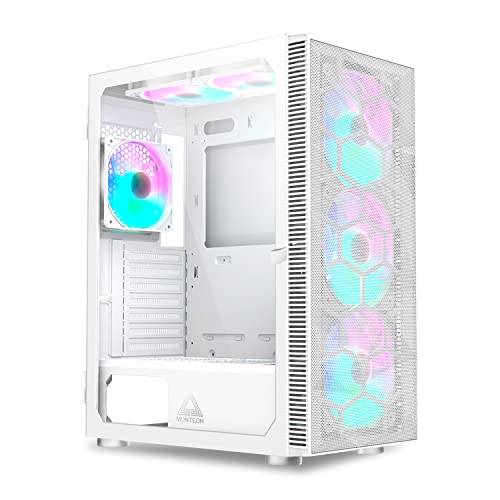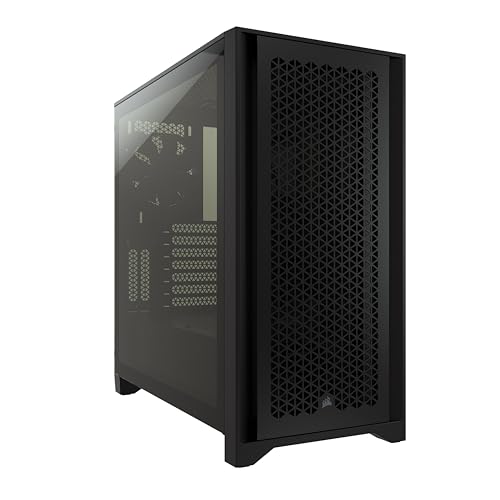
The full tower vs mid tower case decision is the PC builder’s version of buying a vehicle: the mid tower is the family car that suits almost everyone, and the full tower is the truck — genuinely necessary for some jobs, and more machine than most people will ever use. Mid towers dominate the market because they fit standard builds completely; full towers exist for builds that exceed standard in specific, nameable ways: multiple graphics cards, custom water-cooling loops, many storage drives, or the largest motherboards.
This comparison works through size, compatibility, cooling, cost, and daily practicality, and ends with a simple test: if you cannot name the specific thing a full tower would hold that a mid tower cannot, the mid tower is your answer.
Disclosure: As an Amazon Associate, ilcastellomenu.com earns from qualifying purchases. Product examples below link to Amazon, where you can check current availability and specifications; this guide itself lists no fixed prices because pricing and bundles change frequently.
Quick Verdict
Choose a mid tower for a standard single-GPU build with air cooling or a single radiator — which is to say, for the large majority of gaming and workstation PCs. Choose a full tower if your build sheet already contains an E-ATX motherboard, a custom loop with multiple radiators, a stack of hard drives, or multiple graphics cards. The fuller reasoning about sizes lives in What is a Good PC Case Size; this article is the head-to-head.
In this guide
Size and Footprint
A mid tower typically stands in the mid-40s of centimetres tall and houses an ATX motherboard with room for a full-size graphics card and a large air cooler. A full tower adds roughly another ten-plus centimetres of height and extra depth and width, swallowing E-ATX boards, taller reservoirs, and longer radiators. On the floor or desk, that difference is not subtle: a full tower is a piece of furniture, and under a desk it can crowd your legs and its own intakes.
Weight follows size. A built full tower with a custom loop is a two-person lift and a commitment when the room changes; a mid tower is awkward but manageable alone. If the PC will live on the desk, add the full tower’s loaded weight to the desk’s burden and its height to your sightlines before choosing.
Compatibility and Expansion
This is the full tower’s home ground. E-ATX motherboards fit properly rather than approximately. Custom water cooling gains room for multiple radiators and a reservoir without origami. Storage scales: full towers still offer the drive cages that mid towers have been deleting, so builders with many 3.5-inch drives — home servers, media hoarders, workstation scratch disks — are served here and almost nowhere else. Multiple graphics cards, where a workload still justifies them, need the full tower’s slot count and spacing.
The mid tower’s compatibility is narrower but covers the mainstream completely: ATX and smaller boards, any single graphics card (with the length check from How to Measure GPU Clearance in a PC Case), tall air coolers, and one or two radiators in typical gaming sizes. The question is never ‘which fits more’ — it is ‘which fits your actual parts list’, and for most parts lists the mid tower’s answer is everything.
Cooling Behaviour
Bigger is not automatically cooler. A full tower’s larger internal volume gives fans more air to move and can soften temperatures in very high-heat builds with many radiators, but a mid tower with a well-planned front-to-back path (the method in How to Set Up Airflow in a PC Case) cools a standard build just as effectively — the components’ own coolers do most of the work in both. Where the full tower genuinely wins is water cooling capacity and in separating heat sources across a larger space; where it can lose is in unfocused airflow, with intake air wandering a large volume instead of streaming across the graphics card.
Air-cooled builders should note that both sizes accept the tallest tower coolers; cooler height is a case-by-case specification, not a size-class guarantee, so check it either way.
Cost and the Ecosystem Around the Case
Full towers occupy higher price tiers than mid towers of comparable quality, and the premium compounds: more fans to fill more mounts, longer cable runs sometimes needing extensions, a larger desk footprint or floor space. Mid towers sit at the market’s centre of gravity, which means the widest choice, the most competition, and the best-developed accessories at every tier — the segment surveyed in roundups like Best ATX PC Cases Under 100.
Resale and reuse follow the same gravity: a good mid tower suits your next build and most other people’s, while a full tower is a specialist item with a narrower second life.
Building Experience
Full towers are luxurious to build in: cavernous routing space, room for both hands, radiators that mount without negotiation. For a complex custom loop, that luxury is close to a necessity. Mid towers ask for a little more planning — component order matters, and cable management rewards patience — but modern mid towers with good routing design are genuinely pleasant, and most builders finish them faster simply because there is less case to fill.
If you are choosing your very first case, the forgiving option is a good mid tower rather than a full tower: its constraints teach tidy habits, and its size will not punish you at moving time. The selection checklist in How to Choose a PC Case applies unchanged to both sizes.
Side-by-Side Summary
| Criterion | Full tower | Mid tower |
|---|---|---|
| Motherboards | Up to E-ATX, fitted properly | Up to ATX (some E-ATX approximately) |
| Graphics cards | Any length; multiple cards with spacing | Any single card, with the usual length check |
| Water cooling | Multiple radiators, reservoirs, custom loops | One or two radiators in typical sizes |
| Storage | Many 3.5-inch bays remain available | Few bays; M.2 and SSD focused |
| Footprint and weight | Furniture-scale; two-person lift when built | Desk- or floor-friendly; manageable alone |
| Cooling, standard build | No inherent advantage | Equal with a planned airflow path |
| Cost tier | Higher, plus more fans and fittings to fill it | Market centre; widest choice at every tier |
| Best for | Custom loops, E-ATX, many drives, multi-GPU | The large majority of gaming and workstation builds |
Full Tower vs Mid Tower Case: Who Should Choose Which
Choose the full tower when your parts list names its reasons: an E-ATX board, a custom loop drawn with two or more radiators, a drive count in the high single digits or beyond, or multiple graphics cards for a workload that uses them. Builders assembling that class of machine will find candidates in Best PC Cases for Custom Water Cooling.
Choose the mid tower for everything else — which is not a consolation prize but the correct engineering match for a single-GPU, air-cooled or single-radiator build. Spend the savings on the components inside, where they will be felt every day, rather than on empty volume.
The Sizes Between and Beyond
The market’s edges blur the headline comparison, and knowing the blur prevents a mis-purchase. ‘Super tower’ and ultra-large cases sit above the full tower for extreme multi-radiator and dual-system builds — a niche within a niche. At the other end, compact ATX cases use clever layouts (power supply mounted frontally, vertical chambers) to deliver mid-tower compatibility in near-ITX footprints, at the cost of tight clearances that demand the measurement discipline described elsewhere in this series.
The practical lesson is to shop by verified internal clearances and external dimensions rather than by class label. Two cases both sold as ‘mid towers’ can differ by ten litres of volume; the label is a neighbourhood, not an address.
A Decision Shortcut: The Parts-List Test
If you are still torn after the comparison table, apply this test in order. One: does your motherboard list say E-ATX, and do you need all its mounting and routing intact? Two: does your cooling plan name two or more radiators, or a reservoir that needs a home? Three: does your storage count exceed four 3.5-inch drives? Four: does your workload genuinely use a second graphics card? A single yes justifies pricing full towers. Four nos — the overwhelmingly common result — close the question: buy the best mid tower your budget reaches, and put the difference into the components the case exists to hold.
Living With the Choice: Desks, Rooms, and Moving Day
The size decision echoes for years in ways spec sheets never mention. A full tower dictates its room: it will not fit the alcove, it crowds the under-desk space it was promised to, and it turns every redecoration into a negotiation. Owners commonly end up with it standing beside the desk like a small refrigerator — perfectly workable, rarely what the product photos promised. A mid tower keeps its options open: desk or floor, this room or the next, sold or handed down without a logistics plan.
Moving house prices the difference precisely. A built mid tower is a heavy box one person can carry to a car. A built full tower — especially with a filled custom loop, which must travel upright and undisturbed — is a two-person, plan-the-vehicle event. None of this outweighs a genuine need for the volume; all of it belongs in the ledger when the need is hypothetical.
The second-PC and hand-me-down factor
Cases cascade through households: the old gaming case becomes the home server, the child’s first build, the workshop PC. Mid towers cascade gracefully because every household role fits them. A full tower cascades into exactly one role — another big build — and otherwise becomes storage furniture awaiting a purpose. If your household runs that cascade, count it as another quiet point for the default size, and another reason the full tower should be bought for a named present need rather than a possible future one.
The Resale and Donation Test, and Other Honest Signals
A revealing way to sanity-check the size decision is to imagine the case’s exit. Mid towers leave easily: they sell to any builder, donate to any school or relative, and fit any next role. Full towers leave to a shortlist of enthusiasts, often slowly. If imagining your full tower’s exit produces a flicker of dread, that dread is data: it measures how specialised the object is, and specialisation should be purchased only by a present, specific need.
What experienced builders actually own
Survey the desks of builders with a decade of systems behind them and a pattern emerges: the current machine is very often in a mid tower, whatever the builder’s history with larger cases, because experience teaches that builds converge on the mainstream — one card, one board, a handful of drives — and that the case’s job is to disappear. The full towers in those histories cluster around specific eras and projects: the big water-cooling phase, the home-server years. They were right for those projects and would be wrong as defaults.
Let that pattern inform the purchase: buy the case for the project on your desk today, in the size that project specifies, and trust that a future project with different needs can justify its own case when it arrives. Cases are not marriages; they are project equipment, and the mid tower is the project size most projects turn out to be.
One more axis: desk versus floor
Size interacts with placement one final time. A mid tower gives you the choice of desk or floor for the life of the build. A full tower, by weight and height, usually makes the choice for you — floor, beside the desk — and that placement then dictates its dust load, its cable runs, and how often you will open it. If you prefer a desk-kept PC you can admire and service easily, the size question may already be answered by the placement question. Decide where the machine lives, and let the room cast its vote.
A Brief History of Why Towers Got Their Sizes
The tower sizes are fossils of computing history, and knowing it explains their quirks. The full tower’s volume was designed for an era of multiple optical drives, stacks of hard disks, and boards crowded with expansion cards — a machine was a cabinet of peripherals, and the case was its warehouse. The mid tower won the mainstream as storage moved onto the motherboard, optical drives vanished, and one graphics card became the standard expansion: the warehouse’s tenants left, and the building shrank around the one that remained.
This history is why full towers still carry drive cages most builders remove, and why the size question keeps being asked with every build: the classes encode assumptions about what a PC contains, and those assumptions age. Judge your own build’s contents — not the era’s — and the correct class usually announces itself.
The dual-system and showcase extremes
At the market’s far edge sit cases that take the full tower’s logic further: dual-system enclosures housing two complete PCs, and showcase towers built around display rather than density. They are mentioned here only to mark the boundary of this comparison — if your build is one of these, you already know it, and no versus article was going to tell you. For everyone else, their existence is a useful calibration: the full tower is not the extreme of case sizing, merely the largest size a conventional build can plausibly need.
Noise and Fan Economics: The Big Case’s Quiet Argument
The comparison usually sells the full tower on space and the mid tower on sense, but the full tower’s most persuasive daily argument is acoustic. A larger case can move the same air with more fans turning slower, or with larger fans turning slower still, and fan noise falls steeply with speed — so a full tower, properly populated, can be the quieter machine at the same temperatures. The counterweight is arithmetic: those extra fans are a purchase, their hubs and cables are a management task, and a full tower populated sparsely can be louder than a mid tower, because its open volume and many unblanked openings give sound a clear path out and its few fans must work harder to establish a path for air.
The mid tower’s acoustic character is concentration: fewer, harder-working fans, a tighter path, and less surface to radiate sound. In a well-chosen mid tower with quality fans, the result is entirely respectable — the difference between the sizes is not silence versus noise but where the effort goes. Judge by your load: a machine that spends its life at high output benefits from the full tower’s slow-fan headroom; a machine that idles and browses mostly will never ask either case to work, and the quiet argument dissolves into the idle behaviour of the components themselves.
Panel choice interacts with size, as our airflow versus silent comparison explores: a large case with damped panels is a serious quiet machine, and a large glass showcase is a serious display of your fans’ voices. Size buys the option of quiet; it does not include the quiet itself.
Custom Water Cooling: The Full Tower’s Home Turf
If one workload justifies the full tower outright, it is the custom liquid loop. A serious loop wants radiator area — two or three large radiators with their fan stacks — plus a pump and reservoir with honest mounting space, tube runs that bend at dignified radii, and room to drain and service the system without dismantling the machine’s soul. The full tower offers all of it natively: roof and front positions that take thick radiators simultaneously, a basement or a rear chamber for the pump, and the working room that turns loop maintenance from surgery into servicing.
The mid tower’s loop story is one of ingenuity under constraint: one or two slimmer radiators, a combined pump-reservoir unit to save a footprint, tube runs planned to the millimetre. It can be done beautifully and often is — but every decision is a negotiation, the graphics card’s length is taxed by the front radiator’s stack, and the loop’s future — a hotter card, a second radiator — has nowhere to go. Builders who know the loop is a phase buy the mid tower happily; builders who suspect the loop is a hobby buy the full tower and stop negotiating with physics.
The honest middle note: most builders who dream of a loop build one, enjoy it, and return to air or an all-in-one for the next machine, because the loop’s maintenance is a relationship. If that might be you, the full tower bought for the loop becomes a large, expensive monument to a former hobby — while the mid tower shrugs and hosts whatever comes next. Buy the tower for the builder you have been, not the one the forum photographs suggest you might become.
The Storage-Heavy Build: When the Case Is a Filing Cabinet
Drive count is the full tower’s oldest argument and still its most concrete. A home server in a tower — a media archive, a video editor’s project library, a household’s backup destination — wants bays: half a dozen or more mechanical drives, mounted with airflow between them, cabled without heroics, and swappable without dismantling the machine. Full towers remain the cases that offer real bay counts with real cooling for them; the mid tower market has spent a decade deleting bays to feed radiators and graphics cards, and most modern mid towers treat two mechanical drives as a generous provision.
The storage builder should also weigh the unglamorous details size buys: a power supply with the connectors a drive fleet demands, cable runs that reach a bay stack without extensions, and vibration management — many drives in a light case compose a hum that a heavier, better-damped full tower absorbs more gracefully. Our case size explainer works through the volume arithmetic if you are counting drives against litres.
The counter-case is the dedicated NAS: a separate small box that serves files while the PC stays a PC. Households that go that way free the tower decision entirely — the mid tower wins by default — which is why the storage argument for a full tower should be made honestly: it is an argument for consolidation, one machine doing two jobs, with the noise, heat, and single-point-of-failure that consolidation implies. Some households want exactly that. They should buy the full tower with their eyes open and their backups — the real ones, elsewhere — in place.
Scenario Head to Heads: Five Builders, Two Towers
The LAN-party regular carries their machine monthly and games on whatever desk the venue provides. The mid tower wins without a hearing: it fits the car, the desk, and the owner’s arms, and its build survives the road. The full tower’s owner at the same event is a logistics operation. Verdict: mid, emphatically. The home-lab builder runs virtual machines, a fistful of drives, and a second network card, and treats the PC as infrastructure. The full tower’s bays, slots, and cooling headroom are the job description. Verdict: full, equally emphatically.
The competitive gamer with a single flagship card and a fast monitor wants the machine out of mind and out of the way — under the desk, silent at idle, ferocious for two hours an evening. Either case serves; the mid tower serves in less floor space and the full tower serves quieter at full cry. The deciding factor is the room, not the rig: measure the under-desk bay and let it vote. The video editor with a growing archive and a hotter card each generation is a future full-tower owner whether they admit it yet or not — drive growth plus card growth plus cooling growth is the full tower’s exact brief — and buying the mid tower now usually means buying both, in sequence.
The first-time builder, finally, should hear the unfashionable truth: the full tower is the easier build. Everything is reachable, nothing is a puzzle, cables forgive. If the room and the budget allow it and the machine will not travel, a beginner’s full tower is not excess — it is tuition paid in steel rather than in skinned knuckles. The mid tower’s discipline can be learned at the second build, when it will be appreciated rather than endured.
The Room’s Vote: Floors, Desks, and the Space Between
Cases live somewhere, and the somewhere has dimensions that vote in this comparison. The full tower’s footprint is a commitment of floor: under most desks it consumes the bay entirely, dictating where your feet and the subwoofer may not go, and on a desk it is not furniture but architecture — few desks should carry one, fewer rooms forgive it. Its weight, built, makes it a fixture; you will clean around it rather than move it, and its position, once chosen, is a long-term decision about the room’s geography.
The mid tower keeps the room’s options open: under the desk with legroom to spare, on the desk without dominating it, on a shelf or a stand if the room evolves. For renters, students, and anyone whose room serves several lives, that flexibility is not a compromise but the feature. Measure the intended home with the method in our case choosing guide — height under the desk with the case’s feet and any stand counted, width against knees and drawer units, the door’s swing and the chair’s travel — and let the room’s arithmetic join the parts list’s arithmetic in the decision.
Floors vote too. A heavy full tower on carpet needs a board or stand to keep its intakes breathing and its weight from bedding permanently into the pile; on hard floors it wants pads against vibration’s hum. None of this is difficult. All of it is the kind of consideration that separates a case that was chosen from a case that merely arrived.
A Decision in One Pass: The Three Questions
This comparison resolves, for most builders, into three questions asked in order. First: does anything in your build — or your credible next build — require the full tower’s specific gifts: many drives, a custom loop’s radiator area, an extended motherboard, two systems in one box? If yes, the decision is made and the remaining work is choosing which full tower. Second: will the machine travel, or will the room change, within the case’s expected life? If yes, the mid tower’s portability and flexibility outweigh headroom you may never use. Third: at your real load, do you value the quiet headroom of many slow fans enough to furnish the larger footprint and the larger fan budget? If the first two answers are no and the third is yes, the full tower earns its floor honestly.
Notice what the questions exclude: the size of your current graphics card, which both cases almost certainly fit, and the aesthetics of the showcase, which both sizes offer. The mid tower is the default because most builds answer no, no, and not really — and a default is not an insult. It is the accumulated experience of thousands of builds saying that the middle of the road is where most journeys actually go, and the full tower is a deliberate, defensible departure for the builders whose answers say otherwise.
Building Experience Revisited: Time, Hands, and the Second Builder
The building-experience section earlier in this comparison scores the full tower ahead, and ownership adds a chapter the first build cannot: the upgrade days. Every component swap in a mid tower is a small spatial negotiation — the new card threading past the drive cage, the cooler fitted with the motherboard already mounted because the case gives no other order. In a full tower the same jobs are merely jobs. Across a five-year life with three or four upgrades, the full tower returns hours and patience, and the mid tower returns a builder who has become genuinely skilled at working in confined spaces — a skill whose value depends entirely on whether they enjoyed acquiring it.
There is also the question of who else builds in it. A family or shared machine that a second person will maintain — a partner upgrading their own card, a teenager learning the craft — argues for the case that forgives inexperience. The full tower’s room is a teaching environment; the mid tower’s puzzles presume the knowledge they are supposed to teach. Households choosing a first shared machine should weigh that quietly important factor alongside the specifications.
Weight, Casters, and the Physics of Living With a Big Box
A built full tower is heavy in a way that changes behaviour: it is not carried to the workbench, the workbench comes to it; it is not slid out for a cable change, its owner learns to work behind it in place, with a torch, by feel. Casters — offered on some models, fittable to others — are the honest acknowledgement of this physics, and they transform the big case’s maintenance from a deadlift into a roll. If the full tower is your choice, price the casters or a wheeled stand into the purchase and check the result still fits its home’s height, because the wheels spend centimetres the under-desk bay may not have.
The mid tower’s lightness is easy to underrate until the day the machine must go somewhere — a repair, a move, a friend’s house for a weekend of games — and it simply goes, in one person’s arms, into an ordinary car. Portability is a feature that is worth nothing on the three hundred days the machine sits still and everything on the one day it must move. Count your likely moving days across the case’s life as honestly as you count its drive bays; for many owners that count, more than any specification, is the comparison’s real verdict.
The Ecosystem Bill: Fans, Extensions, and Furnishing the Volume
The case’s price is the first line of its bill, not the whole of it, and the two sizes furnish differently. A full tower typically arrives with fewer of its fan positions filled, because the maker assumes a builder with opinions; populating its intakes and exhausts to the standard the cooling sections of this comparison assume can mean several additional fans, a hub to control them, and cable extensions where the volume outruns standard lengths — the processor power cable’s journey to the top of a tall case being the classic. None of this is hidden, exactly, but it is distributed across other shopping baskets, and the honest comparison totals it.
The mid tower’s ecosystem bill is shorter because its ambitions are: the included fans often suffice, standard cables reach, and the accessories it wants are a dust filter’s replacement and perhaps one added exhaust. When you compare the two sizes’ prices, compare the two builds’ totals — case, fans, hub, extensions, stand — and the gap that remains is the true price of the full tower’s headroom. For the builders who need that headroom it is money correctly spent; for the rest it is the comparison’s quietest and most decisive argument.
Two Builds, One Budget: Where the Size Money Could Go Instead
A useful exercise before deciding: build the same machine twice on paper, once in each size, and spend the full tower’s extra total — case, fans, furnishing — on the mid tower build instead. The exercise usually reveals that the size premium, redirected, buys a tier of graphics card life, a quieter set of fans throughout, a larger drive, or the monitor arm the desk has been waiting for. Sometimes the full tower still wins the comparison after its price has been made to compete honestly. Often it does not, and the builder discovers the big case was being bought with money that had better jobs available.
Run the exercise in the other direction too, because fairness cuts both ways: price the mid tower build with the full tower’s future added — the transplant it will need when the loop or the drive fleet arrives, the second case purchase, the rebuilt afternoon. A size that must be bought twice is the expensive size, whatever its ticket said. The comparison’s mature form is not which case costs less today but which ownership story — one large case kept, or one mid case kept, or one of each in sequence — your actual plans describe. Buy the story you are actually living, and the tower question answers itself in the telling.
Gear for This Guide
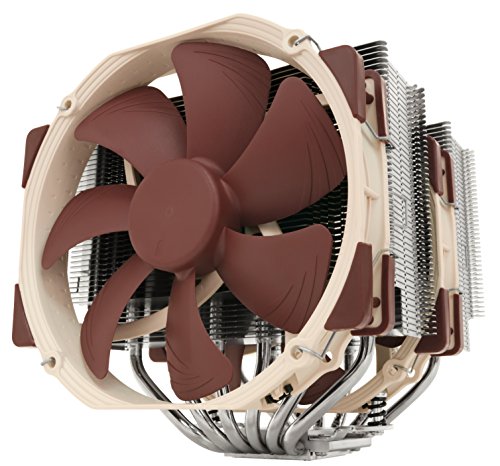
Two verified tall air coolers that fit in good cases of either size — included to make the point that cooler height is a specification to check, not a reason to buy a bigger case by default.
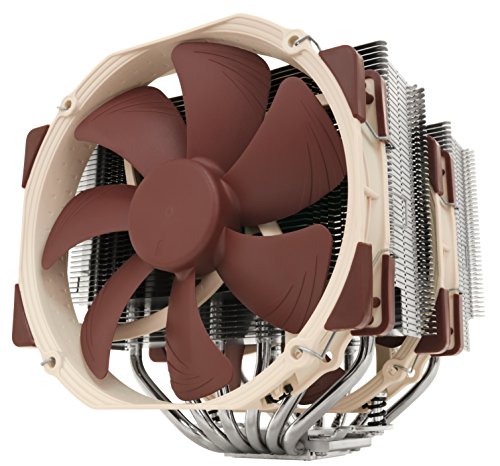
Noctua NH-D15 CPU Cooler
A 168mm dual-tower cooler per its listing: it fits most mid towers with height to spare, which is why ‘my cooler is big’ rarely justifies a full tower on its own. Noctua NH-D15 CPU Cooler — Check on Amazon
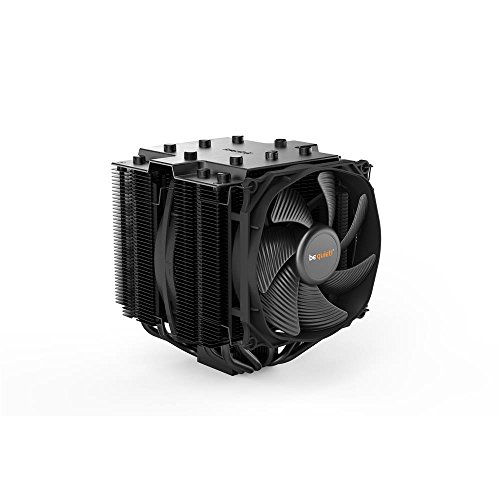
be quiet! Dark Rock Pro 4 CPU Cooler
A large dual-tower cooler with two Silent Wings PWM fans, representing the high-end air cooling that both size classes are designed around. be quiet! Dark Rock Pro 4 CPU Cooler — Check on Amazon
Frequently Asked Questions
Is a full tower cooler than a mid tower?
Not inherently. For a standard build, a mid tower with a planned airflow path matches a full tower, because the components’ own coolers do most of the work. The full tower’s cooling advantage appears with custom water cooling and very high total heat loads, where its radiator capacity and volume matter.
Can a mid tower fit a custom water loop?
A modest one, yes — many mid towers accept a radiator or two and a compact pump-reservoir unit, and tidy single-loop builds are common in them. Multi-radiator loops with large reservoirs are where the full tower stops being optional.
Do I need a full tower for an E-ATX motherboard?
For a proper fit with all mounting points and cable-routing holes usable, yes, in practice. Some mid towers accept E-ATX boards approximately, with routing holes partly covered and edges tight against the tray — workable, but the full tower is the honest match.
Will a full tower fit under my desk?
Measure before assuming: full towers are tall, and under-desk space must also leave room for the case’s top exhaust and your legs. Many full tower owners end up with the case beside the desk rather than under it, which is a room-planning decision to make in advance.
Is a bigger case quieter?
Size alone does not quiet a PC; fan quality, fan curves, and panel design do. A full tower with many fast fans can be louder than a mid tower with few slow ones. If silence is the goal, the airflow-versus-silence comparison in this series addresses it directly.
Is a mid tower enough for a custom water loop?
For a modest loop — one or two slim radiators cooling a processor and a card of moderate heat — yes, and many beautiful examples exist. The constraints are real, though: radiator thickness and card length trade against each other at the front mount, the pump and reservoir must share a compact footprint, and the loop you can build is the loop the case permits, with no headroom for the hotter future. If the loop is the hobby, the full tower is the workbench. If the loop is a means to a quiet machine, the mid tower’s compromise is usually sufficient and considerably cheaper to furnish.
Do full towers actually run hotter because of their size?
No — the myth confuses volume with path. A full tower’s components are cooled by the air delivered to them, and a large case with a planned path delivers as well as any mid tower, usually with slower fans. What a large case can do is hide a lazy setup: fans scattered without a path, dead zones in the empty bays. The cure is the same at any size — the intake-to-exhaust discipline of our airflow setup guide — and a full tower with that discipline is a cool, quiet machine. Size neither heats nor cools; arrangement does.
Can an extended-ATX motherboard fit a mid tower?
Sometimes, and the word sometimes is doing heavy work. Many mid towers accept the narrower extended boards, whose extra width only overhangs the cable cut-outs — at the cost of covering the grommets and making cable routing a negotiation — while the widest server-style boards simply do not fit. Check the case’s stated board support against your board’s actual width in millimetres, and if the fit is the overhang kind, accept it knowingly: the build will work, and every cable change afterwards will remind you of the compromise.
Which size holds its value better?
The mid tower, for the same reason straight desks outsell corner desks: its buyer pool is everyone. A used full tower sells to the narrower audience of loop builders, server builders, and the space-rich, so it tends to wait longer and return less of its price — unless it is a sought-after model with a following, which cuts the other way. If resale matters, buy the mid tower; if the full tower’s gifts matter, buy it for its working life and let the resale be whatever it is.
Is a full tower a waste for a single-GPU gaming build?
Not a waste — an indulgence with real returns and real costs, which is a fair description of half the hobby. The returns: the easiest build you will ever do, the quietest fan configuration at full load, and headroom for every future the build might grow into. The costs: the footprint, the fan budget to furnish it, the portability surrendered. A builder who names both sides honestly and still wants the big case should buy it without apologising to anyone’s spreadsheet. A builder buying it because bigger must be better has not yet read the parts-list test — the build in front of you, not the category, is the argument.
Will a full tower make my components last longer?
Only indirectly, and only if its cooling headroom is actually used. Components age by temperature and time, so a case that runs them cooler at the same load is, in principle, the kinder home — but a mid tower with a competent airflow setup runs the same components at temperatures whose difference is measured in single degrees, not in years of life. Buy the full tower for space, quiet, and building pleasure, where its advantages are real and immediate, rather than for longevity, where its advantage is mostly theoretical.
Is a mid tower cramped for a first build?
It is more demanding, not forbidding: millions of first builds happen in mid towers, and the techniques that make them pleasant — installing the cooler and cables in the right order, using the case’s cut-outs as intended — are the techniques every builder should learn anyway. Choose the mid tower without fear if its size suits your room and plans; choose the full tower if you would simply rather learn with room to spare. Both are legitimate reasons, and only one of them is about the components.
Can I put a mid tower build into a full tower later without buying anything else?
Almost always, yes — the transplant is the easy direction. Boards, cards, coolers, and drives all fit the larger case; the items that may need attention are cable lengths, since a tall case stretches the power supply’s leads further, and fan count, since the bigger volume may want an additional exhaust to keep the path honest. Budget an afternoon and possibly a cable extension, and the migration is one of the gentlest in the hobby.
The Bottom Line
The mid tower is the correct default for the overwhelming majority of builds; the full tower is a specialist tool whose purchase should be justified by a specific line on your parts list — E-ATX, a multi-radiator loop, many drives, multiple cards. Name the reason or buy the mid tower.
Related Guides
Run the clearance measurements, weigh the silence trade-off, and browse build-ready cases: