If you need to know how to fix a wobbly gaming desk, the good news is that wobble is almost never mysterious: it comes from uneven feet, loose frame bolts, a missing or loose crossbar, or — on older desks — worn fixings. Work through the causes in this order and most desks are rigid again within half an hour, with nothing more exotic than the Allen key from the original box. This guide also flags the rare cases where wobble means a part has genuinely failed and should be replaced rather than tightened.
Disclosure: As an Amazon Associate, ilcastellomenu.com earns from qualifying purchases. Product links on this page may earn us a commission at no extra cost to you. Prices and availability change on Amazon, so check the product page for the current details before you buy.
Diagnose the Wobble: Rock, Racking or Flex?
Three different faults all get called ‘wobble’, and they have different fixes. Rocking is the desk pivoting on two diagonal feet like a café table — a levelling problem. Racking is the whole top shifting side to side while the feet stay planted — a frame rigidity problem, usually bolts or the crossbar. Flex is the desktop itself bowing or vibrating under load — a top thickness or support problem. Push the desk in each direction, watch the feet, and name your fault before touching a tool.
Also check the floor’s contribution: a desk straddling a rug edge, a floorboard seam or a cable will rock no matter how well it is built. Slide the desk a few inches in each direction and retest on a clear, hard patch. If the wobble moves house with the desk, it is the desk; if it stays behind, it was the floor — the same first check as for chairs in How to Fix a Gaming Chair that Leans.
In this guide
Fix 1: Level the Feet
Most gaming desks have screw-adjustable feet or levelling pads, and most rocking is simply one foot a few millimetres short — from an uneven floor, a compressed pad, or a foot that was never adjusted after assembly. Press each corner of the desk down in turn to find the corner that lifts or knocks, then adjust that foot in small turns (down to lengthen it) until all four feet bear weight evenly. On carpet, press firmly while testing — pile hides small gaps that show up the moment you lean on the desk.
If a foot’s pad is missing or cracked, replace it before levelling; levelling against a missing pad just stores the problem. Felt or rubber pads also protect hard floors, which is reason enough to keep them intact. Desks assembled without this step — see How to Assemble a Gaming Desk — often ‘develop’ a wobble that was actually built in from day one.
Fix 2: Tighten the Frame, In Rotation
Racking lives in the joints. With the desk unloaded (monitors off if you can bear it — at minimum, everything pushed to the centre), work through every frame bolt: leg-to-desktop fixings, crossbar bolts, and any frame rail screws. Loosen none of them; simply check each for tightness and snug the loose ones, moving in rotation around the desk rather than finishing one leg completely, so the frame pulls together evenly. Bolts in engineered wood should be firm, not forced — a stripped fixing hole is worse than a slightly soft one.
Pay special attention to the crossbar if your desk has one: it is the anti-racking member, and a crossbar with two loose bolts is decorative. If your desk never had a crossbar and racks badly, that is a design limitation — the next section covers workarounds, and How to Choose a Gaming Desk explains why the crossbar tops the shopping checklist.
Fix 3: The Desktop Fixings and the Two-Piece Joint
On desks where the top screws up into the frame from below, individual screws work loose over time, letting the top shift microscopically and creak. Check them all, and replace any that spin without biting — a spinning screw means a stripped hole. A stripped hole in particleboard can often be rescued by a proper repair: the screw removed, the hole filled with a suitable wood filler or a glued wooden plug, cured fully, and re-drilled. That is a legitimate furniture repair, distinct from structural damage.
Two-piece desktops (common on wide and L-shaped models) add a centre joint that can develop a step or a flex. Loosen the joining plates, align the two halves flush on a flat reference, and re-tighten evenly. A joint that will not stay flush usually has a bent plate — a cheap replacement part — rather than a failed top.
Workarounds for Inherently Flexible Desks
Some desks are simply under-built: thin tops, no crossbar, long spans. Before replacing one, try the honest mitigations. Move the tower to the floor or the desk’s strongest corner to cut the live load. Add an aftermarket crossbar or a modesty panel screwed between the legs — a panel turns two legs into a braced frame and transforms racking. Position the desk so one long edge rests against a wall, which quietly braces side-to-side movement (without screwing anything to the wall). Reduce monitor-arm leverage by choosing a grommet mount over a rear-edge clamp on very thin tops.
If the desktop itself flexes under your forearms, a large rigid desk mat or a secondary board under the monitor area spreads load, but treat these as palliatives. A desk is a decade-long foundation for expensive equipment; when mitigations stack up, replacement through a roundup like Best Gaming Desks for Under 200 is often the economically honest answer, especially before you mount heavy arms and triple screens on a top that already complains.
When Wobble Means Failure: Stop and Replace the Part
Some findings end the tightening session. A cracked leg socket or split desktop around a fixing, a bent leg, a crossbar torn from its mounts, or a height-adjustable desk whose lifting columns have developed uneven play — these are failed parts, and a desk under load can collapse onto equipment and legs. Electric standing desks with wobble at full height deserve special care: slight sway at extension is normal for the format (see Standing Gaming Desk vs Seated), but growing play, uneven lifting or grinding is a warranty conversation, not a DIY one — do not open motor housings or lifting columns.
Document the fault with a short video if the desk is under warranty; manufacturers recognise these failure modes instantly. And while any structural part is awaiting replacement, unload the desk — a wobbly desk is annoying, but a collapsing one is expensive.
Prevention: Keeping the Desk Rigid
- Re-check frame bolts every few months; desks settle and loosen exactly like chairs do.
- Keep loads honest: know your desk’s rated capacity and do not park a tower, three monitors and your leaning weight on a span never meant for it.
- Lift, never drag, when moving the desk — dragging racks the frame and loosens every joint at once.
- Keep feet pads intact and re-level after any move, however small.
- Route cables with slack so nothing pulls sideways on the desk or its equipment, per How to Organize Cables on a Gaming Desk.
Five minutes of prevention per quarter keeps a sound desk sound. Wobble is cumulative neglect made audible — catch it at the bolt stage and it never becomes a parts bill.
Wobble in Height-Adjustable Desks: A Separate Playbook
Electric desks wobble for their own reasons and deserve their own sequence. First, height itself: every two-column desk sways more at full extension, so judge yours at your actual working height, not at its maximum. Second, load distribution: a heavy tower at one rear corner torques the frame asymmetrically — centre the load or move the tower to the floor and retest before condemning the frame. Third, the floor: adjustable feet on the frame’s feet (many have them) level exactly as on a fixed desk.
Fourth, the synchronisation check: if one column rises faster or sits higher than the other, the desktop tilts and the frame binds — most controllers have a reset procedure in the manual involving holding the down button through a full cycle. Follow the manufacturer’s reset before anything mechanical. Fifth, cable drag: a taut cable bundle acts as a guy-rope, pulling the desk off true and adding apparent wobble — the routing slack test from this batch’s cable guide applies with full force.
What you must not do is open lifting columns or motor housings, lubricate inside the mechanism, or shim a column. Those are sealed, load-bearing, electrically driven assemblies; their service path is the manufacturer. A desk that lifts your equipment daily deserves the same respect as the equipment.
The Wobble Audit: A Quarterly Five Minutes
Add the desk to the same quarterly maintenance rhythm as your chair. Press each corner and note any rock; run a hand along the frame bolts and snug the drifters; check the desktop fixings from below with a torch; confirm the feet pads are present and the level still holds after any furniture shuffle. Five minutes, four times a year, and wobble never progresses past the stage where a quarter-turn cures it.
Log what you find the way this batch recommends for chair squeaks: date, symptom, fix. A desk whose bolts loosen faster each quarter is telling you a fixing hole is wearing, and that is a repair to schedule calmly — a plug-and-refill on a quiet weekend — rather than discover during a tournament when the monitor starts to dance.
Desks are the silent partners of every setup. The audit is how you keep the partnership silent.
Wobble Signatures: Reading the Pattern
Wobble has a diary if you learn to read it. A wobble that appears only when you type hard lives in the desktop fixings or the top’s own flex — your hands are the load case. A wobble that appears when you lean lives in the feet and frame. A wobble that has grown over months, evenly and everywhere, is the signature of general bolt drift across every joint at once, and it answers beautifully to the full tightening rotation in this guide.
A wobble in one direction only is a gift: it names the axis whose bracing is missing or loose. Side-to-side points at the crossbar; front-to-back points at leg fixings and foot level. A wobble that exists at the desk’s left end but not its right localises the fault to that leg and its fixings — desks, like patients, localise their symptoms for those who test systematically.
Keep the pattern in your maintenance log alongside the fix. A signature that returns is a diagnosis deepening: the same corner loosening quarterly is a worn fixing hole asking for the plug repair, not a bolt asking for another quarter-turn. Patterns are how furniture communicates; the log is how you stop re-solving the same problem as if it were new.
And a wobble that arrives suddenly, severely and with a sound — a crack, a pop, a new creak under load — is not a pattern at all. It is an event. Unload the desk and inspect before any further use, because sudden wobble is how structural failures introduce themselves.
Bracing Projects for the Determined
For a fundamentally under-braced desk you intend to keep, three projects repay their effort. A fitted modesty panel — a board screwed between the rear legs, full width, into both legs and the desktop’s underside rail — converts an open frame into a box structure and can halve perceived wobble in an afternoon. A steel crossbar kit does similar work with less material if the legs offer mounting faces.
A thicker secondary top, screwed through the original, stiffens a flexing desktop and adds the clamp-worthy edge a monitor arm wants — at the cost of height, which your chair and the ergonomics audit must re-approve. And wall-battens — a timber rail fixed to the wall at desktop height, the desk’s rear edge resting and screwed to it — deliver the most rigidity per penny in all of furniture, where tenancy and wall construction allow.
Each project follows the same discipline as the original assembly: square before tightening, hand tools, and a wobble test after every stage so you learn which intervention actually worked. A desk braced by evidence is a desk understood — and understood furniture rarely surprises its owner again.
Wobble After a Move: Transport Damage Triage
Desks that wobble after a house move deserve their own triage, because transport inflicts a characteristic pattern: every bolt loosened a quarter-turn by vibration, one foot pad lost to a van floor, and occasionally a fixing torn by a desk carried assembled when it should have been parted. Work the full sequence from this guide in order — level, frame rotation, desktop fixings — before concluding anything is broken; most post-move wobble is simply the whole desk needing its one-week check at once.
Inspect specifically at the points where hands grabbed it: legs near their tops, the desktop’s edges, the crossbar’s ends. Carrying by the top racks frames; carrying by one leg bends mounts. Damage found there is honest wear of a particular kind, and it usually yields to the same tightening and levelling, with the plug repair reserved for any fixing that now spins.
For the next move, the lesson writes itself: disassemble to frame and top, bag and label the bolts, protect the top’s face, and the desk arrives as a kit instead of a casualty. The assembly guide in this batch is the reassembly manual you will be grateful to reread on the far side.
The Wobble You Should Not Fix: Rental and Warranty Boundaries
Some wobbling desks are not yours to repair. A desk under warranty with a structural fault should travel the claim route before your tools touch it beyond tightening — manufacturers distinguish maintenance from modification, and bracing projects, however excellent, are modifications that can complicate a claim. Photograph, video, describe, claim; then fix what the claim leaves you.
Rented furnished spaces draw the other boundary: the desk is the landlord’s, and your remedies are the reversible ones — levelling feet, tightening accessible bolts with care, mats and load placement. Bracing screwed into a rented desk converts a wobble into a deposit deduction, which is a poor exchange rate for rigidity.
Know which desk you own before you fix it. The techniques in this guide are ordered so that the universal, reversible, claim-safe steps come first — by the time a step could affect a warranty or a tenancy, the guide has already told you to stop and think.
Steady Desks, Steady Aim: Why Gamers Feel Wobble More
Gamers notice wobble that office workers forgive, because gaming loads a desk dynamically: mouse arms sweep and plant, wheels torque, fists occasionally land. A desk can pass the static test — level, tight, still — and fail the gaming test, which is why this guide’s diagnostics end with the working test: sit, play something real, and push the desk the way a match pushes it.
Monitor arms amplify the perception: a long arm is a lever that turns millimetres of desk movement into centimetres of screen travel, and a screen that swims during play is both a comfort and an accuracy problem. If your setup runs arms, judge wobble at the screen, not at the desktop — that is where your eyes live, and it is the strictest judge in the room.
The good news is that the gaming test is also the proof of cure. When the screen sits still through your most animated game, the desk is fixed in the only sense that matters, whatever a spirit level says. Fix for the test you actually play.
Putting a Number on Wobble: Phone Sensors and Honest Thresholds
Wobble diagnosis improves the moment it stops being an adjective. Your phone, running any level or vibration app laid flat on the desktop, turns the fault into data: tap the desk as you type, work the mouse through a hard flick, lean on the front edge, and watch the movement’s size and direction. Record the readings beside the fault’s name from the diagnosis section — a rocking desk shows a slow, large sway at one corner; racking shows a rhythmic side-to-side tremor under lateral force; flex shows a local bounce under the forearms that the corners never feel. The pattern confirms the diagnosis before a single bolt is touched.
Thresholds keep the numbers honest. A monitor that moves a millimetre at its top edge during hard typing is a desk most players will never notice again once they stop testing it; a screen that visibly swims during mouse work is a fault worth the full sequence in this guide. Measure at the screen, not only at the desktop, because the screen is where wobble is actually experienced — and where a monitor arm multiplies it, as the next section details.
Log the numbers with the date, as this batch’s maintenance rhythm prescribes. A wobble measured at each quarterly audit is a trend, and trends are diagnoses: stable readings mean a sound desk with a character; growing readings mean a joint is spending itself, and the quarter where the growth starts is the quarter where the fix is cheapest. Feelings about wobble drift with mood and fatigue. Numbers do not, which is why the instrument earns its place in a furniture guide.
The Monitor Arm Multiplier: Fixing Wobble at the Clamp
A monitor arm is a lever bolted to your desk, and it multiplies whatever movement the desk makes: a millimetre of tremor at the desktop becomes a centimetre of swim at the end of a fully extended arm. Owners therefore chase desk wobble that is really arm physics, tightening frames that were never loose. Separate the two before fixing either: remove the screens’ weight from the equation by folding the arms fully back to their posts, then run the wobble tests. A desk that is steady with its arms folded owns a sound frame and an ambitious load geometry, and its fix lives at the clamp, not in the bolts.
Work the clamp’s side of the problem in order. Position: an arm clamped near a leg or over the frame’s strongest span inherits the desk’s stillest ground, while an arm at the middle of a long rear edge sits on the desk’s most flexible address — moving the clamp a foot sideways can halve the swim without a single tightening. Grip: the clamp’s pads must sit fully on the top, its screw snug, with a load-spreading plate or block beneath thin tops so the jaw bites structure rather than crushing board. Balance: two screens on two arms extended unequally torque the desk’s rear edge asymmetrically; evening the arms’ extension, or moving to a single dual-arm post, removes a twist that no frame tightening addresses.
Only when the arms are folded, the clamp is seated on strong ground and the swim persists does the fault return to the desk itself and the main sequence of this guide. The order matters because arm-side fixes are free and instant, while frame-side fixes are neither — and because a generation of players has re-tightened innocent desks while the lever on their rear edge went on multiplying, unexamined.
Fixing the Floor: Platforms, Shims and Rug Decisions
When the diagnosis convicts the floor — a slope, a springy board, a rug edge under two feet — the repairs belong to the room, and they follow one principle: give all four feet one true plane, at the scale of the whole desk rather than at any single foot. The rug case is the simplest: a mat or board large enough to hold the desk’s entire footprint, so no foot stands on the boundary between surfaces. Boundary standing is the classic rocking generator, because the desk’s load shifts its feet across the border with every lean, and no levelling survives a border that moves.
Sloped floors answer to a platform: a sheet of rigid board under the whole desk, shimmed at its low side until the level confirms it, its edges tapered so the chair’s casters climb it without a jolt. The platform must be bigger than the desk’s footprint by the chair’s approach as well, or you have built a level desk on an island your chair cannot board. Shimmed platforms are honest carpentry, not bodges — provided the shims are solid, full-length where they can be, and fixed so they cannot walk out under vibration.
Springy boards are the subtlest floor fault: a foot standing mid-board rides the floor’s flex every time you lean or a housemate crosses the room. The fixes are placement — shift the desk so its feet land nearer the joists, which you can find by the floor’s own report underfoot — or load-spreading pads under the feet that widen each foot’s claim on the board. What never works is shimming a single foot of the desk itself to pre-load the spring out: the spring is still there, now with a wedge in the system, and the wobble returns wearing a rattle. Fix the plane, never the point — the same rule the leaning-chair guide in this batch teaches, because physics does not care which furniture it is humbling.
Two Special Cases: Glass Tops and Panel Legs
Glass-topped desks wobble in their own dialect. The top cannot flex — glass is rigid until it fails — so all the movement lives in the frame and the top’s mounting pads, and the diagnosis concentrates there: suction or adhesive pads perished or missing, frame bolts into the glass’s metal pucks loosened, a frame that racks while the top rides it like a raft. The fixes are the frame sequence from this guide plus pad renewal, performed with glass discipline: never lever against the top’s edge, never over-tighten a fixing into glass, and treat any chip at a mounting point as a stop-and-replace finding rather than a cosmetic note, because glass under cyclic load grows its flaws.
Panel-leg desks — solid sides instead of post legs — invert the usual geometry: immensely stiff front-to-back, they rack side-to-side if their top fixings or floor contact falter, and their great mass hides looseness until it is advanced. Their audit leans on the top fixings and on the panels’ feet: a panel standing on an uneven floor rocks as a unit, and its levelling is done with full-length shims under the panel’s edge rather than at points, spreading the correction along the panel’s whole footprint.
Both cases obey the guide’s master rule — name the fault before fixing it — with the names translated: for glass, the fault is almost always mounting; for panels, almost always contact. The owner who knows their desk’s dialect skips the chapters that were never about their desk, which is the real economy of diagnosis done in the right order.
Wobble in the First Week: Assembly Debt or Defect?
A new desk that wobbles presents a fork the older desk never does: the fault is either assembly debt — the build’s own unfinished business — or a defect that arrived in the box, and the two have opposite correct responses. Assembly debt is common and honourable: feet levelled before the desk settled onto its floor, bolts tightened before the frame was squared, a crossbar fitted but not truly snug. The response is the build done again properly, in the assembly guide’s order — loosen, square, tighten in rotation, level under load — and most first-week wobble dies there, because it was never damage, only sequence.
The defect’s signatures are different: a leg whose foot will not extend to the floor at any setting, a frame rail visibly bent or a weld cracked, fixing holes drilled where the desktop’s screws cannot bite, a top warped beyond what the frame can pull true. Photograph each against the manual’s diagrams and stop: a desk assembled further around a defect becomes harder to exchange with every bolt, and the seller’s obligation is clearest while the desk is young, unmodified and documented.
The fork’s discipline is timing. Give assembly debt one honest rebuild — a full pass, not a hopeful wiggle of two bolts — and if the wobble survives it unchanged, promote the desk to the defect branch and open the conversation with the seller while the calendar is your friend. Owners lose money at this fork by rebuilding hopefully for a month; the desk that wobbles identically after a correct rebuild has already told you which branch it lives on.
The Load Test: Proving the Fix Under Working Conditions
A fix is a hypothesis until the desk is loaded and used, and the load test is this guide’s proof protocol — the wobble equivalent of the chair guides’ week of sessions. Reload the desk completely: screens on their arms in their working positions, tower in its home, peripherals placed. Then work, genuinely, for an evening that includes your most physical gaming — the hard mouse work, the animated lean, the stand-up-and-sit that racks a frame through its whole vocabulary. A desk tested with fingertips in an empty room has been tested against a life nobody leads.
Judge by the screen, as the measurement section prescribes: it is the wobble’s final destination and the only reading that matters to the player you are. If the swim is gone under working load, log the fix with its date and its readings, and return the desk to the quarterly audit. If a reduced wobble remains, the load test has still done its work — it has converted ‘better, maybe’ into a measured remainder with a direction and a size, which is the input the next diagnostic pass needs.
Resist the temptation to keep tightening beyond the test’s verdict. A desk that passes the load test is fixed, and further turns of the key buy nothing but stripped threads and a frame stressed past its design — the over-repair that manufactures tomorrow’s fault from today’s anxiety. The discipline of stopping is the last skill in this guide and the one that separates maintenance from worry: diagnose, fix, prove, log, and then sit down and play on the thing, which was the point of the desk all along.
When the Desk Is Innocent: Wobble That Arrives Through the Chair
Before the frame is condemned, acquit it of the wobble that is not its own. You experience your desk from a chair, and a chair that rocks, leans or rolls transmits its motion to your hands and eyes exactly where you judge the desk’s stability — at the keyboard and the screen. A player whose chair has developed play in its mechanism, per the leaning and squeaking guides in this batch, can chase a desk fault for a weekend while sitting on the actual culprit. The isolation test costs two minutes: stand at the desk, hands on its surface, and reproduce the tests standing, with the chair rolled away. Then sit in a different, solid chair — a dining chair — and repeat. A wobble that exists only from your gaming chair belongs to the chair’s column of the ledger.
The floor couples the two as well: a chair rolling in a small arc as you play works the floorboards the desk’s feet stand on, and in rooms with springy boards the desk genuinely moves — driven by you, through the floor, at one remove. The desk is then a victim twice removed, and its fix is the floor section’s platform or a relocation of the chair’s rolling territory, not a single turn of its own bolts.
This is the diagnostic philosophy of the whole guide stated one last way: the system is guilty or innocent together, and the desk is only one suspect in it. Isolate before you repair, and let each component be tested in the condition where the others cannot speak for it.
Seasonal Wobble: The House Moves, and the Desk Reports It
Some desks wobble on a calendar. Timber floors and the houses that hold them breathe with the seasons — boards shrink in the dry heated winter and swell in the humid summer — and a desk levelled true in January can rock gently by July on feet that have not moved a thread. Engineered desktops join in modestly, and the house itself settles by millimetres across years. The signature of seasonal wobble is its history: it arrives slowly, it has happened before at the same season, and the quarterly audit’s log — kept, as this guide insists, with dates — shows the readings breathing in and out rather than declining in one direction.
Treat it as weather, not as failure. Re-level at the season’s turn as part of the audit, expecting the correction to reverse itself in six months; check the bolts once for conscience’s sake and then leave them alone, because a frame re-tightened quarterly against a moving floor accumulates exactly the thread wear the prevention section warns about. The floor fixes from this guide — the platform especially — damp the seasonal swing by giving the desk a reference plane of its own, and a desk on a platform in an old house often stops reporting the seasons entirely.
Distinguish the calendar from the cliff: seasonal wobble oscillates, damage only declines. A reading that returns each year to roughly the same value is the house breathing. A reading that ends each year worse than it began is a joint spending itself on schedule, and the log that separates those two stories is worth more than any single fix in this guide.
Calling It: The Maker, a Carpenter, or Replacement
Every wobble eventually meets the question of whose problem it now is, and the answer sorts into three honest destinations. The maker owns the desk that is under warranty with a structural fault — a cracked weld, a failed leg, a frame that will not hold square after a correct rebuild — and the claim runs on the evidence discipline this batch teaches everywhere: dated readings, a short video of the fault under load, and no modifications beyond the guide’s reversible fixes, because a desk drilled and shimmed by its owner is a desk whose warranty has been renegotiated downward by the person least able to afford it.
A carpenter or furniture repairer owns the desk that is out of warranty but structurally sound in concept: the stripped fixing field that needs re-plugging wholesale, the desktop worth re-edging, the frame that wants a welded brace designed rather than improvised. Their hour costs less than the desk’s replacement and more than your afternoon, and the desks that justify it are the good ones — solid tops, honest frames, dimensions your room loves. Get the verdict in writing where you can; a repairer’s ‘this frame has years in it’ is the second opinion that turns a hopeful repair into a sound one.
Replacement owns the rest: the desk whose frame, top and fixings are declining together, where each repair’s cost chases the next fault and the sum buys most of a new desk with none of its warranty — the same combination logic the chair lifespan guide teaches. Call it without sentimentality and with the audit’s numbers in hand, and let the old desk’s measurements — kept, like every measurement in this batch — write the replacement’s specification. Nothing about a well-diagnosed desk is wasted, not even its ending.
Gear for This Guide
You do not need to buy anything to follow most of this guide, but the items below are the ones that genuinely come up again and again in this topic. Each one is a current, widely sold model rather than a placeholder pick.

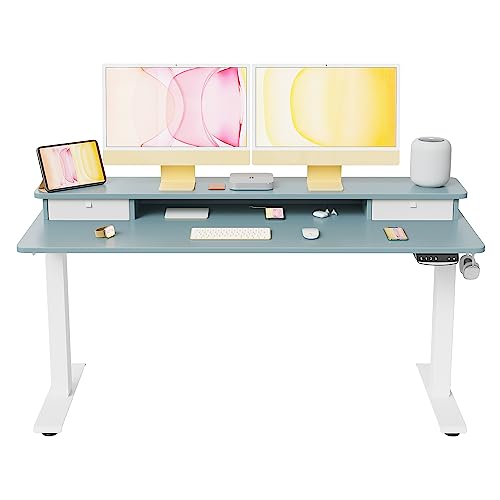
FEZIBO 55 x 24 Inch Electric Standing Desk with Double Drawer
If your wobble verdict is ‘replace’, Fezibo’s 55-inch electric desk is the kind of frame to look for: a full steel underframe with storage, stable at working heights, and sized for dual-monitor stations. Check on Amazon

Bestier 51 Inch Corner Computer Desk with Power Outlets & LED Lights
Bestier’s corner desk shows the braced-frame principle in an L design — shelving and frame members tying the legs together, which is exactly the structure that resists racking in corner layouts. Check on Amazon
Frequently Asked Questions
Why does my gaming desk wobble side to side but not front to back?
That is racking: the frame is flexing in its weakest direction because side-to-side bracing (usually the crossbar) is loose, missing or under-designed. Tighten the crossbar first; add bracing if the design lacks it.
Can a wobbly desk damage my monitors?
Yes, indirectly: persistent vibration loosens monitor-arm clamps and stand fixings over time, and a severe wobble risks a top-heavy screen tipping. Fix the wobble before it fixes your equipment budget.
My standing desk wobbles only when raised. Is it broken?
Some sway at full extension is inherent to two-column lifting desks. It becomes a fault if it is new, growing, uneven between sides, or accompanied by noise — then it is a warranty issue; do not open the lifting columns.
How do I fix a stripped screw hole in a particleboard desk?
Remove the screw, fill the hole with wood filler or a glued wooden plug, let it cure completely, then re-drill a pilot hole and refit. If the surrounding board is crumbling, the top itself is at end of life.
Will a wall-mounted desk stop wobbling?
Wall-fixing braces a desk extremely effectively, but only fix to a wall if the desk’s design and your tenancy allow it, using proper fixings into studs or masonry. Bracing one edge against the wall without fixings already helps.
Can an uneven load make a sound desk wobble?
Yes — load placement is a wobble cause in its own right. A tower at one rear corner, screens on arms extended forward, and a player leaning on the front edge together shift the desk’s centre of mass toward its feet’s edge, and a desk loaded eccentrically can rock on a frame that tests perfectly when empty. Redistribute before you repair: tower over a leg, arms folded closer to their posts, and re-test. The load test in this guide exists because desks must be judged in their working clothes, not naked.
Is it safe to put a heavy book or weight on the desk to stop wobble?
It can mask a symptom — ballast low over a leg sometimes calms a rocking desk — but it treats nothing, adds load the frame may not want, and hides the trend your audit should be watching. Use ballast only as a diagnostic: if weight over one corner changes the wobble, it has told you where the movement lives. Then fix the cause the ballast identified, and let the book go back to being read.
My desk wobbles only when my partner walks past. Is that a desk fault?
Usually it is the floor’s confession: footfall flexing a board that one of the desk’s feet stands on, transmitted straight up the leg. Confirm it by watching the level app on the desktop while they walk the same path, and by testing with the desk shifted a few inches so its feet find different boards. The cures are placement — feet nearer the joists — or the load-spreading platform from this guide. Tightening the desk for a floor’s behaviour is the classic misdiagnosis this guide exists to prevent.
The Short Version
Name the fault first — rocking is feet, racking is frame, flex is top. Level the feet, tighten the frame in rotation, check the desktop fixings and centre joint, and brace or unload under-built designs. Cracked sockets, bent legs and failing lifting columns are replacements, not adjustments. Half an hour of method restores most desks to furniture-grade silence.