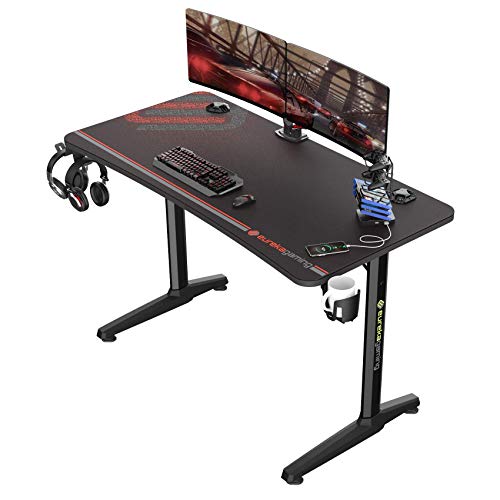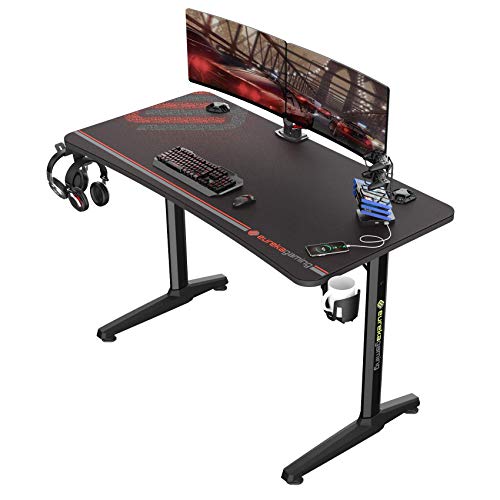
Knowing how to choose a gaming desk comes down to four honest measurements — your room, your monitors, your chair and your PC — plus one honest question about how you actually play. Desks fail buyers in predictable ways: too shallow for a monitor and keyboard, too small for a tower, too flimsy for a multi-screen rig. This guide works through size, shape, materials and features in priority order, so the desk you order is the desk your setup actually needs.
Disclosure: As an Amazon Associate, ilcastellomenu.com earns from qualifying purchases. Product links on this page may earn us a commission at no extra cost to you. Prices and availability change on Amazon, so check the product page for the current details before you buy.
How to Choose a Gaming Desk: Size First, Everything Else Second
Start with the largest monitor setup you realistically plan for the desk’s life, not the one on it today. A single 24–27 inch monitor with a keyboard needs a desktop around 47 inches wide to feel uncramped; dual monitors or an ultrawide push you toward 55–63 inches; triple-screen and streaming rigs need 63 inches or a corner design. Depth matters just as much and is the spec buyers most often under-order: 24 inches of depth is the workable minimum for a monitor on its stand plus a keyboard, while 28–30 inches gives proper viewing distance and room for a monitor arm’s clamp.
Measure the room before falling for any of it. The desk footprint plus chair space behind it (roughly another 30 inches) plus walking room is the real estate a desk consumes. The size logic in full — including viewing-distance maths — is in What is the Best Size for a Gaming Desk, and if your room is tight, the space-efficient shapes in Best Corner Desks for Gaming deserve a look before you commit to a straight desk.
In this guide
Shape: Straight, L-Shaped and Standing
Straight desks are the default for good reason: simplest, cheapest per inch, easiest to place against any wall. L-shaped desks earn their footprint in corners, giving you a main gaming surface plus a genuine second zone for a laptop, console or paperwork — the head-to-head is in L Shaped Gaming Desk vs Straight. Standing desks (fixed tall or height-adjustable) suit players who also work at the desk and want posture variety; the trade-offs are weighed in Standing Gaming Desk vs Seated.
Be honest about which shape your habits need. An L-shape bought for a second zone that becomes a dumping ground is just an expensive shelf; a straight desk bought for a room with a dead corner wastes the room’s best asset. Shape is also where a gaming desk most differs from an office desk, a distinction explored in Gaming Desk vs Regular Desk.
Materials and Build: What ‘Sturdy’ Actually Means
Desktop materials, from most to least durable: solid wood and quality bamboo at the top; high-pressure laminate over MDF or particleboard in the middle (the gaming-desk standard, perfectly serviceable); and thin hollow-core or foil-wrapped boards at the bottom, which flex under monitor arms and sag over years. Thickness matters — a desktop around an inch thick resists the clamp pressure of monitor arms and feels planted when you lean on it.
The frame decides stability more than the top. Steel legs with a crossbar or full frame stay rigid at 55 inches and beyond; two unconnected panel legs wobble at the same width. Check the stated weight capacity against your real load: monitors, tower (if it lives on the desk), speakers and the force of an excited player leaning in. Capacity figures assume evenly spread weight — a tower concentrated at one corner is a sterner test. If stability is your top concern, the wobble diagnostics in How to Fix a Wobbly Gaming Desk double as a checklist of what to avoid buying.
Features Worth Paying For (and Gimmicks to Skip)
- Cable management: a rear tray or channel plus grommet holes — genuinely transformative for a clean setup, as How To Organize Cables On A Gaming Desk shows.
- Monitor shelf/riser: raises screens to eye level and frees desk surface underneath; valuable on shallower desks.
- Cup holder and headphone hook: cheap, and they prevent the two most common desk disasters — spills and headphones on the floor.
- Full-surface mouse mat tops: pleasant and replaceable on some models; a luxury, not a necessity.
- Built-in RGB and USB hubs: fun, but judge the desk as furniture first; electronics date faster than frames.
- Height adjustability: worth real money if you also work at the desk; pure gamers who never stand may never use it.
Notice what is not on the list: racing stripes and carbon-fibre-look film add nothing but price. A plain desk with a tray, a shelf and a steel frame will out-serve a flashy one without them every day of its life. Shoppers comparing finished options can sanity-check their shortlist against Best Desks For Gaming Setups, where these features recur on the proven models.
Ergonomics: The Desk Half of Your Posture
Standard desk height is around 29–30 inches, which suits average-height players with a correctly adjusted chair. If you are notably tall or short, desk height becomes a selection criterion, not a given: your forearms should rest level with elbows near 90 degrees and shoulders relaxed, with the monitor’s top third at eye level. The full system — chair, desk, screen — is explained in Gaming Desk Ergonomics Explained, and the chair side in How To Adjust A Gaming Chair.
Under-desk clearance is the forgotten dimension: confirm your chair’s armrests can slide under the desktop or at least approach it, and that any drawers or PC shelves do not steal the knee room your legs need. A desk that forces you to sit back from it wrecks the ergonomics no chair can repair.
A Five-Step Shortlisting Method
- Measure the room and mark the maximum footprint, including chair space behind the desk.
- Count your screens (present and planned) and set minimum width and depth from them.
- Choose the shape that fits the room and your second-activity habits.
- Filter by build: steel frame, desktop around an inch thick, capacity above your real load.
- Pick features deliberately: cable tray and monitor shelf first, cup holder and hook second, lights last.
Follow those five steps and the market narrows to a handful of desks that genuinely fit your life. The rest of the decision is finish and budget tier — and on budget, remember that a desk is a ten-year purchase; the frame you cheap out on is the wobble you live with.
Gaming Desks for Specific Setups: Streaming, Sim and Shared
Streamers should size for the second screen and the microphone before anything else: a boom arm clamps to the desk’s rear edge and needs both thickness there and clearance behind, and the chat monitor wants its own real estate that does not steal the mouse zone. Desks around 63 inches, or an L with the streaming gear on the return, are the working answers — which is why so many streaming desks in roundups share those dimensions.
Sim racers have a different first question: can the desk take a wheel clamp’s torque without flexing, and is the front edge free of drawers and aprons where knees and pedals live? A rigid straight desk with a thick top is the sim-friendly answer, and some racers bolt through the top — another reason to value solid construction over surface film.
Shared and family desks need forgiveness: rounded corners, finishes that hide marks, and cable management that survives other people’s charging habits. The fanciest gaming surface in the house will lose to the desk everyone can actually use, so choose accordingly and spend the difference on the chair.
Budget Tiers: What Each Level Actually Buys
At the entry tier you are buying a surface and legs: engineered-wood top, basic frame, perhaps a cup holder. These desks serve single-monitor setups well if the frame is steel and the top is not the thinnest on the page — check both, because this tier is where flimsy hides. Longevity here is honest but limited; expect the desk to serve a setup generation rather than a decade.
The middle tier buys the things this guide keeps recommending: thicker tops, crossbars, cable trays, monitor shelves and accessory ecosystems. This is the value summit for most players — every feature that changes daily life is present, and frames are built to be kept. The top tier buys height adjustability with real stability, premium materials like bamboo and solid wood, and warranties that assume you will keep the desk. Buy the top tier when the desk is also your work desk; its cost is amortised over two lives.
Whichever tier you land in, apply the same order of operations: measurements, shape, build, features. A disciplined entry-tier purchase beats an undisciplined premium one, because the wrong size in solid oak is still the wrong size.
Reading Desk Listings: Dimensions That Lie Politely
Desk listings quote overall dimensions, which include every overhang and accessory, while your setup lives on the usable surface. A desk advertised at 55 inches may deliver 50 inches of clear top once a monitor shelf’s supports and a raised rear section take their share. When a listing provides a dimension diagram, read the inner measurements; when it does not, discount the headline width mentally and check owner photos for scale against known objects like keyboards.
Depth is quoted the same generous way, sometimes including a rear cable ledge your monitor cannot use. The number you need is front edge to the start of any obstruction at sitting height. Weight capacity, meanwhile, is usually quoted as a static, evenly distributed figure — impressive and nearly irrelevant; what matters is point-load behaviour under a monitor arm clamp and a tower in one corner, which listings never state and reviews sometimes reveal.
The honest signals in a listing are the boring ones: top thickness, frame material, whether a crossbar exists, and the warranty on the frame. A seller who specifies those four numbers is selling furniture; a seller who specifies only RGB modes is selling a photograph. Shop accordingly.
Finally, check the desk against your chair before ordering, on paper: armrest height versus the desk’s underside clearance, chair base diameter versus leg spacing. Desks and chairs are bought separately and live together; the listings will never check their compatibility for you, so the tape measure must.
Desk Shapes for Rooms That Are Not Bedrooms
Gaming desks increasingly live in living rooms, studios and shared spaces, where shape carries social consequences. In a studio apartment, a straight desk against the wall keeps the gaming identity contained and the room’s centre open; an L announces the hobby to the whole space. Neither is wrong, but the room’s other occupants — human and spatial — deserve a vote in the shape decision.
Open-plan workspaces reward desks that look finished from behind, because the back is visible: cable trays and rear panels stop being optional aesthetics and become the difference between a workstation and a nest of wires on display. Gaming desks with integrated rear management score unusually well here, better than prettier regular desks with no cable story at all.
Garages, basements and dedicated gaming rooms invert every priority: size is cheap, climate is the variable. In unheated spaces, finishes that tolerate temperature swings and humidity matter more than styling, and steel frames shrug off what would swell or crack lesser furniture. Match the desk to the room’s climate as faithfully as to its dimensions and the desk will outlast several generations of the hardware it carries.
Desks for Two: Couples and Shared Battlestations
A desk shared by two players — or one player and one worker — is a sizing problem doubled. Width must serve two full stations or one station plus a genuine second use, which pushes most couples toward 63 inches and beyond, or toward two desks in an L or a line. Depth can be shared more forgivingly, but cable management cannot: two stations’ worth of leads demands a tray system with room to spare and labelling discipline from day one.
Ergonomics compromise is the hidden cost: a fixed desk height serves two bodies exactly as a shared chair does — approximately, and worse for the further-from-average partner. Height-adjustable desks with memory presets are the shared setup’s luxury that is not a luxury, because each user restores their own geometry at a button press.
Territory rules belong in the buying decision too: whose tower lives where, whose peripherals colonise the middle, and whether the desk’s centre is shared space or a border. Desks do not create domestic harmony, but a desk chosen with both users’ measurements and habits in the room prevents the daily frictions that erode it.
The Desk as a Ten-Year Decision
Monitors will be replaced, PCs rebuilt, chairs re-bought — the desk abides. That longevity argues for buying the desk one tier above your current enthusiasm: the frame and top you choose now will host three generations of equipment, and the features that seem optional today — the tray, the depth, the crossbar — become the reasons the desk survives each upgrade instead of being replaced by it.
It also argues for neutrality in the irreversible choices. Finishes and shapes date; dimensions and build quality do not. A plain, deep, steel-framed desk in a finish you merely like will serve a decade of changing tastes, while this season’s dramatic design in a compromised size will be resented by year two and replaced by year three.
Buy the desk for the room’s next three arrangements, the setup’s next three forms, and the player’s next three games. That is what choosing a gaming desk means at full seriousness — and it is why this guide spends so many words on tape measures and so few on product names.
Final Filters: Delivery, Warranty and Returns
Before the final click, run the logistics filter that glamour forgets. Delivery: desk tops are long, heavy and damage-prone in transit — check the seller’s damage policy and photograph the box before opening it. Assembly support: are spare parts and replacement tops actually obtainable for this model, or is the desk a single-use artefact? Warranty: frame terms in years, stated plainly, are the manufacturer’s own lifespan estimate — believe them.
Returns deserve the same scrutiny as with chairs: a desk you cannot return is a desk you must measure perfectly for, which this guide has equipped you to do — but a returnable desk forgives the one variable you cannot measure from a listing, which is feel. Surface texture, edge comfort, the sound a mug makes on it: small things, daily things, discoverable only in person.
With measurements made, shape chosen, build verified and logistics checked, the remaining decision is simply which of your finalists you like looking at. That is the correct final filter — aesthetics last, where it can do no harm, and first in your daily enjoyment once everything else is right.
One Last Sanity Check Before You Order
Run the final checklist aloud, because reading aloud catches what eyes skip. The desk’s usable width fits my screens with the mouse zone intact. Its depth gives my viewing distance, or my monitor arm plan covers the difference. Its height meets my elbows with my chair set correctly, or my footrest plan covers that difference instead. Its frame is steel, its top is thick enough for my clamps, and its capacity exceeds my real load with room to spare. Its shape fits my room’s taped outline, chair zone included, and its delivery route through my home is physically possible.
Every clause you cannot say truthfully is a clause to solve before ordering, not after delivery. Desks are heavy, returns are freight, and the difference between a desk that delights and a desk that merely arrives is almost always one unchecked clause in that paragraph.
Then order, assemble by the method in this batch, and set the one-week bolt check in your calendar before the box is even open. The desk’s decade of service begins with those two appointments — with the tape measure behind you and the Allen key ahead.
Clamp Compatibility: The Edge Your Accessories Need
A modern gaming desk is a mounting platform as much as a surface: monitor arms clamp to its rear edge, wheels and headphone hooks clamp to its sides, microphone booms clamp wherever they fit. Those clamps impose requirements that listings rarely state and buyers discover with the arm already unboxed. A clamp needs an edge it can grip — a desktop thick enough to fill the clamp’s jaw without flexing, an overhang deep enough that the clamp’s pad sits fully on the top’s underside, and clearance beneath for the clamp’s screw, which on many desks collides with the frame rail or the cable tray that runs exactly where clamps want to live.
Judge a candidate desk by walking your accessories around its perimeter on paper. Where will the monitor arm sit, and what is under that exact spot — open underside, or the crossbar? If your wheel clamps for race nights, is the front edge free of aprons and drawers across the width your knees and the clamp both need? Desks with full-length rear frame rails are sturdier and worse for clamping; desks with open rear edges clamp beautifully and may need their stability from elsewhere. Neither is wrong, but the trade should be chosen, not discovered.
Thickness deserves its number: around an inch of solid desktop is the comfortable minimum for a loaded monitor-arm clamp, and thinner tops can be reinforced with a load-spreading plate or a block beneath — a workaround, not a plan. If your setup’s future includes arms and booms, as most setups’ futures do, put the clamp audit on your shortlist checklist beside the dimensions. It takes two minutes per desk and it eliminates the category of disappointment that arrives one accessory at a time.
Weigh Your Setup: A Load Audit Before You Shop
Desk capacity ratings are quoted as a single reassuring number, but your setup’s load is not a single thing — it is a list, and making the list honestly is a five-minute exercise that changes which desks qualify. Weigh or look up the real figures: each monitor with its stand (or the arm plus screens if they will be arm-mounted, which moves their load to one clamped point), the tower if it will live on the surface, speakers, and the distributed miscellany of peripherals, books and elbows. The total surprises most people in one direction or the other, and both surprises are useful.
Distribution matters as much as the total. A desk rated generously can still flex locally under a tower parked at the middle of a long unsupported span, and an arm-mounted triple-screen array concentrates what used to be three feet of load into one clamp’s footprint. When you read a listing’s capacity, ask where the rating assumes the load sits; when you plan your layout, put the heaviest single object — usually the tower — over or near a leg or the frame’s strongest span, and let the light things live in the flexible middle.
Leave headroom deliberately. Setups grow: the second monitor, the bigger tower, the printer that migrates in. A desk bought at ninety percent of its capacity on day one is a desk whose next upgrade is a desk. Fifty percent headroom is not waste; it is the difference between a surface that serves the setup’s next three forms and one that serves only its first, which is the ten-year thinking this guide keeps recommending, expressed in kilograms.
Buying a Desk Second-Hand: The Carpark Inspection
Used desks are among the safest second-hand purchases in the setup — no electronics in the plain models, nothing sealed, every fault visible — provided you inspect like a buyer rather than a browser. Start with the top: sight along its surface from the end, against the light, and a bowed or twisted desktop declares itself. Press the middle of the longest span; flex that feels springy in the showroom of a driveway will feel worse under your monitors. Check the edges and corners, where laminate lifts and particleboard swells from old spills — swollen board does not unswell, and it dates the desk’s remaining cosmetic life precisely.
Then the frame: every bolt present, the crossbar actually fitted (sellers remove them and lose them), the feet’s pads intact, and no ovalled holes where the desktop screws have worked. Ask for the Allen key and the spare bolts the way you would for a chair; their presence signals an owner who kept the desk’s paperwork, and their absence is a small negotiation point rather than a deal-breaker. For standing desks, the inspection adds a powered test: run the desk through its full travel under no load, listen to the motors work evenly, and check the control box’s cables for pinch damage — an electric desk that cannot be test-run is priced as a fixed desk, whatever the seller hopes.
Price the whole transaction, including the van or the roof rack and the hour of reassembly, against the new price of the equivalent desk delivered to your door. Used desks win that comparison often — furniture depreciates faster than it wears — but only when the inspection was honest. A desk is a decade-scale object; the carpark ten minutes is the cheapest decade insurance you will ever buy.
Built-In Power and USB: Convenience With an Expiry Date
Desks increasingly arrive with electronics woven in — power outlets in the desktop, USB charging ports, wireless charging pads, LED systems with their own remotes. Judge them with a single question: what is this desk when the electronics date, fail or lose their standard? USB ports age fastest; a charging spec that is generous today is a slow trickle beside the devices of five years from now, and a dead port in a desktop cannot be upgraded the way a power strip can. The furniture will outlive its electronics by a decade, so the electronics should be treated as a bonus with an expiry date, never as the reason for the purchase.
Safety and serviceability separate the good integrations from the gimmicks. Outlets should be properly rated, fused where the market expects it, and positioned where a spilled drink cannot reach them — which argues against desktop-level sockets anywhere near the cup zone. The wiring should route visibly and replaceably: a desk whose power lead is a standard, detachable cable can be re-powered in a decade; one with a proprietary brick entombed in its frame is a desk with a countdown built in.
None of this forbids enjoying the convenience while it lasts. A well-placed outlet genuinely declutters a setup, and integrated lighting can be the room’s best bias light. Buy the desk as furniture — frame, top, dimensions, clamp edges — and let working electronics be the pleasant surprise of the first years rather than the load-bearing wall of the decision. The strip in the cable tray, boring and replaceable, remains the professional answer the desk’s own features should have to beat.
Surface Discipline: Inventory What Actually Lives on the Desk
Buyers size desks by their monitors and then discover the surface is consumed by everything else. Before shortlisting, run the inventory honestly: list every object that will live on the desktop permanently — not visit, live. The keyboard and mouse with their real footprint, the monitor feet or arm bases, speakers, the tower if it is a surface tenant, a headphone stand, a controller dock, the lamp, the drink’s coaster, the notebook or tablet that is always there. Most players have never written this list, and most ‘my desk feels cramped’ complaints are inventory surprises rather than dimension errors.
Now mark each item with its zone: the golden triangle of constant reach, the weekly zone, and the parked zone of things that live on the desk but are touched monthly. The parked zone is where desks are won back — a shelf, a riser or a drawer often absorbs it entirely, and a desk one size smaller with a riser can out-serve a larger desk without one. This is the practical content behind the features section’s advice: accessories are not decorations, they are surface refunds.
Bring the inventory to the listings with your dimensions. A desk whose usable width fits your screens but whose depth is consumed by oversized monitor feet fails the inventory test; a desk with a monitor shelf passes it by moving the feet’s footprint into the vertical. Choosing stops being about the biggest numbers the room allows and becomes about the specific objects you own living in the zones they deserve — which is what ‘the right size’ actually means once the tape measure is put away.
Desks for Lives That Move: Renters and the Modular Answer
A desk bought for a decade meets a life that moves every two years in many households, and renters should choose with the moves priced in. The virtues invert: light beats massive, a frame that disassembles into flat, labelled parts beats a beautiful welded one, and standard dimensions beat the perfect custom fit, because the next room’s alcove will not match this room’s. A desk that has survived three moves with its bolts bagged and its top protected is worth more to a mobile life than a heavier desk abandoned at the second staircase.
Modularity is the renter’s hedge against unknown rooms: a straight top that can gain an L-return later, legs that accept a longer or shorter top, a frame sold in a range of sizes so the next home’s desk is a new top on the system you already own. None of this requires buying a system on day one — it requires choosing a desk from a range that still exists when you come back, which is the same service-tail logic this batch applies to chairs, transposed to the object the chair serves.
Protect the investment the boring way: keep the assembly manual and the bolt bag with the desk’s identity, photograph the frame’s joints before each disassembly, and never let movers wrap an assembled desk and call it care. The renter’s desk that lasts a decade is not the sturdiest desk in the shop; it is the desk whose owner treated every move as an assembly event, with the discipline the assembly guide in this batch prescribes.
The Parts Question: Feet, Crossbars and Motors in Year Five
Desks fail in small parts long before they fail as furniture, and a choosing criterion hides there: can this desk be re-parted? Feet and levelling pads are universal and trivial. Crossbars, corner brackets and desktop fixings are model-specific but simple — if the maker lists them. For standing desks the question sharpens: motors, control boxes and handsets are the desk’s moving systems, and a maker who sells them as spares, with the desk’s model number leading somewhere useful, is selling a fifteen-year object; a maker who does not is selling a warranty period with a desk attached.
Ask the question before purchase with the same directness as the chair version: find the model’s support page, look for a parts list or at least a responsive channel, and read the warranty split between frame and electronics. The split is the manufacturer’s own forecast — frames are promised long because they last long, electronics short because they do not — and aligning your expectations with it is free.
Keep the desk’s paperwork with the same rigour as its bolts: model, date, and the manual’s parts diagram. The year-five version of you, pricing a control box at midnight before a work week, will be grateful that the year-zero version treated a desk purchase as the start of a service relationship rather than the end of a transaction.
Beyond Standard Height: Options for Tall and Short Players
The standard desk height is a compromise built around the average body, and players far from that average feel the compromise as a daily tax: tall players folding themselves under a top their knees barely clear, short players choosing between feet on the floor and elbows at the surface. Choosing a desk outside the standard band is a legitimate specialism, and the market serves it in three ways worth understanding before you compromise your posture for a decade.
The first is the height-adjustable desk used as a fixed desk: set once to your exact height and rarely moved, it is the most precise answer available and the one this guide recommends whenever the budget reaches, because it also forgives every future change of chair, body and habit. The second is the tall or short variant within a desk range — some makers offer extended-height frames — which buys the same precision without motors, at the price of being wrong forever if your needs change. The third is correction at the margins: a standard desk raised on furniture blocks engineered for the purpose, or a keyboard tray that drops the working surface below the desktop for a shorter player. Both work; both should be recognised as corrections, chosen when the first two routes are closed.
Whichever route you take, verify the whole geometry, not just the desktop: knee clearance under the frame’s crossbar, the monitor’s ability to reach your eye line from the new surface, and the chair’s range against the new height. A desk at a non-standard height is a system decision wearing a single number, and the measuring discipline from this batch — bodies and rooms measured before money moves — is what keeps it a good one.
The Second-Desk Problem: Fitting a New Desk Into a Furnished Room
Most gaming desks are not bought into empty rooms; they are bought into rooms that already contain a bed, a wardrobe, a sofa, a life. The choosing question therefore includes diplomacy: how the desk’s height line meets the windowsill and the radiator, whether its depth leaves the room’s walking line intact, whether its finish starts an argument with every other surface or settles among them. A desk that wins the specification contest and loses the room becomes the object everyone resents daily and nobody can justify replacing — the most expensive outcome in the whole category.
Practical checks carry most of the diplomacy. Sight lines first: from the door and from the bed or sofa, the desk’s rear — cables, tower, monitor backs — is what the room sees, so a desk with honest cable management and a finished back earns its place in shared rooms in a way a slightly larger desk with a cable thicket does not. Light second: a glossy top under the room’s main window can spend the afternoon as a mirror, which the room-fit section’s tape outline will not warn you about and a single sunny visit to the taped footprint will.
None of this softens the guide’s order of operations — measurements, shape, build, features — it adds the room as a stakeholder in each step. The desks that serve longest are rarely the ones that won a spreadsheet; they are the ones the whole room, and everyone in it, could live with at full size, in real light, on an ordinary Tuesday.
Gear for This Guide
You do not need to buy anything to follow most of this guide, but the items below are the ones that genuinely come up again and again in this topic. Each one is a current, widely sold model rather than a placeholder pick.

EUREKA ERGONOMIC 47 Inch Gaming Desk
Eureka’s 47-inch desk shows the sensible-features formula: a full-size surface for a single-monitor setup, cup holder, headphone hook and a rack with USB charging — the checklist above, executed at a starter size. Check on Amazon

SEVEN WARRIOR Gaming Desk 55 Inch with LED Lights & Power Outlets
The 55-inch Seven Warrior model is the step-up pattern: room for dual monitors, a monitor stand, built-in power outlets and a full-desk mouse pad — width and features scaled together. Check on Amazon

Mr IRONSTONE Deep Gaming Desk 45.3 Inch
Mr Ironstone’s desk makes the depth argument physically: its deep desktop suits players whose 24-inch-deep rivals felt cramped, with cable holes and a cup holder included. Check on Amazon
Frequently Asked Questions
What is the minimum desk size for gaming?
Around 47 inches wide by 24 inches deep handles one monitor, a keyboard and a mouse comfortably. Below that, something — usually mouse space or monitor distance — gets compromised.
Is an L-shaped desk better than a straight desk?
Only if you will use the second surface. For pure gaming in a rectangular room, a straight desk of the same budget is usually larger where it counts. The full comparison is in L Shaped Gaming Desk Vs Straight.
Should my PC tower go on the desk or the floor?
On the desk if there is room — better airflow, less dust, and your build is visible. On the floor, use a stand to lift it off carpet. Either way, include the tower’s footprint and weight in your size and capacity maths.
Are gaming desks worth it over regular desks?
If you value the cable management, monitor shelf and accessory hooks, yes; the core furniture is similar. Gaming Desk Vs Regular Desk breaks down exactly what the gaming label adds.
How much weight should a gaming desk hold?
Add up your monitors, tower, speakers and peripherals, then choose a desk rated comfortably above that total — remember the rating assumes spread-out weight, and leaning on the desk adds dynamic load.
Can I put a desktop I already own on a standing-desk frame?
Often, yes — frame-only standing desks are sold for exactly this, and it is one of the better value routes in the category. Check three compatibilities: the frame’s width range against your top’s length, its load rating against your top plus your full setup from the load audit, and the screw pattern — the frame’s mounting plates must land on solid material in your top, not on a hollow or honeycomb section. A solid old desktop on a new frame can out-serve most complete desks at the same money.
How thick should a gaming desktop be?
Around an inch for a solid or quality engineered top is the comfortable standard: thick enough for monitor-arm clamps to grip without flex, for screws to hold through years of re-tightening, and for the span between frame rails to stay flat under load. Thinner tops can work on short spans with full frame support, but they surrender clamp security and fixing strength, which are the two things a gaming desk’s accessories demand most.
Is a bigger desk better for resale and reuse later?
Standard sizes are. A desk around the common widths resells to the widest pool of buyers and repurposes inside the home — homework desk, work desk, hobby table — without a fight, while very large or oddly shaped desks strand in the room they were bought for. If your life includes moves or changes, let standard dimensions cast a vote; if the room and the setup are settled for a decade, the perfect-fit desk is allowed to win on its merits.
Should I choose the desk before or after the gaming chair?
Measure both against your body and your room, but if one must be bought first, buy the chair first and the desk second. Chairs have the narrower fit tolerances — your body either matches their geometry or it does not — while desks offer wider ranges of workable heights and can be corrected at the margins with monitor arms and risers. The exception is a height-adjustable desk, which forgives in both directions and can be bought whenever the opportunity is right.
The Short Version
Measure the room, size for the monitors you will own, pick the shape your habits need, and insist on a steel frame and a desktop thick enough for monitor-arm clamps. Spend on cable management and a monitor shelf before lights. A desk chosen this way disappears into your setup — which is the highest compliment furniture can earn.