What is the best size for a gaming desk? For most players the answer lands at 55 to 63 inches wide and 28 to 30 inches deep — room for two monitors or an ultrawide, a full keyboard and a generous mouse zone. Single-monitor setups thrive at 47 by 24 inches, and triple-screen or streaming rigs want 63 inches or a corner design. This explainer shows the reasoning behind those numbers, so you can compute the right size for your screens, your room and your chair rather than copying someone else’s setup.
Disclosure: As an Amazon Associate, ilcastellomenu.com earns from qualifying purchases. Product links on this page may earn us a commission at no extra cost to you. Prices and availability change on Amazon, so check the product page for the current details before you buy.
What Is the Best Size for a Gaming Desk? The Short Answer by Setup
| Your setup | Recommended width | Recommended depth |
|---|---|---|
| Laptop or single 24in monitor | 40–47 in | 24 in |
| Single 27in monitor + console | 47–55 in | 24–28 in |
| Dual monitors or one ultrawide | 55–63 in | 28–30 in |
| Triple monitors / streaming rig | 63 in+ or L-shaped | 30 in |
| Standing desk, dual monitors | 55–63 in (check frame rating) | 28–30 in |
These are comfort sizes, not minimums — you can game on less, and millions do, but each step down trades away mouse room, viewing distance or elbow space. The sections below explain the three forces that set the numbers: screen width, viewing distance and the human body. If you are actively shopping, apply the results through How to Choose a Gaming Desk.
In this guide
Width: Driven by Screens and Mouse Room
Add up what must live side by side: your monitors’ actual widths (a 27-inch monitor is about 24 inches wide), plus a keyboard around 18 inches for full-size or 12–14 for tenkeyless, plus a mouse zone. The trick is that keyboard and mouse sit in front of the screens, so width is really set by the screens plus whatever else claims the surface — speakers at roughly 6 inches each, a tower at 8–9 inches if it lives on the desk, a console, a stream deck. Dual 27-inch monitors alone span about 48 inches, which is why 55–63 inch desks are their natural home: the screens fit with breathing room instead of overhanging the edges.
Mouse room is the silent constraint. Low-sensitivity players sweep a wide arc; if your mousepad zone is squeezed by a speaker or the desk edge, your aim suffers before your eyes notice why. When measuring a candidate desk, reserve the mouse zone first and let accessories fight over what remains. Setups in Best Desks for Gaming Setups consistently honour that priority.
Depth: Driven by Viewing Distance and Monitor Feet
Depth sets how far your eyes sit from the screen. The comfortable viewing distance for 24–32 inch monitors is roughly 20–30 inches, and your eyes sit a few inches behind the desk’s front edge — so a 24-inch-deep desk puts a monitor on its stand right at the near edge of comfortable, while 28–30 inches gives you the full range plus space for the keyboard without crowding. Monitor arms relax the requirement: the screen can float over the desk’s rear edge, effectively adding inches, which is why arm users can happily use shallower desks.
Depth also decides whether a tower can sit behind or beside the monitor without stealing keyboard space, and whether a monitor shelf leaves usable surface in front of it. If you are choosing between two otherwise equal desks, take the deeper one — depth is the dimension players most consistently wish they had bought more of, a theme that recurs in Gaming Desk vs Regular Desk, where shallow gaming desks meet deeper writing desks.
Height and Legroom: The Dimensions Nobody Lists First
Standard desk height is 29–30 inches, designed around average bodies and standard chairs. What matters for you is the combination: with your chair set so your feet are flat, your forearms should meet the desktop with elbows near 90 degrees. Tall players may find standard desks low (knees and elbows both complain); shorter players find them high and solve it with a raised chair and footrest. Height-adjustable desks dissolve the problem, at the cost discussed in Standing Gaming Desk vs Seated.
Legroom is height’s partner: check under-desk clearance for your thighs plus your chair’s armrests, and beware desks whose modesty panels, drawers or low crossbars steal the space your legs and chair need to tuck in. The full posture picture, desk and chair together, is in Gaming Desk Ergonomics Explained.
Room Fit: The Desk Is Bigger Than Its Top
A desk’s true footprint includes the chair zone behind it — about 30 inches for the chair and your legs, more if the chair reclines — and enough side clearance to actually get into the seat. A 63-inch desk in a small bedroom can leave no route to the chair except sideways. Tape the outline on the floor, chair included, and live with it for a day before ordering; it is the cheapest possible returns process.
Small rooms have good options that are not just ‘smaller desks’: corner and L-shaped designs convert dead space, as compared in L Shaped Gaming Desk vs Straight, and the compact picks in Best Desks For Small Spaces are designed around apartments rather than shrunk from big desks. Size is a fit problem, not a status contest — the best desk is the largest one your room and setup can absorb without crowding everything else out.
Worked Examples: Three Common Stations
The single-screen battlestation
One 27-inch monitor, full-size keyboard, tower on the desk: screens and tower claim about 33 inches side by side, keyboard and mouse live in front. A 55 by 28 inch desk gives this setup air; 47 by 24 works if the tower moves to the floor.
The dual-screen work-and-play desk
Two 27-inch monitors span roughly 48 inches; add speakers and the surface is spoken for at 63 inches wide. Depth of 30 inches keeps viewing distance honest with both screens on stands, or 28 with arms. This is the most common ‘forever desk’ specification for a reason.
The streaming corner
Main gaming screen, second screen for chat and OBS, a microphone on a boom and a console: an L-shape with a 55-inch main wing and a 40-inch return organises this better than any straight desk, with the corner as the cable hub per How To Organize Cables On A Gaming Desk.
Odd Cases: Ultrawides, TVs and Portrait Monitors
Ultrawide monitors break the standard maths in a helpful direction: one 34-inch ultrawide spans about 32 inches of desk width but delivers dual-screen immersion, so a 55-inch desk that would cramp two separate monitors feels generous under an ultrawide. Depth matters more, not less — the panel’s curve brings its edges toward you, and the comfortable distance to its centre is further than a flat screen of the same width suggests. Budget 28–30 inches of depth and let the curve do the rest.
TV-as-monitor setups (a 42–48 inch screen on a desk) invert the problem entirely: the screen is so large that viewing distance demands 30-plus inches of depth or a wall mount behind the desk, and width is rarely the constraint. Portrait secondary monitors, beloved of chat and code readers, are the opposite — nearly free in width, demanding only that the main screen’s position not be compromised to fit them.
The principle survives every odd case: compute from the screens’ real widths and your eyes’ comfortable distance, not from the desk catalogue’s categories. The catalogue sells rectangles; your setup has geometry.
Future-Proofing: Buying for the Setup After Next
Desks outlive monitor generations, so size for the plausible future, not only the present cart. If a second monitor is a ‘someday’ that has been said aloud, buy the width now — the price step between 47 and 55 inches is small, while replacing a desk in two years is not. The same logic applies to depth, which cannot be added later at any price.
But future-proofing has a disciplined limit: buy for the next setup you can describe concretely — the second screen, the ultrawide, the streaming corner — not for an imaginary broadcast studio. Oversizing for fantasies crowds real rooms. The tape outline test adjudicates: if the bigger desk’s outline swallows the room, your future setup needs a future room, and the honest purchase is the desk that fits the life you have.
Record your final measurements and the reasoning with the desk’s paperwork. When the next upgrade arrives, you will know exactly what the desk was sized to absorb — and whether the upgrade fits the plan or breaks it.
Desk Size for Kids, Teens and Growing Players
Young players need desks sized to bodies in motion. The common error is buying the adult forever-desk for a twelve-year-old: its 30-inch height puts the surface at chest level, the chair compensates by rising, feet dangle, and the posture lessons of this entire batch are unlearned nightly. A smaller desk at the right height now, replaced or supplemented later, serves a growing player better than a monument to their future height.
Adjustability is the exception that proves the rule: a height-adjustable desk genuinely can grow with a player from childhood to adulthood, which is the one case where buying big early is buying right. If the budget stretches to one adjustable desk per young player, the size question for them is answered for a decade.
Width, meanwhile, can be generous early without penalty — a wide desk at the correct height harms nothing and absorbs the sprawl of schoolwork, hobbies and the inevitable second screen. It is height, not width, where adult sizing punishes young bodies, so compromise on the horizontal freely and never on the vertical.
Re-run the tape measurements annually for growing players, the same discipline as re-measuring for a chair. Growth is quiet; desks are static; the annual check is how the two stay introduced.
When the Room Says No: Priorities Under a Hard Limit
Sometimes the room’s verdict is final: the desk must fit a fixed alcove, a box room, a corner that measures what it measures. Under a hard limit, spend the available inches in this order. Depth first, to the extent the limit allows, because viewing distance cannot be cheated without a monitor arm — and with an arm, depth’s priority drops and width takes the lead. Width second, sized to the screens you own rather than the screens you envy. Height correctness always, via chair and footrest if the desk’s height is fixed by the space.
Accessories yield before dimensions do: a smaller desk with perfect core geometry and no cup holder beats a feature-laden desk that crowds the mouse. And vertical space is the limit’s loophole — shelves above, hooks below, storage on the wall — reclaiming from the room’s height what its floor plan refuses.
Document the constraint rather than resenting it: the alcove’s measurements, kept with the desk’s paperwork, end every future ‘would a bigger desk fit?’ debate in one glance. Limits, measured honestly, are just specifications by another name.
Depth Versus Width: Spending a Fixed Inch Budget
When a room grants you a fixed total of inches, the allocation question arrives: wider or deeper? For single-monitor players, depth usually wins the argument — viewing distance and keyboard comfort improve with every inch, while width beyond the screen’s needs becomes decorative surface. For dual-monitor players the answer reverses, because the second screen’s width is non-negotiable and depth can be partly recovered with monitor arms.
Arms, in fact, are the exchange rate between the two dimensions: a good arm converts depth problems into solved problems, letting a shallower desk serve a larger screen. If your inch budget is tight, price the desk-plus-arm combination against the bigger desk alone; the combination often wins on both money and geometry.
What never wins is sacrificing the mouse zone. Of all the surfaces on the desk, the mouse’s territory is the one in continuous physical contact with your performance. When inches run out, take them from speaker placement, from the tower’s residence, from decor — never from the sweep of your aim.
Size and the Resale and Reuse Test
Standard sizes resell and repurpose; eccentric sizes strand. A 55 or 63-inch straight desk fits a thousand future rooms and a hundred future purposes, while a very deep, very small or oddly shaped desk fits the room it was bought for and few others. If your life includes moves, growing children or changing rooms, the standard sizes carry an option value the tape measure cannot see but your future self will.
The same logic applies inside the home: the desk that becomes a child’s homework desk, a partner’s work desk or a spare-room table is the standard-sized one. Gaming desks are bought for a setup but live in a household, and households reassign furniture with cheerful disregard for its original purpose.
None of this forbids the perfect odd-sized desk for a permanent room and a settled life. It merely prices the flexibility you are trading away, so the trade is made knowingly — the recurring theme of every guide in this batch.
Your Number, Computed: A Closing Worksheet
Write down, in order: your screens’ combined width; your tower’s residence and width if it shares the surface; your keyboard’s width; your mouse zone, honestly measured mid-game; your room’s taped footprint; your depth from the viewing-distance table in this guide. Add the surface items, compare with the footprint, and the desk’s minimum size is no longer an opinion — it is arithmetic with your name on it.
Then add the one luxury the arithmetic cannot see: a hand’s width of empty surface somewhere, because a desk at one hundred percent occupancy feels cramped even when every item fits. Breathing room is a dimension too, and setups that include it feel calm in a way measurements only partly explain.
Take the worksheet to the listings and let it filter without mercy. The desk that matches your numbers exists at every budget; the worksheet’s job is to stop the wrong desks — however photographed, however discounted — from wasting your attention.
Size Myths That Sell the Wrong Desks
Three myths distort desk sizing. The first: bigger is always better — refuted by every small room where a giant desk crowded the chair, blocked the door’s swing and pushed the second monitor into head-turning territory. The second: depth does not matter if width is generous — refuted nightly by players whose screens sit close enough to count pixels, on desks wide as runways and shallow as shelves. The third: standard sizes exist because they suit everyone — they exist because they suit averages, and your setup’s arithmetic, not the average’s, is the authority this guide keeps returning to.
Underneath all three myths sits the same error: treating size as a property of the desk rather than a relationship between desk, equipment, room and body. Relationships are computed, not browsed. The worksheet in this guide is short; run it, and the myths lose their market.
Manufacturers are not villains in this story — they publish dimensions honestly, and the desks are exactly as big as promised. The sizing failures happen in the gap between the listing’s numbers and the buyer’s unmeasured room, which is a gap only the buyer can close. Close it with tape.
Measure Your Current Setup First: The Tape Audit
Every sizing method in this guide projects from your equipment; the tape audit grounds the projection in the station you already own. Clear an hour, put the tape on your current desk, and measure what your setup actually occupies rather than what you believe it does: the screens’ true combined width including their bezels and the gaps you keep between them, the keyboard’s zone with the mouse’s real swept area — measured by the wear pattern on your desk mat, which has been recording your mouse’s territory honestly for months — and the depth your monitors’ feet or arm actually consume from the desk’s rear edge to the keyboard’s front.
Then measure the negative space: the largest empty area on the desk and where it sits. Empty surface in the wrong place — behind the monitors, in the far corner — is not usable size, and most desks that feel too small are revealed by the audit to be the right size with their emptiness misallocated. The audit’s output is a map, and the map is what you take to the listings: not ‘I need bigger’ but ‘I need four more inches of width in the working zone and my depth is already correct’, which is a purchasable specification.
If you currently game at a table or a borrowed desk, audit that instead — the substitutes record your real habits just as faithfully, which is why the desk comparison in this batch calls the dining table the best research tool in the category. Size is a property of your setup’s behaviour, and behaviour is measured, never remembered accurately.
Sizing Beyond Screens: Sim Rigs and Special Loads
The standard maths sizes a desk by its screens, but special loads rewrite the worksheet. A wheel and pedal set claims the desk’s front in a way no keyboard does: the wheel base clamps at the edge and hangs below it, the driver’s knees need the under-desk depth that a crossbar or a drawer would steal, and the pedals extend the station’s footprint a foot or more in front of the desk’s line, into what the room-fit section calls the chair zone. A sim player’s true desk size includes the floor in front of it, and a room that fits the desk may still refuse the rig.
Flight setups add width in a different pattern — stick centre or side, throttle quadrant, a second screen for charts — spreading the load across the full span and arguing for the widest straight desk the room allows, or the L whose return hosts the quadrant at a natural angle. Streamers with a two-PC rig add a second tower’s worth of width and heat. In every case the method survives: inventory the special load’s real footprint, in three dimensions and including the body that operates it, and let that — not the monitor count — set the minimums.
The worksheet at this guide’s end has room for these lines; add them explicitly, with their measurements, rather than folding them into a vague sense that you need ‘a big desk’. Special loads are where vague sizing goes to die, because a wheel clamp does not negotiate with a drawer unit, and a pedal set does not shrink for a beautiful room.
Centimetres and Standards: Reading Sizes Outside the US Market
Desk sizes are regional dialects of the same language. The US market speaks in round inches — the 47, 55 and 63-inch widths this guide uses — while European ranges speak in centimetres that convert to less theatrical numbers: the ubiquitous 160 by 80 centimetre desk is a 63 by 31.5-inch desk wearing metric clothes, and the 140 by 70 is its 55 by 27.5 sibling. A buyer shopping across markets should convert everything into one system before comparing, and distrust any listing whose conversion is suspiciously round, because a desk quoted as exactly 60 inches in a metric market is a 152-centimetre desk that has been rounded twice, and the missing fractions live exactly where your monitor feet planned to.
Standards differ in depth philosophy as well: European office norms run deeper than US gaming norms, because they were written for paper as much as for screens, and a European office desk can be a superb gaming surface for the player whose setup wants depth — provided its other dimensions pass the worksheet. Height norms vary least, clustering near the same seated compromise worldwide, because bodies vary less than paperwork traditions.
The practical rule closes the section: measure in the units you think in, convert once with a calculator, keep a decimal until the final comparison, and let your own worksheet — built from your screens and your room — arbitrate between the dialects. Desks are exactly the size they are; only their descriptions travel, and descriptions should never be trusted with the last inch.
The Under-Desk Budget: Towers, Knees and Subwoofers
A desk’s size is usually quoted as its top, but the volume beneath it is a budget spent by competing tenants, and overspending it is how a correctly sized desk becomes a cramped one. List the tenants with their real dimensions: your knees and the chair’s approach, which are non-negotiable and own the centre; the tower, if it lives below, with its ventilation clearance added honestly to its case size; a subwoofer, whose placement rules are acoustic rather than geometric; a drawer unit or PC stand; and the cable tray’s swing space if the desk adjusts. Measure the under-desk width the frame actually leaves — between the legs’ inner faces, minus the crossbar’s incursion — because that, not the top’s width, is the budget’s true total.
Spend the centre on the body first. The commonest under-desk failure is a tower or drawer unit drifting into the knee zone because it fit on day one, leaving the player sitting angled all evening — an ergonomic debt no top size can repay. Towers belong at the budget’s edges, drawers under the non-dominant side, and the subwoofer where the room’s acoustics and the floor’s other tenants allow, which is rarely the exact centre your knees had reserved.
Height-adjustable desks must run the budget at both heights: a tower on the floor beside a rising desk is a cable problem the cable guide prices, and a tower under a rising desk is a collision scheduled. The under-desk budget, drawn once on paper with real numbers, prevents the category of disappointment that arrives as a slow realisation over the first month — the desk was the right size everywhere except where you sit.
Size for the Chair You Actually Own
Desk sizing usually treats the chair as a standard unit, but chairs vary as much as desks do, and the pair must be sized together. A wide gaming chair with a generous recline needs a chair zone the standard thirty inches does not describe: its casters’ circle, its reclined length, and the swivel clearance its backrest’s wings demand from the wall and the desk’s legs. Measure your chair as the room-fit section measures the desk — footprint in motion, not at rest — and add its numbers to the worksheet before the room’s verdict is read.
Armrest geometry writes a second line: the desk’s underside height and the chair’s armrest range must agree, or the chair lives pulled up short of the desk and the player’s reach zone stretches by the gap. A deep desk can rescue a proud armrest by letting the player sit further in; a shallow one cannot. This is why the choosing guide in this batch insists the chair and desk be checked against each other on paper — the pair is the product, and sizing either alone is sizing half of it.
If a new desk and a future chair are both in your plans, size the desk for the larger plausible chair rather than the current one: desks outlive chairs, chair sizes drift upward across the market, and a desk whose chair zone fits only today’s chair has an expiry date written by someone else’s product line.
The Vertical Dimension: Shelves, Risers and Stacked Space
When the room refuses more footprint, size grows upward, and the vertical dimension deserves the same arithmetic as width and depth. A monitor riser or shelf converts the desk’s rear strip into two levels — screens above, storage below — effectively adding a second, shallower desk behind the first. Price it honestly: the riser adds its depth’s worth of storage only if the things stored there are the things that were cluttering the surface, and it costs the screens’ distance if the desk is shallow, because a riser pushes the monitors toward you by its own depth unless the desk’s depth absorbs it.
Wall shelves above the desk extend the same logic off the desk entirely: the console, the router, the collection, the books — the parked zone from the choosing guide’s inventory — can live at eye level and free the whole surface for the working zones. Their sizing rule is reach and clearance: low enough to use from the chair, high enough to clear the monitors’ tops and your standing head if the desk adjusts. A shelf that requires standing on the chair to reach is storage that will hold exactly what it holds today, forever.
Stacked space has one hard limit the worksheet must respect: your eyes and your neck own the vertical budget’s centre. Every level added above the desk competes for the sightlines the ergonomics guide defends, and a tower of shelving that forces the monitors low or crowds the view has spent the wrong currency. Grow upward at the edges and behind, keep the middle clear for the screens and the gaze, and the small desk becomes a tall station without becoming a wall.
Prototyping the Size: Cardboard, Tape and a Weekend
Before a desk is bought, its size can be lived with — approximately, honestly, and for almost no money. Build the candidate’s footprint in the room: tape the outline on the floor for the room’s verdict, then go further and build the surface itself at height, from flattened boxes on a table or trestles, at the candidate’s exact width and depth. Put your real monitors on it — carefully, at its rear — your keyboard, your tower, and sit in your chair for a real session. A cardboard desk cannot judge build quality, but size is not build quality: width, depth, reach and the room’s response to the footprint are all genuinely testable at zero cost, and they are the properties this entire guide is about.
Test the runner-up size too if the decision is close; the comparison between two lived-with footprints is worth a hundred comparisons between two listings. Players who prototype routinely report the same discovery: the size they needed was one step different from the size they had argued themselves into, usually smaller in width and larger in depth than instinct suggested — because instinct sizes by the screens’ spectacle, while the body sizes by reach and the eyes by distance.
Photograph the prototype in the room for the same reason the setup guide photographs finished stations: the room’s other life — the door’s swing, the bed’s edge, the walking line — is visible in the photograph in a way it is not to the eye that is busy gaming. Then take the tape numbers from the prototype that survived, and let them, not the listings’ photography, write the order.
Photographs That Lie: Reading Listing Images for True Scale
Desk photography is engineered to flatter size in both directions at once: the desk must look spacious enough to justify itself and compact enough to fit your room, so it is photographed with wide lenses, small monitors, and occasionally a chair scaled by optimism. Learn to read the images against the stated dimensions rather than instead of them. The reliable witnesses in any listing photograph are the objects of known size: a standard keyboard is roughly eighteen inches wide, a 27-inch monitor roughly twenty-four. Count keyboards across the desk’s width in the photograph and you have a scale the lens cannot argue with.
Staging hides depth the same way: monitors pushed to the desk’s rear edge, the keyboard at the front lip, nothing in between — a working depth of perhaps half the surface, photographed to imply the whole. Ask where the tower is in the picture, and where the player’s knees go; a listing that cannot show you a chair tucked under its desk is telling you something about the under-desk it would rather imply.
None of this makes sellers villains — the dimensions are printed, honestly, in the same listing — but it reorders your reading: numbers first, worksheet second, photographs last and least. The desk that survives your arithmetic will look correct when it arrives. The desk bought from its photograph arrives as a surprise, and furniture surprises are measured in years.
The Hand-Me-Down Desk: Sizing Furniture You Did Not Choose
Many setups inherit their desk — a family spare, a flatmate’s leaver, an office clear-out — and inherit its size as a fact rather than a choice. The sizing question inverts: not ‘what should I buy’ but ‘what can this desk be made to fit, and what must change around it’. Audit the inherited desk with the worksheet as if you were buying it: usable width against your screens, depth against your viewing distance, height against your elbows, under-desk budget against your knees and tower. The audit’s output is a list of gaps, and gaps have a price order — most are closed by accessories, a few by arrangement, and a small number not at all.
Accessories close the commonest gaps in the usual order: a monitor arm buys back depth and corrects distance on a shallow desk; a riser adds the second level a narrow desk lacks; a keyboard tray corrects a height that is wrong by an inch. Arrangement closes the next tier: the tower to the floor on a stand frees an under-desk the frame made too small, the second screen to portrait narrows a width that was almost enough. Price the closures honestly against a replacement desk — the inherited desk plus its corrections is often the best value in the whole category, because its purchase price was zero and its dimensions, once audited, are known quantities rather than listing promises.
The gaps that cannot close are the same unforgiving ones as in the chair guides: a desk fundamentally too small for your screens’ honest width, or a height wrong by enough to defeat chair and footrest together. Name those early, sell or pass the desk on with its measurements attached — a kindness to its next owner — and buy with a worksheet that now includes the inherited desk’s numbers as evidence. Even a rejected desk teaches your size, if you measured it before you replaced it.
Gear for This Guide
You do not need to buy anything to follow most of this guide, but the items below are the ones that genuinely come up again and again in this topic. Each one is a current, widely sold model rather than a placeholder pick.

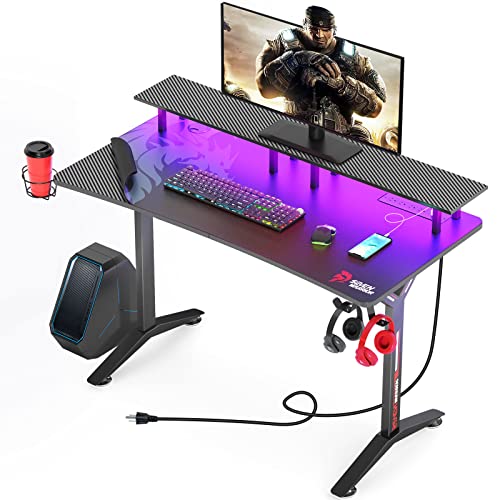
SEVEN WARRIOR Gaming Desk 55 Inch with LED Lights & Power Outlets
Seven Warrior’s 55-inch desk sits exactly in this guide’s sweet spot for dual-monitor or ultrawide stations, with a monitor stand that helps shallower rooms cheat the viewing-distance maths. Check on Amazon

CubiCubi Computer Desk 63×28 Large Electric Standing Desk
CubiCubi’s 63 by 28 inch electric desk is the worked-example specification made real: dual-screen width, full depth, and height adjustability for players whose chair-and-desk maths does not fit the standard 30-inch height. Check on Amazon

Mr IRONSTONE Deep Gaming Desk 45.3 Inch
For single-monitor players, Mr Ironstone’s desk trades width for unusual depth — a reminder that the ‘best size’ is the one matched to your screen count, not the biggest on the page. Check on Amazon
Frequently Asked Questions
Is a 47-inch desk big enough for gaming?
For a single monitor up to 27 inches with the tower on the floor, yes, comfortably. Add a second screen or an on-desk tower and it becomes a compromise — step up to 55 inches.
How deep should a gaming desk be for a 32-inch monitor?
Around 28–30 inches with the monitor on its stand, so your eyes land in the comfortable viewing range. A monitor arm lets a 24–26 inch desk work by floating the screen over the rear edge.
Can a desk be too big?
Yes — when it crowds the chair zone, blocks the room’s flow, or pushes monitors so far apart that you turn your head constantly. Bigger is better only up to your setup’s real needs.
What size desk do streamers need?
Most do well at 63 inches straight or an L-shape: room for a second screen, microphone boom and stream deck without invading the mouse zone. The corner layout in the examples above is the common pattern.
Should I measure my room before or after choosing a desk?
Before. Room footprint — desk plus chair zone plus access — eliminates more candidate desks than any feature list, and taping the outline costs nothing.
I am between two desk sizes. Which way should I break the tie?
Break it toward the larger size if the room genuinely holds it — desk plus chair zone plus walking line, measured rather than imagined — because setups grow into width and almost never shrink out of it. Break it toward the smaller if the larger compromises the room’s other life: the door’s swing, the bed’s space, the path through. The worksheet’s numbers should make the call; where they tie, let the room’s next three years vote, since the desk will meet them all.
Does desk size affect how loud my setup sounds?
Indirectly, yes. A larger desk separates the tower and its fans from your ears and gives speakers the spacing their image needs, while a small desk concentrates every noise source inside arm’s reach. Hollow, lightly built large desks can drum under a keyboard, as the desk comparison in this batch notes, so size is not silence by itself — but distance is a real acoustic tool, and width is how a desk buys it.
Should I size the desk for my current monitor or the bigger one I want?
For the bigger one, if the upgrade is genuinely planned within the desk’s early life — desks outlive monitors by years, and a desk sized exactly for today’s screen is a constraint wearing a receipt. Size for the described next setup, as this guide’s future-proofing section argues, not for a fantasy one: the second screen you have priced and postponed is a plan; the triple ultrawide wall is a screensaver. The worksheet absorbs the honest plan and ignores the fantasy, which is most of what sizing wisdom consists of.
How much empty desk space should I plan to keep?
At least a hand’s width of genuinely empty surface in the working zone, as this guide’s closing worksheet insists — a desk at one hundred percent occupancy has no room for the notebook, the second controller, the plate, the project that arrives mid-evening, and its owner experiences a correctly sized desk as a cramped one. Treat the empty patch as a line item in the worksheet with its own inches, defended against every future peripheral. Setups breathe through their empty space; a desk that cannot breathe feels a size smaller than it measures, which is the last sizing illusion this guide can save you from.
My room fits the desk but not the chair zone behind it. What gives?
The chair zone is not negotiable downward beyond the chair’s actual rolling and reclining footprint — a desk that fits by stealing its own chair’s room has not fit. Take the inches from the desk instead: a shallower desk with a monitor arm usually surrenders less function than a chair zone surrendered to a wall, because depth can be partly replaced by an arm while the space your body occupies cannot be replaced by anything. If neither yields, the room is voting for a smaller setup or a different wall, and the worksheet’s job is to make that vote legible before money is spent.
The Short Version
Size follows screens: 47 by 24 inches for one monitor, 55–63 by 28–30 for two or an ultrawide, 63-plus or an L for triple and streaming rigs. Depth buys viewing distance, width buys mouse room, and the room itself has the final veto. Compute your numbers from your equipment, tape them on the floor, and buy the desk that matches the tape.