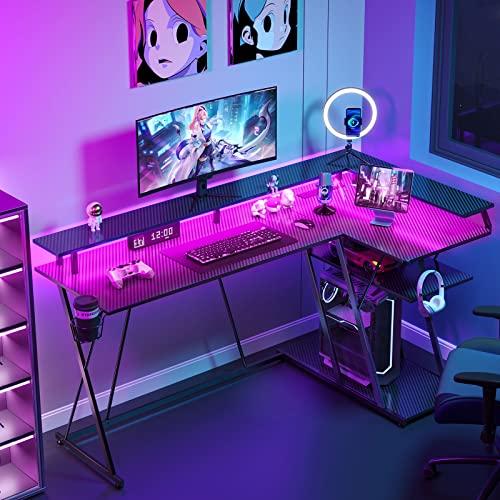
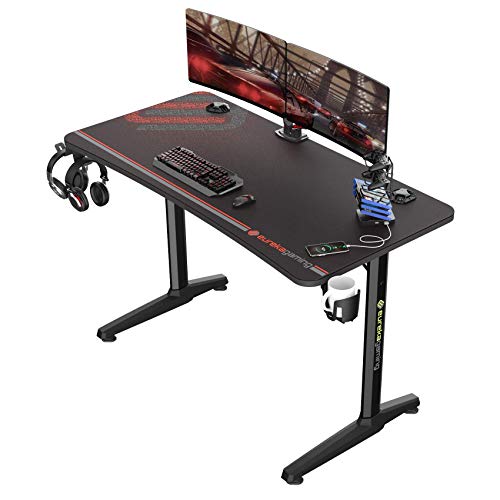
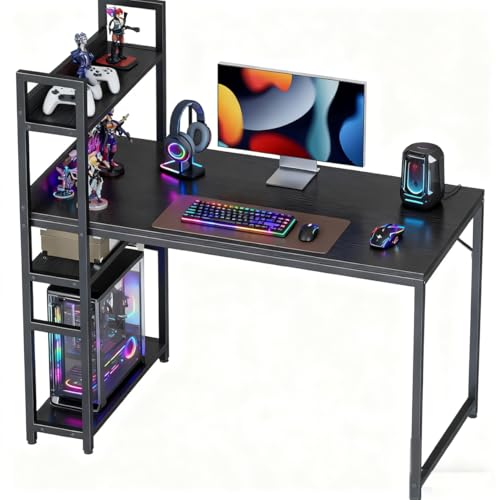
With gaming desk ergonomics explained properly, the desk stops being a passive slab and becomes half of your posture system: its height sets your elbow angle, its depth sets your viewing distance, and its layout decides whether your shoulders relax or creep toward your ears. This explainer covers the desk-side numbers that matter, how they interact with your chair and monitor, and the misconceptions that make expensive setups feel wrong.
Disclosure: As an Amazon Associate, ilcastellomenu.com earns from qualifying purchases. Product links on this page may earn us a commission at no extra cost to you. Prices and availability change on Amazon, so check the product page for the current details before you buy.
Gaming Desk Ergonomics Explained: The Desk Is a Measurement, Not a Product
Ergonomics at a desk reduces to three relationships. First, desktop height versus your seated elbow height: forearms should rest roughly level, elbows near 90 degrees, shoulders completely relaxed. Second, screen distance and height versus your eyes: roughly an arm’s length away, top third of the screen at eye level, so your head balances instead of craning. Third, legroom versus your body: knees, thighs and chair armrests must fit under and around the desk without forcing you to sit back or sideways. Every ergonomic desk feature — height adjustment, monitor shelves, scalloped edges — exists to tune one of those three relationships for your body.
The chair supplies the other half of each relationship, which is why desk ergonomics cannot be separated from chair setup: How to Adjust a Gaming Chair sets your seated elbow height, and the desk must meet it. The spine-side principles are in Gaming Chair Ergonomics Explained; this guide is the furniture side of the same system.
In this guide
Desk Height: The 90-Degree Reference and Its Limits
Standard desks stand 29–30 inches high, a compromise sized for the average adult. If you are much taller or shorter than average, that compromise lands on you: tall players get elbows below the desktop and knees near the apron; shorter players get a desktop at chest height and shoulders that shrug to reach it. The fixes, in order of preference: a height-adjustable desk set to your number; a chair raised to meet the desk plus a footrest to restore your feet (the pattern in How to Measure for a Gaming Chair); or, for tall players, desk risers under the legs of a fixed desk.
Treat 90 degrees as a home base, not a law. Slightly open elbow angles are fine; what matters is that your shoulders are down and your wrists float neutral over the keyboard rather than bending up or pressing into the desk edge. A sharp desktop edge under the forearm is an ergonomic fault in itself — rounded or bevelled front edges, and scalloped cut-outs that let you sit closer, are genuine features, not styling.
Depth, Distance and Your Eyes
Your eyes should meet the screen at roughly 20–30 inches for typical gaming monitors, further for ultrawides and large displays. Desk depth is the lever: a 30-inch desk gives a monitor on its stand room to sit at proper distance with the keyboard in front of you; a 24-inch desk squeezes that geometry, which is why monitor arms and shelves — moving the screen up and back — are ergonomic devices and not just tidiness. The size framework is developed in What is the Best Size for a Gaming Desk.
Screen height interacts with depth: the closer the screen, the lower its centre should be relative to your eyes, following the gentle downward gaze your eyes naturally prefer. Bifocal and varifocal wearers need screens lower still. If you find yourself tilting your head back to read the bottom of the screen or forward to read the top, the screen — not your neck — is in the wrong place, and How to Set Up a Gaming Desk gives the placement routine.
Layout Ergonomics: Reach Zones and Symmetry
Arrange the desk in reach zones. Zone one, directly in front of you: keyboard centred on your body, mouse in its cleared space — the items your hands live on. Zone two, an easy reach: controller, phone, drink in its holder, stream deck. Zone three, the desk’s far corners: speakers, consoles, decor — things you touch rarely. Setups fail ergonomically when a zone-one item migrates (a keyboard pushed aside for a laptop) or a zone-three item invades (a tower squeezing the mouse zone).
Symmetry matters for dual screens: your primary display belongs on your body’s centreline, with secondaries angled in, so your neck’s home position is straight ahead. Corner and L-shaped layouts can honour this — the main screen centred on your seat on one wing — or violate it by centring you on the corner join; L Shaped Gaming Desk vs Straight discusses the seating positions honestly.
Standing Desk Ergonomics: Same Rules, New Numbers
Standing play follows the same three relationships with different inputs: desktop at your standing elbow height (forearms level, shoulders down), screen raised so its top third meets your standing eye level — which usually demands a monitor arm, since a stand set for sitting rarely reaches — and your feet on a mat with room to shift stance. Alternate modes deliberately rather than standing until you ache and sitting until you stiffen; the comparison of the two modes is in Standing Gaming Desk Vs Seated.
Cable slack is an ergonomic issue on adjustable desks too: a cable that goes taut at full height pulls equipment and breaks your layout, which is why the routing method in How To Organize Cables On A Gaming Desk includes a full-range test.
Common Misconceptions About Desk Ergonomics
- ‘A gaming desk is ergonomic by default.’ The label describes features and styling; ergonomics comes from the desk’s dimensions fitting your body, which is why measuring beats branding.
- ‘Higher monitor is always better.’ Too high forces head-tilting and dry eyes (you blink less looking up). Top third at eye level is the target, not the ceiling.
- ‘My chair is ergonomic, so my setup is fine.’ A perfect chair at a wrong-height desk still produces shrugged shoulders and bent wrists. The system is chair plus desk plus screen.
- ‘Standing all day fixes sitting.’ Standing still has its own loads; variety is the principle, not any single posture.
- ‘Wrist rests should carry your wrists while you play.’ Rests are for pauses; during play your wrists should float neutral, with forearms supported at the elbow end.
Each misconception survives because it contains a grain of truth — the corrections above keep the grain and discard the error.
A Five-Minute Desk Ergonomics Audit
- Sit as you play. Shoulders down? Forearms level with the desktop? If not, adjust chair height or desk height until both are true.
- Feet flat, knees unimpeded, armrests clearing or meeting the desk as designed? Fix legroom obstructions now.
- Eyes: arm’s length from the screen, meeting its top third, head balanced? Move the screen, not your head.
- Hands: keyboard centred on your body, mouse zone clear, wrists floating neutral? Rearrange zone one.
- Change one thing, play for a session, and re-audit. Ergonomics converges by iteration, not by shopping.
Run the audit whenever you change desks, chairs or monitors. If a dimension cannot be made to fit — a fixed desk simply too high — that is a purchasing fact to carry into How To Choose A Gaming Desk, not a personal failing to sit through.
Ergonomics for Different Bodies at the Same Desk
Households share desks across bodies that differ by a foot in height, and ergonomic settings that fit one user can actively wrong another. The adjustable elements earn their keep here: chair height and armrests reset in seconds, monitor arms swing between positions, and a height-adjustable desk with per-user memory presets is the only furniture that truly serves two bodies without compromise. If you share, invest in adjustability over every other feature — it is the ergonomics budget spent where sharing actually hurts.
Tall players should audit two things standard setups hide: knee clearance under the desk’s apron or crossbar, which standard heights can make genuinely impossible, and monitor height, where a stand that tops out for an average user leaves a tall user looking down all day. Shorter players audit the mirror image: desktop height versus elbow height, and whether the chair’s minimum height plus a footrest completes their geometry.
Children and teens at gaming desks need the audit run at their scale, with the expectation of re-running it as they grow — a desk that fit at twelve is a posture trap at fifteen if nobody re-measures. Ergonomics is a practice, and growing bodies are its clearest argument.
Beyond the Desk: Breaks, Eyes and the 20-20-20 Habit
Desk ergonomics ends at the desk’s edge, but eye and body strain do not. The eyes focusing at screen distance for hours need distance breaks: the widely shared habit is to look at something far away — roughly twenty feet — for about twenty seconds every twenty minutes or so. It costs nothing, interrupts nothing important, and players who build it into loading screens and queues never notice the effort.
Movement breaks obey the same logic: a minute or two of standing, stretching or walking each hour does more for your back than any single product in this guide. Set the reminder on the same device that tracks your playtime and the habit forms itself. The chair and desk optimise the sitting; the breaks optimise the day.
None of this is medical advice, and persistent symptoms belong with a professional. But the everyday craft of comfort — fit the furniture, vary the posture, rest the eyes — is squarely in the player’s own hands, and this guide has now handed it over.
Lighting Ergonomics: The Forgotten Sense
Desks are judged by posture, but eyes file their own ergonomic reports. The governing principle is contrast management: a bright screen in a dark room forces your eyes to mediate between two worlds, and fatigue follows. A soft light behind the monitor (bias lighting) or a lamp washing the wall behind the desk raises the room side of the equation until the two worlds meet comfortably.
Glare is the second front: any light source reflected in the screen — a window behind you, a bare bulb, a glossy desk surface bouncing light upward — adds a veil your eyes must see through. Matte desk surfaces, lights placed to the side and behind the screen’s plane, and blinds for the afternoon sun are ergonomic interventions as real as any chair adjustment, and cheaper than most.
Colour temperature plays a supporting role: cooler light suits daytime focus, warmer light suits evening wind-down, and consistency between the room’s light and the screen’s white point reduces the sense of strain when your gaze moves between them. None of this requires smart bulbs — it requires noticing, once, what your eyes have been tolerating.
Add lighting to the audit in this guide and re-check it seasonally, because the sun moves and so does its angle through your window. The setup that was glare-free in June can be a mirror in December, and your eyes will report it as tiredness long before you name it as light.
Ergonomics on a Budget: The Order of Spending
If the audit finds faults and the budget finds limits, spend in the order the body notices. First, the free fixes: rearrange the layout, centre the keyboard, raise the monitor on books or a box to its correct height as a prototype. Live with the prototype for a week; ergonomics confirmed by your own body is the only kind worth buying permanently.
Second, the small purchases with structural effects: a footrest if your feet dangle, a basic monitor arm or stand to make the prototype permanent, a desk mat to define the input zone. Third, the chair-side corrections the audit exposed. The expensive items — the adjustable desk, the premium chair — come last, not because they matter least, but because the cheap experiments tell you exactly which expensive item your body actually needs.
This order also protects against the classic ergonomic shopping error: buying the famous product for a fault you do not have. Audits before purchases, prototypes before permanence — the method is the saving, and it scales to any budget including zero.
Ergonomics for Two: Shared Desks and Compromise Settings
A desk shared between two bodies of different sizes is an ergonomics negotiation, and the audit should be run for both users, with the differences written down. Chair height and monitor position are the usual battlegrounds; the household that records each user’s settings — arm height marks, chair lever positions, preset numbers — converts a daily argument into a thirty-second restoration ritual.
Where budgets allow, adjustability is the peace treaty: memory presets on the desk, a monitor arm that swings between two heights, a chair whose controls are quick and legible. Where budgets do not, prioritise the user with the longer hours and let the other inherit a footrest and a cushion — compromise allocated by exposure is compromise made honestly.
Children sharing the family gaming desk need the audit at their scale and the humility to re-run it as they grow, exactly as this guide prescribes for their chairs. Shared ergonomics is not a lesser version of the discipline; it is the discipline applied twice, which is the only way it works for two.
When Ergonomics Points at the Room, Not the Desk
Sometimes the audit’s findings indict the room: the window behind the desk that glares at noon, the radiator that bakes one side, the door that forces the desk into its worst orientation. Furniture adjustments plateau quickly against architectural facts, and the honest fix is rearrangement — the desk rotated, the room’s functions swapped, the setup migrated to the wall that serves it.
Before buying anything ergonomic, therefore, audit the room’s light across a day and its traffic across an evening. The best desk position in the wrong room loses to a modest position in the right one, and rearrangement is the cheapest intervention in this entire guide — it costs an afternoon and occasionally reveals that the setup was fine and the room was the fault all along.
This is also why setup photographs from other people’s rooms mislead: their light, their walls, their bodies. Your audit, in your room, with your measurements, is the only review that was ever written for you.
The Ergonomic Mindset: Iteration Over Acquisition
Close this explainer where it began: ergonomics is a practice, not a purchase. The players with the most comfortable setups are rarely the ones with the most expensive furniture; they are the ones who audit, adjust one variable, play, and audit again — who treat their setup as a living system tuned to a changing body rather than a shrine assembled once.
Every guide in this batch feeds that practice: measuring gives it numbers, choosing gives it material, adjusting gives it method, and troubleshooting gives it recovery when something drifts or breaks. The desk and chair are the instruments; the practice is the music.
Run the audit tonight. Change the one thing it names. Play. That loop, repeated across years, is gaming desk ergonomics — fully explained, and entirely yours.
Desk Ergonomics for Laptop and Console Players
Not every gaming desk hosts a desktop PC. Laptop players face a built-in ergonomic trap: the screen and keyboard are one object, so optimising for the eyes wrecks the wrists and vice versa. The honest fix is separation — a stand or stack raising the screen to eye level, plus an external keyboard and mouse restoring the hands. A laptop on a flat desk, used for hours, is the one setup this guide will call wrong without qualification.
Console players at desks — monitor, controller, chair — inherit the screen and chair rules unchanged, with the controller freeing their hands from the desk entirely. Their audit concentrates on screen distance (consoles invite sitting further back, which the desk’s depth must allow or the chair must roll to provide) and on the recline-friendly chair settings this batch’s chair guides describe.
The principles bend for every platform; they break for none. Feet, spine, arms, eyes — the audit asks the same four questions of a laptop battlestation, a console corner and a tournament rig alike, which is what makes it an audit rather than a product category.
A Worked Example: One Audit With Real Numbers
Theory persuades; arithmetic convicts. Here is this explainer’s audit run on a composite player — five foot eight, a fixed desk at the standard height, a 27-inch monitor on its stand, and a familiar trio of complaints: shoulders that ache by mid-evening, eyes that feel dry, and a right wrist that protests on long sessions. The audit takes the relationships in order, and every fault it finds is measured, not vibed.
Relationship one, elbows: seated with feet flat, their forearms slope upward to the desktop by roughly an inch — the desk is an inch too high for their seated elbow height, and the difference has been paid by their shoulders, shrugged a fraction all day, every day. The chair cannot go higher without floating their feet, so the honest fixes are the desk-side ones from this guide: a keyboard tray, a thinner top’s replacement someday, or — chosen here — a footrest that lets the chair rise the inch, restoring feet and elbows together. Relationship two, eyes: the monitor’s centre sits at eye height rather than its top third, tilting the head back slightly and reducing the blink rate — the dry eyes sign their name — and its distance measures twenty inches, inside the comfortable range for its size, which has been pushing their gaze downward-and-close for months. The stand cannot lower; a monitor arm, the budget section’s highest-value purchase, fixes both numbers in an afternoon.
Relationship three, reach: the mouse zone has drifted right and forward as the desk accumulated objects, and the wrist’s ache maps exactly onto the extended, angled posture the drift imposed. The fix is free and humbling: clear the zone, centre the keyboard on the body, and let the mouse live where the hand falls. Three complaints, three measured causes, one purchase. That ratio — most ergonomic faults are arrangement, a minority are equipment — is the worked example’s real lesson, and it is why the audit precedes the shopping in every guide in this batch.
Glasses, Progressives and Bifocals: The Screen-Height Exception
The standard screen rule — top third at eye level — assumes a single, uniform gaze, and players who wear progressive or bifocal lenses do not have one. Their lenses reserve their lower segment for near focus, which means a screen placed by the standard rule is read through the wrong part of the glass unless the head tilts down to aim the near zone at it — producing the chin-down, neck-loaded posture that progressive wearers report as a mysterious ache no chair adjustment touches. For these players the screen belongs lower and sometimes slightly further than the standard rule puts it, so the near segment meets the display with the head near balance.
Derive the position empirically rather than by formula: sit in your audited posture, hold a book or phone at the distance and height where reading feels effortless through your lenses, and have a helper note where your gaze actually aims — that line, extended to the desk, is your screen’s centre of work. Set the monitor so its most-read zone sits on that line, then re-run the audit’s other checks, because the lower screen will ask the neck for a few degrees the standard setup does not, and the chair’s recline can return them.
Single-vision glasses and contact lenses follow the standard rule unchanged, and players who switch between contacts by day and glasses by night own two subtly different correct setups — one more reason the monitor arm, adjustable in seconds, is the ergonomic tool this batch keeps recommending. The principle survives the exception and is strengthened by it: the screen serves the eyes you actually have, and every rule in this explainer is a default to be corrected by the body in the chair.
Heat at the Desk: Towers, Sunlight and the Body’s Thermostat
Ergonomics is usually drawn as geometry, but the seated body is also a thermal system, and heat quietly rewrites posture. A tower exhausting beside your legs raises the local temperature exactly where your body can least shed it, and the player’s response is unconscious and geometric: legs splayed, body migrated to the desk’s cooler side, lumbar contact abandoned for airflow. Setups audited in a cool morning pass every check and fail by a warm evening, because the audit measured the skeleton and ignored the thermostat that moves it.
Manage heat as an ergonomic input. Give the tower’s exhaust a path that does not cross the leg zone — rearward and upward, into the room’s air rather than the desk’s cave — and in small rooms consider the tower’s placement a climate decision as much as a cable one. Sunlight through a window is the second source: a desk in direct afternoon sun heats its surface, its player and its room together, and the seasonal lighting audit in the setup guide should carry a thermal line — if the sun reaches the desk at playing hours, the blind is an ergonomic device.
Your own heat completes the system: a player running warm fidgets, perches and unseats their support, which is why the movement doctrine and the temperature of the room are secretly the same doctrine. Cool the player — room air, breathable chair materials, a fan’s moving air — and the posture you so carefully arranged survives the evening. Ergonomics that ignores temperature will be defeated by it nightly, in the hours when the longest sessions happen.
Shoulders and Neck: Where the Desk’s Ergonomics Is Decided
Ask players where a bad desk hurts and most point at their shoulders and neck — the trapezius muscles that sling the arms from the neck and bear, all day, whatever the desk’s geometry gets wrong. The mechanism is leverage: an arm weighs a meaningful fraction of your body, and every inch it works forward of the body’s centre — reaching to a distant mouse, typing on a surface an inch too high — multiplies the load those muscles carry statically. Static load is the poison: a muscle that never fully contracts or fully rests, but holds, accumulates fatigue products faster than it clears them, and reports the debt as the burning ache between the shoulder blades that players call desk pain.
The desk’s defences are the audit’s first principles aimed at this one muscle group. Elbows level with relaxed shoulders shorten the lever. The mouse inside the reach envelope keeps the arm’s weight near the body. Armrests or a surface that genuinely carries the forearms during pauses let the muscle stand down in instalments across the day — which is why rests are for pauses, as the misconceptions section insists: a muscle relieved rhythmically outlasts a muscle merely positioned well.
The neck’s share follows from the screen, as the chair ergonomics explainer in this batch details from its side of the system: head balanced, gaze level-to-slightly-down, the screen close enough that the head never leads the body toward it. Shoulders and neck are where desk ergonomics is felt, but they are rarely where it is caused — the causes live at the elbows, the eyes and the reach zone, and the audit’s order exists so you fix causes rather than massaging symptoms.
The Ear’s Ergonomics: Sound, Distance and Listening Fatigue
One sense remains unaudited in most setups: hearing. Players listen for hours — game audio, voice chat, music — and the desk arranges that listening whether it means to or not. Speakers placed by convenience rather than geometry deliver an unbalanced image that the player corrects by turning up, and volume is the ear’s version of load: listening louder to overcome bad placement and room noise accumulates fatigue that presents, confusingly, as tiredness and irritability at the session’s end rather than as anything obviously auditory.
The ergonomic corrections mirror the eyes’ exactly. Bring the source to the sense: speakers at ear height, angled at the head, roughly equidistant, so a moderate volume carries a full image — the audio equivalent of the screen at arm’s length. Reduce the competing noise the volume was fighting: the tower’s fans beside your ear, the room’s hard reflections, the household bleeding through an open door. Headphones move the whole question into the headset’s fit and the session’s length discipline, where the same principle holds — the player who must keep turning up is being told something by their setup, and the answer is placement and environment before it is amplitude.
Add the ear to the audit as a sixth check: at your normal volume, is the image centred, the dialogue clear, the fatigue at session’s end proportionate to the hours? Listening is half of gaming’s sensory load, and a desk ergonomics that ends at the eyes has audited only half the player.
Glossary: Desk Ergonomics in Plain Words
The explainer’s working vocabulary, gathered in one place for the reader who met the terms mid-argument.
Reach envelope
The volume your hands can use without leaning or shrugging. Everything you touch hourly belongs inside its comfortable inner zone; everything outside it taxes the shoulders in instalments.
Neutral wrist
The hand in line with the forearm, neither bent up, pressed down nor angled sideways. The wrist’s zero-load position, and the one your keyboard height and mouse placement should conspire to protect.
Static load
Force a muscle exerts without moving — holding an arm up, holding a posture. Static loads fatigue muscle out of proportion to their size, which is why supported, varied sitting beats even perfect stillness.
Bias lighting
A soft light behind the monitor that reduces the contrast between the bright screen and the dark room. The eye’s equivalent of a lumbar support: unglamorous, and the difference between comfort and strain across an evening.
Viewing distance
The eye-to-screen gap, set by screen size and resolution so text reads without leaning. Roughly an arm’s length for typical gaming monitors, and the variable that desk depth exists to serve.
The Speaking Body: Voice, Microphone and Posture
Players who stream, record or live on calls use their desk for a second performance: speaking, for hours, at conversational quality. The voice is a postural instrument — it is produced by breath, and breath, as the chair ergonomics explainer in this batch establishes, is governed by the trunk’s freedom. A player folded over a low screen, chin down, abdomen compressed, is speaking through a half-closed bellows, and the tired, quiet voice that ends their broadcasts is an ergonomic finding wearing an audio engineer’s clothes.
Set up for the voice with the same audit logic. The microphone belongs where your natural speaking posture puts your mouth — on an arm that brings it to you at your audited screen position — rather than at a fixed point you must lean toward, because a player who leans to the microphone for three hours has added a forward head posture to their evening and called it production value. Screen height and microphone position must be designed together: the gaze line and the voice line are the same line, drawn from the same balanced head.
Breath breaks belong in the movement doctrine for speakers with double force: standing for calls, as the standing comparison notes, genuinely does give the voice more support, which is one reason so many broadcasters stand for segments. The desk that serves a speaking player is audited by ear as well as by eye — record a minute of your normal session and listen for the posture in it. Strain is audible before it is felt, which makes the recording the cheapest ergonomic instrument in this entire explainer.
Ergonomics Across the Decades: The Player Ages, the Desk Adapts
Ergonomic advice is usually written for a body in its twenties, but players keep their desks for decades and bring their bodies with them. The changes arrive predictably: joints stiffen and forgive less static load, so the movement doctrine matters more with every decade; eyes change their focusing range, moving the correct screen distance outward and the correct text size upward; recovery slows, so the small daily insults a young body shrugged off — the inch-too-high desk, the drifting mouse zone — present their bills with interest. None of this is decline as drama; it is a specification that updates, and the desk must be re-audited against it on the same rhythm as a growing teenager’s, for the same reason: the body it serves is not the body it was fitted to.
The adaptations are mostly the audit’s own tools applied with new inputs. Screen further and larger in effective size, which may argue for the monitor arm’s full range or a bigger display rather than new glasses alone. Recline a touch more generous, arm support a touch more real, breaks a touch more scheduled and less negotiable. The chair and desk with wide adjustment ranges age with their owner; the fixed, perfect-for-a-young-body setup expires with the youth it was tuned to, which is one more argument this batch makes for adjustability as the closest thing ergonomics has to future-proofing.
There is also a handover worth planning: the older player’s desk, re-audited honestly, often becomes the household’s second station or a younger player’s first — with its measurements and its audit history attached, per the fit-file discipline. Ergonomics, practised across a life, becomes a family skill rather than a purchase, and the desk that taught it deserves to be passed on with its lessons legible.
Two Desks, One Body: Keeping Home and Office Consistent
Many players maintain two stations — a work desk and a home battlestation, or two homes in a divided week — and discover that a body audited at one is a stranger at the other. The neck that is fine at home aches at the office; the shoulders that survive the workday protest the evening’s gaming. The cause is rarely that one setup is bad: it is that they are inconsistent, and the body, which adapts to anything repeated, is being asked to adapt to two different geometries in alternation and mastering neither.
The fix is to audit both stations against the same numbers — your numbers, from the fit file: seated elbow height, screen distance and height, the reach zone’s layout. Bring the worse station up to the better one’s geometry with the cheap tools first: the monitor raised on books or a stand to the home measurement, the chair set by count and tape rather than by feel, the keyboard centred by the same landmark. Perfect identity is impossible between different furniture; functional identity — the same relationships within a small tolerance — is achievable in an afternoon with a tape measure and your own file.
Keep one audit record for both stations, with each station’s settings written side by side, and re-run both audits when anything changes at either. The body you bring to your games in the evening is the body your work desk spent the day shaping; ergonomics that stops at one desk’s edge is a part-time discipline, and the aches keep full-time hours.
Gear for This Guide
You do not need to buy anything to follow most of this guide, but the items below are the ones that genuinely come up again and again in this topic. Each one is a current, widely sold model rather than a placeholder pick.

Ergotron LX Monitor Arm
The LX arm is the ergonomic correction tool for the most common desk fault — a screen stuck at the wrong height and distance. It decouples screen position from desk depth entirely. Check on Amazon
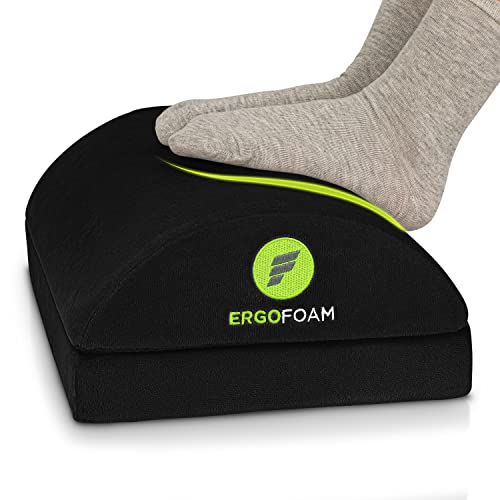
ErgoFoam Foot Rest for Under Desk
When a fixed desk is too high for your legs, the ErgoFoam rest restores the feet-flat foundation after you raise the chair to meet the desktop — the classic two-part fix described in this guide. Check on Amazon

FLEXISPOT EN1 Standing Desk 48 x 24
Flexispot’s EN1 removes the height compromise altogether with electric adjustment and memory presets, letting the desk meet your elbows seated and standing — the system-level solution. Check on Amazon
Frequently Asked Questions
What is the correct height for a gaming desk?
The height at which your forearms rest level with elbows near 90 degrees and shoulders relaxed while your feet are flat. For average adults that is near the standard 29–30 inches; your body, not the standard, is the authority.
How far should I sit from my monitor?
About an arm’s length — roughly 20–30 inches for 24–32 inch screens, more for ultrawides. Text should be readable without leaning, and the corners visible without head-turning.
Is a monitor arm really an ergonomic upgrade?
Yes, often the single biggest one: it sets screen height and distance independently of the desk and stand, which is exactly the adjustment most setups lack.
Can a desk be too deep?
It can push the screen too far for small displays and waste room space, but the common problem is the opposite. Very deep desks also make rear cables harder to reach for management.
Do I need a standing desk for good ergonomics?
No. A fixed desk at your correct height with a good chair and regular movement breaks satisfies the same principles. Standing adjustability adds variety, which helps, but it is not a requirement.
My desk is the wrong height and I cannot replace it. What is the best correction?
Correct at the chair and the feet, in that order: raise the chair until your elbows meet the desktop level with shoulders relaxed, then restore your feet with a footrest at the height the chair now needs. That pairing fixes the elbow relationship — the one your shoulders pay for — without touching the desk. If the desk is too low instead, raise the work with a keyboard tray’s opposite trick: a riser for the keyboard is awkward, so prefer raising the whole desk on engineered furniture raisers, checked for stability, or accept a slightly more upright working posture with the screen raised to match.
How do I know if my wrist pain is from the desk or the mouse?
Change one variable: spend two sessions with the desk relationship corrected — elbows level, mouse in the inner reach zone, wrist floating neutral — on the same mouse. Pain that fades was the geometry’s; pain that persists at the same intensity has a more local cause, in the mouse’s size or your grip, or beyond equipment entirely. Persistent pain, numbness or weakness should leave the setup guides and visit a clinician; ergonomics can remove a desk as a suspect, which is valuable, but it cannot acquit a wrist.
Is a footrest an ergonomic fix or a workaround?
It is a legitimate fix for a specific relationship: when the desk’s height is fixed and correct for your elbows but too high for your feet once the chair is raised to meet it, the footrest completes the geometry honestly. It becomes a workaround only when it is used to excuse a chair or desk that is wrong in ways the audit names — too deep, too low, unsupportive. Judge it by which check it satisfies: feet grounded, knees unimpeded. If it restores those, it is equipment; if it merely makes a bad setup bearable, it is a postponement.
The Short Version
Desk ergonomics is three fits: elbows level with relaxed shoulders, eyes meeting the screen’s top third at arm’s length, and legs and chair moving freely underneath. Measure your body, audit the setup in five minutes, and fix the furniture — never ask your neck and shoulders to compensate for a desk that is the wrong size.