Having motherboard form factors explained clearly saves real money, because form factor is the one specification that decides what physically fits: which cases accept the board, how many expansion cards it can hold, and how crowded the build will feel. A form factor is simply a standardised board size and mounting-hole pattern — ATX, Micro ATX, Mini-ITX, and their relatives — and each size is a deliberate trade between expansion room and physical footprint. This guide walks the family from largest to smallest, explains what each step down actually removes, and ends with the misconceptions that trip up even experienced builders.
The one-sentence summary to carry through: form factor controls space and slots, not speed. Every size can host a fast computer; the question is how much else it can host, and how big a box you want on or under your desk.
Disclosure: As an Amazon Associate, ilcastellomenu.com earns from qualifying purchases. Product links on this page may earn us a commission at no extra cost to you, and that support helps us keep testing and writing guides like this one.
Motherboard Form Factors Explained: The Main Family
Four sizes account for nearly every desktop build. Their standard dimensions are fixed by specification, which is what makes cases and boards interchangeable across brands.
| Form factor | Standard size | Expansion slots | Typical use |
|---|---|---|---|
| E-ATX | 305 × 330 mm (extended width) | Up to 7+ | Extreme and dual-purpose workstation builds |
| ATX | 305 × 244 mm | Up to 7 | The mainstream standard; gaming and workstations |
| Micro ATX | 244 × 244 mm | Up to 4 | Mainstream value and compact mid-towers |
| Mini-ITX | 170 × 170 mm | 1 | Small-form-factor and living-room PCs |
The sizes you will rarely meet
Beyond the main four sit specialists: XL-ATX stretches length for extreme multi-card builds; Flex ATX and Mini-STX serve compact commercial machines; DTX had a brief life in small AMD systems. You will likely never buy one deliberately — they appear in prebuilt and industrial systems — but knowing they exist explains oddball listings. For normal shopping, the four-row table above is the whole decision.
In this guide
What Actually Changes as Boards Shrink
Length is the currency. The step from ATX to Micro ATX removes the bottom slice of the board, and with it two or three expansion-slot positions and often one M.2 slot. The step to Mini-ITX is far more radical: a square board with a single expansion slot, usually two memory slots, and every connector negotiating for edge space. What does not change is the platform: the same sockets, chipsets, and memory standards appear across sizes, which is why a Mini-ITX board can run the same processor as a full ATX one — the sacrifice is purely in what plugs in around it.
Crowding is the hidden cost of small. On Mini-ITX, the graphics card may overhang SATA ports, the CPU socket sits close to the expansion slot so cooler choice narrows, and cable connectors cluster where fingers barely fit. None of this makes small builds bad — it makes them planned. Small-form-factor builders choose every part against published dimensions, a discipline the ATX builder can be lazy about. If you are weighing the two mainstream sizes directly, ATX vs Micro ATX Motherboard is the focused comparison.
Cases: The Other Half of the Fit
Cases declare the largest board they accept, and compatibility flows downward: an ATX case fits Micro ATX and Mini-ITX boards (with the right standoffs), while a Mini-ITX case fits nothing larger. This asymmetry means the case is the commitment and the board is the choice — pick a small case and your board sizes are decided. It also means a big case with a small board is a legitimate, roomy, easy build, not a mismatch.
Two practical checks beyond headline size: graphics-card length and cooler height are case limits that interact with board layout, especially in compact cases where a long card can cover the board’s front-panel headers. And check the case’s front USB-C port against the board: the port needs a matching header, which some small boards omit. Both checks live in the method at How to Check Compatibility of a Motherboard.
Expansion, Storage, and Memory by Size
Expansion slots scale with length, as the table shows, but storage deserves its own sentence because M.2 changed the maths: a modern Micro ATX board with two or three M.2 slots plus SATA covers most builders completely, and even Mini-ITX boards manage one or two M.2 slots, sometimes one on the board’s back. The builders who genuinely outgrow small formats are those adding cards — capture, networking, extra storage controllers — not those adding drives. Memory follows a similar pattern: four slots on ATX and many Micro ATX boards, two on Mini-ITX and budget models, which caps both capacity and the add-later upgrade path.
For a storage-led machine the board-size question merges with the platform question, and shortlists like Best Motherboards for NAS show how makers pack surprising drive counts onto smaller boards when that is the design goal.
Power Delivery and Cooling Myths by Size
A persistent myth says small boards have weak power delivery. Reality: power delivery is a model-level design choice, and the market includes Mini-ITX boards built for flagship processors alongside full-ATX boards that should not be paired with them. Judge heatsinks and reviews of the specific model, not the silhouette. Cooling interacts with size through the case more than the board: compact cases restrict airflow and cooler height, so a small build’s thermal plan is a case plan. Large air coolers and small boards also collide physically — overhanging memory slots and the top slot — which is a clearance check, not a flaw.
Cable management follows the same logic. A full tower with an ATX board is the most forgiving build in PC building; a Mini-ITX shoebox is the least, where cable lengths themselves become a specification. First-time builders consistently underestimate how much of the small-build experience is routing, not performance.
Choosing a Size: Scenarios
The desk-space build: Mini-ITX, chosen deliberately with a parts list checked to the millimetre, rewards you with a machine that disappears into a room. The mainstream gaming build: Micro ATX or ATX — decide by case preference and whether any add-in card beyond the GPU is plausible; the gaming boards in Best Motherboards for Gaming span both. The workstation and the tinkerer: ATX, for slots, headers, and elbow room across years of changes. The living-room or media PC: Mini-ITX or Micro ATX in a case that suits the furniture, with noise as the deciding spec. Notice that ‘fastest’ never appears in these scenarios — size follows use and space, and performance follows the parts.
Common Misconceptions About Form Factors
One: ‘Bigger boards are faster.’ No — format is geometry, not performance. Two: ‘E-ATX is a single standard size.’ It is the loosest label in the family; ‘E-ATX’ boards vary in width, so case support must be checked against the specific board’s dimensions, a trap that has ambushed many full-tower owners. Three: ‘Micro ATX is a budget compromise.’ It is a size, sold at every quality tier. Four: ‘A small board limits my CPU.’ It limits your cooler’s size and your slots; the socket does not care. Five: ‘Mounting holes are universal.’ They are standardised within each format — which is exactly why a stray standoff in the wrong place, detailed in How to Install a Motherboard, is a real hazard when changing sizes.
Mounting Holes, Standoffs, and Why Standards Matter
The unglamorous genius of form factors is the mounting pattern: a standardised grid of holes that lets any maker’s board bolt into any maker’s case of the same format. Cases provide standoff positions for the formats they support, and changing board size means moving standoffs to the new pattern — a five-minute job with real consequences if skipped, because a standoff left where a smaller board has no hole becomes a metal peg pressed against circuitry. This is the mechanical side of compatibility that spec-sheet shoppers never see, and it is why moving between formats deserves a careful ten minutes with the case manual and the board held above the tray for comparison.
The I/O shield opening at the case’s rear is likewise standardised, which is why boards and cases interoperate at all. Standards are the reason PC building is a hobby rather than a machining discipline — every form factor in this article is a promise kept by hundreds of manufacturers simultaneously.
Form Factor and Resale, Reuse, and Second Builds
Size echoes beyond the first build. ATX parts fit the largest universe of cases and buyers, making them the easiest to reuse in a second machine or sell on. Micro ATX is nearly as liquid. Mini-ITX occupies a passionate niche: quality small cases and boards hold value well among enthusiasts, but the audience is narrower and the parts must suit each other precisely. E-ATX is the cautionary tale — its loose sizing makes case matching fiddly even new, and second-hand pairings need dimension checks that simpler formats never demand. None of this should drive a first purchase, but a builder who rotates hardware often feels these currents constantly.
Laptops, Prebuilts, and Other Boards You Will Meet
Not every motherboard follows the desktop standards. Laptop boards are bespoke — shaped for one chassis, soldered where desktops socket — and are neither interchangeable nor part of this decision. Large prebuilt desktops from major brands sometimes use proprietary boards with non-standard mounting or power connectors, which is why upgrading inside them can surprise; the giveaway is a power connector or front-panel block that matches nothing in the standards. Knowing the four desktop formats lets you recognise their absence: if a board matches none of the patterns in this guide, treat every assumption — case fit, power supply, connectors — as unverified until its documentation says otherwise.
A Size for Every Desk: Closing Guidance
Choose the smallest format that honestly fits your expansion and storage plans, in the case that suits your space — or the largest your space tolerates, if tinkering room is your joy. Both instincts are legitimate; the error is only in choosing by myth: that bigger is faster, that smaller is weaker, that the flagship tier requires the biggest board. The formats are furniture decisions with electrical consequences, and like furniture, they are best chosen by measuring the room and counting what must fit.
Worked Example: One Build, Four Sizes
Take a single, ordinary specification — a mid-range processor, one graphics card, 32 gigabytes of memory in two sticks, two NVMe drives, a quiet case — and dress it in each format. As ATX, it is the easiest build in the world: room everywhere, slots to spare, a third drive or a capture card welcome later. As Micro ATX, it is the same machine in a smaller box, identical in behaviour, with the expansion welcome mat slightly narrower. As Mini-ITX, it becomes a deliberate project: the same performance is achievable, but the cooler must be chosen against published clearances, one M.2 drive may live on the board’s back, cable lengths start to matter, and the second expansion card is not postponed but impossible. As E-ATX, the build gains nothing at all — the format’s width exists for hardware this specification does not contain — and merely demands a larger case to house its emptiness.
The example’s lesson generalises: form factor decisions are fit decisions, made by inventory and by room. Performance never entered the paragraph, because it never enters the decision. Choose by what must fit — parts, cards, drives, the desk itself — and the format chooses itself, correctly, every time.
How to Measure Your Current Setup Before Choosing
If you are replacing a board or reusing a case, measure before you shop — literally. The case’s motherboard tray tells its format story: count the standoff positions and compare them against the standard patterns, or simply measure the board coming out; its dimensions name its format exactly, and the case that held it accepts that format and smaller. Measure the graphics card’s length and the cooler’s height while the machine is open, because those two numbers, set against a new case’s published clearances, decide more real fits than any format label. Photograph the front-panel wiring before disconnecting anything; your future self, holding a new board’s manual in one hand and a bundle of unlabelled wires in the other, will be grateful in direct proportion to the photograph’s clarity.
For a fresh build, the measuring is of the room rather than the machine: the shelf, the desk’s underside, the cabinet with its door that must close and its air that must move. Compact formats exist because rooms are real. A Mini-ITX build chosen to fit a measured space, with its parts checked against published dimensions, is a satisfying object; the same build chosen by enthusiasm and fitted by hope is a return shipment. Form factors are standards, and standards reward people who measure — the tape measure is, in a sense, the first tool of PC building, ahead even of the screwdriver.
Keep the numbers with the build’s records afterwards. The next upgrade — a longer graphics card, a taller cooler, a case swap — will ask the same questions, and the builder who can answer from a note rather than from a teardown is the builder these standards were designed for.
The Future of Form Factors: Are the Standards Changing?
Standards this successful change slowly, and the ATX family has outlived several would-be successors — most famously BTX, Intel’s early-2000s attempt to rearrange the board for better cooling, which the market politely declined. The pressures that might eventually reshape the standards are visible, though: graphics cards have grown so large that they, not the board, now dictate case design; power delivery to those cards is being rethought at the connector level; and some makers experiment with moving connectors to the board’s back for cleaner builds, which requires coordinated case support and shows how even a small change needs the whole ecosystem to move together. For a buyer today, the practical meaning is reassurance: the four formats in this guide are the present and the foreseeable future, parts bought against them will find cases and successors for years, and the standard’s very stubbornness is the feature.
The Thirty-Second Version, for Your Next Build
Carry this away: form factor is a size standard — board dimensions and mounting pattern — and the family runs E-ATX, ATX, Micro ATX, Mini-ITX, from workstation-spacious to palm-sized. Shrinking costs expansion slots, some storage connectors, and working room; it never costs processor performance, because every size hosts the same platforms. Cases accept their stated size and smaller, so the case is the commitment and the board is the choice within it. Buy by inventory and by room: count the cards and drives the machine must hold, measure the space it must live in, and the correct format is whichever one both answers point to. Everything else in this article — the myths, the mounting patterns, the second-hand currents — is commentary on those two measurements.
Make them honestly, and the board will fit the case, the build, and the desk — which is all a form factor was ever asked to do.
One Sentence to Anchor It All
If every other detail fades, keep this: a form factor is a promise about size that hundreds of manufacturers keep simultaneously, so that strangers’ boards, cases, and coolers can meet for the first time inside your build and fit as if they had been introduced. Honour the promise by measuring your space and counting your parts, and it will quietly hold, without drama or surprise, for the entire life of the machine — through upgrades, case swaps, and second builds you have not imagined yet.

Gear for This Guide
The products below come from our verified listings pool and are mentioned because they genuinely fit this topic, not because they are the newest or the most expensive option.
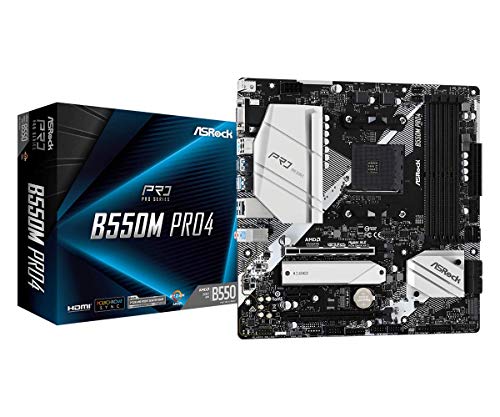
- ASRock B550M Pro4 Micro ATX Motherboard, AMD AM4 Ryzen 3000-5000, DDR4 4733+ — a Micro ATX board that shows the format’s modern reality: four memory slots and dual M.2 in the smaller footprint. Check on Amazon
- MSI MAG B550 Tomahawk Gaming Motherboard — its full-ATX counterpart on the same platform — comparing the two listings side by side is this whole article in miniature. Check on Amazon

The Extended Family Abroad: Workstation and Server Formats
The main family in this guide covers the desktop world; step into workstations and servers and the family grows cousins with their own standards. The names you will meet are SSI CEB and SSI EEB — specifications from the Server System Infrastructure forum, written for dual-processor and high-density machines. CEB is roughly ATX-depth but wider in its ambitions, sharing much of ATX’s mounting logic while serving workstation boards with more memory slots than any desktop format holds. EEB stretches further, a genuinely large rectangle built for two sockets, a wall of memory slots, and the rack and tower enclosures of professional machines. Their mounting patterns overlap the desktop family’s only partially, which is why a server board in a desktop case is a research project rather than a drop-in, however similar the silhouettes look in photographs.
Alongside the standards sits the proprietary wilderness: large server and workstation vendors ship boards shaped for exactly one chassis, with power connectors, mounting, and front-panel wiring that follow the vendor rather than any public specification. These boards are excellent inside their intended machines and nearly useless outside them, which is why the used market prices them strangely — a powerful dual-socket board can sell for little because the case, power supply, and patience required to house it are the real cost. The desktop family’s gift, by contrast, is precisely the interchangeability this article opened with: a standard is a promise that strangers’ parts fit, and the further a format drifts from the mainstream family, the more carefully that promise must be re-verified, hole by hole and connector by connector.
Power Supplies Follow the Format: ATX, SFX, and the Space Between
Form factor decisions quietly choose your power supply’s format too, because case size dictates which supplies physically fit. Full and mid towers for ATX and Micro ATX boards take the standard ATX power supply, the most common and most widely ranged unit in the industry. Compact Mini-ITX cases frequently specify SFX or the slightly longer SFX-L — supplies with the same electrical standards and cables in a much smaller brick, built for enclosures where every litre is spoken for. A few very small cases go further, using external power bricks or compact internal units borrowed from the small-form-factor ecosystem.
The practical consequences deserve a line in any format decision. SFX supplies are excellent but form a smaller market: fewer models, a narrower range of wattages, and prices that reflect specialisation rather than quality. Cabling differs too — SFX units ship with shorter cables tailored to small cases, which is a blessing inside them and a limitation if the supply is ever redeployed to a larger build. None of this argues against small formats; it argues for counting the power supply as part of the format’s cost and character, the way this guide counts cases. When a compact build’s parts list is priced, the honest total includes the SFX premium, and the honest comparison against a Micro ATX build in a roomy case includes the fact that the larger machine could take any supply on the shelf — including the one already in your cupboard.
Builds That Move: Dorms, LAN Events, and the Travelling PC
One choosing scenario deserves more than the paragraph the scenario section gave it, because it inverts the usual priorities: the machine that travels. A student moving between home and dormitory each term, a competitive player carrying a rig to events, a technician whose PC works at multiple sites — for these owners the form factor is a luggage decision. Mini-ITX in a case with a handle, or one small enough for a padded bag, transforms the move from a furniture problem into a backpack line item. Micro ATX in a compact tower is the middle path: carryable by one person without drama, still roomy enough for standard parts and easy repairs far from home.
Travel also reorders the internal priorities. Soldered-down simplicity beats expansion headroom; a single graphics card firmly seated beats a slot census; storage on the board beats a rack of cabled drives that can shake loose in transit — every connector in a travelling machine should be one you would trust on a train. Weight becomes a specification with a number, and the ATX full tower, glorious at a fixed desk, reveals its one true weakness: it was designed on the assumption that moving house is a rare and serious event. If your life moves the machine more than twice a year, let that fact vote early and heavily in the format decision. It is exactly the kind of honest constraint the choosing sections of this guide exist to surface — the build serves the life, not the reverse.
The Format Without a Case: Test Benches and Open Frames
There is one habitat where form factor means something entirely different: no case at all. Reviewers, repair shops, and habitual tinkerers run boards on open test benches — flat frames or simple stands that hold the board, supply, and drives in the open air. On a bench, the format’s case-fit meaning evaporates and only its layout meaning remains: ATX’s spread-out connectors and slot count make it the bench worker’s favourite, because everything is reachable and a day’s work may involve a dozen card and drive swaps. Mini-ITX on a bench is a paradox — a board designed to disappear into a small box, sprawling instead across a desk with full-size peripherals trailing off it.
Open-air running has its own disciplines that case builders never meet: airflow that a case would organise must be provided deliberately, because components cooled by case airflow patterns — the board’s power delivery especially — now sit in still air; and every connector is exposed to the dropped screw and the curious pet. The bench is a workplace, not a lifestyle, but it teaches something worth carrying back to cased builds: a board’s layout quality is a real property, visible the moment no case hides it, and the formats differ in how gracefully they submit to being worked on. If you maintain machines for a household or a small office, the machine you will open most often deserves a format — and a case — chosen partly for the opening.
Glossary of the Wider Family
BTX. Intel’s proposed successor to ATX from the mid-2000s, which rearranged the board for the cooling needs of its era’s hottest processors. The era ended before the standard did, and BTX survives only as a trivia answer and a cautionary tale about betting against the installed base — this guide’s history section tells the fuller story.
DTX and Mini-DTX. A compact standard from AMD, sized between Mini-ITX and Micro ATX, intended to give small boards a second expansion slot. It never gathered an ecosystem and appears today mostly in older small-form-factor machines.
Mini-STX. A near-square format smaller than Mini-ITX, built for very compact systems with processor sockets but minimal expansion — the board provides the computing, and everything else is expected to be USB or built in.
SSI CEB / EEB. The workstation and server specifications described above: wider, deeper boards for many memory slots and, in EEB’s case, two processor sockets, with mounting patterns that only partly overlap the desktop family’s.
Proprietary. Not a format but the absence of one: a board shaped for a single manufacturer’s chassis, identifiable by odd outlines, non-standard power connectors, and mounting holes that match nothing else. Powerful inside its home machine, a project anywhere else.
Moving Between Sizes: What a Format Change Actually Involves
Sooner or later many builders change format — the ATX machine reborn as a compact ITX build for a smaller flat, the ITX experiment promoted to an ATX workstation. It is worth knowing exactly what transfers and what does not, because the answer is more encouraging than most expect. The processor, memory, storage, and graphics card all move freely, provided the new board shares their platform: format is a property of the board and case, not of the components they host. The operating system and your data ride along untouched on the drives. What changes is the board itself, the case, and — in moves toward the small end — often the power supply’s format and sometimes the CPU cooler, whose height or footprint the new case may refuse.
The work itself is a board swap, and it follows the discipline of the installation guides in this series: back up, bench-test the new combination, note that the operating system will meet a new board and may ask for driver attention and reactivation, and keep the old board and case until the new machine has proven itself for a week. Budget-wise, a format change is one of the cheaper transformations in PC building precisely because the expensive components are format-agnostic. That portability is the standards system working as designed: the formats partition the market by size without imprisoning any component inside one size. Choose boldly, therefore — a format decision, unlike a platform decision, can be revisited for the price of a board and a case.
The Sixth Consideration: Being Opened, Cleaned, and Repaired
A machine’s format decides not only its first day but every maintenance day after. Dust arrives on its own schedule, drives fail on theirs, and the machine will be opened — by you or by whoever inherits it — more times than the build day planners assume. Roomy ATX interiors forgive this: connectors reachable, cables slack enough to work around, a graphics card that lifts out without a neighbouring component’s eviction. Compact interiors tax it: the same drive replacement that takes five minutes in a tower can take forty in a shoebox case, with three parts removed to reach the fourth and a photograph needed to reassemble the layering.
Neither is a verdict — small machines repay their compactness daily and their fiddliness rarely — but the ratio matters and it is personal. A builder who upgrades and tinkers constantly should weight working room heavily; a builder who assembles once and closes the panel for years should weight it barely at all. This is the same honesty the rest of this guide applies to slots and drives, extended across time: count not just what the machine will hold, but how often your hands will be inside it, and let the format fit the hands as well as the parts.
Clearances Around the Case: The Room’s Half of the Standard
Form factor standards end at the case’s outer skin, but the machine’s real footprint includes the air around it. Every case breathes — in through intakes, out through exhausts — and a case that fits a cabinet or shelf with millimetres to spare may still fail there thermally, recycling its own exhaust in a closed nook. When you measure a space for a build, as this guide’s measuring section advises, add the invisible dimensions: a hand’s breadth behind the rear panel for cables and exhaust, clearance above a top-venting case, and a door or panel that opens without moving the machine. Compact formats earn a genuine advantage here that raw dimensions understate — a small case in a modest space can still enjoy generous relative clearance, while a large case in a barely-larger cabinet suffocates in a space that technically fits it.
The same logic governs the desk surface itself. A tower under the desk returns the whole desktop to monitors and work; a compact case on the desk spends some of that surface to buy shorter cable runs and easier access to ports. There is no universal right answer, only a room, a machine, and a person whose habits connect them. Form factor, pursued honestly to the end, turns out to be a branch of ergonomics — which is a fitting final lesson for a specification that began as a rectangle’s dimensions.
Fans, and the Sound of Size
One consequence of format that owners hear every day deserves its own short treatment: the size of the fans the case can hold. Cooling follows a simple physical bargain — a larger fan moves the same air as a smaller one while turning more slowly, and slower fans are quieter fans. Full and mid towers built for ATX boards commonly mount 120- or 140-millimetre fans throughout, the industry’s quiet mainstream. Compact cases descend a ladder of compromises: many Mini-ITX enclosures still fit one or two large fans, but the smallest rely on slim fans, 92- or 80-millimetre units, or the processor cooler’s own small fan working alone — each step down that ladder trading a little silence for a little space.
This is not an argument that small machines are loud; a well-designed compact case with one large, slow fan can be quieter than a tower full of cheap fans at full speed. It is an argument that acoustics belong in the format decision for anyone sensitive to them — the bedroom PC, the recording corner, the living-room machine that must vanish sonically as well as visually. Read a candidate case’s fan mounts the way you read its board support: as a specification with consequences. The format chooses the case, the case chooses the fans, and the fans choose the soundtrack of every hour the machine runs. Few specification chains in PC building are longer, or more audible.
Frequently Asked Questions
What is the most common motherboard form factor?
ATX is the long-standing mainstream standard, with Micro ATX close behind in value builds. Between them they cover the great majority of desktop PCs and cases sold, and parts availability for both is effectively unlimited.
Can a Mini-ITX motherboard run a high-end CPU and GPU?
Yes — the socket and the single PCIe slot are full-performance. The constraints are practical: cooler clearance, one expansion slot total, two memory slots, and a compact case’s airflow. Many showcase small builds run flagship parts with careful planning.
Will an ATX motherboard fit in a Micro ATX case?
No. Cases accept their declared size and smaller. A Micro ATX case lacks the depth and mounting positions for a full ATX board. The combination fails physically, not marginally — this is a check to make before buying either part.
Does form factor affect how many drives I can use?
Indirectly. Larger boards usually offer more M.2 slots and SATA ports, but model design matters more than size alone — some compact boards are storage-rich by design. Count the specific board’s slots against your drive plan.
What is E-ATX, exactly?
An extended-width variant of ATX aimed at extreme builds. Unlike the other formats it is not one strict size, so both the board’s exact dimensions and the case’s stated E-ATX support must be checked — some cases accept only the narrower ‘E-ATX’ boards.
Which form factor is best for a first build?
ATX or Micro ATX in a mid-tower case: standard parts, forgiving clearances, room to route cables and reach connectors. Mini-ITX is a wonderful second build, once you know which clearances will matter.
How can I tell what form factor my current motherboard is?
Measure it, or read it. The board’s model name, looked up on the manufacturer’s page, states the format in its specifications; failing that, a tape measure settles it — compare the board’s width and depth against the standard dimensions in this guide’s main table. Counting mounting holes and expansion slots corroborates the answer: seven slot positions say ATX, four say Micro ATX, one says Mini-ITX.
Do small-form-factor builds need special power supplies?
Often, yes. Many Mini-ITX cases specify compact SFX or SFX-L supplies, and a standard ATX supply simply will not fit their bay. Micro ATX cases, by contrast, usually accept standard ATX supplies. The case’s specification is the authority — check its stated power-supply format before ordering either part, since this is a case constraint wearing a board-format costume.
Are all ATX boards exactly the same size?
No — ATX fixes a maximum outline and the mounting pattern, but some boards are manufactured narrower than the full width, trimming the right edge. They fit any ATX case, yet their edge connectors and mounting holes may sit differently than a case’s cable grommets expect. E-ATX varies more still. The dimension line on the spec sheet, checked in thirty seconds, is the defence against every such surprise.
Can I mount a motherboard without a case for daily use?
You can run one on an open bench or frame, and enthusiasts do — but daily use asks questions the bench does not answer: organised airflow for the board’s power delivery, protection from dust, spills, pets, and dropped objects, and safe containment of cabling. Treat open-air as a workshop arrangement. For a permanent setup, a case is not packaging; it is part of the cooling and safety system.
Which form factor is best for a home server?
The one whose storage and expansion counts match the server’s drive plan — which in practice means Micro ATX for most home servers: enough slots and ports for a healthy drive count, a deep market of affordable boards and cases, and modest size and power. Mini-ITX serves the very small, drive-light server beautifully; ATX and the workstation formats take over when the drive census grows past what mainstream boards offer.
Does form factor affect Wi-Fi or Bluetooth?
Not by standard — any format can carry wireless hardware — but by market habit: compact boards, especially Mini-ITX, include Wi-Fi and Bluetooth far more often than large ones, because a small build has no spare slot for a wireless card and its makers know it. On ATX boards wireless is more often an optional variant of the model. If wireless matters, check the specific model either way; the format merely changes which assumption to start from.
What is the smallest form factor that still takes a graphics card?
Mini-ITX: it carries one full-speed PCIe x16 slot electrically identical to the slot on the largest board. Smaller formats below it give up the slot entirely and serve machines built around integrated graphics. The constraints at Mini-ITX are physical — card length, thickness, and case airflow — not electrical, which is why compact gaming builds are a thriving category rather than a compromise corner.
If a case fits ATX, does it fit every smaller board well?
It fits them — the mounting standards guarantee the bolt pattern — but “well” deserves a second look. A Mini-ITX board in a full tower leaves its short cables and small coolers swimming in a volume designed for larger gear, and some case features, like cable grommets placed for a full-width board, sit far from the small board’s connectors. It works, and for a transitional build it can be sensible; as a permanent arrangement it spends the case’s size without collecting any of the benefits that size was bought for.
Why do cases list several form factors instead of one?
Because the mounting standards are nested: a case built for the largest board in its class automatically contains the hole patterns of the smaller boards, so makers list every size that fits. The list is a compatibility promise, not a recommendation — the case was designed around its largest format, and smaller boards are guests in it, welcome but not the reason the room was built. Choose the board first and the case that flatters it, whenever the build allows that order of decisions, and let second-hand cases and inherited parts argue their case afterwards, with measurements in hand rather than hope.