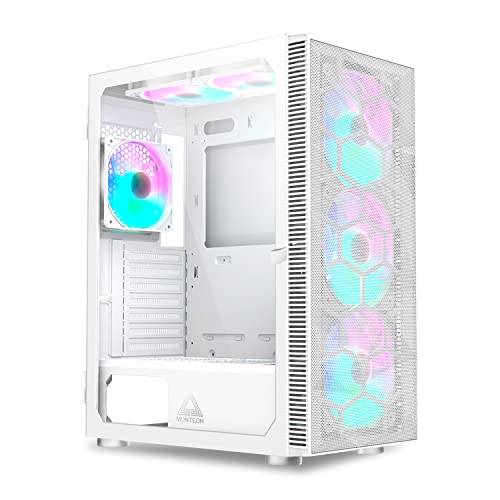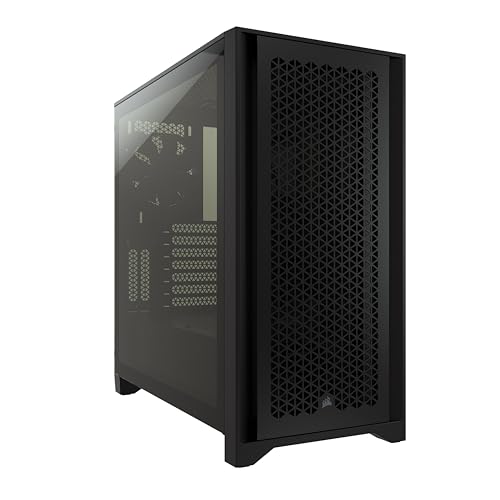
The airflow case vs silent case debate is really a negotiation between two ways of reaching the same destination: a PC that stays cool without annoying you. An airflow case moves air freely through mesh panels so its fans can spin slowly; a silent case seals and dampens its panels to contain noise, accepting more restricted airflow and compensating with careful internal design. Both philosophies can produce a quiet, cool machine — and both can fail if you misunderstand what each asks of the rest of the build.
This comparison explains how each design works, where each wins, and how your components, room, and ears should cast the deciding vote.
Disclosure: As an Amazon Associate, ilcastellomenu.com earns from qualifying purchases. Product examples below link to Amazon, where you can check current availability and specifications; this guide itself lists no fixed prices because pricing and bundles change frequently.
Quick Verdict
Choose an airflow case if your build runs hot hardware, your room is warm, or you want the easiest route to low fan speeds (free airflow is the cheapest silence there is). Choose a silent case if the PC lives in a bedroom, studio, or shared quiet space, your components are moderate in heat output, and you are willing to tune fan curves thoughtfully. The physics both designs are negotiating is laid out in PC Case Airflow Explained.
In this guide
How Each Design Works
An airflow case is built around low restriction: mesh front and often top panels, generous fan mounts, and a straight path for air. With little resistance, fans achieve the needed flow at low rotational speeds — and fan noise rises steeply with speed, so slow fans are quiet fans. The design’s noise strategy is indirect: remove the need for speed.
A silent case is built around containment: solid panels lined with sound-damping material, sealed seams, sometimes a door over the front, and restricted but deliberate vent paths. Its strategy is to trap the noise the components make — fan whoosh, coil whine, drive vibration — inside an insulated box. The cost is that air moves through narrower channels, so internal temperatures tend to run somewhat higher for the same fan speeds, and the fans must be chosen and tuned with more care.
Cooling Performance
With identical components and fan counts, an airflow case will generally post lower component temperatures, especially for high-power graphics cards that dump large heat loads into the case’s interior. The margin matters most at the extremes: overclocked or flagship hardware in a warm room is the airflow case’s home fixture.
A silent case’s temperatures are not ‘bad’ — they are a few degrees behind in like-for-like tests, a gap that matters to an overclocker’s headroom and barely at all to a stock-clocked build’s longevity or stability. What a silent case cannot forgive is a careless fan layout: its restricted paths punish the mistakes that How to Set Up Airflow in a PC Case teaches you to avoid, because there is less spare airflow to hide them.
Noise Behaviour, Honestly Compared
Here the comparison gets subtle, because the two cases make different kinds of noise. The airflow case’s fans are audible as soft broadband whoosh if they must spin up, but at low speeds in a typical build they are close to inaudible — and the open panels also let high-frequency sounds like coil whine escape unimpeded. The silent case muffles exactly those high-frequency and tonal noises best, which is why recording and bedroom users love them; its weakness is that if its restricted airflow forces fans to spin fast, the resulting low-frequency noise is the kind damping handles worst.
In other words: a silent case with cool-running components is the quietest option of all, and a silent case stuffed with hot hardware run hard can end up louder than the airflow case it was meant to out-quiet. Component choice is part of the case decision.
Build and Maintenance Differences
Airflow cases are maintenance-friendly: filters slide out, mesh wipes down, and everything is accessible. Silent cases ask a little more — damping foam should be kept clean with a brush or air rather than soaked, doors and sealed panels add steps to access, and the case’s weight is typically greater. Neither is burdensome; the difference shows up across years of the cleaning routine described in our case-cleaning guide.
Panel style intersects this choice: many airflow cases use mesh where silent cases use solid damped panels, and glass appears on both. The glass-versus-mesh question on its own is compared in Tempered Glass vs Mesh Case.
Cost and Component Pairing
Both philosophies exist across similar tiers; damping material and door mechanisms add cost on the silent side, while elaborate mesh and included-fan bundles add it on the airflow side. The real budget interaction is with your components: a silent case pairs best with efficient, cool-running parts and quiet coolers, and its total system cost should include those choices; an airflow case forgives hotter, cheaper components because it can cool them at low fan speeds.
If your build already exists and runs hot, an airflow case is the safer transplant. If you are speccing a whole system for a quiet room, designing the components and a silent case together produces the most refined result. Either way, the case-selection checklist in How to Choose a PC Case keeps the compatibility fundamentals in view.
Side-by-Side Summary
| Criterion | Airflow case | Silent case |
|---|---|---|
| Panel design | Mesh front/top, low restriction | Solid, damped, sealed; deliberate narrow vents |
| Noise strategy | Slow fans through free airflow | Contain and absorb the noise made |
| Temperatures, like for like | Lower, especially with hot GPUs | Somewhat higher; fine for moderate builds |
| Handles coil whine / tonal noise | Poorly — open panels let it out | Best — damping targets high frequencies |
| Forgiveness of hot components | High | Low — heat forces fan speed, defeating the design |
| Maintenance | Filters and mesh, very accessible | Foam care, doors and seals add steps |
| Best rooms | Warm rooms, gaming dens, workshops | Bedrooms, studios, shared quiet spaces |
Airflow Case vs Silent Case: Who Should Choose Which
Choose airflow for high-power gaming rigs, warm climates, overclocking, and any build whose components you already own and know to run hot; candidates are compared in Best PC Cases for Cooling. Choose silent for a bedroom, a recording or streaming space where a microphone sits near the PC, an office where the machine idles all day near your ears, or a living-room PC — provided the components are efficient enough to let the design work. If fan noise is your current problem in an existing case, diagnose it first with How to Fix PC Case Fan Noise; a new case is not the first fix for a failing fan.
The Middle Ground: Quiet Airflow Builds
The comparison’s honest conclusion is that the market’s centre has already merged the two philosophies. Mesh-fronted cases with large, slow fans are sold as airflow cases and measure quieter at the desk than yesterday’s silent cases, because fan noise collapses at low speeds. Meanwhile modern silent cases have learned to vent more cleverly, narrowing the temperature gap. A builder in 2026 is rarely choosing between loud-and-cool and quiet-and-hot; they are choosing which end of a narrowing spectrum to start from.
That is good news, and it shifts the deciding factors to the secondary rows of the table: whether tonal noise (coil whine) needs containing, whether the room is warm, whether maintenance access matters, and frankly which box you prefer looking at for five years. When the primary criteria converge, secondary criteria are allowed to decide.
Measuring Noise Without a Lab
You cannot audition a case in a shop the way you will hear it at 1 a.m., but you can reason about your own sensitivity and setup. Download any sound-meter app and measure your room’s ambient level at night: in a genuinely quiet room, a PC that reviewers call ‘quiet’ in a normal office can be plainly audible, and the silent case earns its keep. In a room with traffic, housemates, or a TV, the same PC vanishes into the background and the airflow case’s advantages dominate.
Also weigh distance and placement: a PC under a desk, two metres away, behind a modesty panel, is a different acoustic object from the same PC on the desk beside your monitor. Placement is a free noise control that belongs in the decision before panel philosophy does.
What Reviews Measure and What They Miss
Case reviews typically test with a standardised build at fixed fan speeds or fixed noise levels, and both methods illuminate half the story. Fixed-speed tests crown the airflow case, because its fans face no restriction. Fixed-noise tests — where each case is tuned to the same measured loudness — are the fairer comparison for a buyer who cares about quiet, and there the gap narrows dramatically and sometimes reverses, because the silent case’s containment lets its fans work a little harder for the same audible result.
Read reviews for the test method before the verdict, and weight the fixed-noise results if silence is your priority and the thermal results if cooling is. Also note the test build’s heat: a review conducted with a mid-range card cannot acquit a silent case on behalf of your flagship, and an airflow case tested with flagship hardware has proven something your modest build never needed. Match the evidence to your machine.
Your ears, your room, your verdict
Finally, personal sensitivity is a legitimate specification. People vary enormously in their tolerance for fan whoosh and their sensitivity to high-frequency tones; a household where one person works nights beside the PC has a different noise budget from a gaming den. Neither case philosophy can be chosen by spreadsheet alone — the table in this article ranks the physics, but the last row of every comparison is the listener, and the listener is you.
Decision Cases: Four Rooms, Four Answers
Run the comparison through four concrete rooms to see the criteria work. The student bedroom, PC under the desk, mid-range components, sleep eight feet away: silent case, because the night-time idle is the loudest thing in the room’s life and the components will never stress its thermals. The gaming den, flagship card, summer afternoons, door closed: airflow case, because heat is the binding constraint and the room’s ambient noise already includes the game itself.
The home studio and the living room
The recording corner, where a microphone shares the room: silent case and efficient components, chosen together, because the microphone hears what the owner has learned to ignore — and the cost of discovering that in a recorded track is paid forever. The living-room PC behind the television: silent again, but for a social reason — the machine must be inaudible to people who never agreed to live with a computer — with the caveat that its components should be chosen modestly, because a living room offers no desk-fan forgiveness.
Notice that three of four rooms chose silence and one chose airflow, while the deciding variable was never the cases themselves: it was the room’s ears and the components’ heat. That is the comparison’s real output — not a winner, but a method for producing one.
If you truly cannot decide
Default to the airflow case with quiet components. It is the more forgiving error: its weakness (tonal noise escaping) can be softened later by component choices and placement, while the silent case’s weakness (heat it cannot shed) is structural and permanent. Forgiving defaults are how undecided buyers protect themselves, in cases as in most of computing.
Humidity, Dust, and Other Environmental Votes
Environment casts quieter votes in this comparison than temperature does. In a dusty home, the airflow case’s open mesh loads its filters quickly — a maintenance rhythm some owners keep happily and others abandon, with temperatures paying for the abandonment. The silent case’s narrower vents load more slowly and its interior stays cleaner longer between services, a genuine advantage where dust is the dominant environmental fact. In a humid home, neither philosophy changes the advice about keeping the PC in conditioned space, but the silent case’s enclosed interior does buffer the rapid humidity swings that open designs admit freely.
None of these votes outweighs heat and ears, the two senior criteria — but in a close decision, the environment you actually live in is a more honest tiebreaker than a reviewer’s test bench in a climate-controlled lab.
The verdict for the undecided, restated
If this article has left you balanced exactly between the two, apply the tiebreakers in order: hotter components choose airflow; quieter rooms choose silence; dustier homes lean silent for maintenance; warmer rooms lean airflow for headroom; and a true dead heat defaults to the airflow case with quiet components, the combination whose weaknesses can be improved later and whose strengths are structural. Then stop deliberating — either case, chosen with your components in mind, will serve you better than a third week of comparison tables.
The Third Variable: Your Components’ Own Voices
This comparison is usually fought between two case philosophies, but the machine inside casts the deciding vote, because a case can only muffle or expose what the components produce. A build whose graphics card whines under load and whose processor cooler is a modest unit working hard will be audible in any case ever folded from steel; the silent case will take the edge off, the airflow case will let it out, and neither will deliver the quiet the owner imagined when they chose the case instead of addressing the components. Inventory the voices first: run the machine at its real worst load with the panels as they are, stand where you sit, and name what you actually hear — fan rush, fan tone, coil whine, drive chatter, pump hum. Each voice has a different relationship with case design, and the comparison only becomes useful once the voices are named.
Fan rush — the broadband sound of moving air — is the voice both designs manage best: the airflow case reduces it at the source by letting fans turn slower, the silent case contains what remains behind panels and damping. Fan tone — the pitched whine of a particular fan at a particular speed — is a component fault wearing a case question’s clothes; the cure is the fan or its speed, and our fan noise troubleshooting guide works through it in the order a technician would. Coil whine is the silent case’s hardest exam, because it is high-pitched, load-dependent, and generated deep inside components neither design can reach; distance and a solid panel help, and the honest fix is at the component or its frame-rate settings. Choose the case for the voices you have, in the proportions you have them.
Distance, Desks, and the Room’s Acoustics Revisited
Earlier sections of this comparison touch on placement, but the acoustic arithmetic deserves its own direct statement, because it outranks much of the case debate. Sound falls with distance in a way no panel can imitate: the same machine that is present at arm’s length on a desk becomes background under it, and nearly vanishes in a cupboard or the next room’s alcove — with airflow arrangements to match each exile, since a case in a cupboard needs its ventilation planned rather than assumed. Before spending on either philosophy, spend the free experiment: move the machine you have to its alternative home for a week and listen. Many noise problems are geography problems, and they are solved by geography.
The room’s own surfaces referee the result. A hard, bare room — wood floors, plain walls, little soft furnishing — returns every sound to the listener with interest, and in such a room the silent case’s containment earns double, because the room will not help. A soft room absorbs what the case leaks, flattering the airflow design. And the listener’s own situation matters more than either: the open-plan worker on calls, whose microphone reports the machine to colleagues, needs the machine quiet at the microphone’s position, which is a different and stricter standard than quiet at the ear, and one worth testing with an actual recording before the case is chosen.
The Load Profile Decides: Bursts, Marathons, and Idle Lives
Cases do not experience your average load; they experience your load’s shape, and the two philosophies suit different shapes. The bursty life — a machine that idles through documents and sprints through a game’s loading screens, a render, an export — favours the airflow case, because its strength is peak capacity: the sprint is cooled at low fan speed, and the idle hours, where any case is quiet, dominate the day. The marathon life — folding, rendering queues, long simulations, a card held at full draw for six hours — favours whichever design sustains its performance without its fans climbing, and here the silent case’s weakness compounds: heat soaked into a damped, sealed box across hours is heat its fans must eventually move at speeds that surrender the quiet the case was bought for.
The idle life deserves its own sentence, because most machines live it. At idle and light load, both designs should be effectively silent, and if yours is not, the fault is in fan curves and component behaviour, not in the case philosophy — a truth that saves buyers from replacing a case to cure a settings problem. Judge the two designs at your worst sustained hour, audition them at your typical one, and ignore them at idle, where they are equals and the components are the whole story.
Retrofits and Conversions: Moving a Build Between Philosophies
Owners migrate between these designs more often than the marketing admits, and the migration costs differ by direction. An airflow case can be quieted substantially after the fact: fan curves tuned to the knee, the loudest fan replaced, a solid side panel substituted where the maker offers one, the machine moved under the desk. Its temperatures will rise slightly and its voice will fall considerably, and for many owners that conversion is the end of the story — the airflow case’s openness, which was its noise liability, is also what makes it convertible, because every lever remains accessible.
A silent case asked to cool harder has fewer levers. Its panels are its premise; removing them for airflow converts it into a badly ventilated ordinary case with the damping still trapping heat at the walls. Fans can be added where mounts exist and curves can be raised, at the direct expense of the quiet that justified the design. The asymmetry argues a mild bias for the undecided: the airflow case can travel toward silence more gracefully than the silent case can travel toward cooling, and a buyer torn between them, with a hot future possible, should know which direction of regret is cheaper.
The full transplant — same components, new case — is the honest reset, and it is cheaper than a new machine by an order of magnitude. Builders who choose it should carry their measurements with them: the temperatures and the noise readings of the old arrangement, at the standard load, so the new case’s verdict is evidence rather than relief. Our case choosing guide is the checklist to run before the transplant, while the old machine’s numbers are still warm.
Four Rooms Revisited in Depth: The Bedroom, the Studio, the Office, the Lounge
The decision cases earlier in this comparison sketch four rooms; here they are with their second thoughts. The bedroom PC’s true requirement is not quiet at the desk but silence at the pillow, at night, under the machine’s night loads — downloads, backups, the occasional render left running. That standard favours the design whose idle and light-load behaviour is most disciplined, which is a property of fan curves and component choice more than of case philosophy, with the silent case’s containment as a useful second line. Test at the pillow, at 2 a.m. settings, before believing either brochure.
The studio — recording, streaming, voice work — is the one room where the silent case’s premium is simply a professional cost, because a microphone is a listener that never habituates and cannot be asked to sit further away. Even there, the case is the second line of defence: the first is distance and the machine’s placement behind absorption, and a studio that has solved placement may find an airflow case’s voice adequately buried. The home office on calls sits between: the microphone is nearer than the ear’s judgement assumes, and the test recording, again, is the arbiter. The lounge machine answers to other people’s ears — a household watching a film — and the household’s tolerance, tested with an actual quiet scene at actual volume, outranks the owner’s, who has long since stopped hearing the machine at all.
What Silence Costs the Components: The Longevity Ledger
The silent case’s trade is usually stated as temperature versus noise, but its longer form is temperature versus time. Components run warmer age their capacitors, their fans, and their thermal interfaces faster, and a case that holds its machine a consistent margin hotter across a five-year life is spending some of that life. The honest size of the effect matters: at the modest margins a well-built silent system runs — the few degrees its fans accept to stay quiet — the longevity cost is small and mostly theoretical for parts that will be upgraded for other reasons. At the margins a badly matched silent build runs — a flagship card throttling in a sealed box — the cost stops being theoretical and starts being performance, today, not in five years.
The airflow case has a longevity footnote of its own: openness admits dust at the rate the room supplies it, and dust is its own slow tax on temperatures and fan bearings. Its ledger is kept by cleaning, on the schedule our cleaning guide sets, and an airflow case uncleaned for three years can run hotter than the silent case it was bought to out-cool. Neither design is maintenance-free; they simply bill in different currencies — one in degrees, one in dust — and the owner who knows which currency they are disciplined about paying has found their answer to this comparison wearing a new disguise.
A Decision in One Pass: Weighting the Real Variables
Asked in order, five questions settle this comparison for most builders. What do your components actually sound like at full load — named voices, not impressions? Where will the machine sit, and what did the free experiment of moving it teach? What is your load’s shape — bursts, marathons, or an idle life with occasional sprints? Whose ears judge the result — yours, a microphone’s, a household’s, a sleeping partner’s? And which regret is cheaper for you: converting an airflow case toward quiet, or replacing a silent case that cannot cool a future upgrade? The philosophy that survives those five is not a compromise; it is a specification.
Builders who remain torn after the five should buy the airflow design and tune it, for the asymmetry’s sake — it converts toward silence more gracefully than its rival converts toward cooling — and should spend the difference on the two things that help either design: better fans, and the fan-curve evening that our airflow improvement guide turns into a method. The case is the instrument; the setup is the playing, and most of what owners call a case’s character is the playing they have not done yet.
Second-Hand and Hand-Me-Down: The Two Designs as Used Purchases
The used market prices these philosophies differently, and the difference teaches something about their natures. A used silent case’s value hides in its condition: damping foam that has been peeled, compressed, or soaked in a smoker’s years cannot be restored, and panels whose seals have warped leak the very thing the case exists to contain — inspect a used silent case for its soft materials as much as its steel. A used airflow case’s value is mostly its skeleton and its fans; mesh straightens, filters wash or replace cheaply, and its sins are all visible. The airflow design is therefore the safer used buy, and the silent design the one to buy used only from a demonstrably careful owner.
Hand-me-downs within a household follow the same logic. The silent case passed to a child’s room carries its quiet with it and asks only that the child’s build not out-heat it; the airflow case passed down becomes the forgiving first case for a learner’s build, open to every experiment. Either way, the case that gets handed down at all is the one whose design still makes sense for a machine its maker did not plan — another small vote for versatility, recorded here for completeness rather than as a verdict.
When the Answer Is Neither: Relocating the Problem
A mature option hides at the edge of this comparison: if neither case philosophy can give a hot, loud machine an acceptable voice in the room it must live in, the machine can leave the room. A long display cable and a wireless peripheral set let a PC live in a hallway cupboard, a neighbouring room, or a ventilated closet, where its noise is somebody else’s architecture problem and its heat has a door to close on it. The arrangement demands planning — airflow for the cupboard, access for the power button and the occasional disc or cable, a hub at the desk for the daily connections — and it is how recording studios and noise-sensitive households have quietly solved this comparison for decades.
Relocation reframes the case choice for those who adopt it: in a cupboard, the airflow case is the obvious servant, since nobody hears it and its cooling is uncompromised, and the silent case’s premium buys nothing through a closed door. It is worth naming in a comparison of cases because it reminds the reader that the case is one variable in a system — room, distance, doors, and cables are the others — and the cheapest decibels in the whole system are usually the ones bought with distance rather than with damped steel.
The Upgrade Horizon: Which Design Forgives a Hotter Future?
Cases outlive components, and the machine inside yours will very likely grow hotter before it grows cooler — the next graphics card’s draw, the processor after that. The two designs meet that future differently. The airflow case meets it with headroom: its path is already open, its fans have speed in reserve, and a hotter build mostly asks it to do more of what it does. The silent case meets it with a ceiling: its containment was tuned, by you and its maker, around a heat load, and each hotter component spends the margin until the fans must run at speeds that surrender the design’s premise.
This is not an argument that everyone must buy airflow; it is an argument for pricing the future honestly. A builder whose components are stable — the office machine, the media PC, the finished gaming build that will serve unchanged for years — can spend the silent case’s margin safely, because the load it was tuned for is the load it will die with. A builder on the upgrade escalator should count the silent case’s ceiling as part of its price, and may find the airflow design is not the louder choice but the longer one.
A Note on Honesty in Noise Figures
Buyers comparing these designs will meet decibel claims, and should handle them as the marketing artefacts they are. A case has no decibel figure of its own — it has fans, at speeds, in a room, at a distance — and a maker’s number describes their test bench’s arrangement, which will not be yours. Reviews that normalise their testing are the only comparisons worth importing, and even they rank designs rather than predict your room. Your own phone, your own load, and your own chair, used with the discipline the fan-noise guide teaches, will tell you more about your next case than any figure printed on its box — because the number you are buying is not the case’s noise. It is your machine’s noise, in your room, at your hours, and only one laboratory in the world is set up to measure that.
Gear for This Guide
The coolers below are the silent build’s best friends and the airflow build’s insurance: large, slow-turning coolers whose fans rarely need speed in either philosophy.
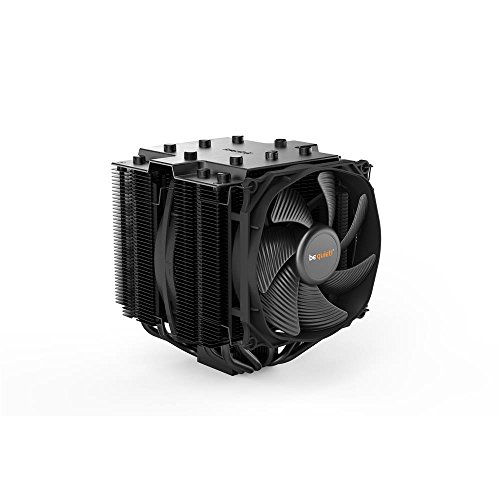
be quiet! Dark Rock Pro 4 CPU Cooler
A dual-tower cooler built around two Silent Wings PWM fans — the component-level expression of the silent philosophy, and quiet enough to serve an airflow build equally well. be quiet! Dark Rock Pro 4 CPU Cooler — Check on Amazon
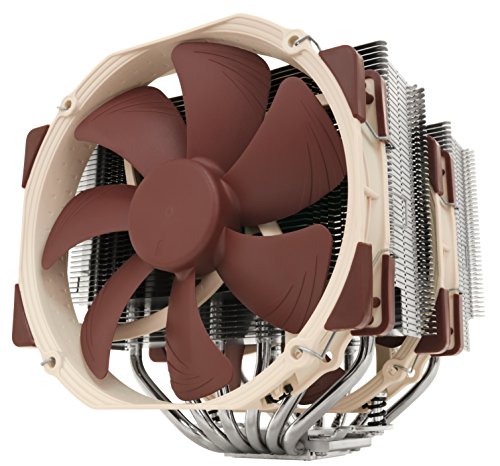
Noctua NH-D15 CPU Cooler
A dual-tower cooler famous for delivering top-tier cooling at low fan speeds, which is precisely the trick both case philosophies are trying to pull off. Noctua NH-D15 CPU Cooler — Check on Amazon
Frequently Asked Questions
Are silent cases bad for temperatures?
They run somewhat warmer than airflow cases with identical hardware — typically a few degrees — because their intakes are restricted by design. For stock-clocked, moderate components that difference is inconsequential. For hot, overclocked hardware in a warm room, it can become the limiting factor, which is why component pairing matters.
Can an airflow case be quiet?
Yes — often surprisingly quiet. Free airflow lets fans turn slowly, and slow fans are quiet fans; in a moderate build an airflow case at desktop loads can be near-inaudible. Its weakness is tonal noise: coil whine and similar high-frequency sounds escape through mesh unimpeded, which a silent case would muffle.
Which is better for a bedroom PC?
Usually the silent case, provided the components are efficient: it contains the idle and light-load noises you hear most in a quiet room at night. If the bedroom PC is also a high-power gaming rig used hard in the evening, weigh the airflow case with a strict fan curve — and consider which hours matter most.
Do silent cases need special fans?
They benefit most from fans with good static pressure at low speeds, since their vents are restrictive, and from fan curves tuned to stay slow. The case cannot do its job if the fans are loud at source; quiet components are half of any silent build.
Can I make my current case quieter without replacing it?
Often, yes: clean its filters, correct the fan layout, and tune fan curves so speeds stay low; replace any fan that ticks, grinds, or rattles. The troubleshooting guide linked in this article works through those fixes in order. A case swap is the last step, not the first.
Can a silent case ever be the right choice for a high-end gaming build?
Yes, when the build is honest about its heat and the room is honest about its ears. A flagship card in a silent case needs the case’s best airflow configuration, quality fans run at considered speeds, and an owner who accepts temperatures a few degrees above the mesh alternative as the price of the room’s peace. What it cannot survive is wishful thinking — the card at full draw, the case in its most sealed configuration, the fans at their quietest curve, all at once. Choose two of the three and the silent gaming build is a real and pleasant thing; demand all three and physics will choose for you.
Does undervolting change this comparison?
It is the closest thing the debate has to a cheat code, and it helps the silent case more. Reducing a graphics card’s or processor’s power draw slightly — with modern tools, often at no measurable performance cost — cuts the heat the case must move at the source, which is worth more to the design whose constraint is moving heat quietly. An undervolted flagship can live in a silent case in a way its stock self cannot. The airflow case benefits too, in fan speed unneeded, but its constraint was never as tight. If you are willing to spend an evening tuning voltages, the silent option’s territory expands noticeably.
Are fanless or passive builds the logical end of the silent path?
They are a different path entirely, with their own physics: passive builds replace fans with mass and surface area, work beautifully at modest power draws, and fall off a cliff at high ones, because a room’s still air can only carry so much heat away. For a media or office machine of frugal components, a passive build is the true silence this comparison gestures at. For a gaming machine, it is a research project. Know which machine you own before envying the fanless ideal.
How do I test my current case’s noise honestly before replacing it?
With a phone, a fixed load, and discipline. Record the machine at your seated position and at the position that matters — pillow, microphone, sofa — during the same repeatable load, at the same distance, before and after any change you try. Note the room’s own noise floor with the machine off, because many a case has been replaced for the sound of a refrigerator in the next room. Measurements made this way will not match a laboratory’s, but they will rank your options truthfully, which is all a purchase ever needs.
Is the noise difference worth it if I wear headphones while gaming?
Mostly no — and this is the comparison’s most liberating sentence for a large audience. If the machine’s working hours are spent under your headphones, its voice reaches you attenuated to a background you already ignore, and the airflow case’s cooling headroom is free. The exceptions are the machine’s other lives: the household that hears it while you do not, the calls taken off-headset, the night loads in a bedroom. If none of those apply, buy the cooling, wear the headphones, and let this entire comparison be somebody else’s problem.
I split my time between gaming and recording. Which design serves both?
The hybrid answer most dual-life owners land on is the airflow case, tuned quiet, in a position that serves the microphone: under the desk or behind a screen of furniture, with fan curves set so the recording hours — which are rarely the machine’s hottest — sit in its calmest range. Record a test at your real gaming load before committing, because the microphone’s verdict at full draw is the one that counts; if the airflow case fails that test even after placement and tuning, the silent case stops being a luxury and becomes the tool of your second trade, and it should be bought without resentment.
Which design is better for a dusty home?
The silent case’s sealed nature slows dust’s arrival, and its filters guard fewer, more deliberate openings; the airflow case admits air — and therefore dust — at a greater rate and leans harder on its filter discipline. In a genuinely dusty home the silent design’s interior stays cleaner for longer, provided its own filters are kept. In a clean home the difference shrinks to a rounding error and should not drive the choice.
Can I hear the difference between the two designs in a shop?
Rarely usefully. Showrooms are loud, display machines are unloaded or looping demos, and the case you hear is not carrying your components. A shop can tell you about build quality and panel fit; the acoustic verdict requires a loaded machine in a quiet room, which is why return terms matter more for this comparison than for almost any other in the case catalogue.
The Bottom Line
Airflow cases buy quiet with freedom — air moves easily, so fans stay slow. Silent cases buy quiet with containment — and demand cool-running components and careful tuning in return. Match the philosophy to your hardware’s heat and your room’s ears, and either can deliver a PC you barely hear.
Related Guides
Apply the case checklist, browse cooling-first roundups, and revisit the size question: