ilcastellomenu.com is reader-supported. When you buy through links on our site, we may earn an affiliate commission.
Where to Buy
Most cameras sold today are asked to live two lives. The best cameras for photos and video are the hybrids that take both lives seriously: stills with full photographic dignity, video with the focus, stamina and colour a modern audience expects, and — hardest of all — a body that switches between the two crafts without making its owner feel like a translator between hostile countries.
That dual brief eliminates more famous names than it admits. A stills champion whose video overheats, hunts focus or records in grudging bursts is not a hybrid; neither is a cinema-leaning body whose stills feel like an afterthought extracted from footage. The six cameras below were chosen because each one can be the only camera a creator, a family documentarian or a small production business owns — and be resented for neither half of the job.
They divide by emphasis rather than by competence. The Panasonic leads for video-led creators who photograph seriously; the Sony pair serve stills-led photographers who film professionally; Canon’s two bodies balance the crafts with an ease beginners and working pros both recognise; and the DJI pocket camera abolishes the tripod-and-rig ceremony for the moving half of life altogether.
Judge them by your own ratio. A photographer who films weddings’ speeches needs different insurance from a filmmaker who grabs posters and thumbnails from the same body — and this guide’s verdicts are written ratio-first, so the right body can find its owner quickly.
One clarification of scope before the verdicts: this guide judges general-purpose hybrids — cameras a person carries through a whole working or family life. Dedicated cinema cameras and broadcast rigs answer a different brief, as do the security and webcam categories elsewhere in this series; the six below are the ones that wake up not knowing which craft the day will demand, and cope either way.
Key Takeaways
- A true hybrid is judged twice: stills dignity and video stamina, with no excuses traded between them.
- The Panasonic LUMIX S5II is the video-led benchmark — long, calm recording with professional stills attached.
- Stills-led honours go to the Sony Alpha 7 IV, whose video is a professional tool rather than a bonus.
- The Canon EOS R6 Mark II balances both crafts with the least friction for working all-rounders.
- The Sony ZV-E10 II is the creator’s shortcut: product-focus intelligence and vlogging manners at a sane size.
- The DJI Osmo Pocket 3 removes the rig entirely — stabilised video and grab-worthy stills from a pocket.
- Heat, battery and audio decide real hybrid work more often than resolution does — this guide weighs them accordingly.
- Save two complete setups in the camera — one per craft — before your first real event; the switch should be a gesture, never a menu expedition.
In this guide
Quick Picks
| Camera | Badge | Why it does both well |
|---|---|---|
| Panasonic LUMIX S5II | Best video-led hybrid | Calm long recording, cinema colour discipline and stills that need no apology. |
| Sony Alpha 7 IV | Best stills-led hybrid | Deep photographic files plus video focus and colour professionals bill for. |
| Canon EOS R6 Mark II | Best balanced all-rounder | Both crafts at full strength, in the friendliest professional body here. |
| Sony ZV-E10 II | Best for creators and vloggers | Product-showcase focus, flip screen and clean streaming manners in a small body. |
| Nikon Z50 II | Best family hybrid | Friendly stills and honest video for households documenting everything twice. |
| DJI Osmo Pocket 3 | Best pocket hybrid | A gimbal camera that films like a crew and stills like a keepsake. |
How Did We Choose Cameras for Photos and Video?
Every candidate was required to pass two separate examinations with no marks carried across. The stills examination covered the usual ground — files, focus, handling, lenses. The video examination was stricter than most hybrid reviews dare: continuous recording at the length of a real event, autofocus behaviour on a walking, talking subject, colour consistency across a whole shoot, and the body’s thermal and battery behaviour when the work stopped being a demonstration.
Switching cost was measured as a first-class criterion. A hybrid earns its name in the transitions: the wedding photographer who must film the first dance ninety seconds after the stills of it, the creator whose tutorial alternates demonstration and detail shots. Bodies with a clean stills-video divide — a switch, saved settings per mode, no menu archaeology — scored as heavily as bodies with superior single-craft numbers.
Audio was treated as part of the camera, because for video it is half the product. Microphone inputs, headphone monitoring, and the body’s willingness to be a recording studio’s centre were weighed for every pick; a hybrid that hears badly is a stills camera with a hobby.
Finally, ecosystems were priced as futures: the lenses a hybrid owner needs must serve both crafts — quiet focusing, minimal breathing, apertures that flatter faces in stills and hold exposure in clips. Each system’s hybrid-friendly glass was part of its body’s verdict.
One deliberate omission should be confessed: action cameras, however hybrid their marketing, were judged here as video instruments with a stills courtesy, and only the Pocket 3’s genuinely photographic sensor and handling earned it a place among bodies a stills photographer could respect. The rest of that family is served, honourably, by the action and waterproof guides in this series.
What Actually Breaks First When a Camera Tries to Do Both?
Heat, usually. Video asks a sensor and processor to work at full stretch continuously, and a body designed around the stills photograph’s brief exertions can throttle, warn and shut down in the middle of the event it was bought to record. The hybrid bodies in this guide are engineered around that duty cycle — Panasonic most ostentatiously, with active cooling philosophy — and their verdicts report stamina as a headline rather than a footnote.
Focus behaviour breaks second. Stills focus may hunt, pulse and correct in milliseconds without consequence; video focus performs those same corrections on screen, in front of an audience, forever. Smooth, confident, breathing-aware autofocus is a different discipline from fast autofocus, and hybrid buyers should audition it on a walking subject rather than trusting the stills reputation of the same system.
The third fracture is workflow: two crafts means two file families, two colour philosophies and two sets of settings competing for one body’s memory. Hybrids that keep the crafts’ settings separate — so the video’s flat profile never ambushes the stills’ JPEGs — save their owners a category of error that has ruined more event coverage than any sensor limitation.
How Should You Split Your Budget Between the Two Crafts?
Let your ratio decide, and be honest about the ratio you have rather than the one you advertise. A creator whose income is video and whose stills are thumbnails should buy the video-led body and let stills ride; a photographer whose films are family records should buy the stills-led body and let video ride. The balanced bodies exist for the genuine fifty-fifty workers, who are rarer than the marketing assumes and know exactly who they are.
Lenses follow the same arithmetic with a twist: hybrid glass must focus silently and smoothly for video while resolving for stills, which makes the standard zooms and bright primes of these systems dual-purpose investments rather than compromises. Budget for one excellent standard lens before two specialised ones; a hybrid kit is a small kit used constantly, and its economics reward quality over coverage.
Audio and support are the budget lines beginners skip and professionals protect: a microphone before a second lens, a tripod that pans before a gimbal that decorates. The cameras below all accept proper audio; the discipline of funding it belongs to the buyer, and it separates amateur hybrid work from professional more reliably than any sensor in this guide.
Why Does Colour Consistency Matter More to Hybrids Than to Anyone?
A hybrid’s audience meets both crafts side by side: the video and its poster frame, the tutorial and its detail stills, the wedding film and the album. When the two crafts render the same dress, product or face in visibly different colours, the audience reads carelessness even if each image is beautiful alone. Consistency is therefore a hybrid’s professional signature, and the bodies here were judged partly on how their stills and video colour shake hands.
The tools differ by philosophy: Panasonic and Sony offer matched colour science and flat profiles that grade both crafts toward one look; Canon’s rendering pleases immediately in both modes with less grading headroom; the creator bodies automate the handshake for audiences who will never open a colour panel. None of these is the wrong answer — but choosing unconsciously, and discovering the mismatch at a client’s screening, is.
Build the habit early: shoot a reference subject in both modes under your working light whenever a new body or lens arrives, and save the settings that make the pair agree. That ten-minute ritual, performed once, is the difference between a hybrid workflow and two workflows sharing a camera bag.
How Do Frame Rates and Shutter Rules Change a Stills Photographer’s Habits?
Video’s foundational discipline is that time is structured: frames arrive at a fixed rate, and the shutter’s share of each frame decides how motion renders. The classic rule — shutter speed near double the frame rate — produces the natural blur audiences read as reality; break it toward faster shutters and motion turns staccato and intense, break it slower and movement melts. A stills photographer arriving in video must learn to feel that dial as an emotional control rather than an exposure one.
The practical consequence is filtration. Outdoors, the shutter is spoken for by the frame rate, so exposure is governed by aperture and neutral-density filters — a new item in the hybrid bag, and the one whose absence teaches the lesson fastest on the first bright shoot. The bodies in this guide all accept the workflow gracefully; the habit is the owner’s to install.
Frame rates themselves are a creative shelf rather than a ladder: standard rates for naturalism, higher rates for slow motion that turns a product pour, a sporting instant or a child’s leap into choreography. Hybrids that offer high rates without crippling crops or heat — the Panasonic and Canon here lead — widen the creator’s emotional vocabulary in ways stills cannot imitate.
Why Is the Flip Screen a Serious Professional Feature Now?
A generation of photographers was trained to regard the articulating screen as a consumer garnish. Hybrid work has reversed the verdict: the screen that faces the subject is the solo creator’s director, the low and high angles of event work are composed through it, and the vlogger’s entire professional posture depends on seeing the frame while inside it. Every body in this guide articulates for exactly these reasons.
The professional question is not whether a screen flips but how it behaves in work: brightness against daylight, touch focus that can be trusted mid-take, and a hinge that survives being used as the primary viewfinder for half the body’s life. Creator bodies like the ZV-E10 II build their whole interface around the screen; the full-frame bodies treat it as a second, increasingly equal, window.
Stills photographers discover its quieter gifts last: the waist-level composition that changes street photography’s social temperature, the overhead flat-lay without a ladder, the tripod work at ankle height. A feature adopted for video ends up educating the stills craft — the hybrid exchange running in its most pleasant direction.
How Much Does Stabilisation Matter Across Both Crafts?
More than either craft admits separately. In stills, stabilisation buys shutter speeds that turn dusk interiors and evening streets into working light; in video, it is the difference between footage that breathes and footage that trembles. A hybrid body with strong stabilisation — the Panasonic and Canon here lead, the gimbal camera transcends the question entirely — effectively adds a stop of courage to every assignment in both modes.
Its limits deserve equal clarity: stabilisation steadies the camera, not the subject, so moving people still demand shutter and frame discipline; and the smoothest handheld video remains a gimbal’s or a tripod’s junior. Treat in-body stabilisation as the floor of a hybrid’s steadiness rather than its ceiling, and the support kit in this guide’s workflow section completes the architecture honestly.
Test it personally when auditioning bodies: film a walk at your normal pace and photograph a dim interior at your normal care, and let the footage and files — not the axis count in the brochure — report back. Stabilisation is felt, not read.
Why Do Hybrid Shooters Talk About Their Second Body Differently?
Stills photographers carry a second body as insurance; hybrid shooters carry one as a colleague. A fixed camera recording the ceremony wide shot while the primary body hunts stills, a pocket camera capturing the journey while the system camera waits for the destination — the second instrument in hybrid work is not a spare but a simultaneous point of view, and the six picks in this guide pair with each other in recognisable combinations.
The commonest professional pairing in this list is a full-frame body with the Pocket 3: the system camera owns the deliberate work in both crafts, the gimbal owns the movement between the moments. The commonest family pairing is the Nikon with a phone, which is not a joke — hybrid thinking is about coverage and presence, and the phone is the second body most households already own.
Plan the pairing when the archive starts mattering more than the purchase: two angles on the unrepeatable is the closest thing to a guarantee this craft offers, and it is cheaper than the regret it insures against.
Which of the Best Cameras for Photos and Video Matches Your Ratio?

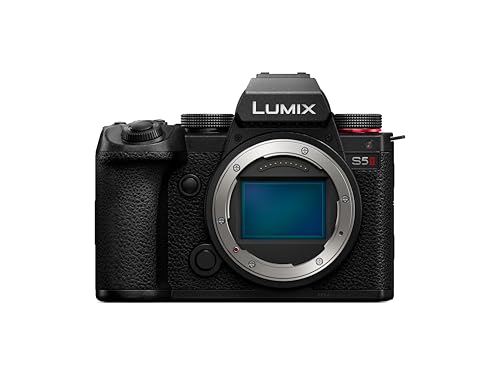
Panasonic LUMIX S5II — Best video-led hybrid
The S5II is what happens when a video-first engineering culture refuses to treat stills as a tax. Its recording stamina is the guide’s benchmark — long events, warm rooms and continuous duty that stills-led bodies meet with warnings — while its colour tools, drawn from cinema practice, give both crafts a disciplined, gradeable foundation that professionals recognise immediately.
The stills half is no garnish: full-frame files with honest colour, strong stabilisation for the handheld registers, and a body that handles like a photographer’s instrument rather than a camcorder’s compromise. Event photographers who film as much as they shoot will find the crafts’ settings kept properly separate and the switching between them free of ceremony.
Its autofocus, once the system’s talking point for the wrong reasons, now performs with the confidence hybrid work requires — people tracked smoothly, products held, faces found — and the L-Mount alliance supplies lenses that focus quietly enough for a ceremony and sharply enough for a cover.
Choose it when the moving image pays the bills and the still image signs the work. In that household, it has no rival in this guide at its level.
- Format: full-frame mirrorless
- Video: long-duty recording, cinema colour tools
- Stills: full-frame files, strong stabilisation
- Modes: clean stills-video separation
- System: L-Mount alliance lenses
Strengths
- Recording stamina that ends thermal anxiety
- Colour discipline shared by both crafts
- Stills that stand as professional work
Trade-offs
- Stills autofocus trails the very leaders
- Lens alliance smaller than Sony’s
- Body is utilitarian in feel
Wedding and event hybrids should weigh its fan-cooled calm specifically: the speeches, the service and the first dance are a thermal marathon, and this is the body in the guide built to finish it without a negotiation.
Panasonic’s colour tools reward a single disciplined afternoon: build your look from a known subject in your working light, save it, and the year’s productions will share a face before the edit begins.
Best for: video-led creators and event hybrids. Not suited for: stills purists wanting the deepest photo menus

Sony Alpha 7 IV — Best stills-led hybrid
The Alpha 7 IV inverts the Panasonic’s emphasis with equal legitimacy: a photographer’s camera, deeply and seriously, whose video department is staffed by professionals rather than interns. Its stills files are this guide’s benchmark for editing depth, and its lens system — the widest in modern photography — serves both crafts with hybrid glass at every price.
Video from this body carries the marks of Sony’s cinema lineage: focus that breathes minimally and tracks faces with tenacity, colour science with a respected flat option for grading, and recording quality that broadcast-adjacent work accepts. Its limits are stamina and ergonomics — long, hot recording sessions ask more of it than of the Panasonic, and its menus serve the stills master first.
For the photographer whose films are serious but secondary — the wedding photographer’s highlights reel, the portraitist’s behind-the-scenes, the journalist’s accompanying clips — those limits rarely bind, while the stills excellence binds daily. Ratio, again, is the whole decision.
Its resale and rental ubiquity add a practical halo: accessories, knowledge and second bodies are everywhere its owner travels. A hybrid career built on this body is built on the industry’s common language.
- Format: full-frame mirrorless
- Stills: benchmark editing depth
- Video: cinema-lineage focus and colour
- System: the widest hybrid lens range
- Audio: full professional connections
Strengths
- Photographs of the first rank, film of the second
- Lenses for every hybrid assignment
- An ecosystem that travels anywhere
Trade-offs
- Long hot recording trails the Panasonic
- Menus prioritise the stills craft
- Body size is a commitment
Product photographers adding demonstration video will find its focus behaviour on presented objects particularly literate — the camera understands the grammar of showing a thing to a lens, in both crafts.
Sony stills shooters filming their first event should rehearse the mode switch and its saved settings at home — the body’s depth is a virtue only when it has been pre-decided, and events punish improvisation in menus.
Best for: stills-led professionals who film seriously. Not suited for: video-led creators recording long events in heat

Canon EOS R6 Mark II — Best balanced all-rounder
The R6 Mark II is the hybrid for people who refuse to declare a primary craft. Its stills are fast, forgiving and low-light graceful; its video is detailed, well-stabilised and recorded with a stamina that covers most real events; and its handling — the deep grip, the sensible controls, the menus that read like instructions rather than riddles — makes switching between crafts feel like changing lenses, not changing professions.
Canon’s colour is its social gift: faces in both crafts emerge pleasing and true, which is why wedding and family professionals, whose audiences are emotionally literate about skin, settle on this body in numbers. Its autofocus performs the hybrid’s hardest trick — invisible competence — in both modes.
Honest boundaries: its stills resolution is ample rather than exhibition-grade, and its longest video duties trail the fan-cooled Panasonic in extreme heat. Within the vast middle where hybrid work actually lives — events, families, creators, small productions — those boundaries are surveyed rarely and forgiven immediately.
If one camera must be bought by a household or a small business that does everything, this is the guide’s safest pair of hands.
- Format: full-frame mirrorless
- Stills: fast, low-light graceful
- Video: stabilised, event-capable
- Handling: the friendliest professional body here
- Colour: faces flattered in both crafts
Strengths
- Both crafts at full strength, minimal friction
- Handling that disappears under pressure
- Colour audiences trust instinctively
Trade-offs
- Resolution ample, not maximal
- Extreme-heat video stamina second to Panasonic
- Professional lenses raise the system cost
Small production companies standardise on bodies like this for a reason worth copying: a new hire can be trusted with it on day one, in either craft, which is an operational virtue no specification table captures.
Canon’s hybrid ease extends to its lens behaviour: the standard RF zooms focus quietly enough for a ceremony and sharply enough for the album, which is the dual requirement in its purest form.
Best for: genuine fifty-fifty workers and small teams. Not suited for: resolution-led stills specialists or extreme-duty video

Sony ZV-E10 II — Best for creators and vloggers
The ZV-E10 II distils the hybrid idea for the creator economy: a compact body whose intelligence is aimed at the one-person production. Its product-showcase focus — hold an object to the lens and it sharpens, return to your face and it follows — automates the commonest shot in creator video, and its stills are proper system-camera photographs rather than frame grabs with ambitions.
The flip screen, the tally-light manners, the clean webcam and streaming behaviour, and a microphone ecosystem sized to a desk make it the fastest route from idea to published hybrid content in this guide. Its APS-C files keep both crafts honest at the sizes feeds, thumbnails and family prints actually use.
Sony’s lens mount gives the creator a growth path that pocket devices cannot: today’s kit zoom, tomorrow’s bright prime for the portrait thumbnails and the evening vlogs. The body is small enough to live on the desk where the work happens, which — as this series of guides keeps concluding — is where cameras earn their keep.
It concedes the professional extremes: no viewfinder for the stills purist, thermal stamina for events rather than marathons, weather sealing for intentions rather than storms. For the desk, the studio corner and the travel creator, those concessions are priced correctly.
- Format: APS-C mirrorless, compact
- Focus: product-showcase and face intelligence
- Screen: fully articulating, creator-facing
- Streaming: clean webcam behaviour
- System: Sony E-mount growth path
Strengths
- The one-person production, automated kindly
- Proper stills from a vlogging body
- Desk-sized and always ready
Trade-offs
- No viewfinder for stills purists
- Event stamina, not marathon stamina
- Small body, small battery rhythm
Teachers, reviewers and makers who demonstrate objects for a living should audition its showcase focus before any rival: it is the rare feature that removes a daily friction entirely rather than merely polishing it.
The ZV-E10 II’s small batteries argue for a creator’s rhythm rather than an event’s: spares in the desk drawer, charged in rotation, turn its one compromise into a non-issue for channel work.
Best for: creators, vloggers and online teachers. Not suited for: event professionals and viewfinder traditionalists

Nikon Z50 II — Best family hybrid
Households were the original hybrid producers — the same camera owes them the birthday stills and the birthday film — and the Z50 II serves that founding brief with unusual grace. Its subject detection works across both crafts, its menus speak plainly to whoever picks it up, and its size respects the reality that family equipment is carried by people already carrying the family.
Stills are its senior partner: clean, faithful files and handling that encourages the household’s photographer. Video is honest and capable — family events, school performances, the dog’s biography — with focus that follows faces without supervision and colour that keeps skin familiar. It will not anchor a production business, and it does not pretend to.
The Nikon’s particular virtue is shareability: a spouse, a grandparent, a teenager can all extract good results from it in both modes within minutes, which multiplies the household archive in a way a personal, idiosyncratic camera never does. Archives are built by whoever was holding the camera, and this one is holdable by everyone.
As the children grow into creators, the Z system grows with them — lenses, bodies and skills all transfer upward. It is the family hybrid bought once and understood for years.
- Format: APS-C mirrorless, compact
- Focus: subject detection in both crafts
- Menus: plain-language, shareable
- Stills: faithful, clean files
- Video: honest family-grade recording
Strengths
- The household camera, in both crafts
- Usable by every family member
- A system the children can inherit
Trade-offs
- No in-body stabilisation
- Video features are family, not professional
- Tilting screen limits front-facing filming
Families documenting a renovation, a puppy or a grandparent’s stories will find its two crafts equally unintimidating — which means both actually get used, and the archive doubles.
Nikon’s plain menus make it the body most easily lent to a second shooter — a wedding’s candid camera, a family’s spare pair of hands — and hybrid events are full of moments that need exactly that.
Best for: families and household documentarians. Not suited for: professional hybrid production

DJI Osmo Pocket 3 — Best pocket hybrid
The Pocket 3 asks why a hybrid camera needs to look like a camera at all. Its gimbal-stabilised lens floats through movement that would shake any body in this guide into blur; its rotating screen flips between filming others and filming yourself; and its stills — from a sensor far larger than its size implies — produce keepsakes and social photographs of genuine quality.
For the moving half of a hybrid life, it is close to magic: walks become tracking shots, travel days become cinema, and the whole apparatus vanishes into a jacket pocket between scenes. Families and travellers who would never carry a rig carry this, and their video archives are transformed accordingly — presence, again, defeating specification.
Stills are its junior craft and should be judged as such: excellent for the shared, printed-small and remembered, short of a system camera’s files for serious photographic work. The honest household pairing is this plus any stills body in the guide; the honest solo verdict is that travellers whose photography is mostly motion will never miss the difference.
DJI’s ecosystem of wireless microphones and accessories turns it into a pocket production company. It is the hybrid idea reduced to its essence: both crafts, no ceremony, always there.
- Format: gimbal camera, pocket-sized
- Stabilisation: mechanical, three-axis
- Screen: rotating, front and back facing
- Stills: quality keepsakes from a large sensor
- Audio: wireless microphone ecosystem
Strengths
- Video smoothness no body here can match
- Always carried, always ready
- A pocket production company
Trade-offs
- Stills are junior to any system body here
- No interchangeable lens or viewfinder
- Fragile elegance beside rugged rivals
Travel journalists and family historians rate it by a different ledger: the shots that exist because the camera was in a pocket outnumber the shots lost to its stills ceiling by an order of magnitude.
The Pocket 3’s stills deserve one deliberate outing as a stills-only camera: its lens quality and colour surprise photographers who filed it as a video toy, and the education costs an afternoon.
Best for: travellers, vloggers and motion-first families. Not suited for: stills-led photographers needing system files
How Should a Hybrid Shoot Be Planned So Both Crafts Survive?
Decide the hierarchy before the event: which craft is the deliverable and which is the insurance, because at the decisive moment they will compete for the same pair of hands. Shoot the primary craft properly and let the secondary be opportunistic — a highlights camera left recording on a tripod, stills grabbed in the film’s pauses — rather than alternating anxiously and serving neither.
Build two saved setups in the camera, one per craft, and rehearse the switch until it is a gesture rather than a procedure. The bodies in this guide all support the separation; the photographer’s discipline in configuring it before the wedding, the launch or the match is what converts a hybrid body into a hybrid workflow.
End every hybrid shoot with the same closing ritual: both crafts’ cards backed up, one frame and one clip reviewed for colour agreement, batteries charged for the next summons. Hybrid equipment fails socially before it fails technically — the craft that was not checked is the one the client asks about — and the ritual is the professional’s answer.
What Audio and Support Kit Does a Hybrid Owner Actually Need?
A microphone first, because audiences forgive modest pictures and never forgive unintelligible speech: a small shotgun for run-and-gun work or a wireless lavalier for presenters, matched to the body’s inputs, with headphones to verify rather than hope. Every camera in this guide hears professionally once equipped; none hears professionally through its built-in microphones in a real room.
Support second: a tripod whose head pans smoothly serves both crafts — locked for stills, fluid for video — and outearns a quiver of novelty mounts. Add light third, because one modest panel transforms indoor hybrid work in both modes at once, flattering the stills’ faces and the video’s exposure with the same photons.
Buy the kit in that order and the hybrid system’s economics stay sane: camera, lens, microphone, support, light. It is the sequence professionals actually follow, and it is reversible at no step — each purchase improves both crafts simultaneously, which is the hybrid idea expressed as a shopping list.
How Should a One-Person Creator Organise a Hybrid Studio Corner?
Permanence beats perfection. A corner where the camera lives on its tripod, the light stands where it stood yesterday, and the background is a decision already made will produce more hybrid work in a month than a studio assembled fresh for every idea. The creator bodies in this guide are designed for exactly that furniture; the full-frame bodies adapt to it without complaint.
Keep the two crafts’ tools visibly separated within the corner — stills on one shelf, audio and video on another — because the hybrid shoot’s commonest delay is hunting the other craft’s cable. A labelled drawer is unglamorous infrastructure, and it is also the difference between an idea filmed today and an idea admired until it evaporates.
Review the corner monthly with the same question this guide asked of the cameras: what broke first, most recently, in real work? Buy the answer to that question next — a longer cable, a warmer light, a second battery — before buying any upgrade to a specification that has never yet failed you.
What Does a Wedding Teach About Hybrid Work That Nothing Else Does?
Everything, under time pressure, in front of witnesses. A wedding demands the album and the film from the same pair of hands, in light that changes by the hour, with moments that occur exactly once and a client whose scrutiny is lifelong. Hybrid photographers who survive weddings professionally share recognisable habits: the crafts’ hierarchy decided with the couple in advance, both setups saved and rehearsed, a second body or a fixed video camera covering the ceremony so the primary hands never have to choose between the kiss as photograph and the kiss as film.
The day also teaches the hybrid’s deepest truth: the crafts protect each other. The film rescues the moment a still missed; the stills give the film its poster, its album, its permanence. Couples do not experience their wedding as two media, and the photographer who serves them in one integrated practice — on the bodies this guide recommends — is practising the hybrid idea at its most human.
Beginners should second-shoot such a day before leading one, in whichever craft is junior, and let the senior partner’s rhythm teach what no tutorial can: when to switch, when to commit, and when to put both crafts down and simply watch for the moment that is actually coming.
How Do You Grow From Hybrid Owner to Hybrid Professional?
The transition is rarely about equipment — the bodies in this guide are already professional instruments — and almost always about deliverables. Professionals promise pairs: the album and the film, the product gallery and the demonstration, the portraits and the interview. Practise promising pairs on unpaid work first, with deadlines, until both crafts arrive on time together as a habit rather than as a rescue operation.
Price the pair honestly when the work turns commercial. Hybrid skill is scarcer than either single craft, and clients value the single pair of hands; undercharging the second craft teaches the market to expect it free, which corrodes the profession for everyone. The camera made the combination possible; the pricing makes it sustainable.
Keep one craft deliberately senior in your own development — attend its workshops, study its masters — because hybrid excellence is two expertises in dialogue, not one expertise diluted. The photographers whose hybrid work commands respect are recognisable by having a home craft whose standards discipline the visiting one.
How Should Hybrid Files Be Organised So Neither Craft Gets Lost?
Treat the shoot, not the medium, as the archive’s unit: one folder per event, stills and clips side by side inside it, named by the same clock. The crafts were one day in the world; splitting them into separate archives at the drive level divorces evidence that belongs together, and the divorce is always regretted at the edit, the anniversary or the client’s request for the other version.
Back up with the video’s appetite in mind: the stills photographer who adopts hybrid work discovers storage the way sailors discover weather. Budget drives as a running cost of the second craft, keep the event folder intact on two devices before any card is formatted, and let the closing ritual in this guide’s workflow section be performed without negotiation.
Cull the crafts by different mercies: stills by the frame’s quality, video by the take’s usability, and never by comparing the two against each other. The hybrid archive that survives is the one whose owner understood that a mediocre clip beside a great still is not a failure but a witness — and witnesses, in family and client work alike, are priceless at exactly the moments professionals predict least.
How Do the Six Hybrid Cameras Compare?
The table’s middle column is the one to read first: it names each body’s centre of gravity, and the correct purchase is the one whose gravity matches your own week’s actual centre. Specifications in this class are all sufficient; emphasis is what differs.
| Camera | Hybrid strength | Centre of gravity | Best matched owner |
|---|---|---|---|
| Panasonic LUMIX S5II | Recording stamina and colour discipline | Video, with pro stills | The video-led creator |
| Sony Alpha 7 IV | File depth in both crafts | Stills, with pro video | The stills-led professional |
| Canon EOS R6 Mark II | Frictionless balance | Dead centre | The all-round worker |
| Sony ZV-E10 II | Creator automation | The desk and the channel | The online creator |
| Nikon Z50 II | Shareable competence | The household | The family documentarian |
| DJI Osmo Pocket 3 | Motion without ceremony | The journey | The travelling storyteller |
Notice that the pocket camera and the family body are not lesser rows of this table but different answers to the same question, asked by different lives. Hybrid is a ratio, not a rank — the table merely helps you confess yours.
A practical tie-breaker for the torn: count the microphones, tripods and lights you already own. A hybrid body that fits the existing kit’s mounts, inputs and habits is worth a specification tier of advantage, because hybrid work is a system performance and the camera is only its most visible musician.
What Mistakes Do Hybrid Buyers Make Most Often?
Buying one craft and assuming the other: the stills flagship whose video was an engineering afterthought, the cinema body whose photographs feel extracted rather than taken. This guide’s entire shortlist exists to prevent that error — every body here passed both examinations — but buyers repeat it whenever a single spectacular specification drowns out the dual brief.
Second, neglecting audio until the first client screening. Built-in microphones record the room, the camera’s own handling and the photographer’s breathing with democratic fidelity, and no editing rescues speech recorded badly at a distance. The microphone is not an accessory to a hybrid purchase; it is the second half of the video craft, and it belongs in the first budget.
Third, letting the crafts’ settings contaminate each other — the flat video profile flattening the family JPEGs, the stills’ picture style grading the wedding film. Configure the separation your body offers, save both setups, and audit them before events. Most hybrid disasters are configuration fossils from the other craft’s last outing.
Fourth, overheating by surprise: discovering a body’s thermal limits during the longest, hottest, most important recording of the year. Test stamina at home, at event length, in a warm room, before the event does it for you — and let the result, not the brochure, plan your coverage.
Fifth, starving the hybrid of cards and power sized for its hungrier craft. Video consumes storage and batteries at rates stills photographers find indecent, and the shoot that ends on a full card ends in the craft that was rolling. Size the consumables for the video day, and the stills day will never notice the generosity.
Sixth, and most quietly: forgetting that the audience for hybrid work compares the crafts against each other. A glorious film beneath a mediocre poster frame undersells itself before it is even played. Give the still that represents your video the same care as the video itself — in hybrid work, every photograph is also a trailer.
Final Recommendation
If your living leans on video, buy the Panasonic LUMIX S5II and let its stills surprise you upward. If it leans on photographs, buy the Sony Alpha 7 IV and let its video do the same. If it leans, honestly, on neither — because both crafts arrive in the same hour — the Canon EOS R6 Mark II is the balanced instrument this category exists to produce.
Below the full-frame line, the Sony ZV-E10 II equips the creator’s desk, the Nikon Z50 II equips the household, and the DJI Osmo Pocket 3 equips the journey. Confess your ratio, buy its body, and spend the savings on the microphone.
Whichever ratio you confess to, buy the body once and buy it properly: the hybrid mistake that outlasts all others is the half-committed purchase, upgraded within the year at a loss, when the honest body was visible from the start. The six above are the honest bodies. Choose yours, equip its ears, and go and make both kinds of record.
Related guides
- Best Digital Cameras for Film Productions: Log, 10-Bit Colour and the Hybrid Bodies That Carry a Set
Frequently Asked Questions
Can one camera really be excellent at both photos and video?
[‘Excellent at both, yes — the bodies in this guide are proof, with professional work in each craft to their names. What no camera offers is being the single best at both simultaneously; the flagships of each craft still lead their own marathons. The hybrid question is whether one body can be professionally sufficient at both while living in one bag, and for the overwhelming majority of working creators, these six answer it affirmatively.’]
How long can these cameras record video continuously?
[‘It varies by body, settings and temperature — which is precisely why this guide weighted stamina in testing rather than quoting a single figure. The Panasonic is engineered for the longest duties, the Canon and Sony full-frame bodies cover typical event segments comfortably, and the creator and family bodies serve their shorter-form briefs. Test your own body at your own event length, in warmth, before relying on it.’]
Do I need special lenses for video, or will photo lenses do?
[“Modern photo lenses from these systems mostly serve video well; the hybrid-specific virtues to look for are quiet focusing motors, minimal focus breathing and smooth aperture behaviour. The standard zooms and primes recommended alongside these bodies were chosen with both crafts in mind, and a creator’s first lens should be exactly that dual-purpose standard — specialisation can come later, per craft, as the work demands.”]
Is 4K necessary, or is HD enough for hybrid work?
[‘For nearly all audiences, well-shot HD remains entirely respectable, and the cameras here oversample their way to excellent HD. 4K earns its storage and heat costs when you crop in the edit, deliver to large screens, or future-proof a commercial archive. Beginners should master framing, focus and audio in whichever resolution they choose — audiences notice those long before they count pixels.’]
How do I keep photos and videos from the same event looking consistent?
[“Fix the shared variables: one white balance philosophy under the event’s light, matched colour settings or a shared grading preset, and the same lens where possible. Review one still and one clip side by side after your first event with a new body and save the corrections as your house setup. Consistency is a habit built once and then merely kept.”]
Should a beginner buy a hybrid or start with stills only?
[‘A hybrid, unhesitatingly, if both crafts interest you at all — the bodies here, particularly the Canon and Nikon mid-range picks, teach stills as kindly as any dedicated camera while keeping the video door open at no penalty. The crafts educate each other: video teaches stills photographers timing and sequence, stills teach filmmakers composition and light, and the beginner who learns both owns a richer visual education.’]
What is the most important video setting a stills photographer must learn?
[‘Shutter discipline: in video, shutter speed is married to frame rate for natural motion, so the exposure habits stills photographers use freely — any shutter, any time — must be relearned around that marriage, with neutral-density filtration as the usual mediator outdoors. It is the one genuine re-education hybrid ownership demands, and a single afternoon of practice installs it permanently.’]
Can I livestream with these cameras?
[‘Most of them, yes — the creator bodies are designed for it, the full-frame bodies stream cleanly via their connections, and the Pocket 3 joins a stream as readily as it records. Streaming adds its own disciplines of audio, light and stamina, and the same bodies this guide recommends for recorded hybrid work carry those disciplines best.’]
Which of these is best for a small business that does everything?
[“The Canon EOS R6 Mark II for a team that shares equipment, or the Sony ZV-E10 II for a solo operator whose stage is a desk and a product shelf. The business’s real question is who holds the camera: many hands argue for the Canon’s friendliness, one pair of hands argues for the Sony’s automation, and both answers keep the microphone budget intact, which matters more than the choice between them.”]
Is it better to buy one hybrid or two specialised cameras?
[“For most owners, one hybrid: the shared lenses, batteries, menus and muscle memory compound in value, and the second body — when the work justifies it — is usually another hybrid pressed into a supporting role. Two specialised cameras make sense at the profession’s extremes, where each craft’s flagship earns its keep weekly; below that altitude, specialisation is mostly a storage arrangement.”]
How do I practise switching between crafts under pressure?
[“Stage small, honest drills: a family walk where every subject must be captured as one still and one five-second clip, a pet’s afternoon, a street market. The drill feels artificial for exactly one outing; by the third, the switch is a gesture and the settings are furniture. Professionals rehearse transitions the way musicians rehearse key changes — privately, repeatedly, and before the audience arrives.”]
Related Guides
Hybrid creators usually continue, once the ratio is confessed and the microphone is bought, into the specialisations their ratio favours, such as our guide to cameras for open broadcaster and streaming work our guide to cameras for photographs and serious stills work our guide to cameras for photographing moving subjects at events


