Disclosure: As an Amazon Associate, ilcastellomenu.com earns from qualifying purchases. Links on this page are affiliate links; they cost you nothing extra. Prices and availability change often, so check the current Amazon listing before you buy.
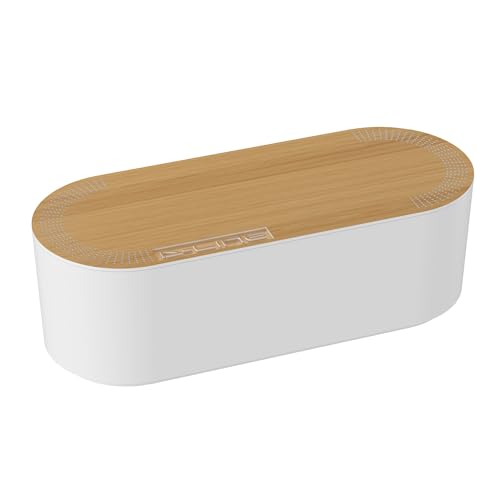
This cable management box review exists because the product itself is easy to misunderstand. A cable management box looks like the simplest object in the home: a container with a lid. Yet the difference between the box that quietly fixes a corner for years and the box that gets returned in a week is real, and it lives in details the product photos barely show: how the lid seats, where the cables leave, how the interior handles a bulky brick, and whether the design lets warm air escape. This review works through the leading designs on the market, led by the D-Line Cable Management Box, the Bluelounge CableBox and the YECAYE Cable Management Box, and judges them the way an owner actually experiences them.
The short verdict first. A good box earns its place when three things line up: your strip and its largest adapter fit without force, the cables exit where your devices actually are, and the design is ventilated rather than sealed. When those three line up, the box disappears into the room and simply stays solved. When any one of them fails, no amount of styling saves it, because you will fight the lid, the cables or the heat every single week.
Key Takeaways
- Fit is decided by your bulkiest power brick, not by the strip alone.
- Choose a ventilated design, keep the vents uncovered, and never drape fabric or a rug over the box.
- A box hides cords from children and pets but is not a childproofing device; lids lift by design.
- Keep the box in a dry place, away from sinks, tanks, bowls and every other water source.
- Do not overload the hidden strip; hidden sockets have exactly the same limits as visible ones.
- The leading designs differ mostly in size range, lid feel and looks, not in the basic job they do.
In this guide
Cable Management Box Review: What It Is and Where It Fits
A cable management box is a lidded enclosure sized to hold a power strip, its plugs and adapters, and the coiled slack of the cables connected to them. It sits on the floor, on a shelf or on a desk, and its whole purpose is to convert a visible tangle into a single calm object. The category splits loosely into three families: rigid plastic boxes with moulded cable slots, design-led boxes where the shell is styled to sit in open view, and fabric or folding covers that wrap a strip in something softer. All three do the same core job, and the reviews below treat them as one family with different strengths.
Where it fits in a home is wherever a strip serves several devices in one place. At a desk, the box solves the problem every home office knows: the strip on the floor collecting chargers for a laptop, a phone, a lamp and a monitor, with cables draping from the desktop like vines. A box at the desk’s foot gathers that population into one calm object, and the desktop cables drop behind the desk into it in a single bundle. The improvement is partly visual and partly practical, because a floor you can vacuum without negotiating a cable nest is a floor that gets vacuumed, and a strip you can reach by lifting one lid gets switched off at night more often.
Behind the television is the box’s second great stage. A television, a soundbar, a streaming box, a console or two and perhaps a router all drink from one strip in the dustiest, least-visited corner of the room. A box there does more than tidy: it gives that whole population one home, so adding or swapping a device means opening one lid instead of reaching blindly behind furniture. Measure the corner honestly, because entertainment strips carry more and bigger bricks than desk strips, and the box that serves a television usually needs to be the larger size in any range.
A box is one tool among several, and sometimes it is not the right one. An under-desk tray carries a strip and its cables along the underside of the desk, off the floor entirely, which suits standing desks and anyone who mops often. Cable sleeves gather a run of cables into a single neat tube between two points, ideal for the stretch between a desk and a wall. Raceways and trunking fix cables along skirting boards and walls, the tidiest answer for permanent television installations. Many good setups combine tools: a tray under the desk, a box at the television, sleeves on the runs between. Choosing a box is really choosing the floor-standing, furniture-like member of that family.
Design, Build and Setup
Three designs carry this review, because between them they cover how most households actually buy: the established all-rounder, the design-led original, and the value set bought for several rooms at once.

D-Line Cable Management Box
The D-Line Cable Management Box is the long-running benchmark design sold in a choice of sizes, with a neat lid and generous cable entry and exit slots at the back. In daily use its strengths show in the ordinary moments: the lid coming off without a fight when a charger changes, cables leaving in the direction they need to go, and a shell that wipes clean when the room gets its weekly dust. Treat it as a premium-leaning option in qualitative terms, the kind of purchase that makes sense when its particular balance of looks, size and simplicity matches the corner you are tidying.
Best for: a setup whose shape matches its size honestly, with the bulkiest brick measured first. Not suited for: anyone hoping to force an oversized strip and several large adapters into the smallest shell in the range, or anyone who plans to cover it with fabric and forget it, because no box in this class rewards being sealed and ignored.
Bluelounge CableBox
The Bluelounge CableBox is the design-led original from a studio known for desk accessories, with a clean sculpted shell and a flame-retardant construction story. In daily use its strengths show in the ordinary moments: the lid coming off without a fight when a charger changes, cables leaving in the direction they need to go, and a shell that wipes clean when the room gets its weekly dust. Treat it as a premium option in qualitative terms, the kind of purchase that makes sense when its particular balance of looks, size and simplicity matches the corner you are tidying.
Best for: a setup whose shape matches its size honestly, with the bulkiest brick measured first. Not suited for: anyone hoping to force an oversized strip and several large adapters into the smallest shell in the range, or anyone who plans to cover it with fabric and forget it, because no box in this class rewards being sealed and ignored.

YECAYE Cable Management Box
The YECAYE Cable Management Box is a value-focused set that often bundles more than one box, aimed at households tidying several rooms at once. In daily use its strengths show in the ordinary moments: the lid coming off without a fight when a charger changes, cables leaving in the direction they need to go, and a shell that wipes clean when the room gets its weekly dust. Treat it as a entry option in qualitative terms, the kind of purchase that makes sense when its particular balance of looks, size and simplicity matches the corner you are tidying.
Best for: a setup whose shape matches its size honestly, with the bulkiest brick measured first. Not suited for: anyone hoping to force an oversized strip and several large adapters into the smallest shell in the range, or anyone who plans to cover it with fabric and forget it, because no box in this class rewards being sealed and ignored.
Materials decide how a box ages. Hard plastic shells are the norm: light, easy to wipe clean, and moulded with the slots and lids the job needs, though the cheapest shells flex and their lids can warp or rattle. Bamboo and wood-effect lids trade a little of that precision for warmth, sitting more naturally on furniture and in living rooms. Fabric-covered and folding designs go furthest toward furniture, softening the object entirely, but they give up the crisp cable routing of a rigid shell and can hold dust in their weave. None of these is the correct answer; the correct answer is the one whose look you will still like in the room where it has to live.
Routing is where a tidy box is won or lost. Cables should enter and leave through the openings the designer provided, at the back or the ends, never pinched under the lid or forced through a gap that bends them sharply. Inside the box, coil the excess length of each cable loosely and keep the coils separate, so the next time you open the lid you can lift one device out without dragging the whole nest with it. A few reusable ties inside the box transform it from a hiding place for chaos into an organised one, and the five minutes spent arranging the interior is repaid every time you change a device.
Performance in Real Use
At the Desk
The desk setup is the box’s home turf. Monitors, docks, chargers and lamps all converge on one strip, usually on the floor, usually visible from the door. A box placed beside the desk leg turns that convergence into a single tidy volume, and the cables from the desktop arrive together down the back edge. For renters and anyone in a temporary workspace, the appeal doubles: no drilling, no clamps, nothing attached to furniture you do not own. When the desk moves, the box moves with it, contents and all, and the new setup takes minutes to recreate.
Heat is the subject every honest discussion of these boxes has to start with. A power strip inside a closed box traps heat that would otherwise drift away into the room, because the chargers and adapters plugged into that strip give off warmth as they work and the box walls slow its escape. That is why the first rule of ownership is to choose a ventilated box, with slots or openings that let warm air leave, rather than a sealed container that happens to fit. It is also why you should never cover the box with fabric, a throw or a rug, however tempting it is to hide it further: a layer over the top turns a ventilated design back into a sealed one.
Behind the Television
Entertainment corners reward a box because their cables never move. The strip behind a television stand might not be touched for a year, and in that year it gathers dust, slips sideways and slowly becomes the thing nobody wants to reach behind the furniture to fix. A box imposes order that lasts: strip seated, bricks spaced, cables leaving toward their devices, lid keeping the dust to a washable surface. When a console changes or a streaming stick arrives, the job is one lid and one free socket, not an archaeological dig.
Do not overload the strip that lives in the box. A strip is rated for a total load, and the fact that its sockets are hidden does not change what those sockets can safely carry. Desk and entertainment loads, which are mostly chargers, lamps, monitors and consoles, sit comfortably within sensible limits when you add them up honestly. The trouble starts when a heater, a kettle or another hungry appliance gets plugged into the hidden strip because a socket looked free. Keep the box for the low, steady loads it was bought to tidy, and give heavy appliances their own visible outlet.
In Family Rooms
A lidded box does hide cords from children and pets, and that is a genuine benefit: dangling cables invite pulling, chewing and tripping, and a box removes most of that invitation. But be precise about what the box is not. It is not a childproofing device. Lids lift, often easily and by design, because you are meant to open them yourself without tools. A curious toddler can open many of these boxes, which means the outlet and the strip still need the normal care you would give them anywhere else in the home: sensible placement, socket covers where you use them, and supervision as the real safety system.
Keep the box away from water sources. That sounds obvious until you map where boxes naturally land: under desks near spilled drinks, behind television stands, beside aquariums, in kitchens and bathrooms where steam and splashes are part of daily life. Electricity and water do not negotiate, and a box concentrates plugs in one place, which raises the stakes of any spill that reaches it. Place boxes on dry floors and dry shelves, route them away from sinks, fish tanks, plant watering spots and pet bowls, and if a drink ever does go over near the box, unplug first and dry everything thoroughly before it goes back into service.
Heat, Bricks and the Limits That Matter
Large power bricks deserve their own warning. The chunky adapter blocks that come with laptops, consoles and some monitors may not fit inside a small box at all, and when they are forced in they crowd the strip, press against cables and run hotter in the confined space than they would in the open. Check fit qualitatively before you buy: think about the single bulkiest thing you own, picture it sitting on the strip, and choose the box size that swallows it without a struggle. A box that fits the strip but not the brick has solved the wrong half of the problem.
Where the box sits matters as much as which box you buy. Under a desk, it should sit where your feet do not kick it and where the chair’s casters never travel. Behind a television stand, it needs enough clearance that the lid can come off without moving furniture. On a desktop, it earns its footprint only if it also calms the cables on the surface, which usually means placing it at the back edge where cables naturally gather. In every location the same checks apply: air can reach it, water cannot, the lid can open, and you can reach the strip’s switch without a excavation.
Strengths and Trade-Offs
Strengths
- One purchase calms the single messiest spot in most rooms, with no tools and no fixings.
- Access stays instant: lift the lid and every plug is in front of you, labelled by its own routing.
- The strip and its cables are shielded from kicks, casters, vacuum heads and everyday knocks.
- A finished corner makes the whole room look deliberate, an effect out of proportion to the effort.
Trade-Offs
- A closed box traps heat, so ventilation is a requirement, not a feature to admire and cover up.
- Large power bricks defeat small boxes entirely; sizing up is often unavoidable.
- The box hides the strip’s state, so inspection becomes a habit you must schedule rather than a glance.
- It tidies one location only; cable runs between locations still need sleeves, trays or raceways.
How It Compares
Set against its closest alternatives, the box occupies the flexible middle ground. The comparison below is qualitative, because the right choice depends on the shape of your mess rather than on any single specification.
| Option | Best at | Watch out for |
|---|---|---|
| Cable management box | Hiding a strip and its bricks on floor or furniture, with instant access | Heat management and honest sizing |
| Under-desk tray | Keeping everything off the floor beneath a desk | Needs a suitable desk and fixings |
| Cable sleeve | Neatening a run of cables between two points | Hides no strip and no bricks |
| Raceway or trunking | Permanent, finished runs along walls | Permanence; hard to change later |
Compare the box honestly with its cousins before you buy. Trays mount under desks and keep everything off the floor, but they ask for screws or clamps and a desk that suits them. Sleeves are cheap and flexible for cable runs, yet they hide nothing bulky, so bricks and strips still need a home. Raceways give the most finished look along walls, at the cost of permanence. The box wins where the mess is a strip plus bricks on the floor or a shelf, where you want access without tools, and where the setup changes often enough that fixed solutions would fight you.
For the head-to-head thinking between the two most compared options, see cable management tray vs cable management box, and for the tray side of the story, our cable management tray review.
Who Should Buy It, and Who Should Skip It
Buy a box if your mess is local: one strip, several devices, one corner. Desk workers with a floor strip, households with a busy television corner, renters who cannot fix anything to walls, and parents or pet owners who want cords off the floor all get their money’s worth quickly. The pre-purchase checklist is short: measure your strip, identify your bulkiest brick, count the directions your cables need to leave in, choose a ventilated design in the size that swallows all of that without force, and pick a finish you can live with in that room.
Skip it, or at least pause, if your real problem is a long cable run rather than a local tangle, if your strip serves a high-draw appliance that should stay visible and separate, or if the only available spot is damp, splash-prone or sealed between furniture with no airflow. In those cases the honest answer is a different tool or a different placement, and our cable management box buying guide walks through the alternatives in order.
Setup, Care and Maintenance Essentials
Setup takes minutes and repays care. Place the empty box in its final spot and test the lid. Lay the strip in flat, plug in the bulkiest adapters first with space between them, coil each cable’s slack into its own loose loop, and route every cable out through the opening nearest its device. Label each cable just inside the lid while you still know which is which. Close the lid without forcing it; if it resists, something inside is too tall or badly placed, and the fix is rearrangement or a larger box, never pressure.
Cleaning a cable box is a small ritual with an outsized effect, because dust is the quiet enemy of everything electrical. Dust settles on the strip, drifts into the box through its slots and coats the adapters, and a dusty interior holds warmth a little more stubbornly. Every few months, switch the strip off, open the box, lift the contents out and wipe or vacuum the interior. Check each cable as it goes back in: insulation intact, plugs seated fully, nothing pinched. The whole job takes minutes, and it doubles as the regular inspection that hidden electrics otherwise never get.
For a fuller method, how to choose a cable management box turns sizing and selection into a step-by-step process, and the desk-focused background in the best cable management options for desks helps place the box within a wider tidy-up.
Final Verdict
Judged as a category, the cable management box is one of the highest-value small purchases in a home office or living room, provided it is bought honestly: sized for the bulkiest brick, ventilated, uncovered, dry and never overloaded. The D-Line design remains the safe default for its size range and tidy detailing, the Bluelounge CableBox justifies its design-led positioning in rooms where the box sits in view, and the YECAYE sets make multi-room tidying affordable in effort if not in money terms. Get the fit right and any of them will simply work, quietly, for years. Get it wrong and no brand name will save the corner.
A Closer Look: Living With the Box
Labelling is the habit that separates a box that stays tidy from a box that slowly reverts. A small tag on each cable, just inside the lid, naming its device, turns every future change into a thirty-second job. Without labels, every unplugging is a guessing game played by tugging cables and watching which screen flickers. The box makes labelling easy because all the decision points are in one place, under one lid. Do it on the day you set the box up, while you still know which cable is which, and the system maintains itself.
There is a quiet psychological effect to a tidy cable corner that owners report consistently: the room feels finished. Cables are visual noise, and noise at floor level is especially tiring because it reads as disorder rather than equipment. A box removes the noise at its source. It does not make a room beautiful by itself, but it removes the one element that made the room look unfinished despite everything else being in place. For a modest, single purchase, that is an outsized return, and it explains why so many people buy a second box for another room within the year.
Consider the box’s relationship with time. Cable populations grow: a charger here, a smart speaker there, a new console at a birthday. An unmanaged strip absorbs growth as sprawl, each new cable draped over the last. A box absorbs growth as capacity, up to a point: open the lid, find the free socket, route the new cable out. That point, the full box, is also useful information, because it tells you the corner has genuinely outgrown one strip and needs a rethink rather than another layer of tangle. The box makes the state of your setup legible at a glance.
Renters develop a particular affection for these boxes, and it is easy to see why. So many cable solutions ask for screws in walls, clamps on desks or adhesive on skirting, all of which are deposits waiting to be argued about. A box asks for nothing. It sits on the floor, does its work, and leaves with you, taking the tidy corner with it and leaving the room exactly as you found it. In a first flat or a temporary posting, that combination of order and reversibility is worth more than a marginally neater fixed installation.
The box also changes how a setup survives being moved. Anyone who has relocated a desk or a television knows the ritual of the cable photograph, the handful of ties, the mysterious spare lead. With a box, the core of the setup travels as a unit: strip, bricks and short cables stay in place under the lid, and only the device ends need reconnecting at the new home. Moves, redecoration and the annual furniture shuffle all become smaller jobs. It is a benefit nobody buys the box for and everybody appreciates the first time it happens.
Think, finally, about what the box asks of you, because it is not nothing. It asks you to open it occasionally, to resist stuffing it, to keep its vents clear and its spot dry, and to remember that the strip inside still has limits even though you cannot see them. These are small asks, minutes a year, but they are the difference between a box that is a genuine improvement and a box that is a lid on a problem. Owners who make peace with that tiny maintenance contract tend to be the ones who recommend these products without hesitation.
One underrated benefit of gathering cables into a box is what it does to cleaning day. A floor with a cable nest on it gets cleaned around, which means the dustiest square of the room is precisely the one the vacuum never reaches. A box turns that square into a single object you can slide aside, clean under and slide back. The strip stays seated, the cables stay routed, and the corner returns to being a corner rather than an ecosystem. Small, domestic and genuinely valuable, this is the benefit owners mention most after the first month.
Labelling is the habit that separates a box that stays tidy from a box that slowly reverts. A small tag on each cable, just inside the lid, naming its device, turns every future change into a thirty-second job. Without labels, every unplugging is a guessing game played by tugging cables and watching which screen flickers. The box makes labelling easy because all the decision points are in one place, under one lid. Do it on the day you set the box up, while you still know which cable is which, and the system maintains itself.
There is a quiet psychological effect to a tidy cable corner that owners report consistently: the room feels finished. Cables are visual noise, and noise at floor level is especially tiring because it reads as disorder rather than equipment. A box removes the noise at its source. It does not make a room beautiful by itself, but it removes the one element that made the room look unfinished despite everything else being in place. For a modest, single purchase, that is an outsized return, and it explains why so many people buy a second box for another room within the year.
Consider the box’s relationship with time. Cable populations grow: a charger here, a smart speaker there, a new console at a birthday. An unmanaged strip absorbs growth as sprawl, each new cable draped over the last. A box absorbs growth as capacity, up to a point: open the lid, find the free socket, route the new cable out. That point, the full box, is also useful information, because it tells you the corner has genuinely outgrown one strip and needs a rethink rather than another layer of tangle. The box makes the state of your setup legible at a glance.
Renters develop a particular affection for these boxes, and it is easy to see why. So many cable solutions ask for screws in walls, clamps on desks or adhesive on skirting, all of which are deposits waiting to be argued about. A box asks for nothing. It sits on the floor, does its work, and leaves with you, taking the tidy corner with it and leaving the room exactly as you found it. In a first flat or a temporary posting, that combination of order and reversibility is worth more than a marginally neater fixed installation.
What a Longer Look Reveals: Verification Checks and Listing Details
What the box should contain — and what it should not need
Unboxing is a small but telling review checkpoint for a cable management box: the essentials for the first session should be in the box, the instructions should match the actual unit, and nothing vital should depend on an immediate second purchase. If a pick requires an accessory to perform its core job, that dependency is flagged in its assessment above, because it changes both the real cost and the first-day experience. Equally, beware bundles padded with extras you will never use; in a busy shared workspace where several people use the same setup across the day, unused bundle clutter is a cost paid in storage, not a bonus.
Reading the assessments against your own routine
These reviews were written against a general routine, and your routine is the final filter. Map each pick’s stated strengths onto your busiest realistic day with a cable management box: if a pick’s best quality serves a task you do rarely, it is not the pick for you, however strong the assessment. If a pick’s noted limitation sits in a corner of the workflow you never visit, discount it. This translation step — from review conditions to your conditions in a busy shared workspace where several people use the same setup across the day — is where a good review becomes a good decision rather than a borrowed opinion.
Verify the listing, not just the product
A review can only judge the cable management box in front of it, but what arrives at your door depends on the listing you order from. Before choosing, confirm that the listing names the exact model, generation and bundle contents you think you are buying, because Desks listings often group variants under one page. When picks such as D-Line Cable Management Box, Bluelounge CableBox and YECAYE Cable Management Box are on your shortlist, run this check against each listing in turn. Check which accessories are in the box and which are sold separately, and note the seller’s returns terms while you are there. Ten minutes of listing hygiene prevents the most common review-versus-reality mismatch: a good product judged by the wrong variant.
Consistency is the quiet test
Single impressive results are easy; a good cable management box repeats them on an ordinary day, with ordinary materials, when you are in a hurry. Across the picks in this review, the models that earned their place did so by being predictable: the same setup producing the same outcome, with controls that behave identically every time. In a busy shared workspace where several people use the same setup across the day, predictability is worth more than a peak performance figure you will rarely reach. When you read the individual assessments above, treat consistency comments as the highest-value signal in each one.
Fit and feel, judged honestly
Specifications can tell you a cable management box will fit; only handling tells you whether it feels right doing it. Weight distribution, control placement, surface finish and the force needed for routine adjustments all shape whether you reach for the product gladly or work around it. When picks such as D-Line Cable Management Box, Bluelounge CableBox and YECAYE Cable Management Box are on your shortlist, run this check against each listing in turn. If your shortlist comes down to two similar models, this tactile layer is usually the honest tie-breaker, and it is personal: a control layout one reviewer calls cramped, a smaller-handed owner may call perfect. Where possible, judge fit against your own hands, desk and habits, not the reviewer’s.
Frequently Asked Questions
Does a cable management box overheat a power strip?
It can contribute to warmth if it is sealed, overloaded or covered, which is why the ventilated designs exist. Choose a box with real openings, leave those openings uncovered, keep fabric and rugs off the top, and keep the strip’s total load sensible. Set up that way, a box is a normal home for a strip carrying chargers, lamps and screens. If anything inside ever feels unusually hot when you open the lid, reduce the load and improve the airflow rather than ignoring it.
Will my laptop power brick fit inside one?
That depends entirely on the brick and the box size, and it is the fit question to settle before buying. Large power bricks may not fit in small boxes, and a brick forced in at an angle crowds cables and runs warmer. Picture your bulkiest adapter sitting on the strip with the lid closing cleanly above it, and choose the size that allows that without force. When you are between sizes, the larger box is almost always the right call.
Is a cable management box safe around children and pets?
It helps, within honest limits. The box hides cords from children and pets, removing the dangling tangle that invites pulling and chewing. It is not a childproofing device, though: lids lift easily, as they are designed to, so a determined toddler can open one. Keep your normal outlet care in place, position the strip thoughtfully, and treat the box as a tidying layer in a safe room rather than as the safety system itself.
Can I put a cable management box in the kitchen or bathroom?
Only with real caution, and often the answer should be no. A box concentrates plugs in one place, which raises the stakes of any splash or spill. Keep boxes away from water sources: sinks, baths, kettles, aquariums and pet bowls all rule out the floor or shelf beneath them. A dry kitchen worktop corner far from the sink is a different matter from a bathroom floor. When the spot is regularly wet or steamy, choose a different solution for that room.
How often should I open and clean the box?
A few times a year is a good rhythm, timed with a proper clean of the room. Switch the strip off, lift the lid, take the contents out and wipe or vacuum the dust that drifts in through the slots. While everything is out, check that plugs are fully seated, insulation is intact and nothing is pinched under the lid line. The job takes minutes and doubles as the inspection a hidden strip would otherwise never receive.
What is the difference between a box and a cable tray?
A box is a freestanding lidded enclosure that sits on the floor, a shelf or a desk and hides a strip where it stands. A tray mounts beneath a desk and carries the strip and cables along the underside, off the floor entirely. Boxes win on flexibility, access and zero installation; trays win under desks where floor space and a clean sweep matter most. Many homes use both, and our tray guides linked from this page explain the tray side in full.
Related Guides
Keep building the same calm, organised setup with these companion guides from the same desk and cable series: our cable management box reviews; our cable management box buying guide; our cable management box pros and cons; our cable management tray review; how to choose a cable management tray; the best cable management options for desks; desks chosen for cable management.