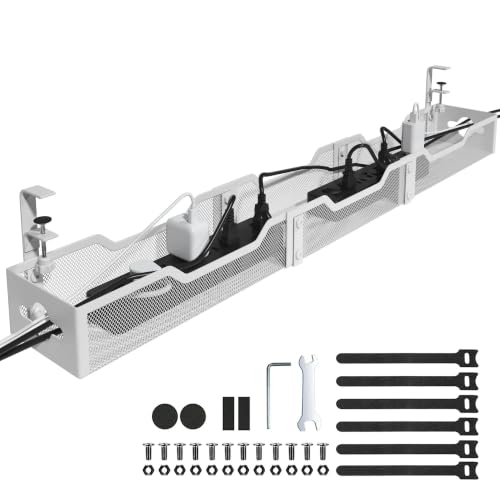
Disclosure: As an Amazon Associate, ilcastellomenu.com earns from qualifying purchases. Links on this page are affiliate links; they cost you nothing extra. Prices and availability change often, so check the current Amazon listing before you buy.
The cable management tray vs cable management box question decides more home offices than any brand choice, because cable management tray vs cable management box is really a choice between air and access on one side and total concealment on the other. Quick verdict: choose the tray if your strip and bricks live under a desk, your desk rises and falls, or you change devices often; choose the box if the strip must sit visibly on a desk or floor and disappear from view. Many good setups, honestly assessed, end up using both.
Key Takeaways
- Tray wins on airflow, access, standing desks and load.
- Box wins on total concealment from every viewing angle.
- A tray mounts to the desk; a box sits on a surface and needs no fixing at all.
- Heat honesty: never bury warm bricks in a closed box or wrap them in fabric.
- The hybrid, tray under desk plus small box for daily charging, suits many homes.
In this guide
Side-by-Side Comparison
| Criterion | Cable Management Tray | Cable Management Box |
|---|---|---|
| Where it lives | Under the desk, mounted | On a desk or floor, freestanding |
| Airflow | Open on all sides; heat escapes | Closed; heat pools around contents |
| Concealment | Hidden from seated eye lines | Hidden from every angle |
| Access for changes | Immediate; everything visible | Open the lid and negotiate contents |
| Standing desks | Travels with the desk; one supply cable | Floor box strands every cable; desk box competes for space |
| Fixing | Screws (permanent) or clamp (removable) | None |
| Load behaviour | Carries strip and bricks as a shelf | Contains whatever fits inside |
| Cleaning | Vacuum and wipe in place | Interior needs separate checks |
Monitor cables are the divas of the bundle. Display cables dislike tight bends, resent being crushed under a power strip, and often arrive in lengths chosen by optimism rather than measurement. Route display cables along the tray rather than through its most crowded middle, keep their bends wide and lazy, and let any excess length rest in a broad loop instead of a tight coil. If a monitor arm is involved, the cable has two journeys, down the arm and then to the tray, and each journey needs its own slack so the screen can tilt and swivel without tugging. A picture that flickers when the desk moves is often a cable complaint, not a monitor fault.
Airflow and Heat
The tray wins this criterion outright. Openness lets warmth leave from every side, while a box asks its contents to share a closed volume of air. A box with one small charger inside is perfectly fine; a box asked to swallow a strip and three warm bricks is being misused, and no lid vent fully rescues it. Verdict: tray.
Monitor cables are the divas of the bundle. Display cables dislike tight bends, resent being crushed under a power strip, and often arrive in lengths chosen by optimism rather than measurement. Route display cables along the tray rather than through its most crowded middle, keep their bends wide and lazy, and let any excess length rest in a broad loop instead of a tight coil. If a monitor arm is involved, the cable has two journeys, down the arm and then to the tray, and each journey needs its own slack so the screen can tilt and swivel without tugging. A picture that flickers when the desk moves is often a cable complaint, not a monitor fault.
Concealment and Looks
The box wins this criterion outright. From any angle, including a child’s eye level and a visitor standing in the doorway, a lidded box simply looks like a box. The tray looks like nothing from a chair and like organised cabling from the floor. Verdict: box.
Metal and wire trays and fabric or mesh trays behave differently over time. A rigid wire or steel tray holds its shape under a heavy strip, shrugs off heat, and can be wiped clean, but its edges and openings dictate where cables can enter. A softer mesh design flexes to swallow awkward brick shapes and is forgiving about entry points, but can belly downward under a concentrated load if the fixing points are far apart. Neither material is the correct one in the abstract. Heavy brick collections argue for rigidity; light charging-focused setups forgive flexibility. Match the material to the load you rehearsed on the floor, not to the tidiest photograph.
Access and Changes
The tray wins. Every cable is visible, labelled and individually removable, so a device swap is a two-minute errand. The box turns the same errand into opening, rummaging and re-lidding, and its interior logic is forgotten between visits. Over a year of small changes this difference dwarfs the others. Verdict: tray.
The rear edge of the desk is the natural home for a tray for three reasons. It is out of the knee space, so your legs never meet it. It is close to where monitor, lamp and laptop cables naturally fall off the back of the desk, so routes stay short. And it is near the wall in most rooms, which shortens the one cable that has to leave the desk. Mounting toward the middle of the underside can work for very deep desks, but it steals legroom and lengthens every route. Before fixing anything, sit at the desk in your normal chair, swing your legs, and check the planned tray position against your knees, your chair arms and any under-desk drawers or crossbars that already live there.
Standing Desks and Movement
The tray wins decisively. Mounted to the moving top, it reduces the whole desk to one travelling supply cable. A floor box leaves every cable to strain and slacken independently, and a desktop box spends scarce surface space to do a worse job. Verdict: tray.
The difference between a tray and doing nothing is mostly about the floor. Without a tray, cables fall where gravity takes them, the strip lives on the carpet collecting dust and shoe contact, and cleaning around the desk means moving a nest. With a tray, the floor clears, the vacuum passes, feet stop finding plugs, and the desk can move a few inches for cleaning without a tangle resisting. People underestimate how much of the benefit is this daily, unglamorous freedom rather than the photograph moment after installation. Judge a tray after a month of ordinary life, including one device swap and one proper room clean, not in the first tidy hour.
Installation and Reversibility
The box wins on effort: unbox, insert strip, close lid. The tray asks for measuring, a mount decision and an hour of routing, though the clamp form removes cleanly and the screw form leaves only small holes. Verdict: box for effort, tray for permanence done right.
Cleaning the desk surface gets easier in a way nobody advertises. With cables gathered below, the rear of the desktop becomes a surface you can actually wipe, monitors can slide back for a proper clean, and nothing tethers the keyboard tray or the desk mat. People who dust rarely because the cable nest made it miserable often find the habit returns once the obstacle is gone. This sounds minor until you live with it: the tray pays rent every single week in small frictions removed, long after the satisfaction of the installation photograph has faded.
Safety Around Drinks, Kids and Pets
A careful draw with conditions. The tray lifts power off the floor and out of spill and castor paths, but remains reachable to a determined toddler. The box shields its strip behind a lid, yet often sits exactly where drinks and feet are. Position decides more than product here. Verdict: even, with the tray ahead under desks and the box ahead on desks.
Cable slack is a design material, not an afterthought. Every device on the desk needs enough cable to reach the tray without tension, plus a little extra so the device can be moved, lifted or turned for cleaning. Too little slack strains connectors and pulls plugs sideways in their sockets. Too much slack creates the coiled nests that trap heat and dust. The middle path is a gentle service loop for each device, tied loosely with a reusable strap rather than a tight cable tie, so the loop can be opened in seconds when a device changes. Plan the loops when the tray goes in, because adding slack later means re-routing everything that shares the tray.
Strengths and Trade-Offs of Each Side
The Tray: Strengths
- Breathes, so bricks and strips run cooler.
- Everything stays visible, labelled and reachable.
- Travels with a standing desk on one supply cable.
The Tray: Trade-Offs
- Needs a mount the desktop can honestly support.
- Visible from underneath by design.
- Collects dust openly and needs a periodic wipe.
The Box: Strengths
- Conceals completely from every angle.
- No fixing, no tools, instant to deploy.
- Portable between rooms and desks.
The Box: Trade-Offs
- Traps heat around bricks and strips.
- Slows every cable change.
- Lives where spills, feet and castors are.
Who Each Option Suits and Who Should Skip Each
Power bricks deserve their own seating plan inside the tray. A laptop brick, a monitor brick and a USB charging brick side by side, touching, in a warm tray is the worst arrangement; the same three with a finger of air between each of them is fine for years. Alternate bricks with cable coils rather than grouping all the heat in one hot corner, keep the largest brick nearest the tray’s open side where air moves best, and never stack one brick on top of another. If a brick runs noticeably hot in normal use, give it the most open position in the tray and check it again after a week of real work rather than assuming the first day told the whole story.
Keep liquids away from the tray and from the power strip inside it. Desks attract coffee, water bottles and the occasional knocked glass, and a tray mounted under the rear edge sits directly in the drip path of anything spilled near the back of the desk. Route the strip so its sockets face along the tray rather than straight up where a spill would land, keep drinks toward the front of the desk as a habit, and never mount a tray where a plant gets watered above it. This is not exotic caution; it is the single most practical safety habit in the whole topic, and it costs nothing beyond paying attention when you choose the tray position.
A tray also protects cables from the desk itself. The rear edge of many desktops is a hard, slightly sharp corner, and cables draped over it under their own weight plus the strip’s weight will wear at exactly that bend. A tray catches the weight before the edge does, so bends stay gentle and supported. Grommet holes deserve the same respect: a cable through a grommet should still be supported by the tray below rather than hanging from the hole. Where cables pass any edge that cannot be avoided, a short sleeve or a wrap of tape at the contact point is cheap insurance against slow abrasion.
How to Decide
Labelling sounds excessive until the first time you need to unplug one thing. Under a desk, in poor light, every black cable looks like every other black cable, and the wrong plug pulled at the wrong moment can mean an unsaved document or a corrupted drive. A small label at each end of each cable, even just a wrap of tape with a handwritten note, turns future changes from archaeology into administration. Labels matter most at the power strip, where several similar plugs sit in a row. Spend the labelling minutes during installation, when you know what everything is, rather than during a fault, when you are guessing under time pressure.
Entry and exit points decide how graceful a tray feels in daily use. Cables should enter from the devices above through the tray’s open top or rear, and the one power cable should leave at the end nearest the wall socket. Trays with generous openings along their length let each cable drop in near its own device, which keeps routes short and crossings few. A tray that forces every cable to enter at one end turns its interior into a motorway of parallel runs that must be unthreaded for any change. When comparing designs, count usable entry points the way you would count sockets: they are a real capacity, not a styling detail.
Ask where the strip must live. Under a desk with bricks: tray. On a visible surface with light loads: box. Both places: both products, each in its place. Deeper help sits in the cable management tray buying guide, the cable management box buying guide, how to choose a cable management box and the best cable management options for desks.
Representative Models for Each Side
IKEA SIGNUM Cable Management Tray
The IKEA SIGNUM Cable Management Tray is a long-running screw-mount design sold as a simple open steel channel that hangs under the rear edge of a desk. In prose terms it sits in the entry-to-mid tier of this category: judge it on mount security, openness for heat, usable entry points and how forgiving it is when devices change, rather than on any single headline claim. Check the current listing before you buy, because versions and included fixings change over time.
What matters in daily use is how it behaves loaded. Seat the strip first, add bricks with air between them, then route device cables in through the nearest openings with gentle loops. A tray of this style rewards that order of work and punishes the reverse: cables first and strip last turns the interior into a knot that must be undone for every change. Owners who keep one end of the tray lighter, near the wall socket, find the single supply cable leaves cleanly without crossing the whole bundle.
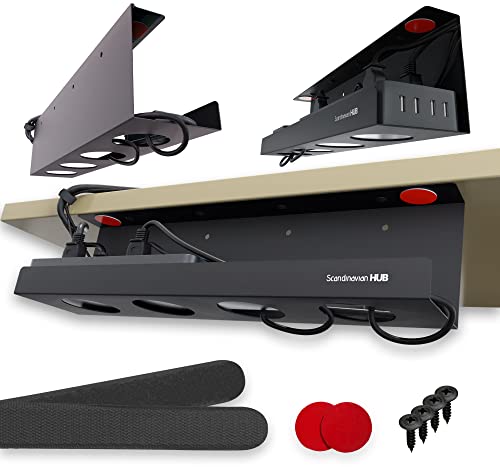
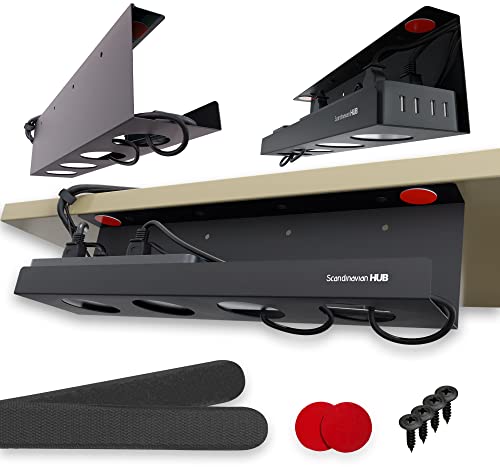
Scandinavian Hub Under Desk Cable Management Tray
The Scandinavian Hub Under Desk Cable Management Tray is a clamp-on tray aimed at people who cannot or will not drill, with a frame that grips the desktop edge. In prose terms it sits in the mid tier of this category: judge it on mount security, openness for heat, usable entry points and how forgiving it is when devices change, rather than on any single headline claim. Check the current listing before you buy, because versions and included fixings change over time.
What matters in daily use is how it behaves loaded. Seat the strip first, add bricks with air between them, then route device cables in through the nearest openings with gentle loops. A tray of this style rewards that order of work and punishes the reverse: cables first and strip last turns the interior into a knot that must be undone for every change. Owners who keep one end of the tray lighter, near the wall socket, find the single supply cable leaves cleanly without crossing the whole bundle.
For the box side, models are covered in prose in our cable management box review and weighed in cable management box pros and cons.
Final Recommendation by Use Case
A tray also protects cables from the desk itself. The rear edge of many desktops is a hard, slightly sharp corner, and cables draped over it under their own weight plus the strip’s weight will wear at exactly that bend. A tray catches the weight before the edge does, so bends stay gentle and supported. Grommet holes deserve the same respect: a cable through a grommet should still be supported by the tray below rather than hanging from the hole. Where cables pass any edge that cannot be avoided, a short sleeve or a wrap of tape at the contact point is cheap insurance against slow abrasion.
One power strip in the tray is the pattern that works; two strips chained together is the pattern that causes trouble. Plugging one strip into another, sometimes called daisy chaining, concentrates load and is discouraged by fire safety guidance in plain terms. If the tray needs more sockets than one good strip offers, the honest fixes are a single larger strip that still fits the tray with air around it, or splitting the desk so that a second strip lives somewhere else entirely, such as feeding a floor-standing PC separately. Count the sockets you truly need before buying either the strip or the tray, and remember that bulky bricks can block neighbouring sockets, so the usable count is often lower than the printed count.
Standing desk, gaming rig, multi-monitor office: tray. Guest-room charging corner, media unit with light loads, photograph-first living room: box. Serious home office that charges phones all day: tray underneath, small box on top. Whatever you choose, keep bricks aired, strips unchained and drinks away from power.
One More Thing Worth Knowing
Think, too, about who else uses the desk. A shared family desk, a partner’s occasional hot-desk, or a child’s homework station all argue for the most forgiving installation: labels in plain words, nothing routed under tension, the strip’s switch reachable without crawling, and a tray position that no one’s knees meet. The installer always knows the system’s logic; the second user never does. Designing for the second user is what separates a tidy installation from a merely tidy-looking one, and it costs nothing but the labelling minutes already recommended.
Sound, dust, heat, load, access: notice that none of the deciding factors in this category are visible in a product photograph. That is the deep reason reviews and guides in this niche repeat the same unglamorous checks. The photograph shows a clean line under a clean desk in an empty room; ownership is a loaded tray under your desk in your room, with your desktop material, your bricks and your habits. Every recommendation in this series is ultimately an instruction to judge the second picture, not the first, and to let measurements and rehearsals outrank imagery.
Consider the humble cable that is too short, because it dictates more installations than any other factor. A monitor placed at the far left with a short display cable and a brick that must sit in the tray pulls the whole layout toward it. The mature response is to let it: put that brick at the tray end nearest its monitor, and arrange the more flexible citizens around it. Fighting the short cable with tension, sharp bends or a brick dangling half out of the tray creates the one visible failure in an otherwise invisible system, and it will nag at every future change.
One more consideration that rarely appears in listings is how a tray behaves when the desk itself moves rooms. Desks get rotated for a window, shifted for a new chair, or carried through a doorway during a reshuffle, and every one of those moments tests the installation. Cables routed with slack and labels survive a move; cables routed at full stretch turn a simple rotation into a disconnection ceremony. If your room rearranges often, favour the clamp mount, keep the supply cable’s route simple, and take the photograph of the finished tray before the desk goes back, because after a move that photograph is the only reliable memory of what went where.
Accessories beyond straps and labels should justify themselves individually. A cable spine earns its place on a standing desk where the supply cable’s journey is long and visible. A short raceway earns its place where one run crosses a walkway or a castor path. Sleeves earn their place where several cables share a visible vertical drop. What none of them should do is arrive in the same parcel as the tray on a wave of optimism, because unneeded accessories become the new clutter, stored in the tray they were meant to improve. Add one thing, live with it, and let evidence argue for the next.
The psychology of a tidy underside is worth one honest paragraph. Nobody sees the tray during the working day, yet people consistently report that a desk with managed cables feels calmer to sit at and easier to leave at the end of the day. The effect is not magic; it is the removal of small visual debts. Every dangling cable is a tiny unfinished task the eye keeps registering, and gathering them removes the whole category at once. This is also why partial solutions disappoint out of proportion to their cost: three cables still on the floor keep issuing the same visual reminder as ten did.
There is a small ritual worth adopting on installation day: the one-week check. After seven days of real use, kneel down with a torch and look at everything. Fixings get a fingertip test for looseness, bricks get a palm test for heat, cables get a glance for tension or chafing at edges, and the clamp, if fitted, gets checked for any slow creep along the edge. Ten minutes, once, catches the entire class of problems that otherwise announce themselves months later as a fall, a flicker or a smell. Put the date in the photograph you took of the finished tray and the system is documented.
The environmental footnote is small but real. A tray is a durable, single purchase with no consumables, and it extends the working life of the cables and bricks it protects from castors, feet, dust and edge wear. Cables replaced less often are waste avoided. That does not make a tray an ecological gesture worth boasting about, but it does mean the category sits comfortably on the buy-once, buy-right side of desk spending, especially in rigid metal form that will outlast several desks and at least one complete change of devices.
One More Thing Worth Knowing
One more consideration that rarely appears in listings is how a tray behaves when the desk itself moves rooms. Desks get rotated for a window, shifted for a new chair, or carried through a doorway during a reshuffle, and every one of those moments tests the installation. Cables routed with slack and labels survive a move; cables routed at full stretch turn a simple rotation into a disconnection ceremony. If your room rearranges often, favour the clamp mount, keep the supply cable’s route simple, and take the photograph of the finished tray before the desk goes back, because after a move that photograph is the only reliable memory of what went where.
Accessories beyond straps and labels should justify themselves individually. A cable spine earns its place on a standing desk where the supply cable’s journey is long and visible. A short raceway earns its place where one run crosses a walkway or a castor path. Sleeves earn their place where several cables share a visible vertical drop. What none of them should do is arrive in the same parcel as the tray on a wave of optimism, because unneeded accessories become the new clutter, stored in the tray they were meant to improve. Add one thing, live with it, and let evidence argue for the next.
Sound, dust, heat, load, access: notice that none of the deciding factors in this category are visible in a product photograph. That is the deep reason reviews and guides in this niche repeat the same unglamorous checks. The photograph shows a clean line under a clean desk in an empty room; ownership is a loaded tray under your desk in your room, with your desktop material, your bricks and your habits. Every recommendation in this series is ultimately an instruction to judge the second picture, not the first, and to let measurements and rehearsals outrank imagery.
Think, too, about who else uses the desk. A shared family desk, a partner’s occasional hot-desk, or a child’s homework station all argue for the most forgiving installation: labels in plain words, nothing routed under tension, the strip’s switch reachable without crawling, and a tray position that no one’s knees meet. The installer always knows the system’s logic; the second user never does. Designing for the second user is what separates a tidy installation from a merely tidy-looking one, and it costs nothing but the labelling minutes already recommended.
The psychology of a tidy underside is worth one honest paragraph. Nobody sees the tray during the working day, yet people consistently report that a desk with managed cables feels calmer to sit at and easier to leave at the end of the day. The effect is not magic; it is the removal of small visual debts. Every dangling cable is a tiny unfinished task the eye keeps registering, and gathering them removes the whole category at once. This is also why partial solutions disappoint out of proportion to their cost: three cables still on the floor keep issuing the same visual reminder as ten did.
The environmental footnote is small but real. A tray is a durable, single purchase with no consumables, and it extends the working life of the cables and bricks it protects from castors, feet, dust and edge wear. Cables replaced less often are waste avoided. That does not make a tray an ecological gesture worth boasting about, but it does mean the category sits comfortably on the buy-once, buy-right side of desk spending, especially in rigid metal form that will outlast several desks and at least one complete change of devices.
There is a small ritual worth adopting on installation day: the one-week check. After seven days of real use, kneel down with a torch and look at everything. Fixings get a fingertip test for looseness, bricks get a palm test for heat, cables get a glance for tension or chafing at edges, and the clamp, if fitted, gets checked for any slow creep along the edge. Ten minutes, once, catches the entire class of problems that otherwise announce themselves months later as a fall, a flicker or a smell. Put the date in the photograph you took of the finished tray and the system is documented.
Consider the humble cable that is too short, because it dictates more installations than any other factor. A monitor placed at the far left with a short display cable and a brick that must sit in the tray pulls the whole layout toward it. The mature response is to let it: put that brick at the tray end nearest its monitor, and arrange the more flexible citizens around it. Fighting the short cable with tension, sharp bends or a brick dangling half out of the tray creates the one visible failure in an otherwise invisible system, and it will nag at every future change.
Cable Management Tray vs Cable Management Box: Closing Notes
Ergonomics is a quiet beneficiary of a well-placed tray. When cables leave the floor, the space under the desk returns to feet, and feet are supposed to move: stretching, resting on a footrest, shifting through the day. A strip on the floor teaches people to keep their feet still and forward, which is a small, constant postural tax. Removing the obstacle will not transform anyone’s back, and no tray should be sold as health equipment, but a clear under-desk zone removes one reason to sit rigidly. Check, when you fit the tray, that its position does not simply move the obstacle from the floor to knee height, because a tray that meets your legs has traded one ergonomic fault for another.
Cable management interacts with desk lighting and bias lighting more than people expect. LED strips and monitor light bars add thin cables and small controllers that want to live exactly where the tray is. Route lighting cables inside the tray like everything else, keep their small controllers reachable rather than buried, and remember that a controller brick, however small, follows the same air rules as a big one. A tray that absorbs the lighting runs as gracefully as the power runs is doing its job completely; a tray that leaves three thin cables dangling because they were an afterthought leaves the job visibly unfinished.
Think about sound-producing neighbours. External drives, small fans in docks, and chargers with coil whine all live happier when they are not sealed in a box and not resting directly on a resonant desktop. A tray cannot silence a whining charger, but its open, off-desk position often moves the noise source away from the surface that amplifies it. If a particular brick is audibly annoying, give it the tray position furthest from your seated ear and check whether the whine was travelling through the desk itself. This is a small, real quality-of-life detail that never appears in specifications and often decides whether an owner loves or merely tolerates a setup.
There is a right way to handle the cable of a device that leaves the desk daily, such as a laptop that travels. Its charger should live in the tray with its cable looped generously and its plug end parked at the tray’s edge, ready to grab, rather than threaded through the permanent bundle. When the laptop leaves, the charger cable’s free end should be secured so it cannot slide off the desk or dangle to the floor. When it returns, reconnecting should take seconds. Designing this one daily ritual properly matters more than the arrangement of cables that move twice a year, and many installations get the priority exactly backwards.
Humidity and room conditions deserve one practical note. A tray under a desk in a damp room, a basement office or a space near a humidifier collects the same moisture as everything else, and connectors dislike it. Keep the tray and strip away from direct humidifier output, never position a desk’s power run under a window that gets left open to rain, and include the tray in any seasonal check of the room. None of this is exotic; it is the same respect you would show any electrical fitting, applied to a fitting people tend to forget is electrical because it also holds data cables.
Consider what happens during a power cut or a tripped breaker, because the tray changes the troubleshooting geography. With the strip in the tray, there is exactly one place to check first, one switch, one supply cable and one wall socket, and that simplicity shortens every fault-finding session. Label the wall socket end of the supply cable as well as the device ends, and keep the tray’s strip switch reachable without moving furniture. When something dies mid-meeting, the difference between a labelled single power path and a floor nest behind a desk is measured in dignity as much as minutes.
A word about aesthetics from the doorway, since that is where most people judge a room. A tray does its visual work by subtraction: the eye stops at a clean desk edge and a clear floor, and never travels downward at all. That is why the category photographs so unremarkably and satisfies so consistently. If your room is judged from a sofa opposite the desk, check the view from that sofa after fitting; the rear underside may be visible from a low seat in a way it never is from standing height, and a tray positioned a little higher and further back answers that angle better.
Finally, keep the receipt and the spare fixings together in the tray itself, in a small bag taped at its lightest end. Trays outlast desks, desks outlast rooms, and the person refitting this tray in three years will be grateful for the clamp pads, the spare screws and the proof of what the thing was. It is a fittingly unglamorous end to an unglamorous subject: the best cable management is the kind you install once, document lightly, and then successfully forget for years at a time.
The head-to-head has one more arena worth judging: travel and temporary setups. A box wins for a desk that exists for a month, a market stall, a temporary office or a borrowed room, because it deploys and vanishes without touching the furniture. A tray wins for any desk with a future. Notice that this is the same pattern as the renter question and the installation question, and it is the deepest pattern in the comparison: the box optimises for the present moment, the tray optimises for the months after it, and most disagreements between their owners are really disagreements about time horizons.
There is also a sequencing answer for the genuinely torn. Start with the tray if your main strip and bricks are the problem, because that is the load-bearing mess, and add a small box later only if a visible charging cluster still bothers you. Starting with the box first often disguises the under-desk problem rather than solving it, and the disguised version returns as heat, strain and a floor nest with a lid on part of it. Sequence matters because each product is best at a different layer of the same system, and layers should be built from the load outward.
Tie-Breakers: The Scenarios That Actually Decide This Match-Up
A five-minute decision drill
If you are still torn, run this drill. Write down the three tasks you will do most with a cable management tray, score each option out of five for each task based on the comparison above, then delete the task you do least often and score again. Most people find the winner changes — or confirms itself — once the rarest task stops distorting the result. Finish by asking which option you would recommend to a friend in a small rented room where drilling, permanent fixings and bulky extras are off the table whose habits match yours. The answer you give for someone else is usually the honest one for yourself.
Start from the task, not the badge
Comparisons between these options collapse into confusion when they start from brand loyalty or headline numbers. Start instead from the task you repeat most: the session length, the load, the space and the other gear involved. In a small rented room where drilling, permanent fixings and bulky extras are off the table, one side of this match-up usually reveals itself as the natural fit within minutes of honest task analysis, because the two designs optimise for different centres of gravity. The loser of this comparison is rarely a bad product; it is a product optimised for somebody else’s routine.
The scenario where the favourite loses
Every head-to-head has a scenario that embarrasses the popular pick, and finding it is the fastest way to test your own leanings. Picture the busiest, messiest version of your week — extra people, extra load, no time to tidy or adjust — and ask which cable management tray option copes with grace and which one needs conditions to be just right. If the favourite only wins on your best days, it is the wrong choice, because purchases have to survive ordinary days. Deliberately stress-testing the comparison this way exposes assumptions that feature tables keep hidden.
Total commitment, not just the unit
Choosing a side in this comparison also chooses an ecosystem: the accessories, consumables, spares and upgrade paths that follow the cable management tray home. One option may look leaner today while quietly committing you to a narrower, pricier ecosystem tomorrow; the other may ask more upfront and reward you with common, interchangeable extras. List what each side obliges you to buy, store and replace over the next two years, in a small rented room where drilling, permanent fixings and bulky extras are off the table, and compare those lists as carefully as the products themselves. Ecosystem regret is slower than product regret, but it lasts longer.
The hybrid answer and when it fails
Faced with a close comparison, many buyers try to split the difference — using each option where it seems strongest. Sometimes that works; often it doubles the clutter, the learning curve and the maintenance while delivering neither side’s full advantage. A hybrid only makes sense when the two use cases are genuinely separate in your week, with their own spaces and their own moments. If both options would live in the same spot serving the same task, commit to one. A decisive single cable management tray setup, well chosen, beats a hesitant double setup in almost every real room.
What would change the verdict
An honest comparison names its own tipping points. If your space grew, your load doubled, your budget for consumables tightened, or another person with different habits joined the setup, the recommendation in this match-up could flip — and it should. Identify which of those variables is most likely to change in your life over the next two years, and choose the cable management tray option that stays right if it does. Buying for the situation you are drifting towards, rather than the snapshot of today, is the difference between a comparison that ages well and one you re-litigate every season.
Five honest minutes at this stage is worth more than five hours of comparison browsing.
If a candidate fails this check, strike it from the list without regret and let the remaining options compete on merit.
Your future self, mid-task on a busy day, is the person this check is really for.
Keep the notes with the product’s paperwork; they become the baseline every later adjustment is judged against.
Write the conclusion of that check down before you order, so the decision survives contact with a tempting listing.
That single habit separates owners who stay pleased with their choice from owners who quietly start shopping again within a season.
Treat it as part of the purchase itself, not as homework to do after the box arrives.
None of this requires expertise — only the willingness to check your own routine before trusting a generic recommendation.
Five honest minutes at this stage is worth more than five hours of comparison browsing.
If a candidate fails this check, strike it from the list without regret and let the remaining options compete on merit.
Your future self, mid-task on a busy day, is the person this check is really for.
Keep the notes with the product’s paperwork; they become the baseline every later adjustment is judged against.
Frequently Asked Questions
Which is better for heat, a tray or a box?
The tray, clearly. Its open structure lets warmth from bricks and the strip escape on all sides, while a closed box pools heat around whatever is inside it. A box can be used safely with modest loads and space around bricks, but if your setup includes several warm bricks, the tray’s airflow is a genuine functional advantage rather than a preference.
Which hides cables better?
The box, clearly. A lidded box on a desk or floor conceals its contents from every normal viewing angle, while a tray hides cables from seated and standing eye lines but leaves them visible, deliberately, to anyone who kneels and looks underneath. Decide which audience you are tidying for: visitors across the room, or yourself on cleaning and maintenance days.
Which suits a standing desk?
The tray, and it is not close. Mounted to the moving desktop, it carries the strip with the desk so one supply cable handles the whole height range. A box on the floor forces every desk cable to travel, strain and slacken independently. A box on the desktop can work for charging, but as the main power hub of a sit-stand desk it fights the furniture.
Can I use a tray and a box together?
Yes, and many tidy desks do exactly that: a tray under the desk for the main strip and bricks, and a small box on the desk or floor for the daily charging cluster or a second location. The combination works when each does the job it is best at and neither is overloaded. It fails when the box becomes an excuse to chain strips or bury hot bricks.
Which is easier to maintain?
The tray. Everything in it is visible and reachable, dust lifts off with a vacuum nozzle, and any single cable can leave without disturbing the rest. A box must be opened, its lid and contents negotiated, and its interior checked for heat and dust separately. Over a year of small changes, the tray’s openness saves far more time than the box’s concealment saves embarrassment.
Which should a renter choose?
A clamp-mount tray is the renter’s strongest option for the main desk run: no holes, clean removal, and it travels to the next home. A box needs no fixing at all, which tempts, but it leaves the strip on the floor or desk where feet, castors and spills live. If the desktop edge cannot take a clamp, a carefully placed box is the fallback, not the first choice.
Related Guides
whether a cable management tray is worth it