Disclosure: As an Amazon Associate, ilcastellomenu.com earns from qualifying purchases. Links on this page are affiliate links; they cost you nothing extra. Prices and availability change often, so check the current Amazon listing before you buy.
Monitor arm vs monitor riser is the friendliest contest in screen support, because the two products barely overlap: one is a simple platform that lifts your screen by a fixed step, cheaply and without a single moving part, and the other is a jointed, counterbalanced limb that floats your screen anywhere within reach, at several times the commitment. The riser is a shelf with ambitions; the arm is a small machine with a job. Choosing between them is therefore not a matter of which is better — it is a matter of diagnosing your actual complaint with unusual honesty. If your screen sits a little too low and your desk collects clutter, the riser is not the budget option; it is the correct one. If your screen must move — between heights, between postures, between people — no riser, however handsome, will do what an arm does. This comparison walks the criteria one by one so the diagnosis makes itself.
The quick verdict: choose the riser if your problem is a fixed amount of height plus storage, your desk and chair never change, and you value simplicity that can be carried to another room in one hand. Choose the arm if your problem is movement itself — sit-stand work, shared desks, screens that pull close for detail and push back for calls. Everything below is the evidence, including the two products’ surprising amount of common ground: both lift a screen off its stand’s limitations, both suit renters perfectly, and both can be installed, if that is the word, in less time than it takes to read this article aloud.
Key Takeaways: Monitor Arm vs Monitor Riser
- The axis: fixed, cheap, simple lifting (riser) versus flexible, full-range movement (arm).
- Height: the riser offers one fixed step, sometimes adjustable in coarse increments; the arm offers continuous travel.
- Storage: the riser gives you a shelf beneath the screen; the arm gives you the stand’s footprint back instead.
- Desk demands: the riser needs flat surface and nothing else; the arm needs a clampable edge or grommet and a desk that does not wobble.
- Movement: the riser does not move, by design and by virtue; the arm moves in seconds, in every direction that matters.
- Tenancy and travel: both are renter-proof and portable — the riser supremely so, the arm nearly.
In this guide
Side by Side
| Criterion | Monitor Riser | Monitor Arm |
|---|---|---|
| What it is | A fixed platform the monitor stands on | A jointed arm that holds the monitor in the air |
| Height logic | One fixed lift; some models adjust in steps | Continuous adjustment within the arm’s travel |
| Other movement | None — the screen stays where it stands | Pull, push, swing, tilt, rotate, in seconds |
| Storage | A working shelf beneath the screen | The stand’s footprint returned to the desk |
| Installation | Put it on the desk. That is the whole entry. | Clamp or bolt the base, attach screen, tune the balance |
| Desk requirements | Any flat surface | A sound edge or grommet; a desk steady enough to carry it |
| Screen compatibility | Anything with a stand that fits the platform | Needs a mounting pattern on the screen’s back |
| Sit-stand desk | Rides the desk; height error stays constant | Rides the desk and corrects height at every level |
| Portability | One hand, any room, any desk | Unclamps and travels; an hour to re-install |
| Price position | Entry tier, the cheapest lift in the category | Mainstream to premium tiers |
| Best home | Fixed desk, fixed chair, small height problem, clutter | Moving work: sit-stand, shared, presentational |
Height: A Fixed Step Versus a Travelling Range
The first criterion is the one both products exist for, and it splits cleanly. A riser lifts the screen by the height of its platform — one determined step, chosen when you buy, identical every day thereafter. Some risers adjust in coarse increments with stacking or telescoping legs, which softens the fixity without changing its character: the height is a setting, not a gesture. An arm lifts the screen through a continuous range and treats height as a gesture — raised for standing, lowered for the low chair, nudged because Tuesday’s posture is not Monday’s. The verdict depends entirely on whether your height problem is a constant or a variable. A constant — this desk, this chair, this body, a screen that sits stubbornly a step too low — is solved completely and permanently by the riser’s single step, and the arm’s range is surplus engineering. A variable — two bodies, two postures, a rising desk — cannot be solved by any fixed step, and pretending otherwise is how risers end up stacked on books, which is the universe’s way of filing a complaint.
Criterion verdict: riser, for the constant problem, on simplicity and price; arm, unanswerably, for the variable one.
Movement Beyond Height
Height is where the riser’s repertoire ends, and honesty requires saying so plainly: a screen on a riser cannot come closer for the spreadsheet’s small print, cannot swing toward the colleague or the camera, cannot rotate into portrait for the long document, cannot fold away when the desk becomes a dining table. The arm does all of these in seconds, and for some working lives they are not embellishments — the presenter, the pair-programmer, the designer who rotates, the video caller who reframes — they are the working day itself. But the criterion cuts the other way for a quieter majority: most screens, most days, are never asked to move at all, and a product whose central virtue is movement earns nothing from an owner who never moves it. Audit your own week before this criterion votes. Count the moments you wished the screen were somewhere else; if the count is zero, the arm’s finest feature is a feature you are buying for a stranger.
Criterion verdict: arm, by acclamation, for movers; a deliberate no-contest for everyone else.
Space and Storage: A Shelf Versus a Footprint
Here the riser lands its best punch, because it is the only screen support that adds storage while it lifts. The platform’s underside is a genuine shelf — keyboard parked at day’s end, notebook, dock, the small clutter that otherwise colonises a desk — and on a crowded desk that shelf can be worth more than the lift itself. The arm’s spatial offer is different: it returns the stand’s footprint to the desk entirely, floating the screen above a clear surface, but it adds no storage and its clamp claims a bite of the rear edge. Which offer is worth more depends on your desk’s pathology. Desks that drown in objects want the shelf; desks that suffocate for surface want the footprint. A third pathology — the desk that is simply too small for either — belongs to the wall mount, the subject of the companion contest in monitor wall mount vs monitor arm, and it is no failure of either contestant here to say so.
Criterion verdict: riser, for storage; arm, for pure clearance — the only criterion the riser wins on features rather than simplicity.
Installation, Compatibility and the Desk Itself
The riser’s installation section can be written on a stamp: place it on the desk, place the monitor on it, confirm the platform is wide and deep enough for the stand’s feet and that the whole arrangement is stable. It asks nothing of the screen — no mounting pattern, no compatibility documents — and nothing of the desk beyond flatness, which makes it the universal donor of screen supports: any monitor, any desk, any room, any tenancy. The arm asks more, and its asks are specific: a mounting pattern on the screen’s back, verified against the arm maker’s guidance; a desk edge that takes a clamp or a grommet that takes a bolt; a desk steady enough that its passenger does not tremble; and a tuning step, balancing the arm to the screen’s weight class as the maker directs. None of this is difficult, and all of it is real — an hour against the riser’s minute, and a compatibility gate the riser simply does not have. Glass desks, fragile edges and patternless screens all vote riser without needing to hear the rest of the comparison.
Criterion verdict: riser, overwhelmingly, for universality and zero installation; the arm’s hour is fair, but it is an hour.
Stability, Safety and Daily Feel
A riser’s stability is the stability of furniture: a rigid platform, well-footed, carrying a screen on its own stand, is as steady as the desk beneath it and asks nothing further. Its failure mode is proportion — a platform too small for the stand, or a flimsy build that flexes — and both are visible in the shop rather than discovered at home. An arm’s stability is engineered rather than inherent: a good one holds its position with a faithfulness that feels like furniture, while a poor one droops, drifts and teaches its owner to stop adjusting it, at which point it becomes an expensive riser with worse storage. In households with children, both are improvements on a bare stand in their different ways — the riser’s screen sits no higher than its stand allows it to be knocked from, a point in the arm’s favour, while the arm’s screen can be swung by small hands into positions its owner did not choose, a point in the riser’s. The daily feel differs, too: the riser disappears into the desk’s landscape like a shelf that was always there; the arm remains a visible, slightly industrial presence, admired or tolerated according to taste.
Criterion verdict: a genuine draw — furniture’s simplicity against engineering’s reach, with quality deciding the arm’s half of it.
Cost and Value, in Tiers
The riser is the cheapest way in this entire category to change a screen’s height, occupying an entry tier that the arm’s mainstream starting point already multiplies. But cost comparisons in this contest are meaningless without the diagnosis, because the two products do not sell the same thing. The riser sells a fixed lift and a shelf; the arm sells movement. A riser bought for a movement problem is not cheap — it is a down payment on the arm you will buy afterwards, plus a riser to give away. An arm bought for a fixed-lift problem is not extravagant in any dramatic sense — it will perform the lift beautifully — but it spends several times the necessary money to own joints that will be used once, on installation day, and admired thereafter as sculpture. The value verdict is therefore identical in both directions: the right product is the bargain, the wrong product is the waste, and the diagnosis in the sections above is worth more than any discount either product will ever offer.
Criterion verdict: riser on price, always; on value, whichever one your diagnosis named.
Strengths and Trade-Offs of Each Side
Riser — strengths: the simplest product in the category, installed in a minute, compatible with every screen and desk; a fixed lift that never drifts, droops or needs tuning; a storage shelf no other support offers. Riser — trade-offs: one fixed height, wrong the day your chair, desk or body changes; no movement of any other kind; the screen still stands on the desk, footprint and all.
Arm — strengths: continuous height and full movement, in seconds, forever; the stand’s footprint returned and the screen floated clear; the only support that serves sit-stand desks and shared desks properly. Arm — trade-offs: several times the riser’s price position; an hour of installation with a compatibility gate; a visible machine on the desk whose quality must be bought, because cheap joints droop.
Who Each Option Suits — and Who Should Skip Each
The riser suits the settled single user whose screen sits a step too low: the home worker with a fixed desk and chair, the student, the reader, the anyone whose desk collects clutter that a shelf would civilise. It suits renters supremely, the patternless-screened, the glass-desked, and the buyer who wants the problem solved today with the change from a modest note. Skip it if your height need varies, if you present or share the screen, or if your real problem is desk surface rather than height. The arm suits the movers: sit-stand devotees, shared-desk households, presenters, rotators, detail workers who pull the screen close, and anyone whose chair or desk will change before the screen does. Skip it if your desk wobbles, your screen has no mounting pattern, or your honest movement count for the week is zero — in which case the riser is not the cheap option but the correct one, and the money saved is a bonus rather than the reason.
How to Decide: Questions That Branch
Ask, in order: Is my height problem the same every day? If yes, the riser is leading and needs only a storage question to close: would a shelf under the screen earn its place? If yes again, decide for the riser and spend the savings on the chair. Is my height problem different across the day, the week or the household? Then the arm is leading, and its closing questions are about the desk: does it offer a sound clamp edge, and does it stand steady? Is my screen asked to move in any direction besides up? A single yes — rotation, swinging, pulling close — ends the riser’s candidacy kindly. And is my screen even eligible for an arm — pattern present, weight within a maker’s guidance? If not, the riser wins by the arm’s disqualification, and it will serve you without a whisper of compromise. The full riser case, for readers leaning that way, is in the monitor riser review and the monitor riser buying guide; the arm’s wider context is in monitor wall mount vs monitor arm.
Where to Buy: Representative Models for Each Side

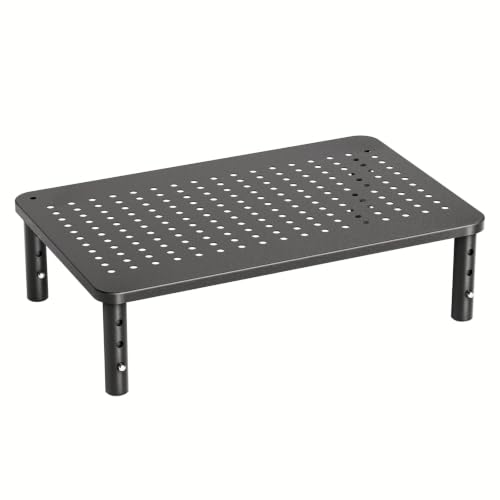
HUANUO Monitor Stand Riser — The Riser Side, Adjustable
The riser archetype for buyers who want their fixed step with a little forgiveness: legs that adjust in increments, so the one-time height decision can be revised at setup and when the chair changes. Best for: settled desks with a not-quite-known ideal height. Not suited for: anyone needing daily movement. It is the riser’s simplicity with a rehearsal built in.
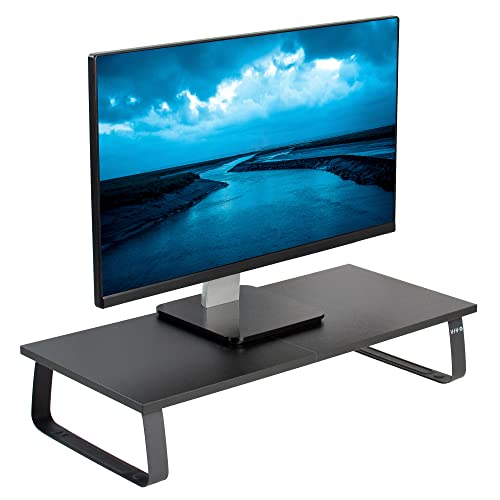
VIVO Monitor Riser — The Riser Side, Classic
The straightforward platform: rigid, unfussy, a shelf beneath and a screen above, in materials that suit a desk rather than a workshop. Best for: the standard lift-and-store brief. Not suited for: very large stands that overhang its platform — measure the feet before anything else. The classic of the category, and the benchmark for the fixed side.
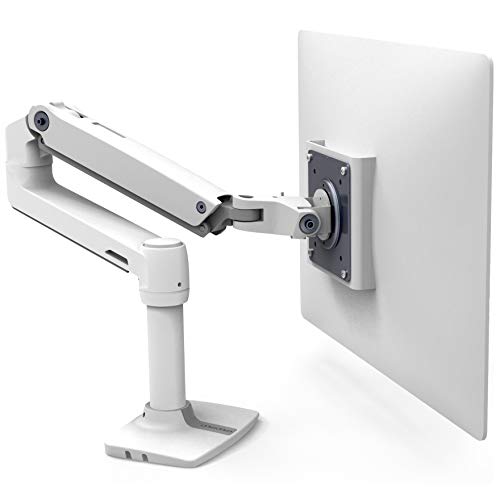
Ergotron LX Desk Monitor Arm — The Arm Side, Premium
The arm at its most accomplished: counterbalanced travel that holds any position indefinitely, built for owners who will move it daily for years. Best for: sit-stand and shared desks, professionals, the movement-heavy. Not suited for: a fixed-lift problem, where its virtues go permanently unemployed. Buy it as a tool and it disappears into usefulness.

VIVO Single Monitor Arm — The Arm Side, Mainstream
The arm’s honest mainstream: real articulation, sensible tuning, a clamp that asks an hour and leaves no trace. Best for: renters and rearrangers who need genuine movement at a mainstream tier. Not suited for: buyers seeking the premium tier’s polish. For most households that choose movement, this is the shape of the choice.
Final Recommendation by Use Case
Fixed desk, fixed chair, screen a step too low, clutter underneath: riser — and read is a monitor riser worth it to confirm the diagnosis. Sit-stand desk, any pattern of alternation: arm, without a contest. Two people, one screen: arm, because height chosen once is height chosen wrong for one of them. Presenter, rotator, detail-puller: arm. Patternless screen, glass desk, rented room, tiny budget of money or patience: riser, gratefully. And the household whose problem is neither height nor movement but the desk’s whole surface: neither — the wall mount takes that case, and the monitor wall mount review argues it. The deepest pattern in this comparison is that each product is the hero of a specific, common, honestly-describable situation — and the reader’s only task is to describe theirs.
The Upgrade Path: Why This Contest Often Ends in a Sequence
Uniquely in this cluster, the two contestants are frequently not rivals but chapters. The riser is the natural first purchase of a workstation’s life: cheap, instant, reversible, diagnostic — a month on a riser teaches a household exactly how much height it wanted and whether the wanting ever changes, which is precisely the information the arm decision needs. Households that graduate from riser to arm do so with evidence, and the riser rarely leaves the family: it migrates to the second screen, the child’s desk, the kitchen laptop, carrying its shelf with it. The reverse migration happens too, and is just as honourable: the arm owner whose work settles, whose desk becomes fixed, whose movement count falls to zero, sometimes retires the machine for the platform and banks the difference in simplicity. Neither direction is an admission of error. They are the same diagnosis, re-run as life changes — which is why this comparison refuses to crown a winner and insists, instead, on teaching the diagnostic. Products are bought once; diagnoses are used forever.
There is a budgetary moral in the sequence as well. Because the riser is inexpensive and universally reusable, it is the rare purchase that can be made experimentally without waste: if it solves the problem, the experiment cost almost nothing; if it does not, it has purchased certainty about the arm, and certainty, in a category where the wrong arm costs several times the riser, is worth more than the riser cost. The arm, by the same logic, should be bought deliberately — after the diagnosis, at the tier the movement frequency justifies — because it is the purchase in this contest that punishes guessing. Sequence the two correctly and the household risks almost nothing on its way to the right answer, whichever answer that turns out to be.
Three Diagnoses in Detail
The Neck That Aches at Four O’Clock
The commonest presenting complaint in this whole category deserves a careful reading, because it can belong to either product. If the ache arrives at the same time, in the same chair, at the same desk, every day, it is the signature of a constant error — a screen sitting a fixed amount too low — and the riser is its specific remedy, provided the amount is measured rather than assumed: sit, have someone note where your eyes rest against the screen’s current position, and choose the platform whose lift closes that gap. If the ache migrates — mornings fine, standing hours sore, a partner’s shifts worse than yours — the error is variable, and no fixed platform will chase it; the arm is the remedy, and the ache’s diary is the evidence. Misreading this diagnosis is the single most common way money is wasted in the category: risers bought for variable aches get stacked on books within a month, and arms bought for constant aches get set once and admired as expensive shelves. Read the ache first. It has been keeping accurate records.
The Desk That Disappears Under Objects
The second complaint is about territory, and it also splits. If the desk disappears under objects that need homes — keyboard, notebook, dock, the charging tangle — the riser’s shelf is a direct intervention: it manufactures a parking level exactly where the chaos breeds, under the screen, and households report the tidiness outlasting the novelty because the shelf keeps working on ordinary Tuesdays. If the desk disappears under work itself — papers, drawings, a second laptop — the problem is surface, and the arm’s returned footprint is the intervention, floating the screen off the contested ground entirely. And if the desk disappears under both, the honest answer may be the third contestant neither of these two can beat for pure space, the wall mount — which is why this cluster keeps all three comparisons in print and cross-linked: the diagnoses form a set, and a household should be able to run all of them in an evening.
The Screen That Must Perform
The third complaint is not about the desk at all but about the screen’s social life: it must face the room for a call, turn toward the sofa for a film, rotate for the document, come close for the detail work and retreat for the overview. This is the arm’s undisputed territory, and the riser’s candidacy ends at the first rotation. But even here the diagnosis has a refinement worth making: how many of those performances are weekly, and how many are annual? A screen that performs daily justifies the premium arm tier without blinking, because joint quality is graded by use. A screen that performs twice a year justifies the mainstream arm and no more — or, in a household that owns a second display for the performances, perhaps the riser for the worker and the arm for the performer, which returns us to the mixed household this comparison keeps endorsing. Frequency, as ever in this cluster, is the number that turns features into value.
A Year Later: What Each Choice Feels Like
Project both purchases forward a year, because that is the timescale on which they will actually be judged. The riser, a year on, has become invisible in the way of successful furniture: the screen sits where it should, the shelf holds what it holds, and the household has forgotten the purchase entirely — which, for the cheapest product in the category, is a triumph of proportion. Its year-later complaints are all diagnostic confessions: the chair changed and the fixed height did not; the desk became a standing desk and the error learned to travel. The arm, a year on, has become a habit: its owner moves the screen without thinking, the way one adjusts a lamp, and the movement has quietly reorganised the work — calls framed better, documents rotated, standing hours properly screened. Its year-later complaints are about quality tiers: the joint that began to droop in month nine, the counterbalance that wants re-tuning with the seasons. Both futures are good futures when the diagnosis was right, and both are faintly disappointing when it was not, which is the entire argument of this article compressed into a calendar: diagnose honestly, and either product will feel, a year later, like the obvious choice it should have been all along.
One more angle deserves air before the questions, because it decides real purchases in design-conscious homes: how the two products look, and what their looks say. The riser looks like furniture — wood, bamboo, metal or glass, chosen to match a desk — and it makes a workstation look warmer and more deliberate, the screen elevated like an object on a plinth, the shelf beneath reading as intentional storage. The arm looks like equipment — articulated, mechanical, faintly industrial — and it makes a workstation look capable and modern, the screen floating with a technical confidence that photographs adore. Neither aesthetic is superior; they are different rooms speaking. Households that curate their spaces should let the room vote, because both products will be looked at daily for years, and a support that fights the room’s character will be resented at a level below reason, whatever its specifications promised. The comparison’s other criteria are all arguable in numbers and habits; this one is arguable only in taste, and taste, in one’s own home, is a legitimate criterion with full voting rights.
And a last practical note that belongs to both sides equally: whichever you choose, keep the other in the household’s future. Desks change, chairs change, screens change, children grow into homework and partners arrive with their own postures. The riser in the cupboard and the knowledge of how an arm installs are both assets, and the household that treats screen support as a small, revisable system — rather than a single, final purchase — will find that this contest, alone among product comparisons, gets easier every time it is re-run.
Re-run it tonight, in the armchair, with the week’s evidence fresh: how often the screen was wished elsewhere, how constant the ache is, what the desk is actually drowning in. Three answers, honestly given, and the contest is over — the platform or the limb, the shelf or the swing, chosen not by a ranking but by a description of your own working life that only you could have written. That is as it should be. The products are simple; the lives are not; and a comparison that ends by handing the decision back to the life, better informed than it found it, has done the only job it ever had.
It is worth pausing, before the questions, on the one scenario where the two products stop being alternatives and become a relay team across a single screen’s life. A new workstation often begins in uncertainty: the desk is temporary, the chair is borrowed, the screen is whatever the budget allowed. The riser is built for exactly that season — it asks nothing, commits nothing, and lifts the screen while the household learns what it actually needs. A year later the season settles: the desk is chosen, the chair is right, and the screen’s habits are known quantities. If the habits are still, the riser simply stays, its experiment concluded in its own favour. If the habits move, the arm arrives as a considered upgrade rather than a guess, sized and tiered by a year of evidence, and the riser walks to the household’s next uncertain desk to begin the cycle again. Read this way, the contest was never really a contest: it is a sequence with a branch in it, and the branch is taken on evidence. Households that understand the sequence stop asking which product is better and start asking which season they are in — a better question, with a cheaper answer, in every sense that matters.
The same seasonal logic explains the comparison’s most common real-world outcome, which no table captures: both products, owned simultaneously, in different rooms, by the same person, without any sense of contradiction. The study’s screen rides an arm because the study is where the movement happens; the bedroom’s screen sits on a riser because the bedroom asks only for a lift and a shelf for the book and the glasses. Consistency is a virtue in arguments, not in furniture. Buy per room, per screen, per season — and let the household’s map, not a reviewer’s bracket, decide where each product serves.
Per room, per screen, per season — and, it should be said, per budget’s season as well. There is no shame, and a great deal of sense, in the household that risers now and arms later when the money and the certainty arrive together; the category does not grade the order in which a workstation grows up. What it grades, relentlessly, is the match between the support and the life — and that match, as this whole comparison has argued from its first table to this paragraph, is a thing you diagnose, not a thing you buy. Diagnose first, and the buying becomes the easiest step in the process: one product, obviously, as if it had been waiting for your description of the problem to be finished so it could introduce itself.
Finish the description, then — in the terms this article has supplied. Fixed or variable height. Still or performing screen. Shelf or surface. This chair forever, or several chairs, several postures, several people. The answers arrange themselves into one of the two columns with a reliability that can feel, the first time, like a trick — until you remember that the columns were built from those answers in the first place, by everyone who ever bought the wrong one and wrote the review that taught the rest of us. Their tuition is in these pages. Yours does not have to be.
Learn from their tuition, choose the support your description named, and let the screen rise — on a platform, on a limb — to the height your working life actually asked for. That, and not a verdict between two innocent products, is what this comparison was always for.
Two closing observations, one for each contestant, by way of fairness. For the riser: do not let its simplicity be mistaken for a compromise. In a category that sells engineering, the platform that lifts exactly enough, stores what needs storing, fits every screen ever made and can be carried away in one hand is not the primitive ancestor of the arm — it is a finished answer to a finished question, and for the majority of desks whose question is finished, it is the most rational object in this entire cluster of articles. For the arm: do not let its machinery be mistaken for extravagance. Movement, bought for a life that moves, is not a luxury feature but the ergonomic substance itself, and the arm that serves a sit-stand household or a shared desk is not showing off — it is doing, daily and invisibly, the thing its owner actually needed done. Respect both products enough to match them correctly, and this friendliest of contests ends, as it should, with both of them employed and neither of them regretted.
Employed, regretted by no one, and — in the households that diagnosed honestly — forgotten by everyone, which for screen supports is the sound of a perfect score. The questions below are the ones that remain when the philosophy is done; answer them against your own desk, and then go and lift your screen by whichever honest means your answers chose.
Whichever means it was — platform or limb, shelf or swing — the screen will not care, and your neck will not ask which product delivered the height. It will simply register, at four o’clock on an ordinary afternoon, that the ache is gone or that it is not; and that registration, repeated daily, is the only review of this decision that will ever truly be written. Write it well by choosing from the diagnosis, and the rest of this comparison becomes what it was designed to be: a formality, confirming a conclusion your own working week had already reached.
Reached, most likely, some time ago — in the week you counted, without knowing you were counting, every time you wished the screen were higher, closer, turned, or simply elsewhere. The counting was the diagnosis. All that remains is to honour it with a purchase, and to let the four-o’clock verdict come in, day after day, in your favour.
In your favour, and in your household’s — because a screen at the right height, by whatever honest means, is one of those small daily mercies that everyone who shares the desk collects without ever knowing a comparison was written about it.
Now it has been. Honour the count, choose the column, and let the desk get on with its work.
Its work, and yours — which was the point of lifting the screen in the first place, by platform or by limb, in this season or the next.
A final word of method, since this comparison has asked more of its reader than most: everything it required was observation, and observation is free. A week of noticing — the ache’s constancy, the screen’s wished-for journeys, the desk’s particular drowning — costs nothing and decides everything, which makes this contest the cheapest decision in the whole workstation to get right and, perversely, one of the most commonly gotten wrong, because observation feels too simple to be the answer in a category that sells engineering. It is the answer. The riser and the arm are both, in their opposite ways, instruments for acting on what the week revealed; buy either one before the week, and you are guessing with money. Buy after it, and you are simply equipping a conclusion. Equip yours, and let the questions below serve as the confirmation they were written to be.
Confirmations, like the riser’s lift itself, are modest things that do exactly the job required of them — no more, and, crucially, no less.
No less is the standard to hold the purchase to as well: the support that does the whole of your diagnosed job, and not a joint more.
And not a shelf less, either — the riser’s owners in the audience may fairly insist, and the comparison, which has tried throughout to be fair, happily concedes the amendment.
Conceded, recorded, and closed — the comparison rests, and the desk, in whichever configuration your diagnosis chose, is ready when you are.
Ready, as it has been all along, for a screen at the height of the eyes that use it.
Your eyes, your desk, your season — the comparison’s three witnesses, and they have all testified.
Believe them, buy accordingly, and let the screen rise.
Rise it will — a fixed step or a floating range, the height is the same height, and it was yours from the moment the diagnosis named it.
Name it, buy it, and sit down to work at the level you were built for.
That is all either product ever promised, and both of them keep the promise.
Drawing the Line: Which Side of This Monitor Arm Comparison Fits Your Setup
Write one sentence for each option describing the owner it suits best, and be honest about which of those two descriptions sounds more like your actual routine. Write the exact model name and variant from the packaging into your notes, so replacement parts, accessories and support conversations start from certainty rather than guesswork. Notice how the monitor arm behaves when you are tired or in a hurry, since products that demand perfect technique tend to fail exactly when you have least patience. Picture the busiest version of your week and ask whether this monitor arm still fits when other people, other tasks and other equipment compete for the same space.
As a concrete listing check, take the HUANUO Monitor Stand Riser and the VIVO Monitor Riser named earlier in this article and confirm, line by line, that each variant offered matches the size, connection and contents described for it here. Leave a little headroom in every direction that matters, whether that means physical space, connection capacity, adjustment range or simply time to do a task properly. Keep the packaging and any small adapters, feet, brackets or fasteners together until the monitor arm has survived a full week of ordinary use in its final position. Treat any accessory bundled in the box as a starting point, and check whether it suits your setup before assuming the maker has solved that part for you. Consider which option you would lend, share or explain to someone else with more confidence, since that instinct often reveals which design you trust more deeply.
Revisit the decision after the novelty fades: the right monitor arm should feel almost boring in use, doing its job without negotiation every single time. If the monitor arm will be shared, agree on one home position and one simple reset routine, so each person does not undo the previous person’s adjustments. Consider who else will use, move or clean around this monitor arm, because a choice that only works for one careful owner often frustrates everyone else in the household or team. When a specification is stated in unfamiliar terms, translate it into your own routine: how long, how often, how far, how loud in practice, before letting it sway you.
Keep liquids, loose papers and anything that sheds dust or fibres at a sensible distance, unless the monitor arm was clearly designed to work right beside them. Ask what you would do on the day this monitor arm stops working as expected, and whether you could swap, reset, clean or return it without dismantling half your setup. To choose between the two sides of this comparison, name the task where they genuinely differ and ignore the many jobs where either would perform perfectly well. Run one deliberately awkward task early on, the kind you usually avoid, and see whether this monitor arm handles your edge cases or only your easiest work. Keep the instructions somewhere you can find them months later, since the setting or step you skip today is often the one a future problem sends you hunting for.
Measure the place where a monitor arm will actually live, including the clearance you need to reach cables, doors, trays, vents or controls without moving everything else first. Ask whether the benefit you want survives your least favourite conditions, such as low light, a crowded desk, a warm room or a rushed start to the day. Plan where the cables or materials connected to this monitor arm will run when the room is tidy, not just while you are testing on an empty surface.
Keep the area underneath and behind the monitor arm reachable for cleaning, since the spots you cannot reach become the spots where dust and lost small parts collect. If you keep switching your preference, the deciding factor is probably a practical detail such as size, connection or handling rather than headline performance, so go and settle that detail directly. Look closely at seams, edges, hinges, threads or contact points when the monitor arm arrives, because build quality is easiest to judge before everyday wear hides the evidence. Recheck the return window and the condition requirements before you discard any packaging, especially for a monitor arm whose fit only becomes clear after several real sessions. Prefer a setup you can explain to another person in a minute, because simple arrangements are easier to troubleshoot, share and repeat than fragile clever ones.
Start this final check away from the listings, with the space, the equipment and the routine you already have written down in plain terms.
Frequently Asked Questions
Is a monitor arm better than a riser?
Better at movement, in every direction, without qualification — and not better at anything else that matters. The riser is simpler, cheaper, universally compatible, and it stores things. “Better” in this contest is a diagnosis, not a ranking: for a fixed height problem the riser is the better product outright, and for a movement problem the arm is the only product. Decide which problem is yours and the ranking takes care of itself.
Can a riser give the same ergonomic benefit as an arm?
For the single variable of a constant height correction, yes — a screen lifted to the right level by a platform serves your posture exactly as well as the same screen floated to that level by an arm, because your eyes cannot tell what is holding the display. The arm’s ergonomic advantage appears only when the correct level changes: across postures, people or desks. If your correct level never changes, the riser delivers the whole ergonomic benefit at the category’s lowest commitment.
Which is better for a standing desk?
The arm, and it is not close. A riser on a rising desk preserves whatever height error existed at sitting level and carries it faithfully upward; an arm lets you correct the screen at every desk height in seconds. The only riser case on a sit-stand desk is the user who works at effectively one height and uses the desk’s travel for other purposes — and even there, the arm is the safer long-term buy if the habit might grow.
Do monitor arms work with every monitor?
No, and the riser’s universality is its quiet triumph here. Arms need a mounting pattern on the screen’s back and a screen within the arm maker’s weight guidance; a minority of slim monitors have no pattern at all. Risers need only a stand that fits their platform. Check your screen’s documentation before falling for an arm, and if the pattern is absent, take the riser with a clear conscience — it was the correct product for your screen all along.
Which should I buy first if I am unsure?
The riser, as a deliberate experiment. It costs the least, installs in a minute, works with everything, and a month with it will tell you the two facts the arm decision needs: how much height you actually wanted, and whether the wanting ever changes. If the riser solves it, you are done at entry-tier cost. If it does not, you own your diagnosis, the riser will find work elsewhere in the house, and the arm you buy next will be bought with certainty.
Can I use a riser and an arm together?
Not on the same screen — the arm replaces the stand the riser exists to support — but happily in the same household, and even on the same desk with two screens: the main display on an arm for movement, the secondary on a riser for a fixed lift and a shelf beneath. Mixed setups are not indecision; they are each screen getting the support its own job describes, which is this comparison’s whole philosophy in furniture form.
Related Reading
monitor riser pros and cons · the monitor wall mount buying guide · how to choose a monitor wall mount · ergonomic monitor picks · home office monitor picks · desk setups worth modelling