Disclosure: As an Amazon Associate, ilcastellomenu.com earns from qualifying purchases. Links on this page are affiliate links; they cost you nothing extra. Prices and availability change often, so check the current Amazon listing before you buy.
Monitor wall mount pros and cons are usually presented as a tidy little table, as if the two columns were equal in weight and the reader could simply count. They are not, and you cannot. The pros of wall mounting are about space, posture and stability — things you feel every working day — while the cons are about permanence, installation and access — things you feel intensely on one weekend and then, mostly, never again. Whether the trade favours you depends entirely on which set of feelings your life contains more of. This article lays out both columns honestly, pro by pro and con by con, and then does the part the tidy tables skip: translating the balance into verdicts for real households, real walls and real working patterns.
The quick verdict, for readers in a hurry: a monitor wall mount is worth it for the settled workstation on a wall you own — a fixed desk, a fixed chair, a screen that has found its home. It is a poor idea for the rented room, the restless rearranger, and the desk that floats in the middle of the floor. Everything between those poles is decided by the details below, and in particular by three questions: Can you drill? Will the setup stay put for years? And is desk space, rather than adjustability, your actual scarcity? Keep those questions in mind as the columns unfold.
Key Takeaways: Monitor Wall Mount Pros and Cons at a Glance
- Biggest pro: total desk clearance — the screen’s entire footprint returns to your work, permanently.
- Most underrated pro: chosen height. The screen lives at your posture’s level, not a stand designer’s.
- Biggest con: permanence — holes, a fixed location, and a decision that outlives your current furniture arrangement.
- Most underrated con: port access. The back of a wall-hung screen is a planned expedition, not a casual reach.
- The pros compound daily; the cons concentrate on installation day. Long tenancies favour mounting; short ones favour furniture.
- Every con has a mitigation except one: a wall you may not drill, or cannot verify, closes the category entirely.
In this guide
The Pros
Pro: The Whole Desk Comes Back
This is the headline benefit and it is not exaggerated. A monitor stand occupies the most valuable territory on any desk — the centre rear, exactly where keyboards park, notebooks open, laptops dock and hands rest. Wall mounting returns all of it, forever, without a single ongoing effort. On a small desk the effect is transformative: a surface that felt like a shelf becomes a workspace. On a large desk the effect is calmer but just as real, because the reclaimed zone is where clutter used to breed in the stand’s shadow. No other screen support gives this. A riser lifts the screen but keeps a structure in the space; an arm floats the screen but its pole or clamp still anchors a corner of the desk. Only the wall removes the screen from the desk’s economy entirely, and for space-starved workers that single pro can outweigh the whole con column.
Pro: Height That Answers to Your Body
Every stand ever shipped embodies a guess about the height of your desk, your chair and you. Wall mounting replaces the guess with a measurement. The screen can sit at precisely the level your seated eyes prefer — and, with a tilting mount, angle itself to meet them — which is why so many owners describe the change in bodily terms: the afternoon hunch gone, the book-stack under the old stand retired, the sense that the workstation was finally built around its occupant. This pro deepens with unusual bodies and unusual furniture: the very tall, the very short, the low lounge desk, the high workbench. Wherever the standard guess fits worst, the freedom to choose fits best. It is the pro that the alternatives approximate — risers in fixed steps, arms within a pole’s travel — and the wall simply grants outright.
Pro: Stability That Furniture Cannot Offer
A screen fixed to a building does not care about your desk. Typing vibration, a bumped desk edge, a cat’s commute across the worktop, a child’s exploratory shove — the wall-hung screen registers none of it, because its support is the structure of the house rather than a piece of furniture standing on a floor. Owners coming from wobbly stands or lively arms consistently name this as the surprise benefit: the picture simply never moves. There is a safety dimension too, which matters in households with small children and large animals: a correctly installed mount, anchored into a stud or sound masonry with its safety fixings engaged, holds the screen where a freestanding display could be pulled down. Stability is the least photogenic pro and, in daily life, one of the most felt.
Pro: The Cleanest Possible Look
A floating screen is the visual signature of every workspace photograph anyone has ever admired, and the wall mount is how it is actually achieved. With cables planned — a raceway, a managed drop, slack hidden behind the screen — the desk reads as a calm horizontal plane and the screen as a deliberate object on the wall, closer to a picture than to equipment. This is not mere vanity. Rooms that look intentional are pleasanter to work and relax in, clients and cameras read them as professional, and the tidiness is structural rather than effortful: there is no stand to dust around and no shadowed dead zone where mess accumulates unseen. The pro depends on doing the cable work, which the cons column will charge you for; but when it is done, it is done permanently.
Pro: Walls Scale to Many Screens
One screen on a wall is an upgrade; three screens on a wall is a capability desk furniture struggles to match. Individual mounts let each display sit at its own exact height and angle, aligned with a patience that stands — each with its own footprint, height and lean — rarely permit. Monitoring stations, trading desks, studio walls and control corners all exploit this: screens arrayed like instruments, consuming no counter, visible from across the room. The pro extends to odd spaces as well. A screen can live above a workbench, over a kitchen counter, high in a garage — places no desk exists to hold it. Wherever a wall is, a screen can be; that simple expansion of possible locations is a genuine, if quieter, advantage.
Pro: The Mount Outlives the Monitor
Most technology accessories die with the device they served. A wall mount, soundly installed, is infrastructure: screens will be replaced on their cycle of years, and the same plate can receive each successor, provided each new display is verified against the mount maker’s pattern and weight guidance at the swap. The purchase therefore amortises across hardware generations in a way almost nothing else on a desk does, and it survives room changes too — a study becoming a nursery becoming a studio keeps its plate, ready for whatever screen the room’s next life requires. Bought once and installed properly, the mount is among the longest-serving objects in the entire workstation.
The Cons
Con: Holes Are Forever (Well, Nearly)
The first con is the one everyone names: mounting means drilling, and drilling means holes, and holes mean a wall that must eventually be filled, sanded and painted when the mount comes down. In a home you own, this is a minor maintenance note — an hour’s work at moving time, invisible afterwards. In a rented home, it can be a deposit, a lease clause or a flat prohibition, and no ergonomic argument outranks those documents. Even owners should weigh the subtler version: every repositioning of the screen writes a new set of holes, so the mount quietly taxes indecision. The mitigation is planning — tape rehearsals, measured heights, a day of living with the outline before drilling — but the tax itself is real, and it is the price of every pro in the first column.
Con: Installation Is a Real Project
A wall mount is not unboxed and used; it is installed, and the installation has non-negotiable steps. The wall’s structure must be found — a stud, or sound masonry — and the fixings matched to the wall and the load, following the mount maker’s instructions for that material. The drill path must be checked for what runs inside the wall, because electrical cables and water pipes share the stud bays and drilling into either turns a furniture project into an emergency. The plate must be levelled, because the mount preserves errors faithfully. And larger screens must be lifted by two people, one supporting the display while the other engages the plate and safety fixings. None of this is beyond a careful DIYer, and all of it is beyond a careless one; buyers who cannot or will not do the steps must price a professional’s visit into the purchase, which is a legitimate cost the headline price never mentions.
Con: The Position Is a Commitment
A fixed wall mount freezes a geometry: the screen’s height, distance and angle are decided once and then simply true. If your life is stable, that is the pro column’s stability wearing another hat. If your life is not — the desk moves rooms, the chair is replaced by one of a different height, a second screen arrives and wants the centre — the frozen geometry becomes the obstacle, and changing it means new holes and a fresh installation. Full-motion mounts soften this con at the price of others, but even they are anchored to one patch of wall. Compare the desk arm, which moves house with the furniture and forgives every rearrangement, and the riser, which can be carried to another room in one hand: the wall mount’s commitment is the deepest in the category, and households in transition feel it as a genuine cost.
Con: Port Access Shrinks
The con nobody mentions in the shop: the back of a wall-hung screen is hard to reach. Ports that a desk screen offers with a casual swivel become, on a wall mount, a matter of tilting, peering, reaching behind with a cable in hand, or — for a full cable swap — taking the screen down with a helper. Households that connect and disconnect things often — the laptop that docks daily, the console that visits, the drive that rotates — feel this friction weekly. It is mitigable, and the mitigations are worth adopting at installation: leave a spare signal cable routed and ready, put a hub or dock at desk level so daily connections happen there, and preserve a service loop so the screen can tilt or lift for access. But mitigated is not eliminated, and frequent connectors should count this con at full weight.
Con: The Wall Itself Can Refuse
Some walls say no. Plasterboard alone, without a stud behind the chosen position, is not a foundation — beyond what specialist anchors explicitly rated for the purpose allow, and not at all for heavy or articulated mounts. Partition walls of unknown construction, walls in converted buildings whose innards nobody can describe, walls carrying pipes and cables exactly where the screen wants to live: all of these can veto the project outright, and the veto is not negotiable by enthusiasm. This con is unique in the category because it is discovered, not chosen — sometimes only after purchase, if the buyer skipped the investigation. The defence is sequence: investigate the wall before shortlisting mounts, and let the wall’s answer shape the purchase rather than ambush it.
Con: It Does Nothing for a Travelling Screen
A wall mount serves exactly one location, and a screen whose life is itinerant — between desks, between home and office, between the study and the kitchen table — gains nothing from it. The same is true of the workstation built around a height-adjustable desk used at many heights: the wall does not travel with the desktop, so the screen’s position is correct for one desk height and approximate for the rest. These are not flaws in the product; they are mismatches between a fixed support and a mobile life. But they are common mismatches, and they belong in the con column at full size, because the buyers who meet them are not careless — they are simply people whose work moves, being sold a product for people whose work stays.
What the Trade-Offs Mean for You
If Your Desk Is Small and Your Tenancy Is Long
The columns are not close. Desk clearance and chosen height — the two headline pros — are worth the most exactly where space is scarcest and time is longest, while the cons, concentrated in one installation weekend, amortise across years. Buy the tilting archetype, rehearse the position with tape, plan the cables properly, and the balance will not be close in retrospect either. Your main risk is not the mount; it is under-planning the one weekend the cons get their say.
If You Rent, Move Often or Rearrange for Joy
The columns reverse. Permanence stops being a footnote and becomes the whole story, because the pros cannot compound in a home you will leave or a room you will re-imagine by spring. The honest recommendation is to let the wall mount go, for now, and take the benefits that travel: a riser for height and storage — the case is made in the monitor riser review — or a desk arm for movement. Walls you own are patient; the mount will be there when the tenancy is.
If Your Screen Serves Several Seats
Your balance turns on a single pro the fixed mounts cannot offer: repositioning. A full-motion mount converts the commitment con into a smaller, manageable version of itself — the patch of wall is fixed, but the screen’s service is not — at the price of the strictest installation discipline in the category and the cable slack to match. For the family screen, the studio flat, the corner desk, that trade is usually worth it. For a single-seat workstation it almost never is, and the discipline of telling those apart is the whole skill this article exists to teach.
If Your Wall Is Masonry, Unknown or Untouchable
Masonry is a pro in disguise — the strongest foundation in the category, once drilled with the right anchors — so your balance favours mounting, with effort priced in. The unknown wall is a pause, not a verdict: investigate, or hire the investigation, before weighing anything else. The untouchable wall — the landlord’s firm no, the listed building, the partition that must not be drilled — is the one true full stop, and recognising it early is a success, not a failure: it routes you to monitor riser pros and cons and the desk-based options while your deposit and your conscience stay intact.
Context: Wall Mount Against the Alternatives
Pros and cons sharpen when the comparison is explicit. Against a desk monitor arm, the wall mount wins desk clearance outright and stability on points, and loses daily adjustability and reversibility by a distance — the full bout, criterion by criterion, is in monitor wall mount vs monitor arm. Against a riser, the comparison is almost philosophical: the riser is a shelf that lifts a little and stores beneath, the mount is a commitment that lifts exactly and stores nothing, and which one is “better” is really a question about whether your problem is height, storage or space. Is a monitor riser worth it argues the small product’s side fairly. Against the stock stand, the mount wins every working criterion and loses the two the stand is unbeatable at — it is already paid for and it asks nothing of your walls. Many households run the honest hybrid: the main screen wall-mounted where the workstation is settled, a secondary screen on its stand or a riser where flexibility matters, and no ideology about it.
How to Buy Smart If the Pros Win
If the balance favours mounting, buy in the order the cons demand. Verify the screen first — its mounting pattern and weight from its own documentation, against the mount maker’s guidance — because compatibility is the gate. Investigate the wall second: structure found, services checked, fixings chosen for the material and the load. Choose the family third, by honest movement needs: fixed for the settled, tilting for the high or the unsure, full-motion only for the genuinely multi-seat. Prefer a detachable VESA plate, especially for a larger screen, and budget the whole result — anchors, raceway, cables, a helper’s afternoon or an installer’s hour — rather than the bracket alone. The detailed shortlist lives in the monitor wall mount buying guide, and the stepwise version in how to choose a monitor wall mount.
VIVO Single Monitor Wall Mount — Where It Sits in the Balance
The balanced archetype: a tilting mount with a detachable plate that maximises the pros column for the standard workstation while keeping the installation con as small as the category allows. Best for: settled single-screen desks. Not suited for: multi-seat rooms. Its trade-off is the family’s — a fixed position that rewards measuring — and its cable provisions are basic enough that a raceway belongs in the same basket.

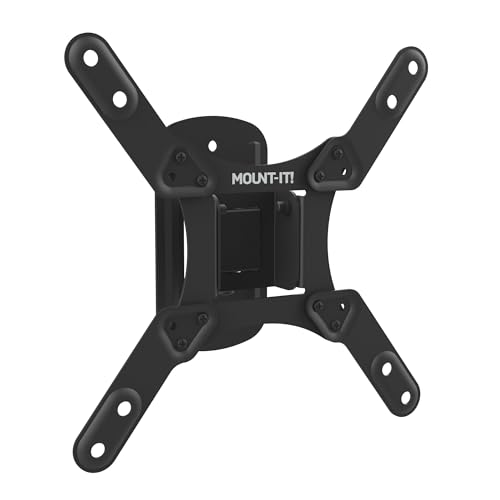
Mount-It! Full Motion Monitor Wall Mount — Where It Sits in the Balance
The flexibility archetype: it buys back the commitment con with genuine movement, and pays for it in the installation con, which it makes the most demanding of the mainstream mounts. Best for: shared screens and corner desks. Not suited for: static workstations or weak walls. Buy it when the screen’s weekly travel is real, and its column balances; buy it for insurance, and the cons win quietly.
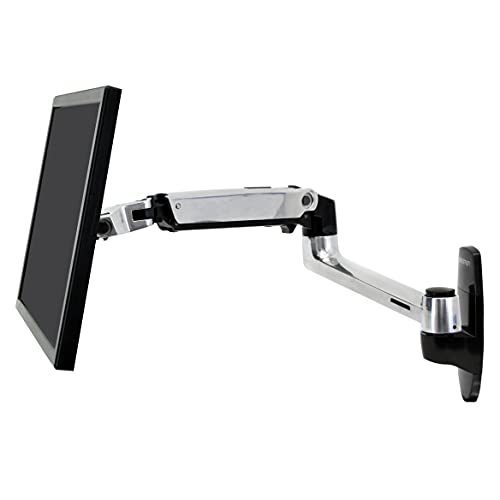
Ergotron LX Wall Monitor Arm — Where It Sits in the Balance
The premium archetype: movement quality and longevity pushed to the category’s ceiling, at a premium tier and with the strictest wall demands of any pick here. Best for: professionals who reposition daily. Not suited for: fixed screens. Its pros compound with use, which is precisely its condition: in a static room, its column never gets the chance to balance.
Setup and Care That Reduce the Cons
Most cons shrink under good practice, and the practices are cheap. The permanence con shrinks with rehearsal: tape the outline, live with it for a day, and drill once, correctly. The installation con shrinks with sequence and help: structure found, services checked, fixings matched to the wall, plate levelled, larger screens lifted by two people, safety fixings engaged, and a professional hired without embarrassment when the wall is unclear. The port-access con shrinks with foresight: a spare routed cable, a desk-level hub, a service loop behind the screen. The commitment con shrinks with honesty at the family-choice stage. What remains after all that shrinking is the irreducible core — holes in a wall you own, in exchange for space, height and stability every day — and for the households this product suits, that core is not a close call. The full installation walkthrough is in how to install a monitor wall mount, and the value question is examined head-on in is a monitor wall mount worth it.
The Pros and Cons That Never Make the Tables
The Hidden Pro: A Quieter, Cooler Desk
Two small benefits escape most lists. The first is acoustic and tactile calm: a screen that cannot tremble makes the whole workstation feel more solid, and people who type hard or share a desk with a printer notice the absence of sympathetic wobble more than they expected. The second is housekeeping physics. A desk with no stand is a desk that can be cleaned in one pass, rearranged without threading cables around a base, and used for other purposes — drawing, sewing, a board game, a laptop-only day — without negotiating with a monument in the middle. Flexible rooms benefit quietly and constantly, and it is one reason wall mounts review so well in studio flats and multi-purpose spaces: the desk stops being a single-purpose altar to the screen.
The Hidden Pro: Distance You Could Not Otherwise Have
Viewing distance is an ergonomic variable that furniture often fixes badly: the desk is as deep as it is, the stand sits where it sits, and the screen ends up closer than your eyes would choose. A wall mount hands the decision back, because the screen can retreat to the wall plane while the desk — and you — stay where you are. For larger screens especially, that extra remove is the difference between a display that fills your view comfortably and one you are forever leaning back from. It costs nothing, it is set once, and it is almost never listed among the pros, because it is really the desk-clearance pro viewed from the eyes instead of the desktop.
The Hidden Con: The Room’s Other Futures
Permanence has a subtler cost than holes: it forecloses the wall. A mounted screen claims not just its own rectangle but the neighbourhood — the shelf that cannot go there now, the picture the wall will not host, the desk’s future orientation ninety degrees from today’s. Households rarely feel this at installation, when the plan is fresh and unanimous; they feel it two years later, mid-rearrangement, when the wall’s one fixed point dictates the room. The mitigation is the same rehearsal discipline this cluster keeps recommending — think of the mount as the room’s anchor and arrange the future around it deliberately — but the con deserves naming, because it is the one that surprises otherwise careful buyers.
The Hidden Con: Sound, Light and Other Wall Physics
Walls interact with screens in ways desks do not. A wall behind a screen can bounce sound from the display’s speakers into the room differently, usually trivially, occasionally noticeably in bare rooms. A window on the same wall or the adjacent one can paint reflections across a screen that a desk position, a metre forward, would have escaped — and a fixed mount cannot shuffle sideways to dodge the afternoon sun the way a stand can be nudged. None of these is a reason to avoid mounting; all of them are reasons the tape rehearsal should happen at the time of day your room is brightest, with the speakers playing and your eyes doing the judging. Physics is cheaper to consult before the holes than after them.
Pros and Cons by Situation, One by One
The Examination Candidate and the Home Student
For a student in a family home, the balance usually favours mounting: the desk is small, the tenancy is the family’s own, the screen’s job is fixed for years of school, and the reclaimed surface goes straight into books and paper. The con that deserves weight is the room’s future — children’s rooms are re-imagined often — so a tilting mount on a wall position that could later serve a television or a shelf is the canny version of the choice.
The Gamer With a Settled Battlestation
Gaming setups are the most settled workstations in domestic life, and the pros compound accordingly: total clearance for a large mat and keyboard, stability under excited desk contact, and a screen height tuned to the chair rather than the stand. The cons to weigh are specific — port access for the console that visits, and light: gaming rooms are often dark, which erases the reflection con entirely. For the settled battlestation, this page’s verdict is among its most confident.
The Professional on Video Calls All Day
For the call-heavy professional, a less obvious pro leads: a wall-mounted screen sits at a height and distance that make the camera geometry better and the background calmer, and it never drifts between calls. The counterweight con is flexibility — the home office that must become a guest room on Friday — which argues, in dual-purpose rooms, for the full-motion archetype despite its installation demands. Judge by how often the room changes jobs, not by how the screen spends its weekdays.
The Older Household and the Accessibility Case
Where a screen must meet a body with specific needs — a particular chair, a particular recline, a carer who adjusts the display — the pros of chosen height and, with an arm, chosen reach are not conveniences but the point of the exercise, and they outweigh the cons comfortably. The professional-installation route deserves emphasis here: the installation con is best retired by hiring it away, and the premium motion archetype earns its tier in exactly these rooms. This is the situation where the category stops being furniture and becomes equipment for living, and it should be bought with that seriousness.
How the Balance Shifts Over Time
Pros and cons are usually weighed as if they were simultaneous, but in this category they arrive on a schedule, and the schedule favours mounting more with every year that passes. The cons are front-loaded to an almost comic degree: the investigation, the drilling, the levelling, the helper’s afternoon, the raceway — essentially the entire con column is discharged in the first weekend. The pros, by contrast, pay out daily and indefinitely: the clear desk on the thousandth morning is worth exactly what it was worth on the first, and the chosen height greets every single sitting. Any honest accounting that multiplies each side by its frequency ends up lopsided, which is why long-tenure owners are the category’s evangelists and why the cons column, read a year later, sounds like a description of a weekend rather than a product.
There are two exceptions to that schedule, and fairness requires naming them. The port-access con is not front-loaded; it recurs whenever connections change, which is why frequent connectors should weight it as a daily con in weekly clothing. And the commitment con can be re-triggered by life: a new home, a new room, a new household member with a different chair can present the installation bill a second time. Neither exception overturns the schedule’s general direction — but both explain the minority of owners whose verdict sours, and both are predictable in advance, which returns us, as every section of this article eventually does, to the value of forecasting your own patterns honestly before the drill comes out.
A last temporal note concerns the screen itself. Displays age into secondary roles — the main screen becomes the spare, the spare becomes the garage’s — and a wall mount’s pros travel down that cascade gracefully, because a sound plate in a utility room is as useful as it was in the study. The cons do not cascade at all; nobody re-pays the installation weekend when a screen is demoted. Durability of benefit, fragility of cost: weighed over the full life of the hardware rather than the first month, the balance is kinder to mounting than any static table suggests — provided, always, that the household was the settled kind to begin with.
There is also a generational angle worth one paragraph. Workstations are increasingly inherited — the desk passes to a partner, a teenager, a parent working from home — and a wall-mounted screen is the easiest workstation component to inherit well, because its height can be re-chosen only by re-drilling but its presence is universally understood and its desk clearance benefits every successor equally. Furniture-based supports inherit too, of course; the difference is that the wall mount’s main gift, space, is the one every generation of user wants in the same way, while its main cost was paid once, by someone else, long ago. Few purchases in the home office age as gracefully.
A Word on Cost, in Qualitative Terms
Money belongs in any honest pros-and-cons account, but it belongs in tiers rather than figures, because the figures date and the tiers do not. The bracket itself ranges from an entry tier that costs less than the cables it will carry, through a mainstream tier where the balanced archetypes live, to a premium tier for counterbalanced arms that costs several times the entry point and justifies itself only through daily use. Around the bracket sit the installation’s quiet costs — anchors for your wall, a raceway, perhaps longer cables, perhaps an installer’s hour — which together can rival the mainstream bracket itself, and which buyers consistently forget to count until the weekend arrives. On the other side of the ledger, the mount may retire other purchases: the bigger desk, the arm, the riser. The fair summary is that wall mounting is neither the cheap option nor the expensive one; it is the option whose cost is honest and front-loaded, like its cons, and whose value, like its pros, arrives daily. Households that flinch at the front-loading should examine whether they are really objecting to the money — or to the commitment the money represents, which is the con column’s deepest item and the one no discount can retire.
It is also worth recording what the money cannot buy in this category, because buyers sometimes shop as if it could. No tier of bracket purchases forgiveness for a bad fixing: a premium mount on plasterboard alone is a worse product than an entry bracket on a stud. No tier purchases back a badly chosen position, though post-install levelling narrows the error. And no tier purchases suitability for a wall that cannot be drilled. The hierarchy of spending in this category is therefore unusual: installation quality first, family choice second, bracket tier third — and the pros and cons of your finished result will follow that hierarchy exactly, whatever the receipts say.
One more consideration belongs to households deciding together, because pros and cons are not distributed evenly across the people in a home. The person who installs carries the cons; the people who use the room collect the pros. That asymmetry explains many a household argument about mounting, and it resolves the same way other such asymmetries do: the installer gets help, company and the good tools, and the household agrees the position together — at the tape stage, where agreement is cheap — rather than delegating the whole decision to whoever owns the drill. A mount chosen by everyone who will live with it is a mount whose pros get noticed and whose cons get forgiven, and that social fact, unscientific as it is, predicts satisfaction as reliably as any specification in this article.
And a final, practical asymmetry: the pros are testable in advance and the cons mostly are not — but the tape rehearsal closes most of that gap. Tape the outline, clear the stand’s footprint, work a day in the simulated future, and you will have sampled the desk clearance, the chosen height, the viewing distance and even the room’s changed feel, all before committing to anything. What the rehearsal cannot sample — installation effort, port access, the wall’s verdict — can be bounded by investigation and, where needed, by hiring experience. A decision made after a rehearsal and an investigation is no longer a gamble on a table of pros and cons; it is a plan, and plans in this category have a very high success rate.
Run that rehearsal this week if this article has left you genuinely torn. Torn readers are usually one working day away from certainty, in one direction or the other, and the tape costs nothing either way. If the day feels cramped and wrong, you have saved yourself holes and a return. If the day feels like the workstation finally exhaling, you have your answer — and the rest of this cluster, from the buying guide to the installation walkthrough, exists to carry that answer safely into the wall.
Either outcome is a win for the price of an afternoon and a roll of tape — which is more than can be said for most product decisions, and a fittingly practical note on which to close a pros-and-cons account of the most practical product in the category.
Keep the tape up for the evening, too, and look at the room from the doorway the way a guest would. The floating-screen look is the pro that photographs trade in, but in person it is subtler and better: a room that seems to have been arranged on purpose. If that doorway view pleases you, it will keep pleasing you, because unlike most pleasures in a workstation it does not depend on novelty. The wall does not get old; it just gets familiar, which for the infrastructure of a working life is the highest available praise.
Familiar, and quietly useful to everyone who ever sits down at that desk after you — which, in a family home, is the longest review any product ever gets.
Products that serve successors without being asked to are rare enough to be worth choosing on purpose when the rest of the balance is anywhere near even.
Choose it, install it once at the standard it deserves, and let the years cast the deciding vote.
They usually do, in this category, and they vote early.
Bottom Line
Count the columns by weight, not by number. The pros of a monitor wall mount are daily, bodily and spatial; the cons are concentrated, plannable and mostly one-time. Long, settled, space-hungry households on drillable walls should mount, and should spend their worry on the installation rather than the decision. Rented, mobile and rearranging households should not, and should spend their money on the supports that travel. Everyone between should answer the three questions from the top of this page — can you drill, will it stay, is space your scarcity — and trust the answers more than any table, including ours.
Living With the Trade-Offs: How a Monitor Wall Mount Settles Into Daily Use
The honest way to weigh the drawbacks of a monitor wall mount is to ask how often each one will actually meet your routine, rather than counting advantages and disadvantages as if they were equal. Decide in advance what good enough looks like for your use, so a minor cosmetic flaw does not distract you from performance that genuinely meets the brief. Give a new monitor wall mount a fair trial in the position it was bought for before improvising workarounds, since many early complaints disappear once placement is corrected. If you work in more than one place, decide whether this monitor wall mount stays fixed in one spot or travels, and judge its size, weight and setup time accordingly.
As a concrete listing check, take the VIVO Single Monitor Wall Mount and the Mount-It! Full Motion Monitor Wall Mount named earlier in this article and confirm, line by line, that each variant offered matches the size, connection and contents described for it here. Look for the failure you would notice first if you chose badly: a port you cannot reach, a part that will not fit, a control you cannot see, or a routine that becomes slower instead of easier. Avoid forcing a connector, bracket or moving part that resists you, because resistance is usually information about alignment or fit rather than an invitation to push harder. Treat any accessory bundled in the box as a starting point, and check whether it suits your setup before assuming the maker has solved that part for you. If a drawback can be softened by placement, a simple accessory or a change of routine, it belongs in a different category from a drawback built into the design itself.
Think about the next purchase this one commits you to, whether that is matching accessories, consumables, a bigger surface or a different connection, and count that commitment honestly. Run one deliberately awkward task early on, the kind you usually avoid, and see whether this monitor wall mount handles your edge cases or only your easiest work. Measure the place where a monitor wall mount will actually live, including the clearance you need to reach cables, doors, trays, vents or controls without moving everything else first. When you compare notes with other owners, match their comments to setups like yours, because advice from a very different room, workload or routine can mislead.
Ask what you would do on the day this monitor wall mount stops working as expected, and whether you could swap, reset, clean or return it without dismantling half your setup. Separate the features you will use in the first month from the ones that only sound reassuring, and let the first group carry far more weight in the decision. Notice which benefits depend on your habits rather than on the product itself, because those are the ones that vanish when you are busy, tired or sharing the setup. Keep the area underneath and behind the monitor wall mount reachable for cleaning, since the spots you cannot reach become the spots where dust and lost small parts collect. Keep the instructions somewhere you can find them months later, since the setting or step you skip today is often the one a future problem sends you hunting for.
Leave a little headroom in every direction that matters, whether that means physical space, connection capacity, adjustment range or simply time to do a task properly. Picture the busiest version of your week and ask whether this monitor wall mount still fits when other people, other tasks and other equipment compete for the same space. Check the connection points you rely on every day, and note which ones are already occupied, shared or awkward to reach once furniture is back in place.
Think about the longest session you realistically run, not the average one, since heat, noise, clutter and small annoyances all grow more noticeable over time. A disadvantage that affects a task you do weekly deserves more weight than an advantage that improves a task you perform once a year, however impressive that advantage sounds. If the monitor wall mount will be shared, agree on one home position and one simple reset routine, so each person does not undo the previous person’s adjustments. Ask whether the benefit you want survives your least favourite conditions, such as low light, a crowded desk, a warm room or a rushed start to the day. Notice how the monitor wall mount behaves when you are tired or in a hurry, since products that demand perfect technique tend to fail exactly when you have least patience.
Frequently Asked Questions
What is the biggest advantage of a monitor wall mount?
Total desk clearance. The screen’s entire footprint — the centre-rear territory every stand occupies — returns to your work permanently, and on a small desk that single change can feel like a larger room. Chosen height runs a close second: the screen sits at the level your posture prefers rather than the level a stand designer guessed, and owners tend to describe that benefit in physical terms for years.
What is the biggest disadvantage?
Permanence, in its several forms: holes in the wall, a location that outlives furniture rearrangements, and a position that must be re-drilled to be changed. For homeowners with settled workstations it is a small, one-time cost. For renters it can be prohibitive — a lease and a deposit outrank any ergonomic gain — and for households that rearrange often it recurs often enough to reverse the whole balance.
Are wall mounts safe for the monitor and the household?
Yes, when the installation respects the fundamentals: the mount matched to the screen’s pattern and weight guidance, fixings anchored into a stud or correctly prepared masonry, the drill path checked for cables and pipes, safety fixings engaged, and larger screens lifted by two people during the hang. A correctly mounted screen is harder for a child or pet to disturb than a freestanding one. Every failure story in this category traces back to one of those fundamentals being skipped.
Do wall mounts work with height-adjustable desks?
Awkwardly, unless your use is lopsided. The wall does not travel with the desktop, so the screen is at the right height for one desk position and approximate for others. If you sit ninety percent of the day, mount for sitting and accept the standing approximation; if you alternate constantly, a desk arm that rides the desk is the coherent tool. Be honest about your own ratio — it, and not the hardware, decides this question.
Can I remove a wall mount later without a trace?
Nearly. The mount unbolts in minutes, and the fixing holes fill, sand and paint to invisibility with ordinary decorating supplies. What you cannot recover is the hour of installation, which is why the category rewards deciding slowly. Keep the monitor’s original stand and you can return the screen to furniture duty at any point, in this home or the next one.
Is a wall mount better than a monitor arm?
Better at some things, worse at others, and the verdict depends on your scarcities. The wall mount wins on desk clearance and stability; the arm wins on daily adjustability, reversibility and travelling with the desk. If space is your problem and your setup is settled, mount. If movement is your need or your walls are unavailable, arm. The detailed comparison is linked from the context section above.
Related Reading
the monitor wall mount review · our monitor wall mount reviews · ergonomic monitor picks · dual monitor wall mount ideas · desk setups worth modelling