Optical vs mechanical switches is a question about how a key press gets detected. A traditional mechanical switch closes a pair of metal contacts; an optical switch interrupts a beam of light. That single difference cascades into speed, durability, feel, and compatibility — and the honest verdict is that optical wins on paper in several categories while mechanical still wins the hearts, and collections, of most enthusiasts.
Short version: choose optical for maximum response speed and contact-wear immunity in gaming; choose mechanical for the widest choice of feels, easy switch swapping across brands, and a mature ecosystem. The criteria below unpack where each technology genuinely pulls ahead and where the differences are smaller than marketing suggests. For the wider switch landscape, Keyboard Switch Types Explained is the companion read.
Disclosure: As an Amazon Associate, ilcastellomenu.com earns from qualifying purchases. Product details and availability can change; check the retailer listing before you buy.
Quick verdict: optical vs mechanical switches
Optical switches actuate without physical contact, so there is no contact bounce to filter and no metal leaf to wear — the two headline advantages. Mechanical switches counter with variety: hundreds of switch models across every feel, weight, and sound profile, fitting a shared standard that optical switches, which are more brand-specific, do not match.
In practice, the speed gap is measured in small fractions of real-world input time that most players will never perceive, while the feel gap is something you notice on every keystroke. That asymmetry drives the recommendation pattern throughout this guide: optical for the performance-focused few, mechanical for everyone choosing by feel — which is most people, most of the time.
In this guide
How each switch detects a press
In a mechanical switch, pressing the stem pushes two metal leaf contacts together, completing a circuit. Because metal contacts bounce microscopically on impact, firmware waits a short debounce interval to confirm the press is real — a delay measured in milliseconds that engineers work hard to minimise. The leaf is also a wear item and the part that eventually produces chatter when it degrades.
In an optical switch, the stem blocks or unblocks an infrared beam as it travels, and the board registers the press the instant the beam state changes. No contact means no bounce and effectively no debounce wait, and nothing physical wears at the sensing point. The stem still rides on rails and a spring like a mechanical switch, which is why optical switches can mimic familiar linear and tactile feels — the detection changed, not the entire mechanism.
A third family deserves a footnote here: magnetic Hall-effect switches sense stem position continuously, enabling adjustable actuation points and rapid-trigger behaviour. They compete with optical at the performance end, and boards like the adjustable-actuation model in the gear section show where that branch is heading. This comparison stays focused on optical versus contact mechanical, but buyers at the performance extreme should know the third option exists.
Speed and latency
Optical’s claim is real: eliminating debounce removes a small but genuine delay, and some optical boards pair the switch with very high polling rates for the fastest possible input chain. In rhythm games, fighting games, and top-level competitive play — the worlds of Best Keyboards for Osu and tournament FPS — players rationally chase every link in that chain.
Context matters, though. Human reaction time, display refresh, and game tick rates all dwarf the switch’s contribution for most players. A mechanical board with well-tuned firmware is not the bottleneck in a typical setup, and upgrading a monitor or simply practising will improve results more than a switch-technology swap. Buy optical for speed if you are already optimising at that level; do not buy it expecting transformation.
Consistency is optical’s quieter speed advantage: because detection is optical, the actuation point does not drift as contacts age. A mechanical board’s feel stays stable for a very long time too, but its oldest age-related fault — chatter — is a contact disease optical switches are structurally immune to, which connects to the diagnosis guide How to Fix a Keyboard Key that is Not Working.
Durability and failure modes
With no contacts to oxidise or fatigue, optical switches are typically rated for longer service than mechanical ones, and their characteristic failures are rarer and different: a failed emitter or sensor rather than a worn leaf. Mechanical switches fail gracefully and individually — and on a hot-swappable board, individually means replaceable in seconds, which reframes the durability question entirely.
That repairability is mechanical’s strongest counter. An optical board’s switches are usually specific to its brand and sensing layout, so spares and alternatives are limited; a mechanical board accepts a universe of standard switches, letting you replace one switch or restyle the whole board. The ecosystem contrast mirrors Hot Swappable vs Soldered Keyboard: openness versus integration, each with real benefits.
Both technologies outlast membrane boards comfortably. For a single board used daily, either will likely be retired for fashion or layout reasons before its switches wear out — which is an argument for choosing by feel today rather than by theoretical lifespan.
Feel, sound, and choice
Feel is where mechanical runs away with it. The mechanical ecosystem offers linears, tactiles, and clickies across countless spring weights, stem materials, and factory-lube states — an entire hobby of tuning documented in guides like How to Lubricate Switches on a Keyboard. Optical ranges are narrower: most optical switches are gaming-focused linears and clickies from a handful of brands, with far fewer tactile options.
Sound follows the same pattern. Optical switches sound like what they are — mechanical-style mechanisms — so an optical board is not a quiet-board shortcut; it clicks, clacks, or thocks according to its case and keycaps just as a mechanical board does. Anyone choosing optical hoping for silence should instead read How to Fix a Loud Mechanical Keyboard and pick switch feel and case design for acoustics.
If you have a known favourite feel — a specific tactile bump, a heavy linear for typing — mechanical is almost certainly where it lives. If you are feel-agnostic and performance-first, optical’s narrower menu stops mattering.
Compatibility and cost
Mechanical switches follow a broadly standardised footprint, so keycaps, switches, and accessories interchange across brands; optical switches generally work only in the boards designed for them, and swapping brands is usually impossible. That lock-in is the price of the integrated sensing design, and it should be a conscious trade, not a surprise discovered when you order a set of switches that cannot fit.
Pricing overlaps heavily: capable boards exist at similar tiers in both camps, with optical concentrated in gaming lines. The value question is therefore less about the sticker and more about the ownership path — mechanical offers cheap, endless refresh options, optical offers a sealed, high-performance appliance. The tier thinking in keyboard-buying-guide applies to both.
Who should choose which
Choose optical if you play competitively, value the fastest and most consistent registration, and are happy within one brand’s ecosystem. Choose mechanical if feel variety, customisation, repairability, or typing experience lead your priorities — or if you simply want the safer, more flexible default. Choose either with confidence for general use; this is a comparison between two good technologies, not a good one and a bad one.
Whichever board lands on your desk, run it through how-to-test-a-keyboard on arrival, paying special attention to consistent registration across all keys — the very quality both switch types promise.
Debounce, polling, and where latency really lives
Switch sensing is one link in a chain that runs finger, switch, controller firmware, USB polling, operating system, game engine, and display. Optical switches shorten the switch-and-debounce link specifically: with no contact bounce to filter, the board can report the press sooner and more consistently. High-polling boards shorten the USB link. Each optimisation is real; each is also small beside the display and engine links for most players, which is why honest latency talk is always chain talk, never switch talk alone.
Consistency deserves equal billing with raw speed. A mechanical contact’s behaviour drifts microscopically as it ages; an optical beam’s does not. For players whose muscle memory is calibrated to a precise actuation feel, that stability across years is a performance feature in itself — the board at month thirty registers like the board at day one, because nothing in the sensing path has worn.
None of this rescues a slow rest-of-chain. A player on a sluggish display gains more from a monitor upgrade than from any switch technology, and this guide’s buying advice follows that arithmetic: fix the chain’s weakest link first, and let optical switches be the final polish rather than the first purchase.
The tactile gap and why it persists
Optical ranges skew linear and clicky for an engineering reason: a tactile bump requires precise interaction between stem legs and a leaf-like element, and reproducing that feel without the contact leaf is a harder design problem. Manufacturers have answered with alternative bump mechanisms, but the variety remains a fraction of the mechanical catalogue, where decades of stem-profile experimentation serve every tactile taste from whisper-subtle to aggressively bumpy.
For typing-first buyers this gap is the comparison. If your satisfaction lives in a specific tactile character, mechanical is not merely the safer choice — it is close to the only choice, and optical’s speed advantages address a problem typing does not have. Hybrid buyers should try an optical tactile in person before ordering; the few that exist are good, but ‘good’ in tactile switches is a fingerprint-level judgement.
Expect the gap to narrow as optical and magnetic designs mature — magnetic sensing in particular invites tactile experimentation because actuation is software-defined. Buy for today’s catalogue, though, not tomorrow’s roadmap: the switch you can order and love now beats the ecosystem that may exist later.
Ownership over five years
Project both purchases forward. The mechanical board at year five: switches replaceable in minutes, keycaps refreshed, feel restorable to new, spares available from a dozen brands. The optical board at year five: sensing as crisp as day one, switches healthy, but replacements and alternatives confined to its maker’s catalogue — if that catalogue still stocks them. Neither projection is bleak; they simply price different risks, longevity of sensing versus longevity of supply.
Resale follows the same split: mechanical boards hold value because buyers can renew them; optical boards sell on their model’s reputation and remaining maker support. If you rotate gear frequently, weight this; if you buy once a decade, weight instead the feel under your fingers today, because that is the variable you will actually live with for those five years.
Either ownership story ends happily if the board was chosen for your real priorities and verified on arrival. The technology debate is loudest online and quietest at desks, where both kinds of switches are, at this moment, registering keystrokes perfectly well for people who chose them deliberately.
Optical switches and typing feel, revisited honestly
Because optical boards are marketed to gamers, their typing qualities are under-reviewed, so let this comparison say it plainly: a good optical linear types perfectly well, and a typist with no tactile allegiance may never miss the mechanical catalogue. The optical penalty is not quality but choice — if the stock feel suits you, the narrower ecosystem never becomes visible; it appears only at the moment you want a feel the catalogue does not stock.
That conditional structure suggests the buying rule: optical is safest when you have tried the specific board’s switches and liked them, because your exit options are limited. Mechanical is safest bought blind, because a missed guess is correctable with a bag of switches. Risk allocation, not performance, is the mature frame for this entire comparison.
Sound: the criterion both camps share
Buyers sometimes choose optical expecting a quieter board and discover a mechanism that sounds — unsurprisingly — like a mechanical keyboard, because it is one in every acoustic respect: stem, housing, spring, keycap, case. The sensing method makes no sound and removes none. If acoustics drive your purchase, shop switch family, case construction, and keycaps, and let the sensing technology be chosen on its own merits afterward.
The one acoustic footnote in optical’s favour is consistency over time: no contact wear means no chatter developing in year three, and chatter is a sound as well as a fault. A board whose tenth year sounds like its first is worth something to owners who keep gear long — though the mechanical owner’s rejoinder, that a chattering switch is a thirty-second swap, is equally true and equally worth something.
Where optical clearly wins: hostile environments
Contactless sensing shrugs off enemies that trouble contacts: dust ingress, humidity, and the slow oxidation of metal surfaces. Boards destined for workshops, industrial desks, humid climates, or simply a decade of inattention have a structural reason to prefer optical, and some sealed optical designs lean into that durability explicitly. It is a niche argument that is decisive inside its niche.
Mechanical’s environmental counter is serviceability: a contaminated mechanical switch can be pulled, cleaned, or replaced by hand, while an optical board’s sensing fault is a board-level repair. Hostile environment plus maintenance access favours mechanical; hostile environment plus sealed-and-forget-it favours optical. As ever in this comparison, the ownership model decides what the technology merely enables.
The future both technologies are heading toward
The frontier is convergence: magnetic sensing borrowing optical’s contactlessness while adding analogue control, firmware turning actuation into software, and mechanical switches absorbing factory lubrication and tighter tolerances from the enthusiast scene. The likely endpoint is not a winner but a spectrum of sensing methods under a shared mechanical feel — which means today’s buyer should choose today’s feel and stop worrying about backing the wrong horse.
Horses, in this race, all finish. Both technologies will be supported, stocked, and typed on for years, because both have large installed bases of satisfied owners. Buy the board whose switches your fingers applaud, verify it on arrival, and let the industry’s future argue with itself.

Scenario head-to-head: the tournament desk
Competitive play is where optical marketing concentrates, so it deserves a careful scenario rather than a slogan. At a tournament desk, the player’s inputs are dense: movement keys held in combination, rapid counter-strafing taps, abilities fired in the same instant as a direction change. Optical switches offer two genuine assets here — actuation the moment the beam breaks, with no mechanical contact to debounce, and in some implementations an adjustable actuation point and rapid-trigger behaviour that resets the key the instant it starts to rise. For the small set of techniques built on that reset behaviour, optical (and its magnetic cousins) is not a marginal gain; it enables a style of movement input that contact switches cannot reproduce exactly.
The mechanical counter-argument at the same desk is ecosystem and trust. The player’s switches feel identical to the ones at home because the same switches are sold everywhere, replacements are in every team manager’s kit, and a board that fails on stage can be swapped for an identical-feeling one. Optical boards tie the player to one maker’s switch line. At the very top level, players optimise for the input style; below it, they optimise for consistency with their practice setup — which is why both technologies are visible on professional desks and neither has swept the other away.
Scenario head-to-head: the writer, the coder, and the long document
For text work the comparison narrows to feel, and feel is where mechanical’s variety becomes a structural advantage. A writer choosing mechanical can select from thousands of switches — bump shapes, spring weights, travel distances, materials — and fine-tune further with lubrication and springs. A writer choosing optical chooses from a short catalogue, historically weighted toward light, linear, gaming-flavoured switches, because that is the market optical was built for. If the catalogue happens to contain your preference, optical serves you perfectly well and adds durability. If it does not, no amount of speed specification compensates for a feel you dislike across eight hours.
There is also an adaptation asymmetry. Mechanical feel is the reference most typists already know from years of boards; optical switches often feel subtly different — lighter return, a different bottom-out character — which some typists love immediately and others never stop noticing. Test optical with real paragraphs, not single presses, before committing a work board to it.
Inside the failure clinic: diagnosing each technology’s typical faults
Mechanical faults are legible. A key that doubles has a chattering contact or a worn leaf; a key that feels scratchy has a worn or dirty slider; a dead key has a failed contact or solder joint. Each fault maps to a part, and on hot-swappable boards most map to a ten-minute swap. Optical faults are fewer but more opaque: a key that misbehaves usually implicates the sensor, the emitter, or the board’s electronics rather than anything your fingers touch, and the fix is likelier to be a board-level repair or replacement than a switch swap. The switch stem can still wear and feel can still degrade, but the sensing itself has nothing to wear out.
This difference shapes ownership. Mechanical boards reward a user willing to maintain them and punish no one who is not — they run for years untouched. Optical boards ask nothing and offer nothing to maintain; when they do fail electronically, the user’s options narrow to warranty and replacement. Choose based on which relationship you prefer with your tools: a maintainable instrument or a sealed appliance. Both relationships are respectable; they are simply different, and they are the real content of this comparison once the speed numbers are set aside.
Actuation points, rapid trigger, and analogue dreams: the feature layer
Because optical sensing measures a beam rather than a contact, it lends itself to features contact switches struggle with: actuation points adjustable in software, keys that reset dynamically as they rise, and in principle analogue depth sensing — a key that knows how far it is pressed, like a trigger. Mechanical switches have answered with magnetic Hall-effect designs that deliver the same features by a different sensing method, which is why the feature conversation and the sensing conversation are slowly separating. The practical advice follows: if a specific feature is why you are shopping — rapid trigger for a specific game, adjustable actuation for mixed typing and play — shop for the feature and verify it works as described, whichever sensing technology delivers it.
Verify, because implementations vary more than names do. Adjustable actuation that is coarse, software that forgets settings, rapid trigger that behaves differently across the board — these separate the good implementations from the brochure versions. Read owner reports about the software specifically; the switch hardware in both camps is more consistent than the programs that configure it. And keep perspective: for typing and for most gaming, fixed, well-chosen actuation beats adjustable actuation you set once and never revisit.
Sound and feel workshop: tuning each technology toward the other
Owners often try to tune one technology toward the other’s virtues, and knowing what transfers is useful. Optical boards can be quieted and deepened with the same case-side tools as mechanical ones — desk mat, case foam, keycap choice, stabiliser tuning — because most of what you hear is the keycap and case, not the sensing method. What cannot be tuned across is the switch catalogue: a mechanical board can become nearly any feel by swapping switches; an optical board’s feel range is bounded by its maker’s line and the stems designed for its sensors.
In the other direction, mechanical boards chase optical’s speed with lighter springs, shorter-travel switches, and higher polling firmware — closing much of the practical gap for players who do not use rapid-trigger techniques. The remaining gap is real but narrow and specific. This is why the mature view treats the two as overlapping families rather than rivals with a winner: choose your feel universe first, your feature list second, and let the sensing technology be whichever one your first two choices happen to use.
Compatibility traps and how to avoid them
Optical’s sharpest practical edge is incompatibility. Optical switches are not interchangeable with mechanical ones: the stems, housings, and board electronics are designed as a system, and a switch puller will not turn an optical board into a mechanical one. Keycaps usually transfer, since the stem cross is shared in most designs, but verify before assuming a favourite set fits. Replacement optical switches must come from the board’s maker or its licensees, so check that spares are actually sold before you buy the board — a switch technology you cannot buy replacements for is a board with a fixed lifespan set by its least durable key.
Mechanical has its own traps, milder ones: pin counts differ between switch variants, plate and PCB mounting differ, and some boards accept only one style without modification. The difference is degree of ecosystem — mechanical’s traps are documented by a huge community and solvable with common parts, while optical’s are solved by a single vendor’s catalogue. Neither is a reason to avoid either; both are reasons to spend ten minutes on compatibility before money changes hands, especially when buying switches or a board second-hand.
The verdict by budget of attention, not money
Strip the comparison down and the deciding resource is not money but attention. If you want a board you can shape for years — swapping, tuning, repairing — mechanical’s ecosystem is the deepest in the hobby and optical cannot match it. If you want a board that asks nothing, survives hostile environments, and delivers its speed features out of the box, optical’s sealed reliability is genuinely attractive. If you want specific modern input features, shop the feature and let either technology win. And if you simply want a good board for mixed use, buy the one whose feel you preferred in a real paragraph test; in this comparison, feel is the tiebreaker that never lies.
Gamers weighing the rest of the desk alongside the board may find it useful to compare notes with compact gaming boards built for fast play, where many of the optical and rapid-trigger models live, before deciding how much of your budget of attention the switch question deserves.
The gaming genres, separated: where sensing actually shows up
Lumping ‘gaming’ into one category hides where optical’s traits matter. In rhythm games and fighting games, inputs are discrete, timed, and often simultaneous in chords — here consistent, debounce-free actuation and rapid reset are directly on the critical path, and optical implementations built for these features earn their reputation. In first-person shooters, the keyboard’s role is movement, and the rapid-trigger style of input has genuinely changed high-level movement technique in the titles that reward it. In strategy and MMO play, by contrast, the keyboard is a field of bindings pressed at human pace; switch sensing is nearly irrelevant, and comfort across a long session dominates — mechanical’s catalogue usually wins those desks.
Single-player and casual play sit outside the debate entirely: no sensing technology measurably changes an experience paced by the player. The genre breakdown matters because marketing addresses all gamers with the competitive minority’s arguments. Locate your own genres honestly on this map before paying for advantages located in someone else’s.
Springs, stems, and the parts bin: maintaining each over years
Long-term mechanical ownership builds a small parts bin: spare switches, springs in a couple of weights, a puller, lubricant. That bin is a capability — nearly any feel problem that develops can be addressed from it in an evening. Optical ownership builds a different bin: spare switches only from the original maker, if they are sold at all, and otherwise nothing, because there is little to maintain. The sealed design’s promise is that the bin stays empty because nothing is needed; its risk is the day something is needed and cannot be bought.
Springs deserve a specific note, because they are the mechanical part most users eventually tune and the part optical designs constrain most. Mechanical springs are interchangeable across an enormous market, in weights and lengths and materials, and changing them is the cheapest feel transformation in the hobby. Optical switches, built around their sensing stems, offer far less of this freedom. If you suspect you are a spring-tuner by temperament — and the existence of this thought suggests you might be — that temperament alone may settle the comparison for you.
Latency, measured honestly: where the milliseconds actually go
The full input chain — switch actuation, debounce or sensing, matrix scanning, polling to the computer, the game’s own processing, the display — contains many delays larger than the one this comparison argues about. Optical removes the debounce term, which is real and worth a few milliseconds in typical implementations, and removes uncertainty about it. Everything downstream remains identical for both technologies. This is why laboratory comparisons show a consistent optical edge and why players’ blind impressions vary: the edge is a small, fixed slice of a chain dominated by other terms, perceptible mainly in techniques built to exploit instant reset rather than in ordinary presses.
The practical conclusion is not that the difference is fake, but that it is specialised. If your play uses the techniques, the difference is functional, not marginal. If it does not, you are buying insurance against a bottleneck you do not have, and the money and choice are better spent on feel — the variable you will perceive on every single press, in every application, for the life of the board.
Two owners, three years on: a pair of follow-ups
Consider two buyers who chose on the same day. The optical owner reports the dullest possible success: the board works exactly as it did on day one, the switches feel unchanged, a spilled drink was wiped off without consequence, and the adjustable actuation was set in the first week and never reopened. The board has given no joy of tinkering and demanded no attention; for its owner, that is the entire point fulfilled. The mechanical owner reports a board that no longer contains its original switches on the letter keys, has been lubed once, gained a quieter spacebar through tuning, and survived one dead switch as a five-minute swap. It is, in a real sense, a different and better board than the one purchased.
Neither follow-up is a failure story, which is the deepest truth in this comparison. The technologies serve two temperaments — the appliance temperament and the instrument temperament — and they serve them both well. Misery comes only from the mismatch: the tinkerer sealed out of an optical board, or the set-and-forget owner maintaining a mechanical one. Identify your temperament first; the switch will follow.
Polling, scan rates, and the rest of the speed stack
Switch sensing is one term in a chain that also includes how fast the board scans its matrix and how often it reports to the computer. A board can pair fast switches with a slow scan and deliver an unremarkable total; another can pair ordinary switches with fast scanning and high polling and feel exceptionally responsive. This is why two optical boards can feel different from each other, and why a well-implemented mechanical board can feel faster than a carelessly implemented optical one despite the sensing disadvantage on paper.
When you shop on speed, ask for the whole stack: switch behaviour, scan or polling figures, and whether those figures hold across the whole board or only a highlighted zone. Then discount the total by the rest of your chain — the game’s tick, your display’s refresh and response — because the keyboard’s slice of the journey is the one you are paying to shrink, and it is worth knowing how large a slice it is before valuing the shrinkage.
What streamers and video creators should weigh
Creators judge switches by a criterion players ignore: how they sound on a microphone, night after night, to an audience. Optical switch lines, built for gaming, often land in the louder, sharper part of the spectrum, though case and keycaps dominate as always. Mechanical’s catalogue includes genuinely quiet switch designs developed for exactly this problem, which is why so many streaming desks are mechanical despite the creator also gaming seriously. The microphone test outranks the latency test for anyone whose audience hears the board more than their gameplay depends on it.
Reliability under broadcast conditions matters too: a board that must never fail live favours the technology whose faults you can repair between streams from a parts drawer, and whose behaviour you have years of familiarity with. Novel input features are a liability mid-season. Creators, like tournament players, should change switch technology in the off-season or not at all.
Optical switches in hostile and public environments
There is a class of desks where this comparison ends quickly: public terminals, industrial workstations, medical and food environments, school labs, and anywhere a keyboard faces dust, moisture, cleaning chemicals, and users who owe it nothing. Sealed optical designs, with no exposed electrical contacts to corrode and no contact leaves to bend, tolerate this world measurably better, and their failure modes under abuse are fewer. This is the same reasoning that put membrane boards in those environments for decades, upgraded: optical offers the sealed robustness with a defined, consistent key feel that membrane cannot match.
If your board’s environment is a home desk, this section is trivia. If it is a workshop bench, a kitchen-adjacent desk, a shared studio, or a child’s first computer in a house with juice, it may be the deciding section of the entire comparison, outweighing feel catalogues and feature lists combined.
Trying optical fairly: the adaptation trap in short tests
Optical boards suffer in short demos for a subtle reason: their feel difference is small but constant, and constant small differences are exactly what a five-minute test exaggerates and a five-day test dissolves. Typists who reject optical in a shop often cannot identify the difference after a week of use; typists who love it instantly sometimes discover the love was novelty. The fair protocol mirrors the one for any board: type real paragraphs, at real speed, on more than one day if the purchase matters, and judge by errors and end-of-day comfort rather than by first-touch impressions.
Retailers’ return windows are the honest version of this test. Buy the board you are curious about, use it as your only board for a week — alternating boards resets adaptation daily and teaches nothing — and keep the notes described in this site’s testing guidance. A week is enough for the sensing technology to become invisible, which is the state in which you will actually own it.
Where both technologies are heading, and what that means for buying now
The frontier of switch design has already moved past this comparison’s terms: magnetic sensing now delivers optical’s feature set — adjustable actuation, dynamic reset — in switches with mechanical-style stems and growing catalogues, and both established camps are responding. The buying implication is reassuring rather than paralysing. Today’s mechanical boards are supported by the deepest ecosystem the hobby has ever had, and today’s optical boards are mature products from makers committed to their lines. Neither is a bet on a dying standard.
Buy for the next three years of your hands, not for the next decade of the industry’s roadmap. Switch technology will keep moving; your board’s job is to serve your current games, your current work, and your current wrists. On that timescale, both technologies in this comparison are safe, proven choices, and the energy spent choosing between them is better spent — as this guide has argued throughout — on the feel test that only you can perform.
A note on switch weight and speed claims, for careful readers
One marketing habit deserves a direct warning: pairing a very light switch with speed language, as if the spring’s weight were itself a sensing advantage. A light switch actuates under less force, which some players experience as faster and others experience as accidental presses and fatigue from holding their fingers suspended. Sensing technology and spring weight are independent variables — both technologies offer a range of weights, though mechanical’s range is far wider — and conflating them in a product description is a sign to read the rest of the description sceptically.
Judge weight the way you judge any feel variable: by typing and playing on it for a sustained session, watching for the two failure modes at either end. Too light shows up as stray inputs and tired, hovering fingers. Too heavy shows up as slowed repeats and end-of-session ache. The right weight is the one you stop noticing, and it is a property of your hands, not of the switch’s technology badge.
With that caution filed, the comparison returns to where it has consistently landed: sensing decides a short list of specialised capabilities, feel decides everything else, and your own week of real use outranks every specification either camp prints.
A final check before you commit
Before money moves, run the shortest version of this guide’s method. Name the one thing you most want the new switches to fix or enable — a technique, a noise, a fatigue, a failure you are tired of. Check that the technology you are leaning toward actually addresses that named thing, in the specific model you are buying, rather than in its marketing family generally. Then confirm the feel with real paragraphs, and confirm that spare switches for your choice can actually be purchased today. Four checks, ten minutes, and the comparison has done its work: most disappointed switch buyers skipped exactly one of them, and it was rarely the same one twice.
Gear mentioned in this guide
The products below are examples referenced in this guide. They were verified through the Amazon Creators API product pool for this site; use them as concrete reference points for the features discussed, not as a ranked list.
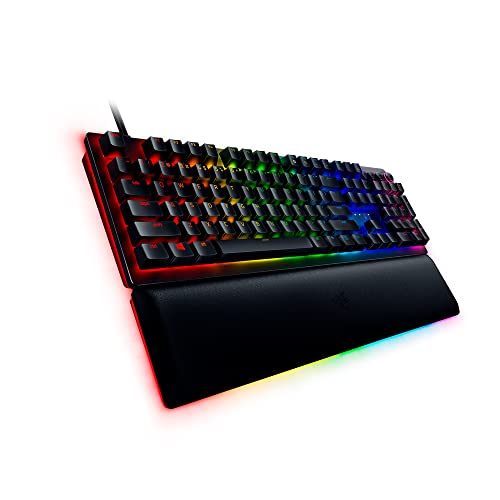
- Razer Huntsman V2 Optical Gaming Keyboard: Linear Optical Switches – 8000Hz Polling Rate – Doubleshot PBT Keycaps – Dedicated Media Keys & Dial – Ergonomic Wrist Rest – Snap Tap — Check on Amazon
- Razer Huntsman V3 Pro TKL Esports Wired Gaming Keyboard, Black — Check on Amazon
- Corsair K70 RGB TKL – Champion Series Tenkeyless Mechanical Gaming Keyboard – Cherry MX Speed Keyswitches – Durable Aluminum Frame – Per-Key RGB LED Backlighting – Detachable USB Type-C Cable — Check on Amazon


Frequently asked questions
Are optical switches actually faster?
Yes, by a small margin: they skip the debounce delay mechanical contacts require. The difference is real but tiny next to human reaction time and display latency, so it matters most to competitive players already optimising every part of their setup.
Do optical switches feel different?
They feel like mechanical switches because the stem, spring, and housing mechanics are similar — the sensing is what changed. The practical difference is choice: far fewer optical feels exist, and most are gaming linears or clickies.
Can I put optical switches in my mechanical keyboard?
Generally no. Optical switches need a board with emitters and sensors aligned to each switch position. The two ecosystems are not interchangeable, which is a key ownership consideration before buying.
Which lasts longer, optical or mechanical?
Optical switches avoid contact wear entirely and are usually rated for longer service. Mechanical switches still last for years of heavy use and, on hot-swappable boards, can be replaced individually in seconds.
Are optical keyboards better for typing?
Not inherently. Typing satisfaction comes from switch feel, and the mechanical ecosystem offers far more tactile variety for typists. An optical linear can type perfectly well; it simply offers fewer alternatives if you dislike its feel.
What about magnetic Hall-effect switches?
They sense stem position magnetically and add adjustable actuation and rapid-trigger features, competing with optical at the performance end. They share optical’s brand-specific ecosystem limits while offering the most configurable behaviour of the three.
Related Guides
Keep exploring with these guides and roundups from the same desk and audio cluster: