ilcastellomenu.com is reader-supported. When you buy through links on our site, we may earn an affiliate commission.
Where to Buy Your Travel Add-On, and Why a Second Camera Changes a Trip
The best addon cameras for traveling are not replacements for the phone in your pocket or the main camera around your neck. They are specialists you add because one particular job keeps going badly: the shaky walking shot through a night market, the group photo nobody wants to hand a stranger a phone for, the rainy-day hike where your good camera stays zipped inside its bag. Every pick below is sold through Amazon, where you can check current availability, bundle options, and delivery timing before a departure date. Prices shift constantly, so this guide deliberately talks about value in tiers rather than fixed figures.
Think of an add-on camera as luggage with a job description. It has to earn its grams every single day of the trip, not just on the one afternoon you imagined when you packed it. That test eliminates a surprising amount of gear. A second interchangeable-lens body rarely survives it, because it duplicates what your main camera already does while doubling the batteries, chargers, and anxiety. The cameras that survive are the ones that behave differently from everything else you carry: they stabilize themselves, survive weather, shoot in a circle, print on the spot, or disappear into a jacket pocket until the exact moment they are needed.
There is also a social dimension nobody mentions in spec sheets. Travel photography fails most often at the human level, not the technical one. Companions tire of waiting while you change lenses. Strangers hesitate when handed an expensive-looking rig. You hesitate too, leaving the big camera at the hotel on the evening walk that turns out to be the best light of the whole trip. A small add-on camera lowers every one of those frictions. It comes along because it weighs nothing, it gets used because it starts instantly, and it produces a different kind of picture than your main camera would have taken, which is the entire point of adding it.
This roundup ranks six add-ons by the distinctness of the job they do. One is a gimbal camera that turns walking footage into something watchable. One sees in every direction at once so you can reframe later. One is a rugged action camera for water, dust, and drops. One prints physical photographs you can hand to people you meet. One is a pocketable compact that outclasses a phone at night. And one is a sealed, crushproof camera built for trips where the weather forecast reads like a warning. If none of those jobs sounds like your trips, save the weight and stop reading here; if one of them made you nod, that is your pick, and the detailed reviews below explain exactly where each one shines and where it will frustrate you.
Key Takeaways
- An add-on camera must do a job your phone and main camera cannot, or it becomes dead weight by day three.
- Gimbal and 360 cameras add new kinds of footage; compacts and instant cameras add new kinds of photographs.
- Charging discipline matters more than battery size when one more device joins your travel kit.
- Weather sealing decides whether the add-on actually leaves the hotel on the interesting days.
- Buy the add-on for the trip you repeat every year, not the expedition you daydream about once.
In this guide
Quick Picks
| Pick | Badge | Why it earns its space |
|---|---|---|
| DJI Osmo Pocket 3 | Best for Walking Footage | A pocket gimbal that makes moving travel video look calm instead of seasick. |
| Insta360 X4 | Best for Reframing Later | Records every direction at once, so framing decisions happen on the train home. |
| GoPro HERO13 Black | Best for Rough Days | The mount-anywhere action camera for surf, snow, dust, and borrowed bicycles. |
| Fujifilm Instax Mini 12 | Best for Giving Photos Away | Prints small physical pictures on the spot, which changes how strangers become subjects. |
| Canon PowerShot G7 X Mark III | Best Pocket Image Quality | A one-inch sensor compact that handles dinners and night streets far better than a phone. |
| OM SYSTEM Tough TG-7 | Best for Bad Weather | Sealed, drop-tested, and happy underwater, so it shoots on the days others stay packed. |
How Did We Decide Which Add-Ons Deserve a Place in the Bag?
We started from trip diaries rather than spec sheets. Across beach weeks, city breaks, mountain treks, and family road trips, the same failure patterns kept appearing: footage too shaky to watch, a main camera left behind on the one spontaneous evening, a phone battery dead by four in the afternoon because it was doing camera duty all day, and whole categories of moments, underwater, in rain, at arm’s length on a moving boat, that simply never got recorded. Each pick below answers at least one of those recorded failures directly.
Weight and volume were scored harshly. An add-on that needs its own padded case, a second charger brick, and a ritual of lens caps has failed the brief before image quality enters the discussion. Every camera here travels in a pocket, a sling corner, or clipped to a strap, and every one charges or feeds in a way that fits a normal hotel-room routine. We also weighted startup speed: the add-on that wakes instantly gets the fleeting shot; the one that boots like a laptop gets left in the room next time.
We also interrogated the resale and rental logic of each candidate, because travel gear lives a strange economic life: used hard for three weeks a year and ignored for forty-nine. A good add-on holds its appeal across that rhythm, asking for no firmware ritual before each trip and no subscription to unlock the features you bought it for. Where a model nudges owners toward paid cloud tiers for full functionality, we counted that as a standing cost of ownership and weighed it against rivals that keep their talents on the device itself. Cameras that demanded homework before every departure, deep menu archaeology after months in a drawer, lost ground to rivals that simply switched on and worked, because a holiday is the worst classroom imaginable and the first morning of a trip is the worst lesson time.
Finally, we checked each model against the pool of products verified for this site, and we favored cameras whose difference from a phone is obvious in the first minute of use. Subtle improvements do not survive travel. Obvious ones, a horizon that stays level while you climb stairs, a print emerging warm from the camera, a shot taken underwater without a housing, justify themselves daily. Cameras that merely duplicated a phone’s abilities with slightly cleaner files were cut, however respectable their pedigrees.
Which Add-On Camera Should Ride Along on Your Trip?

DJI Osmo Pocket 3 — Best for Walking Footage
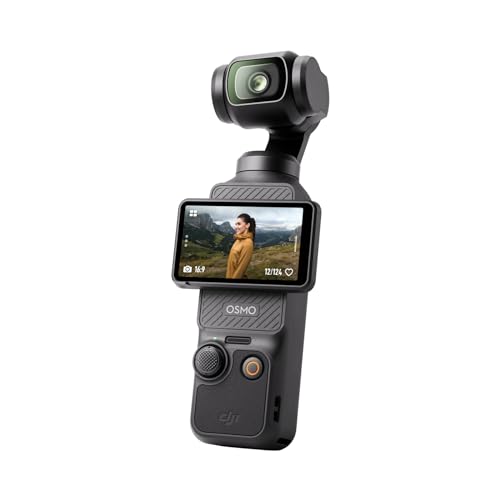
The Pocket 3 exists because walking is the most natural thing travelers do and the hardest thing to film. A phone on a selfie stick bounces with every step; a mirrorless camera on a gimbal rig turns a stroll into a production. This little device folds the whole problem into something the size of a chocolate bar: a camera on a three-axis mechanical gimbal, with a rotating touchscreen you flip sideways for landscape or upright for vertical clips. You pull it from a pocket, it wakes, and the horizon simply stays level while you wander through a bazaar, climb temple steps, or narrate a walk to the station.
Its one-inch sensor is the quiet reason the footage holds up after sunset. Travel video dies at dinner time, when light drops and phone footage turns to smeared noise; the Pocket 3 keeps market stalls, lantern streets, and restaurant tables looking clean and stable at the same time. Face and subject tracking help when you film companions or hand the camera to someone else and ask them to keep you in frame while you walk toward them. The built-in microphones are good enough that your narration over a street scene does not need a separate recorder for casual publishing.
As an add-on it plays a specific role: it is the movement camera. Your main camera or phone still takes the considered photographs; the Pocket 3 owns everything that happens between the photographs, the walking, arriving, reacting. Battery life covers a day of intermittent clips rather than continuous recording, and the sensible travel pattern is exactly that, dozens of short stabilized moments rather than one long take. It charges over USB-C, so it shares the cable ecosystem already in your bag, and its case keeps the gimbal head protected in a daypack pocket.
- Sensor: one-inch class CMOS
- Stabilization: built-in three-axis mechanical gimbal
- Screen: rotating touchscreen for horizontal or vertical framing
- Charging: USB-C
- Role in the bag: dedicated walking and talking footage
Strengths
- Stabilized walking footage that no phone grip fully matches
- Strong low-light video for evenings out
- Pocketable enough to be carried on days you might not shoot
Trade-offs
- Fixed lens, so reach is handled by your feet, not a zoom
- Gimbal head deserves its case; it is not a throw-it-loose camera
- Stills are serviceable rather than a reason to buy it
Best for: travelers who publish walking tours, vlogs, and arrival stories. Not suited for: anyone wanting a stills-first camera or a device that tolerates being dropped on rocks.

Insta360 X4 — Best for Reframing Later
The X4 solves the oldest travel-video problem: you cannot be looking everywhere at once. Two lenses record the full sphere around the camera in high-resolution 360 video, and the framing decision moves to the editing app afterward, where you pan a virtual camera through the scene and export ordinary flat clips in whatever direction tells the story best. On a scooter ride, a boat trip, or a crowded festival street, that means the interesting thing that happened behind you is not lost; it is in the file, waiting for you to notice it.
Used as a travel add-on, its killer feature is the invisible selfie stick effect. Mounted on a stick, the stitching erases the pole, and the footage looks like a drone or a cameraman is following you through the scene. For solo travelers this is transformative: finally, video of yourself inside the place, not just video of the place. The camera is also waterproof to a useful depth without a case, so the same device that filmed the viewpoint can go straight into the sea at the beach below.
The honest cost is workflow. Spherical files are large, and reframing takes deliberate minutes per clip in the app, which is pleasant on a train ride and annoying if you expected to post from the pavement. Battery planning matters too, since recording in every direction consumes power and storage faster than a normal action camera. Treat the X4 as the camera for set-piece moments, the ride, the crossing, the summit, rather than an all-day recorder, and its appetite stays reasonable. Its single-lens mode doubles as a conventional wide action camera when you want simpler files.
- Capture: dual-lens 360 video with in-app reframing
- Effect: selfie stick rendered invisible by stitching
- Sealing: waterproof without a housing for shallow water
- Modes: 360 capture plus standard single-lens action mode
- Role in the bag: set-piece scenes and solo-traveler footage
Strengths
- Nothing in the scene escapes the recording
- Solo travelers finally appear properly in their own footage
- Doubles as a regular action camera in single-lens mode
Trade-offs
- Reframing clips is an extra editing step after every shoot
- Files are large and storage fills quickly on long trips
- Exposed bulging lenses need care against scratches
Best for: solo travelers, riders, and anyone filming chaotic scenes they cannot direct. Not suited for: shoot-and-post minimalists who refuse any editing between capture and upload.

GoPro HERO13 Black — Best for Rough Days
Every trip has a day the itinerary calls adventurous and the weather calls something else. The HERO13 Black is the add-on for that day. It mounts to helmets, handlebars, chest straps, surfboards, and backpack straps; it shrugs off rain, spray, dust, and the occasional drop onto gravel; and its electronic stabilization smooths mountain-bike descents and small-boat chop into footage you can actually watch. Where the Pocket 3 is a precision instrument, the GoPro is a hammer: slightly blunt, completely dependable.
The HERO13 generation leans into interchangeable lens mods and magnetic mounting, which suits travel because the same body reconfigures quickly, ultra-wide for a canyon overlook, macro for tide pools, a neutral-density setup for motion blur at a waterfall. Battery improvements in recent generations mean a day of activity clips is realistic without a pocketful of spares, though cold weather at altitude still argues for one spare kept warm. The voice control sounds like a gimmick until your hands are gloved, wet, or holding a paddle.
As a travel companion to a main camera, its job is perspective: the shot from the board, the bars, the helmet, the chest as you scramble up the dune. Those angles are impossible for any other device on this list, and they are usually the clips people rewatch. It is less happy as an evening camera; small-sensor footage in dim restaurants is its weakest suit, so let the compact or your phone take dinner. Assign it the daylight chaos and it will not disappoint.
- Stabilization: advanced electronic stabilization for action footage
- Mounting: wide accessory ecosystem plus magnetic latch options
- Lenses: interchangeable lens mods for different looks
- Sealing: waterproof body for surf, rain, and snow
- Role in the bag: mounted perspectives and rough-condition video
Strengths
- Mounts almost anywhere and survives the consequences
- Stabilization that rescues genuinely violent movement
- Accessory ecosystem covers sports most travelers try once a year
Trade-offs
- Low-light video is noticeably weaker than the gimbal camera here
- Small touchscreen is fiddly with gloves despite voice control
- Best footage still benefits from trimming in the app
Best for: surfers, riders, skiers, and boat-day travelers. Not suited for: travelers whose trips are mostly cities, meals, and museums after dark.

Fujifilm Instax Mini 12 — Best for Giving Photos Away
The Instax Mini 12 is the only camera on this list whose output you can hand to someone. That changes the social physics of travel photography completely. Photograph the guesthouse owner, the fisherman who showed you the harbor, the kids who appointed themselves your guides, and instead of promising to send a file you will both forget, you give them the print while it is still warm. People pose differently, and more warmly, for a camera that gives something back. Many travelers find the Instax becomes the most-used camera of the trip despite being technically the simplest object they packed.
Operation is nearly thought-free: twist the lens to switch on, frame through the viewfinder, and let the automatic exposure handle the rest. A selfie mirror and close-up mode cover the group-shot duties, and the credit-card-sized prints develop in about a minute and a half of eager watching. The film is the ongoing cost and the ongoing ritual; packs are widely available in cities worldwide, and rationing exposures makes each frame feel considered in a way digital never does. Travelers often keep a parallel set of prints as their own trip journal, annotated on the back with dates and names.
Its limitations are the price of the magic. Image quality is soft and small; this is not a camera for enlargements or careful composition, and bright midday sun can wash exposures out. It is also the bulkiest add-on here relative to its technical power, shaped like a friendly toy rather than a precision tool. Pack it when the trip is about people, family visits, festivals, volunteer stays, reunions, and leave it home when the trip is about landscapes. Used for the right journey, it produces the souvenirs that outlast every file on your hard drive.
- Output: instant prints on Instax Mini film
- Exposure: fully automatic, point-and-shoot operation
- Extras: selfie mirror and close-up mode
- Power: AA batteries, easy to replace anywhere
- Role in the bag: portraits of people you meet, prints to give away
Strengths
- Physical prints transform encounters with strangers and hosts
- Zero learning curve; anyone can use it within a minute
- AA power means no charger and no cable to manage
Trade-offs
- Film is a continuing cost on a long trip
- Small, soft prints will not satisfy detail lovers
- Bulky shape for what is technically a simple camera
Best for: people-centered trips, family travel, and anyone who keeps a paper travel journal. Not suited for: landscape purists or minimalists counting every cubic centimeter.

Canon PowerShot G7 X Mark III — Best Pocket Image Quality
Some trips do not need new kinds of footage; they need the ordinary photographs to be better. The G7 X Mark III is the classic answer: a one-inch sensor and a bright zoom lens in a body that slides into a jacket pocket, ready for the dinner, the jazz bar, the night market, and the museum interior where phones start to smear and your big camera is back at the hotel. Its lens opens wide enough to keep evening shutter speeds sane, and the sensor gives files that tolerate cropping and printing far better than any phone shot of the same scene.
Canon aimed this model at creators, so it films respectable 4K video, offers a microphone input unusual in this class, and can livestream, but as a travel add-on its stills are the headline. The tilting screen flips up for selfies and group shots, the controls include a proper dial and ring for travelers who like adjusting exposure deliberately, and the whole thing charges attention nowhere: it reads as a modest compact, not a production. Waiters, guards, and fellow tourists all relax around it.
The trade-offs are known quantities. Battery life is the compact class’s familiar weakness, so a spare cell in the pocket is standard practice for a full day out. The autofocus, while fine for scenes and portraits, is not the tool for erratic sports. And there is no weather sealing, which is why this list also contains a sealed camera; the Canon is the fair-weather artist, not the storm camera. Within that role, evenings, food, streets, portraits, it remains the add-on most likely to produce the photograph from the trip that ends up framed.
- Sensor: one-inch stacked CMOS
- Lens: bright zoom suited to low light
- Video: 4K capture plus microphone input
- Screen: tilts up for selfies and group shots
- Role in the bag: high-quality stills and evening scenes
Strengths
- Noticeably better night and indoor photos than a phone
- Pocket size means it actually comes along every evening
- Creator-friendly video features if a vlog moment appears
Trade-offs
- Carry a spare battery for full days of shooting
- No weather sealing for rain or beach spray
- Autofocus is composed-scene oriented, not sports oriented
Best for: city breaks, food trips, and travelers whose albums are mostly stills. Not suited for: storm chasers or anyone needing long telephoto reach.

OM SYSTEM Tough TG-7 — Best for Bad Weather
The TG-7 is built around a single liberating idea: the camera should never be the reason you stop shooting. It is waterproof to a depth that covers snorkeling and pool duty without a housing, sealed against dust and freezing temperatures, rated to survive drops onto hard ground, and strong enough to be stepped on by accident in a boat. On the trip where the forecast collapses, where the waterfall spray soaks everything, where the beach day turns to wind and grit, the TG-7 is the only camera in the bag still working, and it knows it.
Its party tricks are close-up ones. The microscope modes magnify tiny subjects, snowflakes, shells, coral polyps, insects on a jungle leaf, with built-in focus stacking that keeps the miniature world sharp. A ring light accessory turns it into a field macro studio. For adventure travelers, hikers, anglers, skiers, and parents lending a camera to children at the shore, that combination of toughness and curiosity is hard to beat. GPS and environmental sensors log where and how deep or cold each shot was, which suits trip journals and dive logs alike.
The compromises live in image quality expectations. The sensor is small, chosen for the sealed lens design, so low-light files and fine detail sit below the Canon compact above. This is the camera of record for conditions, not the camera of finesse for portraits. Its video is competent rather than cinematic. Judge it by the photographs that exist because it was there, underwater, in the sleet, clipped to a kayak, and its value becomes obvious. Every travel bag that regularly meets water or winter deserves one camera with no fear.
- Sealing: waterproof, dustproof, freezeproof construction
- Durability: drop and crush resistance for rough handling
- Macro: microscope modes with focus stacking
- Logging: GPS and temperature/depth sensors
- Role in the bag: the camera for conditions that stop others
Strengths
- Shoots underwater and in storms with no housing or worry
- Macro modes open a miniature world other picks ignore
- Tough enough to lend to kids and companions freely
Trade-offs
- Small sensor limits low-light quality and fine detail
- Video is a supporting feature, not the main event
- Design prioritizes grip and sealing over elegance
Best for: snorkelers, hikers, skiers, anglers, and families at the shore. Not suited for: travelers who judge every file at full magnification in dim light.
How Do the Six Add-Ons Compare Side by Side?
| Pick | Main job | Carries in | Watch out for |
|---|---|---|---|
| DJI Osmo Pocket 3 | Stabilized walking video | Jacket pocket | Fixed lens reach |
| Insta360 X4 | 360 capture, reframe later | Sling or daypack | Editing time per clip |
| GoPro HERO13 Black | Mounted action perspectives | Anywhere, via mounts | Dim-light footage |
| Fujifilm Instax Mini 12 | Instant prints to share | Daypack | Film supply on long trips |
| Canon PowerShot G7 X Mark III | Pocket stills quality | Coat pocket | Battery life, no sealing |
| OM SYSTEM Tough TG-7 | All-conditions shooting | Strap or dry bag | Small-sensor limits |
Read the table by job, not by brand. Travelers routinely buy a second camera that competes with their first instead of complementing it, then wonder why one of them stayed in the safe. The six jobs above do not overlap: movement, omnidirection, mounting, printing, pocket quality, and invulnerability are six different trips wearing one itinerary. If two rows both tempt you, choose by which failure you have actually suffered. The shaky-footage traveler gains nothing from a tougher camera; the rain-soaked hiker gains nothing from a gimbal. Honest trip history is the best buying guide ever written.
What Should You Check Before Adding a Second Camera to Your Kit?
Start with the charger audit. Every device you add competes for the same two hotel sockets and the same overnight hours. Favor add-ons that charge over USB-C from the power bank already in your bag, and be honest about the one camera here running on AA cells: that is either a liberation from cables or an errand, depending on your temperament. Then audit your pockets and bag in real life. Put the candidate’s dimensions against the sling or jacket you genuinely wear; an add-on that needs a new bag has failed its only exam.
Next, examine overlap with your phone with fresh eyes. Modern phones stabilize video well, shoot admirable stills in daylight, and live in your hand already. The add-on must win somewhere specific: mechanical stabilization, spherical capture, mountability, physical prints, a larger sensor for the evening, or sealing. If you cannot name its winning category in one sentence, you are shopping for novelty, and novelty is heavy by day four. This test is also why this guide contains no second interchangeable-lens body: those win on flexibility, which your main camera already provides.
Storage and workflow deserve a paragraph of their own. A 360 camera can fill cards at a rate that surprises first-time owners, and gimbal footage invites long takes. Decide before departure how files move: spare cards in a hard case, nightly offload to a small drive, or cloud upload when the hotel connection allows. Travelers who skip this planning return home with full cards and a camera they stopped using in week two. Finally, insure or at least register the serial numbers of everything you carry; add-ons are small, and small things are what hotel rooms and rental cars quietly keep.
How Do You Actually Use an Add-On Camera Well on the Road?
Give the add-on a daily assignment. Photographers who carry a second camera without a brief tend to shoot everything on whichever device is in hand and duplicate their own coverage. Instead, declare roles at breakfast: today the gimbal owns the market walk, the compact owns dinner, the tough camera owns the boat. Roles make you reach for the right tool before the moment, not after it, and they keep batteries and cards predictable because each device works its own shift.
Build a sixty-second evening routine. Cards out or files offloaded, batteries onto charge, lens cloth across every front element, tomorrow’s device chosen and placed by the door. Travel photography loses more images to flat batteries and full cards than to any technical limitation, and the routine is the entire cure. It also surfaces damage early: a scratched 360 lens or a gritty compact zoom found at night can be managed; found at the viewpoint, it just ruins the morning.
Finally, shoot the add-on’s specialty deliberately at least once a day, even when the day seems ordinary. Print one portrait for a stranger. Film one walking minute through an unremarkable street. Take the tough camera into the hotel pool. Add-ons justify themselves through use, and the specialty shot you force on a quiet day often becomes the trip’s most distinctive memory precisely because your main camera would never have made it.
What Mistakes Do Travelers Make When Buying a Second Camera?
The classic error is buying a smaller version of the main camera. A compact that mimics your mirrorless at lower quality satisfies nobody: too weak to replace it, too similar to complement it. The second error is shopping for the most extreme trip on your wish list rather than the trips you actually take; the expedition add-on sits home during the city breaks that fill your real calendar. Third comes ignoring the film, card, and battery ecosystem, discovering mid-trip that your add-on eats a consumable the local shops do not stock.
A subtler mistake is neglecting the human test. Hand your candidate camera, mentally, to your travel companion. Will they use it happily when you pass it over at a viewpoint? The Instax and the tough camera pass this test effortlessly; a fussy device fails it and returns to your own neck within the hour. And the final mistake is treating the add-on as insurance rather than equipment: packed deep, never charged, never assigned a job. An add-on earns its place through daily use or it should be sold and the weight reclaimed.
What Does a Week on the Road Look Like With Each Add-On?
Abstract rankings become clearer when you run them through an ordinary trip, so consider a week that mixes a coastal town, two city days, a boat excursion, and a family visit at the end. On the first evening, tired from transit, nobody wants a production. The compact earns its keep immediately: out of a jacket pocket for the harbor at dusk, back in the pocket before the food arrives, no bag opened, no lens changed. That frictionless pattern repeats at every dinner of the week, and by the end of the trip the small Canon has quietly produced most of the photographs anyone asks to see again.
The boat day belongs to two different cameras in two different registers. The GoPro, mounted at the bow or worn on a chest strap, records the spray, the leaning into turns, the dolphins that surface on the wrong side for everyone holding a phone. Meanwhile the Tough TG-7 hangs from a wrist in the water itself, photographing swimmers from below the surface and surviving the moment it gets dropped onto the deck and kicked, accidentally, toward the scupper. Neither device asked for a dry bag, a housing, or a prayer, which is precisely why their files from that day exist at all.
The city days reward the gimbal and the sphere. A walking route through an old town, shot on the Pocket 3 in short stabilized passages, becomes a coherent little film instead of a nauseating souvenir. At the festival square, where things happen on all sides and nobody can predict the next drum circle or parade turn, the X4 simply records everything and lets the evening’s train ride become the edit session. Notice the division of labor: the gimbal camera is chosen in advance for a planned walk, while the 360 camera is insurance against the unplannable, and a thoughtful traveler might carry either but rarely needs both on the same day.
The family visit at the week’s end is where the Instax stops being a novelty and becomes the point of the trip. Prints accumulate on the kitchen table: grandparents holding a photograph of themselves holding a photograph, children negotiating trades, one copy taped to the fridge before you have even left. Your main camera’s files from that afternoon may be technically superior in every measurable way, and they will sit in a folder for months. The little prints are already on display. That is the deepest lesson an add-on can teach: the best travel camera is sometimes the one whose pictures escape the hard drive.
How Should You Pack and Protect a Second Camera?
Packing an add-on well is mostly about friction and neighbors. Friction, because a camera buried under a jumper will not be used for the thirty-second moment that justified carrying it; neighbors, because cameras travel badly next to sunscreen tubes, water bottles, and keys. Give the add-on a fixed home, the same pocket or pouch every day, so your hand finds it without looking and your evening routine can verify its presence by touch. Habit is a security system: the traveler who always returns the camera to the same place notices its absence within the hour, not at the airport.
Protection should match the device’s own philosophy. The gimbal camera travels in its fitted case because its moving head is the one delicate mechanism in this entire roundup. The 360 camera wants a lens guard or a soft pouch, since its two bulging eyes scratch against zips and buckles, and a scratched spherical lens taxes every frame it shoots. The compact asks only for a wrist strap and a pocket free of coins. The tough camera and the GoPro ask for almost nothing, which is their charm, though a rinse in fresh water after sea days keeps their seals and mounts honest.
Think about loss in layers. A wrist or neck tether for anything used over water or from viewpoints. A card wallet that stays in different luggage from the cameras, so a stolen day bag does not take the week’s only copies. A phone photograph of each serial number, stored in the cloud, for insurance and police reports you hope never to write. And a deliberate decision about what stays in the room safe on a given day: carrying two cameras everywhere is a fine ambition, but the add-on system works because you rotate, and rotation means something is always resting, charged, and safe while its partner works.
One more packing truth deserves emphasis: cables multiply silently. Each device arrives with its own lead, and six devices later your organizer looks like a nest. Audit before departure and consolidate ruthlessly around USB-C, carry one short cable for the day bag and one long one for the room, and leave every duplicate at home. The single exception is a spare charging option for the camera your trip depends on most; redundancy belongs on the critical path, not spread evenly across gadgets that each matter a little.
Which Traveler Type Matches Which Add-On?
The honeymoon couple and the solo backpacker can stand in the same viewpoint and need opposite cameras. Couples benefit most from devices a partner can operate instantly: the Instax, which turns photography into a shared game, and the compact, which either person can pick up and use without a tutorial. Solo travelers, as noted, gain the most from the sphere and the gimbal, the two machines that act as crew. Parents traveling with children should think like quartermasters: the tough camera survives being borrowed, dropped, and taken into the sea by an eight-year-old, and that survivability buys the adults a relaxed holiday, which is worth more than resolution.
Business travelers adding leisure days to work trips face the strictest volume limits of all, and for them the Pocket 3’s chocolate-bar footprint is the entire argument: it disappears into a laptop bag’s accessory pocket and produces publishable walking footage of an unfamiliar city in the two free hours before dinner. Retirees on escorted tours, meanwhile, often value the compact’s real dials and viewfinder-free simplicity, plus prints from the Instax for fellow travelers met on the coach. Adventure-sports travelers already know their answer; the GoPro’s mount ecosystem was designed around their weekends, and the camera simply extends that habit into holiday territory.
There is also the question of photographic temperament. Some travelers compose carefully and shoot sparingly; for them the compact’s deliberate controls feel like home and the 360 camera’s shoot-everything philosophy feels like cheating followed by homework. Others experience trips as flow and resent every second spent framing; for them the sphere and the action camera are liberation, and the compact is a fussy antique. Neither temperament is wrong, but buying against your own temperament is, because the camera that contradicts your habits is the camera that stays in the safe. Know which kind of traveler you are when nobody is watching, and buy for that person.
Budget temperament matters too, and this guide discusses it in tiers deliberately. The instant camera is the cheapest body here and the most expensive per photograph, because film is a meter running. The action and tough cameras sit in a middle band with modest appetites for mounts and cards. The gimbal, sphere, and one-inch compact ask more upfront and then behave themselves. A traveler who winces at running costs should weigh the Instax’s film honestly; a traveler who winces at upfront cost should notice that the middle band covers water, weather, and motion, three of the six jobs, without touching the top tier at all.
How Does a Second Camera Change the Way You Use the First One?
Something unexpected happens once an add-on takes over a specialty: the main camera gets better at its own job. When the gimbal owns movement, the mirrorless camera stops being asked to be a video rig and returns to considered stills, carried with one lens instead of three. When the tough camera owns the beach, the expensive body no longer risks salt and sand for snapshots, and its owner stops hovering anxiously over it at the shoreline. Specialization relaxes the whole system. Photographers who resist add-ons on purity grounds often discover that the purity was actually anxiety, and that a cheap specialist absorbs it.
The phone benefits too, in the currency that matters most on the road: battery. A phone relieved of full-time camera duty survives the day as a map, translator, ticket wallet, and lifeline, instead of dying at four in the afternoon with the day’s photographs held hostage. Many travelers buy their first add-on for image quality and keep it forever for this reason alone. There is a safety argument hiding here as well; a traveler navigating an unfamiliar station at night with a charged phone is simply better off than one whose phone spent its charge on video.
Expect a short adjustment period. The first trip with a second camera involves duplication, missed handoffs, and at least one moment of filming with the wrong device while the right one sits charged in the room. That is normal systems learning, not a verdict on the purchase. By the second trip the roles feel obvious, the evening routine runs itself, and the add-on stops being an extra and becomes simply how your kit works. Judge the experiment after two trips, not two days, and judge it by the photographs and clips that exist which would not have existed before.
Final Recommendation
Choose by the failure you keep repeating. If your travel videos wobble, the DJI Osmo Pocket 3 is the single most corrective purchase on this page. If your trips are rides, water, and weather, split the decision between the GoPro HERO13 Black for mounted action and the OM SYSTEM Tough TG-7 for everything wet and cold. Solo travelers who want to appear in their own stories should take the Insta360 X4 and accept its editing homework gladly. People-first travelers will get more joy per gram from the Instax Mini 12 than from any specification ever printed, and stills-focused city travelers should slip the Canon PowerShot G7 X Mark III into the pocket their phone currently occupies. One honest job, done daily: that is the whole secret of the second camera.
Related guides
- Best Cameras for Beauty Tutorials: 6 Cameras That Get Skin, Shade and Sparkle Right
- Best Cameras for Backpacking and Hiking: 6 Trail Cameras Worth Their Weight in Your Pack
- Best Cameras for Aspiring Photographers: Growth Platforms That Become a Practice
- Best Cameras for 2nd Shooter Photography: Second Bodies That Match the Lead and Earn Their Place
- Best Camera Video Cameras Under 300: Six Honest Ways to Film Well on a Tight Budget
- Best Cameras for 200 Dollars: The Step Up That Buys Flagships, Studios and Freedom
- Best Body Mount for Professional Cameras: 6 Harnesses and Holsters That Save Your Back
- Best Camera Bag for 2 Cameras: 6 Backpacks That Carry a Working Pair Properly
- Best Battery Operated Cameras for Security: 6 Wire-Free Cameras Judged by Their Charging Rhythm
- Best Beginner Cameras for Video: 6 First Cameras That Teach While They Film
- Best Beach Cameras for Beginners: 6 Waterproof and Tough Cameras That Come Swimming
- Best Arms for Cinema Cameras: 6 Articulating and Magic Arms That Hold a Rig Together
- Best App for Red Light Cameras: 6 Navigation Apps That Warn You in Time
- Best App for Security Cameras for Android: 6 Ecosystems That Use the Whole Phone
- Best Aftermarket Backup Cameras for Older Cars: Six Kits From Wireless-Solar to Wired
- Best Alkaline Batteries for Cameras: Six AA Lines for Flashes, Grips, and Emergency Spares
- Best Age for Kids to Have Cameras: A Stage-by-Stage Guide With Six Cameras From Age 4 to Teen
- Best and Cheapest Cameras for YouTube: Six Cameras From Cheapest Complete to Best-Value Platform
Frequently Asked Questions
Is an add-on camera worth it if my phone is already good?
Only when it does something the phone structurally cannot: mechanical gimbal stabilization, true spherical capture, mounting to a helmet, printing photographs, or surviving underwater without a case. If the difference is merely cleaner daylight files, the phone wins on convenience and the add-on stays home. The six picks here were chosen because each clears that structural bar clearly.
How do I keep batteries manageable with one more device?
Standardize on USB-C charging where possible, carry one multi-port charger, and rotate devices by daily assignment so only two things charge on a given night. Keep one small power bank in the day bag for top-ups during long transit days. The routine matters more than the hardware: charge every night whether the battery looks tired or not.
Which add-on is best for a solo traveler?
The Insta360 X4, because its reframing and invisible-stick effect produce genuine third-person footage of you inside the scene, something no static camera manages alone. The Pocket 3 runs a close second for talk-to-camera walking pieces, especially in cities after dark. Either beats the traditional solo setup of a phone balanced on a rock.
Can one add-on cover both water and evenings?
Not perfectly; that split is exactly why the Tough TG-7 and the G7 X Mark III both appear here. Sealed cameras use small sensors that struggle at night, and quality compacts are not sealed. Travelers whose trips are equal parts beach and bistro sometimes carry the tough camera as the only add-on and accept softer evening files as the price of zero anxiety.
Should my add-on camera match the brand of my main camera?
Almost never, and the attempt usually misses the point. Add-ons are bought for difference, and difference usually lives in another manufacturer’s lineup: the gimbal specialist, the instant-print specialist, and the tough-camera specialist are each the best in the world at one narrow thing precisely because their makers ignored everything else. Brand matching buys you shared menus and sometimes shared batteries, which are conveniences, not capabilities. The one exception is a creator already deep in one action-camera ecosystem, where existing mounts and media habits carry real value. For everyone else, choose the tool by the job, let the logos disagree, and enjoy the fact that your bag now contains the best answer to six different questions rather than one brand’s answer to all of them.
How much storage should I pack for a 360 or gimbal camera?
Plan generously and offload nightly. Spherical files are the hungriest format in consumer cameras, and stabilized walking footage tempts long continuous takes. Two large cards per device, a hard case for the full ones, and a small backup drive in separate luggage is the pattern experienced travel shooters settle on.
What are the airline rules for travelling with addon cameras and their batteries?
The cameras themselves are unproblematic cabin companions; their batteries write the rules. Spare lithium batteries must travel in your hand luggage, never in a checked bag, and each spare should be protected against short circuits — terminals taped, or each battery in its own small case or pouch. Most airlines cap the size of lithium batteries you may carry and limit how many spares one passenger may bring, and the larger power banks creators use to recharge cameras on the road fall under the same regime, so a very high-capacity bank can be refused even in the cabin. Built-in batteries inside the camera are treated more leniently, but a bag stuffed with six devices and a nest of loose spares invites a long conversation at security. Two habits keep it painless. Keep every spare in one clear pouch in the cabin bag, so an inspection takes seconds, and carry a printed or saved copy of the airline’s battery policy for the rare agent who is unsure of it. Rules differ modestly between carriers and countries, and they tighten after every incident in the news, so check your airline’s current page before each trip rather than trusting last year’s memory — the pouch system survives every version of the rules.
Related Guides
Keep planning your kit with our companion reading: choosing a travel camera bag that fits a two-camera setup, the beginner’s guide to shooting travel video that people finish watching, and how to back up photos safely while you are still on the road.


