Disclosure: As an Amazon Associate, ilcastellomenu.com earns from qualifying purchases. Links on this page are affiliate links; they cost you nothing extra. Prices and availability change often, so check the current Amazon listing before you buy.
Monitor wall mount vs monitor arm is the defining contest in screen support, and it reduces to one honest axis: the wall mount trades everything for space and permanence, while the desk arm trades everything for flexibility and reversibility. A wall mount fixes the screen to the building — totally clear of the desk, set at exactly your height, immovable as architecture. A monitor arm clamps or bolts to the desk and holds the screen on a jointed, counterbalanced limb that travels with the furniture and repositions in seconds. Neither is the better product in the abstract, and this comparison will not pretend otherwise. Each is the better product for a specific household, and the sections below — criterion by criterion, with a verdict at the end of each — exist to identify yours.
The quick verdict, for readers who need the answer before the evidence: choose the wall mount if your workstation is settled, your wall is yours and sound, and desk space is your scarcity. Choose the monitor arm if you rearrange, rent, alternate between sitting and standing, or reposition your screen as part of how you work. Everything that follows is the working-out of those two sentences, including the interesting middle ground — full-motion wall mounts and fixed desk setups — where the two products borrow each other’s virtues and the decision gets genuinely close.
Key Takeaways: Monitor Wall Mount vs Monitor Arm
- The axis: fixed, space-saving permanence (wall) versus flexible, daily adjustment (arm).
- Desk space: the wall mount wins outright — the arm still anchors a clamp or pole to the desk.
- Adjustability: the arm wins outright — a fixed wall mount adjusts once, at installation.
- Installation: the arm is an hour of clamping; the wall mount is a project of studs, fixings and checks.
- Stability: the wall mount’s hold is structural; the arm’s is excellent but lives on furniture.
- Tenancy: renters and rearrangers belong to the arm; settled owners belong to the wall.
In this guide
Side by Side
| Criterion | Monitor Wall Mount | Monitor Arm |
|---|---|---|
| Support comes from | The building: plate fixed into a stud or masonry | The desk: clamp, grommet or bolt-through base |
| Desk footprint | None at all | A clamp’s worth of edge, or a pole’s base |
| Daily adjustability | None (fixed) to generous (full-motion wall arm) | Generous by design, in seconds |
| Height range logic | Chosen once, anywhere on the wall | Travels within the arm’s and pole’s range |
| Sit-stand desk | Screen stays; desk moves — a mismatch unless one height dominates | Screen rides the desk — the natural pairing |
| Installation | Stud-finding, services check, drilling, two-person hang | Clamp, assemble, hang — usually one person, no holes |
| Reversibility | Holes to fill; a decision per position | Unclamp and go; travels to the next desk or home |
| Stability | Structural; immune to desk bumps | Very good; inherits the desk’s wobble |
| Wall requirements | Owned or permitted, sound, verifiable | None |
| Best home | Settled workstation, small desk, owned wall | Rented, rearranging, sit-stand, multi-position work |
Desk Space: The Wall Mount’s Home Fixture
Begin where the wall mount is untouchable. A wall-mounted screen consumes no desk whatsoever: not the stand’s footprint, not a clamp’s bite of the rear edge, not a pole’s column rising through your papers. The desk becomes one continuous surface, and on a small desk that transformation is the difference between a workspace and a shelf. The arm’s answer is real but partial — it lifts the screen off the surface and returns most of the footprint, yet its base remains a citizen of the desk, anchoring one corner’s geometry and collecting the cables that converge there. For the space-starved, the verdict is not close, and it compounds with a subtler point: the wall mount also frees the desk’s position, because the screen no longer needs the desk beneath it at all. A desk can become shallower, smaller, or even occasional — a table brought out for work — in a way no desk-supported screen permits.
Criterion verdict: wall mount, decisively — total clearance against near-total clearance, and in small rooms the difference is the room.
Adjustability: The Arm’s Home Fixture
Now the mirror fixture, and it is equally decisive in the other direction. A monitor arm repositions its screen the way a lamp repositions light: pull it close for detail work, push it back for video, swing it toward a colleague, rotate it for a document, raise it for a standing hour — each in seconds, each reversible, each without tools. A fixed wall mount performs exactly one of those movements, at installation, with a drill. The middle ground belongs to the full-motion wall mount, which borrows the arm’s geometry while keeping the wall’s support: it genuinely serves several seats and swings between work and viewing. But even it cannot match the desk arm’s party trick of travelling with a height-adjustable desk, nor its freedom to be re-aimed at a room that has been rearranged around it. If your working life involves the screen being in different places — within the day, not just within the year — the arm is not a preference but a description of your needs.
Criterion verdict: monitor arm, decisively — daily, effortless adjustment against adjustment as an event.
Installation and Reversibility
The arm installs like furniture: clamp the base to the desk edge or bolt it through a grommet hole, assemble the limb, attach the screen — with a helper for larger displays, though the desk does most of the supporting — and adjust the counterbalance to the screen’s weight as the maker directs. An hour, no holes, no wall knowledge required, and the whole thing reverses in minutes when you move, redecorate or change your mind. The wall mount installs like a small building project: the wall must be investigated, its structure found, its hidden electrical cables and water pipes checked before drilling, its fixings matched to the material and the load, the plate levelled, and the screen hung by two people with the safety fixings engaged. None of that is beyond a careful homeowner, and the result is more permanent in every sense — including the holes, which must be filled when the mount comes down. Households should price both truths: the arm’s convenience is real every time life changes; the wall mount’s effort is real exactly once.
Criterion verdict: monitor arm for ease and reversibility; the wall mount’s cost is one honest weekend, then never again.
Stability and the Feel of the Thing
A screen on a wall mount does not move when the desk is bumped, typed on, or used as a cat’s motorway, because its support is the building. That stillness is a quality-of-life property owners praise out of proportion to its apparent importance: the picture simply never trembles, and the workstation feels built rather than arranged. A good arm is stable too — a quality counterbalanced arm holds its position faithfully — but it lives on furniture, and furniture transmits: the desk’s wobble is the screen’s wobble, and a lively desk makes a lively screen no matter how fine the arm. There is also a safety gradient in households with small children: a properly wall-mounted screen, anchored into a stud or sound masonry, cannot be pulled off a desk, while an arm’s screen, though secure, sits within the furniture ecosystem children climb. Neither product is unsafe when correctly installed; they differ in how much of the room’s chaos reaches the glass.
Criterion verdict: wall mount — structural stillness against furniture-borne life.
Ergonomics and the Sit-Stand Question
Ergonomically the two products solve the same equation from opposite ends. The wall mount sets screen height absolutely: anywhere on the wall, chosen against your chair and your eyes, then fixed — perfect for a single-posture workstation, and perfect forever, provided the posture never changes. The arm sets height relatively: a range of travel around the desk, adjustable in seconds — perfect for varied postures, shared desks and changing chairs. The sit-stand desk is where the difference stops being a nuance and becomes the decision. A wall-mounted screen does not rise with a rising desk, so the faithful alternator spends half the day at a compromised height; an arm-mounted screen rides the desktop and is correct at every height the desk offers. Households that mostly sit, or mostly stand, can still choose the wall with open eyes. Households that alternate hourly cannot, and no affection for desk clearance should talk them out of the arithmetic.
Criterion verdict: a draw for single-posture work — the wall’s chosen height is as good as ergonomics gets; the arm, decisively, for sit-stand and shared desks.
Cost and Value, in Tiers
Money, kept qualitative as honest comparisons require: fixed wall mounts occupy the lowest tier in this contest — simple steel, honestly priced — while capable monitor arms live a tier up, because counterbalanced movement is genuinely more engineering than a plate and a hinge. Full-motion wall mounts and premium arms converge at the top, where both are selling refined motion. But the sticker is not the account. The wall mount’s true cost adds its installation — tools, anchors, raceway, perhaps an installer’s hour — and subtracts the purchases it may retire, like the larger desk. The arm’s true cost is nearer its sticker, plus the desk edge it occupies forever. Over a long, settled tenancy the wall mount’s arithmetic is superb; over a short or mobile one, the arm’s portability protects its value completely, because it leaves with you at full function. Value, here as everywhere in this cluster, is a forecast about your household wearing a price tag.
Criterion verdict: wall mount for long settled value; arm for value that survives moving house.
Strengths and Trade-Offs of Each Side
Wall mount — strengths: total desk clearance; height chosen absolutely, anywhere on the wall; structural stability no furniture matches. Wall mount — trade-offs: permanent position and holes; a real installation project with stud, services and fixing discipline; port access reduced to planned visits.
Monitor arm — strengths: effortless daily adjustment in every direction; installs and reverses in minutes with no wall at all; travels with desks, homes and sit-stand routines. Monitor arm — trade-offs: still anchors to the desk and inherits its wobble; quality movement costs a tier more than fixed steel; a screen that can be moved will be bumped, swung and occasionally knocked out of true by life.
Who Each Option Suits — and Who Should Skip Each
The wall mount suits the settled: the owned home office against an owned wall, the small desk that needs its centre back, the monitoring or multi-screen wall, the bedroom screen on a fixed viewing axis, the workshop display above a bench. Skip it if you rent without permission, rearrange for pleasure, float your desk mid-room, or alternate sitting and standing through the day. The arm suits the mobile and the varied: renters, rearrangers, sit-stand devotees, shared-desk households, presenters and pair-workers who swing the screen toward a second chair, and anyone whose room is still becoming what it will be. Skip it if your desk is tiny and its surface is the whole problem, if your desk wobbles enough to make any passenger miserable, or if the screen’s position will genuinely never change — in which case you would be paying a tier more for movement you will use once, on the day you set it.
How to Decide: Questions That Branch
Ask, in order: May I drill this wall, and is it sound enough to hold a mount — into a stud or properly anchored masonry? If no, the arm has won before the contest starts. Will this workstation stay in this arrangement for years? If no, the arm again. Is my scarcity desk space, or is it adjustability? Space points to the wall; adjustability points to the arm, and honesty about which scarcity actually governs your days is the whole decision. Do I alternate sitting and standing, or share this screen between seats daily? Yes points to the arm — or, if the wall is irresistible, to the full-motion wall mount as the deliberate compromise. Did the tape rehearsal — a day with a paper outline on the wall and the desk cleared — feel like the future? That rehearsal is the cheapest vote in the whole comparison, and it should be counted last and weighted most.
Where to Buy: Representative Models for Each Side
VIVO Single Monitor Wall Mount — The Wall Side, Balanced
The tilting archetype that represents the wall mount’s mainstream: detachable plate, honest hinge, total clearance. Best for: settled single-screen desks. Not suited for: sit-stand alternators. Choose it when the wall has won the argument and the screen’s life is a settled one.

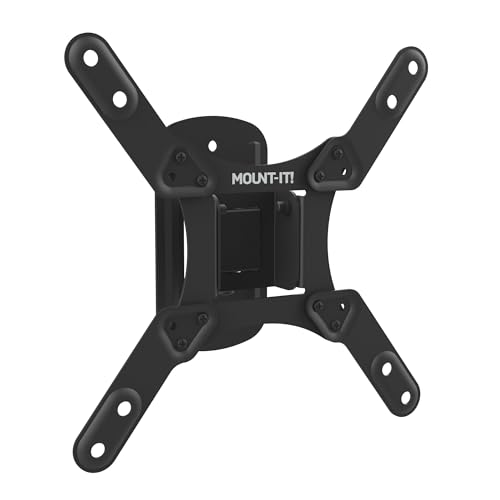
Mount-It! Full Motion Monitor Wall Mount — The Wall Side, Flexible
The compromise candidate: wall support with arm-like travel, for rooms that need both a fixed anchor and a moving screen. Best for: shared screens and dual-purpose rooms. Not suited for: doubtful walls. It demands the strictest installation in this comparison and repays it with the broadest service.
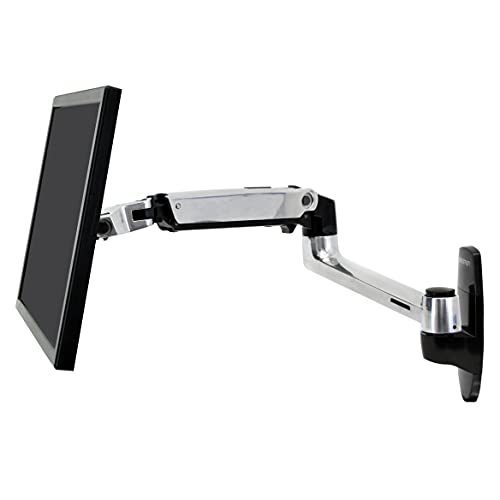
Ergotron LX Desk Monitor Arm — The Arm Side, Premium
The desk arm at its most refined: counterbalanced movement that stays where it is left, year after year, riding any desk including the rising kind. Best for: professionals who reposition daily and sit-stand users. Not suited for: the smallest desks, where even a clamp’s territory matters. It is the arm’s case made in aluminium: flexibility as a daily tool, not a specification.
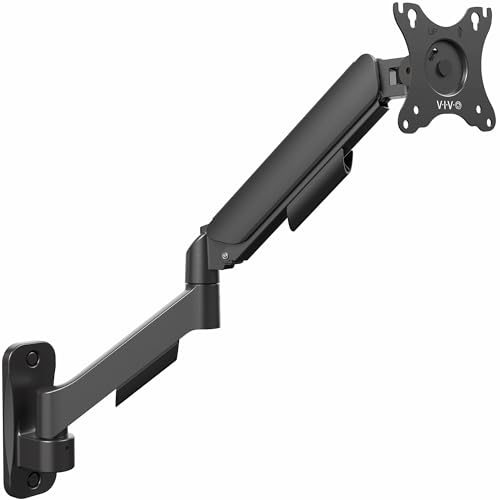
VIVO Single Monitor Arm — The Arm Side, Mainstream
The arm’s mainstream archetype: honest articulation at a mainstream tier, clamping on in minutes and leaving without a trace. Best for: renters, rearrangers and first ergonomic upgrades. Not suited for: buyers seeking the premium tier’s movement polish. For most households that choose the arm, this is the shape the choice takes.
Final Recommendation by Use Case
Settled owner, small desk, one posture: wall mount, tilting family, installed once at full standard — the subject of the monitor wall mount review. Renter, rearranger, or room still in flux: desk arm, mainstream tier, and keep the walls innocent. Sit-stand alternator: desk arm, without a second thought, because the screen must ride the desk. Shared family screen in an owned home: full-motion wall mount, anchored impeccably, as the one true compromise in the contest. Multi-screen wall in a permanent studio: wall mounts, plural, planned on paper first, per dual monitor wall mount ideas. And the household that wants height only, with storage beneath and no commitment at all: neither contestant — the riser, whose own contest with the arm is staged in monitor arm vs monitor riser.
The Middle Ground, Examined Honestly
Comparisons are cleanest at their extremes, but most households live in the middle, so the middle deserves its own examination. The full-motion wall mount is the genuine hybrid: it keeps the wall’s total desk clearance and structural support while borrowing the arm’s travel, and for the owned, settled room with a genuinely multi-position screen — the studio flat, the family room, the corner desk — it is not a compromise but the correct answer outright. Its price is that it inherits both parents’ demands: the wall mount’s full installation discipline, at its strictest because arms multiply leverage, and the arm’s cable-slack and joint-quality concerns. The other hybrid is quieter: a fixed desk, a wall mount, and a household that handles its rare need for a different screen position by moving the chair instead of the screen. More households than admit it live happily in that second hybrid, because the need to move a screen is often really the need to move oneself — to a better light, a different seat, a change of scene that furniture, not hardware, provides.
There is also the two-support household, which comparisons rarely honour because it refuses to pick a winner: the main screen wall-mounted in the settled study, a second screen on an arm in the flexible room, each support matched to its room’s temperament. Nothing in this contest forbids the split, and households with two workstations should feel licensed by this section to run it. Products are not teams. The wall and the arm are both, at their best, answers — and a house is allowed to contain two questions.
What Owners Report After Switching
The testimony pattern in this contest is unusually consistent, and it is worth reporting because it maps the decision better than specifications do. Owners who switch from an arm to a wall mount talk about space and stillness — the desk that feels twice its size, the screen that stopped trembling — and their regrets, when they have them, are about positions chosen hastily, which is to say about installation, not about the contest’s outcome. Owners who switch from a wall mount to an arm talk about freedom — the rearranged room that no longer negotiates with a wall, the standing hours that finally have their screen — and their regrets are about the clamp’s territory and the occasional wobble, accepted as the price of the freedom they came for. Almost nobody switches back in either direction, which is the strongest evidence available that the contest is decided correctly by household temperament: people who read their own lives accurately choose once, and the product they chose keeps agreeing with them.
The switchers’ one unanimous report deserves its own sentence: both groups say the change they feel most is not the one the brochures advertise. Wall converts praise the tidiness more than the floating look; arm converts praise the standing desk more than the showroom swing. In both cases the lived benefit is more ordinary and more daily than the marketed one — a useful calibration for any reader currently imagining either product in the glamour of its first week rather than the reality of its fiftieth.
Cables, Ports and Daily Life
The criterion no brochure leads with may be the one daily life grades hardest. A wall-mounted screen’s cables become architecture: routed down the wall in a raceway or a managed drop, planned once, and thereafter part of the room — tidy to the eye, but fixed, and the screen’s ports become a destination rather than a reach. Swapping a cable means tilting, peering, or taking the screen down with a helper; the mitigations — a desk-level hub, a spare routed cable, a service loop — are effective precisely because they move daily connection-making off the screen entirely. An arm-mounted screen, by contrast, keeps its cables in the furniture world: they drape and travel with the arm, gather at the clamp, and can be re-dressed in minutes when the setup changes. Its ports are a swivel away. Households that connect and disconnect constantly — the docking laptop, the visiting console, the rotating drives — should weight this criterion almost as heavily as space itself, because they will pay its toll weekly in whichever direction they choose.
Cleaning and maintenance tell a similar split story. The wall setup wipes clean in one pass — no stand, no clamp, no pole to dust around — and asks only an occasional check of joints and fixings. The arm setup asks a little more: dust gathers at the base and along the limb, cables want periodic re-dressing as they migrate, and the counterbalance wants re-tuning if the screen is swapped for one of a different weight class. Neither burden is serious; both are real, and they point the same way as every other criterion in this contest — the wall front-loads its effort into one weekend, the arm distributes its effort in small change forever.
Criterion verdict: the arm for connection-heavy households; the wall for set-and-forget ones — a draw that resolves entirely on your habits.
Special Cases: Two Screens, Corners and Shared Rooms
Two Screens
Multi-screen setups sharpen the contest rather than settling it. Wall mounts align a pair or trio with a patience furniture rarely matches — each screen at its exact height, the array consuming no desk — and for permanent multi-screen rooms, studios and monitoring stations, that precision is the deciding argument. Arms answer with independence: each screen repositions for the task, a portrait document display swings in and out of service, and the array can be rebuilt in an afternoon when the work changes. The deciding question is whether your array is a fixture or an instrument. Fixtures belong on walls; instruments belong on arms; and the honest hybrid — main screen walled, utility screen armed — serves more real desks than either purity.
Corners
Corner desks are the wall mount’s hardest geometry and the arm’s easiest. A screen that must face a chair set diagonally needs an articulated answer: either a full-motion wall mount anchored at the corner with particular care, or a desk arm whose clamp cares nothing for angles. Fixed wall mounts in corners freeze a compromise and should be chosen, if at all, with the tape rehearsal performed from the actual chair at the actual hours. Where the corner is the room’s only option and the wall is doubtful, the arm wins the corner by default — a recurring pattern in this contest, in which the arm collects every case the wall cannot serve.
Shared and Family Rooms
In rooms where the screen serves several people, the contest becomes a negotiation between the household’s members rather than between products. The full-motion wall mount offers the room a fixed, safe, always-ready screen that each user swings into place — valuable where children are among the users, because the screen cannot be pulled off furniture it is not on. The arm offers each user a personal geometry, remembered by friction and habit, on a desk that remains the room’s flexible centre. Families with a dedicated screen corner tend to wall; families whose desk is a shared, shifting resource tend to arm. Both are right, and the rehearsal — a day of the whole household using the taped outline — is the fairest ballot the contest offers.
There is a final consideration that belongs in an honest comparison, because it decides real purchases while appearing in no specification: how each product ages in the imagination of its owner. The wall mount disappears. Within a month it is not a product at all but a fact of the room, and its owner stops having opinions about it — the terminal state of infrastructure, and a compliment. The arm remains an object: adjusted, noticed, occasionally admired, occasionally re-tuned, a small machine whose presence is part of the desk’s character. Neither fate is better; they suit different temperaments, and temperament, as this comparison has argued from its first paragraph, is the real ballot paper. Choose the fate you would rather live with, and you will find — as the switchers’ testimony above suggests — that the product you chose keeps agreeing with you, year after year, in the ordinary mornings where these decisions are actually graded.
If the contest is still level after all of that, let the wall itself cast the deciding vote, because it is the one participant that cannot be argued with. A sound, owned, well-placed wall is an asset no other support can use; leaving it idle while a clamp bites a desk edge is a waste a settled household should not volunteer for. A doubtful, rented or service-riddled wall is a veto no enthusiasm should override. Read the wall, read the household, and the comparison resolves — not into a winner, but into an answer, which is what comparisons are for.
The Decision in Five Households
The Homeowner With the Tiny Study
Her desk is the smallest in this comparison and her wall is the soundest, and the contest is not close. The arm would return most of her surface but keep its clamp in the one corner her lamp needs; the wall returns everything and lets the desk be a desk. She mounts, tilting family, rehearses the height for a day in tape, and the study works like a room twice its size. The criterion that decided it — space — is the one her life is scarcest in, and the comparison’s job was simply to make that legible.
The Renter With the Excellent Landlord
His landlord would probably say yes, and the contest is still not close — because permission was never his binding constraint. He moves every two years for work, his furniture is chosen for portability, and a support that cannot travel is a support he will abandon twice. He arms, mainstream tier, and the screen has now lived on three desks in two cities without a single hole being drilled or filled. The criterion that decided it — mobility — never appears on a specification sheet, which is why comparisons that stop at specifications keep failing households like his.
The Couple Who Share One Desk
They are different heights, work different hours, and share one good screen in an owned flat. The fixed wall mount would fit one of them; the arm fits both, in seconds, at the change of shift. They arm — premium tier, because the movement is used four times a day and joint quality is the difference between a pleasure and a chore — and the desk’s other problem, space, is solved by the flat’s second surface rather than by the wall. Their case is the cleanest demonstration in this article that adjustability is not a luxury feature: for two bodies, it is the ergonomic feature, and height chosen once is height chosen wrong for somebody.
The Trader With Three Screens
His array is a fixture in a room that exists for it. He walls all three — individual mounts, aligned on paper, taped for a day, cabled as a system — because his screens’ positions were decided by his work’s geometry years ago and change only when the work does. An arm on any of them would be a joint waiting to be knocked; the wall’s indifference to being bumped is, in his room, a safety property. The criterion that decided it — permanence of the array — is the wall’s home fixture, and the installation weekend, amortised across years of trading days, does not register as a cost at all.
The Student in the Family Home
Her desk is in her bedroom, the wall is her parents’, and the screen is a hand-me-down whose stand is lost. Permission is granted, the stud is found, and the wall mount — entry tier, correctly matched, carefully fixed, safety screws engaged, cables routed away from small siblings — gives her a homework station with room for books where the screen’s feet would have been. When she leaves for university, the plate stays, ready for the room’s next life, and the screen freestands on a replacement stand in a dorm where drilling is unthinkable. Her case spans the whole contest in one biography: the wall where the wall is home, the furniture where life is temporary — and the wisdom to know which season she is in.
Five households, five different winners — and not one of them decided by the products’ specifications. That is the comparison’s deepest finding, and it generalises beyond these pages: in screen support, the household is the specification. Its tenancy, its furniture, its bodies, its habits of rearrangement and connection — those are the numbers that matter, and they are all knowable tonight, from an armchair, without opening a single product page. Open the product pages afterwards, by all means, to choose within the winning side: the wall’s families are compared in our monitor wall mount reviews, and the choice process is laid out step by step in how to choose a monitor wall mount. But let the household speak first. It has been trying to tell you the answer since before the contest had a name.
Listen for it in the questions below, too. Each one is a household describing itself in the grammar of a product question — small desk, standing desk, shared desk, doubtful wall — and each answer simply translates the description back into the support it implies. If your household’s description is not among them, compose it honestly in the same grammar: one sentence about your tenancy, one about your furniture, one about your body and one about your habits. The verdict will be audible in the composition, and it will be yours, which is the only kind of verdict in this contest that has ever stayed decided.
Compose it tonight, before the product pages open and the brochures start composing it for you — in their grammar, which knows nothing about your wall, your landlord, your chair or your cat. Yours knows all four, and in this contest that knowledge is not background. It is the entire decision, waiting to be read aloud.
Read it aloud, ideally to the household it describes, and notice where the sentence produces nods and where it produces arguments. The nods are your criteria, ranked by the people who will live with the result. The arguments are the genuinely close calls — and this comparison has a ruling for close calls, offered earlier and repeated here because it is the most useful sentence in it: when the contest ties, choose the arm, because indecision is itself evidence that flexibility outranks permanence in your household’s real values. The wall mount is a product for the certain. If you are certain, you will not need the tiebreak; if you need the tiebreak, it has already told you its answer.
Certainty, in this contest, looks like a household that can finish the sentence “our screen will be in this room, at this height, for years” without anyone in it smiling. If the sentence survives the room, mount — and mount at the full standard the companion guides describe, because certainty deserves craftsmanship. If the sentence dissolves into qualifications, arm — and arm without a whisper of defeat, because the arm is not the consolation prize in this comparison. It is the champion of every household whose life is still in motion, which is to say, at one time or another, almost every household there is.
Almost every household — including, at different seasons, the same one. The wisest readers of this comparison will not file its verdict as a lifetime allegiance but as a season’s answer, revisited when the tenancy changes, the desk changes or the body does. Products outlive seasons; decisions should be allowed to be younger than the products they govern. Choose for the season you are in, install at the standard the choice deserves, and let the next season ask its own question when it arrives.
It will arrive with its own wall, its own desk and its own scarcities — and the contest, patiently, will be ready to be decided again, on the same axis it has used all along: permanence for the settled, flexibility for the moving, and honesty about which one, this season, is you.
That honesty is the only tool the comparison cannot supply for you — and, fortunately, the one you have been carrying since the first paragraph.
Use it on the tape rehearsal, use it on the branching questions, use it on the sentence about the years — and then buy, once, the support your household actually described. The products will do the rest, in their opposite and excellent ways: one by disappearing into a wall, the other by moving, gracefully, for as long as you ask it to.
Either way, the screen ends up where your eyes wanted it — which was, beneath all the criteria and verdicts, the only prize ever on offer in this contest.
And your desk — cleared to the wall or freed to move — ends up serving the work instead of storing the screen, which was the point of entering the contest at all.
Serve the work, in the season you are in, with the support your household described — and the comparison will have done everything a comparison honestly can.
The rest — the drilling or the clamping, the rehearsing or the swinging — is execution, and execution, unlike the decision, has a guide for every step of it elsewhere in this cluster.
Decide first, execute second, and enjoy the screen third — in that order, and the order matters more than the winner.
Because in this contest, unusually, both winners are real products that keep their promises — the only way to lose is to buy the promise your household never asked for.
Ask, then — of the wall, of the desk, of the household — and let the answers, rather than the advertisements, keep the promise that gets bought.
That is the comparison’s whole method, compressed: the products are constants, the household is the variable, and the verdict is the variable, evaluated honestly.
Evaluate yours, and the questions below become confirmations rather than crossroads.
Confirmations are what well-decided purchases feel like from the inside — quiet, a little anticlimactic, and exactly right.
Anticlimax, in decisions about walls and furniture, is the signature of getting it right the first time.
The first time, and — if the household was read honestly — the only time the question needs asking this season.
Next season can ask its own — and will find this comparison, and its axis, exactly where it left them.
Permanence and flexibility, after all, do not go out of date — only households change, and they change honestly.
Read yours, and choose.
The Deciding Details in This Monitor Wall Mount Comparison
Look at what each choice makes easier next month, not just today, because the better option is usually the one that leaves fewer awkward compromises behind it. Look closely at seams, edges, hinges, threads or contact points when the monitor wall mount arrives, because build quality is easiest to judge before everyday wear hides the evidence. Think about the longest session you realistically run, not the average one, since heat, noise, clutter and small annoyances all grow more noticeable over time. When a specification is stated in unfamiliar terms, translate it into your own routine: how long, how often, how far, how loud in practice, before letting it sway you.
As a concrete listing check, take the VIVO Single Monitor Wall Mount and the Mount-It! Full Motion Monitor Wall Mount named earlier in this article and confirm, line by line, that each variant offered matches the size, connection and contents described for it here. Check that nothing you place on, under or beside the monitor wall mount blocks airflow, movement, visibility or access that the design quietly depends on. Think about storage for the accessories this monitor wall mount brings with it, so spare parts and tools end up in one known place instead of scattered across drawers. Picture the busiest version of your week and ask whether this monitor wall mount still fits when other people, other tasks and other equipment compete for the same space. Consider which option you would lend, share or explain to someone else with more confidence, since that instinct often reveals which design you trust more deeply.
Prefer a setup you can explain to another person in a minute, because simple arrangements are easier to troubleshoot, share and repeat than fragile clever ones. Ask what you would do on the day this monitor wall mount stops working as expected, and whether you could swap, reset, clean or return it without dismantling half your setup. Avoid forcing a connector, bracket or moving part that resists you, because resistance is usually information about alignment or fit rather than an invitation to push harder. If the monitor wall mount will be shared, agree on one home position and one simple reset routine, so each person does not undo the previous person’s adjustments.
Clean and inspect the area around a monitor wall mount on a simple schedule, since dust, loose fasteners and tangled leads cause many problems that get blamed on the product itself. Ask whether the benefit you want survives your least favourite conditions, such as low light, a crowded desk, a warm room or a rushed start to the day. To choose between the two sides of this comparison, name the task where they genuinely differ and ignore the many jobs where either would perform perfectly well. Recheck the return window and the condition requirements before you discard any packaging, especially for a monitor wall mount whose fit only becomes clear after several real sessions. Notice the small sounds, lights and movements during normal use, because those everyday details decide whether a monitor wall mount feels settled or constantly demands attention.
When you compare notes with other owners, match their comments to setups like yours, because advice from a very different room, workload or routine can mislead. When something behaves oddly, return to the basics first: power, connection, position, cleanliness and the last setting you changed, in that order, before assuming a fault. Check the connection points you rely on every day, and note which ones are already occupied, shared or awkward to reach once furniture is back in place.
Keep a short note of what worked, what annoyed you and what you adjusted, because that note is more useful than memory when you later replace or add another monitor wall mount. Write one sentence for each option describing the owner it suits best, and be honest about which of those two descriptions sounds more like your actual routine. Take a quick photo of the working setup before you change anything, so cable routes, positions and settings can be restored exactly if the new arrangement disappoints. Keep liquids, loose papers and anything that sheds dust or fibres at a sensible distance, unless the monitor wall mount was clearly designed to work right beside them. Make one change at a time during the first days, so that when something improves or gets worse you know which change caused it.
Write down the oldest and the newest device you expect this monitor wall mount to work alongside, because compatibility problems usually appear at the edges of a setup rather than in the middle of it. If two options look identical on paper, choose the one whose controls, layout or handling you understood fastest, since clarity in daily use beats a longer feature list you never touch. A calm final test is to walk away mid-task, come back later, and see whether the setup still makes sense at a glance without reconstructing what you were doing.
Frequently Asked Questions
Which is better for a small desk, a wall mount or a monitor arm?
The wall mount, and it is the clearest verdict in this comparison. An arm returns most of the stand’s footprint but keeps its base on the desk; a wall mount returns everything and lets the desk itself shrink if the room demands it. The condition is the wall — owned or permitted, sound, with structure where the screen belongs. If the wall is unavailable, the arm becomes the best remaining answer and a good one.
Which is better for a standing desk?
The monitor arm, decisively, if you alternate heights through the day: the screen must ride the desktop to stay at your eye level, and a wall cannot rise. The exception is the lopsided user — seated ninety percent of the day, standing for calls — who can mount for the dominant posture and accept approximation in the minority one. Know your own ratio before choosing; it, and not the hardware, decides this question.
Is a wall mount more stable than a monitor arm?
Yes, in the way that matters daily. A wall mount’s support is the building, so desk bumps, typing and household traffic never reach the screen. A quality arm holds its position faithfully but sits on furniture, and furniture transmits its own life — wobble, knocks, a leaning elbow — to its passenger. Both are safe when correctly installed; the difference is in how much of the room’s motion the screen is asked to share.
Can a full-motion wall mount replace a monitor arm?
For multi-position use in a settled, owned room, largely yes: it swings, pulls out and angles like an arm while keeping total desk clearance. It cannot follow a height-adjustable desk, cannot move rooms, and demands the strictest wall installation of any option here — studs or sound masonry, fixings exactly as the maker directs, cables slack through the whole range. Within those terms it is the contest’s true middle champion.
Which is cheaper overall?
Kept qualitative: a fixed wall mount is the least expensive hardware in the contest, but its true cost includes installation — anchors, possibly tools or an installer, a raceway. A mainstream arm costs more as hardware and less to install, clamping on with what you own. Over a long settled tenancy the wall mount usually wins the account; over a mobile one the arm protects its value by travelling. Compare finished results, not stickers.
What if I cannot decide?
Run the tape rehearsal and answer the branching questions honestly. Tape the screen’s outline on the wall, clear the desk as a wall mount would clear it, and work a day in the simulated future; then imagine the same day with the screen free to move instead. Most undecided households discover, in that single day, which scarcity actually governs them — space or movement. If the day still ties, choose the arm: indecision itself is evidence that flexibility is worth more to you than permanence, and the reversible product should win ties.
Related Reading
monitor wall mount pros and cons · is a monitor wall mount worth it · how to choose a monitor wall mount · the monitor riser review · monitor arm options · ergonomic setups for two monitors