Learning how to choose a Wi-Fi extender starts with one honest question: what exactly is failing in your home right now? An extender is the right tool when your router is fundamentally fine but its signal cannot reach one or two rooms with enough strength left to be useful — a back bedroom that buffers, a home office where video calls freeze, a garage where the smart door opener keeps dropping offline. If that sounds familiar, the short answer is to match three things: the extender’s Wi-Fi standard should be at least as new as your router’s, its speed class should suit the work happening in the weak room, and it should be a dual-band model unless the job is only keeping a few smart plugs and sensors connected.
Choose badly and you get the classic disappointment: full signal bars in the dead zone and speeds that are somehow worse than before. That happens because an extender can only repeat what it receives — a weak, noisy signal in, a weak, noisy signal out. This guide walks through the decision in the order that actually matters, from diagnosing the dead zone to reading spec sheets without being misled by the biggest number on the box. By the end you will know which class of extender your home needs, which features are worth paying attention to, and which situations call for a different tool entirely, such as the mesh systems compared in Wi-Fi Extender vs Mesh Wi-Fi.
Disclosure: As an Amazon Associate, ilcastellomenu.com earns from qualifying purchases. If you buy through a link on this page, we may earn a commission at no extra cost to you. Product details and availability change over time, so check the current listing before you buy.
Step 1: Confirm an extender is the right fix
Before spending anything, spend ten minutes diagnosing. Walk to the room with the problem, stand where you normally sit or work, and run a speed test on your phone connected to the router’s own network. Then walk halfway toward the router and test again. If the halfway point is dramatically faster, you have a coverage problem with a healthy signal available to repeat — exactly what an extender fixes. If speeds are poor everywhere, even standing next to the router, the bottleneck is the router itself or your internet plan, and no extender will repair that.
Also note what the weak room is used for. A nursery camera, a few smart bulbs and a door sensor need very little bandwidth but demand reliability. A teenager’s gaming setup or a 4K television needs sustained throughput and low delay. Readers shopping mainly for the television case should compare notes with our roundup of Best Wi-Fi Extenders for Streaming, because streaming exposes weak extenders faster than almost any other workload: the picture drops to a blur the moment the repeated link gets busy.
- Coverage problem: fast near the router, slow or dead in one area — an extender fits.
- Everywhere problem: slow in every room — fix or replace the router first.
- One wired device problem: a single desktop or console may be better served by the Ethernet port on an extender, or by the approaches in Wi-Fi Extender vs Powerline Adapter.
- Whole-floor problem: several dead rooms in a row usually point to mesh rather than a single extender.
In this guide
Step 2: Match the Wi-Fi standard to your router
Extenders are sold by Wi-Fi generation: Wi-Fi 5 (802.11ac) models are the long-standing budget class, Wi-Fi 6 (802.11ax) models are the current mainstream, and Wi-Fi 6E and Wi-Fi 7 models add newer bands and capacity at the top end. The practical rule is simple — buy an extender that is the same generation as your router or one step newer. Pairing a Wi-Fi 6 extender with an old Wi-Fi 4 router gains you almost nothing, because the link between the two devices still runs at the older standard. Pairing a Wi-Fi 5 extender with a new Wi-Fi 6 router wastes the router you already paid for.
There is one more consideration: same-brand ecosystems. Several router families offer a shared mesh feature — TP-Link’s OneMesh and EasyMesh, ASUS AiMesh, NETGEAR’s mesh extenders — where the extender joins the router’s network under a single name and devices roam between them intelligently. If your router supports one of these systems, an extender from the same system is usually the smoothest choice even if a rival model looks slightly better on paper. Households still on an older router should read the standard question together with our router coverage in Best Wi-Fi Routers for Home Use, since upgrading the router first sometimes removes the dead zone without any extender at all.
How to choose a Wi-Fi extender by speed class and bands
Extender names carry a class number — AC750, AC1200, AX1800, AX3000 and so on. Treat that number as a ceiling shared across bands, not a promise: it is the sum of the theoretical maximum rates of every band added together, measured in conditions no home reproduces. What matters more is the band layout. A dual-band extender receives on one band and transmits on the other, or shares both, while a tri-band extender can dedicate an entire band to the link back to the router. That dedicated backhaul is the single biggest real-world speed advantage an extender can have, because a basic dual-band repeater typically gives up roughly half its throughput to repeating.
Single-band, dual-band or tri-band?
Single-band 2.4 GHz extenders are the cheapest class and the easiest to regret. The 2.4 GHz band is crowded, slow and shared with everything from microwaves to neighbours’ networks. Reserve single-band units for keeping low-demand smart devices online at the edge of a property. Dual-band is the sensible default for most homes: 2.4 GHz for reach, 5 GHz for speed. Tri-band earns its keep in large homes and busy households where the extender itself will serve several demanding devices at once — the scenario explored in Best Wi-Fi Extenders for Large Homes.
Also check the Ethernet port. Many extenders include one, which lets you plug in a television, console or desktop and give it a wired connection fed by the wireless link. It is also how many extenders switch into access point mode, the alternative setup examined in Wi-Fi Extender vs Access Point. A gigabit port matters if your internet plan is fast; a slower 100 Mbps port quietly caps anything plugged into it.
Step 3: Size the coverage claim to your walls, not your hopes
Coverage figures on extender boxes are measured in open space. Your home is not open space. Drywall and wood framing cost a little signal; brick, concrete, stone, tile backer board, metal ducting and mirrors cost a lot. A model advertised for a large open area may cover one modest floor of a masonry house. Instead of trusting the square-foot figure, think in terms of rooms and obstacles between the router, the extender’s position and the dead zone — placement gets its own full treatment in how to position a wifi extender, including the halfway rule that decides most installations.
Antennas play a supporting role. External adjustable antennas can be aimed and often help at the margins, especially in multi-storey homes where angling one antenna horizontally improves the floor-to-floor path. Internal-antenna designs look tidier and are fine when the extender sits in open space. Either way, antenna count on a spec sheet is a weak predictor of results compared with where the unit is plugged in and how strong the router’s signal is at that outlet.
Step 4: Check the features that change daily life
- Single network name (mesh-style roaming): extenders that clone the router’s name, or join a same-brand mesh system, save you from manually switching networks as you move rooms.
- App-based setup and a signal-strength indicator: a setup app plus an LED that reports link quality makes the trial-and-error of placement far faster — see how to set up a wifi extender for the process.
- Access point mode: lets the same hardware run from an Ethernet cable later if you wire the house, protecting the purchase.
- A pass-through outlet: plug-style extenders block a socket; models with a pass-through give it back, which matters in kitchens and hallways.
- Guest network and security support: the extender should support WPA2 or WPA3 matching your router, and pass through guest-network settings if you use them.
- Automatic firmware updates: updates patch security holes; a model that updates itself is one less chore — the manual process is covered in how to update firmware on a wifi extender.
Notice what is missing from that list: raw class numbers and antenna counts. They are the easiest things to compare on a shelf and among the least useful. The features above decide whether you forget the extender exists — the true goal — or keep fiddling with it every few weeks.
Common mistakes when choosing
The most common mistake is buying the fastest extender to pair with a slow or badly placed router. The second is buying the cheapest single-band unit for a room that streams video. The third is assuming two extenders are better than one: daisy-chained extenders, where the second repeats the first, compound the speed loss and are rarely stable; one well-placed unit, or a proper mesh system, beats a chain almost every time.
A subtler mistake is ignoring the return path. People test the dead room with a phone held high in the doorway, buy accordingly, then place the extender behind a sofa at floor level and wonder what happened. Choose for the outlet you will actually use, at the height you will actually use it, with the furniture in place. Finally, do not buy an extender to fix a problem that is really interference — a neighbour’s network on the same channel or a router stuffed inside a metal cabinet. Moving the router six feet often outperforms any purchase.
The short version
Diagnose first: extender for a coverage gap, not a slow-everywhere network. Match the Wi-Fi generation to your router, default to dual-band, step up to tri-band or a same-brand mesh extender for large or busy homes, insist on an Ethernet port if anything will plug in, and treat coverage numbers as open-air fiction. Readers who want the same advice condensed into a shopping checklist can jump to the companion wifi extender buying guide, and anyone whose dead zone covers several rooms should seriously price the mesh alternative before deciding.
Worked examples: three homes, three different answers
A one-bedroom flat with a router by the door and a bedroom behind a bathroom: the path crosses tile and plumbing, the distance is short but hostile. The right purchase is a modest dual-band plug extender placed in the hallway before the bathroom, not a high-end unit — the problem is one obstacle, not acreage. A large class number would buy nothing here; a signal meter in the app buys everything, because the winning outlet is found by testing, not by spec.
A two-storey family house, router in the front lounge, dead zone in the back upstairs bedroom used for video calls: distance plus a floor slab plus a working adult who cannot have calls drop. Here the answer climbs a tier — a Wi-Fi 6 dual-band unit at the stairwell as a minimum, with a tri-band or ecosystem model justified because the workload is latency-sensitive and daily. If the router is the provider’s ageing box, the honest recommendation may be to skip the extender and price mesh, because the router is half the problem.
A renter’s room in a shared house, one desktop PC for gaming, landlord’s router downstairs: no permission to replace anything, no cable runs allowed. The answer is an extender with a gigabit Ethernet port, positioned for the strongest backhaul, with the PC wired into the port — the wireless hop count drops to one and the gaming experience stabilises out of proportion to the modest hardware. Three homes, three budgets, one method: name the workload, name the obstacle, then let the class follow.
Reading the two most abused numbers on the box
Coverage area first. The square-foot or square-metre figure is measured in open space with no walls, a condition that exists in warehouses and nowhere else. Translate it by obstacles instead: each ordinary stud wall costs a noticeable slice of range, each masonry wall or tiled room costs far more, and a floor slab costs most of all. A model claiming a big open-air number will typically serve a floor or a wing of a real house — which is usually exactly the job — but two such claims cannot be compared unless the construction matches yours.
Device count second. ‘Supports 30 devices’ describes how many connections the unit can hold open, not how many can stream at once; bandwidth, not connection count, is the binding constraint in real homes. A house with forty sleepy smart plugs is an easy load. A house with four simultaneous video streams through one extender is a heavy one. Choose by the busy-hour workload of the extended room — streams, calls, games — and let the device-count figure reassure you only about the sleepy gadgets.
When to stop choosing and start testing
There is a point in every extender purchase where further research has negative value, because the remaining uncertainty is not about products but about your house: its walls, its wiring of outlets, its neighbours. Two households buying the same model will get different results, and both will be telling the truth in their reviews. The rational method is to shortlist two candidate classes from this guide, buy the more suitable one from a retailer with a painless returns policy, and run a proper home trial over a few evenings — busy hours included — before the window closes.
Test like you mean it: place the unit by the halfway method, run the room’s real workloads at the real times, walk a call through the house, and check the one device that complains most. If the trial fails, the failure itself is information — a room that defeats a well-placed mid-range extender is telling you it needs a different architecture, and you should believe it and change plans rather than climbing the price ladder one rung at a time.
Know your router first: the five facts that decide everything
Every choosing mistake in this category is, at root, a failure to inventory the router. Fact one: its Wi-Fi generation, which sets the ceiling for the extender link — find it in the router’s admin page or on its label, not from memory. Fact two: whether it offers an extender ecosystem (OneMesh, AiMesh, EasyMesh), because that single fact can outweigh every other line of the extender’s spec sheet. Fact three: its age and health — a router that reboots weekly or runs firmware from another era will make a new extender look guilty of its crimes, and the money may belong to the router budget instead.
Fact four: where it is allowed to live. Provider gateways tied to a TV service or a fixed entry point may be immovable, which fixes the geometry the extender must solve; a router free to move to a central shelf may shrink the dead zone before any purchase. Fact five: what the provider permits — most allow any extender, but managed whole-home services from the provider itself sometimes compete with, or include, their own extender units, and it is worth one look at your account before duplicating something you may already be entitled to.
With those five facts written down, the extender shortlist usually writes itself: generation matched, ecosystem matched where available, band layout matched to the dead zone’s workload, class matched to the busy hour rather than the brochure. The choosing process in this guide is deliberately unglamorous — inventory, then geometry, then workload, then product — because the glamorous order (product first, justified later) is how households end up with a magnificent extender repeating a dying router’s signal into a room that needed a cable.
Gear mentioned in this guide
These are examples from the product classes this guide discusses. Every model below was checked against the Amazon Creators API product pool for this site, and the link goes to the exact listing that was verified.
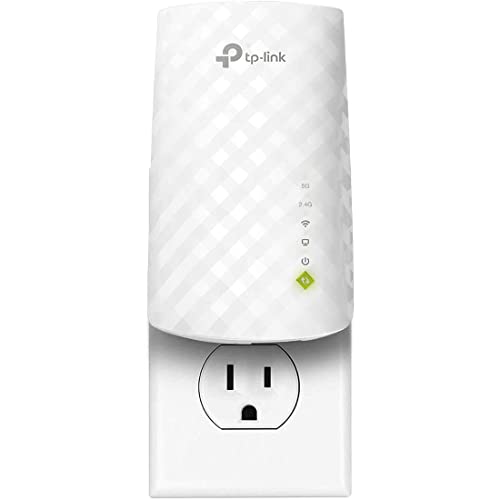
TP-Link RE220 — the sensible entry point
A dual-band Wi-Fi 5 extender with an Ethernet port and OneMesh support, the RE220 represents the class most small homes should start from: it covers a room or two, keeps the router’s ecosystem features if you run a compatible TP-Link router, and its wired port rescues a single desktop or TV. It is the reference point against which fancier models must justify themselves.

NETGEAR Nighthawk EAX15 — the Wi-Fi 6 step up
The EAX15 moves to Wi-Fi 6 (AX1800 class) with a gigabit Ethernet port and mesh-style single-name operation with any router brand. Choose this class when your router is Wi-Fi 6, your plan is fast, and the dead zone includes video calls or streaming rather than just smart gadgets.

TP-Link RE715X — the high-capacity option
An AX3000-class extender with a gigabit port and EasyMesh support, the RE715X suits larger homes and busier dead zones — a family room full of devices rather than a single spare bedroom. It is the class to consider before giving up on extenders and pricing a full mesh replacement.
Choosing for the device that actually struggles, not the whole house
Most people choose an extender by thinking about square footage, but the better starting point is the single device that frustrates you most. Walk to that device and ask what it really needs. A smart TV that buffers during films needs sustained throughput on one band, in one place, for hours at a time. A laptop used for video calls needs low, stable latency more than it needs a huge headline speed, because a call that stutters at a modest bitrate feels far worse than a download that merely takes longer. A phone that drops off Wi-Fi while you walk between rooms needs clean roaming behaviour more than either of those things. Those three needs point at three slightly different extenders, even though all three homes might look identical on a floor plan.
Work through the struggling device’s radio before you look at any extender box. Older laptops, budget tablets, smart plugs, cameras and many games consoles only have a 2.4 GHz radio, or a basic 5 GHz radio with one spatial stream. An extender cannot give such a device capabilities it does not have. If the weak-room device is 2.4 GHz only, then the quality of the extender’s 2.4 GHz band, its antenna design and its placement matter far more than whether the box advertises a very fast 5 GHz class. Conversely, a modern laptop with a good Wi-Fi 6 radio can actually use a faster extender, provided the router-to-extender link is strong enough to feed it. Matching the extender to the weakest important device, rather than to the newest device you own, prevents the common mistake of buying capacity that nothing in the room can use.
Also count how the struggling device connects. If it has an Ethernet socket — many TVs, consoles, desktop PCs and streaming boxes do — an extender with a wired port becomes a different and often better tool. In that arrangement the extender does the difficult wireless hop to the router once, with its larger antennas and better position, and the final metre to the device travels by cable with no extra wireless loss. Choosing with that port in mind changes the shortlist completely: a modest extender with a reliable Ethernet port can outperform a faster wireless-only model for a fixed desk or TV setup. If every device in the room is mobile, the port matters less, and money is better spent on band quality and roaming support.
How to judge an extender in a rented home, a dorm and other places you cannot rewire
Rented homes and shared housing impose limits that buying advice often ignores. You may not be able to move the router, run a cable, drill for an access point or even access the router’s admin page if a landlord or provider controls it. An extender is often the only upgrade you are allowed to make, which makes choosing the right one more important, not less. In this situation, prioritise an extender that can be set up without changing router settings: WPS pairing or app-based setup that only needs the network name and password. Avoid models whose best features depend on router-side cooperation, such as ecosystem roaming modes that require a compatible router you do not control.
Shared housing adds a second problem: congestion you do not own. Neighbours’ networks, housemates’ streaming and a crowded 2.4 GHz band can matter more than raw distance. A dual-band extender earns its keep here because it lets your devices use the quieter 5 GHz band in your room even when the shared 2.4 GHz band is busy, as long as the extender itself sits close enough to the router to hold a good 5 GHz link. If the router is in a hallway or another person’s room, measure honestly before buying: stand where your extender would go with a phone and check whether 5 GHz is still usable there. If it is already marginal, a model with strong 2.4 GHz performance and good channel handling will serve you better than a faster headline class built around 5 GHz.
Portability is a genuine feature in temporary housing. A compact plug-in extender you can take to the next flat, reuse in a garage or lend to family has value that a large desktop unit does not. Students and renters should also think about the next home, not just this one: a dual-band Wi-Fi 6 extender bought now will still pair sensibly with the router in a future property, while a very cheap single-band unit is the one most likely to be replaced at the first move. Choosing for the second home as well as the first is how a small purchase avoids becoming a recurring one.
Antennas, radios and sensitivity: the hardware differences you can actually feel
Two extenders with the same speed class can behave very differently in the same hallway, and the reason is usually radio quality rather than headline numbers. Receive sensitivity — how weak a signal the extender can still decode cleanly — decides whether the router link stays fast at the edge of coverage or collapses into retransmissions. Manufacturers rarely headline this figure, but you can infer a lot from design: larger external antennas that can be oriented deliberately, a less cramped plug-in body that keeps radios and amplifiers apart, and a model line with a track record in larger homes all tend to correlate with a link that holds up at distance. This is also why the cheapest no-name units disappoint out of proportion to their spec sheets: the class number describes a laboratory maximum, not the quality of the conversation at a weak signal.
Spatial streams deserve the same practical reading. A 2×2 extender can talk to the router and to your devices with two streams each way in ideal conditions, which helps when several devices are active at once. A basic 1×1 design may reach a respectable speed with one laptop and then fall apart when a phone, a TV and a console share it. If the extended room is a family living space rather than a single desk, stream count and band design matter more than a small difference in class number. If the room holds one person and one laptop, they matter much less, and a simpler model placed well will feel identical.
Heat is the quiet hardware factor. Extenders live in hallways, behind furniture and in warm corners, often running all day. A unit that throttles or becomes unstable when warm will produce the maddening pattern of good mornings and bad evenings. You cannot test this from a listing, but you can choose sensibly: avoid sealing any extender in a cupboard or behind heavy curtains, favour designs with ventilation rather than a fully sealed glossy shell for a warm location, and treat persistent evening slowdowns as a placement and heat clue before assuming the model itself is too slow. Good choosing includes choosing where the hardware can breathe.
Choosing when the real problem is outdoors, in a garage or in a garden building
Extending coverage beyond the house changes the decision. A garage, workshop, garden office or patio asks the signal to cross an exterior wall, which is usually denser than interior partitions, and then travel across open space where weather, foliage and distance all play a part. A standard indoor plug-in extender placed inside the house, near the exterior wall, is the right first attempt for a patio or a garage attached to the home. Keep expectations honest: you are aiming for reliable coverage for music, cameras, smart openers and calls, not for replicating the living-room speed at the bottom of the garden.
For a separate garden building, think in stages. If the building has mains power on the same electrical circuit, some households do better feeding that building differently and then covering it locally, a trade-off explored in the comparison with powerline. If you stay with an extender, position becomes the whole game: the extender wants a window or wall facing the building, as high and unobstructed as your outlets allow, and the receiving devices in the outbuilding want to be on the house-facing side where possible. Weatherproof outdoor-rated models exist for mounting outside, and for readers weighing that route the roundup of best Wi-Fi extenders for outdoors covers the dedicated options; for most attached garages and patios, though, a well-chosen indoor model at the right wall solves the problem without outdoor hardware.
Security cameras deserve a specific mention when choosing for these spaces. Cameras are unforgiving clients: they sit at the edge of coverage, they upload continuously and they reconnect badly after drops. If cameras are the reason for the purchase, favour stability over speed — a strong 2.4 GHz link, an extender that recovers automatically after a power cut, and a placement that gives the camera a short, clear path. Test with the camera’s live view, not a phone speed test, because the camera’s smaller radio is the honest measure of whether the choice worked.
A pre-purchase checklist you can run in one evening
Before ordering anything, spend one evening gathering the facts that make the choice obvious. First, confirm the router is healthy: stand beside it with your main device, run a speed test and browse for ten minutes. If performance is already poor next to the router, an extender is the wrong purchase and the router or the internet line needs attention first. Second, map the dead zone properly. Note which rooms fail, which devices fail in them and whether the failure is no signal, slow speed or frequent dropping — three different symptoms that point at different fixes.
Third, survey the halfway outlets. The extender will live where router signal is still strong, so identify the sockets between the router and the dead zone and check what blocks them: furniture, appliances, a chimney breast or a bathroom’s tiled walls. Fourth, write down your router’s exact model and Wi-Fi standard, whether it has a WPS button you can reach, and whether it came from your provider. Fifth, decide the naming question in advance: do you want the extended network to share the router’s name for simpler roaming, accepting that devices sometimes cling to the weaker signal, or a distinct name you choose manually room by room? Neither answer is wrong, but choosing an extender whose app handles your preferred approach cleanly saves frustration later.
Finally, set your success test before the box arrives. Decide which device, in which room, doing which task, must work for the purchase to count as a success — the TV streaming without buffering through a whole film, the call staying clear for thirty minutes, the camera staying online overnight. A defined test stops you judging the extender by bars on a phone in the doorway, and it makes the returns decision easy if the honest answer is that your home needs a different architecture altogether, such as the mesh approach weighed in the extender-versus-mesh comparison. Readers who want the product-level shortlist that follows from these criteria will find it in the best Wi-Fi extenders for large homes roundup and the general home picks.
How your floor plan should change the model you pick
Two homes with the same floor area can need opposite extenders, because what matters is the path the signal travels, not the size of the property. In a long, narrow flat where every room hangs off one corridor, the signal travels in a straight line and loses strength mainly through distance and the doors along the way. A single mid-range dual-band extender placed partway down that corridor usually transforms the far end, and spending more on a larger model adds little. In a compact but densely built house — thick internal walls, a chimney breast in the middle, a bathroom wrapped in tile and pipework — the same distance can cost far more signal, and the smarter purchase is the extender with the better antennas and receive sensitivity, placed to shoot through a doorway rather than through the chimney mass.
Multi-storey homes add a vertical problem that headline coverage figures ignore. Floors and ceilings, especially with underfloor heating, foil insulation or dense screed, attenuate signal heavily, and the router’s signal spreads mostly sideways rather than up and down. If the dead zone is directly above or below the router, antenna orientation and a model that handles a steep vertical path well matter more than class. If the dead zone is above and across — the classic far upstairs bedroom — the extender belongs on the landing or stairwell wall where it can see both the router’s floor and the target room, and a model with adjustable external antennas gives you the tilting options that a sealed plug-in unit does not.
Open-plan homes mislead in the opposite direction. They look easy, and near the router they are, but the kitchen at the far end of an open-plan space is full of large metal appliances that reflect and block signal in unpredictable ways. Here the honest approach is to choose an extender with a clear signal-strength indicator and a forgiving setup app, because you may need to try three or four sockets along the space before finding the one that threads past the fridge and the oven housing. A model that makes repositioning painless — quick reconnect, remembered settings, a readable strength light — is worth more in this home than a nominally faster model that punishes every experiment with a long re-setup.
Finally, consider the home you are becoming, not only the one you have. A room that is a nursery today becomes a study or a teenager’s gaming room within a few years; a spare room that hosts guests occasionally may become a full-time office. Choosing an extender one step above today’s need — dual-band rather than single-band, Wi-Fi 6 rather than the older standard when the price gap is small, an Ethernet port even if nothing uses it yet — is cheap insurance against rebuying. The exception is a home where you already know a mesh conversion or a router move is coming within months; there, buy the simplest adequate extender, solve today’s room, and save the serious spending for the architecture you actually plan to keep.
One last choosing habit separates satisfied buyers from frustrated ones: decide in advance what you will do if the extender only half-works. If the honest fallback is moving the router, trying a different halfway socket or stepping up to mesh, then a mid-range extender bought from a retailer with easy returns is a low-risk experiment. If the fallback is nothing — the purchase has to work — spend the extra care up front on the survey, the router facts and the placement plan described above, because in that case the choosing, not the hardware, is what has to be right first time.
Frequently asked questions
Can I use two Wi-Fi extenders in one house?
Yes, if each connects back to the router rather than to each other, and each serves a different area. Avoid chaining one extender off another’s signal — the speed penalty stacks. If you need coverage in several directions at once, a mesh system is usually the cleaner answer.
Will an extender work with my internet provider’s router?
Almost always. Extenders are brand-agnostic and work with provider gateways from cable, fibre and DSL services. Same-brand mesh features are the only thing you give up; the basic repeating function works with any router that has Wi-Fi and a WPS button or a setup page.
Does an extender need to match my router’s brand?
No. Any extender can repeat any router’s network. Matching brands only matters for optional ecosystem features such as OneMesh, AiMesh or EasyMesh roaming, where the extender and router coordinate under one network name.
Is a Wi-Fi 6 extender worth it with a Wi-Fi 5 router?
Only as future-proofing. The link between router and extender runs at the slower device’s standard, so you will not see Wi-Fi 6 speeds until the router is upgraded too. If a router replacement is planned within a year or so, buying ahead is reasonable.
What speed should I expect in the extended room?
Plan on noticeably less than at the router. A well-placed dual-band extender commonly delivers a third to a half of the router-side speed to the far room; tri-band models with a dedicated backhaul do better. That is still plenty for streaming and calls when the starting plan is reasonably fast — the full explanation is in do wifi extenders slow down internet.
Should I choose an extender with external antennas?
Only if you will actually adjust them. External antennas help when you need to aim signal between floors or around an obstruction. In an open hallway position, tidy internal-antenna models perform just as well.
If my router is old, should I replace it instead of choosing an extender?
Often, yes. If the router is more than about five years old, only offers 2.4 GHz, or struggles even in the same room, a new router improves every room at once and may remove the dead zone entirely if it can also be placed better. Choose an extender when the router is modern and strong nearby but one or two rooms sit beyond its reach. Replacing a weak router and then extending its signal is the worst of both worlds.
Does the extender’s coverage rating in square feet mean anything?
Treat it as a rough size hint, not a promise. Those figures are measured in open conditions without your walls, floors and furniture. A home with brick internal walls, foil-backed insulation or a metal-clad extension will get far less than the printed figure, while an open-plan flat may get more. Use the rating only to separate small-home models from large-home models, then rely on placement and your own testing for the real answer.
Should I choose a plug-in extender or a desktop model?
Choose plug-in for convenience, hallways and a single problem room; it disappears into a socket and needs no shelf. Choose a desktop model when the extended room is a busy hub — a family living room or a home office with several devices — because larger bodies usually bring better antennas, more ports and cooler running. The deciding factor is the room’s workload, not the shape itself.
Can choosing a stronger extender disturb my neighbours or break any rules?
No special concern applies to ordinary home extenders bought through normal retail channels: they operate within the same regulated power limits as routers. A stronger model does not transmit louder in a way that harms neighbouring networks; it mainly receives better and organises its own traffic better. In flats, good channel selection and sensible placement help everyone, including your neighbours.
Related Guides
Keep going with these guides and roundups from the same networking cluster: