The Wi-Fi extender vs powerline adapter contest is a fight between two ways of crossing a difficult house without running cable. The quick verdict: choose an extender when you need wireless coverage in a room — phones, tablets, laptops moving around — and the path from the router is merely long. Choose powerline when one fixed device (a desktop, console or TV) needs a stable connection in a room Wi-Fi reaches badly, especially through thick walls, and your home’s electrical wiring is modern and simple. Powerline sends data over your mains wiring between two plug adapters; an extender repeats radio through the air. They solve different halves of the problem, and many homes end up using both.
Each technology has a characteristic failure. Extenders fail when the radio path is hostile — masonry, foil insulation, long distances. Powerline fails when the electrical path is hostile — old wiring, multiple fuse boards, noisy circuits. This comparison explains both honestly, including the part of the powerline story its fans understate: headline powerline speeds are laboratory numbers, and real throughput depends entirely on your wiring. For the extender side of the basics, What is a Wi-Fi Extender is the primer.
Disclosure: As an Amazon Associate, ilcastellomenu.com earns from qualifying purchases. If you buy through a link on this page, we may earn a commission at no extra cost to you. Product details and availability change over time, so check the current listing before you buy.
The quick verdict
| Criterion | Wi-Fi extender | Powerline adapter |
|---|---|---|
| How it travels | Radio, router → extender → device | Mains wiring, adapter → adapter |
| What the far room gets | A wireless network to join | An Ethernet socket (some kits add Wi-Fi too) |
| Best for | Phones, tablets, roaming devices | One fixed desktop, console or TV |
| Weakened by | Walls, distance, interference | Old wiring, separate circuits, noisy appliances |
| Speed character | Variable with signal quality | Variable with wiring quality; often steadier latency |
| Setup | App/WPS, ~15 minutes | Plug in, pair, ~10 minutes |
| Renting-friendly | Yes | Yes — nothing is installed |
Notice the asymmetry in row two. An extender creates Wi-Fi; a basic powerline kit creates a wired socket. If the far room’s problem is a phone that drops in bed, powerline alone does nothing unless you buy a kit whose far adapter also broadcasts Wi-Fi. If the problem is a gaming PC that needs calm, consistent latency, a wired socket from powerline can beat any wireless hop — which is why this comparison matters for the audience of Best Extenders for Gaming as much as for general readers.
In this guide
How powerline works — and where it disappoints
A powerline kit has two adapters. One plugs into a wall socket near the router and connects to it with an Ethernet cable; the other plugs in near the target device and offers an Ethernet port (and, on Wi-Fi kits, a wireless network). Data rides the electrical wiring between them. The adapters must generally be on the same electrical system, work best on the same circuit, and must plug directly into wall sockets — surge protectors and most extension strips filter out the signal.
The honest caveats: homes with wiring split across multiple consumer units or fuse boards (common in extended or older properties) may see the signal fail to cross between boards. Certain appliances — cheap phone chargers, some LED supplies, anything with a noisy motor — inject interference onto the wiring and can crater throughput while they run. And the speed class printed on powerline boxes is even more theoretical than Wi-Fi’s. None of this makes powerline bad; it makes it a technology to buy from somewhere with easy returns, test in your actual sockets, and judge by your actual wiring.
Wi-Fi extender vs powerline adapter on speed and stability
On a good day, a modern dual-band extender in a well-chosen position delivers higher raw throughput than most powerline links — Wi-Fi has simply become very fast. Powerline’s counter-argument is consistency: its latency is typically steadier, with fewer spikes, because the path does not change when someone walks past or a neighbour’s network gets busy. For a video call or a film, both are fine. For competitive gaming on a desktop, steadiness often beats peak speed, which is why powerline keeps a loyal following among PC gamers in old houses — the same readers who weigh the wired-port extenders in Best Wi-Fi Range Extenders for Gaming.
Both technologies share one truth: they cannot exceed what feeds them. A slow router or plan caps both. And both degrade gracefully rather than failing outright, which is why testing in place matters more than reviews — the extender’s placement method is in How to Position a Wi-Fi Extender, and powerline’s equivalent is simply trying the actual sockets you intend to use, on the actual circuit, with the house’s appliances running.
Walls, wiring and house types: who each suits
- Choose an extender: modern stud-wall construction; the dead zone is one or two rooms from a decent signal path; the devices are wireless-only (phones, tablets, most smart TVs).
- Choose powerline: thick stone, brick or concrete between router and target; foil-backed insulation that murders radio; a single fixed device; both sockets on the same modern wiring.
- Choose a Wi-Fi powerline kit: the far room needs both — a wired socket for the desktop and a local wireless bubble for phones.
- Choose neither: if you can run a real Ethernet cable (skirting, loft, outside wall), it beats both on every axis — the access-point pattern in Wi-Fi Extender vs Access Point is built on exactly that.
Apartments deserve a footnote: powerline signals can sometimes bleed to neighbouring flats on shared wiring. Modern kits encrypt adapter-to-adapter traffic with a pairing button — use it. Extenders have the analogous hygiene of a strong Wi-Fi password. Neither concern is a reason to avoid the technologies; both are reasons to do the two-minute security step.
Cost, effort and living with each
The two options sit in a similar modest price band, with Wi-Fi powerline kits at the top of it. Effort differs in flavour: extenders ask for placement judgement; powerline asks for socket discipline (wall sockets only, no surge strips) and a pairing press. Living with an extender means an occupied outlet and occasional placement re-thinks; living with powerline means remembering that the far adapter’s socket cannot be ‘tidied’ onto a power strip without killing the link — a mistake every powerline household makes exactly once.
There is also a hybrid worth knowing: many extenders include an Ethernet port, letting one device plug in while the room gets Wi-Fi — a halfway house between the two columns of this comparison. If the far room holds one desktop plus phones, an extender with a port may cover both needs in a single purchase; the selection logic is in How to Choose a Wi-Fi Extender.
Final recommendation by use case
Phones and tablets dead in a bedroom of a modern house: extender. A gaming desktop behind two masonry walls in an older house with tidy wiring: powerline, tested in place, with an extender-with-port as the fallback if the wiring disappoints. A far room needing everything: a Wi-Fi powerline kit, or a mesh conversation instead — wifi extender vs mesh wifi covers the third contestant. Whichever you choose, buy it as an experiment with a returns window, because both technologies are ultimately judged by your specific house, not by anyone’s spec sheet.
Testing powerline honestly: a one-evening protocol
- Plug adapter one into a wall socket beside the router — not a power strip — and connect it to the router with the supplied cable.
- Plug adapter two into the exact wall socket the far device will use. Pair the adapters with their security button so they form a private group.
- Connect a laptop to adapter two by cable and run three speed tests; note the average, and also run a continuous ping or a video call to feel the latency’s steadiness.
- Repeat the tests at the house’s busy hour, with the usual appliances running — washing machine, microwave, chargers — because wiring noise is a prime-time phenomenon.
- If the far room also needs wireless, test the Wi-Fi kit version’s local signal in the room’s corners, not just beside the adapter.
- Decide on the busy-hour numbers, not the afternoon ones. That is the connection you actually bought.
Run the mirror-image protocol for the extender — the placement walk and busy-hour tests from the positioning guide — and you have something rare in networking: two honest measurements of your actual house, between which the choice usually makes itself. Households that skip the protocols buy on hope and argue with the results for years.
The electrical details that decide powerline’s fate
Powerline’s destiny is written in your consumer unit. Adapters on the same circuit enjoy the cleanest path. Adapters on different circuits of the same board usually still talk, with some loss. Adapters separated by different boards — common where an extension, a loft conversion or an outbuilding got its own supply — may fail to connect at all, or connect at speeds that embarrass the box’s claims. Modern protective devices in the board can also attenuate the signal. None of this is visible from the sockets, which is why the protocol above, in your sockets, outranks every review written in someone else’s house.
Noise is the second author of fate. The worst offenders are cheap switch-mode chargers, some LED lighting supplies, and motor-driven appliances, all injecting hash onto the wiring the adapters share. The signature is a link that is fast at noon and ragged at dinner. Moving the adapter one socket along, or moving the offending appliance’s plug, sometimes performs miracles; sometimes the wiring simply is what it is, and the extender — indifferent to your electrics, vulnerable only to your walls — takes the room by default.
Worked examples: where each technology earned its keep
A stone cottage with walls a radio cannot cross and wiring renewed a decade ago: powerline’s showcase. The extender experiment produced a strong signal that contained almost no internet; the powerline kit, same-circuit, delivered a calm wired socket to the desk and a Wi-Fi bubble from its far adapter. The house’s hostility was entirely in the air and not at all in the copper, and the technology choice followed the hostility.
The mirror image: a modern flat with stud walls, where the desktop’s room is two ordinary walls from the router — but the flat’s wiring is split across boards for reasons lost to history, and powerline connected at a crawl. The extender, placed in the hallway, delivered several times the throughput and the desktop wired happily into its port. Same problem statement, opposite answer, decided entirely by which medium — air or mains — the building happened to favour. That is the whole comparison in one sentence, and why both technologies survive.
Standards, generations and living with powerline long-term
Powerline has generations, and they matter to compatibility. The widely deployed standard family is HomePlug AV and its faster successor AV2; most kits sold in the last decade speak one of these, and adapters of the same family generally interoperate, with the whole link falling to the capability of the slowest member. A rival standard (G.hn) exists in some markets and does not talk to HomePlug gear. Practical translation: expand an existing powerline network with adapters from the same family — ideally the same maker — and expect a mixed-generation network to run at the older generation’s pace.
Long-term ownership has its own character. Adapters are fit-and-forget until the house changes electrically: a new consumer unit, an extension’s separate board, a heat pump or EV charger adding noise and load patterns the old setup never met. When a powerline link degrades ‘for no reason’ after electrical work, the work is the reason, and re-running the socket protocol from this guide re-maps what the house now allows. Extenders, by contrast, are indifferent to electrical work and sensitive to building work — each technology keeps its own ledger of household events, and knowing which ledger your home writes in most often is a legitimate way to choose between them.
Security over the long term is the pairing discipline already described: keep the adapters in their private encrypted group, and re-pair after adding any new adapter rather than letting it join loosely. In houses split into flats or with shared wiring runs, treat this as seriously as the Wi-Fi password — because functionally, that is what it is: the password to a network that happens to travel through the walls’ copper instead of the air.
When the answer is both: the hybrid patterns that actually work
The comparison format forces a winner, but real houses often crown a coalition. Pattern one, the powerline bridge: powerline carries the connection across the hostile stretch — the masonry core, the floor slab — and its far adapter is a Wi-Fi model, broadcasting a local bubble in the far wing. The far wing’s devices get short, strong wireless hops; the long haul rides copper; the router’s signal never has to survive the walls at all. This is the pattern that fixes stone cottages and long houses, and it is functionally a poor household’s wired access point.
Pattern two, the divided house: the extender serves the wireless crowd in the mild rooms (phones in bedrooms, tablets everywhere), while powerline serves the one fixed, demanding device behind the hostile wall (the gaming desktop, the office workstation). Each technology works the shift it is good at, and neither is asked to perform its weak trick. Pattern three, the staged experiment: buy the extender first (it is the more generally reusable device), and add powerline only for the room the extender demonstrably cannot save — the comparison resolved by evidence, one room at a time, with no technology bought twice.
What all three patterns share is a refusal to treat the house as one problem. Houses are archipelagos of different problems wearing a single address, and the households with the calmest networks are usually the ones that noticed this earliest. Extender versus powerline is the right question for a room; for a whole house, the right question is which rooms belong to which answer — and the honest testing protocols in this guide are how you find out without buying the entire shop.
Gear mentioned in this guide
These are examples from the product classes this guide discusses. Every model below was checked against the Amazon Creators API product pool for this site, and the link goes to the exact listing that was verified.
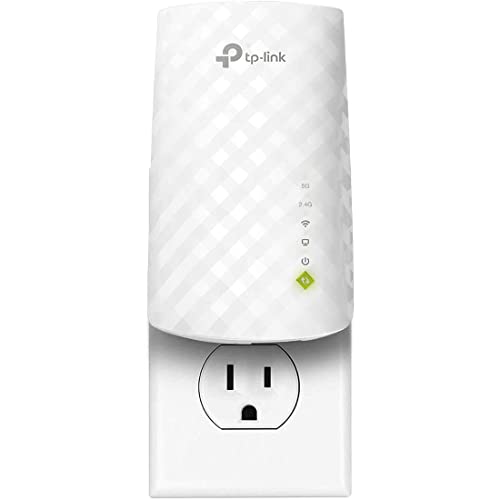
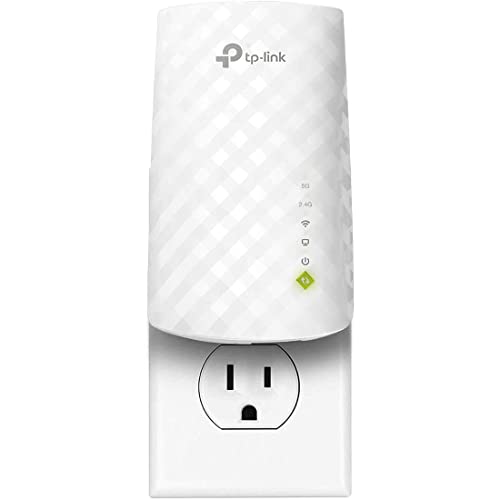
TP-Link RE220 — the extender with the hybrid trick
The RE220 represents the extender column, including its most powerline-like feature: an Ethernet port that gives one far-room device a wired connection fed wirelessly. For a single desktop plus phones in the same room, this is often the simplest single purchase in the whole comparison. (Powerline kits are discussed in prose above; no powerline model is linked because none sits in this site’s verified product pool.)
Head-to-head for the jobs people actually buy them for
Strip away the spec sheets and most buyers are choosing between these two for one of four jobs. Job one: a television or streaming box in a far room. Here powerline with a Wi-Fi or wired end point often wins on stability, because streaming forgives modest speed but punishes dropouts and jitter, and a wired-fed picture that never stutters beats a faster wireless picture that occasionally falls apart. Job two: a home office desk. The same logic applies with more force — calls and file transfers reward consistency, and a powerline adapter feeding the desk by cable removes the last wireless hop entirely for the machine that matters most. If the house wiring cooperates, the office job is powerline’s strongest case.
Job three reverses the verdict: phones, tablets and laptops used all over a room or a floor. Powerline’s wireless end points cover a modest radius well, but they are fundamentally a way to deliver a connection to a place, not to blanket a space, and households whose life is mobile — children with tablets, a laptop that migrates between sofa, table and bed — are better served by the extender’s broader, designed-for-roaming coverage. Job four is the games console or gaming PC, where the honest ranking puts any wired feed first: powerline delivering an Ethernet socket to the console beats an extender’s wireless hop on latency consistency in most homes where the wiring allows a decent link, while in homes with hostile wiring the extender, placed well, can return the favour. Every one of these verdicts carries the same asterisk — powerline’s performance is a property of your specific house in a way the extender’s never is — which is why the testing protocol elsewhere in this guide matters more for this purchase than for almost any other in home networking.
The wiring audit: reading your home’s electrical story before you buy
Powerline turns your mains wiring into a network cable, so the comparison hinges on a subject most buyers have never thought about: how their home is wired. Start at the consumer unit. Homes wired as a single ring or a small number of circuits, with the router’s socket and the target room’s socket on the same circuit, are powerline’s natural habitat. Homes with multiple consumer units, a separate unit for an extension or outbuilding, or wiring split across phases — common in larger and older properties in some regions — can defeat powerline completely between those boundaries, no matter how good the adapters are.
Age cuts both ways. Very old wiring with deteriorated insulation and many junctions adds noise and attenuation; very new wiring is usually clean but may include modern protective devices whose characteristics some adapters dislike. Add-ons matter as much as age: immersion heaters, large motors, cheap LED drivers, dimmers and ageing power supplies all inject noise onto the circuits, and the noise is worst exactly when those devices run. A home whose powerline link collapses every evening may simply be a home whose heating, lighting and cooking all switch on every evening. The extender, indifferent to all of this, wins those homes by default — not because it is better technology, but because it never asked the wiring to do anything.
You can audit before buying with nothing more than observation. Note which rooms share circuits if your consumer unit is labelled, check whether the extension or garden building has its own unit, and count the heavy or noisy loads on the path. If the audit reads badly — separate units, a long chain of junctions, an electrically noisy household — believe it, and spend your effort on the extender’s placement instead. If it reads well, powerline deserves its evening of testing, because in a favourable house it delivers the one thing no extender can: a connection in the far room that behaves as if it were wired, because underneath the plaster, it is.
Interference portraits: what actually disturbs each system
Each technology has its own weather. The extender’s weather is the radio environment: neighbouring networks on your channel, a baby monitor or video sender leaking across the band, microwave ovens shredding 2.4 GHz at lunchtime, Bluetooth and smart-home radios crowding the same spectrum. Its bad days correlate with what the neighbourhood is doing and with your own household’s wireless load, and its remedies are positional and configurational — a different socket, a different channel, a band change.
Powerline’s weather is the electrical environment, and its storms have different names. Vacuum cleaners, hair dryers, treadmills, faulty power supplies and some chargers inject bursts of noise that can halve a link’s throughput or drop it entirely for the duration. The pattern fools people because it correlates with human activity rather than with the network: the connection “fails every evening” when the household cooks, heats and lights itself, or “fails when the cleaner comes,” which is nearly a confession. Its remedies are also electrical — moving an adapter off a shared strip, separating it from a noisy appliance’s circuit, plugging the offending device through a filtered socket where appropriate — and they require thinking like an electrician rather than like a radio engineer.
Knowing which weather your home suffers from is genuinely diagnostic. If your existing Wi-Fi is reliable near the router and the far room’s problem is pure distance through walls, both systems are candidates and the wiring audit decides. If your home is radio-hostile — a dense apartment block saturated with neighbouring networks — powerline’s indifference to the airwaves is a real structural advantage. If your home is electrically hostile or architecturally split, the extender’s indifference to wiring returns the compliment. Most homes are mildly hostile to both, which is why so many households end up, happily, with the hybrid arrangements described later in this guide.
Long-term living: updates, expansion and quiet failure modes
Live with each system for three years and different maintenance profiles emerge. The extender lives in the Wi-Fi world: it needs the occasional firmware check, it must be re-paired or reset when the router or its password changes, and it ages alongside Wi-Fi standards, becoming the weak link when a new router generation arrives. Its failures are usually visible — a room loses coverage — and its replacement is a like-for-like swap an hour long.
Powerline lives in the electrical world and is oddly insulated from networking fashion: a pair of adapters feeding a desk does not care whether the household’s phones have moved on a Wi-Fi generation, because the desk machine talks Ethernet at its end. Its maintenance is close to nil, but its failures are quieter and stranger — a link that degrades when a new appliance arrives, an adapter orphaned when a circuit is rewired during building work, a spare room repurposed whose socket turns out to be on the other consumer unit. Expanding powerline means adding adapters to the same network, which is simple in principle and bounded in practice by the shared capacity of the wiring and by the discipline of keeping adapters matched and directly in wall sockets.
Expansion ambitions therefore tilt the comparison for growing households. A home expecting to serve more rooms wirelessly over time will outgrow powerline’s place-delivery model and should look at the extender as a first step or mesh as the destination. A home whose fixed points are multiplying — a second office, a workshop PC, a media server in a cupboard — can grow a powerline network point by point with a stability wireless still envies. As with the rest of this comparison, the correct answer is the one that matches the shape of the household’s future, not the shape of its present frustration. Households leaning wireless for a large property will find the current field surveyed in the best Wi-Fi extenders for large homes roundup.
Renting, listing and leaving: the portability verdict
For renters, both products pass the fundamental test — no drilling, no rewiring, everything leaves with you — but they travel differently. The extender is the simpler emigrant: it pairs to whatever router the next home provides, asks only for a network name and password, and its placement lessons transfer wholesale. Powerline travels well too, with one caveat: its performance must be re-proven in every new home, because each property’s wiring writes a new verdict. A pair of adapters that was superb in one flat can be mediocre in the next, through no fault of their own.
That caveat inverts for people selling or letting a property. Leaving an extender behind hands the next occupant a device paired to a router that may also leave, with a configuration nobody documented — a small puzzle rather than a gift. A network, by contrast, is usually removed entirely when households move, and neither system should be considered part of a home’s fixtures. The exception is the landlord equipping a property deliberately, where the better gift is the boring one: a well-placed router, sockets in sensible places, and coverage that does not depend on a tenant understanding either technology in this comparison.
Students and anyone in temporary or shared accommodation should weight setup politics as well as performance. An extender joins the existing network without touching shared infrastructure. Powerline adapters also leave the router alone, but they do occupy wall sockets directly — never a trivial matter in a shared house — and housemates’ noisy appliances become your network’s weather. In a quiet, wiring-friendly shared house, powerline to a bedroom desk is a genuinely elegant solution; in a chaotic one, the extender’s independence wins. Judge the household, not just the hardware.
Two worked comparisons: the flat and the farmhouse
Consider first a two-bedroom flat in a modern block: reinforced floors, dozens of neighbouring networks, but new wiring on a single consumer unit and rooms that are close together by any rural standard. The extender’s trial disappoints mildly — it works, but the crowded airwaves cap what it can do at busy hours, and the far bedroom’s calls wobble when the block comes home. The powerline trial, run honestly over an evening, surprises in the other direction: the short, clean wiring delivers a steady link to the bedroom desk, the calls hold, and the phones simply use the router’s own still-adequate Wi-Fi for wandering. Verdict for this home: powerline for the desk, nothing at all for the rest, and the extender returned. The deciding factors were invisible on any spec sheet — circuit layout and spectrum congestion.
Now the farmhouse: thick stone walls, an extension added in a different decade on its own consumer unit, wiring that has been extended, joined and repaired across generations, and a household that works in the old part of the house while the router sits by the only viable line entry. Powerline’s trial fails instructively — excellent within the extension, absent across the boundary to the old wing, exactly as the audit predicted. The extender’s trial is a qualified success: placed at the doorway between the wings, hearing the router through openings rather than through stone, it gives the work rooms a usable, honest connection, slower than anyone would wish and immeasurably better than the nothing that preceded it. Verdict: the extender earns its socket, the adapters go back, and the household files away the real lesson — that the permanent fix, one day, is a cable run during the next round of building work.
Set the two stories side by side and the comparison’s deepest point emerges. These technologies are not ranked; they are matched, each to the physical character of a building — one to its radio geography, the other to its electrical geography. Buyers who learn to read their own home, with the audit and the evening test as their instruments, almost always end up satisfied with whichever they choose. Buyers who shop by headline numbers alone are gambling on a building they have not examined, and the losing bets get blamed on the technology rather than on the match.
One practical footnote belongs in every version of this comparison: whichever system you trial, trial it from a retailer whose returns process you have actually read, and keep the packaging intact until the verdict is in. Powerline in particular is a product whose honest evaluation requires your specific house and your specific evening load, and no review — including the guidance in this cluster — can substitute for that test. The extender can be judged almost as quickly, from its app’s link readings and one busy evening in the target room. Both verdicts arrive within days; the discipline is simply refusing to decide before they do, and refusing to keep a loser out of inertia once they have.
Households that run the test properly also gain something beyond the purchase itself: a working knowledge of their own building. You will know which circuits serve which rooms, where your Wi-Fi genuinely reaches and where it merely pretends to, and which appliances your wiring dislikes. That knowledge outlasts both products and informs every later decision, from placing a mesh node to planning a renovation’s cable runs.
Finally, resist upgrading the winner prematurely. A powerline pair that delivers a steady, sufficient link to the desk does not need replacing because a newer standard exists, and an extender holding its room does not need a successor because a faster class launched. Both technologies reward the household that lets a working arrangement work, and saves its attention — and its budget — for the day the household’s needs, rather than the market’s calendar, say otherwise.
That patience has a technical basis, too: both systems perform at their best once their quirks in your home are known and accommodated — the extender’s socket chosen, the adapters’ circuits mapped, the noisy appliance identified. A settled installation of either kind is worth more than a theoretically superior replacement starting again from ignorance, which is why experienced households change these systems when they move, renovate or rewire, and otherwise leave them respectfully alone.
Write down those accommodations as you discover them — the good socket, the bad circuit, the appliance that must not share a strip — in the same network notes that hold your passwords. The next person to touch the system, even if that person is simply you in three years, inherits a working installation instead of a riddle.
With the notes kept and the verdict respected, either choice settles into the background of a house that simply works: the desk call that never stutters, the far-room stream that never buffers, the connection nobody mentions at dinner any more. That ordinariness, reached by matching a technology to a building honestly, was the point of comparing them carefully in the first place.
Ordinary, reliable and unremarked is, for home infrastructure, the highest praise available — and either of these technologies, honestly matched, can earn it.
Frequently asked questions
Do powerline adapters work in any house?
Most, but not all. Same-circuit, modern wiring works best. Split consumer units, very old wiring and heavy electrical noise can reduce speeds drastically or break the link. The only reliable test is in your own sockets, which is why easy returns matter for powerline more than for almost any other network gear.
Can powerline be faster than Wi-Fi?
Its latency is often steadier, which can feel faster for gaming and calls. For raw download throughput, a good modern extender usually wins. Judge by your workload: consistency for games and calls, peak speed for big downloads.
Do powerline adapters need to be the same brand?
Adapters following the same powerline standard generally interoperate, but pairing and management are smoothest within one brand’s kits. Mixing generations also drops the whole link to the slowest standard in the chain.
Why does my powerline link die when the washing machine runs?
Electrical noise. Motors and cheap power supplies inject interference onto the wiring. Moving the adapter to a different socket on the circuit, or the appliance’s plug to a filtered strip (never the adapter itself), often cures it.
Is powerline secure from neighbours?
Modern kits encrypt traffic between paired adapters. Press the pairing/security button during setup so your adapters form a private group — in flats on shared wiring this step is essential, not optional.
Can I combine powerline and an extender?
Yes, and it is a genuinely good pattern: powerline carries the connection across the hostile part of the house, and its far adapter (Wi-Fi model) or a small access point/extender in AP mode broadcasts locally. It is the poor man’s wired backhaul.
Do powerline adapters work through surge protectors or extension strips?
Generally, no — and this is the rule new owners break first. Surge protection and filtering circuitry in strips treats the powerline signal as noise and strips it out, so adapters belong directly in wall sockets. If the far room’s only socket is occupied by a strip, rearrange the furniture of your power: the adapter takes the wall socket, and if it has a pass-through socket (many do), the strip plugs into the adapter. That arrangement — adapter in the wall, everything else downstream of it — is the one the makers design for, and it preserves both the link and your surge protection.
Can I use powerline in a rented flat?
Yes, and it is one of powerline’s quiet strengths for renters: nothing is installed, nothing is drilled, and the kit leaves with you. Two rental-specific notes. First, flats in converted houses sometimes share wiring runs or have eccentric circuit layouts from the conversion, so the in-place testing protocol matters even more than usual. Second, use the pairing/encryption step without fail — shared building wiring is exactly the environment it exists for. Subject to those two, powerline and renting are natural partners, much like the extender itself.
Can powerline adapters interfere with my other electrical devices, or be harmed by them?
The harm mostly runs one way: noisy appliances degrade the powerline link rather than the link disturbing appliances. Standards-compliant adapters coexist with normal household equipment, and the practical symptom is throughput dropping while a particular device runs. If a specific appliance reliably wrecks the link, separating the two — different sockets, different circuits where possible, the adapter straight into the wall rather than sharing a strip with the culprit — resolves most cases. Persistent, unexplained noise on a circuit is worth an electrician’s opinion in its own right.
Do I need an electrician to install powerline adapters?
No. Adapters are plug-and-pair devices: one connects to the router by Ethernet and plugs into a nearby wall socket, the other plugs in where you need the connection, and the pair link themselves, usually with encryption enabled by a button press or by default. An electrician only enters the story if your audit reveals split consumer units or wiring questions you want answered for other reasons, or if you graduate to running real Ethernet cable, which is the permanent version of what powerline imitates.
Will a powerline network reach my garden office or detached garage?
Only if that building is fed from the same consumer unit on a circuit the signal can traverse — and even then, distance and junctions tax the link heavily. Many outbuildings have their own consumer unit, which usually ends the discussion. Test before relying on it, and treat success as a pleasant surprise rather than an expectation. For outbuildings that fail the test, the realistic options are an outdoor-rated wireless solution, a mesh node strategy or a proper cable run; the outdoor extender options are surveyed in the best Wi-Fi extenders for outdoors roundup.
Which is better for a house with very thick stone or brick walls?
Thick masonry is the extender’s hardest environment and powerline’s best argument, because the wiring passes through those walls inside the building fabric while radio must batter through them. In a stone cottage or a brick house where Wi-Fi dies at every doorway, a powerline link to the far room — even at a modest real-world speed — delivers a working connection where an extender may deliver only a stronger-looking failure. The wiring audit still applies, but in heavy construction the burden of proof shifts onto the wireless option.
Can I run powerline and an extender on the same network without them fighting?
Yes, and many homes do: they occupy different roles and different media, so there is nothing to fight about. A sensible division is powerline feeding fixed points that prize stability — the office desk, the TV — while the extender covers mobile devices in its zone. Keep the extender connected to the router rather than to a powerline-fed point unless you deliberately want the hybrid arrangement described in this guide, and give the two systems’ networks clear names during setup so that later fault-finding can tell at a glance which path a struggling device is using.
Related Guides
Keep going with these guides and roundups from the same networking cluster: