Disclosure: As an Amazon Associate, ilcastellomenu.com earns from qualifying purchases. Links on this page are affiliate links; they cost you nothing extra. Prices and availability change often, so check the current Amazon listing before you buy.
A wifi antenna buying guide has one job: to stop you buying a perfectly good antenna that cannot possibly help your home. Antennas fail as purchases far more often through mismatch than through quality: the wrong connector, the wrong radiation pattern for the floor plan, an indoor design sent to live outdoors, a single-band bargain fitted to a dual-band network. This guide works through the category in the order that prevents those failures: what antennas do and the main types, the picks worth shortlisting at each tier, the questions that actually decide a purchase, and the profiles that show how the answers combine for real households.
Key Takeaways
- State your problem in one sentence with a place in it; if you cannot, an antenna is probably not your fix.
- Connector family and gender, confirmed from your device’s documentation, come before every other specification.
- Omnidirectional for every direction, directional for one direction, magnetic-base for a badly placed device: pattern is the purchase.
- Dual-band support should mirror the bands your network genuinely uses, no more and no less.
- Outdoor buying includes installation buying: weather sealing, safe mounting in dry calm weather, and a professional for masts, grounding and lightning protection.
In this guide
What a Wifi Antenna Does, and the Main Types
A wifi antenna converts between the electrical signal in a cable and radio energy in the air, and its physical shape decides the pattern of that conversion. It adds no power and no intelligence; it redistributes. Think of the router’s output as a fixed budget of light and the antenna as the choice between a bare bulb, a lampshade that flattens the glow across one floor, and a torch. Every buying decision in this guide is a version of that choice, complicated only by connectors, bands and weather. With that picture fixed, the main types fall into place quickly.
Omnidirectional Whips and Paddles
The default type: a vertical element radiating in a full circle, flattened to a greater or lesser degree depending on its design. Whips screw directly onto routers and adapters; paddles are flatter blades that suit shelves and wall mounts. This is the type for a source that serves all around itself, the standard upgrade over bundled stubs, and the safest first purchase in the category. Its ceiling is set by physics: it cannot reach unusually far in any one direction, and its flattened pattern is weakest toward the floors directly above and below.
Directional Panels
A flat panel that concentrates its pattern forward, like a torch with a soft edge. Panels serve hallways, long rooms, and the classic house-to-outbuilding link in weather-rated form. They are the strongest tool per unit of spending when the target is known and stable, and the most disappointing when bought as a general upgrade, because the energy they push forward is taken from behind and beside. Buy a panel only when you can point at the place it will serve, literally.
Magnetic-Base Antennas
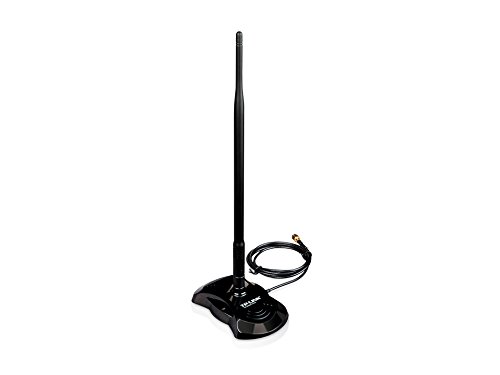
An element on a cable with a magnetic foot, designed to relocate the radiating point away from the device. This type exists for receivers in bad positions, above all desktops under desks, and it routinely outperforms its modest tier because it fixes position, the variable that matters most. Its discipline is cable management: short, direct runs, loosely coiled excess, and a mounting surface of real steel positioned by testing rather than assumption.
Outdoor Yagis, Grids and Panels
The long-reach specialists: highly directional designs in sealed housings, built for links between buildings and coverage across yards and land. They deliver what no indoor type can, at the price of a real installation project with alignment, weather sealing and professional involvement for masts, grounding and lightning protection. This guide treats them as a separate purchase category with its own safety section, because that is what they are.
Top Picks at a Glance
The shortlist below spans the types and tiers honestly. Check the current Amazon listing for the exact configuration before ordering, and confirm it against your device’s documentation.
| Pick | Badge | Type | Tier |
|---|---|---|---|
| TP-Link TL-ANT2408CL | Best Budget | Indoor omni whip | Entry |
| Eightwood Dual Band WiFi Antenna | Best for Desktops | Magnetic base | Mid |
| Alfa Network APA-M25 | Best Directional | Panel | Premium |
| Bingfu Dual Band WiFi Antenna Pair | Best Replacement Pair | Dual-band whips | Entry |
| Alfa Network ARS-N19M | Best Flexible Placement | Magnetic mount omni | Mid |
| TP-Link TL-ANT2414A | Best Outdoor | Weather-rated panel | Premium |
Wifi Antenna Buying Guide: The Questions That Decide the Purchase
Which Connector Does Your Device Actually Have?
This question outranks all others because its wrong answer voids the purchase. Home wifi gear concentrates on a small threaded connector that exists in two mirror-image forms distinguished by which side carries the centre pin; the forms look alike, feel alike on the thread, and are not interchangeable. Enthusiast and outdoor gear uses larger connectors, some of them weather-sealed designs. Establish your port from the manual or specification sheet, not from a photograph of a similar model, because manufacturers change ports between generations of the same product line. If your device has no external antenna port at all, and many modern mesh units and laptops do not, then this entire category is closed to that device, and the money belongs to placement, mesh or wiring instead. Adapters between connector families exist, but each adds signal loss and a joint that can loosen; treat them as a fallback, never the plan.
Do You Need Signal Everywhere, or Somewhere?
Walk your home and name the places where wifi genuinely disappoints. If the answer is one room, one desk or one outbuilding, your pattern choice is directional or receiver-side, and this guide’s panel and magnetic-base picks apply. If the answer is a soft disappointment everywhere, the honest purchase is not an antenna; it is more signal sources, meaning mesh nodes or a wired access point, and our coverage notes in wifi routers for distance explain the economics. If the answer is one floor of a multi-storey home, consider pattern flatness: an omni that spreads across its own floor starves the others, and antenna orientation experiments on a multi-antenna router may beat any purchase. This single question, answered honestly, eliminates most wrong orders.
Which Bands Does Your Network Really Use?
Modern networks run on two bands with opposite personalities: the lower band travels further and penetrates walls better, the higher band is faster at shorter range and less crowded. An antenna must support the bands it will serve, and a dual-band design is the natural match for a dual-band router or adapter. The subtle buying error is paying for pattern behaviour on the wrong band: a household whose far room survives only on the longer-range band should judge antennas by their behaviour there, not by headline claims drawn from the faster band at close range. Check which band your struggling devices actually connect on, in the router’s client list, before shortlisting; the answer sometimes reveals that the real fix is steering a device to the other band, which costs nothing.
How Long Will the Cable Run Be?
Any antenna separated from its device by cable, which means magnetic-base and all outdoor designs, pays a tax: the cable absorbs some signal, and thinner, longer cables tax more. The buying implication is to choose the shortest run that achieves a genuinely better position, and to prefer a modest relocation done well over an ambitious one done through a long thin lead. Outdoors, cable choice hardens into a specification: outdoor-rated cable, routed with drip loops so water runs off rather than into connectors, every joint sealed against weather. When comparing two similar antennas, the one whose cable and mounting story is described in sober detail is usually the one engineered by people who have installed their own product.
Indoors, Outdoors, or Both Ends of the Link?
Decide where the work happens. Router-side antennas help every device in the favoured direction; device-side antennas help one device completely. Long links, above all to outbuildings, reward antennas at both ends aimed at each other, and punish the assumption that one heroic antenna can shout across a distance to a device that can only whisper back. Environment decides construction: outdoor positions require rated housings and sealed connectors without exception, and any mounting beyond a simple wall bracket at reachable height imports the safety discipline detailed later in this guide.
How to Prioritise by Use Case
The renter with a fixed line point and a far study should prioritise pattern and reversibility: a panel aimed down the hallway, or a tall omni as the gentler experiment, fitted in minutes and removable without trace. The desktop gamer should prioritise position over pattern: a magnetic-base antenna at the machine, judged by stability across an evening of play, with the router untouched. The small business with a stockroom dead zone should prioritise coverage honesty: if staff roam the whole space, the answer is a proper access point, possibly informed by wifi routers for many simultaneous devices, and an antenna only if the dead zone is one fixed till or terminal. The rural owner feeding a workshop should prioritise the installation, not the antenna: line of sight, outdoor-rated panels at both ends, sealed connectors, a mounting plan with absolute clearance from overhead power lines, and a professional for the mast, grounding and lightning protection. In every profile the antenna is the last decision, not the first.
The Picks in Detail

TP-Link TL-ANT2408CL — Best Budget Omni
A hinged indoor whip that improves on bundled stubs through stature and a hinge that holds its position. Strengths: effortless fitting, honest all-direction coverage, the lowest-risk first experiment in the category. Trade-offs: no directional reach, and its generation-spanning popularity makes connector verification essential. Best for: small homes with the router at one end. Not suited for: outbuildings, outdoor use, or whole multi-storey coverage.
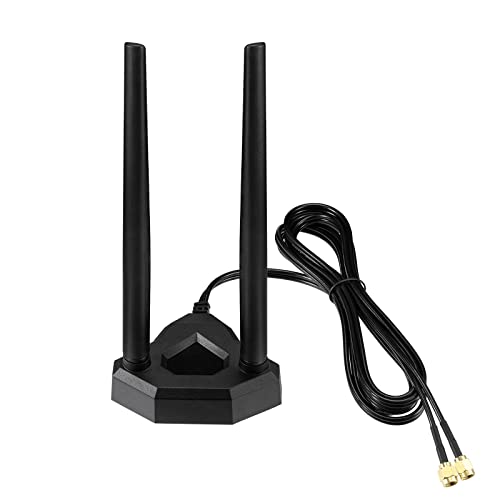
Eightwood Dual Band WiFi Antenna — Best for Desktops
A dual-band element on a magnetic base that relocates a receiver’s ears out of the under-desk canyon. Strengths: the largest typical before-and-after difference in this guide, flexible placement by testing, no changes to the shared router. Trade-offs: cable discipline required, and useless on devices without an external port. Best for: desktops, small-form PCs and adapters in metal shadows. Not suited for: laptops without ports or outdoor mounting.

Alfa Network APA-M25 — Best Directional Panel
A dual-band panel that concentrates the conversation toward one target, indoors down a hallway or in a sheltered position toward an outbuilding. Strengths: the firmest single-direction links on this shortlist, discreet flat form, rewards careful aim. Trade-offs: coverage behind it thins, and aim must be revisited if the room changes. Best for: one stubborn room or building in a stable direction. Not suited for: serving every direction from one point. Compare its character with the alternatives in our wifi antenna reviews roundup.

Bingfu Dual Band WiFi Antenna Pair — Best Replacement Pair
Matched dual-band whips sold as a pair for the large installed base of dual-antenna routers and adapters. Strengths: restores broken or lost antennas like-for-like, keeps a device’s antenna pair balanced, entry-tier commitment. Trade-offs: restoration and mild improvement are the honest ceiling. Best for: repairs and refreshes of dual-antenna gear. Not suited for: reach problems or directional needs.
TP-Link TL-ANT2414A — Best Outdoor Panel
A weather-rated directional panel for house-to-outbuilding links along a clear line of sight. Strengths: sealed construction, genuine outdoor endurance, strong focused links when aligned at both ends. Trade-offs: it is a project, requiring weather-sealed connectors, safe installation in dry calm conditions only, total clearance from overhead power lines, and professional mast, grounding and lightning protection work. Best for: workshops, barns and garden buildings. Not suited for: improvised or hurried installation.
First Setup and Care Essentials
Fit antennas finger-tight plus a gentle nudge; tools invite cross-threading and cracked housings. Stand whips vertical, aim panels by testing with a helper at the target seat, and place magnetic bases by experiment, judging each candidate spot across an evening rather than a moment. Keep elements clear of large metal, mirrors and water. Re-check connector snugness after any cleaning or furniture move, and dust housings as part of ordinary housekeeping. Outdoors, inspect connector sealing each season and after severe weather, replace degraded sealing promptly, and never climb to inspect during a storm or while surfaces are wet: wait for dry, calm conditions, use proper ladder safety, and leave anything involving the mast itself to the professional who installed it. The full procedure lives in how to install a wifi antenna.
Mistakes to Avoid
The category’s recurring mistakes are all preventable. Ordering by photograph instead of connector specification. Buying directional reach for an everywhere problem, or omni politeness for a single distant target. Paying for headline gain figures without asking what pattern produced them. Running long thin cable to a theoretically perfect position and taxing away the benefit. Mounting an indoor antenna outdoors. Forgetting the return journey: a link fails at its weaker end, so a powerful router antenna cannot rescue a device that cannot reply. And the gravest mistake, treating outdoor installation as a casual chore: work only in dry calm weather, keep everything far from overhead power lines, never site a mast where a fall could reach one, and put grounding and lightning protection in professional hands.
Final Recommendation
Buy the pattern your floor plan asks for, on the connector your device actually has, at the tier the problem deserves, which is usually entry or mid rather than premium. Let panels be specialists, whips be generalists, magnetic bases be rescuers and outdoor designs be professionally supported projects. Follow that discipline and an antenna becomes the most cost-effective tool in home networking; ignore it and the same products become the category’s famous disappointments. For the other side of the ledger, read wifi antenna pros and cons before you order.
Reading a Product Listing Like an Engineer
A good antenna listing answers five questions in plain language, and learning to scan for them turns shopping from gambling into filtering. What is the connector, family and gender, stated in words rather than left to a photograph? What bands does it serve? What is its radiation pattern, described as omnidirectional or directional with some sense of its beam? What environment is it built for, indoor or outdoor, with the outdoor claim backed by sealing and housing detail? And what does it not do, which honest listings volunteer and dishonest ones never mention? Score any candidate against those five and the field narrows fast. Listings that lead with enormous gain figures and universal promises while omitting connector gender are telling you, in the only language available to them, that returns are part of their business model. Your documentation-first discipline from this guide, manual before catalogue, is what makes the scan possible: you cannot recognise a plainly stated connector if you do not know which one you need.
Photographs deserve a specific warning. Connector photographs are routinely shot from angles that hide the centre contact, product families share shells across connector variants, and scale is impossible to judge without a reference object. Treat photographs as illustrations of form factor only, never as compatibility evidence. The specification table and the manual are evidence; the gallery is marketing. Similarly, treat bundled claims about compatibility with long lists of router models as a starting hint rather than a guarantee, because manufacturers change ports between hardware revisions of the same model. The listing that survives an engineer’s reading is usually written in a drier tone than its competitors, and that dryness is a feature: it is the sound of a seller describing a physical object instead of a miracle.
Tiers Explained in Words
This guide uses entry, mid and premium tiers deliberately instead of prices, because what a tier buys in this category is consistent even as prices drift. Entry tier buys correctness: a sound connector, an honest pattern, adequate build for indoor life. Most replacement and first-experiment purchases should live here, and many households never need to leave it. Mid tier buys mechanics and flexibility: hinges that hold for years, magnetic bases with sensible cable, dual-band manners executed properly, housings that survive being knocked off a desk. Premium tier buys specialisation and endurance: serious directional panels with disciplined patterns, and outdoor construction whose sealing and mounts are engineered for seasons rather than months, with the understanding that outdoor premium honestly includes professional installation in its true cost. The buying error tiers exist to prevent is climbing for reassurance: paying premium money for a generalist problem buys narrower patterns and more installation, not more coverage.
When Two Antennas Beat One
Several common situations reward spending at both ends or in matched sets rather than concentrating the budget. A link between buildings is the clearest: modest directional antennas aimed at each other outperform one heroic antenna shouting at a deaf partner, because the return journey matters as much as the outward one. Dual-antenna devices are the second: matched pairs preserve the cooperation the device was designed around, while one upgraded and one tired antenna can behave worse than two honest equals. The third situation is the two-problem home: a router-side omni for general tidiness plus a magnetic base at the one trapped desktop often beats a single premium panel asked to do both jobs and doing the second badly. The principle is that antennas are cheap specialists; a small team of them, each matched to one sentence of your problem list, is frequently the best-value architecture in home networking.
Compatibility Scenarios Buyers Actually Face
Consider the situations that generate the most confused orders. The owner of a mesh system discovers the nodes are sealed and no antenna can be fitted; the correct purchase is another node or better node placement, and this guide’s role is to say so before money moves. The owner of an older router finds its port is the mirror image of the modern default; the correct purchase is the antenna specified for that port from the manual, not the popular listing. The owner of a USB adapter for a desktop finds the adapter’s tiny antenna is its bottleneck; the correct purchase is at the adapter end, a magnetic base, leaving the household router untouched. The owner of a camera or similar device with a single small antenna finds range limited by the device itself; the correct purchase may be repositioning the device or the router rather than any antenna. Each scenario rewards the same habit: locate the port, the pattern and the problem before the product, and let the scenario, not the catalogue, lead.
The Deep Criteria: What Separates a Good Buy From a Lucky One
Build Quality You Can Judge Without Instruments
Buyers cannot measure an antenna’s pattern at the kitchen table, but they can judge its mechanics, and mechanics predict ownership satisfaction better than any published figure. Work the hinge through its full travel: it should move with even resistance and hold every position against the element’s weight without creep. Flex the housing gently: it should feel like a sealed object, not a shell waiting to split along its seam. Inspect the connector’s threads and centre contact under good light: clean machining here is the visible signature of a maker who cares about the invisible parts too. On magnetic bases, test the magnet against real steel and judge the cable’s strain relief where it leaves the base, because that joint flexes every time the base is auditioned in a new position. None of these checks requires expertise, and together they filter out most of the category’s disappointments before the pattern ever gets a chance to matter.
Pattern Honesty and the Beamwidth Question
Directional antennas live or die by how their beam matches your space, and the honest way to think about beamwidth is in room terms rather than degrees. A wide beam behaves like a porch light: it favours a broad area in front of the panel, forgiving of aim, suitable for a living room or a near outbuilding. A narrow beam behaves like a spotlight: it reaches further and forgives nothing, suitable for a defined distant target with a clear path. Buyers should match beam character to target character and distrust any directional listing that does not describe its beam at all, because a panel without a stated pattern is a panel whose maker either does not know or does not wish to say. Indoors, err wide: rooms are close, reflections are generous, and the forgiving beam usually wins. Outdoors across real distance, err narrow, and budget the aiming patience that narrowness demands.
Weather Construction, Judged From the Listing
Outdoor suitability is a construction claim, and it can be cross-examined before purchase. A credible outdoor antenna describes a sealed housing, a connector arrangement that can itself be sealed, a mounting system designed for wind load, and materials chosen for sun exposure. A listing that merely adds the word outdoor to an indoor design reveals itself by silence on all four points. Buyers should also examine the cable story: outdoor projects need outdoor-rated cable and a sealing method for every joint, and a package that includes neither while promising outdoor performance is selling the antenna and abandoning the installation. This guide’s position is strict because the field evidence is strict: outdoor links fail at joints and seals, not at radiating elements, and the time to discover a listing’s indifference to that fact is before the order, not after the first wet season.
The Two-Band Reality Check
Dual-band buying contains a subtlety that deserves its own paragraph. An antenna serves both bands with one physical structure, and designs compromise differently: some favour the longer-range band’s behaviour, some the faster band’s, and the listing rarely says which. The buyer’s defence is to know which band carries their problem. If the far room survives on the lower band, as far rooms usually do, then judge candidates by their reputation and description on that band, and treat higher-band performance as a bonus for nearer devices. If the problem seat is near the router and starved on the faster band by congestion rather than distance, an antenna is probably the wrong purchase entirely, and the correct spend is on placement, channel hygiene or a router generation that handles crowds better. The reality check takes five minutes in the router’s client list and has saved more buyers from elegant irrelevance than any other step in this guide.
Three Budgets, Honestly Allocated
An entry-tier budget, spent well, covers the category’s highest-probability wins: a matched replacement pair for tired antennas, a sound omni upgrade for a modest home, or the first directional experiment in a flat whose hallway invites one. The allocation rule at this tier is to buy correctness over ambition: the right connector, the right pattern, no adapters, no outdoor improvisation. A mid-tier budget adds mechanics and options: the magnetic base that transforms a desktop, a better-hinged omni set for a multi-antenna router, or a panel of genuine build quality for the stubborn room. The rule here is to spend on the end of the link where the problem physically lives, which the worked profiles in this guide demonstrate repeatedly. A premium budget belongs to specialisation and to the outdoors: serious directional hardware, and, counted honestly within the same budget, the professional installation, sealing materials and outdoor cable that make outdoor hardware meaningful. The rule at this tier is that the installation is part of the purchase; a premium antenna on an amateur mast is a mid-tier outcome at a premium price.
Across all three budgets, one allocation never pays: spreading a budget thinly across several speculative antennas for several vague problems. Concentrate on the problem you stated in one sentence, solve it measurably, and let the confidence and knowledge from that success fund the next decision. Households that buy this way accumulate a small, well-understood kit: perhaps an omni set on the router, a magnetic base at the desk, a panel that owns the hallway. Households that buy speculatively accumulate a drawer. This guide was written to build the kit and empty the drawer.
After the Purchase: The First Fortnight
A buying guide’s responsibility extends past the checkout, because the first fortnight decides whether a good purchase becomes a good outcome. Days one and two belong to baselines and first positions, following the testing discipline this guide has described: worst room, worst hour, real activities, written notes. The rest of the first week belongs to position auditions, one variable at a time, including the rooms a directional choice may have taxed. The second week belongs to stillness: live with the winning arrangement and let ordinary life deliver its verdict, the dropped call that does or does not happen, the stream that holds or does not. Only then decide whether the purchase is final, and keep the packaging and the original antennas until that decision is made. Buyers who grant a purchase this fortnight almost never regret antennas; buyers who judge on installation afternoon regret them at the category’s famous rate, and the difference is not the product. It is the calendar.
Worked Buying Scenarios, Priced in Tiers and Reasoning
Scenario One: The First Flat
A young household in a first flat, router by the door because that is where the line arrives, one bedroom at the hallway’s end where calls go to die. The buying sequence this guide prescribes runs: confirm the router is healthy with a test beside it; walk the hallway and note that the problem has a single direction; verify the connector from the manual; shortlist a panel at a premium-leaning tier or a tall omni at entry tier as the gentler first experiment. The reasoning to record is that the flat’s geometry is the textbook directional case, and the budget follows the geometry, not the anxiety. If the omni experiment stabilises the bedroom, the household stops there, richer by the difference and by the knowledge. If it does not, the panel is bought with the connector and the aim already understood, and the omni retires to the next home, because entry-tier generalists are never wasted money in a life that will contain more flats.
Scenario Two: The Family House With the Study Problem
A family house where everything works except the study, which is also where the desktop lives, two floors of ordinary construction between it and a router that serves the ground floor contentedly. The buying sequence: resist the router-side heroics the catalogue suggests; audit the study first and find a desktop under a desk with its antennas in a metal canyon; verify the desktop adapter’s port; buy the magnetic base at mid tier and audition its positions across a week of working evenings. The reasoning is the two-way truth applied with discipline: the household’s problem is one device’s ears, and the purchase belongs at that device. Only if the study’s phones and laptops share the complaint does the buying widen to a router-side pattern decision, and by then the desktop experiment has already mapped the room’s geometry for free.
Scenario Three: The Workshop Across the Yard
A rural owner whose workshop sits beyond the house’s comfortable signal, with a clear view between the buildings and a real need for the workshop to join the network. The buying sequence is a project plan wearing a shopping list: survey the line of sight in leaf and out of leaf; choose weather-rated panels for both ends at premium tier; add outdoor-rated cable, sealing materials and proper mounting hardware to the same order; engage the professional for the mast work, grounding and lightning protection before the hardware arrives; schedule installation for dry calm weather with total clearance from the property’s overhead lines confirmed on paper. The reasoning this guide insists on is that the antenna is the cheapest line in this budget and the installation is the product; a household that buys the panel and improvises the rest has not saved the professional’s fee, it has merely deferred it to the first failure, with interest payable in weather.
The Guide’s Final Filters
Before any order, run the purchase through four final filters that summarise this entire guide. The sentence filter: can you state the problem this antenna solves in one sentence with a place in it, and does the antenna’s pattern match that sentence. The documentation filter: is the connector confirmed from the device’s own manual, the bands confirmed against the network’s real usage, and the environment rating confirmed for the place the antenna will live. The honesty filter: does the listing describe its pattern, its connector and its limits in sober language, and would the seller’s description survive being read aloud to an engineer. The installation filter: is there a plan, proportionate to the setting, for positioning, cable, sealing and, outdoors, for professional mast support and absolute clearance from overhead power lines. A purchase that passes all four filters is, in this guide’s long observation, almost never regretted. A purchase that fails one is not necessarily wrong, but the failing filter names the exact risk being accepted, and naming a risk before paying for it is the difference between buying and gambling.
It remains only to place this guide among its companions. The choosing method that turns these filters into steps lives in how to choose a wifi antenna; the deep single-category evaluation lives in our companion wifi antenna review; and the profiles of households whose real answer was not an antenna at all are gathered in our large-house router and fibre extender guides. A buyer who has read this far has already performed the guide’s central act, which is not shopping but thinking, in the right order, about a problem that rewards thought far more reliably than it rewards spending.
Buying for a Household, Not a Hobby
Most antenna purchases are made by one member of a household on behalf of all of them, and this guide closes its advice with the responsibilities that follow from that fact. The buyer owes the household an experiment that can be undone, which the category’s reversibility happily provides, and owes it honest reporting: if the new panel’s favour is paid for by the spare room, the household deserves to hear that from the buyer before it hears it from the spare room’s occupant. The buyer also owes the household a finish line. Antenna work invites endless refinement, and the discipline this guide has taught, a named problem, a baseline, a fortnight of judgement, exists partly to protect the household’s peace from the buyer’s perfectly understandable enthusiasm. When the named problem is solved, declare the project complete in the hearing of the house, file the notes, and return the network to its proper state, which is invisibility. The best compliment a buying guide can earn is a household that never thinks about its antennas again, and every filter, tier and scenario in the preceding pages was arranged to earn exactly that compliment.
And if the household’s verdict, honestly gathered, is that the antenna did not earn its place, this guide’s last word is reassurance: you have not failed at networking. You have run the cheapest diagnostic the field offers and learned the true shape of your home’s problem, which is the knowledge every subsequent purchase will spend. Return the antenna inside its window, keep the notes it generated, and spend next on the source, the node or the cable run that your experiment just proved necessary. That is not a consolation prize. That is the guide working exactly as designed, because a buying guide’s first loyalty is not to the category it covers but to the household it serves, and sometimes serving the household means talking it out of the purchase and into the knowledge. Buy the pattern your floor plan asks for, or buy nothing and know why: both are victories, and both are yours for the price of one honest evening’s thought.
Let the guide’s last paragraph be a benediction for the buyer who has done the work. You have stated a problem, walked a route, read a manual, matched a pattern and interrogated a listing, and in doing so you have already received most of what this category has to teach, whether or not a parcel ever arrives. If one does arrive, install it with the patience the companion guide prescribes, judge it across its fortnight, and file your notes where the next decision can find them. The antenna, if the method held, will now proceed to bore you for years by simply working, and boredom, in home networking, is the sound of a purchase made perfectly. May all your dead zones be named, all your connectors verified, and all your evenings online be as uneventful as this guide has tried to make them.
One more consideration belongs in a complete buying guide, and it is the household’s future selves, who will inherit this purchase without having read this page. Leave them the manual, the worksheet and the note of what was fitted where and why, taped inside the cupboard where the router lives. An antenna explained is an antenna that survives rearrangements, because the next person to move the router will know which element is aimed, which base is placed, and what the little forest of whips is for. Buying well is an afternoon; documenting well is what makes the afternoon permanent, and permanence, in a house, is the whole point.
Sizing and Compatibility Checks to Run Before You Decide
Separate the headline feature from the daily feature
Every Routers range has one headline feature that dominates the marketing and one unglamorous feature you will use every single day. For a wifi antenna, the daily feature is usually the control you touch most, the consumable you replace most, or the connection you make and break most often. Weight your shortlist by the daily feature first and let the headline feature break ties, because novelty fades within weeks while a clumsy daily interaction stays annoying for the life of the product.
Plan the consumables and spares shelf
Ownership of a wifi antenna usually involves a small ecosystem of consumables, refills, replacement parts or spares, and availability matters as much as the unit itself. Check that the refills your shortlisted models need are standard, stocked by more than one seller, and replaceable without tools you do not own. A model tied to a single obscure consumable becomes a liability the moment that line is discontinued, whereas a wifi antenna built around common refills stays useful for years. Keep one spare of the fastest-wearing part from day one.
Run the two-week test on paper
Imagine the wifi antenna arriving today and simulate the next two weeks of use in detail: where it sits, what you do with it on a normal weekday, what happens on the busiest day, and where it goes when guests arrive or the room is cleaned. This simple rehearsal exposes storage gaps, missing accessories and workflow clashes that specification tables never show. If the simulation produces friction in a busy shared workspace where several people use the same setup across the day, adjust the shortlist now, while the fix is a different model rather than a return label and a refund wait.
Decide your return-risk tolerance in advance
Some wifi antenna choices are easy to judge from a listing and some only reveal themselves in the hand, in the room, or in your software. If your shortlist includes a model you are judging on feel, fit or noise, buy from a seller whose returns process you have actually read, and keep the packaging intact until the first full week of use is done. Knowing your exit route in advance lets you choose the bolder option on the shortlist without gambling, and it removes the pressure to keep a wifi antenna that is merely acceptable.
Start with the space, not the shortlist
Before comparing a single wifi antenna, measure the space it has to live and work in, and write the numbers down. Footprint is only the start: allow for cables, ventilation, doors or lids that swing open, and the room your hands need to load, adjust or clean it. In a busy shared workspace where several people use the same setup across the day, a model that fits on paper can still fail in practice because access is blocked or a cable run has nowhere tidy to go. Measuring first turns the Routers shortlist from a wish list into a filtered list where every remaining option is physically plausible.
Check compatibility against what you already own
A wifi antenna rarely works alone, so list the devices, mounts, media, software or accessories it must cooperate with, and check each pairing against the listing details rather than assuming standards guarantee harmony. Connector versions, physical clearances, supported formats and control apps are the usual friction points. When picks such as Bingfu Dual Band WiFi Antenna, TP-Link TL-ANT2414A and TP-Link TL-ANT2408CL are on your shortlist, run this check against each listing in turn. Where a listing is vague about a pairing you depend on, treat that silence as a risk to resolve before ordering, not a detail to discover afterwards. Compatibility failures are the most common reason a well-reviewed wifi antenna gets returned.
None of this requires expertise — only the willingness to check your own routine before trusting a generic recommendation.
Five honest minutes at this stage is worth more than five hours of comparison browsing.
If a candidate fails this check, strike it from the list without regret and let the remaining options compete on merit.
Your future self, mid-task on a busy day, is the person this check is really for.
Keep the notes with the product’s paperwork; they become the baseline every later adjustment is judged against.
Write the conclusion of that check down before you order, so the decision survives contact with a tempting listing.
That single habit separates owners who stay pleased with their choice from owners who quietly start shopping again within a season.
Treat it as part of the purchase itself, not as homework to do after the box arrives.
None of this requires expertise — only the willingness to check your own routine before trusting a generic recommendation.
Frequently Asked Questions
How much should I spend on a wifi antenna?
Spend at the tier of the problem, not the tier of the marketing. Indoor omni replacements and magnetic-base antennas are entry-to-mid purchases that solve most household cases; directional panels sit a tier higher; outdoor links are premium once professional installation is honestly included. Overspending usually buys pattern you do not need or gain figures achieved by narrowing coverage you did need. If the shortlist in this guide contains an entry-tier answer to your stated problem, start there and judge by a week of evenings.
Does a wifi antenna need to match my router brand?
No. Antennas are passive and brand-agnostic; what must match is the connector family and gender, the bands supported, and the intended environment. A third-party antenna on your router is a normal, warranty-friendly experiment in most cases because it simply screws onto a standard port. The exception is proprietary or sealed equipment with no external port, where no antenna of any brand can be fitted and the upgrade path is placement, mesh or wiring instead.
Should I replace all the antennas on my router at once?
On multi-antenna routers, matched sets behave most predictably, and replacing a broken antenna with a dissimilar one can unbalance the cooperation between elements. If you are upgrading for pattern reasons, replacing the set with matched antennas is the cleaner experiment. If you are experimenting with one directional element among omnis for a specific room, do it as a deliberate, tested exception and keep the originals, because the honest outcome is knowable only by trying both arrangements.
Can an antenna help my wifi go through thick walls?
It can help at the margins by putting more energy on the path, but masonry, foil-backed insulation and metal are hard limits that no antenna repeals. A directional panel aimed through the one wall that matters is the best antenna answer; repositioning the router or adding a wired access point on the other side of the wall is the better structural answer. Judge by which side of the wall the people and devices actually live on, and spend accordingly.
Is a detachable antenna a reason to choose a router?
For tinkerers and for homes with known geometry problems, yes: a router with standard external ports keeps the entire antenna category open to you, including receiver-style and directional experiments, for the life of the device. Sealed designs can be excellent routers, but they foreclose this cheap class of fix. If your current router has ports you have never used, this guide is your invitation to treat them as an asset before considering any larger purchase.
What is the first thing to try before buying anything?
Position and orientation, which are free. Move the router higher and clearer of metal and clutter, stand its antennas vertical or at complementary angles, and test the problem room across an evening. Then check which band the struggling device is using. A surprising share of antenna purchases are quietly solving a placement problem that an hour of experiments would have solved first, and the experiments also teach you the geometry that makes any later antenna purchase a good one.
Related Guides
Keep reading with these companion guides from the same cluster and the wider networking library: the wifi antenna review in depth; choosing a wifi antenna step by step; mesh routers for large houses; wifi extenders for fibre connections.