Disclosure: As an Amazon Associate, ilcastellomenu.com earns from qualifying purchases. Links on this page are affiliate links; they cost you nothing extra. Prices and availability change often, so check the current Amazon listing before you buy.
This wifi antenna review starts from a frustration almost every home network owner recognises: the router is working, the internet plan is fast enough on paper, yet one room still stutters through video calls and another drops off the network entirely. A replacement or add-on wifi antenna promises to fix that by reshaping the signal your equipment already produces, rather than by replacing the equipment itself. That promise is real but narrow, and the honest value of an antenna depends entirely on whether your problem is actually a signal-shape problem. This review examines the product class the way an owner experiences it: what an antenna can change, what it can never change, how the main designs differ in daily use, and which checks separate a satisfying upgrade from a wasted order.
Key Takeaways
- An antenna reshapes and concentrates the signal your router or adapter already makes; it creates no new speed, bandwidth or coverage out of thin air.
- The single biggest predictor of success is connector compatibility: the antenna, the cable and the device port must all match, in type and in gender.
- Directional designs trade coverage area for reach in one direction; omnidirectional designs spread signal evenly but cannot push it further in any one direction.
- An antenna upgrade pays off most when the router must stay where it is and one specific area needs help; it pays off least when the whole home is underserved.
- Outdoor mounting raises the stakes: weather sealing, safe ladder work in dry calm conditions only, and professional help for masts, grounding and lightning protection.
Our verdict in short: a well-chosen wifi antenna is one of the most satisfying small upgrades in home networking, because it solves a geometry problem with geometry. It suits owners whose router position is fixed by the incoming line, renters who cannot run cable, and anyone feeding a signal to one stubborn room, workshop or garden office. It does not suit households whose real problem is an old router, a congested neighbourhood band, or a floor plan so large that only a mesh system or a wired access point will genuinely fix it. Read the rest of this review as a filter: by the end you should know which of those situations is yours.
In this guide
Wifi Antenna Review: What a Wifi Antenna Is and Where It Fits
A wifi antenna is the part of a wireless system that actually exchanges energy with the air. Your router or USB adapter generates a radio signal, the feedline carries it to the antenna, and the antenna’s shape decides how that energy leaves: spread in a doughnut around a vertical whip, pushed forward in a beam from a flat panel, or collected from one direction by a grid or yagi design. Every antenna is passive. It has no processor, no firmware and no power of its own, which is both its charm and its limit. It cannot clean up interference, negotiate a faster standard, or persuade a distant device to transmit more strongly back. What it can do is put more of the existing signal where you need it and waste less of it where you do not.
That is why antenna upgrades feel miraculous in one home and useless in the next. If your router sits in a corner behind a television and the dead room lies straight down a hallway, a directional panel aimed down that hallway concentrates energy exactly along the path it must travel, and the improvement can be dramatic. If your router sits in the middle of a large house and every room is equally mediocre, no antenna shape fixes the underlying shortage of signal; you need the signal source itself moved or multiplied, which is the job of a mesh node or a wired access point. Owners comparing those routes will find our companion piece on getting wifi to rooms at a distance a useful reality check before spending anything.
Where an antenna fits, then, is in the gap between a working router and a badly served space. It also fits on the device side: many desktop computers, older laptops with external ports, and dedicated wireless adapters accept a screw-on antenna, and upgrading the antenna on the receiving device can help as much as upgrading the router’s, because a wifi conversation is two-way. A strong signal travelling down to a laptop is wasted if the laptop’s reply cannot travel back. This two-way thinking runs through the whole review, and it is the detail most quick buying advice skips.
Antennas also divide by placement. Indoor whips and paddles live on desks and router tops, cost little, and can be repositioned in seconds. Magnetic-base antennas add a short cable so the radiating element can sit on a shelf or a metal surface away from the clutter behind a desk. Outdoor panels and yagis live on walls and masts, survive weather, and serve outbuildings, yards and long rural links, but they demand proper installation discipline, which this review treats seriously in the setup section below. Each placement class solves a different problem, and confusing them is the most common buying mistake in the category.
Design, Build and Setup
Pick up a typical replacement whip antenna and the design story is told by three things: the hinge, the connector and the housing. The hinge lets the antenna stand vertical, which matters more than almost anything else, because a whip radiates most strongly in the plane perpendicular to its length; a whip left leaning at a jaunty angle is quietly wasting signal into the ceiling and floor. Better hinges click through firm detents and hold position against the weight of a longer element. Cheap hinges go slack within months, and the antenna slowly droops into exactly the orientation that performs worst. When you handle one in a shop or unbox one at home, work the hinge through its range and judge whether it will still be holding position a year from now.
The connector is the second design story, and it is unforgiving. The home wifi world mostly uses a small threaded connector in two mirror-image forms: one with the pin on the device side, one with the pin on the antenna side. They look nearly identical in photographs, thread together just as smoothly, and absolutely do not substitute for each other; forcing the wrong pairing can damage the centre contact and silently ruin the connection. Larger outdoor and enthusiast gear uses bigger, weather-resistant connectors instead. The practical lesson is to identify your device’s port from its manual or specification sheet before ordering, and to treat any listing that does not state its connector clearly as a listing to skip. Our step-by-step companion, how to choose a wifi antenna, walks through connector identification with the care it deserves.
Housing quality separates indoor toys from outdoor tools. An indoor antenna’s shell mainly needs to survive knocks, dust and the occasional fall behind a desk. An outdoor antenna’s housing is a weather system in miniature: sealed seams, drainage that does not trap water against the connector, and materials that tolerate years of sun without going brittle. The joint where cable meets antenna is the vulnerable point on any outdoor design, and it must be sealed against weather with proper outdoor-rated tape or a fitted boot once installed; water inside a feedline degrades a signal slowly and then completely. Treat any outdoor antenna sold without a credible sealing story as an indoor antenna with ambitions.
Setup, indoors, is mostly a lesson in placement rather than installation. Screw the antenna on finger-tight plus a gentle nudge, stand it vertical, and then experiment: height helps, distance from large metal objects helps, and moving the antenna even a short distance along a shelf can matter because reflections inside a room create standing patterns of strong and weak spots. Magnetic-base models exist precisely to make this experimentation easy, letting the element ride on a filing cabinet or a high shelf while the device stays below. Outdoor setup is a different discipline entirely and gets its own treatment later in this review; the short version is that anything involving a roof, a mast or a ladder belongs in dry, calm weather, with proper ladder safety, and the mast, grounding and lightning protection side of the job belongs to a professional.
Performance in Real Use
Feeding One Stubborn Room
The classic antenna success story is the room that almost works: the back bedroom where calls freeze twice an hour, the study where downloads crawl in the evening. In this scenario the signal is arriving, just weakly and inconsistently, and a better-shaped antenna on the router or on the receiving computer tips the balance from marginal to comfortable. A directional panel aimed along the route to that room is the strongest tool here, because it stops spending signal on the rooms behind the router that never needed help. Owners consistently describe the change less as raw speed and more as stability: the freezes stop, the call holds, the stream stops dropping to low resolution. Judge an antenna in this use case by consistency across the worst hour of the evening, not by a single speed test taken beside the router at noon.
Reaching a Garden Office or Outbuilding
The second scenario stretches the same idea outdoors. A garden office, a workshop or a converted garage sits beyond the comfortable reach of a house router, and running cable is disruptive or impossible. Here an outdoor directional antenna on the house wall, aimed at the outbuilding, paired ideally with a cooperative antenna or adapter at the far end, turns an unusable fringe signal into a working link. Line of sight matters enormously: the beam wants a clear path, and every wall, metal fence and wet tree along the way taxes it. This is also the scenario where installation discipline stops being a footnote. The antenna lives outside, its connector must be sealed against weather, its cable must be routed away from any overhead power line and mounted so that a falling mast could never touch one, and the grounding and lightning protection for any mast installation is a professional’s job, not a weekend experiment.
Improving a Desktop That Cannot Move
The third scenario flips the direction. A desktop computer often lives exactly where antennas perform worst: under a desk, against a wall, its supplied stubby antennas shadowed by the metal case itself. A magnetic-base antenna on a cable transforms this setup, because the radiating element can climb out of the metal canyon and sit on top of the desk or case where it can actually see the router. Owners who make this single change frequently report the largest improvements of any scenario in this review, precisely because the starting position was so bad. The lesson generalises: before blaming an antenna for weak results, audit the position it is radiating from. Antennas obey geometry, and geometry is usually the real product being bought. Readers weighing a receiver-side fix against a whole new router should also read our wifi antenna buying guide for the wider decision.
Whole-Home Coverage: The Honest Limit
The fourth scenario is the one where this review must talk you out of a purchase. When the complaint is that wifi is mediocre everywhere in a large or masonry-heavy home, an antenna on the existing router rearranges a shortage rather than fixing it. Concentrating signal toward the worst room steals it from the others. In this situation the honest tools are a mesh system that multiplies signal sources, or a wired access point placed where the people actually are, and our notes on mesh routers for large houses and long-range wifi antennas for extenders cover the trade-offs. An antenna can still play a supporting role on one node of such a system, but as the whole answer to a whole-home problem it will disappoint, and a fair review has to say so plainly.
Strengths and Trade-Offs
Strengths
- Costs a fraction of a new router or mesh kit while solving the specific geometry problems it is suited to.
- Passive and silent: no firmware, no subscriptions, no extra power draw, and nothing to configure beyond position and aim.
- Reversible in minutes: if it does not help, it unscrews, which makes it the lowest-risk experiment in home networking.
Trade-Offs
- Cannot create capacity: a slow plan, an old router standard or a congested band stays exactly as it was.
- Connector and gender mismatches are common, easy to order by mistake, and occasionally damaging if forced.
- Directional gains are bought with coverage elsewhere; aim one way and the rooms behind the antenna get less.
How It Compares: Antennas Against the Alternatives
An antenna competes less with other antennas than with three alternative strategies. A mesh system replaces one loud voice with several well-placed ones and wins on whole-home evenness, at a higher tier of spending and complexity. A plug-in extender repeats the signal it hears and wins on simplicity, but repeats a weak signal weakly and halves its own usefulness in the process. A wired access point wins on outright performance wherever a cable can reach, and loses only on the effort of running that cable. The antenna wins when the existing router is good, its position is fixed, and exactly one direction or one device needs help. Check the current Amazon listing for the connector and band details of any model before ordering.
| Approach | Best at | Weakest at | Effort |
|---|---|---|---|
| Replacement antenna | One direction, one device, fixed router | Whole-home shortage | Minutes indoors; professional help outdoors |
| Mesh system | Even coverage in large homes | Cost and complexity | An afternoon of placement |
| Plug-in extender | Cheap, quick fill-in | Repeating a weak signal | Minutes |
| Wired access point | Raw performance and stability | Running the cable | Hours, sometimes a tradesperson |
Representative Models Behind This Review

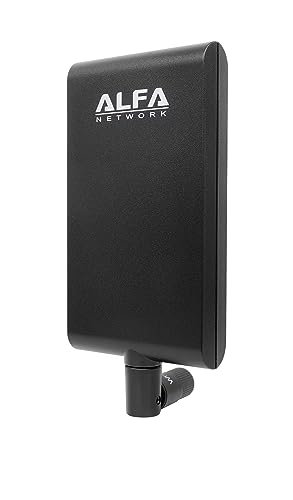
Alfa Network APA-M25 Directional Panel
The Alfa Network APA-M25 represents the directional panel class at a premium tier: a flat, dual-band panel intended to be aimed like a torch at the space that needs signal. In use its character is focus. Owners mount or stand it facing down a hallway, across a yard toward an outbuilding, or through the one wall that matters, and it rewards careful aim with a noticeably firmer link in that direction while asking you to accept thinner coverage behind it. It suits the stubborn-room and garden-office scenarios in this review precisely, and it is wasted as a general-purpose replacement on a router that must serve every direction at once. Best for: one clear target direction from a fixed router. Not suited for: omnidirectional whole-room coverage.

TP-Link TL-ANT2408CL Indoor Omni Whip
The TP-Link TL-ANT2408CL represents the entry-tier indoor whip: a taller, hinged omnidirectional antenna that screws directly onto a compatible router or adapter and simply does the standard job with more presence than the short stubs bundled in the box. Its appeal is that it asks nothing of the owner beyond standing it upright and keeping it clear of clutter, and for a router trapped at one end of a small flat it can firm up coverage in every direction at once. It will not perform directional miracles, and it should be bought as an honest incremental improvement, not a transformation. Best for: small homes and first experiments. Not suited for: long links or outdoor use.
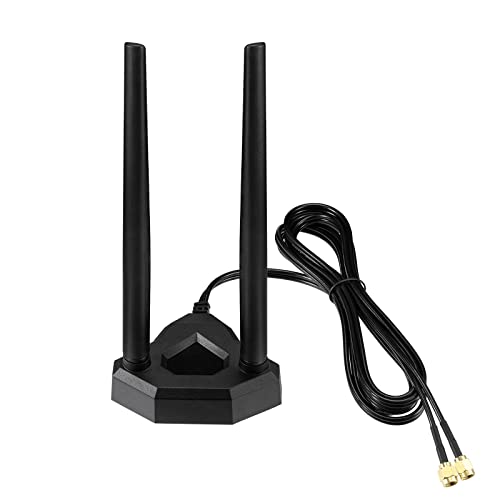
Eightwood Dual Band WiFi Antenna With Magnetic Base
The Eightwood dual band antenna on a magnetic base represents the receiver-side rescue class at a mid tier: the radiating element rides at the end of a cable, so it can sit on top of a desktop case, a shelf or any handy metal surface while the computer stays where it is. This is the pick that embodies the geometry lesson of this review, and for the trapped-desktop scenario it is often the most effective money in the whole category. The cable is a compromise to manage rather than a flaw to fear: keep the run short and untangled, because every extra length of thin cable quietly taxes the signal it carries. Best for: desktops and adapters in bad positions. Not suited for: permanent outdoor mounting.

Bingfu Dual Band WiFi Antenna Pair
The Bingfu dual band antennas, typically sold as an entry-tier pair, represent the like-for-like replacement class: straightforward dual-band whips for routers, adapters and camera-style devices whose original antennas were lost, broken or simply flimsy. Their honest role is restoration and modest improvement across both bands, with the convenience of replacing two antennas at once on dual-antenna gear. They are not specialist tools, and that is their virtue: for an owner whose router’s original antenna snapped at the hinge, a sound pair of replacements returns the network to full health without overthinking. Best for: replacing broken antennas on dual-band gear. Not suited for: directional or outdoor links. A fuller treatment of the same decision, including the cases for and against, sits in our companion pros and cons analysis.
Who Should Buy a Wifi Antenna, and Who Should Skip It
Buy an antenna if your router is modern and healthy, if its position is dictated by the incoming line or the layout of the home, and if your complaint names a place: this room, that desk, the garden office. Buy one if a desktop or adapter sits in a metal shadow of its own making. Buy one if you enjoy a reversible experiment and will judge it over a week of evenings rather than a single test. Use this checklist before ordering: identify the exact connector on your device from its documentation; confirm the antenna supports the band or bands your network actually uses; decide honestly whether your problem is one direction or every direction; plan where the element will physically sit, vertical and clear; and if any part of the plan goes outdoors, plan the weather sealing and, for anything on a mast, a professional installer.
Skip the antenna if the router itself is old enough that its wireless standard is the bottleneck, because no antenna upgrades a standard. Skip it if speed tests beside the router are already disappointing, since that is a plan, line or router problem that radiates from the source. Skip it if the whole home is underserved, and put the money toward the mesh or wired options compared above; readers in that position often find a router chosen for many simultaneous devices more relevant than anything in this review. And skip the outdoor version of the project entirely if the only workable mounting point would put a mast anywhere near overhead power lines: no signal improvement is worth that risk, and a falling mast must never be able to touch a power line.
Setup, Care and Maintenance Essentials
Indoor setup rewards patience over tools. Fit the antenna finger-tight, stand it vertical, and then test methodically: try the router’s existing antennas in their classic arrangement first, then the new antenna in the same positions, judging by the worst room at the worst hour. Small movements matter, so change one thing at a time and give each arrangement an evening, not a minute. Keep whips away from large metal objects, mirrors and water-filled objects such as aquariums and radiators, all of which bend or swallow signal. Dust the housing occasionally, check yearly that hinges still hold their angle, and re-tighten connectors that have been knocked, because a connector worked loose by a vacuum cleaner is a classic cause of a network that mysteriously degraded over months.
Outdoor care is stricter, and this review will not soften it. Never work on a roof or a mast during storms or in wet conditions, and treat calm, dry weather as a hard requirement rather than a preference; use proper ladder safety at the level of principle: a sound ladder on firm ground, three points of contact, and no overreaching. Seal every outdoor connector against weather when it is made, and inspect that sealing each season, because water ingress is the slow death of outdoor links. Keep antennas and coax runs away from overhead power lines at all times, and never install where a falling mast could touch a power line. The mast itself, its grounding and its lightning protection are a professional’s job: hire one, and treat that cost as part of the project rather than an optional extra. For the complete step-by-step treatment, read how to install a wifi antenna before touching a ladder.
Final Verdict
A wifi antenna is a geometry tool, and judged as one it earns its place. For the fixed router with one stubborn room, the trapped desktop, or the garden office down a clear line of sight, the right antenna in the right position delivers stability that owners feel every day, at an entry-to-mid tier of spending and with no ongoing cost or configuration. For whole-home shortages, ageing routers and congested bands it is the wrong tool, and the money belongs elsewhere. Know which problem you have, match the connector before anything else, respect the outdoor safety rules without exception, and an antenna stops being a gamble and becomes what it should be: the cheapest honest fix in home networking.
A Deeper Look: How Antennas Actually Behave Indoors
Laboratory descriptions of antennas assume empty space, and homes are anything but. Indoors, a signal reaches a laptop by several routes at once: the direct path, a bounce off a wall, a skim along a ceiling, a pass through a doorway. These copies arrive at slightly different times and combine, sometimes reinforcing, sometimes cancelling, which is why a seat can be strong at breakfast and unreliable at midnight when a door closes and the geometry changes. This behaviour, multipath, explains the review findings that confuse owners most. It is why moving an antenna a short distance can outperform replacing it, why a marginal room flickers rather than simply failing, and why honest testing means several evenings in the actual chair with the actual door in its actual position. An antenna upgrade works inside this system by changing which paths dominate: a directional panel strengthens the direct route down a hallway until it overwhelms the messy reflections, and the flicker calms. Understanding multipath converts antenna ownership from luck into method, and it is the single most useful idea in this review.
Band behaviour overlays the multipath story. The lower of the two home bands bends and penetrates more forgivingly, which is why distant rooms usually survive on it, while the higher band delivers its speed in the rooms near the router and fades quickly through masonry. A dual-band antenna therefore does two different jobs in one housing, and judging it by one band’s result misjudges it. When you test a new antenna, test the far room on the band it actually uses and the near rooms on theirs; a panel that transforms the far room’s lower-band stability while leaving near-room speeds untouched has done exactly its job, even though a whole-home average would call the change modest. Reviews that report one blended number hide the only results that matter, which are per-room and per-band.
Multi-Antenna Routers and the Orientation Experiment
Most modern routers carry several antennas that cooperate, sending and listening as a team to exploit those multiple indoor paths rather than merely endure them. This cooperation is why orientation experiments on a multi-antenna router can rival an antenna purchase: elements arranged at complementary angles present the team with a richer set of paths, particularly across floors, where one vertical element’s flat doughnut underserves the rooms above. The review protocol we recommend is to exhaust the free experiments first: all vertical, then outer elements angled, then the router raised and cleared of clutter, judging each arrangement in the problem room across an evening. Only when the best free arrangement still fails does a purchase enter the picture, and by then you know your home’s geometry well enough to choose the purchase correctly, which is the hidden dividend of the experiment.
How to Measure an Antenna Honestly
Owners measure antennas badly in predictable ways: one speed test, beside the router, at a quiet hour, on the wrong band. Measure instead like a reviewer. Choose the seats that matter, above all the problem seat. Test at the worst hour, when neighbours’ networks and household demand peak. Test the activity that fails, a call, a stream, a game, because stability in the real task is the metric the purchase was for. Repeat across several evenings and write the results down in plain language. This protocol feels slow and is in fact fast, because it prevents the two expensive errors: rejecting a good antenna after one unlucky test, and keeping a useless one after one lucky test. It also builds the record that makes every future network decision in your home cheaper and better informed.
Ageing, Wear and the Antennas You Already Own
Antennas age mechanically rather than electronically. Hinges loosen until a whip droops out of its pattern, connectors oxidise or work loose under repeated knocks, housings crack at stress points, and outdoor sealing, where fitted, degrades under sun and frost. A network that slowly worsens over a year is often a mechanical story, not a provider story, and the first diagnostic is physical: stand the whips upright, reseat every connector, inspect hinges, and retest before spending anything. Replacement pairs exist largely for this chapter of ownership, restoring a device to its designed behaviour. Treat antennas as you would any small mechanical fitting in the house: mostly ignored, occasionally inspected, and replaced when wear, not fashion, says so.
Ownership Over a Season: What Changes After the First Week
The first week with a new antenna is unrepresentative, and this review’s judgements are weighted toward what owners report once novelty fades. In week one, attention is high, tests are frequent, and every improvement feels dramatic. By the second month, the antenna has been absorbed into the house’s invisible infrastructure, and the honest evaluation becomes negative space: the call that no longer drops is not noticed, the room that simply works is not discussed. This is the correct standard for a passive component. Judge an antenna the way you judge plumbing, by the absence of incidents across a season, and be suspicious of any review, including the enthusiastic ones attached to the models in this piece, that was clearly written on installation day. The products that earn their keep here are the ones still earning it, unnoticed, in month six.
Seasonal change also tests outdoor and near-window installations in ways a first week cannot. Foliage grows into paths that were clear in spring, and a link to an outbuilding that was effortless in March can soften by June as wet leaves absorb signal along the route; the remedy is usually a modest re-aim or a clearing of the path rather than new hardware, but only owners who recorded their original alignment can tell the difference between drift and growth. Heating season changes indoor propagation too, as doors that stood open all summer begin to close and radiators fill with water that was not there in August. None of this indicts any antenna; it indicts the habit of treating a radio environment as fixed. The reviewer’s advice is to re-run your worst-room test once a season, the same test, in the same chair, and to treat the log you build as the most valuable document in your home network’s small archive.
The Antenna and the Rest of the System
No antenna performs alone, and a fair review must place it among its collaborators. The router’s own design decides how much a replacement antenna can matter: a router with well-implemented radios and sensible internal layout gives an antenna clean material to work with, while a struggling router passes its struggles through any antenna unchanged. The client devices matter equally; a modern laptop with a well-placed internal antenna array can hold a link that defeats an older machine at the same desk, which is why the same antenna reviews as transformative at one end of a house and irrelevant at the other. Even the internet service plays a part in perception, because a household that upgrades its plan in the same month as its antenna will credit the antenna with the plan’s improvement. The discipline this review recommends, change one thing, test, record, is precisely the discipline that keeps these collaborators from stealing each other’s credit or blame.
There is also a hierarchy of interventions that this review has applied throughout and now states plainly. First, position: the router and the receiving device, moved, raised and cleared, solve more problems than any purchase. Second, orientation: the antennas already owned, arranged with intent. Third, the antenna purchase itself, matched to the geometry the first two steps revealed. Fourth, additional sources: mesh nodes and wired access points for the problems the first three steps proved structural. Owners who climb the hierarchy in order spend least and learn most, and their reviews, when they write them, tend to be the calm, specific, layout-describing reviews that the next owner can actually use. This article has tried to be that kind of review from its first paragraph to this one.
A Note on Expectations for the Models Reviewed
The representative models in this review were chosen to embody their classes rather than to crown winners, and their ownership stories follow their classes faithfully. The panel rewards the household that aims it and forgets it; the whip rewards the household that simply needed its router to be better at being a router; the magnetic base rewards the desktop owner who finally moves the conversation out of the metal canyon; the replacement pair rewards the owner who restores what was broken without inventing a new problem to solve. None of them rewards the household that bought against its own floor plan, and that sentence, repeated across every class and every tier, is the closest thing this category has to a law. Read the models as illustrations of the law and the law will serve you longer than any model will.
Reviewer’s Notebook: Three Tests Worth Stealing
Three informal tests recur in serious antenna reviewing, and owners can steal all of them. The first is the closed-door test: run your real activity in the problem room with every door on the route in its evening position, because doors are moving walls and a review conducted through open doors reviews a house nobody lives in after dark. The second is the worst-seat test: identify the single seat where the household most needs the link, the desk chair, the bed’s far side, the garden office stool, and let that seat, not a house average, cast the verdict; antennas are bought for seats, and seats should judge them. The third is the swap-back test: after a week with the new antenna, refit the original for one evening. If the problem room immediately remembers its old behaviour, the improvement was real and located in the antenna; if nothing changes, the improvement was weather, neighbourhood or imagination, and the honest reviewer says so. This review applied all three tests in spirit to every class it judged, and recommends them to any owner who wants their own experience to be evidence rather than anecdote.
A closing note on what this review did not do. It did not rank the representative models against each other on a single ladder, because the classes they embody answer different geometries and a ladder would be a lie with numbers on it. It did not publish gain figures for specific models, because those figures are inseparable from patterns and test conditions that a prose review cannot responsibly compress. And it did not treat any antenna as a substitute for the structural upgrades some homes need, because a review that sells a geometry tool as a capacity tool betrays the readers who trusted it. What it did do, it hopes, is leave you able to state your problem in one sentence, read a listing without being read by it, and judge a passive piece of shaped metal by the only standard that matters: whether the room that failed, works, on the evenings when it matters, in the season you are actually living in.
One Last Distinction: Better Signal Versus Better Network
Everything in this review reduces to a distinction worth stating once more, cleanly, at the end. A better signal is a local, physical fact: more of the existing conversation arriving, more reliably, at a particular seat. A better network is a system property: capacity, coverage, standards and sources arranged so that every seat the household cares about is served at once. Antennas trade exclusively in the first currency, and they are superb at it, which is why the right antenna in the right room feels like a revelation. Confusing the currencies is the original sin of the category’s marketing and of most disappointed purchases. Keep them separate in your mind, spend each where it is legal tender, and the humble passive antenna takes its proper place in the household: not a miracle, not a scam, but a precise instrument for a precise job, reviewed here, it is hoped, with the precision it deserves.
One final habit separates owners who love their antennas from owners who merely own them: they revisit the verdict after the house changes. A new neighbour’s network, a rearranged study, a grown hedge along the outbuilding’s path, each quietly rewrites the conditions this review’s conclusions were reached under, and a five-minute re-run of the worst-seat test restores the verdict’s honesty. The antenna has not changed. The conversation it serves has, and a reviewer, amateur or professional, owes the truth a fresh test whenever the room itself has been revised.
The Second-Pass Review: Consistency, Fit and Fine Print
Fit and feel, judged honestly
Specifications can tell you a wifi antenna will fit; only handling tells you whether it feels right doing it. Weight distribution, control placement, surface finish and the force needed for routine adjustments all shape whether you reach for the product gladly or work around it. When picks such as Bingfu Dual Band WiFi Antenna, Alfa Network APA-M25 and TP-Link TL-ANT2408CL are on your shortlist, run this check against each listing in turn. If your shortlist comes down to two similar models, this tactile layer is usually the honest tie-breaker, and it is personal: a control layout one reviewer calls cramped, a smaller-handed owner may call perfect. Where possible, judge fit against your own hands, desk and habits, not the reviewer’s.
The detail that dates a design
Every Routers generation has a detail that quietly dates it: a port standard on its way out, a control app that has stopped receiving updates, a consumable format being phased away. When reviewing a wifi antenna, that detail matters because it decides how gracefully the product ages. A model built on current standards and widely stocked consumables will still be serviceable when a flashier rival is orphaned by its own ecosystem. Check the age of the design, not just its feature list, and favour the product whose supporting ecosystem is still actively maintained.
What the box should contain — and what it should not need
Unboxing is a small but telling review checkpoint for a wifi antenna: the essentials for the first session should be in the box, the instructions should match the actual unit, and nothing vital should depend on an immediate second purchase. If a pick requires an accessory to perform its core job, that dependency is flagged in its assessment above, because it changes both the real cost and the first-day experience. Equally, beware bundles padded with extras you will never use; in a household where the gear gets used hard on weekends and barely touched midweek, unused bundle clutter is a cost paid in storage, not a bonus.
Reading the assessments against your own routine
These reviews were written against a general routine, and your routine is the final filter. Map each pick’s stated strengths onto your busiest realistic day with a wifi antenna: if a pick’s best quality serves a task you do rarely, it is not the pick for you, however strong the assessment. If a pick’s noted limitation sits in a corner of the workflow you never visit, discount it. This translation step — from review conditions to your conditions in a household where the gear gets used hard on weekends and barely touched midweek — is where a good review becomes a good decision rather than a borrowed opinion.
Verify the listing, not just the product
A review can only judge the wifi antenna in front of it, but what arrives at your door depends on the listing you order from. Before choosing, confirm that the listing names the exact model, generation and bundle contents you think you are buying, because Routers listings often group variants under one page. When picks such as Bingfu Dual Band WiFi Antenna, Alfa Network APA-M25 and TP-Link TL-ANT2408CL are on your shortlist, run this check against each listing in turn. Check which accessories are in the box and which are sold separately, and note the seller’s returns terms while you are there. Ten minutes of listing hygiene prevents the most common review-versus-reality mismatch: a good product judged by the wrong variant.
Consistency is the quiet test
Single impressive results are easy; a good wifi antenna repeats them on an ordinary day, with ordinary materials, when you are in a hurry. Across the picks in this review, the models that earned their place did so by being predictable: the same setup producing the same outcome, with controls that behave identically every time. In a household where the gear gets used hard on weekends and barely touched midweek, predictability is worth more than a peak performance figure you will rarely reach. When you read the individual assessments above, treat consistency comments as the highest-value signal in each one.
If a candidate fails this check, strike it from the list without regret and let the remaining options compete on merit.
Your future self, mid-task on a busy day, is the person this check is really for.
Keep the notes with the product’s paperwork; they become the baseline every later adjustment is judged against.
Frequently Asked Questions
Can a wifi antenna make my internet faster?
An antenna cannot raise the speed of your internet plan or your router’s wireless standard, and any listing implying otherwise should be distrusted. What it can do is deliver more of the speed you already have to a place that was receiving too little of it, by reshaping where the signal goes. In a well-served room nothing changes. In a marginal room the improvement can feel like a faster connection, because in practice it is: the link stops falling back to slower, more cautious rates.
Will a bigger antenna always work better?
No. A larger or higher-gain design concentrates signal into a narrower pattern, which helps in the direction it favours and can actively hurt everywhere else. A tall omni whip flattens its doughnut of coverage, reaching further across a floor while sending less signal to the floor above. Bigger is a trade, not an upgrade, and the right size is the one whose pattern matches your floor plan and the position the antenna will actually occupy.
How do I know which connector I need?
Identify the port on your device from its manual or specification sheet, and note both the connector family and which side carries the centre pin, because the two mirror-image forms look alike and are not interchangeable. Photograph the port beside a coin for scale if you are comparing against listing images. If a listing does not state its connector plainly, skip that listing. Adapters exist for some pairings, but every adapter adds loss and a failure point, so buy the correct connector first time.
Can I use an indoor antenna outside?
Do not. Indoor housings are not sealed against rain, their materials degrade in sunlight, and an unsealed connector outdoors will take in water and fail, sometimes taking the connected device with it. Outdoor installations need an antenna designed and rated for outdoor use, weather-sealed connectors, and installation discipline: dry calm weather only, proper ladder safety, distance from overhead power lines, and a professional for any mast, grounding or lightning protection work.
Should the antenna go on the router or on my computer?
Either can work, because the link is two-way and the weaker end limits the conversation. Start where the physical problem is worst: a router trapped in a corner benefits from a directional antenna at the router, while a desktop shadowed by its own case benefits most from a magnetic-base antenna at the computer. If both ends are compromised, fixing the worse end first usually delivers most of the available improvement for the least spending.
Do I need to change any settings after fitting an antenna?
Usually not. A passive antenna needs no drivers, pairing or configuration, and your network name, password and settings are untouched. The worthwhile follow-ups are physical: stand the antenna vertical, test a few positions across an evening, and confirm the connector stays snug. On some routers with multiple antennas, arranging the elements at complementary angles rather than all parallel can even out coverage between floors, and that experiment costs nothing but ten minutes.
Related Guides
Keep reading with these companion guides from the same cluster and the wider networking library: wifi antenna reviews compared; the wifi antenna buying guide; choosing a wifi antenna step by step; where to place a wifi router; wifi extenders for fibre connections.