ilcastellomenu.com is reader-supported. When you buy through links on our site, we may earn an affiliate commission.
Where to Buy
A computer show, the trade exhibitions where the tech industry launches its year, is one of the hardest filming environments ever sold as a media pass. The light is a war between a thousand booth displays, the noise floor is a permanent crowd, the stories move at walking pace between halls the size of aircraft hangars, and the interview that matters happens standing up, in a corridor, with ninety seconds’ warning. The best cameras for computer show coverage are therefore chosen for a working journalist’s reality: fast to deploy, honest in mixed LED light, stabilised for the walking shot, discreet enough for a crowded booth and sharp enough that a product’s screen, ports and finish read clearly when the viewer pauses the video.
This guide interprets the brief plainly: cameras for covering a computer show, filming booth demos, keynote-adjacent interviews, hands-on product walkthroughs and the roaming report that ties a show together. It is not about webcams for video calls, which live in another guide, nor about the computers themselves. The six picks divide the working roles between them: the gimbal camera that walks the halls, the mirrorless anchor for scheduled interviews, the 360 camera that captures a booth’s whole theatre, the action camera for the mount-anywhere detail shot, and two specialists for the demo desk and the budget creator.
Battery life, media appetite and audio inputs are treated here as first-order virtues, because a show day is ten hours long and the exclusive demo does not wait for a card change. Every pick was judged as part of a one-person or two-person crew’s kit, the reality of most show coverage outside the broadcast networks.
Key Takeaways
- Show coverage is walking work: stabilisation and deployment speed beat studio specifications.
- Mixed booth light punishes weak colour; honest sensors keep screens and faces believable together.
- The interview is the show’s currency, so audio inputs matter as much as the lens.
- A 360 camera earns its bag space by capturing booth theatre nothing else can reframe later.
- Ten-hour days make battery and media discipline a creative feature, not a logistics footnote.
- Small crews win shows: every pick here serves a one or two person team.
In this guide
Quick Picks
| Pick | Badge | Why it is here |
|---|---|---|
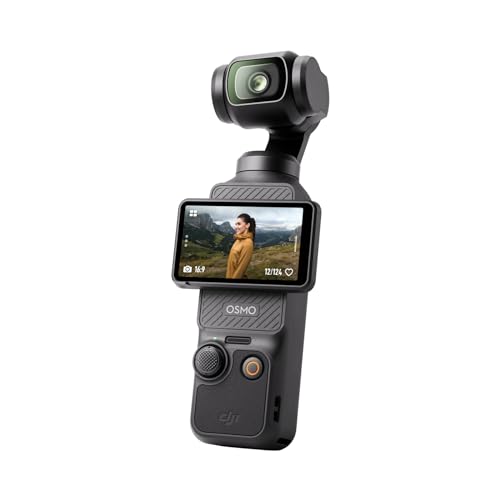
| DJI Osmo Pocket 3 | Best walking camera for show floors | A gimbal-stabilised camera the size of a chocolate bar that walks halls, rides escalators and films demos without a rig. |
| Sony ZV-E10 II | Best interview anchor on a budget | The scheduled-interview workhorse: interchangeable lenses, proper audio and autofocus that holds a product manager’s face through a whole demo. |
| Insta360 X4 | Best for booth theatre and replays | A 360 camera that captures the whole booth at once, letting the edit choose the frame after the show has moved on. |
| Canon EOS R50 | Best for product close-ups and B-roll | Light, kind-coloured and quick, for the hands-on detail footage, ports, keyboards, finishes, that show articles are made of. |
| GoPro HERO13 Black | Best mount-anywhere detail camera | For the shots that need a camera clamped to the demo rig, the robot arm or the presenter’s chest while the show happens to it. |
| OBSBOT Tiny 2 | Best for demo-desk presentations | A tracking camera for the booth’s presentation corner and the press-room desk, following a demonstrator who moves around their product. |
How Did We Choose These Computer Show Picks?
We walked the candidates, in imagination and in specification, through a real show day: the keynote queue at dawn, the first booth demo under exhibition lighting, the corridor interview grabbed between appointments, the hands-on session where the product’s own screen must film without moiré or colour lies, the walking piece to camera across a hall, and the evening edit uploaded from a hotel desk. A camera earned its place by owning one of those moments outright and surviving the others, because show kits are small and every item must justify its weight across the whole day.
The filters were a working crew’s. Deployment first: a camera that needs five minutes of rigging misses the demo that started without it. Light honesty second: exhibition halls mix daylight, tungsten spots and a thousand LED walls, and footage must cut together without each booth becoming a different colour planet. Endurance third: batteries, media and heat across a ten-hour day. Audio fourth and non-negotiable: the interview is the deliverable, so microphone inputs or a credible audio plan run through every pick’s assessment.
What Makes Show Floor Filming Different from Event Videography?
Density and permission. An event videographer works a room that was arranged for an audience; a show crew works a marketplace arranged for ten thousand simultaneous conversations, where every frame contains a rival’s branding, a crowd that did not consent to be extras and a product whose makers are watching how you film it. The camera must be quick, quiet and unthreatening, gathering the booth’s theatre without becoming part of it, and its operator must think like a journalist in a bazaar: the story is the product’s claim, tested on camera, in the noise, with the demonstrator’s hands shaking slightly like everyone’s.
The light deserves its own warning. Exhibition colour is designed to seduce the eye and betray the sensor, saturated LED washes that clip colour channels, screens that flicker against careless shutter choices, and faces lit half by a booth’s glow and half by the hall’s gloom. The picks below were chosen for colour behaviour under exactly that abuse, and the sections after them cover the shutter and white-balance disciplines that keep screens readable and skin human in the same frame.

DJI Osmo Pocket 3 — Best walking camera for show floors
The Pocket 3 has quietly become the show floor’s defining camera, and one walk through a crowded hall explains why. Its mechanical gimbal turns a moving operator into a tracking shot, its rotating screen flips between the product and the presenter’s face in one motion, and the whole instrument deploys from a jacket pocket in the time a mirrorless camera needs its lens cap removed. For the roaming report, the booth approach, the escalator reveal of a hall’s scale, nothing else in this guide gathers usable footage at that speed, and its picture quality, from a sensor far larger than its body suggests, stands up in the edit beside the bigger cameras without apology.
Its show-floor manners are equally considered: it is too small to intimidate a demonstrator, its face tracking holds an interviewee while the operator thinks about questions, and its wireless microphone pairing gives the corridor interview broadcast-clean audio without a cable across a crowded booth. Battery and media discipline remain the operator’s job, and a full day wants spares carried, but as the camera that is always ready when the show does something unscripted, the Pocket 3 is the first item in the modern show kit and the last one its owner would surrender.
- Form: pocket gimbal camera, instant deployment
- Stabilisation: mechanical, walking-shot smooth
- Audio: pairs with wireless microphones
- Role: roaming reports and booth walkthroughs
Strengths
- Ready before the moment escapes.
- Walking footage that looks tracked.
- Interviews without intimidation.
Trade-offs
- Fixed lens, feet do the zooming.
- Small sensor in the darkest halls.
- A day’s shooting wants spare batteries.
Best for: solo creators and roaming reporters. Not suited for: the scheduled sit-down interview as a main camera.
Show craft counsel: set the Pocket’s white balance manually per hall rather than letting it chase each booth’s colour wash, because footage that must cut together across twenty booths needs one consistent world. Its screen makes the check quick, and the habit separates show footage that edits like a programme from footage that edits like a scrapbook.
Its vertical mode deserves a producer’s mention: the same walkthrough that feeds the long-form report can be reframed for the short vertical clips the show’s own social channels consume within the hour. Crews that plan both framings at the moment of shooting, rather than cropping in desperation later, find the Pocket’s quick rotation becomes a publishing strategy, not merely a convenience.

Sony ZV-E10 II — Best interview anchor on a budget
Every show day has its fixed points, the booked interviews and embargoed demos where the crew can set up properly, and the ZV-E10 II is the budget anchor for those appointments. On a small tripod at a booth’s quiet corner it becomes a real interview camera: a lens chosen for the space, a microphone input feeding it the demonstrator’s lavalier or a camera-top shotgun, and autofocus that holds an animated product manager’s face while they gesture at the product between you. Its footage has the depth and colour honesty that make an interview look produced rather than captured, at a price that lets a small outlet field two of them for a two-camera setup.
Sony’s lens bench serves the show’s variety, a wide zoom for the booth’s whole theatre, a fast prime for the corridor’s shallow-focus interview, and its creator-tuned handling means the camera is also the day’s capable backup for stills, thumbnails and the product close-ups the article needs. It asks for the mirrorless courtesies, batteries in rotation and a lens plan made the night before, and returns a professionalism that belies its tier every time the red light goes on.
- Sensor class: APS-C, honest colour
- Audio: microphone input for interviews
- Mount: Sony E, lenses for every booth
- Role: booked interviews and demos
Strengths
- Two-camera interviews on a budget.
- Focus that frees you to listen.
- Stills and video in one body.
Trade-offs
- No in-body stabilisation for walking.
- Tripod work is its home ground.
- Battery rotation is a discipline.
Best for: small outlets and two-person crews. Not suited for: the all-day walking camera role.
Interview counsel: arrive at the booth ten minutes early and claim the quiet corner before the appointment does, because the ZV-E10 II can only record the audio environment it is given. A demonstrator facing into the booth rather than out into the aisle halves the crowd noise in the recording, and that single piece of stage management is worth more than any microphone upgrade in the bag.
Its thumbnail and stills life deserves emphasis in a publishing economy where the video’s click depends on a product photograph made in the same ninety seconds. The crew that shoots the interview and the hero still on one body, one lens and one colour philosophy publishes faster and more coherently than the crew juggling separate stills kit, and show news is a speed business above all.

Insta360 X4 — Best for booth theatre and replays
Some show moments cannot be framed in advance: the robot demo that suddenly dances, the crowd surge at a product reveal, the booth whose theatre is a dome of screens with the audience inside it. The X4 exists for those moments. Mounted on a small pole above head height or held at the booth’s centre, it records everything in every direction, and the edit afterwards becomes a directing session, panning the captured sphere toward the action wherever it actually happened. For show coverage, where the unscripted is the valuable, that insurance has no substitute in a conventional kit.
Its second show talent is the invisible-selfie-stick walkthrough, the floating camera move through a booth that looks like a drone was permitted indoors. The honest costs are workflow and resolution: 360 footage demands reframing time in the edit and delivers a smaller effective frame than a dedicated camera pointed correctly the first time. Crews use it as the specialist it is, deployed for reveals, rides and booth theatre, not as the day’s main camera, and in that role it gathers the shots the show’s own highlight reels are built from.
- Form: 360 camera, captures every direction
- Workflow: frame chosen in the edit
- Mounting: pole or handheld, crew-invisible
- Role: reveals, rides and booth theatre
Strengths
- The unscripted moment, captured anyway.
- Walkthroughs that look flown.
- One camera covers a whole booth.
Trade-offs
- Reframing costs edit time.
- Effective resolution below dedicated picks.
- A specialist, not the main camera.
Best for: reveals, demos and experiential booths. Not suited for: interviews or deadline-fast edits.
Deployment counsel: the X4 earns its keep when it is already mounted and running before the reveal begins, because its whole philosophy is capturing first and deciding later. Crews that treat it as a camera to fetch when something happens have misunderstood it; treat it as the booth’s memory, running at the moments of maximum uncertainty, and it will repay the card space with the day’s most shared clip.
Its audio is ambience rather than interview, and wise crews let it be: the 360 clip’s job is the roar, the gasp and the theatre’s scale, laid under the interview camera’s clean voice in the edit. Show packages are built in layers, and the X4’s layer is the one that makes viewers feel the hall rather than merely see the product.

Canon EOS R50 — Best for product close-ups and B-roll
Show journalism is ultimately about objects: the hinge’s action, the keyboard’s travel, the port selection, the finish under light. The R50 is the detail camera for that work, light enough to hold one-handed over a crowded hands-on table while the other hand operates the product, with autofocus that finds the port or the keycap and colour that renders a product’s actual finish honestly under booth lighting. Its B-roll has the clean, product-photography character that makes a review package look expensive, and its friendliness suits the press-room reality where the camera is set up and struck twenty times a day.
It doubles gracefully as the second interview angle and the stills camera for the written review, and its price lets a publication send it into the crowd without the anxiety a flagship’s loss would cause. The APS-C low-light ceiling and the kit lens’s limits are answered the show way, with a fast prime for the dim booths and the hands-on area’s own lighting for the rest. In a two-body show kit, this is the body that does the looking closely while the other does the talking.
- Sensor class: APS-C, product-honest colour
- Handling: one-handed at the demo table
- Focus: quick onto ports and details
- Role: close-ups, B-roll and stills
Strengths
- Products rendered as they are.
- Light enough for all-day detail work.
- Doubles as stills and second angle.
Trade-offs
- Dim booths want a fast prime.
- Not the walking-shot specialist.
- Modest battery for a full day.
Best for: hands-on coverage and product detail. Not suited for: the main roaming camera in dark halls.
Close-up counsel: at the hands-on table, film the product in the demonstrator’s hands before your own, because their practised gestures show the hinge, the fold and the mechanism the way its makers intend, and your own first-touch fumbling, however honest, undersells both the product and the publication. Take your own hands-on pass second, for the verdict, with the choreography already learned.
Its stills deserve a workflow note: the written review’s photographs and the video’s B-roll should be shot in the same session, on the same light, so the package’s colour world coheres. The R50 makes that coherence easy by being genuinely good at both, and show editors consistently rate the coherent package above the technically finer mismatched one.

GoPro HERO13 Black — Best mount-anywhere detail camera
Every show has footage that requires the camera to go where an operator cannot: clamped to the gaming rig for the player’s-eye view, mounted on the robot demonstrator’s arm, fixed above the 3D printer for the whole build, worn by the VR demonstrator so the audience sees the experience’s frame. The HERO13 is the kit’s expendable genius for those positions, tiny, tough, stabilised beyond its size and cheerfully indifferent to being bumped by ten thousand attendees. Its wide view swallows a booth corner whole, and its footage cuts into packages as the energy shot, the angle nobody else in the press scrum could get.
It is nobody’s interview camera and this guide will not pretend otherwise: audio is a plan involving other devices, and its fixed wide perspective flattens products that deserve better. But as the third camera in a show kit, the one pre-positioned at the demo that will run all day, or chest-mounted for the presenter’s walkthrough of their own booth, it produces the footage that makes a package feel produced. Shows reward the crew that plants cameras; this is the camera worth planting.
- Form: action camera, mounts anywhere
- Stabilisation: remarkable for its size
- Role: planted, worn and clamped angles
- Audio: pair it, never rely on it
Strengths
- Angles no operator can occupy.
- Survives the crowd’s attentions.
- Runs a demo’s whole day planted.
Trade-offs
- Wide view flattens fine products.
- Interview audio is not its gift.
- Small sensor, booth light is its friend.
Best for: planted demo angles and POV shots. Not suited for: interviews or product beauty work.
Planting counsel: position the GoPro before the hall opens, frame it on the demo’s climax rather than its average moment, and set it running in managed intervals the media plan can sustain. A planted camera’s value is patience, and the crew that checks it at lunch and harvests it at close owns footage the roaming cameras were never present for.
Its time-lapse patience deserves a line: the booth build before the show, the hall filling at opening, the teardown at close are the show’s secret films, and a GoPro on a clamp gathers them for the cost of being remembered the night before. Packages open and close on such shots, and they are available to any crew organised enough to plant the camera while the hall is still a building site.

OBSBOT Tiny 2 — Best for demo-desk presentations
Booth presentations have a choreography problem: the demonstrator circles the product, gestures at the screen, steps to the prototype and back, while a fixed camera loses them at every move. The Tiny 2’s motorised tracking solves it in the specific places shows provide, the booth’s presentation corner, the press briefing desk, the podcast-from-the-show setup, by following the presenter automatically and reframing without an operator. For the small outlet whose booth interviews are really standing presentations, it converts a one-person crew into a directed production.
Its limits are the show floor’s open spaces, where its webcam-class sensor and tracking range are out of their element, and this guide assigns it accordingly: a specialist for the booth’s controlled corner and the media room, not a hall camera. Within that assignment it is genuinely liberating, and its gesture control suits the demonstrator who must start and stop their own recording between visitor groups. Several exhibitors themselves have adopted it for their booth loops, which tells the visiting journalist exactly where it belongs.
- Form: motorised tracking webcam
- Control: gestures, presenter-operated
- Role: booth presentation corners, press desks
- Picture: strong in controlled booth light
Strengths
- Follows a moving demonstrator alone.
- One-person booth productions.
- Ideal for show-floor podcast desks.
Trade-offs
- Open hall floors exceed its design.
- Tracking range suits corners, not stages.
- Premium price for a specialist.
Best for: booth presenters and show podcast setups. Not suited for: roaming hall coverage.
Booth counsel: agree the Tiny 2’s territory with the demonstrator before filming, a marked arc around the product within which the tracking is happiest, because presenters who know the camera’s geography perform to it naturally. Five minutes of that stage management gives the small crew a presentation recording that looks staffed, which is the entire point of the device.
Its press-room life is the sleeper use: the end-of-day piece to camera, recorded at the media centre desk while the hall’s noise fades, with the Tiny 2 following the presenter’s tired gestures and keeping the frame alive. Shows are marathons of content, and the camera that makes the final daily wrap effortless earns its bag space on stamina grounds alone.
How Do the Six Compare Side by Side?
| Camera | Best show role | Deployment | Signature strength | Watch out for |
|---|---|---|---|---|
| DJI Osmo Pocket 3 | Roaming reports | Seconds, from a pocket | Gimbal walking shots | Fixed lens |
| Sony ZV-E10 II | Booked interviews | Tripod, minutes | Audio and lens choice | Walking shots |
| Insta360 X4 | Reveals, theatre | Mounted, always-on | Captures everything | Edit time |
| Canon EOS R50 | Close-ups, B-roll | Handheld, instant | Product honesty | Dim booths |
| GoPro HERO13 Black | Planted angles | Clamped, forgotten | Impossible positions | Audio planning |
| OBSBOT Tiny 2 | Booth presentations | Desk, self-running | Presenter tracking | Open floors |
How Do You Keep Screens from Flickering and Colours from Lying?
With shutter discipline and white-balance stubbornness. Product screens refresh at their own rates, and a shutter speed chosen as a sensible relation to the local mains and the screen’s behaviour keeps footage free of the rolling bars that mark amateur show coverage. Test on the first booth of the day, check the playback at full size, and carry that setting as the hall’s default rather than rediscovering it per stand. White balance wants the same stubbornness: set it manually for the hall’s dominant light and let booths vary around a constant, because auto balance chasing every LED wall produces footage that cannot be cut together without a colourist’s apology.
Faces are the reference that matters. A product’s screen can be graded toward truth in the edit if the demonstrator’s skin stayed believable in the capture, while footage with lying skin and accurate screens is unusable everywhere. Expose and balance for the human, let the product be slightly theatrical, and the package will read as professional to every viewer who never consciously notices why.
What Does a One-Person Show Kit Actually Contain?
Less than the forums pack, arranged for speed. The Pocket 3 as the walking camera, one mirrorless body with a wide zoom and a fast prime as the interview and detail camera, a wireless microphone system that serves both, a monopod that doubles as a high-angle pole, and a bag organised so every item has one home reachable without looking. Media and batteries live in the bag’s lid in a rotation the owner can run by touch, because the show’s decisive moments do not pause for rummaging. The X4 and GoPro join for the days whose schedule, reveals, rides, planted demos, specifically promises their footage.
The kit’s philosophy is that a show is won on appointments kept and moments seized, both of which punish weight and reward readiness. Every gram in the bag should be able to answer the question of which scheduled moment it serves, and the crew that audits its kit against the next day’s diary each evening walks the halls lighter and films more than the crew carrying a festival’s worth of might-need glass.
How Should Show Footage Be Edited the Same Night?
Triage first, artistry second, because show news decays by the hour. The interviews are logged and cut while the demonstrators’ claims are still checkable, the roaming footage is skimmed for its three best sequences rather than reviewed in full, and the package is built around the day’s actual story rather than the preview’s promise. Colour is unified to the hall’s constant, audio is levelled before it is beautified, and the piece ships at a length the audience’s commute can hold. The cameras in this guide support that pace with files that need little rescue and formats the laptop ingests without argument.
The night’s second discipline is backup before sleep: cards copied twice, the edit project saved with its media, and the next day’s kit charged and re-lidded before the editor rests. Show weeks are lost to the third day’s fatigue more than to any technical failure, and the crew whose evenings run on rails wakes with its judgement intact, which is the real editing instrument.
What Mistakes Do Crews Make at Their First Computer Show?
Filming everything and publishing nothing tops the list: the crew that shoots nine hours and ships one video on the flight home has documented the show rather than covered it. Second is audio surrender, interviews recorded on camera microphones across a noisy booth, unusable at any picture quality. Third is colour chaos from auto white balance chasing every booth. Fourth is the missed appointment, the exclusive demo traded for a photogenic crowd scene, which is a diary failure disguised as a creative choice.
Fifth is carrying a studio to a walking job. The crew that rigs cinema cameras for corridor interviews films fewer, later and worse than the crew whose kit matches the show’s actual physics, and the picks in this guide were chosen, every one, for the show as it is: fast, loud, bright, crowded and unforgiving of anything slow.
Final Recommendation
Build the show kit around the walking reality. The solo creator should start with the DJI Osmo Pocket 3 and a wireless microphone, add the Sony ZV-E10 II when booked interviews become the day’s backbone, and let the Canon EOS R50 handle the product detail that turns coverage into reviews. Crews expecting reveals and experiential booths should find room for the Insta360 X4, plant a GoPro HERO13 Black at the day’s best demo, and give the booth presentation corner to the OBSBOT Tiny 2. Cover the show at its own speed, keep the audio clean and the colour honest, and the footage will still look like journalism when the hall has become a car park again.
Related guides
- Best Cameras for Filming Concerts: 6 Picks for Stages, Clubs and Arena Shows
- Best Cameras for Filming Podcasts: 6 Picks for Studios, Desks and Two-Shots
- Best Cameras for Filming Skiing: 6 Picks for Powder, Park and Follow-Cams
- Best Cameras for Ethnography: 6 Discreet Picks for Fieldwork and Long Interviews
- Best Cameras for Filming Outside: 6 Rugged Picks for Outdoor Video
Frequently Asked Questions
Is a phone good enough for computer show coverage?
A current phone is a credible emergency and social-clips camera, and many outlets publish phone footage from shows without shame. Its limits arrive at the interview, where audio inputs and lens choice matter, in the dark booth, and across a ten-hour day of battery arithmetic. The dedicated picks here exist to remove those ceilings; the professional pattern is a phone as the third camera and backup, not as the kit’s foundation.
How do I film a product’s screen without distortion or flicker?
Approach as square-on as the booth allows, because oblique angles bend screens and invite reflections, then set a shutter speed that behaves with the display’s refresh, testing on the first screen of the day and keeping the discipline. Expose for the screen’s own brightness rather than the booth’s, letting the surroundings fall darker, and ask the demonstrator to hold the key screen still for three seconds longer than feels natural. Those seconds are where thumbnails and verdicts come from.
What microphone setup suits a noisy show floor?
A wireless lavalier on the interviewee is the show standard, because it places the microphone inside the conversation and outside the crowd’s roar, with a camera-top shotgun as the roaming compromise and backup. Whatever the system, monitor on headphones for the first ten seconds of every interview, because show-floor audio failures, a muted transmitter, a clothing-rustled lavalier, are silent until the edit unless somebody listened at the start.
How much footage should a crew shoot at a show?
As little as tells the day’s stories completely, which for a practiced crew is a few hours across all cameras, logged and backed up nightly. Indiscriminate volume is a debt the edit must pay at the show’s pace, and it bankrupts more coverage than any camera limitation. Shoot the appointment, the demo’s climax, the walkthrough and the detail inserts with intention, and let the planted and 360 cameras carry the insurance rather than the operator’s trigger finger.
Do I need a media pass to film at a computer show?
For anything beyond attendee-level clips, yes, and the pass is a professional relationship as much as a credential: it carries the show’s filming rules, the exhibitors’ consent framework and access to the media facilities this guide’s workflows assume. Apply early, respect the booths that decline filming, and remember that a crew’s reputation at one show is its credential at the next. The cameras here are discreet enough to work within those courtesies without surrendering quality.
Which single camera should a tiny outlet buy first for shows?
The DJI Osmo Pocket 3, because it covers the most show situations per gram and per minute of setup: walkthroughs, demos, pieces to camera and, with its wireless microphone, credible corridor interviews. Add the interview anchor when the diary fills with booked appointments. Outlets that reverse the order own a fine camera that is being rigged while the show happens elsewhere, which is the defining tragedy of first-year show coverage.
How Do Keynotes and Launches Differ from Booth Filming?
The keynote is a broadcast the crew attends rather than produces: fixed positions, house light designed for cameras, a feed often available to media, and a crowd whose reaction is part of the story. The working pattern is one camera locked on a wide that holds the stage and screen together, the roaming camera free for audience and atmosphere, and discipline about the embargo’s timing rather than the technology’s limits. Launches at booths invert the pattern, the crew is the production, the light is the booth’s own theatre, and the X4’s everything-at-once insurance and the Pocket’s readiness earn their places in the first row of the scrum.
Both reward the same preparation: positions scouted during the previous session’s rehearsal, sightlines to the screen tested for the flicker discipline described earlier, and an exit plan for the moment the embargo lifts and forty crews move at once. The cameras here are small enough for that choreography, which is not a trivial virtue when the scrum is the story’s first paragraph.
What Should a Crew Do When Two Stories Happen at Once?
Split by role rather than by anxiety. The interview anchor holds the booked appointment, because appointments are the show’s perishable currency and a missed exclusive cannot be re-shot, while the roaming camera takes the unscripted event, whose nature forgives a lighter kit. The planted GoPro and the running X4 exist precisely to soften these collisions, holding the third and fourth stories in trust until the edit decides. Crews that plan the split before the day begins, with a simple rule for which story outranks which, make the decision in calm rather than in a corridor argument.
The debrief matters as much: each evening, the crew reviews what the split cost and what it saved, and adjusts the next day’s rule. Shows are long enough for a team to become good at them mid-week, and the outlets whose day-three coverage visibly outclasses their day-one coverage are the ones running that nightly audit rather than merely repeating the day.
How Does Show Coverage Change for a Photographer Shooting Stills?
The stills photographer at a computer show is hunting the single frame that carries the story the video tells in minutes: the demonstrator’s hands on the impossible hinge, the crowd’s face at the reveal, the booth’s architecture at the moment its lighting show peaks. The mirrorless picks here serve that hunt directly, and the working pattern is the reverse of the video crew’s: position before the moment, patience during it, and a ruthless same-night edit because a show still published tomorrow is history. Burst discipline, silent shutters in the keynote’s hush and the fastest card workflow in the press room are the stills craft’s equivalents of the video crew’s audio discipline.
Many modern show assignments are hybrid by contract, the article, the video and the social cut from one attendance, which is why this guide’s mirrorless picks were chosen for stills competence as carefully as for video. The crew of one who can return with all three has become the show economy’s standard unit, and the kit that serves that unit is a system, not a camera.
Why Do Exhibitors Film Their Own Booths Differently?
Because their film is a loop, not a story. The exhibitor’s booth video runs all day to a standing audience of three seconds each, so it is built from spectacle, legibility at distance and a presenter, often the Tiny 2’s tracking keeping them framed, whose performance resets every few minutes. The visiting journalist can learn from that loop what the booth itself believes its story is, then film the test of that belief: the hands-on queue’s faces, the demo’s difficult question, the competitor’s booth across the aisle making the opposite claim. Show journalism begins where the exhibitor’s loop ends, and the cameras in this guide serve the journalism precisely because they are quicker, quieter and more sceptical than the booth’s own production.
There is a courtesy in that scepticism worth stating: film the claim fairly, in its best light and its demonstrator’s best take, before filming the test. Exhibitors remember the crews who were rigorous and fair in equal measure, and next year’s access, the pre-show briefing, the engineer’s time, the embargoed first look, is allocated on those memories.
How Do Crews Handle Embargoes and Exclusive Demos?
An embargoed demo is the show’s trust economy in miniature: the exhibitor shows tomorrow’s product today, and the crew’s side of the bargain is absolute discipline about what leaves the booth and when. Practically, that means the footage is labelled and segregated from the day’s publishable material the moment it is shot, the crew’s social channels stay silent about it even in silhouette, and the piece is edited to the embargo’s minute rather than approximately to it. Crews develop reputations in this economy quickly, and the outlets that are careless once find the following year’s diary mysteriously thin.
The camera work itself changes under embargo: there is time, usually, because the demo is scheduled and private, so the interview anchor and the detail camera do their best work of the week, unhurried close-ups, a full walkthrough, the engineer’s own explanation at length. Those embargo sessions produce the launch-day packages that define an outlet’s show, and the kit that serves them is the considered end of this guide’s range rather than its fastest.
What Makes a Booth Interview Actually Watchable?
A claim, a test and a number, in that order. The watchable interview opens with the demonstrator’s claim in their own words, moves immediately to the product doing the thing claimed, on camera, at the hands-on table, and closes with the specifics a viewer can hold: who it is for, what it replaces, when it can be bought. The unwatchable version, the tour of features narrated over nodding B-roll, is the show’s most produced and least remembered genre. The crew’s craft is editorial before it is technical: the questions that force the claim into the open and the camera placement that can cut from face to hands without a reset.
The picks here support that structure deliberately, the anchor camera holding the two-shot, the detail camera already positioned for the test, the audio clean enough that the claim’s exact wording survives. Show audiences forgive a booth’s noise and a hall’s light; they do not forgive an interview in which nothing was actually established, and they can tell the difference within twenty seconds.
How Should a Crew Cover a Show It Cannot Attend in Person?
By directing the show’s own abundance rather than pretending to be there. Exhibitors publish keynotes, demo loops and press kits of a quality that a remote desk can license and verify, the show’s floor cameras and fellow outlets’ pooled feeds cover the theatre, and the remote crew’s value moves to curation, context and the interviews conducted by video call with the engineers who were on the booth. The cameras in this guide then serve the home studio end of that work, the Tiny 2’s desk and the mirrorless anchor’s clean interview frame, which is a reminder that show kit and desk kit are one economy viewed from two ends.
Honesty is the remote coverage’s licence: label what was witnessed and what was supplied, and let the audience trust the label. The outlets that blurred that line during the years of remote shows are still rebuilding the credibility the honest ones banked, and in a beat where the same products will be covered by forty publications, credibility is the only durable exclusive.
Why Do Show Videos Age So Quickly, and Which Ones Do Not?
Because most of them are announcements wearing a video’s clothes, and an announcement’s value expires with the news cycle. The show films that keep being watched share a different construction: they tested something. The hinge cycled a hundred times on camera, the battery claim measured against a real workload, the keyboard reviewed by the reviewer typing the review on it, these pieces remain useful for the product’s whole commercial life, and search treats them accordingly. The crew’s camera discipline serves that longevity directly, close-ups honest enough to be re-examined in a year, colour truthful enough that the product still looks like itself.
There is a production habit inside that difference: film the test before the tour. Crews that begin the booth visit with the verifiable claim, while their scepticism and battery are fresh, produce the durable piece even when the day later dissolves into announcements. The rest of the booth’s theatre can be gathered afterwards for colour, in every sense.
How Does a Crew Stay Credible When Exhibitors Pay for Access?
By keeping the transactions visible and the verdicts unbought. Sponsored travel, hosted access and review units are the show economy’s normal plumbing, and audiences accept them when they are disclosed in the piece itself rather than discovered afterwards. The credibility line is editorial: the sponsored crew must be free to find the product wanting, on camera, in the same detail as the product they travelled independently to see, and the exhibitors worth covering are precisely the ones who accept that term because their products survive it.
The camera’s small part in credibility is consistency: the same close-up honesty for the host’s product as for its rival across the aisle, the same audio clarity for the critical question as for the friendly one. Viewers read production values as character evidence more than journalists like to admit, and a kit that treats every booth identically is an ethical statement made in equipment.
What Is the Show Photographer’s Equivalent of a Notebook?
The contact sheet reviewed nightly, and the discipline of the caption written while the hall is still in the memory. Show images detach from their facts faster than any other genre’s: forty similar booths, a hundred similar products, and by the flight home the demonstrator’s name and the prototype’s status have merged into soup. The crew that captions at the day’s end, product, claim, embargo, contact, owns an archive; the crew that captions later owns a puzzle. The mirrorless picks’ file discipline and the press room’s unglamorous hour after close are where that archive is actually made.
The notebook habit extends to the diary itself: which booths over-delivered, which engineers explained honestly, which queues revealed the show’s real hierarchy of interest. Next year’s show is planned from this year’s notebook, and the outlets whose coverage compounds in quality are running that loop while their rivals are re-learning the hall plan every January.
How Do Crews Film in Halls Where Tripods Are Banned?
Many halls and booths forbid tripods for the crowd’s safety, and the show kit in this guide was assembled with that rule in mind. The monopod is the standard citizen’s answer, a single leg that steadies without obstructing, often doubling as the high-angle pole for the crowd and booth overviews. The Pocket 3’s gimbal removes the question entirely for walking work, and the mirrorless picks’ stabilisation covers the standing interview’s small sways when a monopod is impractical. Crews should learn the rule per hall before the doors open, because discovering it at the keynote queue costs the position the whole day was planned around.
There is also a choreography to banned-tripod filming: brace against the booth’s own architecture with permission, rest the camera’s base on the demo counter for the product pass, and let the planted cameras take the long static duties. The footage from a well-braced handheld at a show is routinely steadier than a tripod’s in a crowd being jostled, which is one of the floor’s small ironies the experienced crews quietly rely on.
What Is the Press Room’s Unwritten Curriculum?
The press room teaches the show’s real hierarchy faster than any panel: which outlets the exhibitors court, which engineers give the honest ten minutes, which stories the whole room is chasing and which one quiet crew in the corner is ignoring them for something better. The working habits are simple and rarely written down: file early, help the crew beside you with the cable or the contact, share the power strip, and never be the person whose exclusive was another outlet’s embargoed material overheard. Reputations made in press rooms outlast the products launched in the halls.
The kit’s press-room virtues are unglamorous and decisive: chargers that label themselves, a card workflow that finishes before the coffee does, and files that need so little rescue that the desk’s hour goes to writing rather than repair. The cameras in this guide were chosen with that hour in mind, because show journalism is ultimately published from a folding table by tired people, and equipment that respects that fact is a professional courtesy to its owner.
How Should a Show Crew Pack for the Flight Home?
With the footage treated as the cargo and the cameras as the luggage. The masters travel in the cabin, in two copies on two people or two bags, because a show’s week of work is irreplaceable in a way no camera body is. Cards are never formatted in transit, the edit project flies with its media, and the kit that checked in as baggage is the kit whose loss would inconvenience rather than end the outlet. Crews formalise this after their first scare, and the wise ones formalise it before.
The homecoming audit completes the week: what the kit lacked, what it carried unused, which booths earned next year’s first appointments. Written on the flight, while the show is still legible, that audit is the cheapest production meeting of the year, and the outlets whose show coverage visibly improves annually are, without exception, the ones holding it.
Related Guides
Crews covering other live briefs will also find our guides to the best cameras for live events and the best cameras for event videography and the best cameras for recording lectures.


