Figuring out how to fix a Wi-Fi extender that keeps disconnecting starts with noticing what kind of disconnecting it is. Does the extended network vanish entirely, suggesting the extender itself is rebooting or losing power? Do devices stay connected but lose the internet, pointing at the link between extender and router? Or does one device drop while others hold, which usually indicts the device, not the extender? Each pattern has a different cause list, and working through them in the safe order below — power and placement first, settings next, firmware after that, reset last — resolves the large majority of cases without replacing anything.
Extenders live unglamorous lives: plugged in around the clock, often warm, often in the worst-ventilated corner of the house, expected to be invisible. When they start dropping, the cause is usually environmental rather than electronic — a marginal signal, a crowded channel, a router that changed something overnight. This guide is ordered from most common cause to least, and every step is reversible and safe: no opening the unit, no risky procedures. If instead your extender connects but shows no internet at all, the sibling guide How to Fix a Wi-Fi Extender with No Internet covers that distinct pattern.
Disclosure: As an Amazon Associate, ilcastellomenu.com earns from qualifying purchases. If you buy through a link on this page, we may earn a commission at no extra cost to you. Product details and availability change over time, so check the current listing before you buy.
First, identify your pattern
| Pattern | Most likely suspects | Start at |
|---|---|---|
| Extended network disappears, then returns minutes later | Extender rebooting: power, heat, failing hardware, firmware bug | Step 1 |
| Network visible, devices connected, but ‘no internet’ | Extender-to-router link lost or router-side issue | Step 2 |
| Drops at the same times of day | Interference, neighbour congestion, scheduled router behaviour | Step 3 |
| One device drops, others fine | That device’s Wi-Fi, power saving, or roaming stubbornness | Step 4 |
| Drops began right after a change (new router, password, move) | Configuration mismatch | Step 5 |
Spend two minutes matching your experience to a row before changing anything. Random, undifferentiated fiddling — resetting this, toggling that — destroys the evidence that distinguishes a dying extender from a misplaced one. Note also when the problem started and what changed in the house around then: new appliances, a moved router, a provider visit, a heatwave. Disconnecting extenders are usually reacting to something.
In this guide
Step 1: Power, heat and the rebooting extender
If the whole extended network vanishes periodically, suspect the extender’s own stability first. Check the plug: extenders in loose or worn sockets lose power momentarily and reboot, and a unit hanging half-out of an outlet behind furniture is a classic. Reseat it firmly, directly in the wall socket — not on an extension strip shared with a vibrating appliance. Feel the case: warm is normal, hot is not. A plug-style unit cooked behind a sofa or against a curtain overheats and protects itself by restarting; move it to open air using the placement principles in How to Position a Wi-Fi Extender, and if it has vents, make sure they are unobstructed.
Watch the lights during a dropout if you can. A unit cycling through its full boot sequence is rebooting — power, heat or failing hardware. A unit whose lights stay lit while devices drop is not rebooting, and your problem lives in Step 2 or 3 instead. This one observation halves the diagnostic tree, which is why it is worth engineering a chance to see it: note the time of the next few drops and be nearby for one.
How to fix a Wi-Fi extender that keeps disconnecting at the router link
The second pattern — connected but useless, or devices dropping to the router’s own weak network — usually means the extender-to-router link is marginal. The extender sits at the edge of the router’s range, and small changes (a closed door, evening congestion, the router hopping channels) push the link over the edge repeatedly. The fix is unglamorous and effective: move the extender one outlet closer to the router, even at the cost of some signal in the far room. A slightly weaker extended signal that never drops beats a strong one that drops hourly. Confirm with the extender’s link indicator — it should sit solidly in the good zone, not flicker at its boundary.
While you are in the router’s settings, check two quiet culprits. First, routers set to ‘auto’ channel sometimes change channels on a schedule or on detecting interference; a cheap extender may fail to follow gracefully, dropping until it rescans. Setting the router’s 2.4 GHz channel to a fixed, uncongested one (1, 6 or 11) often stabilises the pair. Second, if your router offers band steering or a combined smart-connect name, try the extender against a separated, fixed band SSID instead — some extenders track a steered network poorly. The setup mechanics for reconnecting after such changes are in How to Set Up a Wi-Fi Extender.
Step 3: Interference and the evening-dropout pattern
Drops that cluster at particular times — cooking hours, evenings, when a particular appliance runs — point to interference. The 2.4 GHz band is shared with microwave ovens, baby monitors, older cordless phones, Bluetooth and every neighbour’s network. An extender, which must both hear a distant router and be heard, suffers interference twice. Countermeasures: move the extender away from the kitchen and from known emitters; prefer the 5 GHz band for the extender’s router link if distance allows, since that band is roomier and less appliance-ridden; and set fixed channels rather than auto, so the pair stops chasing a moving target.
Neighbour congestion follows the evening pattern too — everyone streams at nine. A Wi-Fi analyser app on your phone shows how crowded each channel is at the problem hour; move the router (and therefore the extender) to the emptiest of the non-overlapping channels. If your whole street is saturated on 2.4 GHz, the durable fix is architectural: dual-band gear everywhere and, for the worst room, the wired options compared in Wi-Fi Extender vs Access Point.
Step 4: When it is one device, not the extender
If a single laptop or phone drops while everything else holds the extended network happily, believe the evidence: the problem is that device. Usual causes: aggressive power saving that sleeps its Wi-Fi radio, an outdated Wi-Fi driver (laptops especially), or roaming stubbornness — with separate network names, a device may cling to the router’s fading signal until it drops, rather than switching to the strong extended network in good time. Remedies, in order: toggle the device’s Wi-Fi off and on at the problem moment (does it recover instantly?); update its Wi-Fi driver or OS; disable Wi-Fi power saving in its settings for a test day; and ‘forget’ both networks on the device, then rejoin the extended one afresh.
Mesh-style single-name setups invert this problem: the device roams, but occasionally lands on the farther node. Toggling Wi-Fi re-seats it. Either way, a one-device pattern almost never justifies replacing the extender — a conclusion households reach only after buying one, which is why this step sits before the shopping step.
Step 5: Firmware, then factory reset, in that order
If the drops survive placement, power and interference work, update the extender’s firmware — makers do fix dropout bugs, and release notes saying ‘stability’ are aimed at exactly you. The safe procedure is How to Update Firmware on a Wi-Fi Extender. Give the updated unit a fair trial of several days; dropout patterns need time to prove themselves gone.
Last resort before replacement: the factory reset and clean re-setup of how to reset a wifi extender. A configuration that has survived router changes, password changes and years of tweaks can harbour a subtle mismatch that no single setting reveals. A clean rebuild eliminates the whole category at once. If a freshly reset, freshly updated, well-placed extender still drops on a healthy router — verified by testing other devices on the router’s own network at the same distance — the hardware is failing, and replacement is the honest answer. The current dependable options are in Best Wi-Fi Extenders for Home.
Prevention: keeping it fixed
- Keep the extender in open air, firmly socketed, out of heat and steam.
- Keep firmware current — enable automatic updates if offered.
- Avoid auto-channel roulette on the router for the band the extender uses; fixed and uncongested wins.
- After any router change (new unit, new password, provider swap), expect to re-run extender setup rather than hoping it follows.
- Re-check placement after furniture moves or building work; radio paths are physical.
- If the house outgrows one extender — more rooms, more devices — upgrade the architecture to mesh rather than adding a second repeater, per wifi extender vs mesh wifi.
Keep a dropout log: the two-day diagnostic that ends guessing
Dropouts feel random because nobody records them. For two days, note four things per incident: the time, which devices were affected, what the extender’s lights showed if you saw them, and what the house was doing (cooking, streaming peak, a particular appliance, nobody home). Patterns that are invisible in memory become obvious on paper — drops that track the microwave’s shift, drops that spare every device except one laptop, drops that happen only when the house is empty and the smart heating cycles.
The log converts troubleshooting from folklore into evidence and, just as usefully, tells you when to stop: a fault that survives every fix in this guide, documented across two weeks, is a replacement conversation with the maker or the shop, and the log is your proof that the unit, not your imagination, is at fault. Support lines take logs seriously in a way they cannot take ‘it keeps dropping, honestly’.
Router-side settings that quietly destabilise extenders
Three router features deserve specific suspicion in stubborn cases. DHCP lease time: if the router hands out very short leases, a sleepy extender can fumble renewals and drop its session; lengthening the lease (or reserving a fixed address for the extender in the router’s settings) stabilises some pairs noticeably. Band steering: routers that aggressively move clients between bands can confuse extenders that joined under a combined name; separating the bands for the extender’s host connection is the standard peace treaty. Airtime and ‘smart’ optimisation features with names unique to each brand: occasionally one interacts badly with a repeater’s traffic pattern, and toggling it for a two-day trial costs nothing but the trial.
Change one setting at a time and give each change a full day — dropout faults are intermittent, and a setting changed at noon proves nothing by one o’clock. This discipline is tedious and is the entire difference between households that fix these problems and households that develop superstitions about them. Write down what you changed; the log habit applies to cures as well as symptoms.
When the drops are the router dying, not the extender
The extender is the most blamed innocent in home networking, and the router is the most common unexamined suspect. Routers age in the same ways extenders do — heat, tired power supplies, bloated firmware — with the difference that a failing router’s symptoms appear everywhere, including through the extender, which then absorbs the blame for faithfully repeating a dying signal. The tell-tale test remains the simplest: during an episode, test devices on the router’s own network at the extender’s position and beside the router. Trouble in both places is the router’s confession.
A second confession is pattern: router faults often take the whole network down together, extender included, and the router’s own lights or logs show reboots. If that is your picture, the extender conversation ends and the router conversation begins — and since a new router may bring a mesh ecosystem with it, it is worth reading the architecture comparison before replacing like with like. Fixing the source fixes every dependent at once, which is more than can be said for a third extender.
The environmental audit: walking the house like an inspector
When the electronic suspects have been cleared, audit the physical ones, room by room, with fresh eyes. Start at the extender: is its socket shared with anything that vibrates, heats or cycles — a fridge, a washing machine, a heater on a timer? Is the unit itself in a pocket of trapped heat, behind a curtain, inside a cabinet that ‘has always been fine’ — through summers that were cooler than this one? Move along the radio path: what is new on it? A mirror, a metal shelving unit, an aquarium, a foil-backed poster board from a school project — the history of home networking is full of faults that turned out to be furniture.
Continue to the router: has it been nudged into a worse spot by cleaning, decorating or a new television’s installation crew? Is its ventilation now shared with a games console’s exhaust? Then audit the calendar: do the drops respect any schedule the house keeps — the cleaner’s vacuum (a motor, on the same circuit, at the same hour weekly), the heating system’s pump, the neighbour’s shift pattern bringing their network home at six? An audit sounds excessive until it finds the thing, and in stubborn cases it finds the thing more often than any settings page does.
Close the audit by changing the environment back where you can — one variable, a day of observation — rather than redecorating the whole network at once. The audit’s real product is a house whose networking-relevant facts you actually know: where the heat is, what shares the circuits, what stands on the radio paths. That knowledge outlasts the current fault and quietly prevents the next three.
Weather, seasons and the mains: the slow variables
Some dropout causes operate on the calendar rather than the clock. Summer heat is the first: an extender in a sun-struck room or above a radiator that was off when you installed it lives a harder thermal life in July than in January, and marginal units begin their reboot season accordingly — a unit that drops only in heatwaves has confessed, and the cure is air and shade, not settings. Storm season brings the second: brief power sags and flickers that reboot extenders (and routers, out of sequence with each other), leaving a morning-after pattern of weirdness that a single sequenced restart clears — and that recurs with the next storm, innocently.
The mains itself is the third slow variable. Voltage dips when large appliances start, ageing sockets loosen their grip over years, and a plug-style extender — heavier than a phone charger, hanging in that socket around the clock — is exactly the device to suffer a socket’s decline first. If an extender’s drops correlate with the kettle, the immersion heater or the washing machine’s spin, suspect the socket and the circuit before the radio: move the unit to a different, firmer socket for a week’s trial and let the correlation vote.
None of these variables appear in any settings menu, which is why they close this guide: they are found by attention to the house rather than to the network. The dropout log recommended earlier is what makes them visible — times become dates, dates become seasons, and the pattern that looked like random electronic spite resolves into a hot room, a loose socket or a stormy month, each with a practical answer that costs little and fixes much.
Gear mentioned in this guide
These are examples from the product classes this guide discusses. Every model below was checked against the Amazon Creators API product pool for this site, and the link goes to the exact listing that was verified.

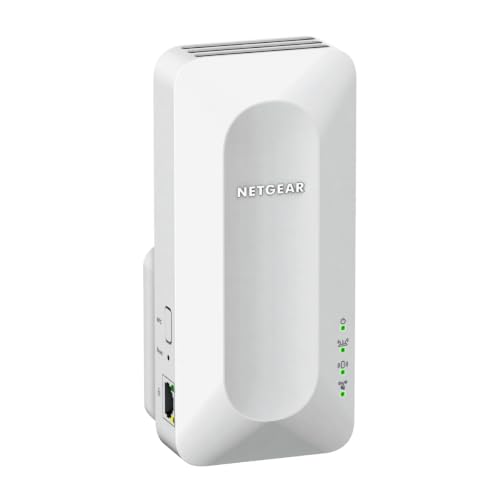
NETGEAR Nighthawk EAX15 — if replacement becomes the answer
If your diagnosis ends at failing hardware, the EAX15 is the class to replace into: Wi-Fi 6, a gigabit port, and mesh-style single-name operation with any router, removing several classic dropout causes (band confusion, _EXT roaming stubbornness) by design. Replace for diagnosis, not on suspicion.
The diagnostic flow, written as decisions rather than guesses
When an extender keeps disconnecting, work this flow in order and stop at the first branch that matches. First decision: does the extender lose its link to the router, or do devices lose their link to the extender while the extender itself stays connected? The extender’s status light and its app answer this — a unit whose router-link indicator drops is a different patient from a unit that stays happily linked while one phone complains. Router-link drops send you to placement, interference and the router itself. Device-side drops, with a healthy router link, send you to the device, its roaming behaviour and the extender’s client handling.
Second decision, for router-link drops: is the pattern timed or random? Drops at the same time daily point at schedules and renewals — a router reboot timer, a lease cycle, a neighbouring event, the heating system’s evening start. Drops after a fixed period of uptime point at slow software decay in either unit. Drops that correlate with appliances or weather point outward, to the environment audit elsewhere in this guide. Random drops with none of those patterns, on a link that measures weak, are usually just a marginal signal confessing at last: the extender is too far, or too obstructed, for the reliability the household expects.
Third decision: does a restart cure it for days, for hours, or not at all? Days suggests accumulating state that firmware or a scheduled reboot can manage. Hours suggests the fault reasserts itself under ordinary load or heat, and restart merely resets the clock. Not at all — a unit that reconnects and immediately resumes dropping — suggests a hard cause: a failing radio, a broken configuration, a router actively rejecting it, or interference so strong that no software state survives it. Each answer on this flow deletes whole chapters of speculation, which is the point of having a flow at all. Guessing feels faster and is, in aggregate, the slowest method known to home networking.
Case patterns: four households, four different culprits
The evening-only household: drops begin when the family comes home and end when it sleeps. In one real pattern behind this symptom, the culprit was a neighbour’s newly installed network on the same channel, invisible during the working day because that household was out too. The fix was a channel change on the router, chosen from an evening scan rather than a daytime one. In another household with the same symptom, the culprit was internal: a smart television waking at prime time and clinging to the extender from a room it should never have used, destabilising the marginal clients around it. Same hours, same complaint, opposite addresses — one outside the walls, one inside — which is why the dropout log in this guide records devices and times, not just times.
The after-the-cleaner household: the extender works for weeks and fails on a weekday morning, recovering by the time anyone investigates. The pattern behind this one is almost embarrassingly physical — the unit unplugged for a vacuum and returned to a different socket, a switched outlet left off, a power strip’s switch knocked. It is included here because it is common, because it masquerades as an intermittent electronic fault, and because its cure is social rather than technical: a labelled socket, an agreed rule, a household that knows the small box in the hallway is infrastructure. Intermittent faults that follow the cleaning rota are not faults at all.
The new-device household: everything was stable until a particular gadget arrived — a camera, a console, a budget smart plug — after which drops began that seemed to implicate the whole network. One badly behaved client can genuinely destabilise a marginal extender, through constant reconnect attempts, obsolete wireless habits or sheer chatter. The diagnostic is subtraction: power the newcomer down for two evenings and watch the log. If stability returns, the extender was never ill; it was being pestered, and the remedies are aimed at the pest — its own firmware, its placement, its band assignment — rather than at the victim.
The slow-decay household: an installation that was solid for a year degrades across a season with no single change to blame. This pattern collects the slow variables — a tree in leaf between house and office, a neighbour’s extension altering reflections, an ageing router whose radios are weakening, an extender slowly cooking in a sunlit hallway. It is the hardest pattern to fix because it has no event to reverse, and it responds best to a methodical re-survey: repeat the original placement walk, re-read the link quality, and re-run the environmental audit as if the installation were new. Houses change around static networks; sometimes the network must be re-fitted to the house it now lives in.
Working with the maker’s support without wasting the call
If the flow points at the unit itself, support becomes part of troubleshooting, and a prepared caller gets a different outcome from an unprepared one. Arrive with the dropout log, the model and hardware version, the firmware version, the router’s model, and a precise description of which link drops and in what pattern. State what you have already ruled out — placement tested, firmware current, reset performed, pattern logged — in the first minute. This is not about sounding expert; it is about skipping the script’s first six steps, which you have already done, and reaching the part of the conversation where replacements, beta firmware and known-issue lists live.
Known issues deserve emphasis. Manufacturers accumulate reports by model and firmware, and some disconnect patterns are documented faults with documented remedies — a specific version to avoid, a setting that interacts badly with certain routers, a hardware revision with a weakness. Your pattern, matched against that knowledge in one call, can end weeks of local detective work. If the unit is within its warranty period and the pattern matches a hardware suspicion, press politely for the replacement process rather than another round of resets; the reset has already given its testimony, and repeating it for a support script is ceremony, not diagnosis.
Keep notes of the support interaction itself — date, the representative’s summary, any case reference, the agreed next step — in the same network file as the dropout log. If the fault recurs, the second conversation continues where the first ended instead of restarting the universe. Households that treat support as a documented process, rather than a fresh plea each time, consistently reach resolutions faster, and the same file serves the next owner of the problem, whoever that turns out to be.
Stabilising a marginal installation you cannot yet replace
Sometimes the flow’s verdict is clear — the installation is marginal, the architecture is outgrown — and life nevertheless requires the current setup to survive a few more months: a house move is coming, a renovation will rewire everything, a budget resets next quarter. Stabilisation is a legitimate engineering goal, and it has its own toolkit. Reduce the extender’s responsibilities: move the heaviest fixed devices off it by any available means, even a temporarily trailing cable, so the relay serves only what it must. Prefer stability settings over performance settings — a fixed channel over a wandering automatic one, separate band names over clever steering — because a marginal link survives on predictability.
Shrink the distance the relay must cover, even at the cost of the far room’s coverage shape: an extender one room closer to the router, serving the target room partially but reliably, beats an ambitious placement serving it fully and intermittently. Add the scheduled reboot if the model offers it, timed for the household’s dead hours, so accumulating state is cleared before it can ripen into drops. Lower your expectations deliberately and document that you have: this is a managed decline with a planned end, not a mystery to keep solving.
Above all, stop re-diagnosing. A stabilised installation with a known ceiling and a replacement date is a solved problem wearing temporary clothes. The households that suffer with disconnecting extenders are rarely the ones with the worst hardware; they are the ones re-litigating the same fault every weekend, resetting and re-placing in circles, long after the evidence has delivered its verdict. This guide’s flow exists to reach that verdict once, cleanly — and then, whether the answer is a channel, a socket, a replacement or a rewire, to let the household act on it and get its evenings back. For households whose verdict is replacement, the current field is surveyed in the best Wi-Fi extenders for home roundup; for those whose verdict is architectural, the mesh comparison linked in this cluster picks up the story.
Prevention as a system: the quarterly hour that keeps it fixed
Once a disconnecting extender is fixed, the household’s instinct is to never think about it again, and that instinct is exactly what the next fault feeds on. Replace it with a small, scheduled system: one hour, four times a year, in which the network gets the attention that furnaces and gutters already receive. Check for firmware updates on the extender and the router and apply them in the calm conditions the firmware guide describes. Open the extender’s app and read its link quality and client list with fresh eyes — a client that has latched on from the wrong room, a link quality that has sagged a grade since last quarter, are next season’s disconnections introducing themselves early, while they are still cheap to fix.
Walk the physical installation during the same hour. Is the extender still in its documented socket, unobstructed, cool and firmly seated? Has furniture migrated into its path, a metal cabinet arrived on its line to the router, a sun-facing curtain changed its thermal life? Has the household gained a device — a camera, a console, a neighbour-visible new appliance — whose arrival the network has been quietly absorbing? Most disconnection sagas begin as one of these small drifts, and a quarterly hour catches them while they are still observations rather than symptoms.
Close the hour by updating the network notes: firmware versions, any placement change, any new device of consequence, and a line on how the network has behaved since the last check. That running record converts the next fault — if one ever earns the name — from a cold start into a continuation. The dropout log method in this guide was designed for active faults; the quarterly hour is its peacetime counterpart, and together they are the difference between households that operate their networks and households that are operated by them. An extender maintained this way rarely keeps disconnecting, because the conditions that make extenders disconnect are precisely the conditions the quarterly hour exists to notice.
One last diagnostic habit deserves a place beside the quarterly hour, because it costs nothing and catches what schedules miss: pay attention to the first drop. A network that has been silent for months and drops once has sent a message at the cheapest possible price. Note the time, the device and the circumstances in the log while the details are fresh, and glance at the obvious physical suspects the same day. Households that answer the first drop with curiosity rarely meet the tenth; households that ignore it as a blip eventually meet the pattern fully grown, on the evening it can least be afforded, with the early evidence long forgotten.
Treat that first-drop note as the opening entry of a log you hope stays at one line. Most do. A single unexplained drop in a season, against an otherwise clean record, is the network clearing its throat; a second entry within days is the pattern announcing itself, and that is the moment the diagnostic flow in this guide earns its keep — worked calmly, in order, while the evidence is still warm and the household’s patience still intact.
And when the flow, the log and the quarterly hour all eventually point the same way — at a household that has simply outgrown a single relay — accept the promotion the evidence is offering. The disconnects were never really a fault to be fixed; they were a growing network asking, in the only language it has, for an architecture with more room in it. Answering that request, with mesh or a wired point chosen by the comparisons in this cluster, ends the story more completely than any repair can.
Until that day, the standard to hold any fix to is simple and strict: a full week of the household’s real life — busy evenings, closed doors, every device awake — without a single noticed drop. Fixes that survive that week are fixes. Fixes that merely survive an afternoon of testing are hypotheses, and the log should record them as such, so that hope is never mistaken for evidence in this house again.
Keep the week’s verdict in the notes either way. If the fix held, the record tells the next troubleshooter — often you, in a year, at midnight — exactly what worked and in what order, turning a saga into a footnote. If it did not hold, the record is the evidence that moves the conversation, whether that conversation is with a support line, a retailer or your own household about a bigger change, from opinion to proof.
Proof, patiently gathered, is the whole method of this guide: observe the pattern, follow the flow, change one thing, watch honestly, and write it down. Households that troubleshoot this way stop fearing the blinking light, because they know the light is only ever the first sentence of a story they now know how to read to its end.
Read it that way once, successfully, and the skill stays with you for every network you will ever be handed — your own, your parents’, the one in the holiday rental that fails on the first evening. The devices change; the method does not.
That portability is the real dividend of fixing this extender properly rather than merely making the symptom stop for now: a method you own, a record you keep, and a household that gets its evenings back for good.
Frequently asked questions
Why does my extender disconnect every night at the same time?
Time-patterned drops usually mean interference (appliances, neighbour congestion at peak hours), a router scheduled reboot or channel change, or — check this one — a smart plug or timer on the extender’s socket. Match the time to something in the house before suspecting the hardware.
Is it normal for an extender to need restarting every few weeks?
An occasional restart after a power cut or router change is normal life. Needing restarts weekly or daily is a symptom — work this guide’s steps rather than accepting the ritual, because the cause (heat, marginal link, firmware) usually worsens.
My devices show full bars but pages stall. Is that disconnecting?
It is the marginal-link pattern: the device-to-extender hop is strong (hence bars) while the extender-to-router hop is failing. Move the extender closer to the router and watch its link indicator, not the phone’s bars.
Could my router be the real problem?
Yes — extenders get blamed for router faults constantly. Test a laptop on the router’s own network from the extender’s position during a dropout. If it struggles too, the router or its placement is the story, and the extender is innocent.
Does a factory reset really fix disconnects?
It fixes the configuration-mismatch category completely and the rest not at all — which is why it sits late in the order, after placement, power, interference and firmware. As a diagnostic it is still valuable: a clean unit that still drops has told you the fault is physical.
When should I just replace the extender?
When it reboots itself, runs unusually hot, loses settings, or keeps dropping after a reset, update and good placement on a verified-healthy router. Extenders are consumables with a multi-year life, not heirlooms.
Could my neighbour’s new router be causing my dropouts?
It genuinely could. A new nearby network on your channel — especially a strong one in a flat or a semi-detached house — raises the interference floor your extender’s marginal link must survive, and links that coped in spring can start dropping the week the neighbours upgrade. The test costs nothing: run a Wi-Fi analyser at the problem hour, note which channels are crowded, and move your router (and therefore your extender) to the emptiest of the non-overlapping channels for a two-day trial. If the drops follow the channel change away, the mystery is solved and the neighbour never needs to know.
My extender disconnects only when it rains or the weather turns. Is that plausible?
Yes, through several honest mechanisms. Wet foliage and wet building materials attenuate signal more than dry ones, so a marginal outdoor path — to a garage or garden building — can dip below viability in rain. Storms also bring power flickers too brief to notice but long enough to restart a sensitive unit, and atmospheric conditions can occasionally carry distant interference further than usual. Treat weather-correlated drops as a marginality report: the link has no reserve for a wet day, and the durable fixes are the ones that build reserve — better placement, a clearer path, or a wired alternative for that building.
The extender’s lights look normal while my devices say it disconnected. Who is lying?
Neither — they are reporting different links. The lights describe the extender’s own health and usually its router link; your devices are reporting their separate relationship with the extender. A unit can hold its router link serenely while a particular device’s connection to it collapses, because that device sits at the edge of the extender’s coverage, clings to the wrong network, or has its own wireless frailties. Diagnose the two links independently, starting with whether other devices in the same room stay connected when the complaining one drops.
Could my internet provider be causing the extender’s disconnects?
Indirectly, in two ways. Provider-side outages and line faults drop the internet while leaving the local network standing, which many devices report in language that sounds like a Wi-Fi disconnection — check whether devices near the router lose the internet at the same moments. And provider-managed routers receive provider-pushed updates and configuration changes on the provider’s schedule, occasionally altering settings an extender depended on. If drops begin across the whole house simultaneously, suspect the line or the gateway before the extender; if they afflict only the extended zone, the provider is almost certainly innocent.
Is it worth buying a second extender to replace a disconnecting one as a test?
Only as a controlled experiment, not as a hope. A borrowed or returnable unit, placed in the identical position and configured identically, cleanly separates unit faults from environment faults: if the substitute is stable, the original unit stands convicted; if it drops in the same pattern, the environment is guilty and no replacement of the same kind will acquit it. That is a genuinely decisive test and the cheapest way to run it is a loan or a retailer with a painless returns process — not a second permanent purchase made in frustration.
How many disconnections a week count as normal?
For a healthy installation, effectively none that a user notices. Brief roaming transitions when walking between the router’s and extender’s zones can look like a stutter on a call, and an occasional overnight reconnection that no one witnesses is unremarkable. But drops that interrupt work, calls or viewing on a weekly rhythm are a fault with a cause, not a personality trait of extenders, and they deserve the diagnostic flow rather than acceptance. A well-matched, well-placed extender should be boring for months at a stretch.
Related Guides
Keep going with these guides and roundups from the same networking cluster: